Amazonレビューアナライザー

レビューを分析して、感情傾向、テーマ、主要なメリット・デメリットを抽出。商品改善や商品ページ最適化に役立つ、分かりやすい要約を得られます。

Amazon 商品 URL を貼り付けます。システムがレビューを取得して評価分析レポートを生成します。

Amazonレビューのデータ抽出をもっと速くThunderbitなら、AIでレビューや商品ページをスクレイピングし、数クリックで必要な項目を構造化して抽出できます。複数の出品ページにまたがる収集も自動化し、Sheets・Airtable・Notionへエクスポート可能です。
chrome-web-store
インストール元Chrome Web Store

Amazonレビューのデータ抽出をもっと速く

ThunderbitのAIウェブスクレイパーを使えば、Amazonページや関連サブページからレビュー本文、評価、日付、商品情報を収集できます。コード不要で表形式に整え、フィードバックのテーマ分類や分析向けの整形まで一気に実行。 ページネーションをまたいだ取得にも対応し、必要に応じてPDFやドキュメントから補足ファイルを取り込んだり、参照用に画像をキャプチャしたりできます。結果はGoogle Sheets、Airtable、Notionへ出力してチーム共有し、時間経過での変化も追跡できます。

ThunderbitでAmazonレビューを分析する方法

step_01.png
ステップ 1ダウンロードしてインストールThunderbit Chrome Extension Download Page からThunderbit Chrome拡張機能をダウンロードしてインストールします。インストール後、ログインするか無料アカウントを作成して開始してください。
step_02.png
ステップ 2拡張機能を開く評価したいAmazonの商品ページを開くか、レビュー数据をCSVファイルまたは貼り付け用テキストとして用意します。ChromeでThunderbit拡張機能アイコンをクリックし、Amazon Review Analyzerを開きます。入力方法を1つ選択してください:(1) Amazon Product URLを分析:ASINページのリンクを貼り付け、(2) レビューCSVをアップロード:CSVファイルを1つアップロード、(3) レビュー本文を貼り付け:1行につき1レビューで貼り付け。必要に応じて、最大レビュー数、レビュー日付範囲、星評価フィルタなどのオプションも設定します。
step03.png
ステップ 3「Analyze reviews」ボタンをクリック「Analyze reviews」ボタンをクリックして分析を実行します。Thunderbitが入力されたレビューを処理し、全体の感情傾向、内訳、主なメリット・デメリット、キーワード傾向、繰り返しの問題点、顧客の改善提案、代表的な引用を含む構造化レポートを返します。生成後は、ドキュメントにコピーするか、Google Sheets、Notion、Airtable、またはローカルファイルなど、普段のワークフローに合わせてエクスポートして保存できます。

Amazon商品レビューを、感情・テーマ・繰り返しの問題点の観点で分析する方法を学ぶ

Amazonの商品URLからレビューを分析
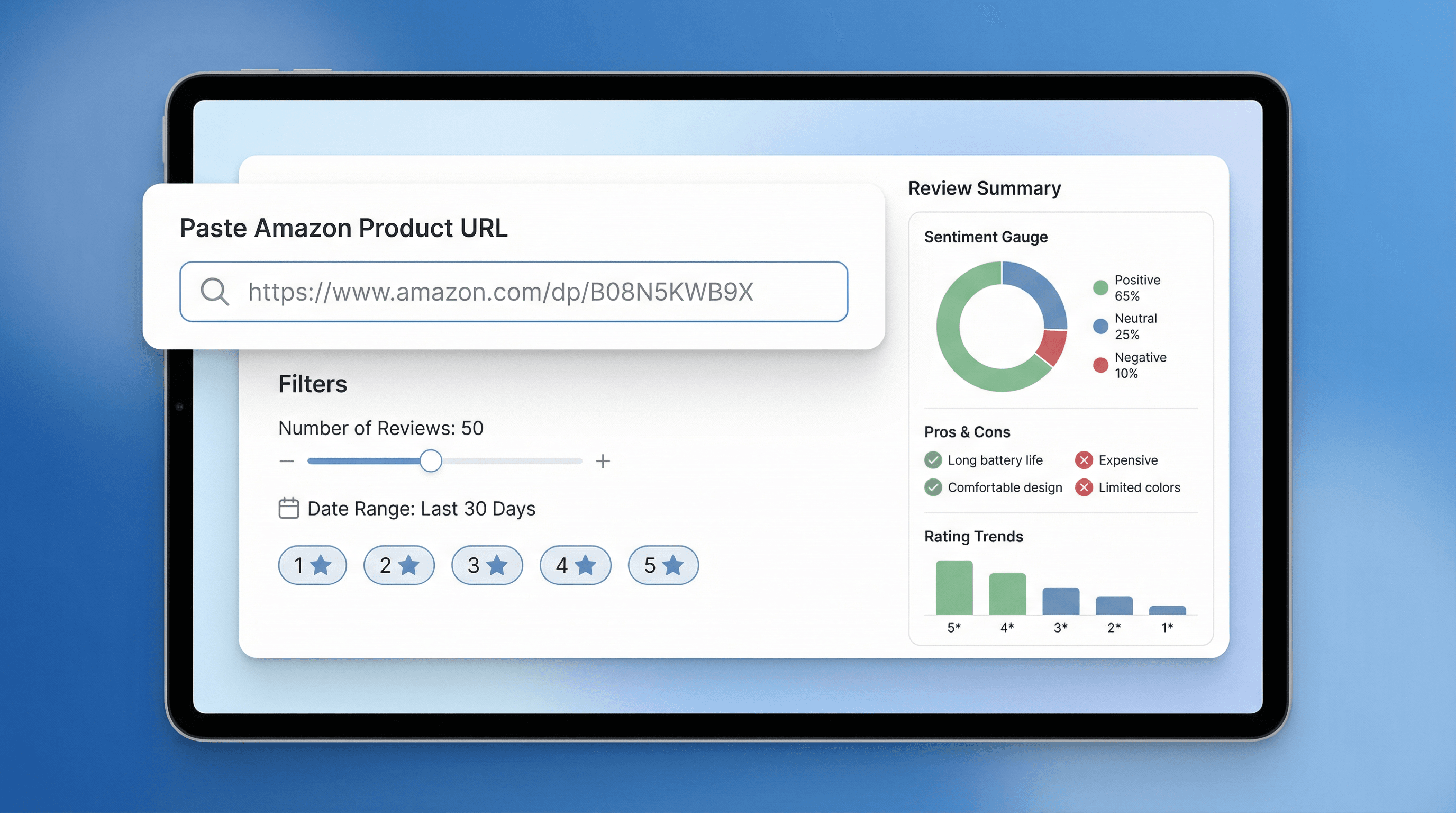
Amazonの商品URLを貼り付け、分析するレビュー数を指定し、必要に応じて日付範囲や星評価などのフィルタを設定できます。Amazon Review Analyzerは、バラバラなレビュー本文を、全体の感情傾向、主なメリット・デメリット、繰り返しの問題点を含む構造化レポートに変換します。Amazonセラー、EC運用担当、プロダクトチームが、何百件ものレビューを読み込まずに顧客の声を素早く把握するために設計されています。
無料で始める
section1_url_analysis.png

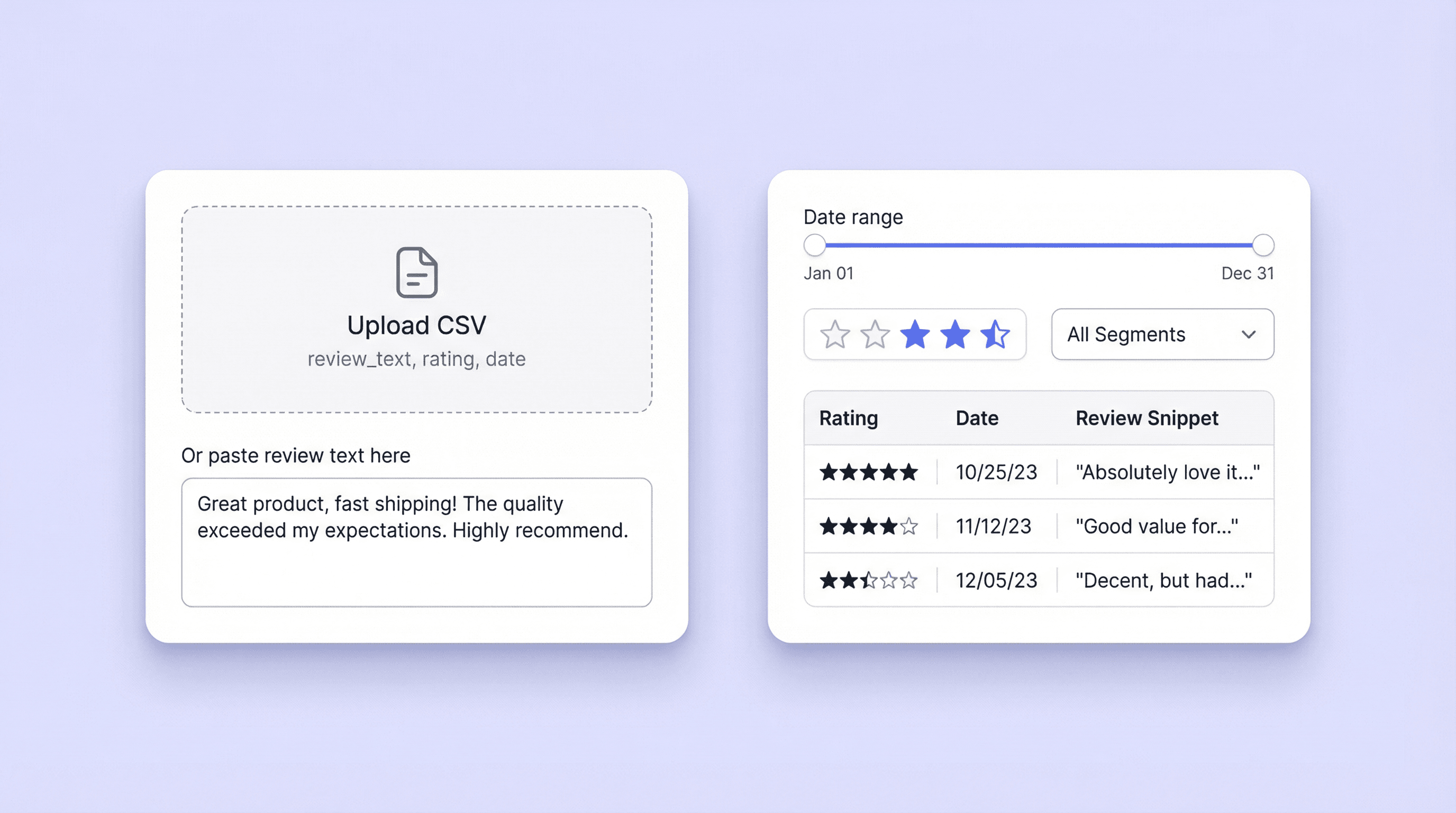
CSVアップロードや貼り付けテキストのレビュー本文を処理

レビューCSVをアップロードするか、レビュー本文をそのまま貼り付けて、すでに手元にあるフィードバック(エクスポートデータ、サポートチケット、調査ドキュメントなど)を分析できます。ファイルに評価や日付の列が含まれていれば、同じフィルタで特定セグメントに絞り込み可能。期間、バリエーション、星評価帯ごとの比較を、データソースが違っても一貫した手法で行えます。
無料で始める
section2_csv_upload.png

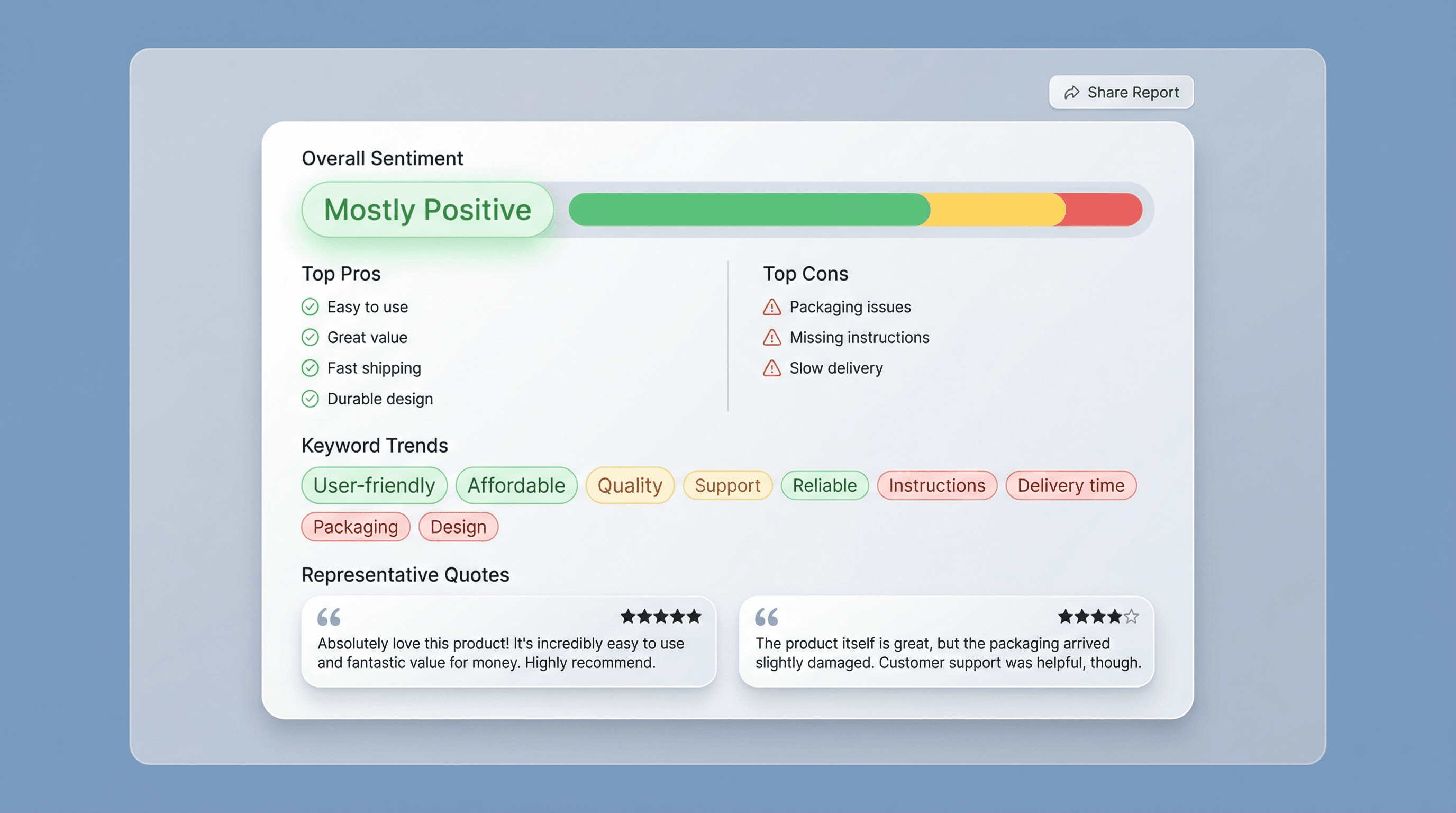
販売者が使いやすい要約レポートに落とし込む

全体の感情傾向、内訳、頻出するメリット・デメリット、キーワード傾向、深刻度を伴う繰り返し不具合、顧客の改善提案を含む、簡潔なレポートを作成できます。散在するコメントを明確なテーマに整理し、関係者へ共有しやすい形にします。代表的な引用も含まれるため、結論の妥当性を確認でき、商品ページ、FAQ、サポート返信で「顧客の言葉」をそのまま活用できます。
無料で始める
section3_summary_report.png

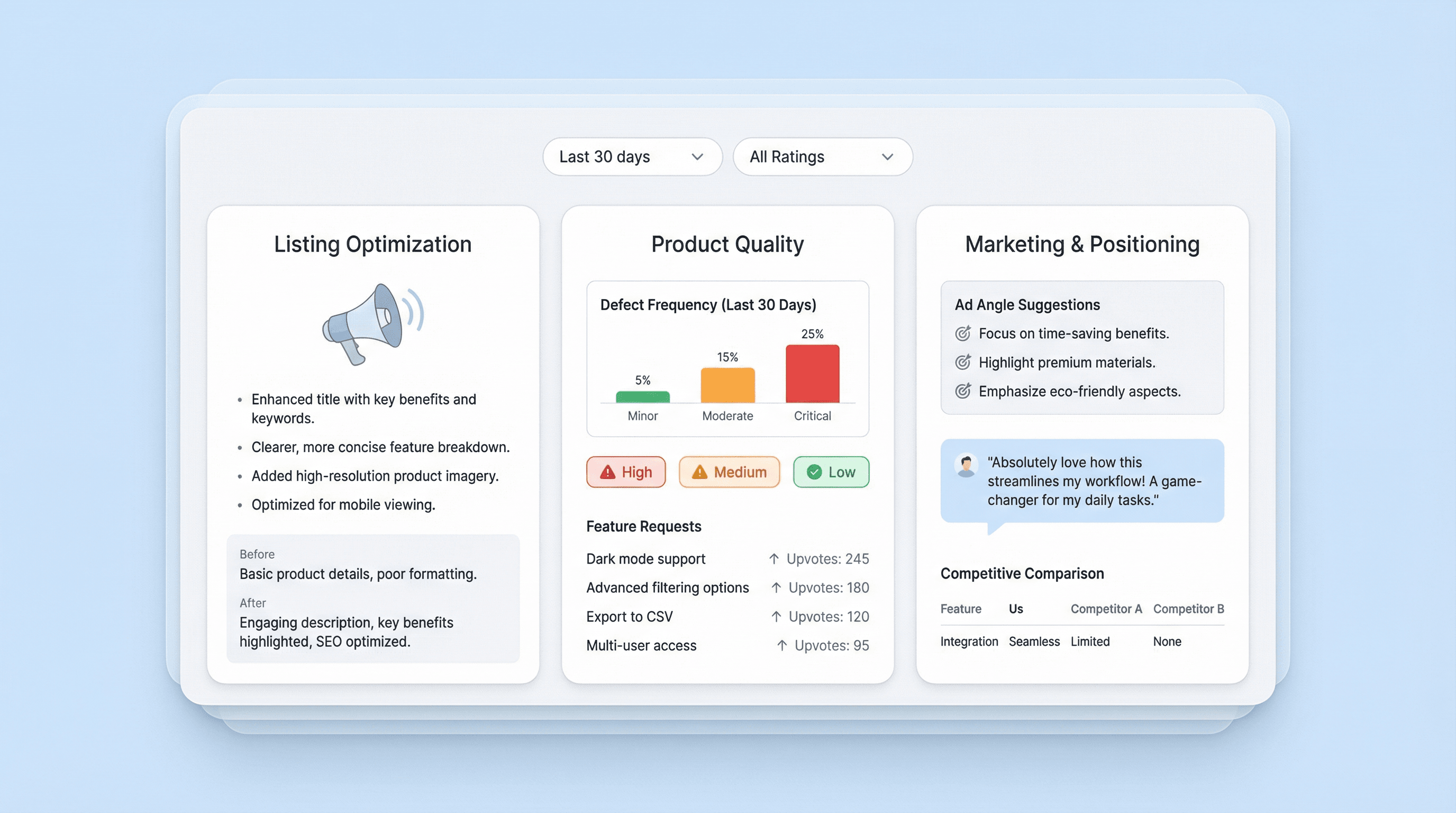
示唆を活かして、商品ページ・品質・ロードマップ判断を改善

分析結果をもとに、修正優先度や訴求の更新を決められます。繰り返しの不満を解消し、商品ページで期待値を明確化し、顧客が最も評価している利点を強調しましょう。ECチームは直近レビューに絞って変化をモニタリングでき、プロダクトチームは不具合パターンや機能要望を追跡できます。代理店やマーケターは、メリット/デメリットや引用を使って、ポジショニング、広告訴求、競合比較の材料にできます。
無料で始める
section4_insights_dashboard.png

もっと無料ツールを見る

Google ショッピングスクレイパー

Google ショッピングの検索結果から、価格調査や競合リサーチに使える商品リストを構造化して抽出します。タイトル、価格、販売店、評価、レビュー数、送料、リンクを見やすい表形式で取得できます。

Amazon出品情報 品質チェッカー

Amazonの商品ページを「抜け漏れ」と「SEO最適化の準備状況」の観点で診断。タイトル、箇条書き、画像、キーワードの不足や弱点を検出し、スコアと具体的な改善策で検索露出の向上を後押しします。

UPC検索

UPCから商品情報を検索して、商品確認や出品情報の比較に役立てられます。商品名、ブランド、メーカー、カテゴリ、画像までを1回の検索で取得できます。

Amazon商品スクレイパー

Amazonの商品URLを貼り付けるだけで、商品情報を抽出できます。商品名、価格、評価などを整理された表形式で取得し、すぐにエクスポートや確認に活用できます。

ZoomInfo スクレイパー

ZoomInfo のページから企業情報や連絡先情報を抽出し、構造化されたテーブルに整理して、より素早いリード獲得と分析を実現します。

Flipkartスクレイパー

FlipkartのリストやSKUページから、AIが提案する項目で商品データを抽出。スピーディーかつ構造化されたデータ分析が可能です。ECリサーチや価格調査に最適なツールです。

メールアドレス形式検索

任意の企業ドメインから、最も可能性の高いメールアドレスのパターンを見つけ、特定の人物向けの候補アドレスを生成します。信頼度付きで形式を順位表示し、アウトリーチを効率化しながらバウンスリスクを抑えられます。

名前パーサー

フルネームを敬称(prefix)、名(first)、ミドルネーム(middle)、姓(last)、接尾辞(suffix)などの要素に分解して構造化。CRMのレコードやフォーム入力、データベースの表記ゆれを整え、データをきれいに保てます。

今すぐもっとツールを探す

Thunderbitについてのユーザーの声

Taryn W.Growth Strategist@Thunderbit has changed how I run competitor research. I click 'AI Suggest Fields,' and it builds a clean table across paginated results—no coding, no CSS. Huge time-saver when analyzing product data from long-tail marketplaces.
Miles T.Sales Development ConsultantI use Thunderbit to grab emails and phone numbers from directories. It extracts clean contact info in one click, and exporting to Sheets or Notion takes seconds. No extra setup, no coding—just usable data ready to work with.
Rhea C.E-commerce AnalystThunderbit helps me monitor SKU data across multiple pages. I scrape the listings, then use Subpage Scraping to pull full product specs, pricing, reviews, and stock. The AI organizes everything into columns I define.
Cassian B.Real Estate AdvisorThunderbit's Scheduled Scraper makes real estate tracking easier. I describe the interval in plain English, and it automatically pulls updated listings, prices, and links without touching the setup again. Simple and very practical.
Dorian B.Content & SEO SpecialistI use Thunderbit's Field AI Prompts to clean and tag scraped blog content. It extracts titles, authors, and even suggests categories. Works great across dynamic sites and subpages—perfect for building structured SEO datasets.
Lina K.Marketplace Operations LeadWe track SKUs from niche stores using Thunderbit. Cloud Scraping handles 50 pages at a time, and for login-required sites, we switch to browser mode. It’s fast, flexible, and doesn’t need ongoing maintenance or manual edits.
Jorge F.Inbound Sales ManagerThunderbit’s AI Autofill is a lifesaver. After scraping contact info, I use it to fill lead forms directly in my browser. I just select the tab, and it fills everything using the scraped row. No manual input needed.
Alina D.Freelance ResearcherI rely on Thunderbit for extracting data from PDFs, image-based sites, and infinite scroll pages. It handles messy formats with AI and delivers ready-to-export tables I can send to Google Sheets or Airtable in seconds.
Taryn W.Growth Strategist@Thunderbit has changed how I run competitor research. I click 'AI Suggest Fields,' and it builds a clean table across paginated results—no coding, no CSS. Huge time-saver when analyzing product data from long-tail marketplaces.
Miles T.Sales Development ConsultantI use Thunderbit to grab emails and phone numbers from directories. It extracts clean contact info in one click, and exporting to Sheets or Notion takes seconds. No extra setup, no coding—just usable data ready to work with.
Rhea C.E-commerce AnalystThunderbit helps me monitor SKU data across multiple pages. I scrape the listings, then use Subpage Scraping to pull full product specs, pricing, reviews, and stock. The AI organizes everything into columns I define.
Cassian B.Real Estate AdvisorThunderbit's Scheduled Scraper makes real estate tracking easier. I describe the interval in plain English, and it automatically pulls updated listings, prices, and links without touching the setup again. Simple and very practical.
Dorian B.Content & SEO SpecialistI use Thunderbit's Field AI Prompts to clean and tag scraped blog content. It extracts titles, authors, and even suggests categories. Works great across dynamic sites and subpages—perfect for building structured SEO datasets.
Lina K.Marketplace Operations LeadWe track SKUs from niche stores using Thunderbit. Cloud Scraping handles 50 pages at a time, and for login-required sites, we switch to browser mode. It’s fast, flexible, and doesn’t need ongoing maintenance or manual edits.
Jorge F.Inbound Sales ManagerThunderbit’s AI Autofill is a lifesaver. After scraping contact info, I use it to fill lead forms directly in my browser. I just select the tab, and it fills everything using the scraped row. No manual input needed.
Alina D.Freelance ResearcherI rely on Thunderbit for extracting data from PDFs, image-based sites, and infinite scroll pages. It handles messy formats with AI and delivers ready-to-export tables I can send to Google Sheets or Airtable in seconds.

よくある質問

AIでデータを抽出
Google Sheets、Airtable、Notionへ簡単にデータを転送
Chrome Store Rating
PRODUCT HUNT#1 Product of the Week