

कुछ महीने पहले, हमारे एक यूज़र ने मुझसे एक बात कही जो आज तक याद है: “ईमेल मिला, पिच भेजी, और वह बाउंस हो गई। फिर वही ईमेल एक दूसरे टूल से ढूँढा, दोबारा भेजा, और फिर से बाउंस हो गई।” 2026 में ईमेल ढूँढने की दुनिया का यही हाल है।
Hunter.io ने डोमेन-आधारित ईमेल लुकअप को लोकप्रिय बनाने का सही श्रेय पाया है। यह साफ-सुथरा है, आसान है, और अगर आपको जल्दी से “इस कंपनी में कौन काम करता है?” जैसा सर्च करना हो, तो आज भी काम आता है। लेकिन B2B prospecting का माहौल अब काफी बदल चुका है। sales intelligence market 2026 तक $4.99B तक पहुँचने और 2031 तक लगभग $9.15B तक बढ़ने का अनुमान है।
अब टीमें सिर्फ ईमेल नहीं चाहतीं — उन्हें verification, phone numbers, CRM integrations, API flexibility, और ऐसे contacts चाहिए जो किसी pre-built database में मौजूद ही न हों। Credit-based pricing, बढ़ती bounce rates, और non-Western markets में coverage gaps की वजह से बहुत से यूज़र अब दूसरे विकल्प तलाश रहे हैं। यह गाइड pricing, email accuracy, API access, free tiers, और geographic coverage के आधार पर 8 Hunter.io alternatives की तुलना करती है — और इसमें एक ऐसा तरीका भी शामिल है जिसे ज्यादातर comparison articles पूरी तरह नज़रअंदाज़ कर देते हैं: websites से सीधे contacts scrape करना।
किसी भी वेबसाइट से contacts scrape करने के लिए Thunderbit आज़माएँ
2026 में Sales Teams Hunter.io का विकल्प क्यों ढूँढ रहे हैं
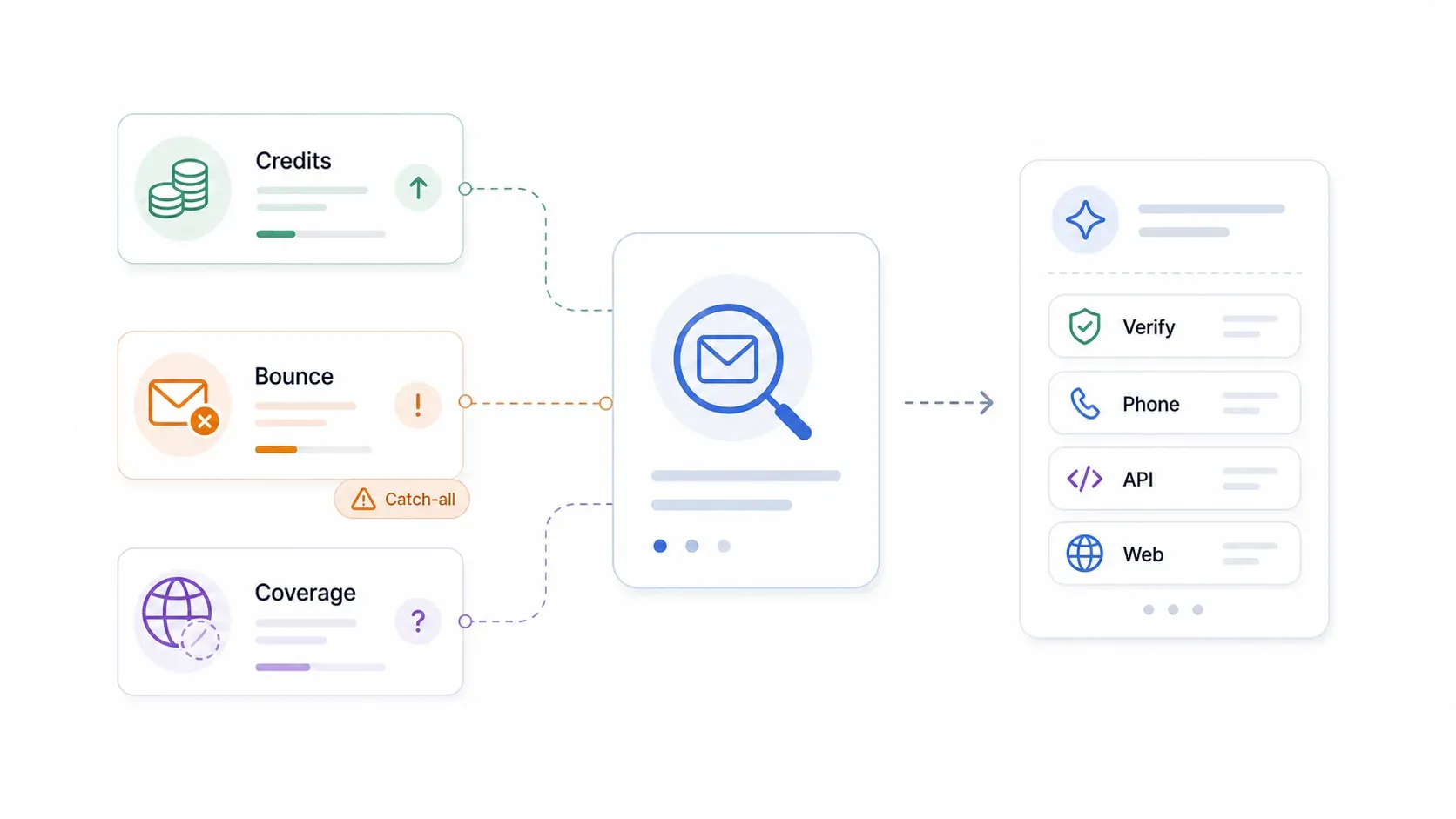
Forums, G2 reviews, और हमारे अपने users के साथ बातचीत में तीन समस्याएँ बार-बार सामने आती हैं:
Credit-based pricing जो scale करने पर भारी पड़ता है। Hunter का credit model हल्के-फुल्के domain lookup के लिए ठीक है, लेकिन bulk enrichment, verification, और API workflows करने पर budget पर दबाव बन जाता है। r/coldemail में एक Reddit user ने साफ कहा था: bulk में credit systems महंगे हो सकते हैं, और भेजने से पहले Hunter results verify कर लेने चाहिए.
Accuracy में गिरावट और bounce को लेकर चिंता। Hunter की अपनी documentation भी मानती है कि accept-all/catch-all domains को पूरी तरह verify नहीं किया जा सकता। Users अक्सर Hunter results को भेजने से पहले एक दूसरे verifier से गुज़ारते हैं, जिससे cost और friction दोनों बढ़ते हैं। Capterra reviewers “limited data scope” और phone numbers या deeper enrichment की कमी को भी highlight करते हैं।
Niche और non-Western markets में coverage gaps। Pattern-based email finders तब सबसे अच्छा काम करते हैं जब नामों के conventions predictable हों और companies अच्छी तरह indexed हों। Small businesses, APAC directories, और असामान्य naming conventions में यह अनुमान लगाने वाला मॉडल अक्सर फेल हो जाता है।
इसका मतलब यह नहीं कि Hunter बेकार है। Quick domain searches और basic verification के लिए यह आज भी अच्छा है। Switch करने की वजह अक्सर यह होती है कि workflow एक email-only finder से आगे निकल चुका होता है — और finding के लिए Hunter, verification के लिए ZeroBounce, और sending के लिए अलग tool जोड़ने की tool sprawl जल्दी महँगी और परेशान करने वाली हो जाती है।
Lead generation tools की तुलना पर और संदर्भ के लिए हमारा lead generation statistics और best lead scraping software वाला गाइड देखें।
Hunter.io Alternative चुनते समय क्या देखना चाहिए
Tools की तुलना करने से पहले यह जानना ज़रूरी है कि असल में मायने क्या रखता है। मैंने यह evaluation framework इस्तेमाल किया:
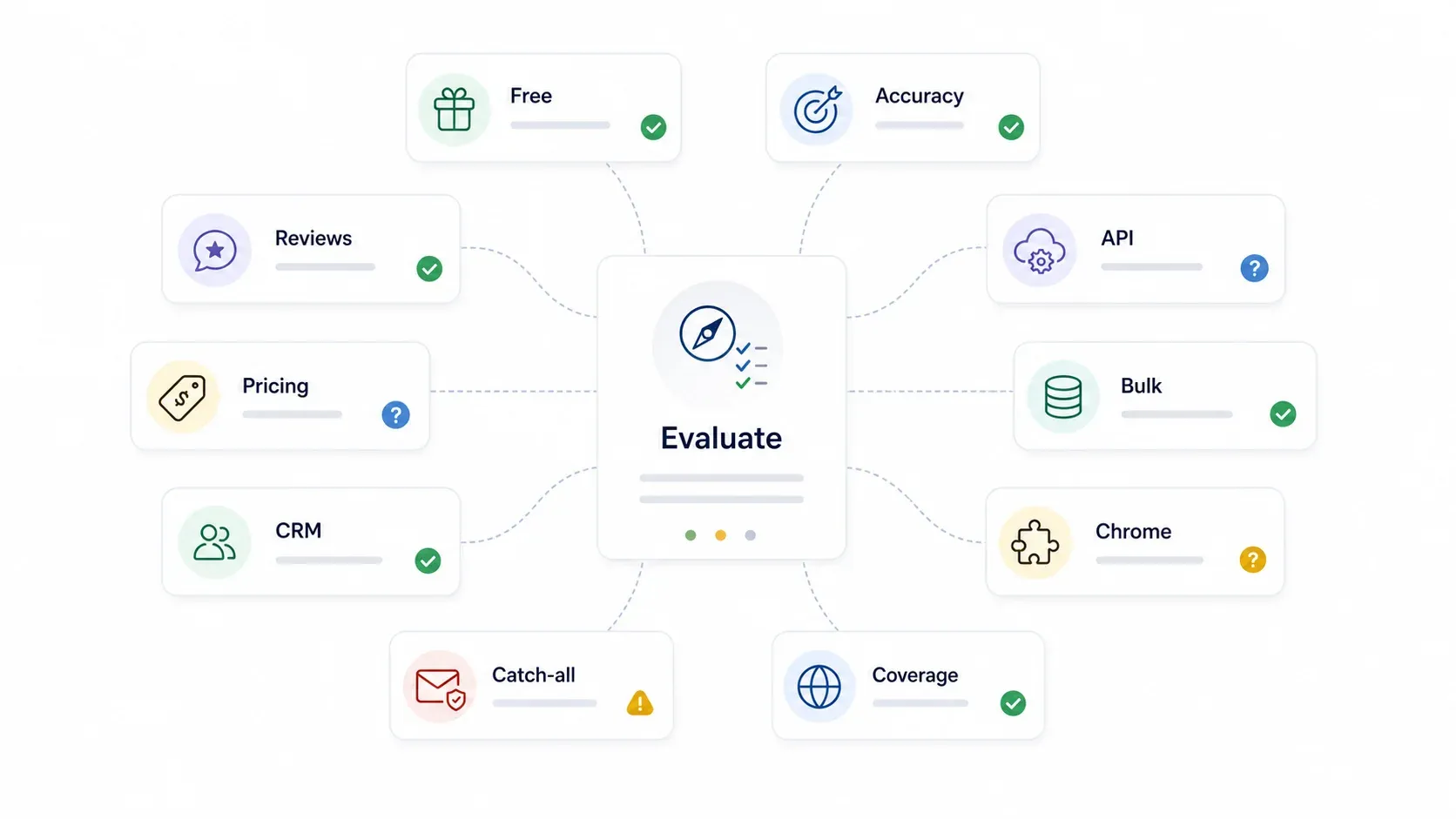
| मानदंड | यह क्यों ज़रूरी है |
|---|---|
| Free Tier / Freemium | सबसे ज़्यादा search intent यही है — budget-conscious users $0 से शुरू करना चाहते हैं |
| Email Accuracy / Verification | मिला हुआ email तभी काम का है जब deliverability खराब न करे |
| API Access & Flexibility | Developers को predictable endpoints, rate limits, और SDKs चाहिए |
| Bulk CSV Enrichment | Agencies और RevOps teams अक्सर हज़ारों rows एक साथ enrich करती हैं |
| Chrome Extension UX | LinkedIn या website prospecting करने वालों के लिए कम friction वाला lookup चाहिए |
| Database Size & Geographic Coverage | Mainstream databases regional businesses और APAC companies को अक्सर miss कर देती हैं |
| Catch-All Domain Handling | Catch-all domains में "valid" या high-confidence scores भ्रमित कर सकते हैं |
| CRM Integrations | Sales teams को Salesforce, HubSpot, Pipedrive आदि में साफ data push करना होता है |
| Pricing Model | Credits, seats, या flat fee — scale economics हर model में अलग होती हैं |
| Review Scores (G2/Capterra) | User sentiment का संकेत देता है, लेकिन specific failure modes के लिए review text भी पढ़ें |
एक quick definition: catch-all domain किसी domain पर आने वाले किसी भी mailbox के लिए email accept कर लेता है, इसलिए verifier यह confirm नहीं कर पाता कि कोई specific inbox सच में मौजूद है या नहीं। Hunter की docs के अनुसार accept-all emails बाउंस हो सकते हैं और उन्हें “valid” emails से अलग समझना चाहिए।
एक नज़र में 8 Hunter.io Alternatives
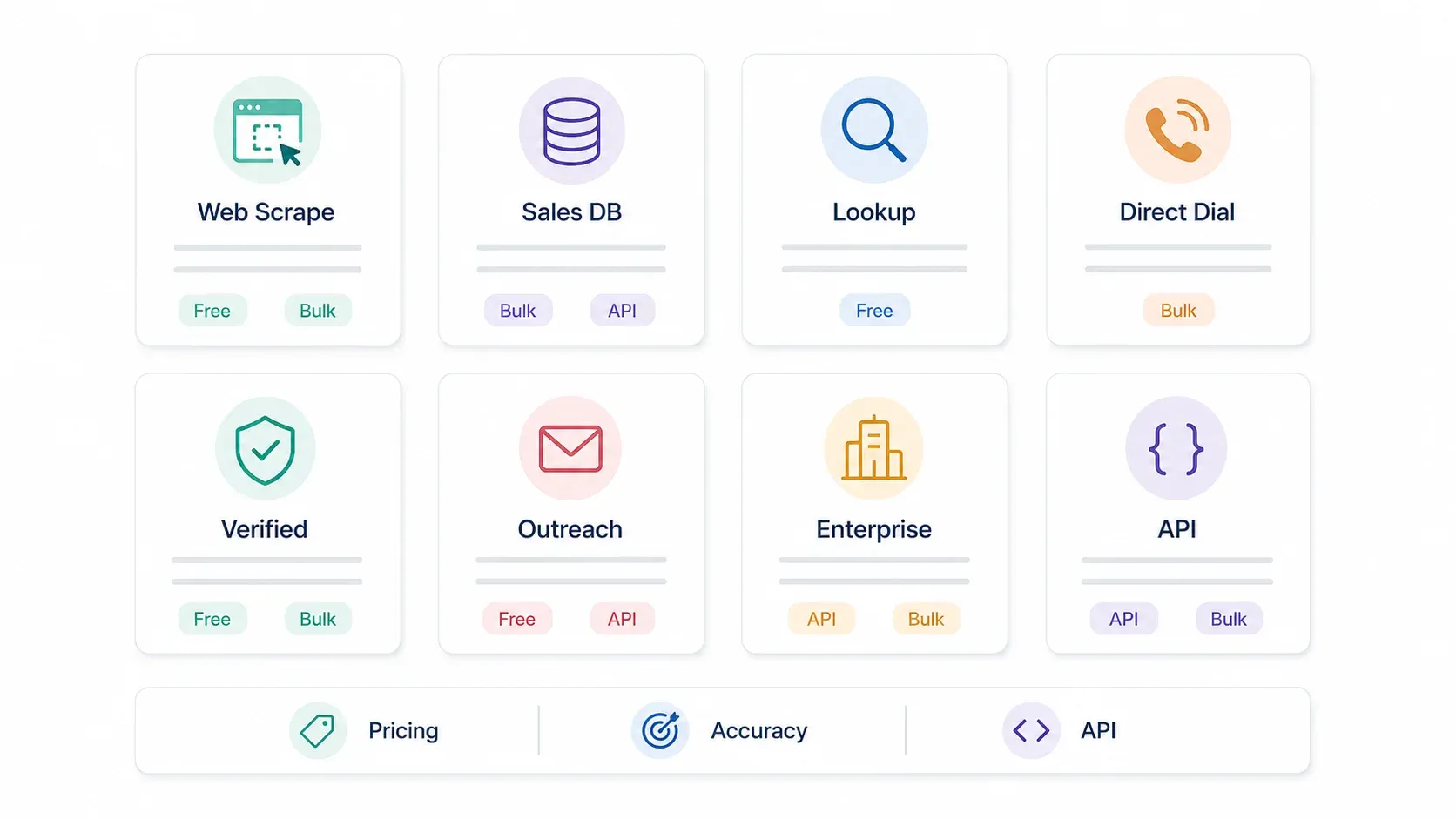
पूरा comparison यहाँ है। हर tool की विस्तार से जानकारी नीचे दी गई है।
| टूल | Free Tier | Starting Price | Verification | API | Bulk CSV | Chrome Ext | G2/Capterra | Best For |
|---|---|---|---|---|---|---|---|---|
| Thunderbit | ✅ 6 pages/mo; API 600 units | ~$9/mo (annual) | Published emails extract करता है | ✅ Open API | ✅ Batch extract | ✅ | — | किसी भी वेबसाइट से contacts scrape करना |
| Apollo.io | ✅ Free plan | ~$49/user/mo | ✅ Built-in | ✅ | ✅ | ✅ | G2 4.7/5; Capterra 4.5/5 | Full-funnel sales intelligence + outreach |
| RocketReach | ✅ 5 lookups | ~$69/mo | ✅ Database lookup | Higher tiers | ✅ | ✅ | G2 4.4/5 | Individual lookups, recruiting |
| Lusha | ✅ Up to 70 credits/mo | ~$37/mo | ✅ Email + phone | Higher tiers | ✅ (paid) | ✅ | G2 4.3/5 | Quick LinkedIn prospecting |
| UpLead | ✅ 7-day trial, 5 credits | ~$99/mo ($74 annual) | ✅ Real-time, 95% claim | ✅ | ✅ | ✅ | G2 4.7/5; Capterra 4.6/5 | Verified-only data चाहने वाले SMBs |
| Snov.io | ✅ 50 credits/mo | ~$30-39/mo | ✅ | ✅ | ✅ | ✅ | Capterra 4.6/5; G2 4.5/5 | Budget में multi-channel outreach |
| Cognism | ❌ Demo only | Custom (~$1,000+/mo) | ✅ Phone-verified | ✅ (add-on) | ✅ | ✅ | G2 4.6/5; Capterra 4.7/5 | Enterprise EMEA/APAC, compliance |
| Tomba.io | ✅ 25 searches/mo | ~$89/mo (10K credits) | ✅ Included | ✅ + SDKs | ✅ | ✅ | G2 ~4.7/5 | API-first domain email finder |
रेटिंग्स पर एक नोट: review counts और scores अक्सर बदलते रहते हैं। खरीदने का फैसला करने से पहले marketplace pages पर ज़रूर verify करें।
1. Thunderbit
Thunderbit email-finding की समस्या को बिल्कुल अलग तरीके से हल करता है। यह किसी pre-built B2B database पर निर्भर नहीं रहता और न ही किसी domain से email pattern का अनुमान लगाता है। इसके बजाय Thunderbit contact data — emails, phone numbers, names, titles — सीधे किसी भी webpage से निकालता है। इसे इस सवाल का जवाब समझिए: “अगर मुझे चाहिए contacts किसी database में हैं ही नहीं?”
और यह सवाल जितना आप सोचते हैं, उससे कहीं ज़्यादा बार सामने आता है।
Niche verticals, local businesses, regional directories, conference sponsor pages, association member lists, marketplace seller profiles — ये contacts Apollo या ZoomInfo में अक्सर दिखते ही नहीं। ऐसे मामलों में source को scrape करना ही कई बार एकमात्र रास्ता होता है।
मैंने हमारी टीम को Thunderbit को शुरू से बनाते देखा है, और core idea हमेशा एक ही रहा है: data extraction को इतना आसान बनाना कि बस एक button क्लिक करना हो। Chrome extension का workflow दो clicks का है — “AI Suggest Fields” से AI page पढ़कर columns सुझाता है, फिर “Scrape” से data निकाल लिया जाता है। No coding, no CSS selectors, no config files.
Prospecting के लिए key features:
- Free email and phone extractors: किसी भी webpage से एक click में contact data निकालें, basic extraction के लिए credits नहीं लगते
- Subpage scraping: किसी directory listing को scrape करें, फिर हर company subpage पर अपने आप जाएँ और table में emails, phones, addresses, और contextual data जोड़ें
- Batch Extract API (
/batch/extract): तय schema के साथ 100 URLs तक programmatic extraction — custom lead pipelines बनाने वाले developers के लिए - AI labeling और transformation: एक ही step में data scrape, categorize, translate, या reformat करें
- Scheduled scraping: ongoing monitoring के लिए recurring runs सेट करें (जैसे directory में नई listings)
- Export anywhere: Google Sheets, Excel, Airtable, Notion — free exports, no paywall
Pricing:
- Free tier: 6 pages/month, प्रति page unlimited rows, data export included
- Paid web scraper plans लगभग $15/month (monthly) या $9/month (annual) से शुरू होते हैं, 500 credits/month के साथ
- API: 600 units का one-time free tier (लगभग 30 extracted pages), paid API plans $16/month (annual) से 60,000 units/year के लिए
Accuracy क्यों बेहतर होती है: Hunter जैसे tools indexed sources और patterns से emails infer करते हैं। Thunderbit live source page से published contact data निकालता है। Email guess नहीं किया जाता — website owner ने जो लिखा है, वही लिया जाता है। इससे name-pattern failures काफी कम हो जाते हैं, खासकर non-Western naming formats में।
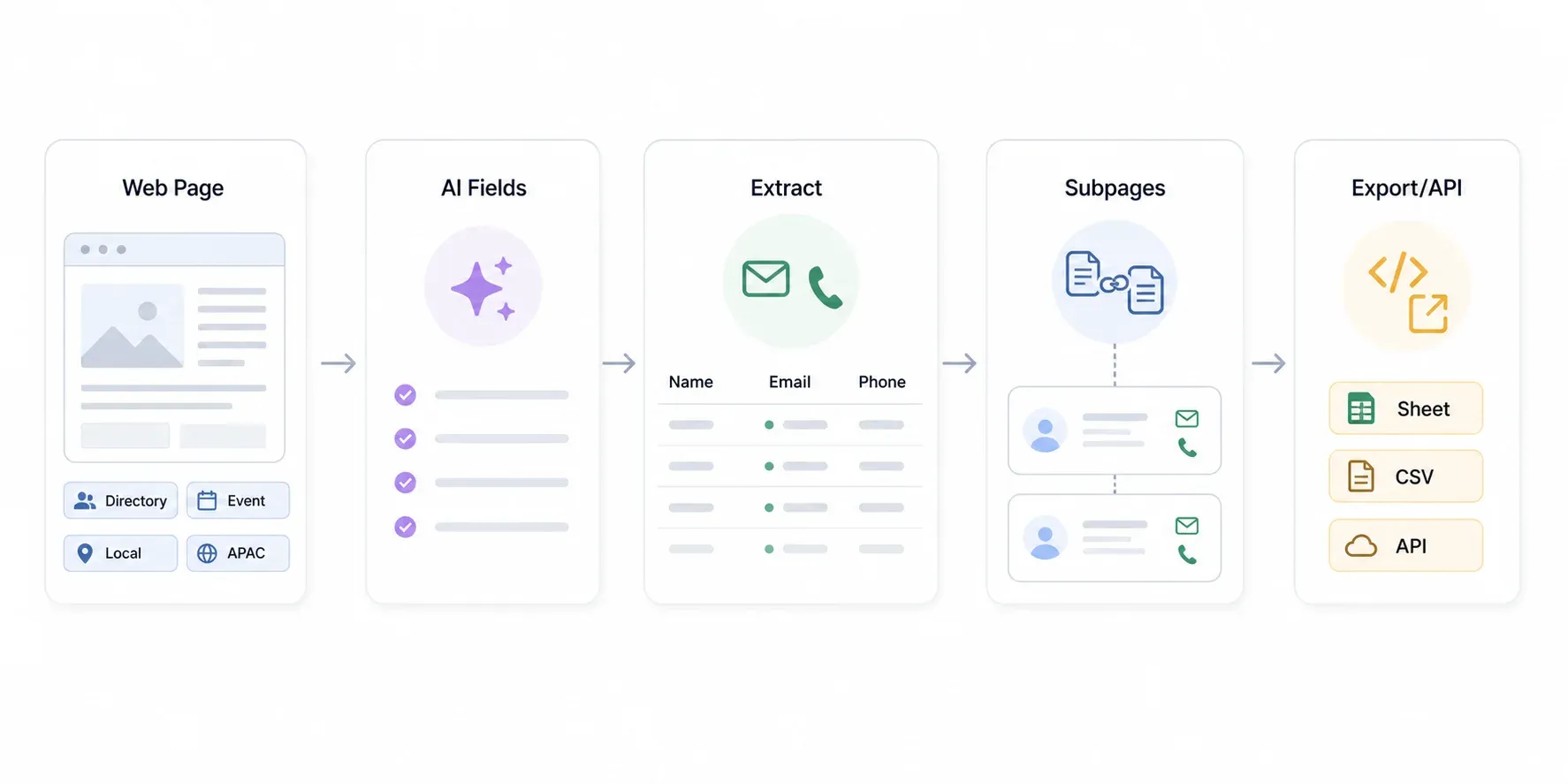
Best for: Niche lead lists, regional markets, directories scraping, non-Western sources, और वे teams जिन्हें mainstream databases के बाहर contacts चाहिए। अगर आपके contacts किसी website पर मौजूद हैं, तो Thunderbit शायद उन्हें निकाल सकता है।
AI की मदद से websites से सीधे contacts scrape करें Get Started Free
2. Apollo.io
Apollo.io Hunter का सबसे नज़दीकी all-in-one विकल्प है — और उससे भी आगे। 210M+ contacts और 30M+ companies के साथ यह database search, email verification, multi-step sequences, dialer, CRM pipeline management, और warmup व spam testing तक देता है।
Chrome extension LinkedIn और company websites पर काम करता है, और filtering सच में काफी deep है: intent signals, technographics, job changes, company size, funding stage। Mid-market sales team के लिए जो पाँच tools की जगह एक platform चाहती है, Apollo को हराना आसान नहीं।
Key features:
- विशाल B2B database और advanced filtering
- Built-in email sequences, dialer, और warmup
- CRM जैसी pipeline management
- LinkedIn prospecting के लिए Chrome extension
- API access और bulk CSV enrichment
Pricing: Free plan उपलब्ध है। Paid plans $49/user/month (Basic, annual), $79/user/month (Professional), और $119/user/month (Organization, 3-user minimum) से शुरू होते हैं। Free plan में unlimited email credits मिलते हैं, लेकिन सिर्फ 5 mobile credits/month और 10 export credits/month होते हैं।
Limitations: बड़े teams और agencies के लिए per-seat pricing जल्दी महँगा हो जाता है। Capterra reviewers बताते हैं कि paid plans अब पहले से कम credits देते हैं, और waterfall/unlock logic की वजह से credit model confusing हो सकता है। अगर आपको सिर्फ quick email lookup चाहिए, तो यह Hunter से कहीं ज़्यादा complex है।
Best for: Mid-market और बड़े sales teams जो prospecting, email outreach, calling, और CRM workflows के लिए एक ही system चाहती हैं।
3. RocketReach
RocketReach 700M+ professional profiles और 60M+ companies का दावा करता है, जिससे यह उपलब्ध सबसे बड़े contact directories में से एक बन जाता है। यह खास तौर पर individual lookups — किसी खास व्यक्ति का email या phone number ढूँढने — में मजबूत है, bulk list building में उतना नहीं।
Chrome extension LinkedIn और company websites पर काम करता है, और database में personal (non-corporate) emails भी शामिल हैं, जो recruiting और executive outreach के लिए उपयोगी है।
Key features:
- बड़ा profile database (700M+ profiles)
- Personal और professional email coverage
- LinkedIn और web के लिए Chrome extension
- Higher tiers पर API उपलब्ध
- Bulk CSV enrichment supported
Pricing: Free tier: 5 lookups। Essentials: $69/month (100 lookups/month)। Pro: $119/month (250 lookups/month)। Higher volumes के लिए plans $409/month तक जाते हैं। Annual billing से effective monthly price कम हो जाता है।
Limitations: Free tier बहुत सीमित है (लगभग trial जैसा)। Built-in sending या warmup features नहीं हैं। Bulk prospecting के लिए महँगा पड़ता है। Phone और API access के लिए ऊँचे tiers चाहिए।
Best for: Recruiters और वे teams जिन्हें individual lookups चाहिए, खासकर personal email addresses और executive contacts।
4. Lusha
Lusha ने LinkedIn prospecting के लिए तेज़ और सरल Chrome extension से अपनी पहचान बनाई। LinkedIn profile पर क्लिक करें, email और direct-dial phone number मिल जाता है। जो reps दिनभर LinkedIn पर रहते हैं और कभी-कभार quick lookup करना चाहते हैं, उनके लिए इसकी speed मुश्किल से beat होती है।
Key features:
- LinkedIn और company pages के लिए तेज़ Chrome extension
- Email + direct phone number lookup
- Salesforce और HubSpot integrations
- आसान, intuitive UX
Pricing: Free plan: up to 70 credits/month के साथ browser extension access मिलता है। G2 में paid plans लगभग $37.45/month से शुरू दिखते हैं, और ज़्यादा credits व features के लिए higher tiers हैं।
Limitations: Phone-heavy workflows में credit cost ज़्यादा पड़ती है। Bulk agency enrichment के लिए कम उपयोगी। Regional coverage अलग-अलग हो सकती है — मुख्य रूप से North America में मज़बूत।
Best for: SMB sales reps जो LinkedIn पर काम करते हैं और direct dials के साथ तेज़, occasional lookups चाहते हैं।
5. UpLead
UpLead खुद को quality-over-volume alternative के रूप में पेश करता है, 95% data accuracy guarantee और verified contacts से सीधे जुड़े credit model के साथ। इसकी सबसे खास बात: अगर कोई email bounce करता है, तो वे credit वापस कर देते हैं।
Real-time email verification export के समय होती है, बाद में नहीं। इसका मतलब है कि आप unverified guesses के लिए पैसे नहीं दे रहे। Database में 160M+ B2B contacts और technographic तथा intent data filters शामिल हैं।
Key features:
- Export के समय real-time email verification
- 95% accuracy claim, bounce होने पर credit reimbursement
- Technographic और intent data filters
- साफ, intuitive UI
- Salesforce, HubSpot, Zoho, Pipedrive, Outreach, Salesloft, और 1,500+ apps via Zapier से integrations
Pricing: 7-day free trial with 5 credits. Essentials: $99/month (170 credits)। One credit = one contact, जिसमें email और mobile direct dial शामिल हैं।
Reality check: एक Reddit user ने बताया कि उनकी tracked accuracy करीब 70-75% थी, 95% नहीं, और phone numbers भी कभी मिलते हैं, कभी नहीं। Guarantee को safety net समझें, certainty नहीं।
Best for: SMBs जो volume से ज़्यादा data quality को प्राथमिकता देते हैं और कम waste वाले outreach के लिए प्रति contact अधिक भुगतान करने को तैयार हैं।
6. Snov.io
Snov.io email finding, verification, drip campaigns, warmup, और LinkedIn automation को एक ही platform में जोड़ता है — और इसकी कीमत इसे startups तथा छोटे teams के लिए सबसे accessible options में से एक बनाती है।
Free tier वाकई उपयोगी है: 50 credits/month, campaigns के लिए 100 recipients, और 1 warm-up slot. पूरा workflow test करने के लिए यह काफी है।
Key features:
- Email finder + verification + drip campaigns एक ही tool में
- LinkedIn और web prospecting के लिए Chrome extension
- सभी plans पर API access
- Bulk CSV enrichment
- LinkedIn automation (add-on)
Pricing: Free: 50 credits/month, 100 recipients, 1 warm-up slot। Paid plans billing cycle के हिसाब से लगभग $30-39/month से शुरू होते हैं। हर verification या prospect search की कीमत 1 credit है।
Limitations: Database size Apollo या RocketReach से छोटी है। Catch-all domain handling फिर भी tricky है (बाकी pattern-based tools की तरह)। LinkedIn automation base plans में शामिल नहीं, add-on है।
Best for: Startups, agencies, और छोटे teams जो एक affordable tool में email finding + verification + drip campaigns चाहते हैं।
7. Cognism
Cognism enterprise play है। अगर आपकी team EMEA या APAC markets में बेचती है और phone-verified mobile numbers, GDPR-compliant data, और intent signals चाहिए, तो Cognism उसी use case के लिए बना है।
इसका “Diamond Data” feature मानव-verified direct dials देता है — सिर्फ database lookup नहीं, बल्कि research team द्वारा confirm किए गए असली phone numbers। यह स्तर की verification ज़्यादातर tools नहीं देते।
Key features:
- Phone-verified mobile data (Diamond Data)
- GDPR/compliance-first positioning
- Bombora-powered intent data
- मज़बूत EMEA और APAC coverage
- Salesforce/HubSpot integrations, CSV/API/bulk delivery
Pricing: सिर्फ custom/enterprise pricing। Capterra लगभग $1,000/month का directional figure बताता है. कोई self-serve free tier नहीं — demo लेना होगा।
Limitations: Solo founders या छोटे teams के लिए उपयुक्त नहीं। अगर जरूरत सिर्फ email lookup की है, तो यह overkill है। Self-serve pricing न होने से sales call के बिना evaluation मुश्किल हो जाता है।
Best for: EMEA/APAC focus वाली enterprise teams जिन्हें phone-verified contacts, compliance-first data, और intent signals चाहिए।
8. Tomba.io
Tomba.io Hunter.io का सबसे करीबी functional equivalent है — domain-based email discovery और verification, साथ में strong API-first approach। अगर आपको Hunter की simplicity पसंद थी लेकिन बेहतर developer tooling और ज्यादा flexible pricing चाहिए, तो Tomba देखने लायक है।
API documentation साफ है, और वे Python, Node.js, PHP, Ruby, Go, Java, Dart, Lua, R, और Elixir के लिए SDKs देते हैं। यह ज़्यादातर competitors से ज़्यादा व्यापक SDK coverage है।
Key features:
- 450M+ contacts और 80M+ domains
- Domain search और email verification
- 10+ भाषाओं के लिए SDKs
- Browser extensions और spreadsheet add-ons
- सिर्फ valid emails मिलने पर pay करें
Pricing: Free: 25 searches/month (या signup पर 75 free API credits). Growth: $89/month for 10,000 credits. Pro: $199/month for 40,000 credits. Phone lookups की कीमत 10 credits each है।
Limitations: Hunter/Apollo/RocketReach की तुलना में brand recognition कम है। Sales engagement functionality भी कम है — built-in sequences या warmup नहीं हैं। Free tier का presentation उनकी साइट के अलग-अलग pages पर थोड़ा inconsistent है, इसलिए confusion हो सकती है।
Best for: Developers और छोटे teams जिन्हें budget में API-first domain email finder चाहिए, broad SDK support के साथ।
Free Tier में असल में क्या मिलता है: $0 पर किसका क्या काम आता है

यह वह section है जिसे मैं चाहता हूँ कि हर comparison article में हो। Hunter.io alternative खोजने का सबसे बड़ा कारण cost ही है। तो यहाँ देखें कि हर tool free में वास्तव में क्या देता है:
| टूल | Free Credits/Mo | Verification Included? | API on Free? | Bulk? | मुख्य सीमा |
|---|---|---|---|---|---|
| Hunter.io | 50 credits/mo | Yes (0.5 credit/verif.) | Yes | Yes | Scale पर credits जल्दी खत्म हो जाते हैं |
| Thunderbit | 6 pages/mo; API 600 units one-time | Source data extract करता है | Yes (rate-limited) | Yes (batch API) | Source websites चाहिए |
| Apollo.io | Free plan (limited credits) | Built-in | Limited | Limited | Export caps, credit model बदलता रहता है |
| Snov.io | 50 credits/mo | Yes (1 credit/verif.) | Some availability | Paid scale | Free tier testing के लिए है |
| Lusha | Up to 70 credits/mo | Email/phone lookup | Higher tiers | Limited | Phone reveals ज़्यादा value consume करते हैं |
| Tomba.io | 25 searches/mo या 75 API credits | Plan-dependent | Yes | Yes | Free-entry framing page के अनुसार बदलता है |
| RocketReach | 5 lookups | Lookup only | No/limited | Limited | लगभग trial जैसा |
| UpLead | 7-day trial, 5 credits | Verified contacts | Trial only | Yes | Trial है, हमेशा का free नहीं |
| Cognism | Demo only | Yes (on platform) | Paid/custom | Yes | Self-serve free tier नहीं |
Takeaway: वाकई उपयोगी free workflow के लिए Thunderbit को websites से published contacts scrape करने के लिए, Hunter या Snov.io को occasional domain lookup और verification के लिए, और broader sales intelligence test करने के लिए Apollo को combine करें। RocketReach और UpLead ज़्यादा trial जैसे हैं — evaluation के लिए उपयोगी, ongoing free use के लिए नहीं।
Confidence Scores आपको क्यों भ्रमित कर सकते हैं (और bounce rates सच में कैसे घटाएँ)
Email-finding की बातचीत में यह वह हिस्सा है जिस पर लगभग कोई ईमानदारी से बात नहीं करता। Reddit पर एक user ने इसे बहुत साफ कहा: Hunter का “confidence level 95%” था, फिर भी email bounce हो गई। यह केवल Hunter की समस्या नहीं — यह email verification के काम करने के तरीके की structural समस्या है।
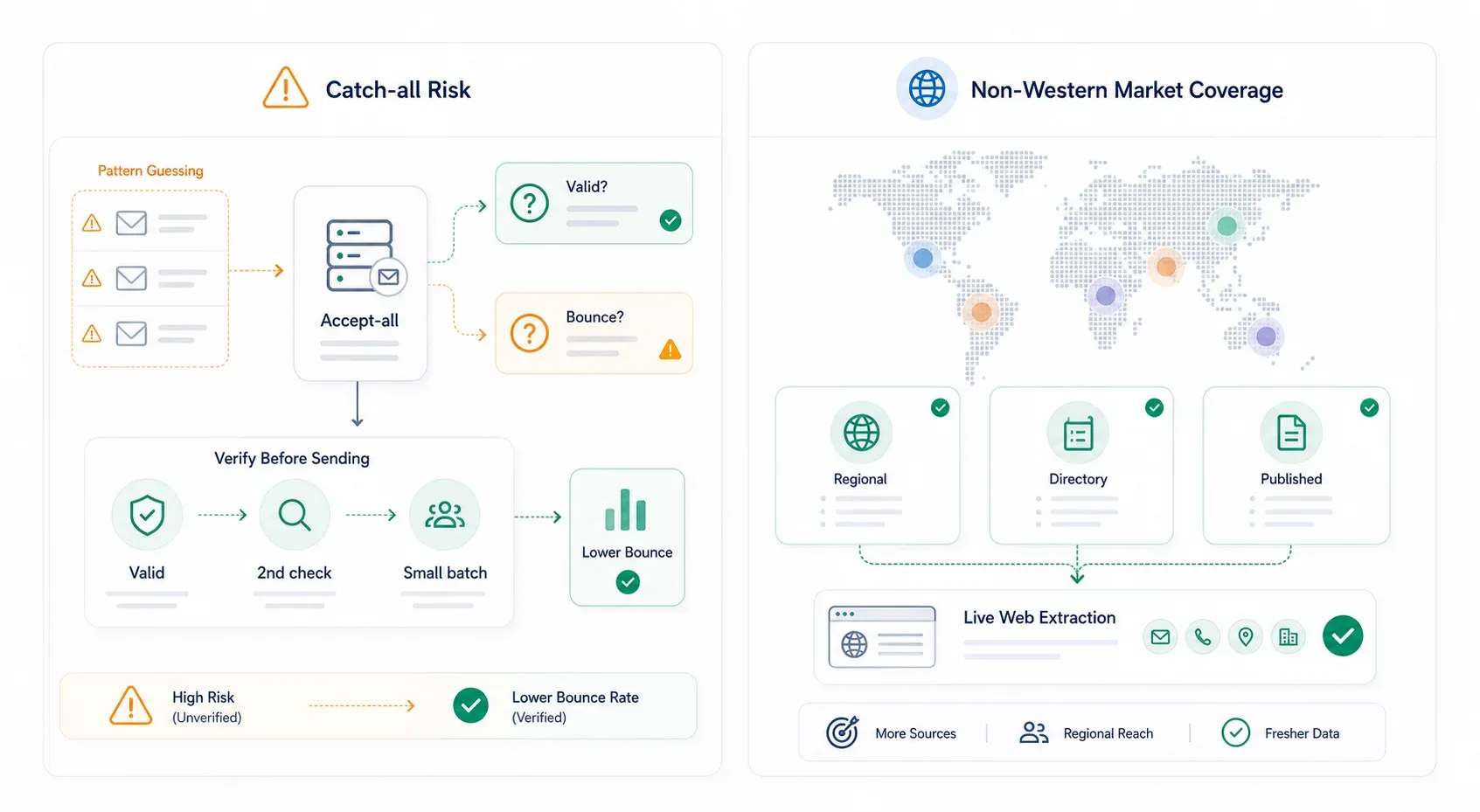
सरल भाषा में: जब verifier किसी email को चेक करता है, तो वह mail server से पूछता है, “क्या आप इस address पर mail accept करोगे?” Normal domain किसी specific mailbox के लिए yes या no कहता है। Catch-all domain हर address के लिए yes कहता है — यहाँ तक कि उन addresses के लिए भी जो मौजूद नहीं हैं। इसलिए verifier “valid” या “95% confidence” कह देता है, और email फिर भी bounce हो जाती है।
Hunter की अपनी docs भी यही मानती हैं: accept-all emails bounce कर सकती हैं और उन्हें “valid” emails से अलग देखा जाना चाहिए।
Bounce rate कम करने की practical workflow:
- पहले सिर्फ “valid” addresses भेजें — catch-all/accept-all को अलग risk tier में रखें
- Risky addresses को दूसरे verifier से फिर चेक करें (ZeroBounce, NeverBounce, Clearout, MillionVerifier)
- Catch-all segments को छोटे batches में test करें और domain-wise hard bounces पर नज़र रखें
- अगर किसी domain पर test में 10-15%+ bounces आएँ, तो उस domain को suppress करें या दूसरा source खोजें
- जब संभव हो, source pages से निकाले गए published emails को प्राथमिकता दें — address pattern से guess नहीं किया गया होता
Catch-all risk पर अलग-अलग approaches की तुलना:
| Approach | Example Tools | Catch-All Risk |
|---|---|---|
| Pattern/domain guessing | Hunter, Tomba, Snov.io | ⚠️ Catch-all domains पर मध्यम-उच्च |
| Large databases | Apollo, RocketReach, Lusha | मध्यम — stale records और shared datasets आम हैं |
| Verified-only databases | UpLead, Cognism | कम, लेकिन premium-priced और फिर भी perfect नहीं |
| Live-web scraping | Thunderbit | ✅ कम pattern risk — published emails निकालता है |
| Dedicated verification | ZeroBounce, Clearout, आदि | दूसरा pass सबसे अच्छा, लेकिन हर catch-all inbox को magically prove नहीं कर सकता |
कोई भी एक tool bounce risk को पूरी तरह खत्म नहीं करता। सबसे स्मार्ट तरीका layered है — primary source इस्तेमाल करें, दूसरे tool से verify करें, और catch-all domains को अलग risk category मानें।
Non-Western Market Blind Spot: APAC और उससे आगे Contacts कैसे खोजें
यह एक ऐसा pain point है जो forums में और हमारे अपने users के साथ बार-बार सामने आता है: Hunter.io और similar tools Asian names के साथ संघर्ष करते हैं। कई users ने बताया है कि “Hunter Asian names (जैसे Chinese/Vietnamese) के लिए optimized नहीं है” और वे “Asia में बने alternatives” सुझाते हैं।
समस्या structural है। Pattern-based email finders firstname.lastname@domain.com जैसे formats का अनुमान लगाकर काम करते हैं। यह तब टूट जाता है जब:
- नाम का order उल्टा हो (surname पहले)
- Transliteration अलग-अलग हो (Chinese, Japanese, Korean के लिए कई Romanization systems)
- काम के email में initials या English nicknames इस्तेमाल किए जाते हों
- APAC की छोटी कंपनियाँ Western corporate-email conventions follow न करती हों
- व्यक्ति पश्चिम-केंद्रित databases में indexed ही न हो
APAC data में किन tools की पकड़ मज़बूत है:
- Cognism enterprise/international positioning में सबसे मज़बूत है, और EMEA व APAC coverage के explicit claims रखता है
- Apollo और RocketReach के global datasets व्यापक हैं, लेकिन खरीदने से पहले target-country samples test करना चाहिए
- Tomba, Hunter, और Snov.io तब उपयोगी हैं जब company domain पता हो और naming patterns predictable हों
- Thunderbit name-format problem को पूरी तरह bypass करता है: email patterns guess करने के बजाय यह regional directories, company websites, और social profiles से actual published contact data scrape करता है। Email format मायने नहीं रखता क्योंकि आप वही निकाल रहे हैं जो पहले से display हो रहा है
जहाँ scraping databases से बेहतर काम करता है: Japanese local clinic directories, Southeast Asian exporter/manufacturer directories, Chinese trade association member pages, Indian startup directories, और regional chambers of commerce.
आपकी स्थिति के लिए कौन-सा Hunter.io Alternative सही है?
सिर्फ “best for” वाली one-liners के बजाय, यहाँ real scenarios से जुड़ी decision matrix दी गई है:
| आपकी स्थिति | Budget | Best Pick(s) | क्यों |
|---|---|---|---|
| Solo founder, pre-revenue | $0 | Thunderbit (free extractors) + Snov.io (50 free credits) | Niche sites free में scrape करें; cold email sequences के लिए Snov.io |
| SMB sales team (5-20 reps) | $50-200/mo | Apollo.io या UpLead | Full-funnel features; verified-only data के लिए UpLead |
| Multiple clients संभालने वाली agency | $200-500/mo | Snov.io या Apollo.io | Multi-campaign management, client separation |
| Enterprise (EMEA/APAC focus) | $1,000+/mo | Cognism + Thunderbit API | Phone-verified contacts के लिए Cognism; scale पर custom extraction के लिए Thunderbit API |
| Custom pipeline बना रहे developer | Varies | Thunderbit API + Tomba.io API | किसी भी site से structured extraction के लिए Thunderbit; domain-based lookups के लिए Tomba |
| Niche/regional businesses target करना | $0-50/mo | Thunderbit | Contacts databases में नहीं हैं — directories और company pages से सीधे scrape करें |
| Recruiting / individual lookups | $39-119/mo | RocketReach या Lusha | Strong one-off profile और contact discovery |
अगर आपके contacts mainstream databases में हैं, तो Apollo, RocketReach, UpLead, Lusha, या Cognism अच्छा काम करेंगे। अगर वे वहाँ नहीं हैं — niche directories, regional portals, छोटे local businesses, non-Western markets — तो Thunderbit अक्सर बेहतर पहला कदम है क्योंकि यह contact data वहीं से निकालता है जहाँ वह सच में मौजूद है।
Prospect lists और lead generation workflows बनाने के बारे में और पढ़ने के लिए हमारे making a prospect list और best email extractor software वाले गाइड देखें।
निष्कर्ष
Hunter.io ने domain-based email lookup को लोकप्रिय बनाया, और simple use cases के लिए यह आज भी काम करता है। लेकिन 2026 का prospecting landscape अब सिर्फ एक finder से कहीं अधिक मांगता है। Verification, phone numbers, API economics, CRM integrations, non-Western coverage, और ऐसे contacts जो किसी pre-built database के बाहर रहते हैं — आज असली ज़रूरतें यही हैं।
सही alternative आपके workflow, budget, और आपके contacts वास्तव में कहाँ मौजूद हैं, इस पर निर्भर करता है। अगर आप एक अलग तरीका आज़माना चाहते हैं — database में उम्मीद करने की बजाय web से सीधे contacts निकालना — तो Thunderbit का free tier ज़रूर आज़माएँ। आपको हैरानी हो सकती है कि कितने contacts ऐसे मिल जाते हैं जिन्हें किसी database ने index ही नहीं किया। और और walkthroughs के लिए Thunderbit YouTube channel देखें या हमारे building lead lists और email extraction tools वाले guides explore करें।
Happy prospecting — और आपकी bounce rates कम से कम रहें।
AI contact scraping के लिए Thunderbit आज़माएँ Get Started Free
FAQs
1. Hunter.io का सबसे अच्छा free alternative कौन-सा है?
वाकई उपयोगी free workflow के लिए Thunderbit (किसी भी webpage से free email और phone extractors), Snov.io (outreach के साथ 50 free credits/month), और Apollo.io (limited credits वाला free plan) सबसे काम के free options देते हैं। Thunderbit तब सबसे मजबूत है जब data websites पर published हो; Snov.io finding को cold email sequences के साथ जोड़ने के लिए सबसे अच्छा है।
2. क्या Hunter.io 2026 में भी accurate है?
Hunter आज भी common corporate domains और quick email discovery के लिए उपयोगी है। छोटे businesses, sparse domains, non-Western names, और catch-all domains के लिए accuracy कम predictable हो जाती है। Users का कहना है कि भेजने से पहले Hunter results को दूसरे tool से verify करना समझदारी है।
3. क्या मैं Hunter.io alternative से phone numbers ढूँढ सकता हूँ?
हाँ। Lusha और Cognism direct-dial phone numbers के लिए सबसे मजबूत हैं। RocketReach, UpLead, और Tomba.io भी paid plans पर phone data देते हैं। Thunderbit का free phone number extractor किसी भी webpage से published phone numbers निकालता है — directories और company sites के लिए उपयोगी।
4. किस Hunter.io alternative का API सबसे अच्छा है?
यह use case पर निर्भर करता है। Tomba.io एक lightweight, अच्छी तरह documented API देता है, 10+ languages के SDKs के साथ — domain-based email lookups के लिए आदर्श। Apollo.io ज़्यादा व्यापक sales intelligence API देता है। Thunderbit का Open API arbitrary websites से structured extraction के लिए सबसे अच्छा है, जिसमें तय schema के साथ 100 URLs तक batch extraction भी शामिल है।
5. Emails verify करते समय catch-all domains को कैसे संभालूँ?
Catch-all/accept-all emails को risky मानें, automatically valid नहीं। उन्हें अलग tier में रखें, दूसरे tool (ZeroBounce, Clearout, NeverBounce) से verify करें, छोटे batches में test करें, और domain-wise bounce rates पर नज़र रखें। जब संभव हो, source pages से extracted published emails को pattern-guessed addresses की बजाय चुनें — email वेबसाइट owner द्वारा confirm किया गया होता है, किसी algorithm द्वारा अनुमानित नहीं।
और जानें




