
वेबसाइट से बार-बार copy-paste करके थक गए हैं? web scraping scripts को बार-बार बदलते-बदलते परेशान हो चुके हैं? पारंपरिक web scraping सच में बड़ी झंझट वाली प्रक्रिया हो सकती है। लेकिन AI के जमाने में ये अड़चनें काफी कम हो गई हैं, और अब आम business users के लिए भी web scraping पहले से कहीं ज्यादा आसान हो गई है।
इस लेख में हम देखेंगे कि AI web scraper का इस्तेमाल करके किसी भी वेबसाइट से data कैसे extract करें, और साथ ही पारंपरिक web scraping method भी समझेंगे। आप beginner हों या experienced pro, AI की ताकत आपकी efficiency काफी बढ़ा सकती है। चलिए शुरू करते हैं!
Web Scraping क्या है?
Web scraping एक powerful technique है, जिसकी मदद से websites से data को automatically grab किया जाता है और उसे structured, easy-to-use format में व्यवस्थित किया जाता है। जब data बहुत ज्यादा हो, तब यह समय और मेहनत दोनों बचाता है। यह market research, real estate analysis, या Lead generation जैसे कामों के लिए बेहद उपयोगी है।
Traditional Web Scraper क्यों न इस्तेमाल करें?
Traditional web scraping में scripts या खास scraping tools की मदद से वेबसाइट की HTML structure से specific data points निकाले जाते हैं।
- Python web scraping के लिए एक लोकप्रिय भाषा है। यहाँ Python का उपयोग करके वेबसाइट scrape करने पर एक tutorial video है:
- ऑनलाइन कई traditional web scraping tools उपलब्ध हैं, जैसे Webscraper और Octoparse। चलिए Webscraper को उदाहरण के तौर पर लेते हैं। इसे इस्तेमाल करने का तरीका यहाँ दिया गया है:
हालाँकि traditional web scrapers काम आ सकते हैं, लेकिन उनकी कुछ बड़ी कमियाँ आपको रोक सकती हैं:
- High Barrier: जो लोग tech-savvy नहीं हैं, उनके लिए web scraping कठिन हो सकता है, क्योंकि इसमें coding सीखना और web page structure समझना पड़ता है।
- Time Investment: नए sites के लिए scrapers सेट करने में घंटों लग सकते हैं—data identify करना, setup करना, और बदलाव होने पर उसे फिर से adjust करना पड़ता है।
- Maintenance Headache: Websites लगातार update होती रहती हैं, जिससे traditional scrapers बिगड़ सकते हैं। इसका मतलब है कि काम चालू रखने के लिए बार-बार fixes करने पड़ते हैं।
इन चुनौतियों की वजह से traditional web scraping उन लोगों के लिए उतना अच्छा नहीं है जिन्हें तेज़ और भरोसेमंद समाधान चाहिए। अच्छी बात यह है कि AI-powered scrapers ज्यादा flexible और efficient समाधान देते हैं।
AI Web Scraper क्यों इस्तेमाल करें?
AI web scraper, AI-powered tools की मदद से websites से data निकालने का ज्यादा स्मार्ट और automated तरीका है।
Traditional scraping जहाँ website changes के हिसाब से coding और maintenance मांगता है, वहीं AI scrapers machine learning का इस्तेमाल करके page पर patterns और context समझते हैं। इससे AI scrapers ज़्यादा flexible, faster, और user-friendly बन जाते हैं—tech skills की ज़रूरत नहीं। आइए देखें कि AI web scraping आपका नया best friend क्यों बन सकता है:
- Easy for Non-Techies: AI web scraping tools सबके लिए बनाए गए हैं; no-code interface इन्हें 1-click जितना आसान बना देता है। scripting या deep technical knowledge की ज़रूरत नहीं!
- Fast and Efficient: LLM support के साथ, AI scrapers कई websites से बड़ी मात्रा में data बेहद तेज़ी से निकाल सकते हैं। ये product names, prices, descriptions, और dates जैसे data tags को लगभग बिना setup के पहचान लेते हैं, जिससे mistakes और manual work कम होता है।
- Flexible and Versatile: AI-powered scrapers बड़े data volume को संभाल सकते हैं और website layout बदलने पर खुद को automatically adjust कर लेते हैं, इसलिए आपको settings बार-बार tweak नहीं करनी पड़ती। इन्हें अलग-अलग data types को आसानी से पहचानने के लिए बनाया गया है, ताकि data collection तेज़ और error-free रहे।
Give It a Go: AI के साथ web scrape करें
इसे आज़माएँ! आप देखते-देखते click, explore, और workflow run कर सकते हैं।
Thunderbit के साथ शुरुआत कैसे करें
दिलचस्प लग रहा है? यहाँ बताया गया है कि Thunderbit को मुफ्त में कैसे शुरू करें:
- Thunderbit website पर जाएँ
thunderbit.com पर जाएँ और sign up करें। नए users को Thunderbit के tools आज़माने के लिए free credits मिलते हैं — AI Web Scraper, Autofill, और Summarize features सहित — साथ ही Amazon, eBay, और Google Maps जैसे लोकप्रिय sites के लिए one-click instant templates भी मिलते हैं। इन free credits का उपयोग करके देखें कि ये tools आपके workflow में कैसे fit होते हैं।
- Thunderbit extension install करें
Chrome Web Store से Thunderbit डाउनलोड करें। इंस्टॉल होने के बाद आप सीधे websites के साथ interact कर सकते हैं, data के अलग-अलग types पहचान सकते हैं, और अपने data के लिए column headers भी adjust कर सकते हैं।
- Set up करें और log in करें
इंस्टॉलेशन के बाद, full access पाने के लिए log in करें। side panel से आप projects manage, files upload, और अपनी ज़रूरत के हिसाब से scraping settings adjust कर सकते हैं।
- Scrape करना शुरू करें
Thunderbit के side panel से एक नया project शुरू करें। आप चुन सकते हैं कि किस तरह का data चाहिए, specific extraction points सेट कर सकते हैं, और बाकी details configure कर सकते हैं। सब कुछ interactive है, इसलिए आप real-time में देख सकते हैं कि क्या निकाला जा रहा है।
यहाँ Thunderbit AI Web Scraper का उपयोग करने का एक उदाहरण है।
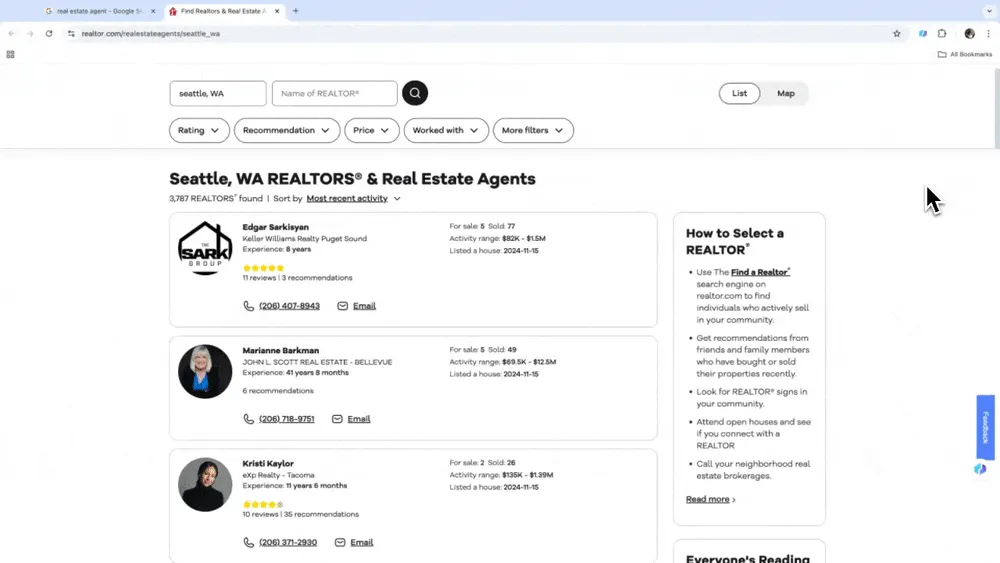
Thunderbit के Advanced Scraping Features
Thunderbit में कुछ उपयोगी advanced features हैं, जो AI web scraping को और आसान बनाते हैं:
- Natural Language से scrape करें: Thunderbit का interface किसी coding knowledge की मांग नहीं करता। आपको सिर्फ column names define करने होते हैं ताकि AI समझ सके कि आप क्या scrape करना चाहते हैं। चाहे आप tech-savvy हों या नहीं, complex data scraping projects आसानी से संभाले जा सकते हैं।
- AI Suggest Columns: Thunderbit का AI खास तौर पर smart है—यह जिस website को आप देख रहे हैं उसे समझता है, सबसे महत्वपूर्ण data पहचानता है, और आपके use case के लिए column names बना देता है। इस feature से यह अनावश्यक जानकारी छाँट देता है और सिर्फ ज़रूरी data दिखाता है, जिससे आपकी efficiency बढ़ती है।
- Various File Types के साथ compatible: Thunderbit का AI Web Scraper PDFs और images जैसे अलग-अलग data formats को भी scrape कर सकता है। Thunderbit का AI इन files में मौजूद key information को automatically पहचानकर सटीकता से extract कर सकता है।
AI के साथ Web Scraping के लिए Best Practices
Zillow
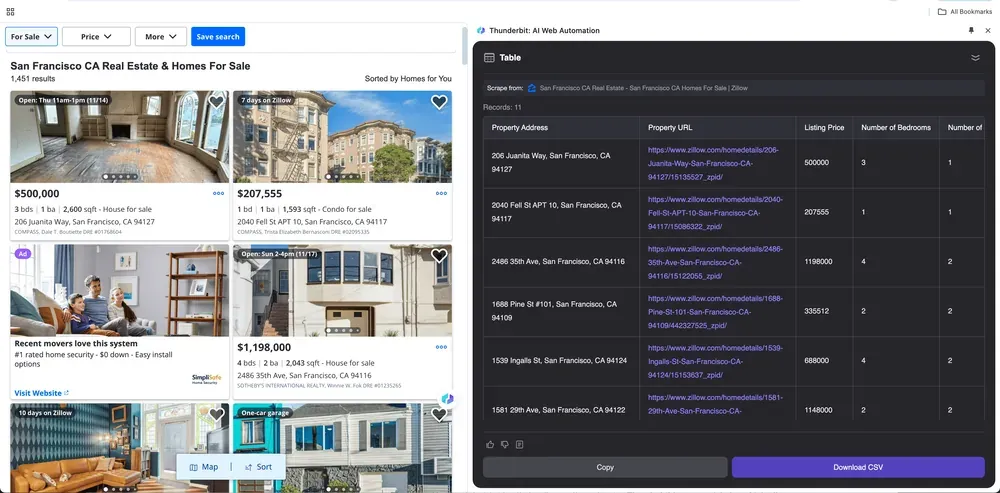
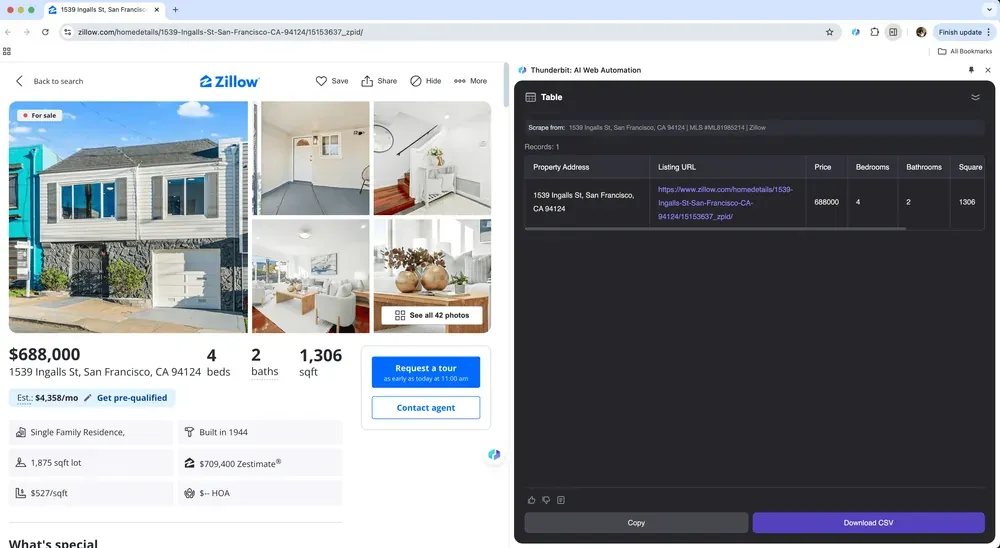
अगर आप real estate agent हैं और किसी specific area के property data को Zillow से इकट्ठा करना चाहते हैं, या investor हैं जो बढ़िया opportunities ढूँढ़ रहे हैं, तो एक भरोसेमंद web scraping tool आपका सबसे अच्छा सहायक बन सकता है। Thunderbit का AI web scraper आपको Zillow से ज़रूरी property details निकालने में आसानी देता है, जिससे आप अपडेटेड और competitive बने रहते हैं। नीचे Zillow के लिए Thunderbit इस्तेमाल करने का tutorial video दिया गया है।
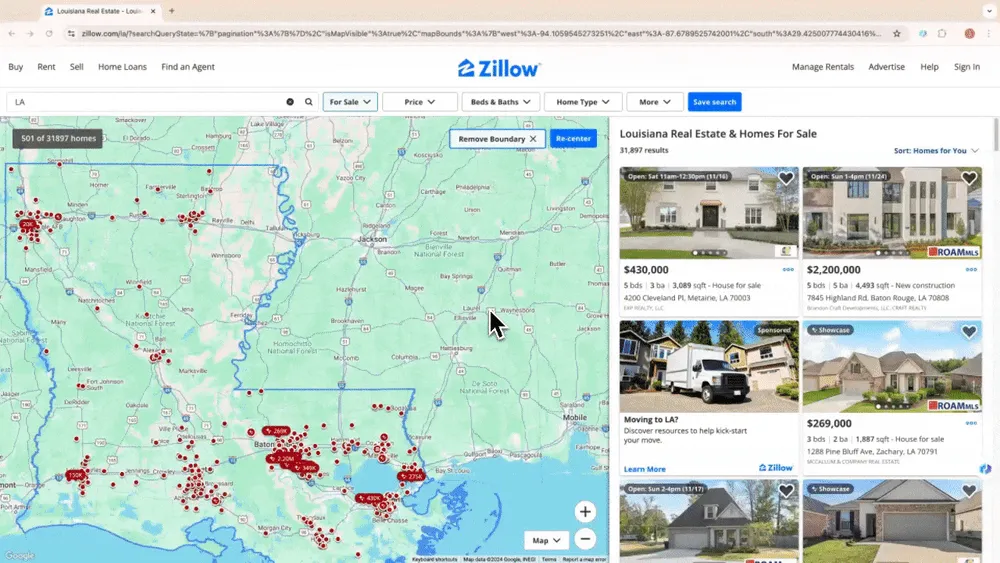
Zillow Scraping के Use Cases
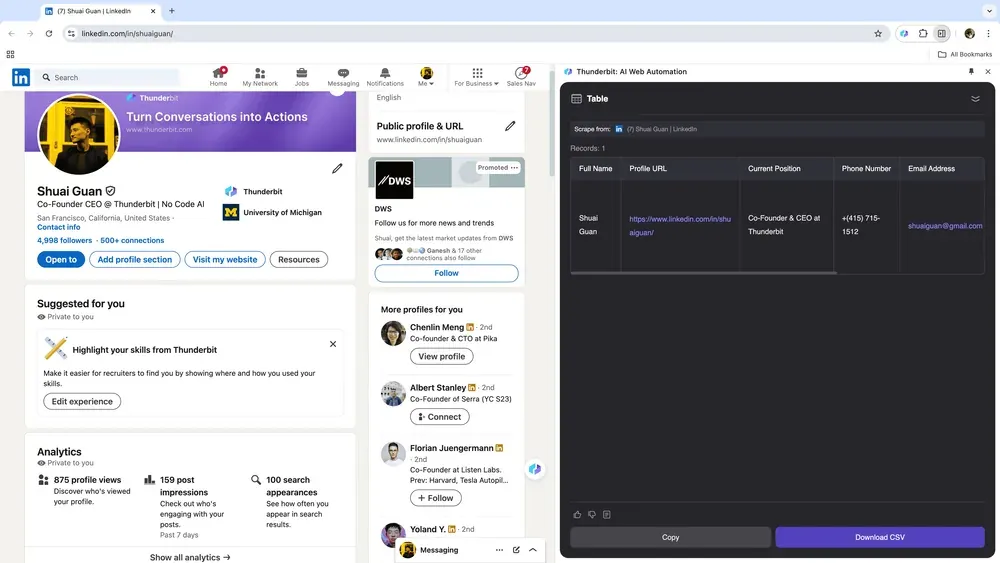
अगर आप HR हैं और talent ढूँढ़ना चाहते हैं, या sales में हैं और नए leads चाहते हैं, तो एक भरोसेमंद web scraping tool आपके लिए powerful ally साबित हो सकता है। Thunderbit आपको LinkedIn से ज़रूरी data आसानी से निकालने देता है, जिससे talent sourcing और lead management सरल हो जाती है। इसे इस्तेमाल करने के बाद आपको महसूस होगा कि समय लेने वाली manual searches और copy-pasting अब पीछे छूट गई हैं। नीचे एक tutorial video है जो LinkedIn से data scrape करने के लिए Thunderbit के उपयोग को समझाता है।
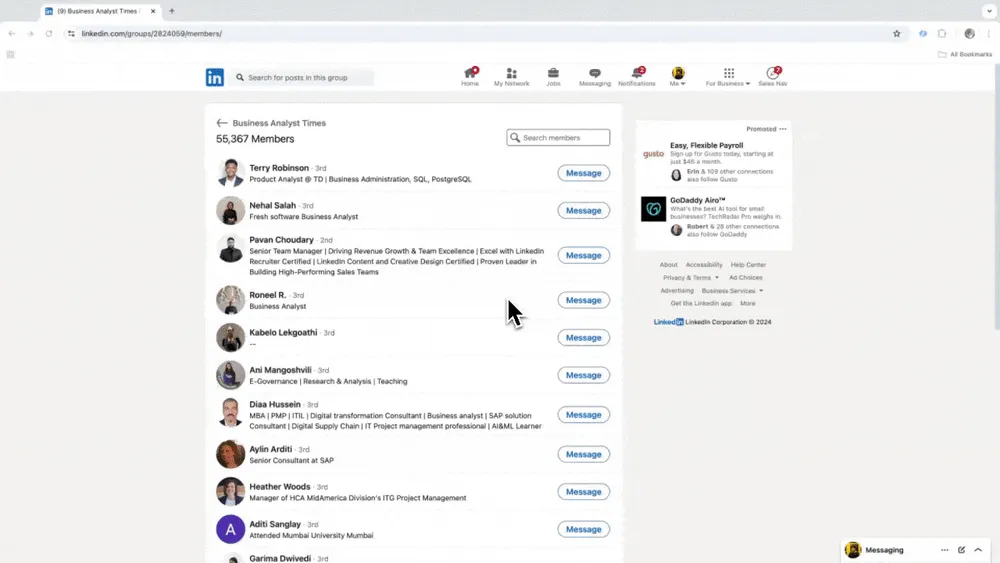
LinkedIn Scraping के Use Cases
Google Maps
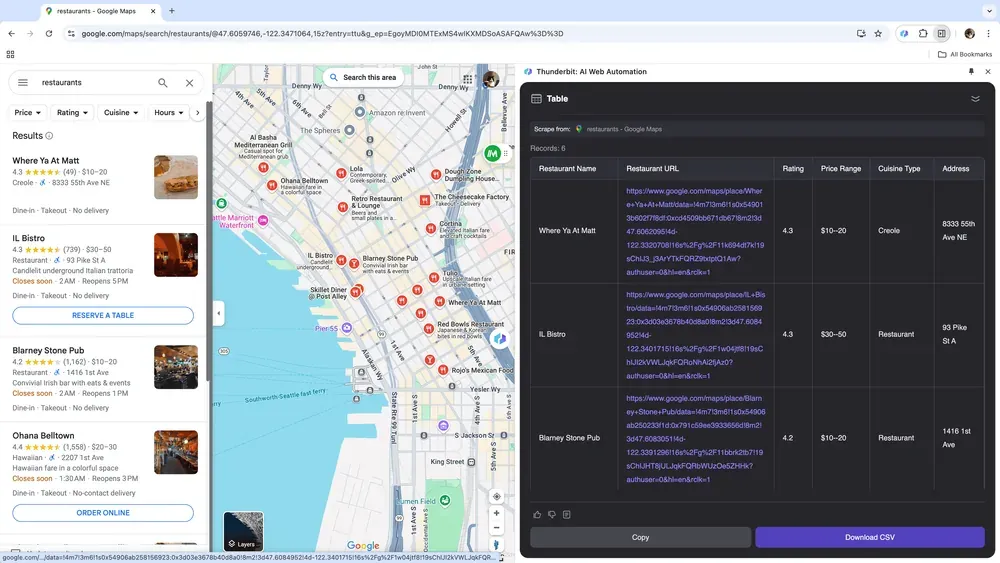
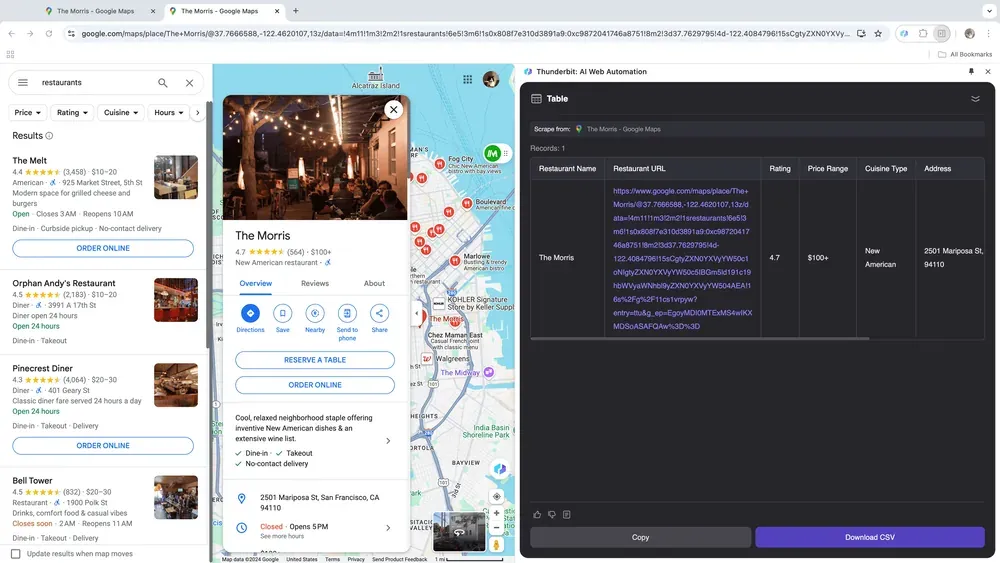
अगर आप एक business owner हैं और market analysis के लिए location-based data इकट्ठा करना चाहते हैं, या sales professional हैं और local business leads खोज रहे हैं, तो एक भरोसेमंद web scraping tool खेल बदल सकता है। Thunderbit आपको Google Maps से key data बिना मेहनत के extract करने देता है, जिससे आप बेहतर फैसले ले सकते हैं और outreach को optimize कर सकते हैं। नीचे Google Maps scraping के लिए Thunderbit इस्तेमाल करने का tutorial video है।
Google Maps के Use Case
-
Google Maps
Amazon
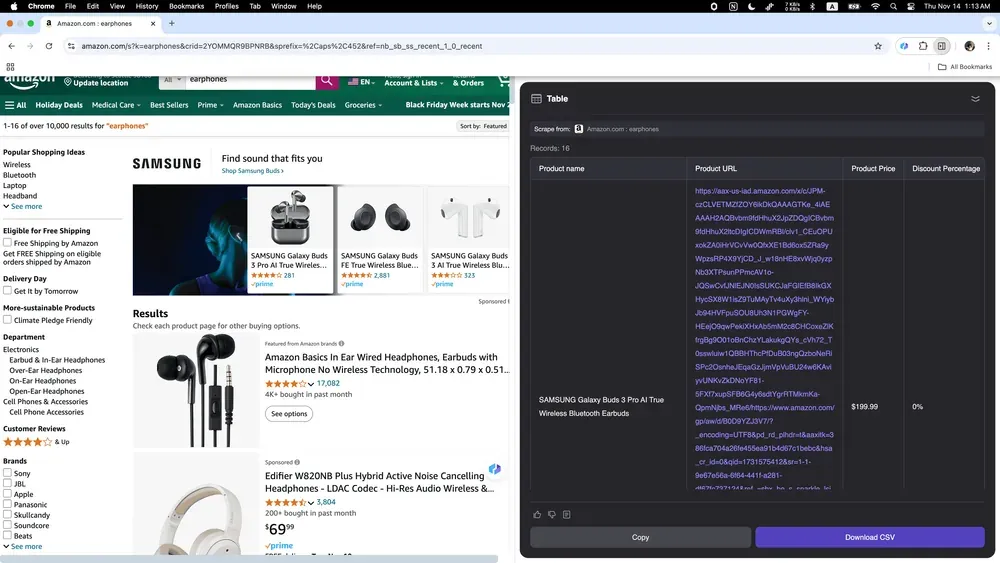
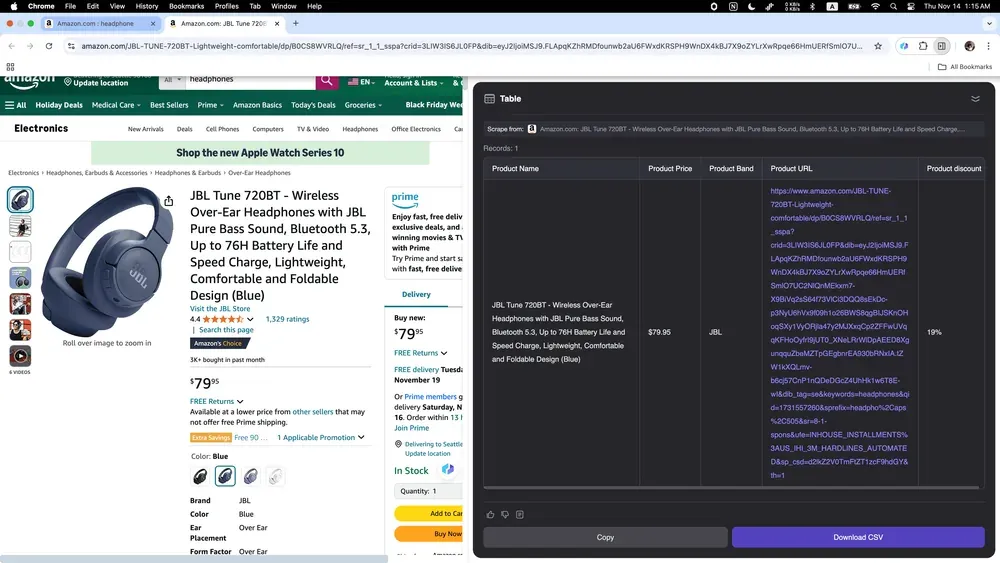
अगर आप एक online seller हैं और अपने competitors की insights पाना चाहते हैं, या entrepreneur हैं और market trends track करना चाहते हैं, तो Thunderbit आपके लिए perfect tool है! यह Amazon से product data के हर तरह के details—जैसे descriptions, prices, user reviews, और बहुत कुछ—इकट्ठा करना आसान बनाता है। नीचे Amazon data scraping के लिए Thunderbit उपयोग करने का step-by-step tutorial video दिया गया है, ताकि आपकी e-commerce strategy बेहतर हो सके।
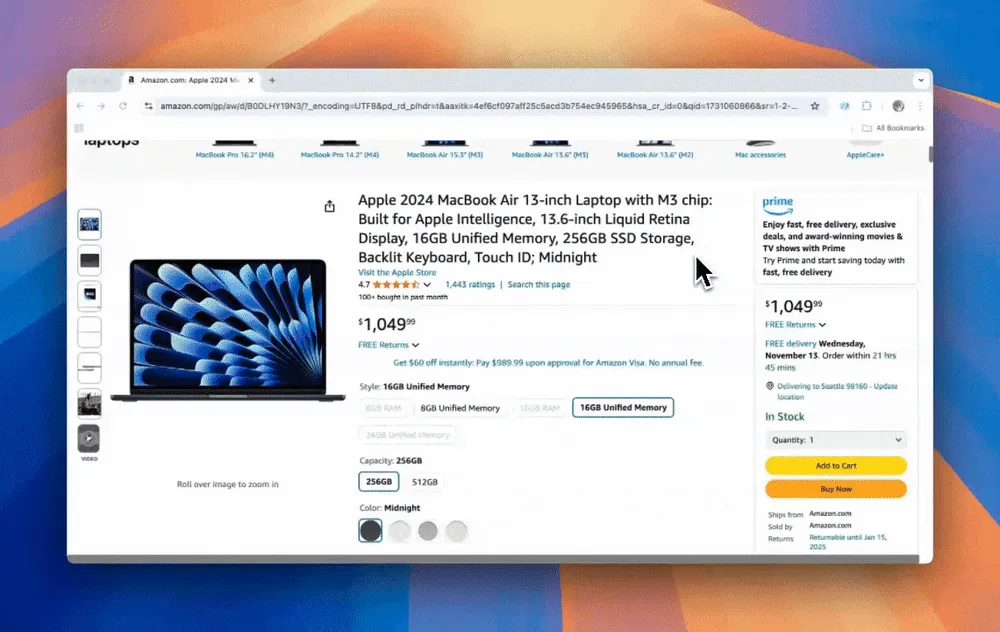
Amazon के Use Case
Thunderbit AI Web Scraper ने business users के लिए data collection का तरीका ही बदल दिया है, इसे पहले से कहीं ज़्यादा faster, easier, और अधिक efficient बना दिया है। चाहे आप Zillow पर properties देख रहे हों, LinkedIn पर leads ढूँढ़ रहे हों, Google Maps पर local businesses map कर रहे हों, या Amazon पर trends analyze कर रहे हों—AI web scrapers आपको अनगिनत घंटे और परेशानियाँ बचा सकते हैं। AI की ताकत को web scraping में अपनाइए, और अपनी productivity को उड़ान भरते देखिए। शुरू करने के लिए तैयार हैं? Thunderbit को आज़माइए और आज ही smarter web scraping की ओर पहला कदम बढ़ाइए।
FAQs
-
मैं AI web scraping का उपयोग किस लिए कर सकता हूँ?
- Market research और trend analysis
- Zillow जैसे sites पर real estate property tracking
- LinkedIn पर talent sourcing और lead generation
- Amazon पर product और competitor analysis
- Google Maps से local business data gathering
-
Thunderbit के साथ AI web scraping के लिए कौन-सी websites सबसे उपयुक्त हैं?
- Zillow: Real estate analysis के लिए
- LinkedIn: Talent sourcing और lead generation के लिए
- Google Maps: Location-based market research के लिए
- Amazon: Product और competitor insights के लिए
-
क्या मैं Thunderbit को मुफ्त में आज़मा सकता हूँ?
हाँ, Thunderbit नए users को अपने features explore करने के लिए free credits देता है। शुरुआत करने के लिए thunderbit.com पर sign up करें।
और जानें:
- How to scrape data from a website
- 3 ways to extract/scrape data from websites
- How to scrape a website without code
- Web Scraping With Python – Step-By-Step Guide
- How To Scrape Google Using Python
शून्य मेहनत से AI के साथ काम करें. Get Started Free