

Yelp पर 330 million cumulative reviews और 8.4 million active business pages मौजूद हैं — और इस डेटा को usable format में निकालना अब पहले से कहीं ज़्यादा tricky हो गया है। Yelp की 2024–2025 वाली anti-bot सख्ती ने quietly ज़्यादातर पुराने Python scraping tutorials को बेकार कर दिया है।
अगर आपने हाल ही में Yelp scraper चलाने की कोशिश की है और 403 errors, खाली HTML responses, या ऐसे CAPTCHAs मिले हैं जो छह महीने पहले नहीं थे, तो तुम कुछ गलत नहीं समझ रहे। Yelp अब TLS/JA3 fingerprinting, बदलते हुए obfuscated CSS class names, और aggressive IP reputation scoring का इस्तेमाल कर रहा है — यानी वह पुराना requests + BeautifulSoup वाला तरीका, जिसे हर tutorial आज भी सुझाता है, पहले ही request पर fail हो जाता है। मैंने Yelp के मौजूदा stack के खिलाफ अलग-अलग तरीकों को हफ्तों तक test किया है, और यह guide वही सब cover करती है जो 2025 में सच में काम करता है: official Fusion API (और क्यों यह शायद काफी नहीं होगा), layered anti-blocking strategy के साथ पूरा Python scraping workflow, और उन readers के लिए 2-click no-code alternative with Thunderbit जो बस data चाहते हैं, debugging marathon नहीं।
Yelp Scraping के लिए Thunderbit आज़माएँ
Python से Yelp क्यों Scrape करें, और इससे सच में किसे फायदा होता है?
कोड की एक भी line लिखने से पहले असली business case क्या है? Yelp सिर्फ restaurant review site नहीं है — यह structured contact info, ratings, categories, hours, और करोड़ों customer reviews के साथ local businesses का एक live database है।
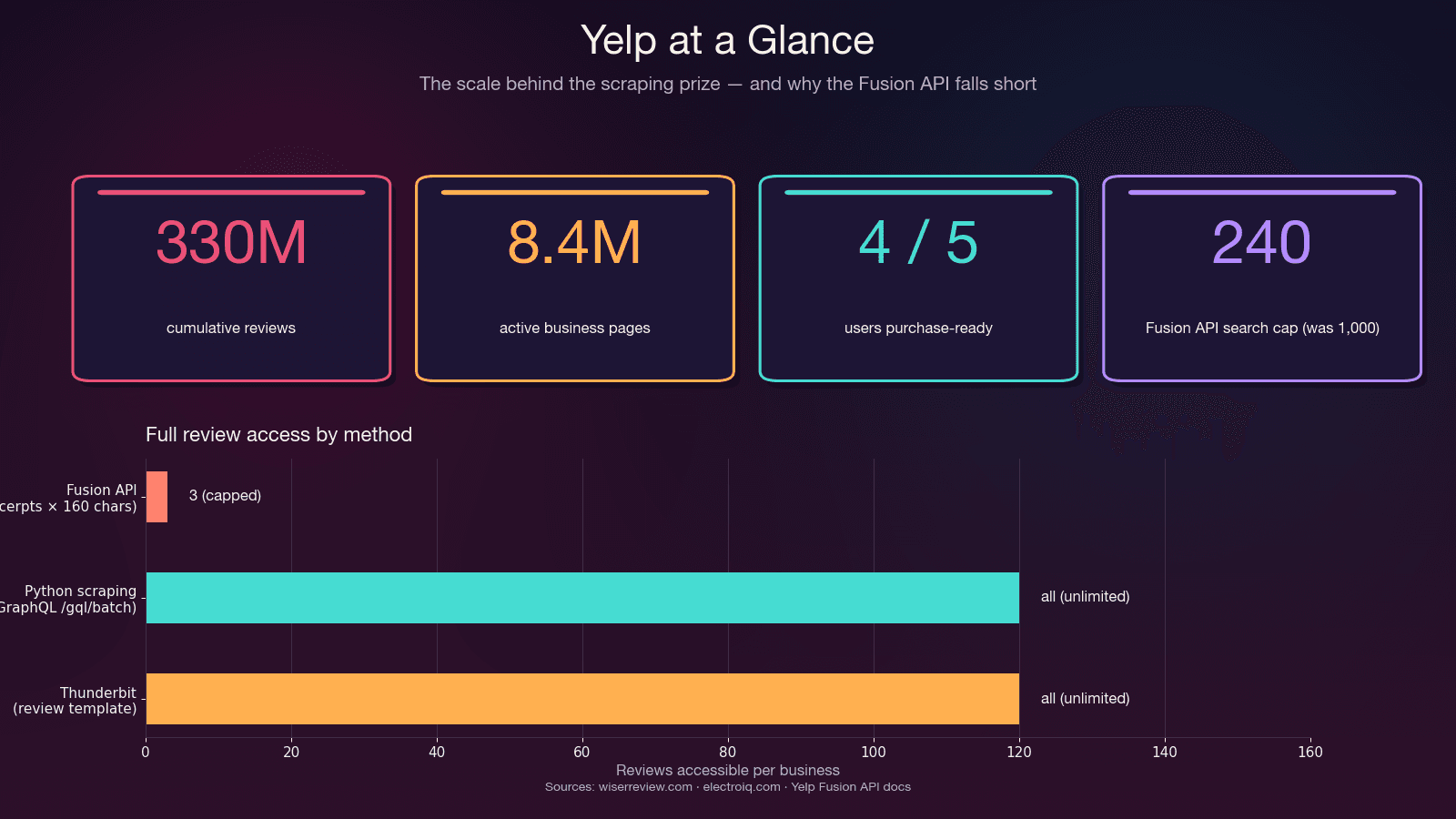
सबसे ज़्यादा फायदा किसे होता है और वे क्या निकालते हैं:
| Use Case | Key Data Fields | Why It Matters |
|---|---|---|
| Sales & lead generation | Business name, phone, website, address, category, rating | Local SMBs की targeted prospect lists बनती हैं — 4 of 5 Yelp users are purchase-ready on arrival |
| Competitive intelligence | Reviews, star ratings, review volume, sentiment | Competitor reputation monitor करें, service gaps पहचानें, trends track करें |
| Market research & NLP | Full review text, dates, reviewer metadata | Sentiment analysis, topic modeling — academic research में Yelp reviews one of the most-used NLP corpora हैं |
| Real estate & site selection | Business density, category mix, review quality by area | Franchise और retail site selection — Yelp इसी use case के लिए Location Intelligence को licensed B2B product के रूप में बेचता है |
| Ecommerce & operations | Pricing signals, customer complaints, service hours | Competitors की review patterns और operational patterns समझें |
असल बात यह है: लक्ष्य structured data है, और वहाँ पहुँचने का एक रास्ता Python है। कुछ readers को full programmatic control चाहिए होगा। दूसरों को सिर्फ Austin के plumbers की contact info वाली spreadsheet चाहिए। यहाँ दोनों रास्ते शामिल हैं।
Yelp Fusion API बनाम Python Web Scraping: आपको क्या चुनना चाहिए?
ज़्यादातर guides यह decision छोड़े बिना सीधे code पर कूद जाती हैं, यह देखे बिना कि official Yelp Fusion API (अब “Yelp Places API” नाम से rebrand) पर्याप्त होती या नहीं। मेरे experience में, यह evaluation कई घंटे बचा सकती है — क्योंकि API कुछ चीज़ों के लिए बढ़िया है, और कुछ के लिए बिल्कुल नाकाफी।
Fusion API वास्तव में क्या देती है
Fusion API structured business search, business details, autocomplete, और एक reviews endpoint देती है। यह authorized है, well-documented है, और इसमें anti-bot tricks की ज़रूरत नहीं होती।
लेकिन असली problem reviews endpoint में आती है। Yelp staff ने GitHub पर खुद यह confirm किया है:
"The Yelp API does not return full review text. Three review excerpts of 160 characters are provided by default." — Yelp staff reply, GitHub Issue #163
यह bug नहीं है — यह जानबूझकर ऐसा किया गया है। API maximum 3 review excerpts तक सीमित है (Premium पर 7), और हर excerpt लगभग 160 characters तक ही truncated होता है। कोई review metadata नहीं (useful/funny/cool votes), कोई reviewer history नहीं, कोई owner replies नहीं। और new clients के लिए daily rate limit May 2023 के बाद 300–500 calls/day तक गिर गया — पहले यह 5,000 था। शुरुआती pricing $29/month से शुरू होती है।
Decision Framework
| Factor | Yelp Fusion API | Python Web Scraping | Thunderbit (No-Code) |
|---|---|---|---|
| Full reviews | ❌ केवल 3 excerpts (~160 chars each) | ✅ GraphQL के जरिए सभी reviews | ✅ सभी visible reviews |
| Rate limits | 300–500/day (new); 5,000 (legacy) | Self-managed (proxy budget) | Credit-based |
| Setup effort | ~15 min (API key + SDK) | Hours to days | ~2 minutes |
| Business fields | ~20 structured fields | Unlimited (parse HTML/JSON) | AI-suggested fields |
| Anti-bot handling | N/A (authorized) | खुद बनानी पड़ती है | Automatically handled |
| Legal risk | ✅ Authorized | ⚠️ ToS gray area | ⚠️ Scraping जैसा ही |
| Cost | $29/mo minimum | Free (+ proxy costs $0.75–$4/GB) | Free tier available |
| Maintenance | Low (API stable) | High (selectors rot, anti-bot escalates) | Low (AI re-adapts) |
Fusion API का उपयोग करें अगर: आपको basic business info, छोटे-scale lookups, या authorized integration चाहिए — और हर business के लिए 3 review snippets काफी हैं।
Python scraping का उपयोग करें अगर: आपको full review text, किसी business के सारे reviews, review metadata, search में 240 से ज़्यादा results, या आपका budget $29/month से कम है।
Thunderbit का उपयोग करें अगर: आप code लिखे या maintain किए बिना तेज़ी से डेटा चाहते हैं। नीचे no-code section में और details है।
No-Code Shortcut: Thunderbit से Yelp Scrape करें (Python की ज़रूरत नहीं)
Python deep-dive से पहले, उन readers के लिए सबसे तेज़ रास्ता यह है जिनका असली goal data है, coding exercise नहीं। हर competitor guide मानकर चलती है कि Python आता है, लेकिन Thunderbit में अपने काम के दौरान मैंने देखा है कि "scrape Yelp" search करने वाले बहुत से लोग sales reps, ops managers, और small business owners होते हैं — उन्हें local businesses की spreadsheet चाहिए, TLS fingerprinting का crash course नहीं।
Thunderbit में पहले से बने हुए Yelp templates मौजूद हैं:
- Yelp Business Web Scraper — business name, rating, contact details, address, hours, category निकालता है
- Yelp Review Scraper — reviewer username, review content, rating, date, reviewer location निकालता है
यह practically कैसे काम करता है
- Chrome में Yelp search results page या business page खोलें
- Thunderbit extension में AI Suggest Fields पर क्लिक करें — AI page पढ़कर columns सुझाएगा (business name, rating, review count, price range, category, address, phone, URL)
- Scrape पर क्लिक करें — काम पूरा
Pre-built Yelp templates के साथ तो यह और भी आसान है: template खोलें, Scrape क्लिक करें।
Subpage scraping enrichment loop को अपने आप handle करता है — Yelp search results page से शुरू करें, subpage scraping चालू करें, और Thunderbit हर business page पर जाकर hours, full reviews, website, photos, और amenities निकाल लेता है। अतिरिक्त setup नहीं।
Pagination automatic है — click-based और scroll-based दोनों, out of the box। (यह कैसे काम करता है, जानने के लिए हमारा pagination guide देखें।)
Exports हर tier पर free हैं — Excel, Google Sheets, Airtable, Notion, CSV, JSON। न pandas, न CSV-writing code।
Time Comparison
| Time | Python Scraper | Thunderbit |
|---|---|---|
| First run | Hours to days (selectors, pagination, proxies, retry logic बनाना) | Pre-built Yelp template के साथ ~30 seconds |
| जब Yelp markup बदलता है | Selectors manually rewrite करने पड़ते हैं | AI Suggest Fields फिर से क्लिक करें — अपने आप re-adapt हो जाता है |
| जब IP banned होता है | Debug करें, proxy pools rotate करें, फिर test करें | Cloud mode IP rotation संभालता है |
| Google Sheets में export | OAuth + pandas glue code लिखना पड़ता है | One click, free |
अगर Thunderbit पहले आज़माकर यह पता चलता है कि आपकी ज़रूरतें पूरी हो जाती हैं, तो आप इस लेख के बाकी हिस्से skip कर सकते हैं। अगर आपको full programmatic control, custom fields, या महीने में कुछ हजार records से ऊपर scale चाहिए — तो आगे पढ़ें।
Yelp Scraping के लिए Python Libraries: कौन-सी चुनें
“Scrapy, BS4+requests, या Selenium — क्या इस्तेमाल करूँ?” Yelp पर r/webscraping threads में यह सबसे common सवालों में से एक है। लेकिन हर tutorial अपनी पसंदीदा library चुनकर आगे बढ़ जाती है, यह बताए बिना कि क्यों। यहाँ साफ़-साफ़ तुलना है।
2025 की सच्चाई: Yelp के लिए requests + BeautifulSoup टूट चुका है
वह stack जिसे हर canonical Yelp tutorial सुझाता है — pip install requests beautifulsoup4 — 2025 में पहली request पर ही block हो जाता है। पचासवीं पर नहीं। पहली पर।
कारण: Python की requests library एक ऐसा TLS/JA3 fingerprint भेजती है जो किसी real browser से match नहीं करता। Yelp का anti-bot layer इसे TLS-handshake level पर ही flag कर देता है, User-Agent header पढ़ने से पहले। मैंने यह बार-बार test किया — fresh IP, realistic headers, randomized delays — और फिर भी vanilla requests पर तुरंत 403 Forbidden मिला।
Library Decision Matrix
| Library | Best For | Handles JS? | Anti-Bot? | Learning Curve | Speed |
|---|---|---|---|---|---|
requests + BeautifulSoup | ❌ | ❌ | बहुत कम | तेज़ (block होने तक) | |
httpx async + parsel | Large-scale async scraping | ❌ | ❌ | कम | बहुत तेज़ |
curl_cffi + parsel | Yelp-specific: TLS impersonation | ❌ | ✅ TLS/JA3/HTTP2 | कम | बहुत तेज़ |
Scrapy 2.14 | Pagination के साथ full crawl pipelines | Partial (scrapy-playwright के जरिए) | AutoThrottle, retry middleware | Medium-High | तेज़ |
Selenium 4.43 / Playwright 1.58 | JS-heavy pages, CAPTCHA workarounds | ✅ | Partial | Medium | धीमा (~10–30 pages/min) |
| Thunderbit | Non-coders, quick extraction | ✅ (browser) | Built-in (Cloud mode) | बहुत कम | तेज़ |
curl_cffi का breakthrough
Yelp scraping workflow में जिसने सबसे बड़ा बदलाव किया, वह library है curl_cffi — curl-impersonate के लिए Python binding। यह real Chrome जैसा exact TLS/JA3 + HTTP/2 fingerprint भेजती है, और इसका API requests का direct replacement है:
from curl_cffi import requests

r = requests.get(
    "https://www.yelp.com/biz/some-restaurant",
    impersonate="chrome131",
)
print(r.status_code, len(r.text))
यह एक ही बदलाव — from curl_cffi import requests और impersonate="chrome131" — browser खोले बिना Yelp की सबसे बड़ी anti-bot layer को bypass कर देता है। मेरे tests में, यही instant 403s और साफ 200 responses के बीच का फर्क था।
2025 के लिए मेरा recommended stack: curl_cffi + parsel + jmespath + residential proxies। अगर आपको scheduling के साथ full crawl pipeline चाहिए, तो इसे Scrapy 2.14 में curl_cffi-based downloader middleware के साथ wrap करें।
Yelp Scrape करने के लिए Python Environment कैसे सेट करें
- Difficulty: Intermediate
- Time Required: setup के लिए ~15 मिनट, working scraper के लिए 1–2 घंटे
- What You'll Need: Python 3.10+ (3.12 recommended), terminal, और optionally residential proxy provider
Step 1: Virtual Environment बनाएं और Packages install करें
python3.12 -m venv .venv
source .venv/bin/activate  # On Windows: .venv\Scripts\activate
pip install "curl_cffi>=0.11" "parsel>=1.9" "jmespath>=1.0" pandas
हर package क्या करता है:
curl_cffi— Chrome के TLS fingerprint के साथ HTTP requests बनाती है (anti-bot bypass)parsel— HTML parse करने के लिए CSS/XPath selectors (Scrapy जैसा engine, लेकिन हल्का)jmespath— declarative JSON querying (Yelp के embedded JSON के लिए nested dict access से बेहतर)pandas— CSV/Excel export
Optional but useful:
pip install fake-useragent # Note: repo archived April 2026 but still installable
Step-by-Step: Python से Yelp कैसे Scrape करें
यह core tutorial है। इसे ज़्यादा resilient बनाने वाली सबसे अहम बात: CSS selectors छोड़ो, hidden JSON निकालो। Yelp build time पर CSS class names randomize करता है (y-css-14xwok2 एक हफ्ते, y-css-hcq7b9 अगले हफ्ते), इसलिए उन पर टिके हुए scrapers कुछ ही हफ्तों में टूट जाते हैं। Embedded JSON payloads — application/ld+json schema और react-root-props — stable रहते हैं।
Step 2: Yelp Search Results Scrape करें
Yelp search URLs एक predictable pattern follow करते हैं: https://www.yelp.com/search?find_desc={term}&find_loc={location}। Search results data <script data-id="react-root-props"> tag में JSON के रूप में embedded होता है — CSS class soup में नहीं।
import re, json, jmespath
from curl_cffi import requests
from parsel import Selector

HEADERS = {
    "user-agent": "Mozilla/5.0 (Windows NT 10.0; Win64; x64) "
                  "AppleWebKit/537.36 (KHTML, like Gecko) "
                  "Chrome/124.0.0.0 Safari/537.36",
    "accept": "text/html,application/xhtml+xml,application/xml;q=0.9,"
              "image/avif,image/webp,image/apng,*/*;q=0.8",
    "accept-language": "en-US,en;q=0.9",
    "accept-encoding": "gzip, deflate, br",
    "cookie": "intl_splash=false",
}

def scrape_search(term: str, location: str, max_pages: int = 3):
    results = []
    for page in range(max_pages):
        url = (f"https://www.yelp.com/search?"
               f"find_desc={term}&find_loc={location}&start={page * 10}")
        r = requests.get(url, headers=HEADERS, impersonate="chrome131")
        if r.status_code != 200:
            print(f"Page {page} पर block: {r.status_code}")
            break
        sel = Selector(text=r.text)
        script = sel.xpath(
            "//script[@data-id='react-root-props']/text()"
        ).get() or ""
        m = re.search(r"react_root_props\s*=\s*(\{.*?\});", script, re.S)
        if not m:
            print(f"Page {page} पर react-root-props नहीं मिला — संभवतः soft block")
            break
        data = json.loads(m.group(1))
        businesses = jmespath.search(
            "legacyProps.searchAppProps.searchPageProps"
            ".mainContentComponentsListProps"
            "[?searchResultBusiness].searchResultBusiness.{"
            "name: name, url: businessUrl, rating: rating, "
            "reviews: reviewCount, phone: phone, "
            "neighborhoods: neighborhoods}",
            data,
        ) or []
        results.extend(businesses)
        import time, random
        time.sleep(random.uniform(3, 7))
    return results
तुम्हें business names, URLs, ratings, और review counts वाली dicts की list मिलनी चाहिए। अगर response में react-root-props गायब है, तो तुम्हें block shell दिया गया है — IP rotate करें और retry करें।
Cookie: intl_splash=false header Yelp के country-splash redirect के लिए एक standard workaround है। इसके बिना, non-US IPs एक splash page पर पहुँचते हैं जो soft block जैसी दिखती है, लेकिन होती नहीं है।
Step 3: Yelp Business Pages Scrape करें
Search results से मिलने वाला हर business URL richer data वाली detail page पर ले जाता है। सबसे stable extraction target <script type="application/ld+json"> block है — इसमें structured schema.org data होता है, जिसे Yelp SEO के लिए रखता है और obfuscate नहीं करता।
def scrape_business(biz_url: str) -> dict:
    url = f"https://www.yelp.com{biz_url}" if biz_url.startswith("/") else biz_url
    r = requests.get(url, headers=HEADERS, impersonate="chrome131")
    if r.status_code != 200:
        return {"url": url, "error": r.status_code}
    sel = Selector(text=r.text)
    biz_id = sel.css('meta[name="yelp-biz-id"]::attr(content)').get()
    for raw in sel.css('script[type="application/ld+json"]::text').getall():
        try:
            data = json.loads(raw)
        except json.JSONDecodeError:
            continue
        for node in (data if isinstance(data, list) else [data]):
            if node.get("@type") in (
                "Restaurant", "LocalBusiness", "FoodEstablishment",
                "HealthAndBeautyBusiness", "HomeAndConstructionBusiness",
            ):
                return {
                    "biz_id": biz_id,
                    "name": node.get("name"),
                    "rating": (node.get("aggregateRating") or {}).get("ratingValue"),
                    "review_count": (node.get("aggregateRating") or {}).get("reviewCount"),
                    "address": node.get("address"),
                    "telephone": node.get("telephone"),
                    "price_range": node.get("priceRange"),
                    "hours": node.get("openingHours"),
                    "url": url,
                }
    return {"biz_id": biz_id, "url": url}
meta[name="yelp-biz-id"] value वही encoded business ID है जिसकी तुम्हें reviews endpoint के लिए ज़रूरत होगी। इसे यहाँ से लें — अगला step इसी का इस्तेमाल करेगा।
Step 4: Pagination के साथ Yelp Reviews Scrape करें
यहीं Fusion API कम पड़ती है और scraping चमकती है। Yelp का internal GraphQL batch endpoint full review text, reviewer info, dates, ratings, और vote counts लौटाता है — वह सब जो API छुपाती है।
Endpoint https://www.yelp.com/gql/batch है, और GetBusinessReviewFeed operation के लिए static documentId इस्तेमाल होता है। Pagination base64-encoded cursor से होती है।
import base64

GQL_URL = "https://www.yelp.com/gql/batch"
DOC_ID = "ef51f33d1b0eccc958dddbf6cde15739c48b34637a00ebe316441031d4bf7681"

def fetch_reviews(enc_biz_id: str, num_pages: int = 5):
    all_reviews = []
    for page in range(num_pages):
        offset = page * 10
        cursor = base64.b64encode(
            json.dumps({"version": 1, "offset": offset}).encode()
        ).decode()
        payload = [{
            "operationName": "GetBusinessReviewFeed",
            "variables": {
                "encBizId": enc_biz_id,
                "reviewsPerPage": 10,
                "after": cursor,
                "sortBy": "DATE_DESC",
                "language": "en",
            },
            "extensions": {
                "operationType": "query",
                "documentId": DOC_ID,
            },
        }]
        r = requests.post(
            GQL_URL,
            json=payload,
            headers={
                **HEADERS,
                "content-type": "application/json",
                "x-apollo-operation-name": "GetBusinessReviewFeed",
                "apollographql-client-name": "yelp-main-frontend",
            },
            impersonate="chrome131",
        )
        if r.status_code != 200:
            print(f"Review fetch failed at offset {offset}: {r.status_code}")
            break
        data = r.json()
        # Extract reviews के लिए response structure में जाएँ
        try:
            reviews = data[0]["data"]["business"]["reviews"]["edges"]
            for edge in reviews:
                node = edge.get("node", {})
                all_reviews.append({
                    "reviewer": node.get("author", {}).get("displayName"),
                    "rating": node.get("rating"),
                    "date": node.get("localizedDate"),
                    "text": node.get("text", {}).get("full"),
                })
        except (KeyError, IndexError, TypeError):
            break
        import time, random
        time.sleep(random.uniform(3, 7))
    return all_reviews
हर page 10 reviews लौटाता है। Pagination के लिए base64 cursor में offset बढ़ाएँ। sortBy parameter DATE_DESC (newest first), RATING_ASC, RATING_DESC, और अन्य values स्वीकार करता है।
Step 5: Scraped Yelp Data Export करें
import pandas as pd

# मान लें आपने businesses और reviews collect कर लिए हैं
df_businesses = pd.DataFrame(businesses)
df_businesses.to_csv("yelp_businesses.csv", index=False)

df_reviews = pd.DataFrame(all_reviews)
df_reviews.to_csv("yelp_reviews.csv", index=False)

# या flexibility के लिए JSON के रूप में save करें
import json
with open("yelp_data.json", "w") as f:
    json.dump({"businesses": businesses, "reviews": all_reviews}, f, indent=2)
No-code path पर जाने वाले readers के लिए, Thunderbit वही data सीधे Excel, Google Sheets, Airtable, या Notion में export करता है — pandas या file-writing code की ज़रूरत नहीं।
Anti-Blocking Playbook: Block हुए बिना Yelp कैसे Scrape करें
यह section ही इस article के अस्तित्व की वजह है। late 2024 से Yelp के anti-bot measures काफी सख्त हो गए हैं — TLS fingerprinting, IP reputation checks, CAPTCHAs, और behavioral analysis सब active हैं। ज़्यादातर मौजूदा guides outdated हैं क्योंकि वे इस crackdown से पहले लिखी गई थीं।
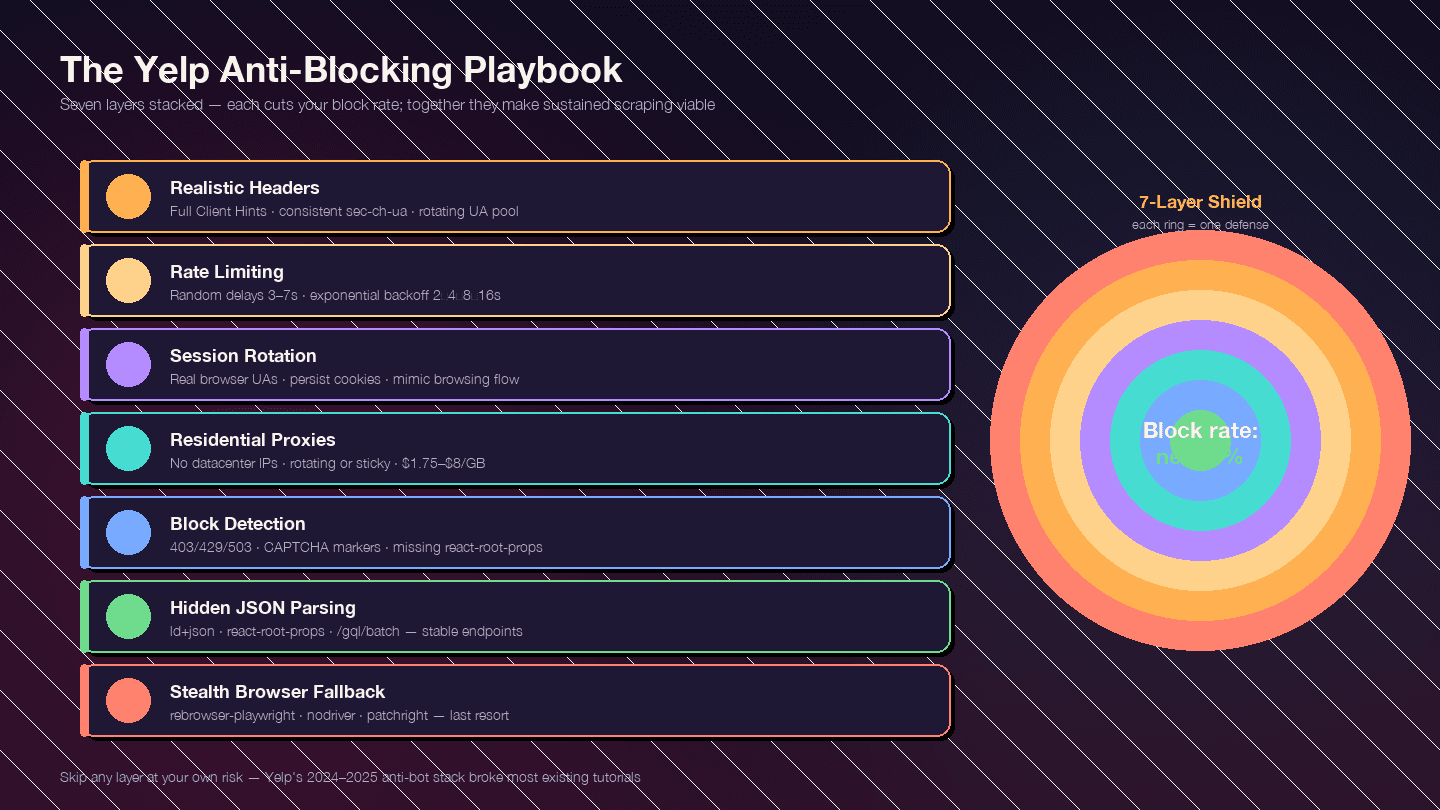
Strategy layered है। हर layer block rate कम करती है; साथ मिलकर ये sustained scraping को possible बनाती हैं।
Layer 1: Realistic Request Headers
Default Python requests headers User-Agent: python-requests/2.x भेजते हैं — तुरंत block। लेकिन सिर्फ realistic User-Agent काफी नहीं है। Yelp पूरे Client Hints header set की consistency भी जांचता है।
FULL_HEADERS = {
    "authority": "www.yelp.com",
    "user-agent": "Mozilla/5.0 (Windows NT 10.0; Win64; x64) "
                  "AppleWebKit/537.36 (KHTML, like Gecko) "
                  "Chrome/124.0.0.0 Safari/537.36",
    "accept": "text/html,application/xhtml+xml,application/xml;q=0.9,"
              "image/avif,image/webp,image/apng,*/*;q=0.8",
    "accept-language": "en-US,en;q=0.9",
    "accept-encoding": "gzip, deflate, br",
    "sec-ch-ua": '"Chromium";v="124", "Google Chrome";v="124", "Not-A.Brand";v="99"',
    "sec-ch-ua-mobile": "?0",
    "sec-ch-ua-platform": '"Windows"',
    "sec-fetch-dest": "document",
    "sec-fetch-mode": "navigate",
    "sec-fetch-site": "same-origin",
    "sec-fetch-user": "?1",
    "upgrade-insecure-requests": "1",
    "referer": "https://www.yelp.com/",
    "cookie": "intl_splash=false",
}
तीन गलतियाँ जो तुम्हें flag कर देती हैं:
- UA Chrome कहता है लेकिन
sec-ch-uaगायब है या UA version से contradict करता है sec-ch-ua-platform"Windows" कहता है लेकिन UA string macOS बताती है- एक ही IP से हजारों requests में बिल्कुल वही UA — 10–20 recent Chrome/Firefox/Safari strings का pool rotate करें
Layer 2: Rate Limiting और Random Delays
Predictable timing patterns red flag हैं। Random sleep intervals जोड़ें और error responses पर exponential backoff लागू करें।
import random, time

def polite_get(client_get, url, attempt=0):
    r = client_get(url, headers=FULL_HEADERS, impersonate="chrome131")
    if r.status_code in (403, 429, 503):
        if attempt >= 4:
            raise RuntimeError(f"{url} पर {attempt + 1} attempts के बाद block")
        backoff = 2 ** (attempt + 1) + random.random()
        print(f"  मिला {r.status_code}, {backoff:.1f}s backoff (attempt {attempt + 1})")
        time.sleep(backoff)
        return polite_get(client_get, url, attempt + 1)
    time.sleep(random.uniform(3, 7))
    return r
| Parameter | Recommended Value |
|---|---|
| Requests के बीच random sleep | random.uniform(3, 7) seconds |
| 429/403/503 पर backoff | 2 → 4 → 8 → 16s, max 5 attempts |
| प्रति IP concurrent workers | 1 (per IP serialize करें; parallelism के लिए proxies उपयोग करें) |
| Residential IP पर max sustained rate | ~1 req / 5s (~12 rpm) |
Layer 3: User-Agent और Session Rotation
Real browser User-Agent strings का pool rotate करें। Sessions और cookies persist करें ताकि real browsing behavior लगे — Yelp cookie-based detection इस्तेमाल करता है, इसलिए हर request पर fresh session बनाना भी suspicious है।
UA_POOL = [
    "Mozilla/5.0 (Windows NT 10.0; Win64; x64) AppleWebKit/537.36 Chrome/124.0.0.0 Safari/537.36",
    "Mozilla/5.0 (Macintosh; Intel Mac OS X 14_4_1) AppleWebKit/537.36 Chrome/124.0.0.0 Safari/537.36",
    "Mozilla/5.0 (Windows NT 10.0; Win64; x64; rv:125.0) Gecko/20100101 Firefox/125.0",
    "Mozilla/5.0 (Macintosh; Intel Mac OS X 14.4; rv:125.0) Gecko/20100101 Firefox/125.0",
    "Mozilla/5.0 (Macintosh; Intel Mac OS X 14_4_1) AppleWebKit/605.1.15 Safari/17.4.1",
    # 5-10 और recent strings जोड़ें
]
Layer 4: Proxy Rotation
असल volume पर तुम्हें residential proxies की ज़रूरत होगी। Datacenter और free proxies Yelp पर काम नहीं करते — Yelp का IP-reputation layer AWS, GCP, और DigitalOcean IP ranges को पहले ही 403 कर देता है।
| Provider | Entry $/GB | Notes |
|---|---|---|
| IPRoyal | $1.75/GB | सबसे सस्ता; सबसे अधिक cited Yelp tutorial इसी पर चलता है |
| Decodo (ex-Smartproxy) | $3.20–$3.50 | Volume पर GB/$ ratio सबसे अच्छा |
| Bright Data | $4.00 (PAYG) | 150M+ IP pool; dedicated Yelp Proxies page |
| Oxylabs | $6.00–$8.00 | Premium; 10M+ IPs |
| Aluvia (mobile SIM) | $3.00 | Real US carrier mobile IPs, Yelp scraping के लिए positioned |
Rotating residential (हर request पर नया IP) high-volume search crawls के लिए सबसे अच्छा काम करता है। Sticky sessions (10 मिनट तक एक IP बनाए रखें) business-page → reviews → pagination flow में cookies persist करने के लिए बेहतर हैं।
Layer 5: Blocks की पहचान और handling
हर block एक जैसा नहीं दिखता। Yelp अक्सर CAPTCHA की बजाय generic “page not available” shell दिखाता है, इसलिए naive scrapers सोचते हैं कि उन्हें data मिला है जबकि असल में खाली responses मिल रहे होते हैं।
BLOCK_MARKERS = (
    "captcha", "px-captcha", "page not available",
    "access denied", "unusual traffic",
)

def is_blocked(resp):
    if resp.status_code in (401, 403, 429, 503):
        return True
    body = resp.text.lower()
    if any(m in body for m in BLOCK_MARKERS):
        return True
    # अगर यह search/business page है लेकिन react-root-props गायब है,
    # तो Yelp ने stripped block response भेजा है
    if "react-root-props" not in body and "/biz/" in str(resp.url):
        return True
    return False
| Signal | Meaning |
|---|---|
| HTTP 403 | Hard block — IP/header/TLS burnt |
| HTTP 429 | Rate limited — backoff से अक्सर recover हो जाता है |
| HTTP 503 | Generic block या load shedding |
/error पर redirect या "page not available" body | Soft block |
| खाली जिसमें सिर्फ | JS challenge page |
body में captcha / g-recaptcha / px-captcha | Escalated — CAPTCHA required |
listing page पर react-root-props missing | Stripped block response |
Layer 6: Resilient Parsing Trick — CSS Selectors की जगह Hidden JSON
फिर दोहराना ज़रूरी है: Yelp build time पर CSS class names randomize करता है। h3.y-css-14xwok2 पर टिके scraper का Yelp के redeploy के कुछ हफ्तों में h3.y-css-hcq7b9 के साथ टूट जाना तय है।
वे payloads जो नहीं बदलते:
<script type="application/ld+json">— schema.org structured data (name, address, phone, rating, hours)<script data-id="react-root-props">— पूरा search results data JSON मेंhttps://www.yelp.com/gql/batch— GraphQL reviews endpoint with stabledocumentId
अगर तुम CSS classes parse कर रहे हो, तो तुम रेत पर घर बना रहे हो। JSON parse करो।
Layer 7: Stealth Browser Fallback
Headless browser पर तभी जाएँ जब curl_cffi + residential proxies काम न करें — आमतौर पर तब जब Yelp JavaScript challenge page या CAPTCHA दिखाता है।
95% business/search/review scraping के लिए curl_cffi + hidden JSON + residential proxies browser से तेज़, सस्ता, और ज़्यादा reliable है। लेकिन जब browser चाहिए ही हो:
| Tool | Status (2025) | Notes |
|---|---|---|
| rebrowser-playwright | Recommended starting point | CDP leaks ठीक करने के लिए patched Playwright drop-in |
| nodriver | Chrome stealth के लिए best-in-class | undetected-chromedriver का successor; WebDriver protocol से पूरी तरह बचता है |
| patchright | Actively maintained Playwright fork | Modern detection tests पास करता है |
| playwright-stealth | Mature | navigator.webdriver patch करता है, UA से HeadlessChrome हटाता है |
Yelp के लिए vanilla Selenium छोड़ दें। इसे fingerprint करना बहुत आसान है।
Yelp Fusion API बनाम Python Scraping बनाम Thunderbit: पूरी तुलना
| Dimension | Yelp Fusion API | Python Scraping | Thunderbit |
|---|---|---|---|
| Full review text | ❌ 3 excerpts × ~160 chars | ✅ Unlimited (GraphQL) | ✅ Built-in review template |
| Review metadata (votes, owner replies) | ❌ | ✅ | ✅ Via AI-suggested fields |
| Photos | ❌ (0 on Base) | ✅ Unlimited | ✅ |
| Max results per search | 240 (2024 से पहले 1,000 था) | Unlimited (paginated) | Unlimited |
| Daily rate limit | 300–500 (new) / 5,000 (legacy) | Proxy budget only | Credit-based (Pro पर 3,000/mo) |
| Setup effort | ~15 min | Hours to days | ~2 minutes |
| Anti-bot handling | N/A | Your problem | Handled (Cloud mode) |
| Legal risk | Low (authorized) | Medium (ToS gray area) | Medium (same as scraping) |
| Cost (entry) | $29/mo | ~$0.75–$4/GB proxies + dev time | Free tier |
| Cost (heavy use) | $643+/mo | $50–$500/mo proxies + dev time | $38–$49/mo |
| Data export | JSON | CSV/JSON (you write it) | Excel / Sheets / Airtable / Notion — free |
| Maintenance | Low | High (selectors rot, anti-bot escalates) | Low (AI re-adapts) |
Yelp Scraping के लिए Legal और Ethical Tips
मैं lawyer नहीं हूँ, और यह legal advice नहीं है। लेकिन पिछले दो साल में legal landscape इतना बदल गया है कि Yelp scraping project में समय लगाने से पहले basics जान लेना चाहिए।
Yelp के Terms of Service क्या कहते हैं: October 2025 ToS update में साफ़ तौर पर "any robot, spider... or other automated device" का उपयोग करके "access, retrieve, copy, scrape, or index any portion of the Service" करने पर रोक है। इसमें अब "AI Technologies and/or other automated tools" जैसी भाषा भी जोड़ दी गई है।
Yelp Support दोहराता है: "Yelp site की scraping की अनुमति नहीं देता।"
robots.txt क्या कहता है: Yelp की robots.txt में wildcard User-agent: * / Disallow: / है और GPTBot, ClaudeBot, PerplexityBot, CCBot, और Meta-ExternalAgent को खास तौर पर block किया गया है। सिर्फ Googlebot, Bingbot, और कुछ social-media crawlers whitelist हैं।
जो legal precedent मायने रखता है: Meta v. Bright Data (N.D. Cal. Jan 2024) में court ने फैसला दिया कि publicly available, logged-out data का scraping Meta की Terms of Service का उल्लंघन नहीं था। असली distinction: logged-out public data vs. logged-in data। hiQ v. LinkedIn मामले ने स्थापित किया कि public data scraping शायद CFAA का उल्लंघन नहीं है, लेकिन hiQ फिर भी state tort claims (trespass to chattels, misappropriation) पर हार गया और $500,000 judgment झेलना पड़ा।
Practical guidelines:
- सिर्फ publicly available, logged-out pages scrape करें
- Requests को rate-limit करें (इस guide में दिए गए delays ethical rate limits का काम भी करते हैं)
- Named users को attributed raw review text फिर से बेचें नहीं — reviewer privacy का सम्मान करें
- Local data protection laws (CCPA, GDPR) का पालन करें
- Scrape करने के लिए login न करें — यह authorization line पार करता है
- Business info (name/address/phone/rating) को public factual data मानें; review text को ज्यादा sensitive मानें
अपनी specific situation के लिए legal professional से सलाह लें।
निष्कर्ष
तीन रास्ते, एक लक्ष्य।
Yelp Fusion API authorized और low-maintenance विकल्प है — लेकिन यह 3 review excerpts तक सीमित है और $29/month से शुरू होता है। Python scraping तुम्हें Yelp के हर data point पर पूरा control देती है, लेकिन इसके लिए असली investment चाहिए: TLS impersonation के लिए curl_cffi, residential proxies, randomized delays, hidden JSON parsing, और Yelp की defenses के evolve होने के साथ ongoing maintenance। Thunderbit तुम्हें लगभग 30 seconds में “मुझे Yelp data चाहिए” से “यह रही मेरी spreadsheet” तक पहुँचा देता है, बिना code और बिना proxy configuration के।
2025 में जो anti-blocking essentials सच में काम करते हैं: full Client Hints के साथ realistic headers, TLS fingerprint impersonation के लिए curl_cffi, exponential backoff के साथ randomized delays, residential proxy rotation, और सबसे बढ़कर fragile CSS selectors की बजाय hidden JSON (application/ld+json और react-root-props) को parse करना।
समझ नहीं आ रहा कौन-सा रास्ता सही है? पहले Thunderbit के free tier को आज़माएँ। अगर आपकी ज़रूरतें पूरी हो जाएँ, तो आपने कई घंटे बचा लिए। अगर तुम्हें ज़्यादा control चाहिए — full programmatic pipelines, custom fields, tight CRM integration — तो ऊपर दिया गया Python guide आपके काम आएगा। और scraping tools landscape की और गहरी समझ के लिए, हमारे best web scraper Chrome extensions के roundup या scraping data from websites into Excel वाले guide को देखें।
Yelp डेटा निकालने के लिए Thunderbit आज़माएँ Get Started Free
FAQs
क्या मैं Python से Yelp free में scrape कर सकता हूँ?
हाँ — curl_cffi, parsel, और jmespath जैसी free libraries का उपयोग करके। लेकिन असली volume पर (कुछ दर्जन pages से ज़्यादा), तुम्हें paid residential proxies की ज़रूरत होगी, जिनकी शुरुआत लगभग $1.75/GB with IPRoyal से होती है। Thunderbit quick, no-code extraction के लिए 6 pages/month वाला free tier भी देता है।
क्या Yelp scrapers को block करता है?
हाँ, बहुत aggressively। Yelp TLS/JA3 fingerprinting, IP reputation scoring, CAPTCHAs, behavioral analysis, और rotating obfuscated CSS classes का इस्तेमाल करता है। Vanilla requests पहली hit पर ही block हो जाता है। इस guide की layered anti-blocking strategy — TLS impersonation के लिए curl_cffi, realistic headers, random delays, और residential proxies — 2025 में काम करने वाला तरीका है।
क्या Yelp Fusion API scraping से बेहतर है?
यह आपकी ज़रूरतों पर depend करता है। API authorized और low-risk है, लेकिन यह सिर्फ लगभग 160 characters के 3 review excerpts देता है, search results को 240 तक सीमित करता है, और $29/month से शुरू होता है। अगर तुम्हें full review text, review metadata, या रोज़ कुछ सौ से ज़्यादा records चाहिए, तो scraping ही विकल्प है।
Python से Yelp reviews कैसे scrape करूँ?
impersonate="chrome131" के साथ curl_cffi इस्तेमाल करके business page fetch करें, <meta name="yelp-biz-id"> से encoded business ID निकालें, फिर GetBusinessReviewFeed operation के साथ https://www.yelp.com/gql/batch पर POST करें और base64-encoded after cursor से pagination करें। Step-by-step code ऊपर tutorial section में है। Scrapfly Yelp scraper repo भी एक अच्छा reference implementation है।
क्या बिना coding के Yelp scrape कर सकता हूँ?
हाँ — Thunderbit's AI Web Scraper पहले से बने Yelp business और review templates के साथ आता है। Yelp page खोलें, AI Suggest Fields क्लिक करें, फिर Scrape क्लिक करें। Google Sheets, Excel, Airtable, और Notion में export हर tier पर free है, free plan सहित।
और जानें




