
The web is overflowing with valuable data—whether you’re in sales, ecommerce, or market research, web scraping is the secret weapon for lead generation, price monitoring, and competitive analysis. But here’s the catch: as more businesses tap into scraping, websites are fighting back harder than ever. The shift is real: a 2024 ppc.land analysis found that more than a third of the top 1,000 sites already block OpenAI's crawler alone — and the broader toolkit of IP bans, CAPTCHAs, and browser fingerprinting is now the norm rather than the exception.
If you’ve ever watched your Python script run smoothly for 20 minutes—then suddenly hit a wall of 403 errors—you know the frustration is real.
I’ve spent years in SaaS and automation, and I’ve seen firsthand how scraping projects can go from “wow, this is easy” to “why am I blocked everywhere?” in a heartbeat. So, let’s get practical: I’ll walk you through how to do web scraping without getting blocked in Python, share the best techniques and code snippets, and show you when it’s time to consider AI-powered alternatives like Thunderbit. Whether you’re a Python pro or just scraping by (pun intended), you’ll leave with a toolkit for reliable, block-free data extraction.
What Is Web Scraping Without Getting Blocked in Python?
At its core, web scraping without getting blocked means extracting data from websites in a way that avoids triggering their anti-bot defenses. In the Python world, this is about more than just writing a requests.get() loop—it’s about blending in, mimicking real users, and staying one step ahead of detection systems.
Why Python? Python is the most popular language for web scraping—thanks to its simple syntax, massive ecosystem (think: requests, BeautifulSoup, Scrapy, Selenium), and flexibility for everything from quick scripts to distributed crawlers. But popularity comes with a price: many anti-bot systems are now tuned to spot Python-based scraping patterns.
So, if you want to scrape reliably, you need to go beyond the basics. That means understanding how sites detect bots, and how you can outsmart them—without crossing any ethical or legal lines.
Why Avoiding Blocks Matters for Python Web Scraping Projects
Getting blocked isn’t just a technical hiccup—it can derail entire business workflows. Let’s break it down:
| Use Case | Impact of Being Blocked |
|---|---|
| Lead Generation | Incomplete or outdated prospect lists, lost sales |
| Price Monitoring | Missed competitor price changes, poor pricing decisions |
| Content Aggregation | Gaps in news, reviews, or research data |
| Market Intelligence | Blind spots in competitor or industry tracking |
| Real Estate Listings | Inaccurate or stale property data, missed opportunities |
When a scraper gets blocked, you’re not just missing data—you’re wasting resources, risking compliance issues, and potentially making bad business calls based on incomplete information. In a world where 79% of businesses rely on web scraping for lead generation, reliability is everything.
How Websites Detect and Block Python Web Scrapers
Websites have gotten seriously clever about spotting bots. Here are the most common anti-scraping defenses you’ll run into (Medium, Bright Data):
- IP Address Blacklisting: Too many requests from one IP? Blocked.
- User-Agent and Header Checks: Requests with missing or generic headers (like Python’s default
python-requests/2.25.1) stand out. - Rate Limiting: Too many requests in a short time triggers throttling or bans.
- CAPTCHAs: “Prove you’re human” puzzles that bots can’t solve (easily).
- Behavioral Analysis: Sites watch for robotic patterns—like clicking the same button at the same interval.
- Honeypots: Hidden links or fields that only bots will interact with.
- Browser Fingerprinting: Collecting details about your browser and device to spot automation tools.
- Cookie and Session Tracking: Bots that don’t handle cookies or sessions properly get flagged.
Think of it like airport security: if you look, act, and move like everyone else, you breeze through. If you show up in a trench coat and sunglasses, expect extra questions.
Essential Python Techniques for Web Scraping Without Getting Blocked
Let’s get to the good stuff: how to actually avoid blocks when scraping with Python. Here are the core strategies every scraper should know:
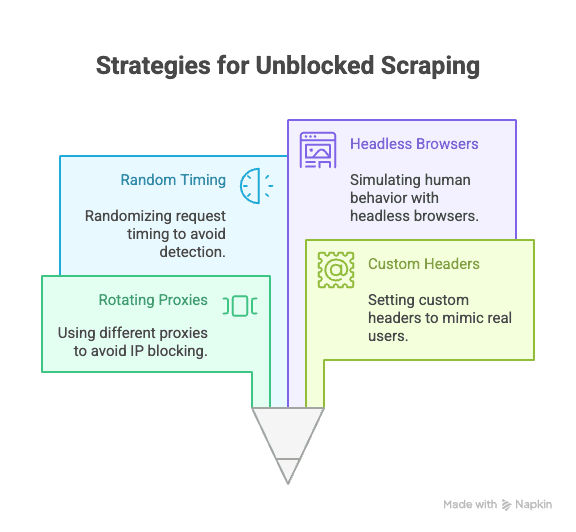
Rotating Proxies and IP Addresses
Why it matters: If all your requests come from the same IP, you’re an easy target for IP bans. Rotating proxies let you distribute requests across many IPs, making it much harder to block you.
How to do it in Python:
import requests

proxies = [
    "<http://proxy1.example.com:8000>",
    "<http://proxy2.example.com:8000>",
    # ...more proxies
]

for i, url in enumerate(urls):
    proxy = {"http": proxies[i % len(proxies)]}
    response = requests.get(url, proxies=proxy)
    # process response
You can use paid proxy services (like residential or rotating proxies) for more reliability (ScrapingBee).
Setting User-Agent and Custom Headers
Why it matters: Default Python headers scream “bot.” Mimic real browsers by setting user-agent and other headers.
Sample code:
headers = {
    "User-Agent": "Mozilla/5.0 (Windows NT 10.0; Win64; x64) AppleWebKit/537.36 (KHTML, like Gecko) Chrome/124.0.0.0 Safari/537.36",
    "Accept-Language": "en-US,en;q=0.9",
    "Accept-Encoding": "gzip, deflate, br",
    "Connection": "keep-alive"
}
response = requests.get(url, headers=headers)
Rotate user-agents for extra stealth (ZenRows).
Randomizing Request Timing and Patterns
Why it matters: Bots are fast and predictable; humans are slow and random. Add delays and mix up your navigation.
Python tip:
import time, random

for url in urls:
    response = requests.get(url)
    time.sleep(random.uniform(2, 7))  # Wait 2–7 seconds
You can also randomize click paths and scroll patterns if using Selenium.
Managing Cookies and Sessions
Why it matters: Many sites require cookies or session tokens to access content. Bots that ignore these get blocked.
How to manage in Python:
import requests

session = requests.Session()
response = session.get(url)
# session will handle cookies automatically
For more complex flows, use Selenium to capture and reuse cookies.
Simulating Human Behavior with Headless Browsers
Why it matters: Some sites use JavaScript, mouse movement, or scrolling as signals of real users. Headless browsers like Selenium or Playwright can mimic these actions.
Example with Selenium:
from selenium import webdriver
from selenium.webdriver.common.action_chains import ActionChains
import random, time

driver = webdriver.Chrome()
driver.get(url)
actions = ActionChains(driver)
actions.move_by_offset(random.randint(0, 100), random.randint(0, 100)).perform()
time.sleep(random.uniform(2, 5))
This helps you bypass behavioral analysis and dynamic content (ScrapingBee).
Advanced Strategies: Bypassing CAPTCHAs and Honeypots in Python
CAPTCHAs are designed to stop bots in their tracks. While some Python libraries can solve simple CAPTCHAs, most serious scrapers rely on third-party services (like 2Captcha or Anti-Captcha) to solve them for a fee (Medium).
Sample integration:
# Pseudocode for using 2Captcha API
import requests

captcha_id = requests.post("<https://2captcha.com/in.php>", data={...}).text
# Wait for solution, then submit with your request
Honeypots are hidden fields or links that only bots will interact with. Avoid clicking or submitting anything that isn’t visible in a real browser (ZenRows).
Designing Robust Request Headers with Python Libraries
Beyond user-agent, you can rotate and randomize other headers (like Referer, Accept, Origin, etc.) to further blend in.
With Scrapy:
class MySpider(scrapy.Spider):
    custom_settings = {
        'DEFAULT_REQUEST_HEADERS': {
            'User-Agent': '...',
            'Accept-Language': 'en-US,en;q=0.9',
            # More headers
        }
    }
With Selenium: Use browser profiles or extensions to set headers, or inject them via JavaScript.
Keep your header list updated—copy real browser requests using browser DevTools for inspiration.
When Traditional Python Scraping Isn’t Enough: The Rise of Anti-Bot Technology
Here’s the reality: as scraping gets more popular, so do anti-bot upgrades. Major sites are now blocking not just obvious bots, but even sophisticated headless browsers and rotating proxies. AI-powered detection, dynamic request thresholds, and browser fingerprinting are making it harder than ever for even advanced Python scripts to stay undetected (Medium).
Sometimes, no matter how clever your code, you’ll hit a wall. That’s when it’s time to consider a different approach.
Thunderbit: An AI Web Scraper Alternative to Python Scraping
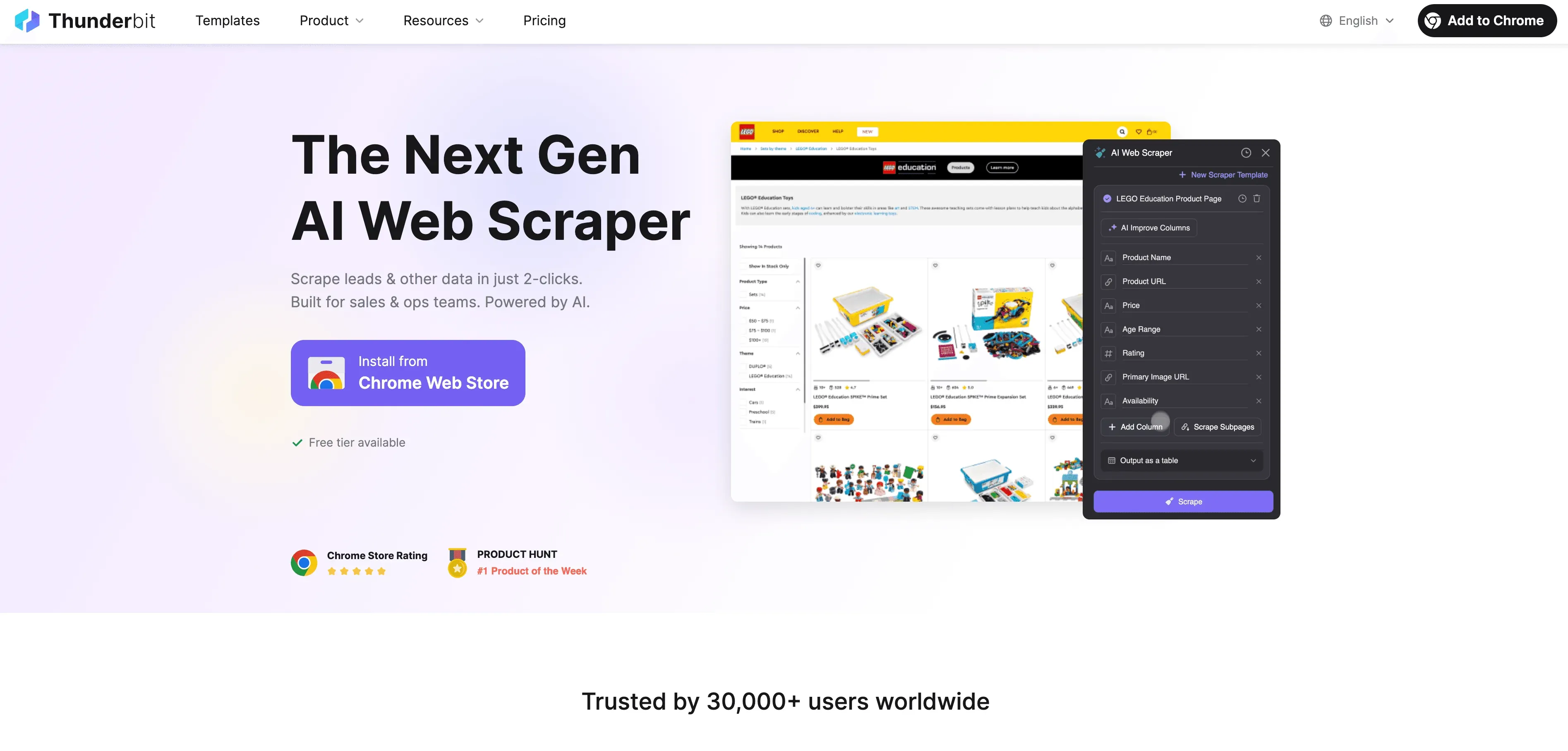
When Python hits its limits, Thunderbit steps in as a no-code, AI-powered web scraper that’s built for business users—not just developers. Instead of wrestling with proxies, headers, and CAPTCHAs, Thunderbit’s AI agent reads the website, suggests the best fields to extract, and handles everything from subpage navigation to data export.
What makes Thunderbit different?
- AI Field Suggestion: Click “AI Suggest Fields” and Thunderbit scans the page, recommends columns, and even generates extraction instructions.
- Subpage Scraping: Thunderbit can visit each subpage (like product details or LinkedIn profiles) and enrich your table automatically.
- Cloud or Browser Scraping: Choose the fastest option—cloud for public sites, browser for login-protected pages.
- Scheduled Scraping: Set it and forget it—Thunderbit can scrape on a schedule, so your data is always fresh.
- Instant Templates: For popular sites (Amazon, Zillow, Shopify, etc.), Thunderbit offers 1-click templates—no setup needed.
- Free Data Export: Export to Excel, Google Sheets, Airtable, or Notion—no extra fees.
Thunderbit is trusted by over 100,000 users worldwide, and you don’t need to write a single line of code.
Scrape data from any website using AI Get Started Free
How Thunderbit Helps Users Avoid Blocks and Automate Data Extraction
Thunderbit’s AI doesn’t just mimic human behavior—it adapts to each site in real time, reducing the risk of being blocked. Here’s how:
- AI adapts to layout changes: Less rework when a site updates its design — you don't go back and re-tune selectors every week.
- Subpage and pagination handling: Thunderbit follows links and paginated lists for you, the way a person clicking through would.
- Cloud scraping in batches: Run jobs from Thunderbit's cloud rather than your laptop, with batch sizes set per plan (see the pricing page for current limits).
- Less code to maintain: You're not the one chasing broken selectors at midnight when a site changes; the AI re-reads the page.
For a deeper dive, check out How to Scrape Any Website Using AI.
Comparing Python Scraping vs. Thunderbit: Which Should You Choose?
Let’s put them side by side:
| Feature | Python Scraping | Thunderbit |
|---|---|---|
| Setup Time | Medium–High (scripts, proxies, etc) | Low (2 clicks, AI does the rest) |
| Technical Skill | Coding required | No coding needed |
| Reliability | Varies (easy to break) | High (AI adapts to changes) |
| Risk of Blocks | Moderate–High | Low (AI mimics user, adapts) |
| Scalability | Needs custom code/cloud setup | Built-in cloud/batch scraping |
| Maintenance | Frequent (site changes, blocks) | Minimal (AI auto-adjusts) |
| Export Options | Manual (CSV, DB) | Direct to Sheets, Notion, Airtable, CSV |
| Cost | Free (but time-intensive) | Free tier, paid plans for scale |
When to use Python:
- You need full control, custom logic, or integration with other Python workflows.
- You’re scraping sites with minimal anti-bot defenses.
When to use Thunderbit:
- You want speed, reliability, and zero setup.
- You’re scraping complex or frequently changing sites.
- You don’t want to deal with proxies, CAPTCHAs, or code.
Try Thunderbit AI Web Scraper for Free
Step-by-Step Guide: Setting Up Web Scraping Without Getting Blocked in Python
Let’s walk through a practical example: scraping product data from a sample site, while applying anti-blocking best practices.
1. Install Required Libraries
pip install requests beautifulsoup4 fake-useragent
2. Prepare Your Script
import requests
from bs4 import BeautifulSoup
from fake_useragent import UserAgent
import time, random

ua = UserAgent()
urls = ["<https://example.com/product/1>", "<https://example.com/product/2>"]  # Replace with your URLs

for url in urls:
    headers = {
        "User-Agent": ua.random,
        "Accept-Language": "en-US,en;q=0.9"
    }
    response = requests.get(url, headers=headers)
    if response.status_code == 200:
        soup = BeautifulSoup(response.text, "html.parser")
        # Extract data here
        print(soup.title.text)
    else:
        print(f"Blocked or error on {url}: {response.status_code}")
    time.sleep(random.uniform(2, 6))  # Random delay
3. Add Proxy Rotation (Optional)
proxies = [
    "<http://proxy1.example.com:8000>",
    "<http://proxy2.example.com:8000>",
    # More proxies
]

for i, url in enumerate(urls):
    proxy = {"http": proxies[i % len(proxies)]}
    headers = {"User-Agent": ua.random}
    response = requests.get(url, headers=headers, proxies=proxy)
    # ...rest of code
4. Handle Cookies and Sessions
session = requests.Session()
for url in urls:
    response = session.get(url, headers=headers)
    # ...rest of code
5. Troubleshooting Tips
- If you see lots of 403/429 errors, slow down your requests or try new proxies.
- If you hit CAPTCHAs, consider using Selenium or a CAPTCHA-solving service.
- Always check the site’s
robots.txtand terms of service.
Conclusion & Key Takeaways
Web scraping in Python is powerful—but getting blocked is a constant risk as anti-bot tech evolves. The best way to avoid blocks? Combine technical best practices (rotating proxies, smart headers, random delays, session handling, and headless browsers) with a healthy respect for site rules and ethics.
But sometimes, even the best Python tricks aren’t enough. That's where AI tools like Thunderbit come in — no-code, designed to handle the layout changes and pagination that trip up rigid scripts, and aimed at business users who'd rather not spend their evenings babysitting a Selenium job.
Want to see how easy scraping can be? Download Thunderbit’s Chrome Extension and try it for yourself—or check out our blog for more scraping tips and tutorials.
Scrape Data Without Getting Blocked
FAQs
1. Why do websites block Python web scrapers?
Websites block scrapers to protect their data, prevent server overload, and stop automated bots from abusing their services. Python scripts are easy to spot if they use default headers, don’t handle cookies, or send too many requests too quickly.
2. What are the most effective ways to avoid getting blocked when scraping with Python?
Use rotating proxies, set realistic user-agent and headers, randomize request timing, manage cookies/sessions, and simulate human behavior with tools like Selenium or Playwright.
3. How does Thunderbit help avoid blocks compared to Python scripts?
Thunderbit uses AI to adapt to site layouts, mimic human browsing, and handle subpages and pagination automatically. It reduces the risk of blocks by blending in and updating its approach in real time—no coding or proxies needed.
4. When should I use Python scraping vs. an AI tool like Thunderbit?
Use Python when you need custom logic, integration with other Python code, or are scraping simple sites. Use Thunderbit for fast, reliable, and scalable scraping—especially when sites are complex, frequently changing, or block scripts aggressively.
5. Is web scraping legal?
Web scraping is legal for publicly available data, but you must respect each site’s terms of service, privacy policies, and relevant laws. Never scrape sensitive or private data, and always use scraping ethically and responsibly.
Ready to scrape smarter, not harder? Give Thunderbit a try, and leave the blocks behind.
Learn More:
- Google News Scraping with Python: A Step-by-Step Guide
- Build a Price Tracker Best Buy Tool Using Python
- 14 Ways for Web Scraping Without Getting Blocked
- 10 Best Tips on How to Not Get Blocked When Web Scraping
Try AI Web Scraper Get Started Free




