

Crunchbase is arguably the richest publicly accessible database of startup and company intelligence on the planet — funding rounds, employee counts, industries, investors, founder names, the works. And every time I've watched a sales rep try to actually get that data into a spreadsheet, the experience looks roughly the same: filter, click, copy, paste, repeat, lose the will to live.
The core frustration is simple: Crunchbase lets you discover companies all day long, but the moment you want to export more than a handful of records, you hit a paywall. Forum users regularly complain about being quoted hundreds or even thousands of dollars just to download a few thousand rows. One Reddit user put it bluntly: "Crunchbase tried to charge me $500 to export 5K companies."
I've spent a lot of time at Thunderbit thinking about this exact bottleneck — how do you get high-quality company data out of Crunchbase and into your pipeline without breaking the bank or learning Python? This guide covers four practical methods, from zero-code AI tools to developer scripts, and walks through the full pipeline from extraction to outreach. No Pro plan required.
What Is Crunchbase and Why Is It a Lead Goldmine?
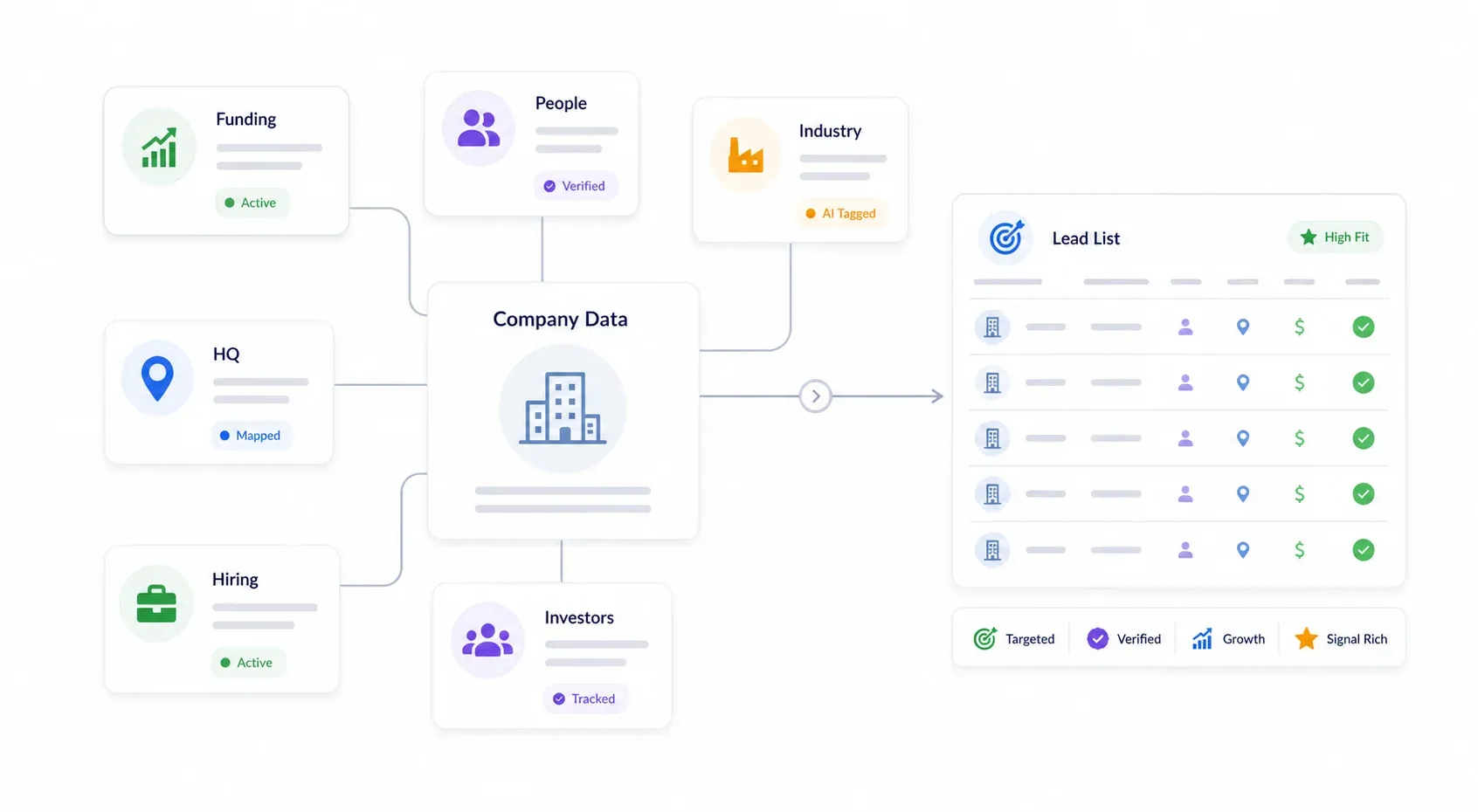
Crunchbase is the largest public database of company financials, funding history, leadership, and industry data for both public and private companies. Their Pro product alone covers 4M+ private companies, with 30M+ verified data updates annually and 400+ algorithms validating data every day.
For B2B sales and operations teams, the available data fields read like a prospector's wish list:
- Company name, description, website, HQ location, postal code
- Industry and industry groups
- Estimated revenue range, operating status, founded date
- Funding rounds, total funding, last funding date, last funding type, valuation
- Employee count, active hiring status
- Leadership/founders, investors, lead investors
- Acquisitions, IPO status, tech stack, social links
- Contact email and phone number (where available)
Crunchbase's Advanced Search lets you filter by funding stage, location, industry, employee count, and dozens of other criteria. The problem? Free accounts are limited to up to 5 results per search and no data exports. Paid plans unlock more visibility, but exports are still capped — 1,000 rows per CSV download, 2,000 rows/month on Pro, 5,000 rows/month on Business. And the 7-day free trial doesn't include export at all.
That's why so many teams look for ways to scrape Crunchbase for leads at scale.
Why Scrape Crunchbase for Leads Without the Pro Plan?
The cost problem is real. Crunchbase Pro starts around $49/month, Business is around $99/user/month, and the Enterprise API is custom-priced — procurement sources like Vendr estimate contracts can range from $1,000 to $150,000 depending on company size and package, while SpendHound reports an average contract value of $17,364/year. For an individual rep, a small team, or an agency, that's a tough pill to swallow just to build a lead list.
Where does scraping Crunchbase for leads actually pay off?
| Use Case | Key Data Fields Needed |
|---|---|
| Targeted lead lists (e.g., "SaaS, Series A, US") | Company name, website, funding, industry, HQ |
| Monitoring new funding rounds for timely outreach | Last funding date, amount, type, investors |
| Competitive analysis and market mapping | Industry, employee count, revenue range, tech stack |
| Enriching CRM data with company details | Website, HQ, employee count, funding, status |
A well-targeted Crunchbase lead list can fuel weeks of outreach for the cost of a few hours of setup. Crunchbase's own case studies report results like 2,350+ new accounts in 8 months (UserTesting) and 50% email open rate and 22% conversion rate from targeted newly funded account lists (Dialpad). Those numbers are vendor-supplied, but they illustrate why sales teams care about funding and growth signals.
4 Methods to Scrape Crunchbase for Leads: Pick Your Path
Different teams, different constraints. This matrix should help you pick the right path fast:
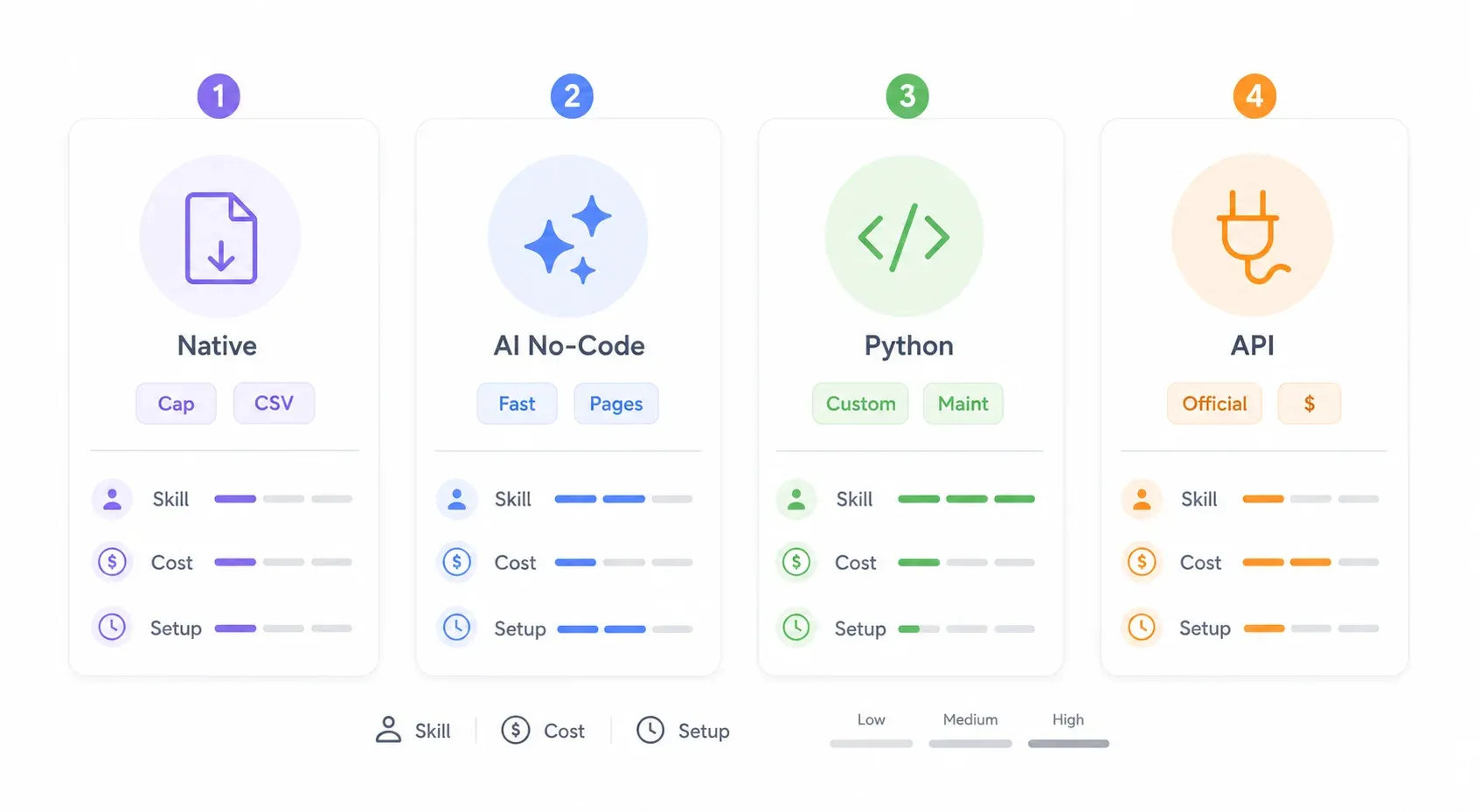
| Method | Technical Skill | Cost | Volume (rows/session) | Setup Time | Maintenance |
|---|---|---|---|---|---|
| Crunchbase Native Export | None | Pro plan (~$49+/mo) | Up to 1K–5K (with workarounds) | Minutes | None |
| Thunderbit (AI Chrome Extension) | None | Free tier + credits | Unlimited (paginated) | ~2 min | None (AI adapts) |
| Python + Requests/Puppeteer | Advanced | Free (dev time) | Unlimited | Hours | High (anti-bot changes) |
| Crunchbase Official API | Intermediate | ~$10K+/year (custom) | Varies by plan | Moderate | Low |
Quick recommendation: If you're a non-technical sales rep, start with Method 2 (Thunderbit). If you have a developer on your team and need massive scale, consider Method 3 (Python). If budget is no object and you need official, licensed access, Method 4 (API) is your best bet. And if you already have Crunchbase Pro and just need a quick pull, Method 1 works in a pinch.
Method 1: Crunchbase Native Export (The Pro Plan Workaround)
If you already have a Crunchbase Pro or Business subscription, the built-in export is the most straightforward path — but it's still limited. Here's how to stretch it.
The Standard Export
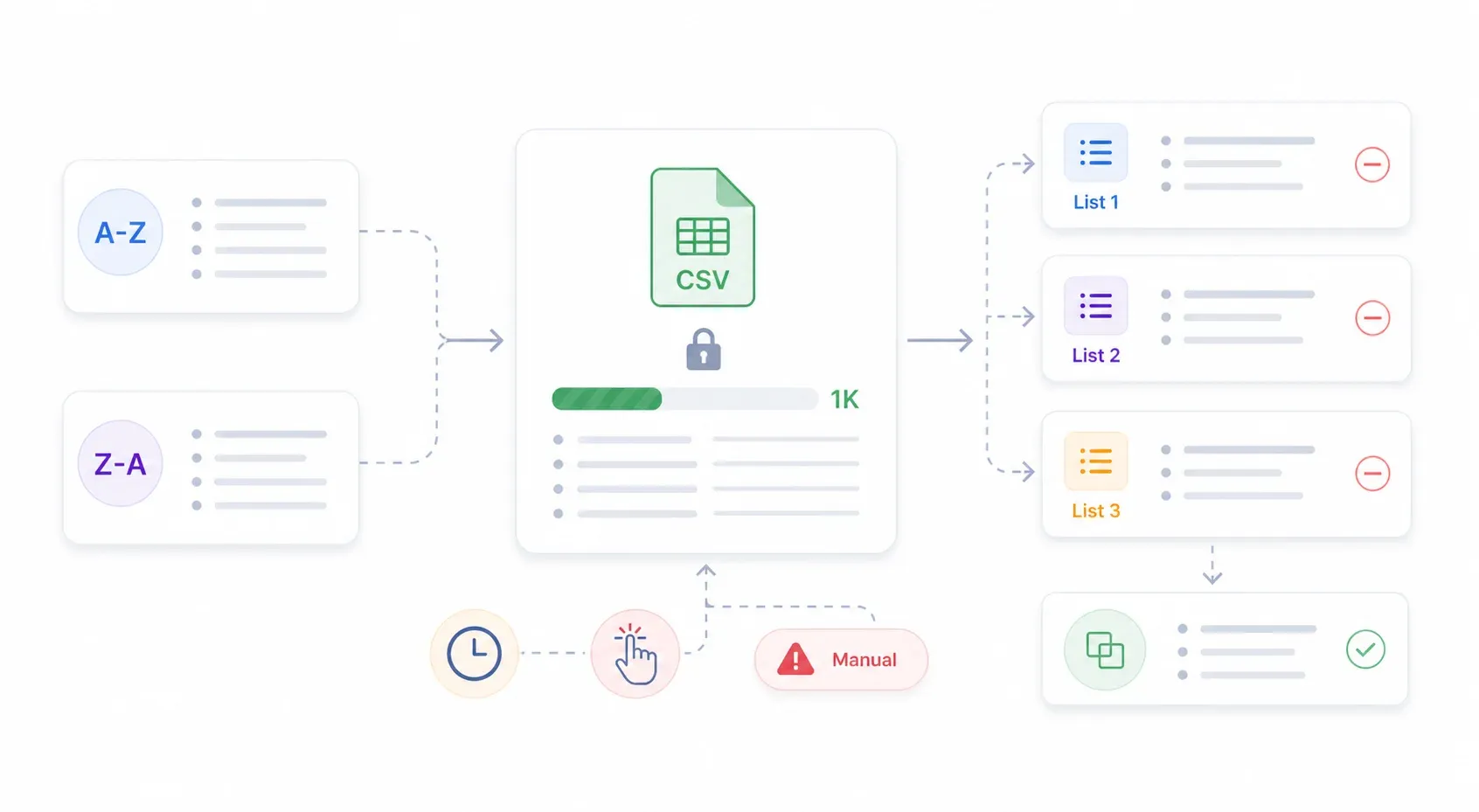
Run your filtered search, then click "Export to CSV." You'll get up to 1,000 rows per download. Pro accounts are capped at 2,000 rows/month, Business at 5,000 rows/month.
Sort-and-Export Trick (Up to ~2,000 Records)
- Run your search with filters (e.g., "SaaS, Series A, United States").
- Sort A–Z by company name and export the first 1,000 rows.
- Sort Z–A and export the next 1,000 rows.
- Merge both CSVs and deduplicate.
This is a community workaround, not an official Crunchbase feature. It's tedious, but it roughly doubles your output per search.
Exclusion List Method (Up to ~5,000+ Records)
- Create a saved list (List 1) and add the first 1,000 results.
- Run the same search, but use Crunchbase's include/exclude list filters to exclude List 1.
- Export the next 1,000 to List 2. Repeat for Lists 3–5.
- Merge all lists.
This is even more manual and fragile, but some teams use it to squeeze out a few thousand extra records.
When This Method Falls Short
The native export still requires a paid plan, is capped, and involves a lot of manual effort. There's no automation, no enrichment, and no way to scale for ongoing lead generation. If you need more volume or a repeatable workflow, the next methods are better options.
Method 2: Scrape Crunchbase for Leads with Thunderbit (No-Code, AI-Powered)
Scrape Crunchbase for leads with AI Get Started Free
This is the method I'd recommend for most sales and operations teams. We built Thunderbit specifically for this kind of workflow — open a page, let the AI figure out the data structure, extract everything in a couple of clicks. No coding, no config files, no maintenance.
Before You Start:
- Difficulty: Beginner
- Time Required: ~5–10 minutes for a full Crunchbase search scrape
- What You'll Need: Chrome browser, Thunderbit extension (free tier works), a Crunchbase account (free is fine for browsing)
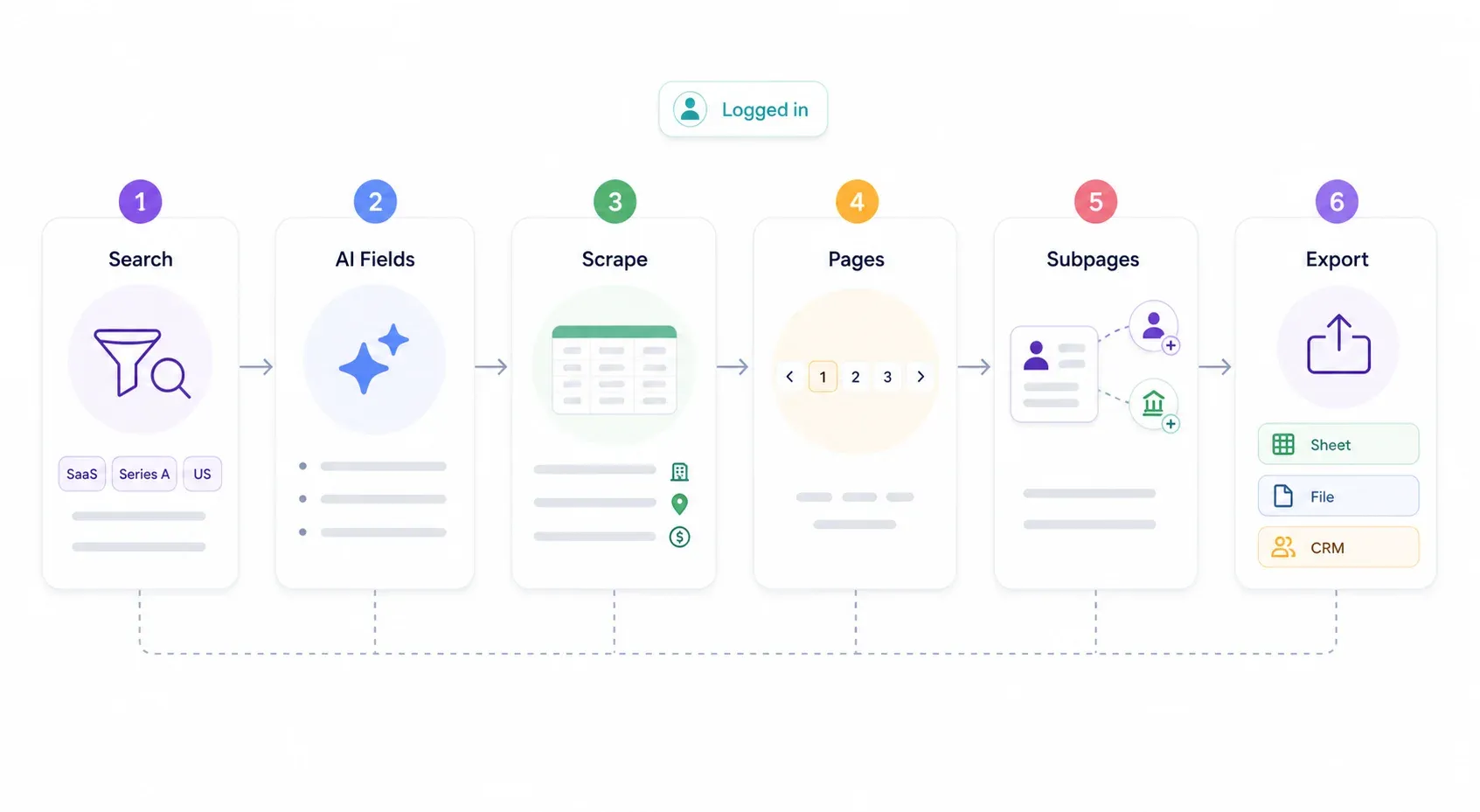
Step 1: Set Up Your Crunchbase Search
Log into Crunchbase and run a filtered search. For example: "SaaS companies, Series A, United States, 11–50 employees." The more specific your filters, the more qualified your leads will be. Don't scrape everything — scrape the right companies.
You should see a results page with a list of companies matching your criteria.
Step 2: Click "AI Suggest Fields" — Let Thunderbit Read the Page
With the Crunchbase search results page open, click Thunderbit's "AI Suggest Fields" button in the extension sidebar. Thunderbit's AI scans the page layout and automatically proposes columns: company name, description, HQ location, total funding, last funding date, employee count, website URL, industry categories.
You can adjust, add, or remove fields. You can also add a Field AI Prompt — for example, "If total funding > $10M, label as 'High Value'; otherwise label as 'Early Stage'." This lets you categorize and transform data during extraction, not after.
You should now see a table preview with your configured columns.
Step 3: Click "Scrape" and Extract All Results
Hit the "Scrape" button. Thunderbit pulls all visible results from the current page. Since Crunchbase requires login for deeper data, use Browser Scraping mode — it runs in your own logged-in session, so there are no blocked requests.
The extracted data appears in a clean table inside the Thunderbit panel.
Step 4: Use Pagination Scraping to Capture Every Page
Crunchbase search results often span dozens of pages. Thunderbit's pagination scraping automatically navigates through all pages and appends results. No manual clicking — set it and let it run.
After pagination completes, you'll have a full table of all companies matching your search.
Step 5: Enrich with Subpage Scraping
This is where things get interesting. After the initial scrape, click "Scrape Subpages" to have Thunderbit visit each company's Crunchbase profile page and pull deeper fields: founder names, contact email, phone, LinkedIn profiles, tech stack, latest news, key people.
This goes well beyond what the search results page shows. It's the difference between a list of company names and a list you can actually use for outreach.
Step 6: Export to Google Sheets, Excel, Airtable, or Notion
Export is completely free. Download as CSV or Excel, or push directly to Google Sheets, Airtable, or Notion. Data is clean, structured, and ready for CRM import or outreach.
Why Thunderbit Stands Out for Crunchbase Scraping
- AI adapts to layout changes — no broken scripts when Crunchbase updates their UI
- No maintenance — unlike Python scrapers that break every time Crunchbase tweaks their anti-bot tech
- Field AI Prompts let you label, categorize, and transform data during extraction
- 2-click setup means any sales rep can build their own lead list without waiting for engineering
- Free-tier starts at 6 pages/month, with paid plans from $9/month billed yearly
If you want to see the full workflow in action, check out the Thunderbit YouTube channel for walkthroughs.
Method 3: Scrape Crunchbase with Python (For Technical Teams)
If you have a developer on the team who'd rather write code than click buttons, Python is the classic route. But it comes with real trade-offs.
How It Works at a High Level
Crunchbase uses Angular and stores page data in a <script id="client-app-state"> (or <script id="ng-state">) JSON blob. Scrapers can extract this hidden data instead of parsing HTML. Recent public guides describe an internal /v4/data/searches/organizations POST endpoint with parameters like field_ids, order, query, limit: 50, and after_id for pagination. Sources: ScrapFly Crunchbase guide, RoundProxies Crunchbase guide.
You'd typically use Python libraries like requests, httpx, or headless browsers like Playwright or Puppeteer, plus tools like JMESPath to parse the large JSON response and extract specific fields.
The Challenges You Will Face
Crunchbase has aggressive anti-bot protections. AIMultiple's Nov. 2025 benchmark found that direct requests, headers-only requests, Selenium, and undetected-chromedriver all failed or were unstable under Crunchbase's Cloudflare protection. My own team's test in May 2026 returned HTTP 403 with a Cloudflare bot-management cookie.
Expect to deal with:
- CAPTCHAs, IP blocking, TLS/browser fingerprinting
- Proxy rotation and header management (potentially residential proxies)
- Scripts breaking when Crunchbase changes their frontend or API structure
- Ongoing maintenance: someone must monitor and fix the scraper regularly
For context, Akamai reported bots made up 42% of overall web traffic in a 2024 release, with nearly two-thirds malicious. That's why platforms like Crunchbase invest heavily in bot detection.
When Python Makes Sense
- You need tens of thousands of records on a recurring schedule
- You have a developer willing to maintain the scraper
- You need deep customization (e.g., scraping funding round timelines, investor networks, or event appearances)
If you're curious about building scrapers in Python, we have a detailed guide on Python web scraping and how to create a web scraper.
Method 4: The Crunchbase Official API (Worth the Price Tag?)
Time to address the $10K elephant in the room. A lot of users wonder whether the official Crunchbase API is a viable path — here's the honest breakdown.
What You Get with the Official API
Crunchbase's Enterprise API provides structured endpoints for companies, people, funding rounds, acquisitions, IPOs, investors, categories, locations, and events. Data freshness is real-time, support is official, and endpoints are stable. The API FAQ documents a 200 calls/minute rate limit.
What It Costs and Who It Is For
API pricing is custom and requires sales approval. Procurement sources estimate the Enterprise API at $10,000+/year, and not everyone qualifies. It's best suited for large organizations with dedicated data teams and big budgets — or for companies building a product on top of Crunchbase data.
Here's the comparison:
| Factor | Crunchbase API | Scraping (e.g., Thunderbit) |
|---|---|---|
| Annual cost | ~$10,000+ | $0–$38/mo |
| Data freshness | Real-time | Near-real-time |
| Access approval | Required | Not needed |
| Contact data included? | Limited | Depends on page content |
| Technical setup | Moderate (API keys, docs) | Minimal (2-click AI scraping) |
The Honest Verdict
For most sales teams and small-to-mid businesses, the official API is overkill in both cost and complexity. Scraping approaches — especially no-code tools like Thunderbit — deliver 90% of the value at a fraction of the cost. The API makes sense only if you need guaranteed uptime, contractual data access, or are building a product on top of Crunchbase data.
From Scraped Data to Sales Pipeline: The Full Lead Workflow
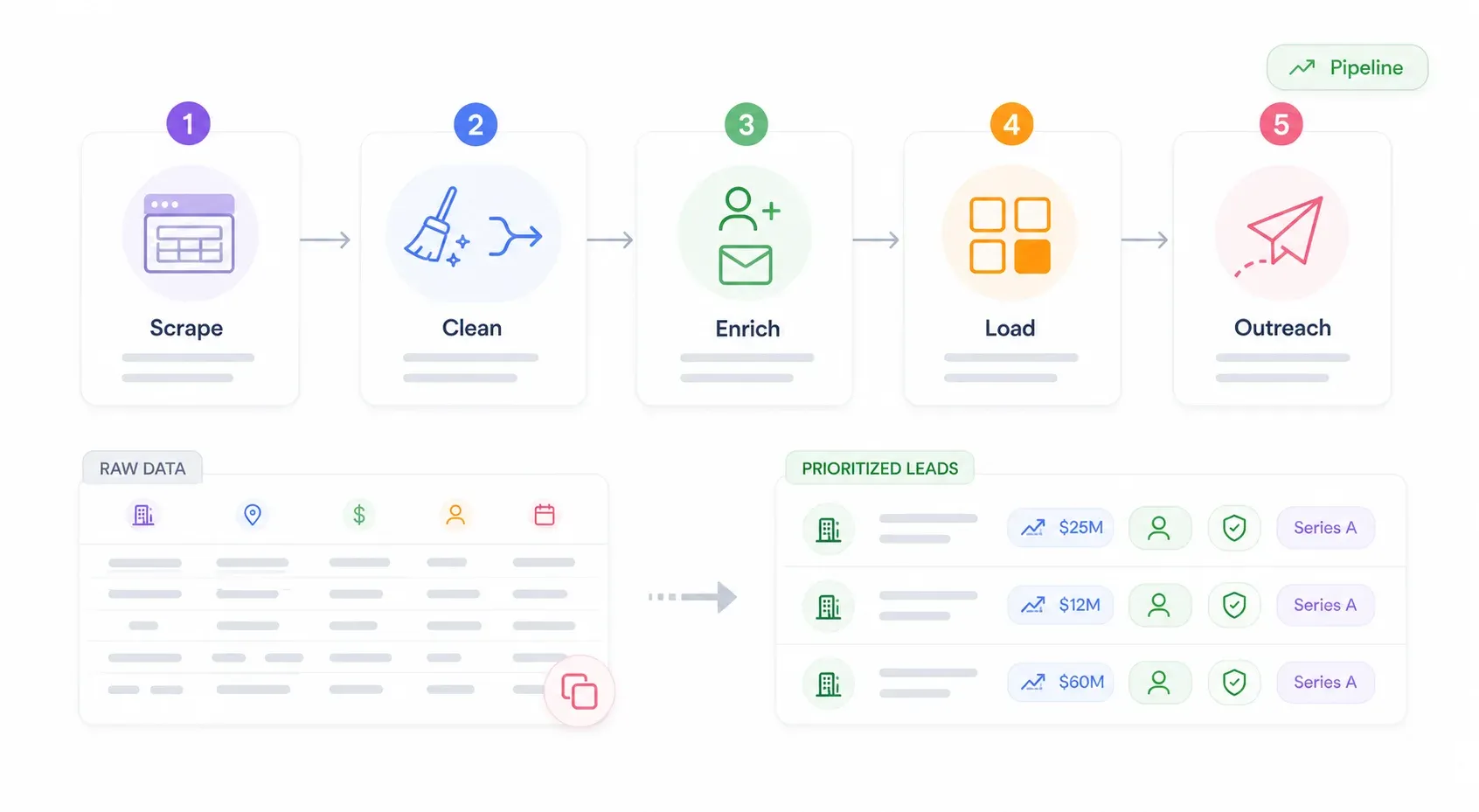
Most guides stop at "here's your CSV" and call it a day. But the keyword literally says "for leads" — and a CSV sitting in your Downloads folder isn't a lead. Turning raw Crunchbase data into pipeline requires cleaning, enrichment, CRM import, and personalized outreach.
Step 1: Scrape — Extract Company Data from Crunchbase
Use any of the four methods above to pull company names, domains, HQ, industry, employee count, funding, and profile URLs. For most users, Thunderbit's AI Suggest Fields reads the Crunchbase page and proposes the right columns automatically.
Step 2: Clean — Deduplicate and Standardize Your List
- Remove duplicate entries (especially if you used the native export workaround and merged multiple CSVs)
- Standardize company domains (strip
www, trailing slashes) - Remove dead or inactive companies (check the operating status field)
- Use Thunderbit's Field AI Prompt to tag or categorize companies during extraction — e.g., label by funding stage, flag companies with >100 employees
Good CRM hygiene starts here. HubSpot uses company domain name as a strong dedupe field, and Salesforce's Duplicate Management can catch repeats on import.
Step 3: Enrich — Find Decision-Maker Contacts
Crunchbase gives you company-level data, but for outreach you need people: names, emails, phone numbers. Pass company domains through enrichment tools like Apollo, Hunter, or UpLead to find decision-maker contacts. These are the tools forum users actually name and trust for finding verified emails and direct dials.
Thunderbit's Subpage Scraping can also pull founder names and LinkedIn URLs directly from Crunchbase profiles — useful for building your initial outreach list before enrichment.
Step 4: Load — Push Data to Your CRM or Outreach Tool
- Export from Thunderbit directly to Google Sheets, Airtable, or Notion (free)
- Upload CSV to your CRM (HubSpot supports importing contacts, companies, deals, and more; Salesforce's Data Import Wizard handles up to 50,000 records at a time)
- Organize leads into segments based on scraped fields: industry, funding stage, geography, company size
Step 5: Outreach — Personalize and Send
Use scraped data as personalization fields in cold email campaigns. Mention recent funding rounds, company growth, tech stack, or industry. For example:
"Congrats on your Series A — saw you raised $5M last month. We help SaaS teams at your stage with [value prop]..."
This level of personalization is only possible because you scraped rich data from Crunchbase, not just a name and email. For templates and deliverability tips, see our guides on cold email personalization and cold email deliverability.
Tips for Getting Better Leads from Crunchbase
Use Precise Crunchbase Filters Before You Scrape
The tighter your search filters (industry + funding stage + location + employee count), the more qualified your leads. Crunchbase's filter families include Basic Information, Funding, Investors, Signals, Rank & Scores, and more. Don't scrape everything — scrape the right companies.
Leverage Field AI Prompts for In-Scrape Data Labeling
Use Thunderbit's Field AI Prompt to categorize, translate, or reformat data during extraction. Example: "If total funding > $10M, label as 'High Value'; otherwise label as 'Early Stage'." This saves a ton of post-processing time.
Schedule Regular Scrapes to Catch New Leads
Crunchbase adds new companies and funding rounds daily. Use Thunderbit's Scheduled Scraper to re-run your Crunchbase search weekly or monthly and catch fresh leads automatically.
Clean Your Data Before Importing to CRM
Always deduplicate, remove blanks, and standardize formats before pushing to your CRM. This prevents messy data from cluttering your pipeline and keeps your sales team focused on real opportunities.
Staying on the Right Side: Legal and Ethical Considerations
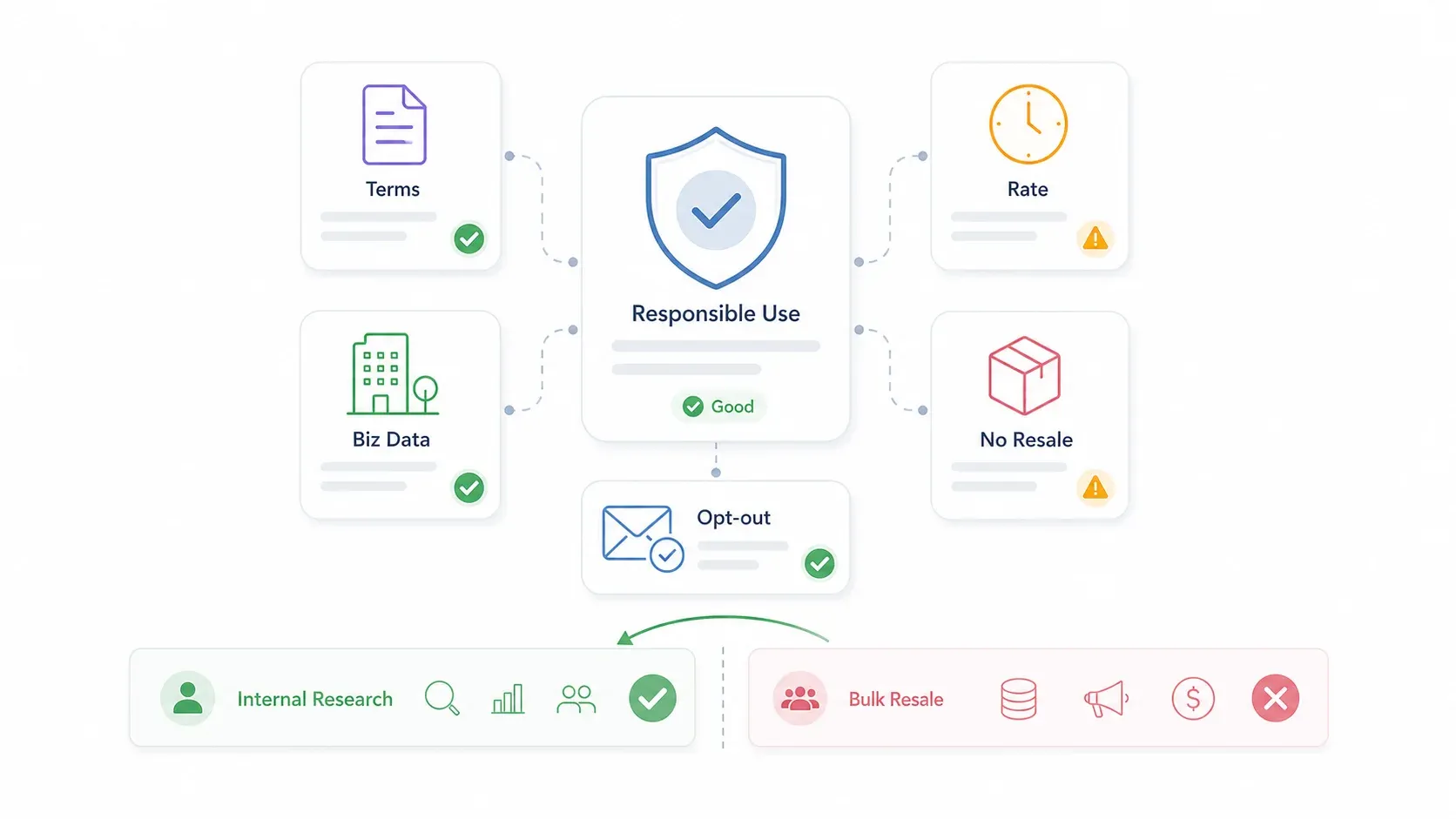
The legal question comes up constantly in forums — and for good reason. So I want to be upfront.
Crunchbase's Terms of Service explicitly prohibit automated crawling, scraping, spidering, automated exports/downloads, circumvention of limitations, and storing significant portions of Crunchbase content. That's a real restriction, and readers should be aware of it.
There is, however, a practical distinction between scraping publicly available company data for your own business research and reselling bulk datasets commercially. The hiQ Labs v. LinkedIn case provides useful legal context — the courts found that scraping publicly available data doesn't necessarily violate the CFAA — but that precedent is fact-specific and doesn't override contract terms, privacy law, or platform enforcement.
Best practices to stay on solid ground:
- Respect robots.txt and rate limits
- Don't overwhelm Crunchbase's servers (Thunderbit's cloud scraping distributes requests responsibly)
- Don't scrape personal data beyond a business context
- Don't redistribute raw datasets
- Use Crunchbase data for your own lead research and qualification
- Enrich contacts through legitimate tools (Apollo, Hunter) rather than mass-scraping personal emails
- Follow CAN-SPAM, GDPR/CCPA, and opt-out requirements for outreach
My recommendation: use scraped data responsibly and for internal prospecting, not for resale. If you want a deeper look at legal considerations, we have a full guide on web scraping legal implications.
The Fastest Way to Scrape Crunchbase for Leads in 2026
So where does that leave you?
- Native export: Fine for small, one-time pulls if you already have Pro. Capped, manual, and not scalable.
- Thunderbit: Best for non-technical teams who need a repeatable, scalable workflow. 2-click setup, AI-powered, free export, no Pro plan required.
- Python: Best for developer teams with custom needs and high volume. Powerful, but high maintenance and subject to anti-bot measures.
- Official API: Best for enterprise budgets and product integrations. Reliable, but expensive and gated.
Scraping is just step one. Cleaning, enriching, loading, and personalizing outreach is what turns raw data into revenue.
The teams that win aren't the ones with the biggest Crunchbase budget — they're the ones who build a repeatable pipeline from discovery to deal.
Want to try it yourself? Thunderbit's free tier lets you experiment with Crunchbase scraping on a small scale and see the results firsthand. For deeper dives on lead workflows, check out our guides on how to build a lead list and lead generation with AI.
Try Thunderbit for Crunchbase Leads
FAQs
Can you scrape Crunchbase for free?
Yes. Tools like Thunderbit offer a free tier that lets you scrape Crunchbase search results and export data at no cost. Python scraping has no software cost either, though it requires developer time. Crunchbase's own native export requires a Pro or Business plan.
Is it legal to scrape Crunchbase?
Crunchbase's Terms of Service prohibit automated scraping, so there is a contractual risk. The hiQ v. LinkedIn precedent provides some legal context for scraping publicly available data, but it doesn't override platform terms. Best practice: use scraped data for internal prospecting, respect rate limits, don't redistribute bulk datasets, and follow privacy and outreach compliance laws.
What data can you scrape from Crunchbase?
Company name, website, description, HQ location, funding rounds, total funding, last funding date, employee count, industry, founders, investors, tech stack, contact email and phone (where available), social links, operating status, and more. The exact fields depend on what's visible in your browser session and the method you use.
How do I get emails from Crunchbase leads?
Crunchbase primarily provides company-level data. For decision-maker emails, use enrichment tools like Apollo, Hunter, or UpLead after scraping. You can also use Thunderbit's Subpage Scraping to pull any emails or LinkedIn URLs visible on Crunchbase company profiles.
What is the best tool to scrape Crunchbase for leads?
It depends on your needs. For non-technical sales teams, Thunderbit is the fastest and easiest — 2-click setup, AI-powered, free export. Developers who want maximum control will prefer Python. And for enterprise budgets or product integrations, the Crunchbase official API is the most reliable, fully licensed option.
Try AI Web Scraper for Crunchbase Leads Get Started Free
Learn More




