
If you’ve ever spent a Monday morning elbow-deep in spreadsheets, manually copying names and emails from a directory, you know that traditional lead generation can feel like digging a swimming pool with a teaspoon. The good news? The world has changed—fast. AI-powered lead generation isn’t just a buzzword anymore; it’s the new backbone of sales and operations teams everywhere. In fact, 88% of companies now use AI in at least one business function, and three out of four are already using or planning to use AI for lead gen. That’s not just a trend—it’s a tidal wave.
Scrape data from any website using AI Get Started Free
So, what’s really different about lead generation with AI? Why are so many teams swapping out their old manual processes for tools like Thunderbit? And most importantly, how can you actually put AI to work in your own workflow—without needing a PhD in data science or a 30-step onboarding process? Let’s dig in.
The New Era of Lead Generation with AI: What’s Changed?
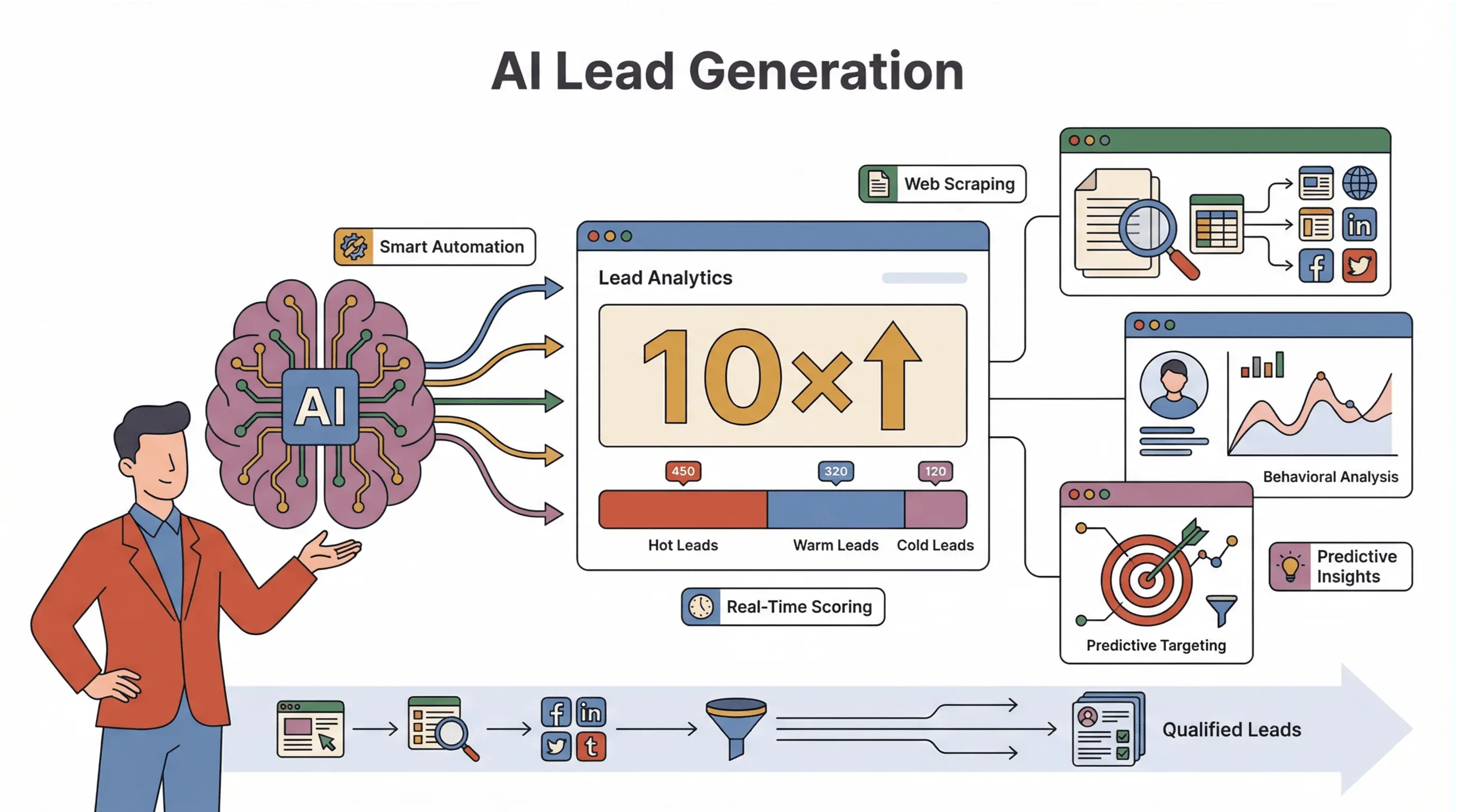 AI is rewriting the playbook for how businesses find and qualify prospects. Gone are the days when lead gen meant hours of manual research, endless copy-paste, and a lot of crossed fingers. Now, AI-driven tools can analyze web pages, directories, and even user behavior in real time—spotting buying signals, categorizing prospects, and surfacing the hottest leads before your competition even knows they exist.
Here’s what’s really changed:
- Automation of Data Collection: AI scrapers and agents can scan thousands of web pages, directories, and forums 24/7, pulling in lead data at a scale humans just can’t match. One team using directory scraping saw 10× more leads compared to manual collection.
- Behavioral Analysis: Instead of just collecting names and emails, AI can analyze website activity, social signals, or even the language used in reviews to predict which prospects are most likely to convert.
- Predictive Targeting: Machine learning models can score and prioritize leads automatically, so sales teams focus on the right opportunities, not just the most obvious ones.
The result? Sales reps spend only about 25% of their time actually selling, per Bain's Technology Report 2025—AI can offload much of the rest, freeing your team for the work that actually moves deals.
Why Lead Generation with AI Matters for Modern Businesses
Let’s get specific. Why does AI-powered lead generation matter so much for sales and operations teams? It comes down to four big wins: speed, accuracy, personalization, and scalability.
- Speed: AI agents can analyze a prospect’s website and behavior in seconds—work that would take a human 30–45 minutes (monday.com).
- Accuracy: AI models can spot patterns and signals that humans miss, leading to 51% higher lead-to-deal conversion.
- Personalization: AI can enrich leads with context—like recent social posts or company news—making your outreach more relevant and timely.
- Scalability: AI scrapers don’t get tired. They can handle thousands of records in parallel, ensuring no prospect is missed.
Here’s a quick summary of the ROI-focused benefits:
| Benefit | Impact | Evidence |
|---|---|---|
| Speed & Scalability | 24/7 prospecting, thousands of leads at once | Bain |
| Higher Conversion | More accurate targeting and nurturing | Deloitte |
| Improved Lead Quality | Better prioritization and enrichment | Setter AI |
| Cost Efficiency | Lower acquisition and operational costs | Setter AI |
In short, AI doesn’t just help you find more leads—it helps you find the right leads, faster, and at a lower cost.
Thunderbit: The AI Lead Generation Tool That Changes the Rules
Let’s talk about Thunderbit, because this is where the rubber meets the road. Thunderbit is an AI-powered web scraper Chrome Extension designed specifically for business users—no coding, no templates, just results.
Here’s what makes Thunderbit stand out:
- Natural Language Prompts: Just describe what you want (“Get name, title, and email from this page”), and Thunderbit’s AI figures out the rest.
- 2-Click Scraping: Click “AI Suggest Fields,” review the suggested columns, then hit “Scrape.” That’s it.
- Subpage & Pagination Scraping: Thunderbit can follow links to subpages (like individual profiles or product pages) and handle multi-page or infinite-scroll sites automatically.
- Instant Export: Export your data directly to Excel, Google Sheets, Airtable, Notion, or as CSV/JSON—free and unlimited.
- Cloud vs. Browser Scraping: Choose fast cloud scraping for public sites or browser scraping for login-required pages.
Thunderbit’s real superpower? It excels at extracting leads from unstructured web data—think messy directories, forums, or niche sites where traditional scrapers break down. And it does all this with a setup time measured in minutes, not hours.
Try Thunderbit for AI Lead Generation
Comparing AI Lead Generation Solutions: Thunderbit vs. Traditional Methods
Let’s put Thunderbit side-by-side with other approaches:
| Approach | Ease of Setup | Data Accuracy & Scope | Integration / Export | Typical ROI & Speed |
|---|---|---|---|---|
| Manual (spreadsheets) | Very slow; tedious | Error-prone, often outdated | Manual import to CRM | Low; high labor, slow cycle |
| Legacy No-Code Scraper | Medium; visual setup | Good for structured sites, breaks on others | CSV/Excel export, some CRM support | Mixed; setup slows agility |
| PhantomBuster/Bots | Medium; some tech | Good for social, needs chaining for depth | Sheets/CRM export, multi-step flows | Medium; learning curve |
| Thunderbit (AI) | Very easy; 2 clicks | Handles any site, unstructured data, subpages | Free export to Sheets/CRM/Notion | High; fast setup, quick wins |
Traditional methods are like using a flip phone in the age of smartphones—sure, you can make a call, but you’re missing out on everything else.
Step-by-Step: How to Use Thunderbit for Lead Generation with AI
Let’s get practical. Here’s how you can use Thunderbit to supercharge your lead generation:
Setting Up Thunderbit for AI-Powered Lead Generation
- Install the Thunderbit Chrome Extension: Head to the Chrome Web Store and add Thunderbit to your browser. Sign up for a free account—no credit card required.
- Connect to Your Workflow: Thunderbit exports directly to Google Sheets, Airtable, Notion, or Excel. You can also download CSV/JSON files for your CRM.
Using AI Suggest Fields to Identify Lead Data
- Open the web page or directory you want to scrape.
- Click the Thunderbit icon in your browser.
- Hit “AI Suggest Fields.” Thunderbit’s AI scans the page and suggests columns like Name, Company, Email, and more.
- Refine or add custom fields as needed. You can even use custom AI prompts to categorize or label leads (e.g., “Tag as Enterprise if employee count > 1000”).
Scraping and Enriching Leads with Subpage and Pagination Features
- Click “Scrape.” Thunderbit extracts all visible leads on the page.
- For directories with multiple pages, Thunderbit handles pagination automatically.
- Need more details? Click “Scrape Subpages.” Thunderbit will visit each linked profile or detail page and enrich your table with extra info (like phone numbers or social links).
Exporting and Integrating Leads into Your CRM
- Review your data in Thunderbit’s sidebar.
- Click “Export” and choose your preferred format—Google Sheets, Airtable, Notion, Excel, CSV, or JSON.
- Your data is now ready for outreach, analysis, or direct import into your CRM.
Integrating Thunderbit into Your Business Workflow
Thunderbit isn’t just a one-off tool—it’s designed to fit right into your daily operations:
- Scheduled Scraping: Set up recurring scrapes (e.g., “every Monday at 9am”) to keep your lead lists fresh. Thunderbit will run the scrape automatically and export the latest data to your chosen destination.
- Instant Data Sync: As soon as data lands in your Google Sheet or Airtable, you can trigger CRM workflows, notifications, or email sequences.
- No-Code Customization: Use Field AI Prompts to clean, label, or format data as it’s scraped—no technical skills required.
For non-technical users, this means you can automate your lead pipeline without ever touching a line of code. For sales ops and marketing teams, it’s a way to keep your CRM full of high-quality, up-to-date leads—without the manual grind.
See more AI lead generation guides Get Started Free
Beyond Quantity: How AI Improves Lead Quality and Conversion
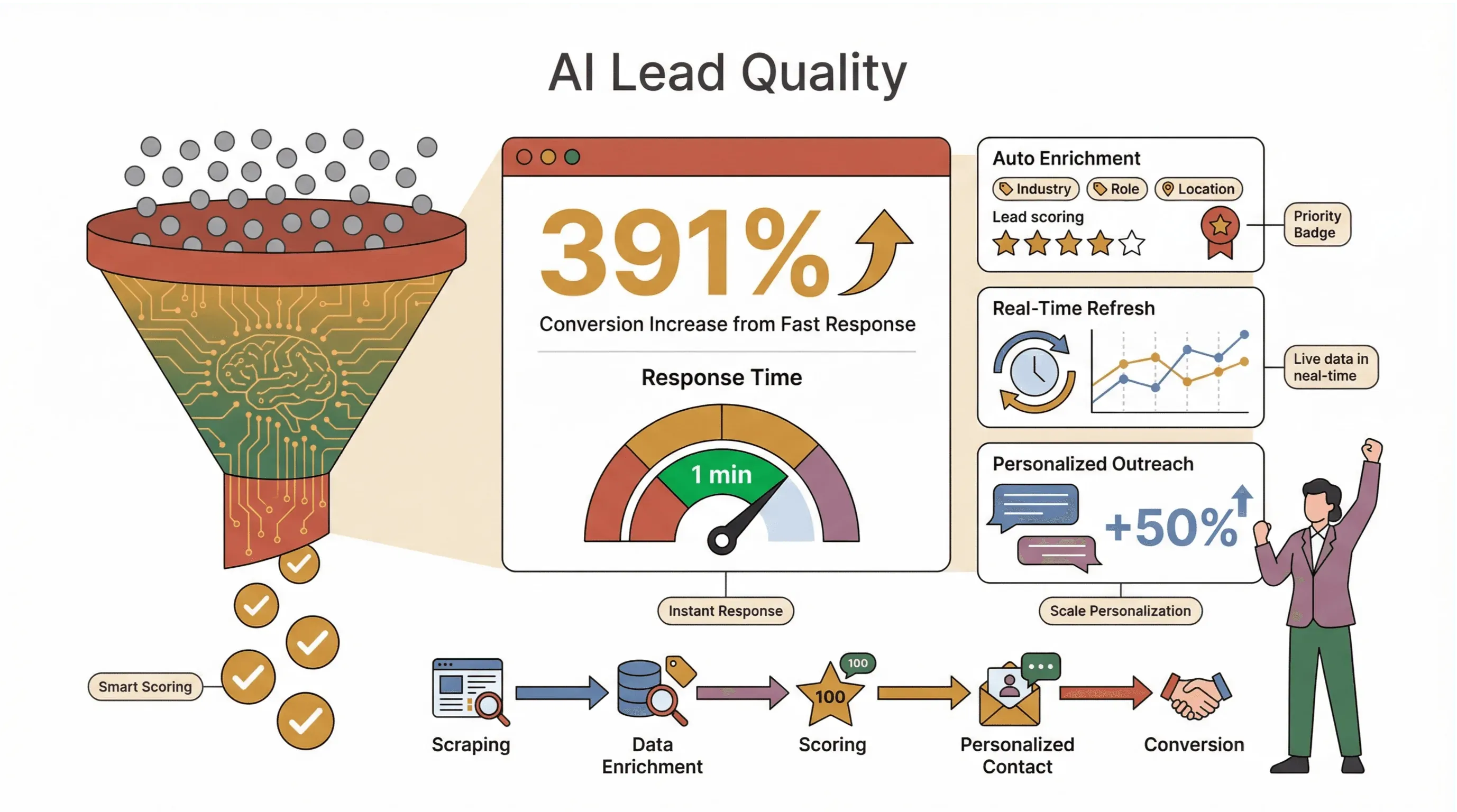 Here’s the real kicker: AI-powered lead gen isn’t just about getting more leads—it’s about getting better leads.
- Automated Enrichment & Scoring: Use AI prompts to tag, classify, or score leads as they’re scraped. For example, label leads as “Priority” if they mention certain keywords, or categorize by company size or industry.
- Faster Response: AI scrapers can refresh your lead lists in real time, so you can reach out to new prospects within minutes—not days. In some industries, responding to a new lead within the first minute can boost conversions by 391%—the original Vendasta speed-to-lead study, also cited in Amplemarket's roundup.
- Personalization at Scale: Scrape context-rich data (like recent reviews or social posts) and use AI to generate outreach that actually mentions the prospect's product, recent post, or last funding round. Generic "Hi {first_name}, just wanted to reach out" is now table stakes — the lift comes from referencing something only a real reader of their site would know.
The bottom line: AI helps you focus on the leads that matter, not just the ones that are easy to find.
Real-World Success: Thunderbit Lead Generation Case Studies
Let’s look at how Thunderbit is making a difference in the real world:
Ecommerce: Scaling Up Product Leads
A fast-growing ecommerce team needed to monitor competitor SKUs and capture new product launches across dozens of supplier sites. Using Thunderbit, they set up scheduled scrapes to pull product names, prices, and stock status into Google Sheets daily. The result? They spotted pricing changes and new SKUs within hours, not days—giving them a real edge in a crowded market.
Real Estate: Aggregating Listings and Contacts
A real estate agency wanted to build a comprehensive database of properties and agent contacts from multiple listing sites. With Thunderbit’s subpage scraping, they extracted property details and agent emails from hundreds of listings in minutes, exporting the data directly to Airtable for their sales team. This cut their research time by over 80%.
Marketing Agency: Hyper-Targeted Lead Lists
A digital marketing agency used Thunderbit to scrape industry directories and event attendee lists, tagging leads based on company size and recent activity. By enriching leads with social profiles and recent news, they increased their outreach conversion rate by 30%—all without hiring extra staff.
Overcoming Common Challenges in AI Lead Generation
Of course, no tool is perfect. Here’s how to tackle the most common hurdles:
- Data Quality & Compliance: Always respect website terms of service and privacy laws. Thunderbit only scrapes public, browser-visible data at human-like speeds, minimizing risk. Use AI prompts to clean and validate data as you scrape.
- Integration: Make sure your scraped data flows directly into the tools your team already uses—Thunderbit’s free exports make this easy.
- User Adoption: Some team members may be skeptical of AI. Start with a pilot project, show quick wins, and highlight how AI eliminates tedious work—not jobs.
- Maintenance: Web layouts change. If a scrape fails, just rerun “AI Suggest Fields” to update your columns—Thunderbit’s AI adapts automatically.
Conclusion & Key Takeaways for Lead Generation with AI
Let’s wrap it up:
- AI is transforming lead generation—it’s faster, smarter, and more scalable than manual methods.
- Thunderbit makes AI lead gen accessible to everyone, with natural language prompts, 2-click setup, and seamless integration into your workflow.
- It’s not just about more leads—it’s about better leads. Use AI to enrich, score, and prioritize prospects for higher conversion rates.
- Start small, measure results, and scale up. Try Thunderbit on a key lead source, track your ROI, and expand as you see the impact.
Ready to leave the teaspoon behind and start digging with a backhoe? Download Thunderbit, set up your first AI-powered lead gen workflow, and see just how much more you can accomplish in less time. And if you want to dive deeper, check out the Thunderbit Blog for more guides, tips, and real-world success stories.
Start AI Lead Generation for Free
FAQs
1. How does AI lead generation differ from traditional methods?
AI lead generation automates data collection, qualification, and enrichment—analyzing web pages, directories, and user behavior in real time. This means faster, more accurate, and more scalable prospecting compared to manual research and copy-paste.
2. What makes Thunderbit unique for AI-powered lead generation?
Thunderbit uses natural language prompts and AI to suggest fields, scrape data, and enrich leads from any website—including unstructured directories and subpages. It’s designed for non-technical users, with 2-click setup and free export to Sheets, Airtable, Notion, or CRM.
3. Can I use Thunderbit to keep my lead lists up to date automatically?
Yes! Thunderbit’s scheduled scraping feature lets you set up recurring data collection (e.g., daily or weekly), so your lead lists are always fresh and ready for outreach.
4. How does AI improve lead quality, not just quantity?
AI-driven tools like Thunderbit can classify, tag, and score leads as they’re scraped—helping you focus on high-value prospects and personalize your outreach for better conversion rates.
5. Is AI lead generation safe and compliant?
Thunderbit scrapes only public, browser-visible data at human-like speeds, reducing compliance risks. Always respect website terms of service and privacy laws, and use AI prompts to clean and validate your data as you go.
Ready to see the difference AI can make in your lead generation? Try Thunderbit for free and start building smarter, higher-converting pipelines today.
Try AI Web Scraper for Lead Generation Get Started Free
Learn More




