

Thunderbit’s LoopNet Scraper helps you turn LoopNet listing pages into clean, structured datasets using AI. You can scrape sale and lease results, then enrich your table with subpage details like pricing, cap rate, square footage, and broker contacts. With the Thunderbit AI agent, you click AI Suggest Columns to auto-detect fields, then click Scrape to export to Excel, Google Sheets, Airtable, Notion, CSV, or JSON.
🏢 What is LoopNet Scraper
The LoopNet Scraper is an AI Web Scraper built for extracting commercial real estate listings and property details from LoopNet. You simply open a LoopNet results page (or a filtered search), click AI Suggest Columns, and Thunderbit’s AI structures the page into a table you can download or sync to your tools.
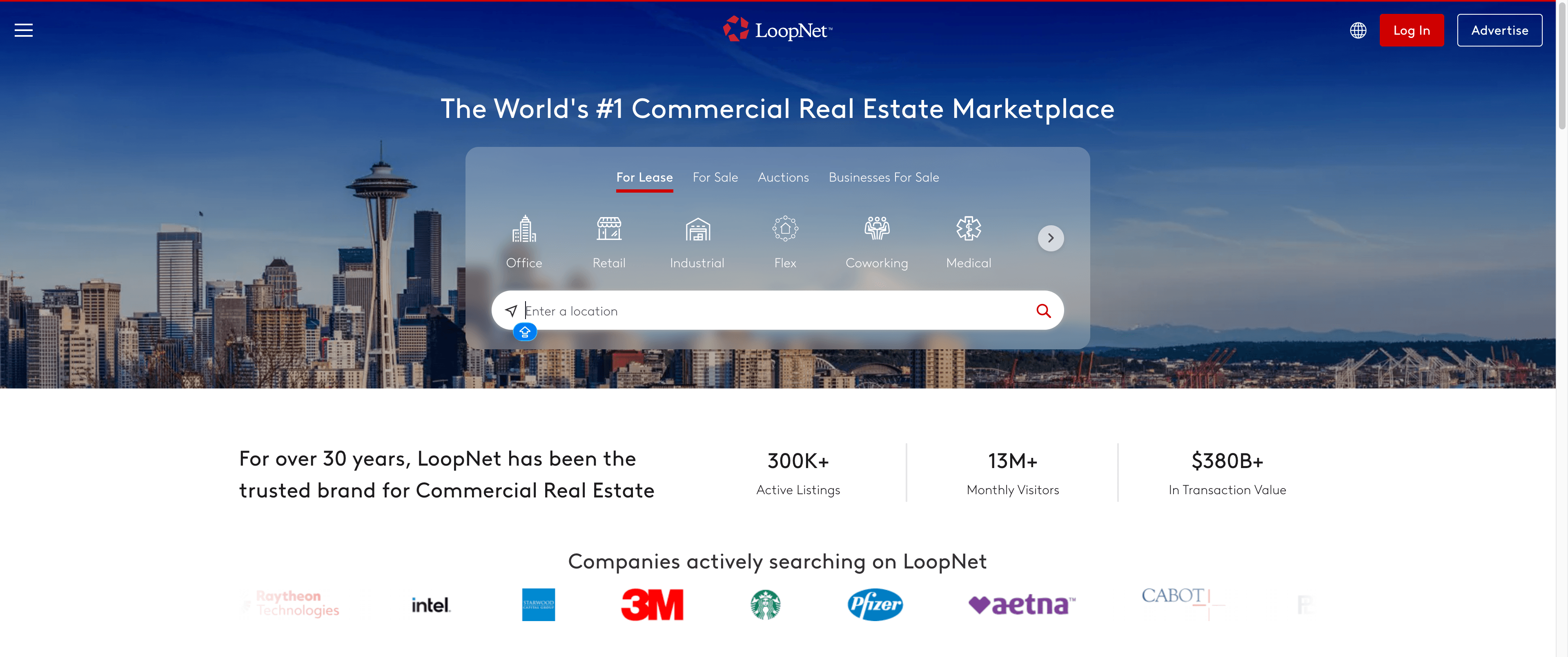
Thunderbit also supports pagination scraping (next pages or infinite scroll) and subpage scraping, so you can collect high-level listing rows first, then have AI visit each property page to pull deeper details.
🧾 What can you scrape with LoopNet
LoopNet is widely used for sourcing commercial properties for sale and lease. With Thunderbit, you can scrape:
- Listing results (address, price, property type, size, broker, etc.)
- Filters and market coverage (city, county, state, asset class)
- Subpage details (cap rate, NOI, year built, tenancy, broker contacts, images)
Below are two common workflows you can run right away.
📍 Scrape LoopNet Regional Investment Deal Flow
This use case is ideal when you want a steady pipeline of investment opportunities from a region, such as Washington state listings for sale:
LoopNet WA Commercial Real Estate for Sale
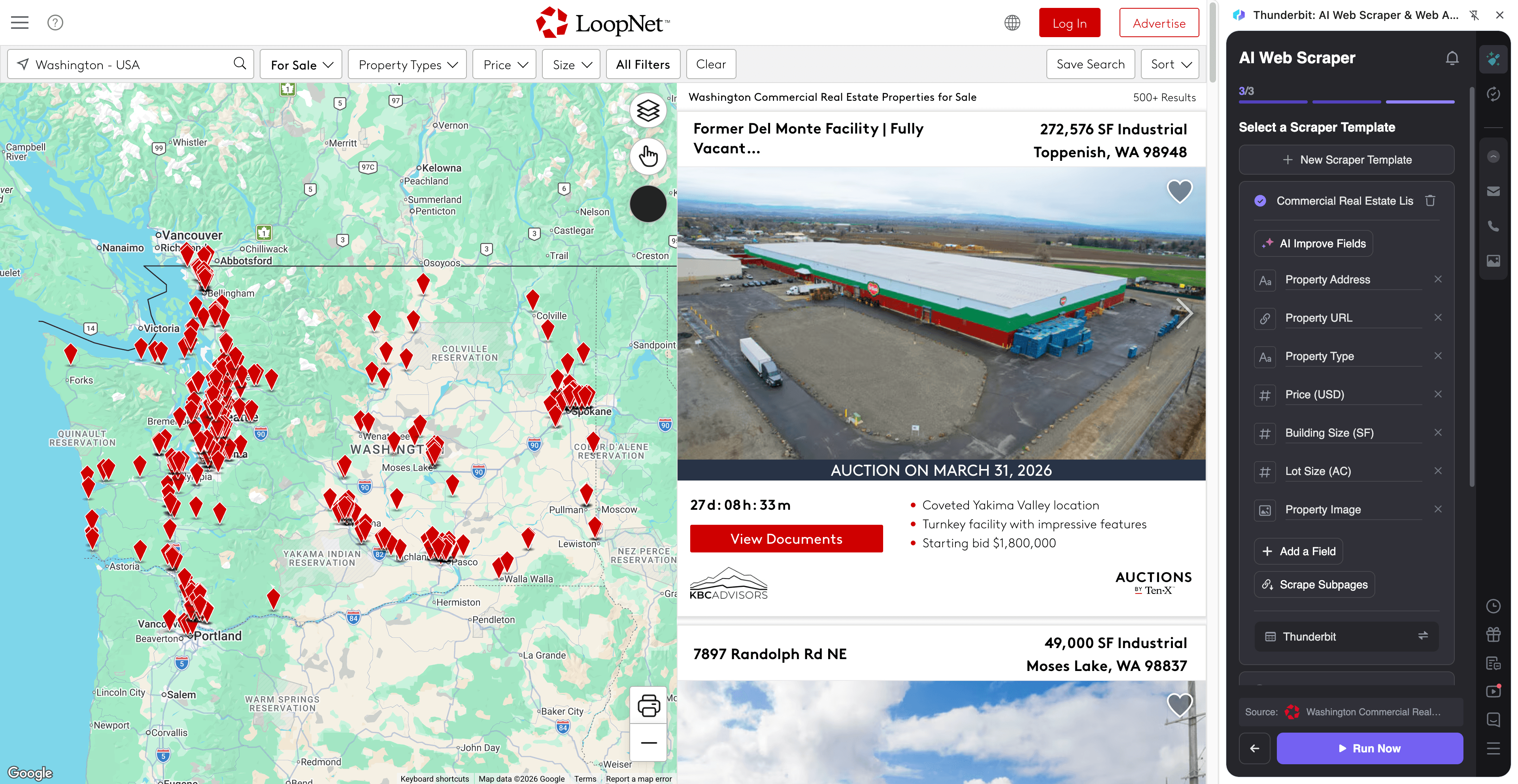
Steps:
- Download the Thunderbit Chrome Extension and register an account.
- Go to the destination page, for example: WA commercial real estate for sale.
- Click AI Suggest Columns to let AI recommend the best column names and data types.
- Click Scrape to extract the data, then export to Excel, Google Sheets, Airtable, Notion, CSV, or JSON.
Column names
| Column | Description |
|---|---|
| 🏷️ Listing Title | The headline/name of the property listing shown in results. |
| 🌐 Listing URL | The direct link to the listing detail page (useful for subpage scraping). |
| 📍 Address | Street address (or partial address) displayed on the card. |
| 🗺️ City / State / ZIP | Location fields parsed from the listing card. |
| 🏢 Property Type | Asset class such as office, retail, multifamily, land, or mixed-use. |
| 💲 Asking Price | The listed price (or “Call for Price” when not disclosed). |
| 📐 Building Size (SF) | Square footage shown on the results card. |
| 🌳 Lot Size | Land area when available (acres or SF). |
| 📊 Cap Rate | Cap rate shown on the card (if provided). |
| 🧩 Listing Status | For sale / for lease / auction / under contract (when shown). |
| 🧑💼 Broker / Agent Name | The broker/agent name displayed on the listing card. |
| 🏢 Brokerage | Brokerage/company name associated with the listing. |
| 📞 Phone (if shown) | Any phone number visible on the results card (Thunderbit can format to E.164). |
| 🖼️ Primary Image URL | The main thumbnail image for the listing. |
🏭 Scrape LoopNet Industrial & Logistics Sourcing
This use case is designed for industrial acquisition and logistics site selection, such as warehouses and distribution properties in Washington:
LoopNet WA Industrial Properties for Sale
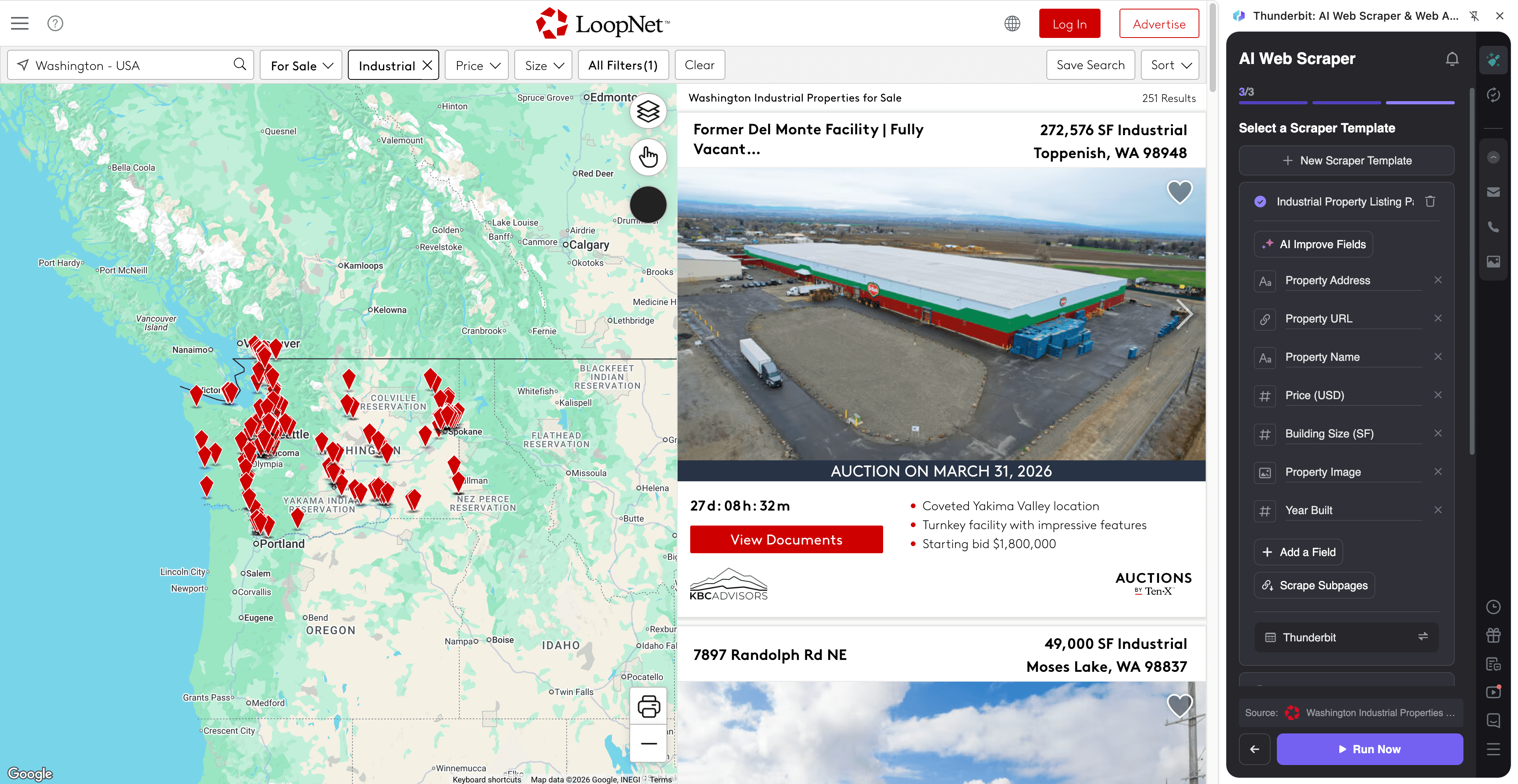
Steps:
- Download the Thunderbit Chrome Extension and register an account.
- Go to the destination page, for example: WA industrial properties for sale.
- Click AI Suggest Columns to generate recommended fields for industrial listings.
- Click Scrape to collect rows, then export to your preferred format.
Column names
| Column | Description |
|---|---|
| 🏷️ Property Name | The listing name/headline for the industrial property. |
| 🌐 Property URL | Link to the property detail page for enrichment via subpage scraping. |
| 📍 Location | Address and market area shown in the results. |
| 🏭 Industrial Type | Warehouse, distribution, flex, manufacturing, cold storage (when available). |
| 📐 Total SF | Total building square footage listed. |
| 🚪 Dock / Grade Doors (if shown) | Door counts or loading features when present on the card or subpage. |
| 📏 Clear Height (if shown) | Clear height details when available (often on subpages). |
| 💲 Price | Asking price or pricing label. |
| 🧾 Price per SF (if shown) | Unit pricing when provided. |
| 🗓️ Year Built (if shown) | Construction year when available (often on subpages). |
| 🧑💼 Contact Name | Broker/agent contact shown on the listing. |
| ✉️ Email (if shown) | Email address when visible; you can also use Thunderbit’s free email extractor. |
| 📞 Phone (if shown) | Phone number when visible; can be normalized to E.164. |
| 🖼️ Image URL | Main image URL for the listing card. |
🎯 Why Use LoopNet Tool
Scraping LoopNet helps you move faster than manual copy/paste and keeps your pipeline organized in the tools you already use.
Common reasons you might scrape LoopNet:
- Real estate investment teams: Build a regional deal flow list, track pricing changes, and prioritize outreach with broker contact fields.
- Acquisitions and development: Compare sites across markets, filter by size/type, and enrich with subpage details like cap rate, tenancy, and building specs.
- Brokerage and capital markets: Create comps, monitor new inventory, and maintain a structured database for internal reporting.
- Ecommerce and operations: Source industrial/warehouse locations and keep a shortlist synced to Google Sheets or Airtable.
- Marketing and research: Analyze listing language, asset mix, and market activity over time.
Thunderbit’s subpage scraping is especially useful on LoopNet because many high-value fields (cap rate, NOI, broker details, property facts) are often richer on the listing detail page than on the results grid.
🧩 How to Use LoopNet Chrome Extension
- Install the Thunderbit Chrome Extension: Get it from the Chrome Web Store and create your account on Thunderbit.
- Navigate to a LoopNet results page: For example, WA commercial real estate for sale or WA industrial properties for sale.
- Activate AI-Powered Scraper: Click AI Suggest Columns to generate fields, adjust any column names/data types, then click Scrape.
- Enrich with Subpage Scraping (recommended): After you have the results table, click Scrape Subpages so AI can visit each listing URL and append details like cap rate, broker contacts, and property facts.
If you’re new to AI scraping, these guides can help:
- How to Scrape Any Website Using AI
- What Is Data Scraping and How to Do It in 2025
- How to Scrape Website Data into Excel using AI
- What Is List Crawling and How to Do It Using AI
💳 Pricing for LoopNet
Thunderbit uses a simple credit system:
- 1 credit = 1 output row in your results table.
- The AI-powered scraper experience (AI Suggest Columns + structured extraction) is included, and you can start testing without a paid plan.
What you can try for free:
- Free tier: scrape 6 pages per month (page-based free usage).
- Free trial: scrape 10 pages for free before choosing a paid plan.
Paid plans (monthly and yearly) are designed for different volumes. If you scrape regularly for sourcing, comps, or monitoring, the yearly plan is typically more cost effective because it includes a discount compared to paying month to month.
You can review options on the Thunderbit Pricing page:
- Starter: $15 monthly or $9 yearly (billed yearly), includes 500 credits/month or 5,000 credits/year
- Pro tiers scale up for teams scraping thousands of listings per month
Tip: If you’re scraping LoopNet results plus subpages, plan credits around the final number of rows you want in your exported table.
❓ FAQ
-
What is the AI Powered LoopNet Scraper?
The AI Powered LoopNet Scraper is an AI Web Scraper workflow that extracts structured data from LoopNet listing pages and property detail pages. You click AI Suggest Columns to let AI detect fields, then click Scrape to collect rows and export them to your preferred format. -
What is Thunderbit?
Thunderbit is an AI web scraping and productivity Chrome extension that helps you extract data from websites, PDFs, and images into structured tables. It’s built for business workflows like lead generation, ecommerce operations, and real estate sourcing, with exports to Excel, Google Sheets, Airtable, and Notion. -
What LoopNet pages can I scrape with Thunderbit?
You can scrape listing results pages (search pages with filters) and also scrape individual property detail pages. Thunderbit works well for both because it reads the page content with AI and adapts to different layouts. -
Can Thunderbit scrape subpage details like cap rate, NOI, and broker contacts?
Yes. After scraping a results page, you can use Subpage Scraping to have AI visit each listing URL and append additional fields into the same table. This is one of the fastest ways to build a complete dataset without manually opening dozens of tabs. -
How does pagination work on LoopNet searches?
Thunderbit supports pagination scraping for pages that use “next page” navigation and for pages that load more results as you scroll. You can scrape multiple pages in one run, which is useful when you’re building a statewide or multi-market dataset. -
Do I need to know code to scrape LoopNet?
No. Thunderbit is designed for non-technical workflows: open the page, click AI Suggest Columns, then click Scrape. You can still customize columns and data types if you want more control, but you don’t need Python, selectors, or maintenance scripts. -
What formats can I export LoopNet data to?
You can export to Excel, Google Sheets, Airtable, Notion, or download as CSV or JSON. Export is free, so you can test different destinations without extra cost. -
Should I use Cloud Scraping or Browser Scraping for LoopNet?
If the pages you need are publicly accessible, Cloud Scraping is usually faster and can process batches efficiently. If you need to access pages behind a login or want to scrape what’s visible in your current Chrome session, Browser Scraping is a better fit. -
Is it okay to scrape LoopNet data for my business?
You should always follow applicable laws, respect privacy, and review the website’s terms and policies before scraping. Thunderbit is a tool that helps you collect and structure data; how you use that data should align with your compliance requirements and internal guidelines.
📚 Learn More
- Get started with the Thunderbit Chrome Extension
- Explore tutorials on the Thunderbit Blog
- Learn fundamentals: What Is Data Scraping and How to Do It in 2025
- Build list workflows: What Is List Crawling and How to Do It Using AI
- Export to spreadsheets: How to Scrape Website Data into Excel using AI
- Compare tools: The Best Web Scraping Tools & Software in 2025
- If you also collect contacts: The Best Email Scrapers in 2025