idealista-scraper

Idealista Scraper

Thunderbit’s Idealista Scraper helps you extract real estate listings from Idealista Spain for both properties for sale and for rent. Use AI to capture listing data from search results, then scrape subpages to collect full property details and export to Excel, Google Sheets, Airtable, Notion, CSV, or JSON.
5.0
Monthly users15.6k
AI-Powered
Real Estate
Get Started Free
Free tier available

Thunderbit’s Idealista Scraper helps you turn Idealista listings into structured data using AI, so you can analyze the Spain real estate market faster. You can scrape search results for properties for sale or for rent, then use subpage scraping to collect full property details (photos, descriptions, agent info, and more). Export your results to Excel, Google Sheets, Airtable, Notion, CSV, or JSON with in a couple of clicks.

🏠 What is Idealista Scraper

The Idealista Scraper is an built for extracting real estate listings from . You simply open an Idealista results page, click AI Suggest Columns, and then click Scrape to generate a clean table of listings.

It’s designed for real estate agents, investors, analysts, and operations teams who need reliable listing data without building or maintaining scraping scripts. Thunderbit’s AI adapts to layout changes and can also follow each listing into its detail page for deeper data enrichment.

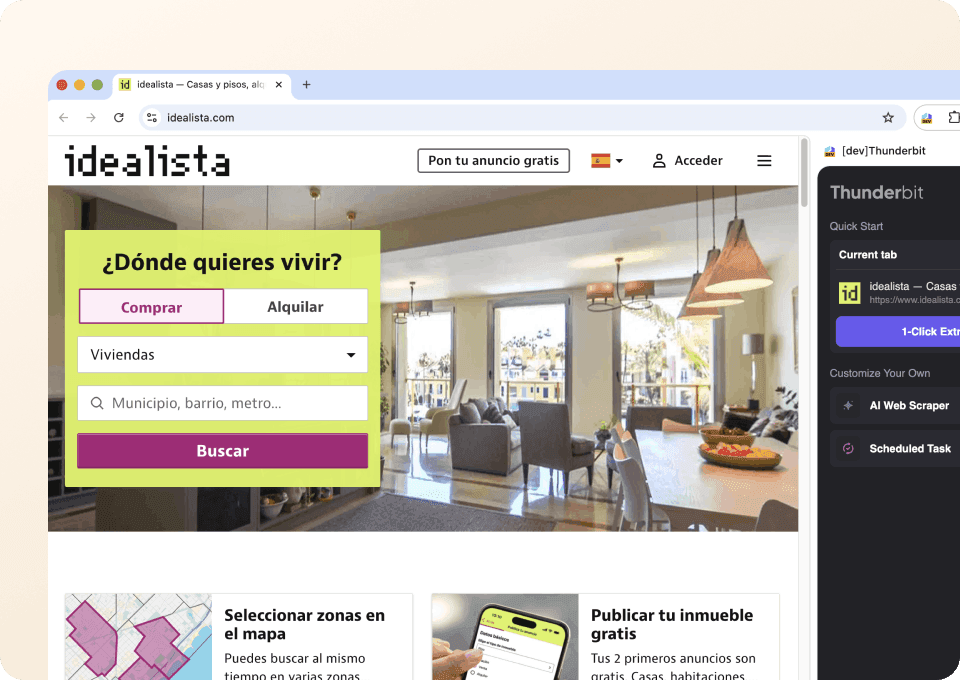
idealista — Real estate in Spain. Houses for rent and sale

🧾 What can you scrape with idealista

Idealista is packed with valuable data across listing cards and property detail pages. With Thunderbit, you can scrape both the search results and the subpages (each property’s detail page) to build a complete dataset for pricing analysis, lead lists, rental comps, and market monitoring.

Scrape Properties for Sale from Idealista

Use this workflow to scrape listings from the Idealista “for sale” results page, such as: . This is ideal for building a comparable-sales dataset, tracking price changes, or collecting inventory by neighborhood.

Scrape Properties for Sale from Idealista

Steps:

  1. Download the and register an account.
  2. Go to the destination page, for example: .
  3. Click AI Suggest Columns, which recommends column names based on the page content.
  4. Click Scrape to run the scraper, get data, and download or export the file.

Column names

ColumnDescription
🏷️ Listing TitleThe headline/title of the property listing shown in results.
🌐 Listing URLThe direct link to the property detail page (useful for subpage scraping).
💶 PriceThe listed sale price (when available).
📍 Address / AreaThe neighborhood, district, or location text shown on the card.
🗺️ City / ProvinceThe broader location context when present in the results.
📐 Size (m²)The property size in square meters.
🛏️ BedroomsNumber of bedrooms (if shown).
🛁 BathroomsNumber of bathrooms (if shown).
🏢 Property TypeApartment, house, studio, etc., when available.
🖼️ Main PhotoThe primary image URL from the listing card.
🏷️ Tags / FeaturesSnippets like terrace, elevator, parking, new development, etc.
🧑‍💼 Agency / AdvertiserThe agent/agency name when displayed.
📅 Listing Update TimeAny “updated” or recency indicator shown on the results page.

Scrape Properties for Rent from Idealista

Use this workflow to scrape rental listings from: . This is useful for rental comps, yield analysis, relocation research, and monitoring availability.

Scrape Properties for Rent from Idealista

Steps:

  1. Download the and register an account.
  2. Go to the destination page, for example: .
  3. Click AI Suggest Columns, which recommends column names based on the page content.
  4. Click Scrape to run the scraper, get data, and download or export the file.

Column names

ColumnDescription
🏷️ Listing TitleThe rental listing title shown in the results.
🌐 Listing URLThe link to the rental property detail page.
💶 Monthly RentThe listed monthly rent price (when available).
💳 Deposit / FeesAny deposit or fee info shown on the card or extracted from subpages.
📍 Address / AreaNeighborhood/district/location text.
📐 Size (m²)Rental unit size in square meters.
🛏️ BedroomsNumber of bedrooms (if shown).
🛁 BathroomsNumber of bathrooms (if shown).
🏢 Property TypeApartment, studio, house, etc.
🧾 ConditionNotes like furnished/unfurnished, renovated, new, etc.
🖼️ Main PhotoThe primary image URL from the listing card.
🧑‍💼 Agency / AdvertiserAgent/agency/landlord label when available.
📅 Availability / UpdatedAny availability or recency indicator shown.

📈 Why Use idealista Tool

Scraping Idealista helps you move from browsing listings to building a dataset you can actually work with.

  • Real estate agents: Build targeted shortlists for clients, track new inventory, and compare pricing across neighborhoods.
  • Investors & analysts: Create comp sets, monitor price per m², and evaluate rental yields by area.
  • Property managers: Track competing rentals, amenities, and pricing changes over time.
  • Marketing & lead gen teams: Collect agency/advertiser names and listing URLs, then enrich with subpage details for outreach workflows.
  • Operations teams: Standardize listing data into spreadsheets and keep it updated with scheduled runs.

Thunderbit’s Subpage Scraping is especially useful on Idealista: scrape the results page first, then have AI visit each property page to extract deeper fields like full description, photo gallery, energy rating, and contact details (when available).

🧩 How to Use idealista Chrome Extension

  1. Install the Thunderbit Chrome Extension: Get it from the and create your account on .
  2. Navigate to an Idealista results page: Open either or .
  3. Activate AI-Powered Scraper: Click AI Suggest Columns to generate fields, adjust any column names/data types, then click Scrape.
    • Optional but recommended: use Scrape Subpages to enrich each row with detail-page data (agent info, full address, long description, more photos, and structured features).
    • If you need to handle pagination or infinite scroll, Thunderbit supports both.

💳 Pricing for idealista

Thunderbit uses a credit system where 1 credit = 1 output row in your results table. The AI-powered scraping experience (including AI Suggest Columns) is available from the start, and you can test it before paying.

  • Free tier: scrape 6 pages per month for free.
  • Free trial: scrape 10 pages for free to validate your Idealista workflow end-to-end.
  • Paid plans scale with your volume, and the yearly plan is more cost effective due to the discount.

You can review plan details on the page. For many real estate workflows (weekly comp checks, inventory monitoring, rental tracking), a yearly plan can reduce your effective monthly cost while giving you enough credits to run consistent scrapes.

❓ FAQ

  1. What is the AI Powered Idealista Scraper?
    The AI Powered Idealista Scraper is an that extracts structured listing data from Idealista results pages and property detail pages. You click AI Suggest Columns to generate a schema, then click Scrape to collect the data into a table you can export.

  2. What is Thunderbit?
    is an AI web scraping and productivity Chrome extension that helps you extract data from websites, PDFs, and images into structured formats. It’s built for business workflows like lead generation, ecommerce operations, marketing research, and real estate analysis, with exports to Excel, Google Sheets, Airtable, and Notion.

  3. Can I scrape Idealista property detail pages (subpages), not just search results?
    Yes. After scraping the results page, you can use Subpage Scraping to have Thunderbit visit each listing URL and extract deeper fields. This is useful for pulling full descriptions, additional photos, energy ratings, and other details that are often only visible on the property page.

  4. What data can I export from Idealista to Excel or Google Sheets?
    You can export any columns you define, such as price, size, bedrooms, bathrooms, location, listing URL, and image URLs. Thunderbit supports free export to Excel/CSV and direct export to Google Sheets, Airtable, and Notion, so you can plug the dataset into your existing workflow.

  5. How does Thunderbit handle pagination and infinite scroll on Idealista?
    Thunderbit supports common pagination patterns, including next-page buttons and infinite scrolling. If your Idealista search has multiple pages, you can scrape across pages to build a larger dataset without manually copying and pasting listings.

  6. Do I need coding skills to use the Idealista Scraper?
    No. Thunderbit is designed for non-technical teams, so you don’t need Python, selectors, or scraping infrastructure. The AI reads the page and proposes columns, and you can refine them with a few clicks.

  7. Should I use Cloud Scraping or Browser Scraping for Idealista?
    If the pages you need are public and don’t require login, Cloud Scraping is usually faster and can process many pages quickly. If you need to scrape content that depends on your session, preferences, or login state, Browser Scraping is a better fit because it runs inside your Chrome session.

  8. How much does it cost to scrape Idealista listings?
    Cost is based on output rows: 1 credit equals 1 row in your results. You can start with the free tier (6 pages/month) or the free trial (10 pages) to estimate how many rows you typically collect per run, then choose a plan on the that matches your volume.

  9. Is it safe and compliant to scrape Idealista?
    You should always follow applicable laws, privacy requirements, and the website’s terms. Thunderbit is a tool that helps you extract data you have access to; how you use that data (storage, outreach, redistribution) should be aligned with your compliance policies and local regulations.

📚 Learn More

  • Get started with the
  • Explore guides on the
  • Learn fundamentals:
  • Build list workflows:
  • Export to spreadsheets: and
  • Broader tooling overview:
  • Video tutorials:

Ready to build a clean Idealista dataset for sales comps, rental comps, or market monitoring? Start with and run your first scrape from the .