ईमेल फ़ॉर्मेट फ़ाइंडर

द्वारा
किसी भी कंपनी डोमेन के लिए सबसे संभावित ईमेल पैटर्न खोजें और किसी व्यक्ति के लिए अनुमानित ईमेल पते तैयार करें। रैंक किए गए फ़ॉर्मेट और confidence स्कोर की मदद से आउटरीच तेज़ करें और बाउंस जोखिम कम करें।
PRODUCT HUNT#1 Product of the Week
Accenture logoCriteo logoGrammarly logoVerisk logoklook logoPuma logoRingCentral logoAccenture logoCriteo logoGrammarly logoVerisk logoklook logoPuma logoRingCentral logoAccenture logoCriteo logoGrammarly logoVerisk logoklook logoPuma logoRingCentral logoAccenture logoCriteo logoGrammarly logoVerisk logoklook logoPuma logoRingCentral logoAccenture logoCriteo logoGrammarly logoVerisk logoklook logoPuma logoRingCentral logoAccenture logoCriteo logoGrammarly logoVerisk logoklook logoPuma logoRingCentral logo
Product Listing
Extracted Data Table
Just Click to Extract
Thunderbit के साथ लीड्स तेज़ी से खोजेंThunderbit का इस्तेमाल करके वेबसाइटों से डेटा स्क्रैप करें और कुछ ही क्लिक में स्ट्रक्चर्ड कॉन्टैक्ट डेटा निकालें। पेजों के बीच जानकारी इकट्ठा करने की प्रक्रिया ऑटोमेट करें और परिणाम Sheets, Airtable, या Notion में एक्सपोर्ट करें।
chrome-web-store
से इंस्टॉल करेंChrome Web Store

Thunderbit के साथ लीड्स तेज़ी से खोजें

Thunderbit वेबसाइटों, सबपेजों, PDFs, डॉक्यूमेंट्स और इमेजेज़ से स्क्रैप करके नाम, भूमिका, डोमेन और ईमेल जैसे स्ट्रक्चर्ड फ़ील्ड निकालता है। AI Suggest Fields से कॉलम जल्दी मैप करें, फिर स्क्रैप करें और Thunderbit से नतीजों को आपके वर्कफ़्लो के हिसाब से summarize, categorize, और format करवाएँ। एक्सट्रैक्शन के बाद साफ़ टेबल्स को Google Sheets, Airtable, या Notion में एक्सपोर्ट करें, या CSV/JSON के रूप में डाउनलोड करें। लीड लिस्ट को बड़े पैमाने पर तैयार करने के लिए सबपेज और pagination scraping का उपयोग करें, और AI-powered labeling व formatting से डेटा को व्यवस्थित रखें।

Thunderbit से ईमेल फ़ॉर्मेट कैसे खोजें

step_01.png
STEP 1डाउनलोड और इंस्टॉल करेंThunderbit Chrome Extension को Thunderbit Chrome Extension Download Page से डाउनलोड और इंस्टॉल करें। इंस्टॉल होने के बाद, लॉग इन करें या नया फ्री अकाउंट बनाकर शुरुआत करें।
step_02.png
STEP 2एक्सटेंशन खोलेंChrome में Thunderbit Chrome Extension खोलें। टूल सूची में से "Email Format Finder" चुनें, फिर "Find Email Format by Domain" टैब खोलें। आवश्यक डोमेन दर्ज करें (उदाहरण: acme.com)। चाहें तो कंपनी का नाम जोड़कर सटीकता बढ़ाएँ, और अगर किसी खास व्यक्ति के लिए संभावित ईमेल चाहिए तो first name और last name भी जोड़ें।
step03.png
STEP 3“Find email format” बटन पर क्लिक करें"Find email format" बटन पर क्लिक करके डोमेन के लिए अनुमानित ईमेल पैटर्न की टेबल तैयार करें। रैंक किए गए फ़ॉर्मेट और confidence score देखें, और अगर आपने first name तथा last name दिया है, तो उस व्यक्ति के लिए अनुमानित ईमेल वैल्यूज़ भी जाँचें। परिणामों को Excel, Google Sheets, Airtable, या Notion में एक्सपोर्ट करें, या डेटा को CSV या JSON के रूप में डाउनलोड करें।

डोमेन के आधार पर कंपनी के ईमेल पते का फ़ॉर्मेट कैसे अनुमानित करें, जानें

डोमेन से ईमेल पैटर्न का अनुमान लगाएँ
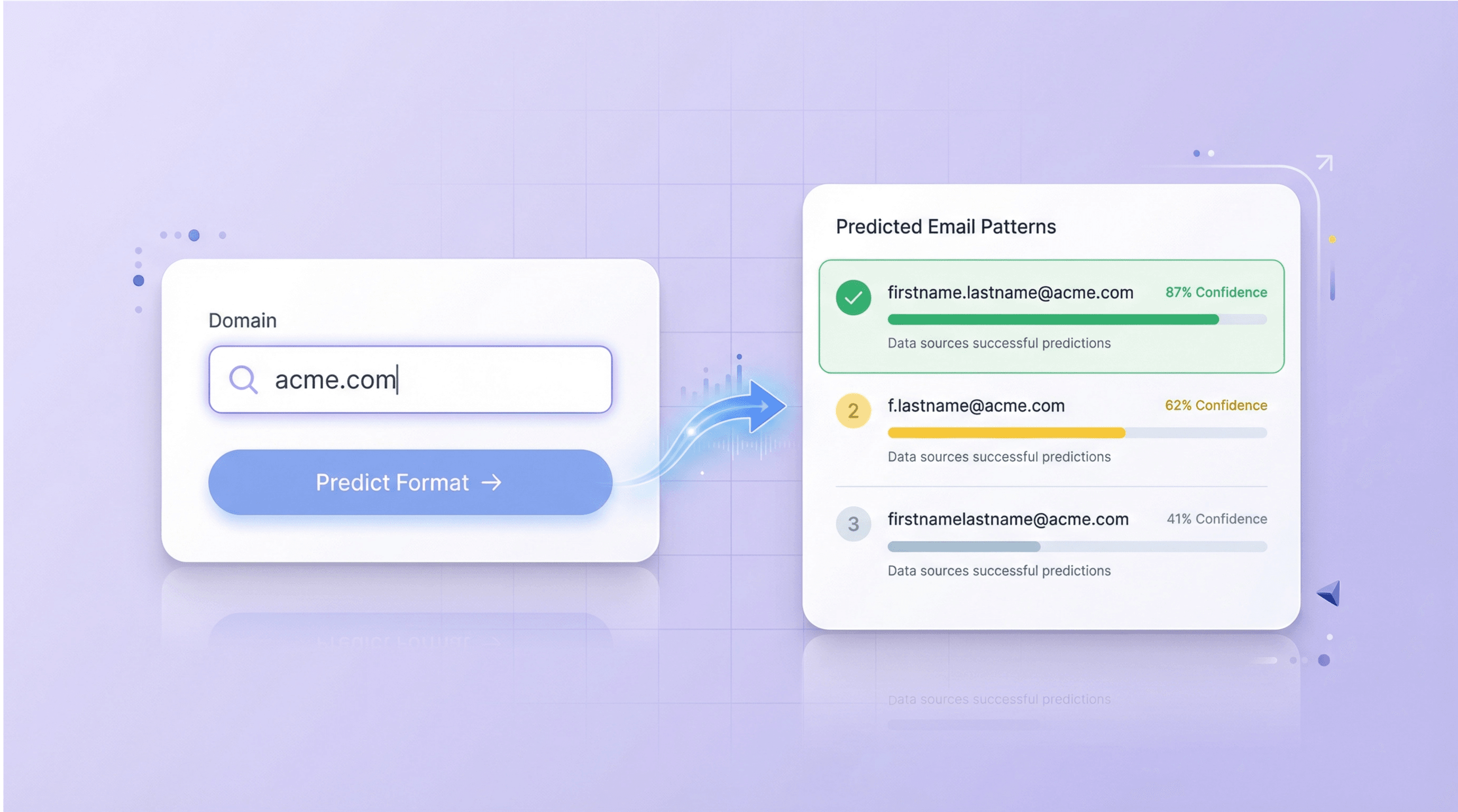
Email Format Finder किसी कंपनी के डोमेन और सामान्य कॉर्पोरेट naming conventions का विश्लेषण करके संगठन में इस्तेमाल होने वाले सबसे संभावित ईमेल फ़ॉर्मेट का अनुमान लगाता है। यह firstname.lastname@domain.com या f.lastname@domain.com जैसे कई रैंक किए गए पैटर्न, साथ में confidence scores और छोटे कारण भी दिखाता है। इससे sales, recruiting, और partnerships teams को valid work emails बनाने में अंदाज़े पर निर्भर नहीं रहना पड़ता।
मुफ़्त शुरू करें
email_format_finder_section1.png

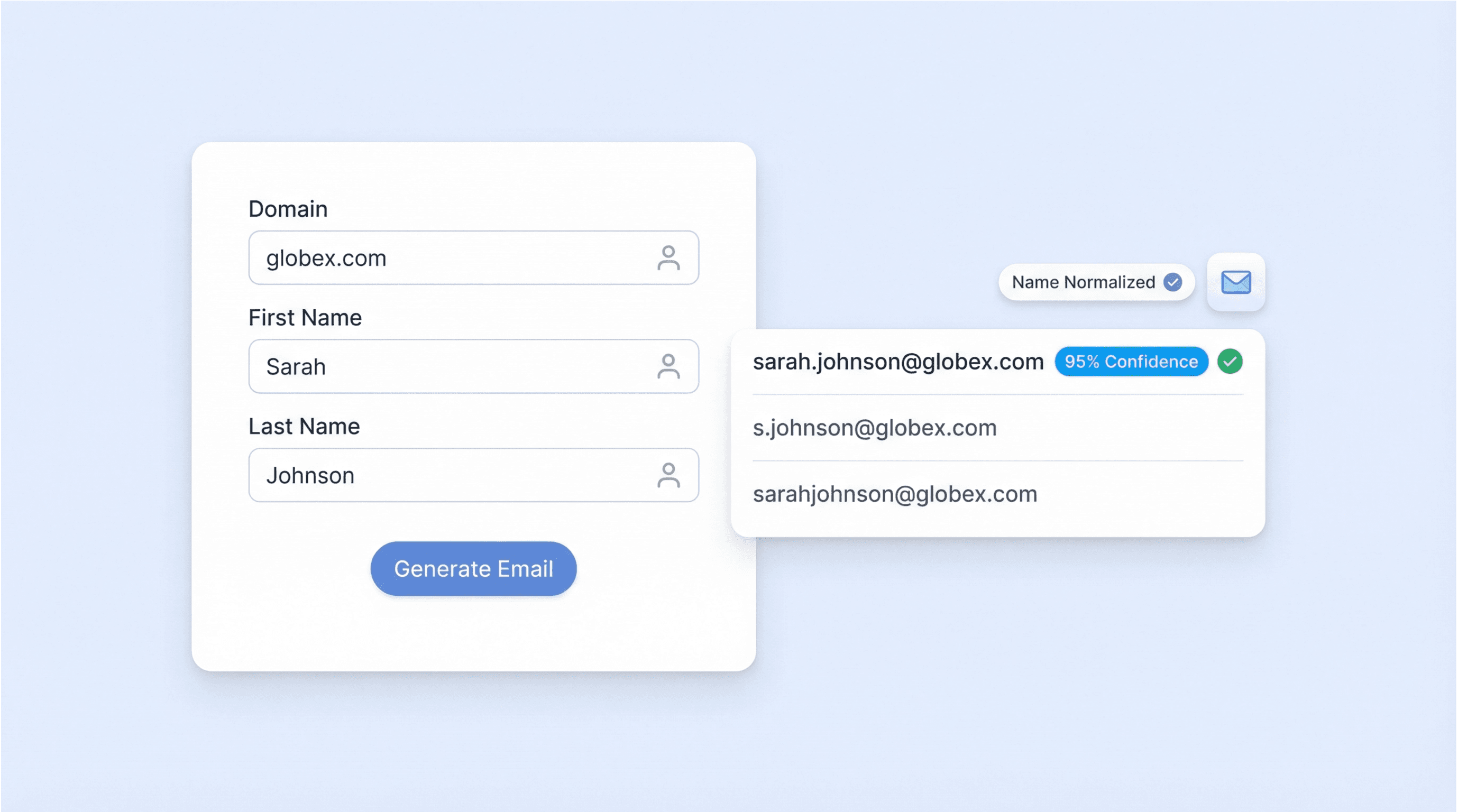
किसी खास व्यक्ति के लिए संभावित ईमेल बनाएं

First name और last name जोड़कर उस व्यक्ति के लिए संभावित ईमेल पता तैयार करें, जो डोमेन के अनुमानित फ़ॉर्मेट पर आधारित होगा। टूल नामों को normalize करता है (lowercase करके और accents/punctuation हटाकर) ताकि formatting errors कम हों, और हर candidate pattern के लिए example भी देता है। यह तब उपयोगी है जब आपके पास किसी contact का नाम हो लेकिन सीधे ईमेल न हो, और आप validate करने के लिए एक structured shortlist चाहते हों।
मुफ़्त शुरू करें
email_format_finder_section2.png

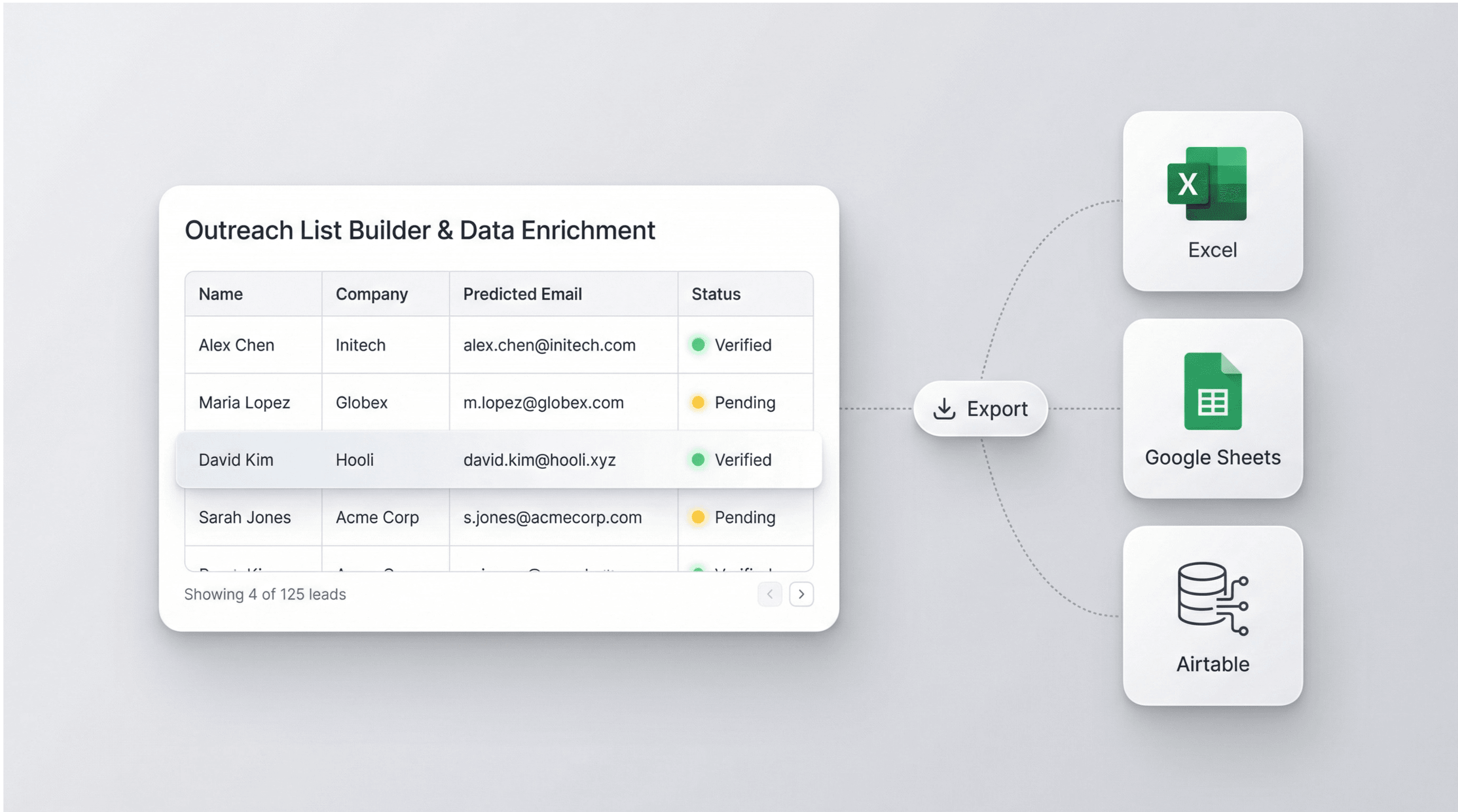
Outreach lists बनाएं और lead data enrich करें

Predicted formats का उपयोग करके lead lists में missing emails complete करें, फिर Thunderbit web scraping के साथ names, roles, और company pages directories या LinkedIn-style listings से इकट्ठा करें। Enrichment के बाद अपनी table को Excel, Google Sheets, Airtable, या Notion में sequencing, CRM import, या team review के लिए export करें। यह workflow manual research कम करता है और tools के बीच contact data को consistent रखता है।
मुफ़्त शुरू करें
email_format_finder_section3.png

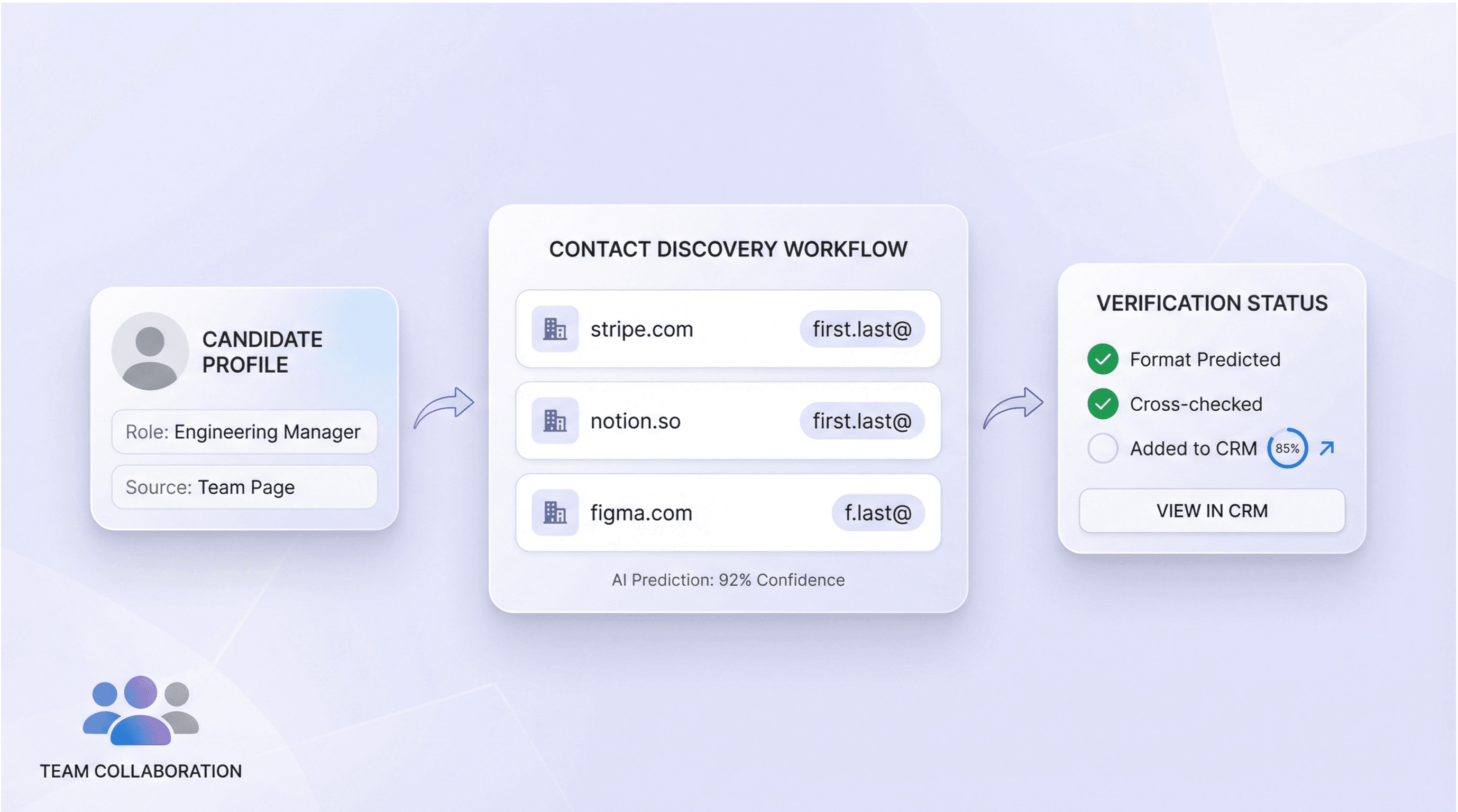
Recruiting और partnerships के लिए contact discovery को standardize करें

Recruiters और partner managers एक ही domain-based format logic को कई target companies पर लागू करके candidates, hiring managers, या business stakeholders के लिए consistent contact hypotheses बना सकते हैं। Thunderbit के Email Extractor और subpage scraping के साथ output को मिलाकर team pages, press releases, या PDFs में मिले emails cross-check करें। फिर ranked candidates और confidence scores को अपने system में follow-up और verification के लिए store करें।
मुफ़्त शुरू करें
email_format_finder_section4.png

Thunderbit के बारे में उपयोगकर्ता क्या कहते हैं

Taryn W.Growth Strategist@Thunderbit ने मेरे competitor research करने का तरीका बदल दिया। मैं 'AI Suggest Fields' पर क्लिक करती हूँ, और यह paginated results में एक साफ़ टेबल बना देता है—ना coding, ना CSS. लंबे-tail marketplaces से product data analyze करते समय यह बहुत समय बचाता है।
Miles T.Sales Development Consultantमैं Thunderbit का उपयोग directories से emails और phone numbers लेने के लिए करता हूँ। यह एक क्लिक में साफ़ contact info निकाल देता है, और Sheets या Notion में export करना कुछ ही सेकंड लेता है। कोई extra setup नहीं, कोई coding नहीं—बस काम का data, तुरंत उपयोग के लिए तैयार।
Rhea C.E-commerce AnalystThunderbit मुझे कई pages पर SKU data मॉनिटर करने में मदद करता है। मैं listings स्क्रैप करती हूँ, फिर Subpage Scraping से full product specs, pricing, reviews, और stock निकालती हूँ। AI सब कुछ मेरे तय किए हुए columns में व्यवस्थित कर देता है।
Cassian B.Real Estate AdvisorThunderbit का Scheduled Scraper real estate tracking को आसान बनाता है। मैं interval को simple English में बताता हूँ, और यह अपने आप updated listings, prices, और links खींच लेता है—setup दोबारा छूने की जरूरत नहीं। सरल और बहुत उपयोगी।
Dorian B.Content & SEO Specialistमैं Thunderbit के Field AI Prompts का उपयोग scraped blog content को साफ़ करने और tag करने के लिए करता हूँ। यह titles, authors, और categories तक सुझाता है। dynamic sites और subpages पर बढ़िया काम करता है—structured SEO datasets बनाने के लिए बिल्कुल सही।
Lina K.Marketplace Operations Leadहम Thunderbit का उपयोग niche stores से SKUs track करने के लिए करते हैं। Cloud Scraping एक बार में 50 pages संभाल लेता है, और login-required sites के लिए हम browser mode में switch कर देते हैं। यह तेज़, flexible है, और ongoing maintenance या manual edits की जरूरत नहीं होती।
Jorge F.Inbound Sales ManagerThunderbit का AI Autofill बहुत काम आता है। contact info स्क्रैप करने के बाद, मैं इसका उपयोग सीधे ब्राउज़र में lead forms भरने के लिए करता हूँ। मैं बस tab चुनता हूँ, और यह scraped row का उपयोग करके सब कुछ भर देता है। manual input की जरूरत नहीं।
Alina D.Freelance Researcherमैं PDFs, image-based sites, और infinite scroll pages से डेटा निकालने के लिए Thunderbit पर भरोसा करती हूँ। यह messy formats को AI से संभालता है और ऐसे tables देता है जिन्हें मैं कुछ ही सेकंड में Google Sheets या Airtable में भेज सकती हूँ।
Taryn W.Growth Strategist@Thunderbit ने मेरे competitor research करने का तरीका बदल दिया। मैं 'AI Suggest Fields' पर क्लिक करती हूँ, और यह paginated results में एक साफ़ टेबल बना देता है—ना coding, ना CSS. लंबे-tail marketplaces से product data analyze करते समय यह बहुत समय बचाता है।
Miles T.Sales Development Consultantमैं Thunderbit का उपयोग directories से emails और phone numbers लेने के लिए करता हूँ। यह एक क्लिक में साफ़ contact info निकाल देता है, और Sheets या Notion में export करना कुछ ही सेकंड लेता है। कोई extra setup नहीं, कोई coding नहीं—बस काम का data, तुरंत उपयोग के लिए तैयार।
Rhea C.E-commerce AnalystThunderbit मुझे कई pages पर SKU data मॉनिटर करने में मदद करता है। मैं listings स्क्रैप करती हूँ, फिर Subpage Scraping से full product specs, pricing, reviews, और stock निकालती हूँ। AI सब कुछ मेरे तय किए हुए columns में व्यवस्थित कर देता है।
Cassian B.Real Estate AdvisorThunderbit का Scheduled Scraper real estate tracking को आसान बनाता है। मैं interval को simple English में बताता हूँ, और यह अपने आप updated listings, prices, और links खींच लेता है—setup दोबारा छूने की जरूरत नहीं। सरल और बहुत उपयोगी।
Dorian B.Content & SEO Specialistमैं Thunderbit के Field AI Prompts का उपयोग scraped blog content को साफ़ करने और tag करने के लिए करता हूँ। यह titles, authors, और categories तक सुझाता है। dynamic sites और subpages पर बढ़िया काम करता है—structured SEO datasets बनाने के लिए बिल्कुल सही।
Lina K.Marketplace Operations Leadहम Thunderbit का उपयोग niche stores से SKUs track करने के लिए करते हैं। Cloud Scraping एक बार में 50 pages संभाल लेता है, और login-required sites के लिए हम browser mode में switch कर देते हैं। यह तेज़, flexible है, और ongoing maintenance या manual edits की जरूरत नहीं होती।
Jorge F.Inbound Sales ManagerThunderbit का AI Autofill बहुत काम आता है। contact info स्क्रैप करने के बाद, मैं इसका उपयोग सीधे ब्राउज़र में lead forms भरने के लिए करता हूँ। मैं बस tab चुनता हूँ, और यह scraped row का उपयोग करके सब कुछ भर देता है। manual input की जरूरत नहीं।
Alina D.Freelance Researcherमैं PDFs, image-based sites, और infinite scroll pages से डेटा निकालने के लिए Thunderbit पर भरोसा करती हूँ। यह messy formats को AI से संभालता है और ऐसे tables देता है जिन्हें मैं कुछ ही सेकंड में Google Sheets या Airtable में भेज सकती हूँ।

अक्सर पूछे जाने वाले प्रश्न

AI का उपयोग करके डेटा निकालें
Google Sheets, Airtable, या Notion में डेटा आसानी से ट्रांसफर करें
PRODUCT HUNT#1 Product of the Week