Crunchbase Scraper

द्वारा
Extract key company details from any Crunchbase profile, including funding, social links, and descriptions. Save time on research and export structured data in one click.

क्या आप बल्क में डेटा स्क्रैप करना चाहते हैं? Thunderbit को मुफ्त में आज़माएँ।

Chrome Store Rating
PRODUCT HUNT#1 Product of the Week
Accenture logoCriteo logoGrammarly logoVerisk logoklook logoPuma logoRingCentral logoAccenture logoCriteo logoGrammarly logoVerisk logoklook logoPuma logoRingCentral logoAccenture logoCriteo logoGrammarly logoVerisk logoklook logoPuma logoRingCentral logoAccenture logoCriteo logoGrammarly logoVerisk logoklook logoPuma logoRingCentral logoAccenture logoCriteo logoGrammarly logoVerisk logoklook logoPuma logoRingCentral logoAccenture logoCriteo logoGrammarly logoVerisk logoklook logoPuma logoRingCentral logo
Extract Company Data from CrunchbaseScrape company profiles from Crunchbase in seconds with Thunderbit. Get structured data for research, sales, or analysis—no manual copy-paste required.
chrome-web-store
इंस्टॉल करें:Chrome Web Store

Extract Company Data from Crunchbase

Thunderbit lets you pull company names, funding, social links, and more from Crunchbase with just a URL. The AI-powered scraper structures your data and supports exporting to Google Sheets, Airtable, or Notion for easy analysis. With support for subpage and pagination scraping, Thunderbit captures all relevant company information, even from linked pages or documents. Use built-in templates for popular sites and automate your data collection workflow—no coding or setup needed.

How to Extract Company Details from Crunchbase Using Thunderbit

step_01.png
STEP 1Download and InstallDownload and install the Thunderbit Chrome Extension from the Thunderbit Chrome Extension Download Page. Once installed, log in or create a free account to get started.
step_02.png
STEP 2Open ExtensionNavigate to the Crunchbase company profile page you want to extract details from. Open the Thunderbit Chrome Extension and select the 'Crunchbase Scraper' tool from the menu. Enter the full Crunchbase company profile URL in the provided field.
step03.png
STEP 3Click the Extract Company Details ButtonClick the 'Extract Company Details' button. Thunderbit will process the Crunchbase page and extract information such as Company Name,Headquarters Location, Description, Company Type, LinkedIn URL, Facebook URL, Company Website, and Total Funding into a structured table. You can then export the results to Excel, Google Sheets, Airtable, Notion, or download them as CSV or JSON.

Learn how to extract company details from Crunchbase profiles

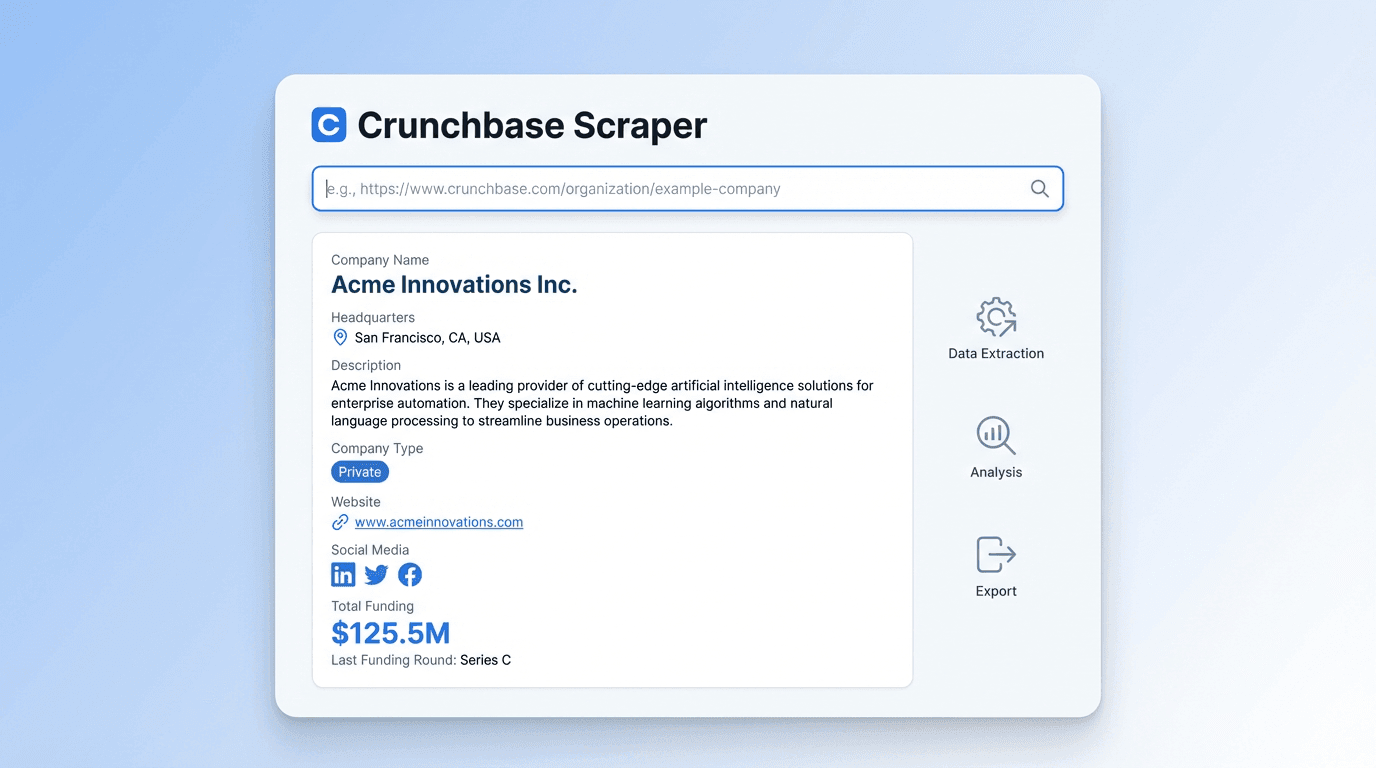
Extract Comprehensive Company Information

The Crunchbase Scraper allows you to gather a wide range of company details by simply entering a Crunchbase company profile URL. It identifies and organizes information such as company name, headquarters location, full description, company type, social media links, website, and total funding. This tool is ideal for sales, business development, and research professionals who need accurate company data for prospecting or market analysis.
मुफ्त में शुरू करें
crunchbase_scraper_interface (1).png

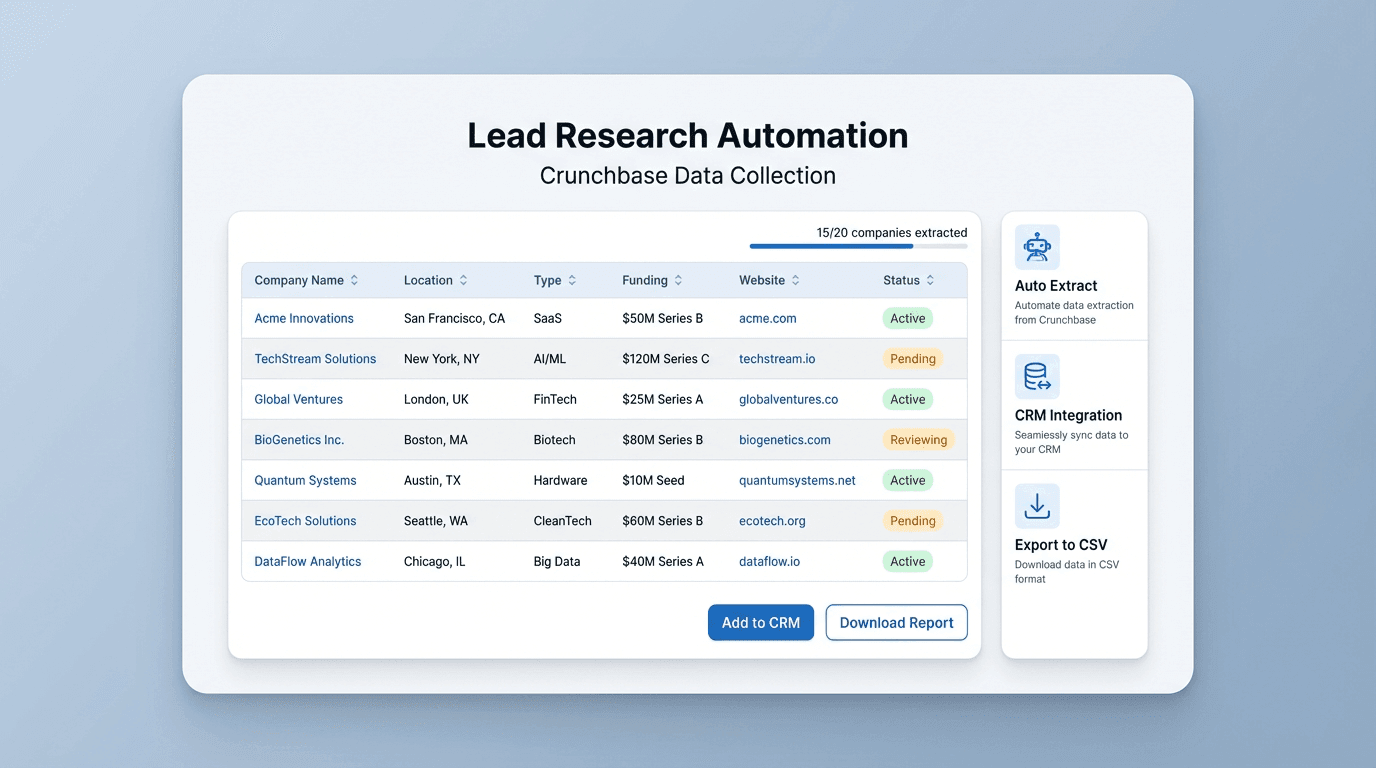
Automate Data Collection for Lead Research

By automating the extraction of company data from Crunchbase, you can save significant time compared to manual research. The tool ensures that all relevant fields are captured and structured in a table, reducing the risk of missing key information. This is especially useful for teams building lead lists, tracking competitors, or enriching CRM records with up-to-date company profiles.
मुफ्त में शुरू करें
crunchbase_lead_research_interface (1).png

Export and Integrate Company Data Effortlessly

Once the company details are extracted, you can export the data to Excel, Google Sheets, Airtable, or Notion. The output is formatted in a table, making it easy to integrate into your existing workflows. This feature supports quick sharing with your team or direct import into sales and marketing tools, streamlining your data management process.
मुफ्त में शुरू करें
crunchbase_export_integration_interface (1).png

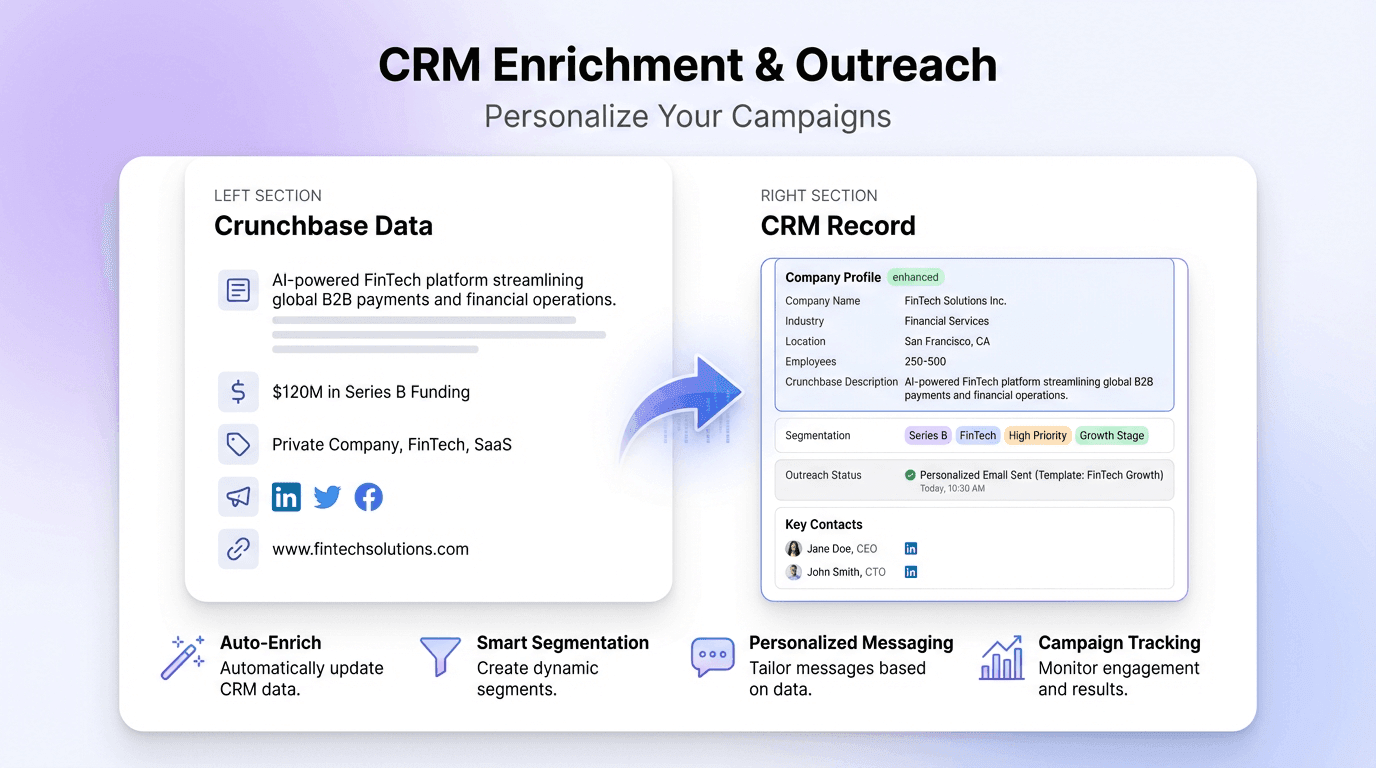
Enrich CRM and Outreach Campaigns

Use the extracted Crunchbase data to enhance your CRM records or personalize outreach campaigns. With access to company descriptions, funding information, and social media links, you can tailor your messaging and segment your audience more effectively. This helps sales and marketing teams improve targeting and engagement with potential clients or partners.
मुफ्त में शुरू करें
crunchbase_crm_enrichment_interface (1).png

और मुफ्त टूल्स देखें

TAM SAM SOM कैलकुलेटर

टॉप-डाउन या बॉटम-अप इनपुट के आधार पर अपने बाजार अवसर का अनुमान लगाएँ। योजना, फंडरेज़िंग और वैलिडेशन के लिए स्पष्ट TAM, SAM और SOM परिणाम पाएँ।

डिस्काउंट कैलकुलेटर

मूल कीमत और डिस्काउंट रेट से बचत और अंतिम कीमत निकालें—या अंतिम कीमत से उल्टा हिसाब लगाकर डिस्काउंट प्रतिशत पता करें। दो दशमलव तक सटीक, साफ़-सुथरे टोटल्स के साथ खरीदारी के फैसले तेज़ करें।

ROI कैलकुलेटर

लागत और शुद्ध लाभ के आधार पर निवेश पर रिटर्न (ROI) निकालें। अवसरों की तुलना और प्रोजेक्ट परफॉर्मेंस का आकलन करने के लिए स्पष्ट ROI प्रतिशत पाएं।

वैट चेकर

आधिकारिक डेटाबेस के आधार पर VAT नंबर की पुष्टि करें और उसकी वैधता जांचें। जहाँ उपलब्ध हो, इनवॉइसिंग और कंप्लायंस जोखिम कम करने के लिए रजिस्टर्ड कंपनी की जानकारी—जैसे नाम और पता—भी प्राप्त करें।

ब्रेक-ईवन कैलकुलेटर

कुल लागत कवर करने के लिए आवश्यक बिक्री मात्रा की गणना करें। ब्रेक-ईवन यूनिट्स जानने के लिए स्थिर लागत, प्रति यूनिट परिवर्ती लागत, और प्रति यूनिट मूल्य दर्ज करें। आत्मविश्वास के साथ मूल्य निर्धारण और लक्ष्य तय करें।

ऑनलाइन शब्द गणक

किसी भी टेक्स्ट में शब्द, अक्षर, वाक्य और पैराग्राफ की गिनती करें। लेखन, पढ़ाई और संपादन के लिए साफ-सुथरे लंबाई आँकड़े पाएं।

Random Team Generator

Quickly split a list of names into random teams based on your chosen team count. Ideal for group activities, meetings, or classroom assignments.


BIN चेकर

कार्ड का BIN खोजकर जारी करने वाला बैंक, ब्रांड, प्रकार और देश पहचानें। भुगतान विवरण सत्यापित करके गलतियाँ कम करें और जोखिमभरे लेन-देन जल्दी पकड़ें।

ईएसपी खोजक

किसी ईमेल या डोमेन के पीछे कौन-सा Email Service Provider (ESP) है, यह पहचानें। प्रोवाइडर की जानकारी, MX रिकॉर्ड्स और कॉन्फिडेंस स्कोर देखकर आउटरीच और IT वेरिफिकेशन को सपोर्ट करें।

मुफ़्त ऑनलाइन प्रोफ़ाइल स्क्रैपर

एआई का उपयोग करके सोशल और लिस्टिंग पेजों से संरचित सार्वजनिक प्रोफ़ाइल डेटा निकालें। विश्लेषण और आउटरीच के लिए नाम, हैंडल, बायो, स्थान और फ़ॉलोअर आँकड़े इकट्ठा करें।

Talabat स्क्रैपर

Talabat लिस्टिंग्स से रेस्टोरेंट डेटा निकालें और उसे विश्लेषण के लिए एक संरचित तालिका में बदलें। मैन्युअल रिसर्च में समय बचाएँ और प्रतिस्पर्धियों पर उपयोगी अंतर्दृष्टि पाएँ।

Glassdoor Review Exporter

Extract company reviews from Glassdoor, including ratings, summaries, pros, cons, and employee details, into a structured table for easy analysis.

Naver क्रॉलिंग टूल

Naver पेजों से शीर्षक, लिंक, सारांश और तिथियाँ निकालें। खोज परिणामों और पेज सामग्री से संरचित डेटा के साथ शोध में समय बचाएँ।

इमेज से एक्सेल कन्वर्टर

टेबल, रसीदों या सूचियों की तस्वीरों को संरचित JSON ऐरे में बदलें, ताकि उन्हें आसानी से Excel में निर्यात किया जा सके। मैन्युअल डेटा एंट्री में समय बचाएँ और सटीकता सुनिश्चित करें।

एआई ईमेल विषय पंक्ति जनरेटर

एक छोटी-सी जानकारी के आधार पर आकर्षक ईमेल विषय पंक्तियाँ बनाएं। AI-संचालित सुझावों से ओपन रेट बढ़ाएँ। तेज़, आसान और बिना साइन-अप के।

Amazon प्रोडक्ट्स स्क्रैपर

Amazon उत्पादों के URL पेस्ट करके उनसे प्रोडक्ट जानकारी निकालें। शीर्षक, कीमत, रेटिंग और अन्य विवरणों को एक व्यवस्थित टेबल में पाएं, ताकि आप उन्हें जल्दी से एक्सपोर्ट और रिव्यू कर सकें।

अभी और टूल्स खोजें

Thunderbit के बारे में उपयोगकर्ता क्या कहते हैं

Taryn W.Growth Strategist@Thunderbit ने मेरे competitor research करने का तरीका बदल दिया। मैं 'AI Suggest Fields' पर क्लिक करती हूँ, और यह paginated results के across एक साफ table बना देता है—कोडिंग नहीं, CSS नहीं। लंबे-tail marketplaces से product data analyze करते समय यह बहुत समय बचाता है।
Miles T.Sales Development Consultantमैं Thunderbit का उपयोग directories से emails और phone numbers लेने के लिए करता हूँ। यह एक क्लिक में साफ contact info निकाल देता है, और Sheets या Notion में export करना कुछ ही सेकंड लेता है। कोई extra setup नहीं, कोई coding नहीं—बस काम का data तुरंत तैयार।
Rhea C.E-commerce AnalystThunderbit मुझे कई पेजों पर SKU data मॉनिटर करने में मदद करता है। मैं listings स्क्रैप करती हूँ, फिर Subpage Scraping से पूरी product specs, pricing, reviews और stock लेती हूँ। AI सब कुछ मेरे तय किए हुए columns में व्यवस्थित कर देता है।
Cassian B.Real Estate AdvisorThunderbit का Scheduled Scraper real estate tracking को आसान बनाता है। मैं interval को simple English में बताता हूँ, और यह सेटअप दोबारा छुए बिना खुद ही updated listings, prices और links निकाल देता है। आसान और बहुत practical।
Dorian B.Content & SEO Specialistमैं Thunderbit के Field AI Prompts का इस्तेमाल scraped blog content को साफ और tag करने के लिए करता हूँ। यह titles, authors निकालता है और categories तक suggest करता है। Dynamic sites और subpages पर बहुत बढ़िया काम करता है—structured SEO datasets बनाने के लिए perfect।
Lina K.Marketplace Operations Leadहम Thunderbit से niche stores के SKUs ट्रैक करते हैं। Cloud Scraping एक बार में 50 pages संभाल लेता है, और login-required sites के लिए हम browser mode पर स्विच कर देते हैं। यह तेज़, flexible है, और लगातार maintenance या manual edits नहीं मांगता।
Jorge F.Inbound Sales ManagerThunderbit का AI Autofill बहुत बड़ा सहारा है। contact info स्क्रैप करने के बाद, मैं इसका इस्तेमाल सीधे browser में lead forms भरने के लिए करता हूँ। मैं बस tab चुनता हूँ, और यह scraped row से सब कुछ भर देता है। manual input की जरूरत नहीं।
Alina D.Freelance Researcherमैं PDFs, image-based sites और infinite scroll pages से data निकालने के लिए Thunderbit पर भरोसा करती हूँ। यह messy formats को AI से संभालता है और ready-to-export tables देता है जिन्हें मैं कुछ ही सेकंड में Google Sheets या Airtable में भेज सकती हूँ।
Taryn W.Growth Strategist@Thunderbit ने मेरे competitor research करने का तरीका बदल दिया। मैं 'AI Suggest Fields' पर क्लिक करती हूँ, और यह paginated results के across एक साफ table बना देता है—कोडिंग नहीं, CSS नहीं। लंबे-tail marketplaces से product data analyze करते समय यह बहुत समय बचाता है।
Miles T.Sales Development Consultantमैं Thunderbit का उपयोग directories से emails और phone numbers लेने के लिए करता हूँ। यह एक क्लिक में साफ contact info निकाल देता है, और Sheets या Notion में export करना कुछ ही सेकंड लेता है। कोई extra setup नहीं, कोई coding नहीं—बस काम का data तुरंत तैयार।
Rhea C.E-commerce AnalystThunderbit मुझे कई पेजों पर SKU data मॉनिटर करने में मदद करता है। मैं listings स्क्रैप करती हूँ, फिर Subpage Scraping से पूरी product specs, pricing, reviews और stock लेती हूँ। AI सब कुछ मेरे तय किए हुए columns में व्यवस्थित कर देता है।
Cassian B.Real Estate AdvisorThunderbit का Scheduled Scraper real estate tracking को आसान बनाता है। मैं interval को simple English में बताता हूँ, और यह सेटअप दोबारा छुए बिना खुद ही updated listings, prices और links निकाल देता है। आसान और बहुत practical।
Dorian B.Content & SEO Specialistमैं Thunderbit के Field AI Prompts का इस्तेमाल scraped blog content को साफ और tag करने के लिए करता हूँ। यह titles, authors निकालता है और categories तक suggest करता है। Dynamic sites और subpages पर बहुत बढ़िया काम करता है—structured SEO datasets बनाने के लिए perfect।
Lina K.Marketplace Operations Leadहम Thunderbit से niche stores के SKUs ट्रैक करते हैं। Cloud Scraping एक बार में 50 pages संभाल लेता है, और login-required sites के लिए हम browser mode पर स्विच कर देते हैं। यह तेज़, flexible है, और लगातार maintenance या manual edits नहीं मांगता।
Jorge F.Inbound Sales ManagerThunderbit का AI Autofill बहुत बड़ा सहारा है। contact info स्क्रैप करने के बाद, मैं इसका इस्तेमाल सीधे browser में lead forms भरने के लिए करता हूँ। मैं बस tab चुनता हूँ, और यह scraped row से सब कुछ भर देता है। manual input की जरूरत नहीं।
Alina D.Freelance Researcherमैं PDFs, image-based sites और infinite scroll pages से data निकालने के लिए Thunderbit पर भरोसा करती हूँ। यह messy formats को AI से संभालता है और ready-to-export tables देता है जिन्हें मैं कुछ ही सेकंड में Google Sheets या Airtable में भेज सकती हूँ।

Frequently Asked Questions

AI का उपयोग करके डेटा निकालें
डेटा को आसानी से Google Sheets, Airtable, या Notion में ट्रांसफर करें
Chrome Store Rating
PRODUCT HUNT#1 Product of the Week