Jumbo Scraper













Thunderbit के साथ Jumbo data को अनलॉक करें
Thunderbit की मदद से Jumbo से product data आसानी से extract करें।
Jumbo के layout बदलते ही टूटना बंद
क्या आप ऐसे scrapers से परेशान हैं जो Jumbo अपनी website redesign करते ही टूट जाते हैं? Thunderbit page content के meaning को समझता है — सिर्फ़ fixed CSS selectors पर निर्भर नहीं रहता। जब Jumbo discounted price field को बदलता है या product listing की structure अलग करता है, Thunderbit अपने-आप adapt हो जाता है और बिना किसी manual fix के product names, prices, availability और बहुत कुछ निकालता रहता है।

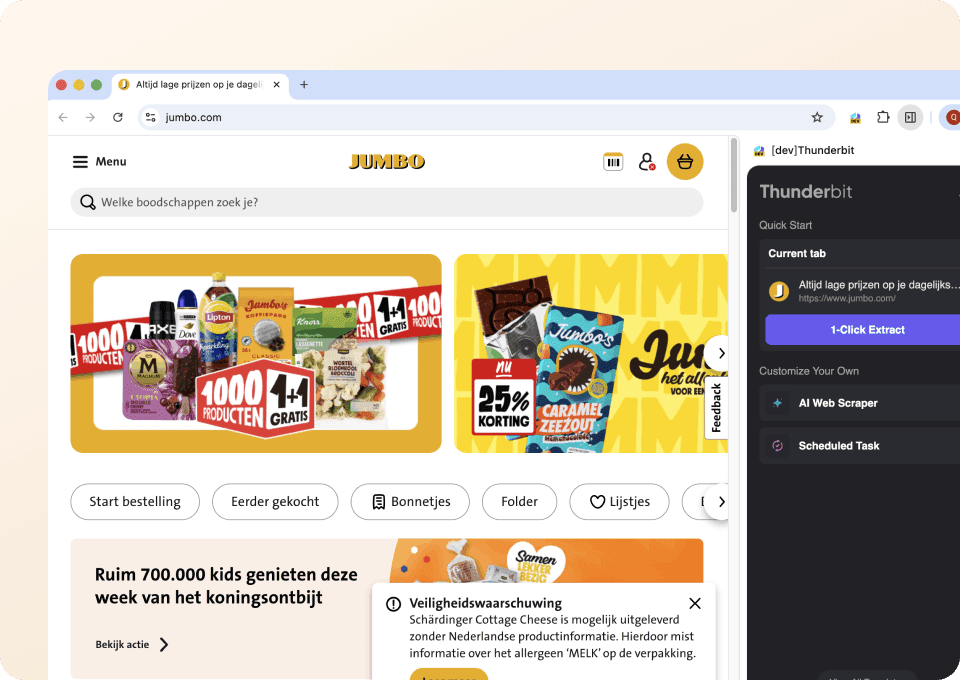
सिर्फ़ दो क्लिक में Jumbo data extract करें
जटिल code या confusing setup को भूल जाइए। Thunderbit के साथ Jumbo scraping बिल्कुल point-and-click जितना आसान है। जिन fields की आपको ज़रूरत है — product name, price, availability — उन्हें चुनिए, और AI पेज पर मौजूद सभी similar data को detect कर लेगा। दो क्लिक में आपका data Google Sheets, Notion या Excel में export करने के लिए तैयार हो जाता है।
समय-निर्धारित schedule पर Jumbo को automatically scrape करें
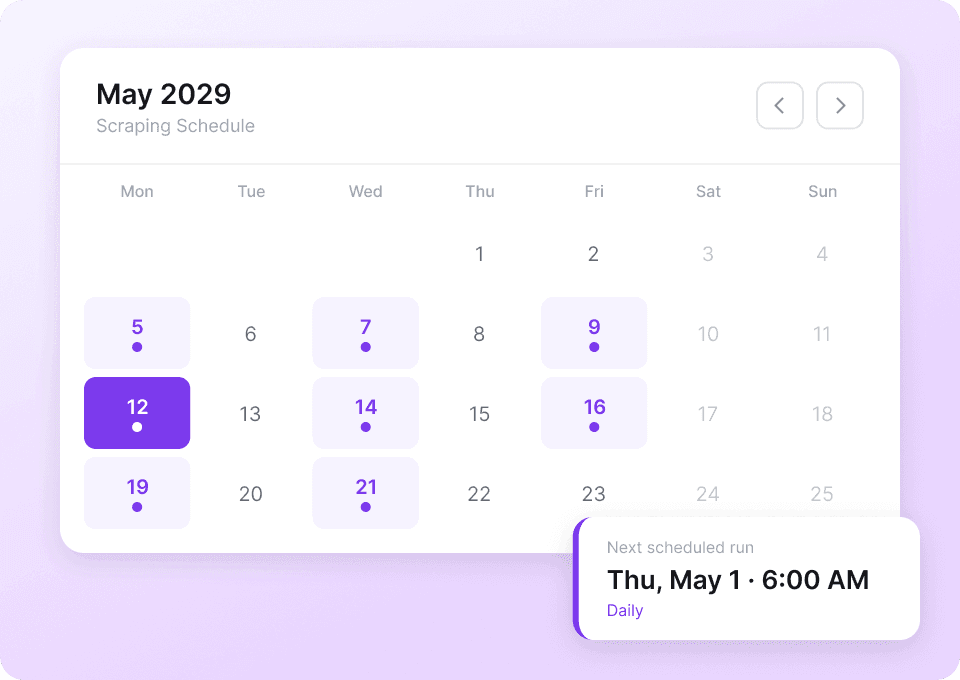
Jumbo पर prices और availability लगातार बदलते रहते हैं। हर दिन manual checking बंद कीजिए। Thunderbit के scheduled scraping को set up करें ताकि latest product listings, unit prices और category data आपके तय समय पर अपने-आप pull हो जाएँ। Fresh results सीधे Google Sheets में पहुँचते हैं, बिना आपकी उंगली उठाए।
Thunderbit पारंपरिक Jumbo scrapers से अलग क्यों है?
AI की मदद से Jumbo से बिना कोडिंग के आसानी से data extract करें।
पारंपरिक scrapers
काम करने का पुराना तरीकाThunderbit AI
ज़्यादा स्मार्ट तरीका







अक्सर पूछे जाने वाले सवाल
संबंधित उपयोग के मामले
Thunderbit के web scraper के और उपयोग के मामले देखें।

Craigslist फोन नंबर स्क्रैपर
Thunderbit का Craigslist फोन नंबर स्क्रैपर AI की मदद से Craigslist सर्च रिज़ल्ट्स से फोन नंबर और लिस्टिंग डिटेल्स निकालने में मदद करता है। लिस्टिंग्स स्क्रैप करें, हर पोस्ट खोलकर (सबपेज स्क्रैपिंग) कॉन्टैक्ट जानकारी और अतिरिक्त फ़ील्ड्स कैप्चर करें, फिर Excel, Google Sheets, Airtable, Notion, CSV या JSON में एक्सपोर्ट करें।
और जानें ->
PeopleWhiz स्क्रैपर
Thunderbit PeopleWhiz स्क्रैपर आपको AI-संचालित फ़ील्ड सुझावों के साथ PeopleWhiz खोज परिणामों और प्रोफाइलों से डेटा निकालने देता है। शोध, मार्केटिंग या लीड जनरेशन के लिए नाम, संपर्क विवरण, स्थान और भी बहुत कुछ इकट्ठा करें। PeopleWhiz डेटा को संरचित डेटासेट में जल्दी और कुशलता से बदलें।
और जानें ->
Sports Direct Scraper
Thunderbit के AI की मदद से सिर्फ 2 क्लिक में Sports Direct से प्रोडक्ट के नाम, कीमतें और डिस्काउंट प्रतिशत निकालें — और फिर अपना डेटा तुरंत Excel, Google Sheets या Notion में एक्सपोर्ट करें। न कोडिंग की ज़रूरत, न किसी सेटअप की।
और जानें ->
Substack स्क्रैपर
सिर्फ 2 क्लिक में Substack के सब्सक्राइबर काउंट, आर्टिकल टाइटल और पब्लिकेशन डिस्क्रिप्शन निकालें — फिर उन्हें Excel, Google Sheets या Notion में एक्सपोर्ट करें। किसी कोड की जरूरत नहीं; Thunderbit का AI पूरी structuring अपने आप कर देता है।
और जानें ->
Wikipedia स्क्रैपर
Wikipedia के infobox डेटा, संदर्भों और लेख के टेक्स्ट को सिर्फ 2 क्लिक में साफ़-सुथरी, structured spreadsheet में बदलें — और तुरंत Excel, Google Sheets या Notion में export करें, बिना किसी code के.
और जानें ->
Priceline स्क्रेपर
Thunderbit के AI की मदद से सिर्फ 2 क्लिक में Priceline से होटल के नाम, कीमतें, रेटिंग और सुविधाएँ निकालें — फिर साफ़, स्ट्रक्चर्ड डेटा तुरंत Excel, Google Sheets या Notion में एक्सपोर्ट करें।
और जानें ->क्या आप अपनी data extraction को तेज़ करना चाहते हैं?
Join 200,000+ professionals already using Thunderbit to automate their web scraping workflows.
फ्री ट्रायल 8 webpages के लिए unlimited credits देता है।



