Air Canada Scraper













Air Canada flight data आसानी से निकालें
Thunderbit आपको point-and-click तरीके से Air Canada से flight data scrape करने की सुविधा देता है।
Air Canada flights के लिए bulk scraping
अलग-अलग Air Canada पेजों से flight numbers, origin airports, destinations, departure times, arrival times और fares को हाथ से कॉपी करना बहुत समय लेने वाला काम है। Thunderbit आपको एक साथ सैकड़ों flight listings scrape करने देता है — बस Air Canada URLs की सूची पर इसे point करें, और डेटा अपने आप आना शुरू हो जाएगा।

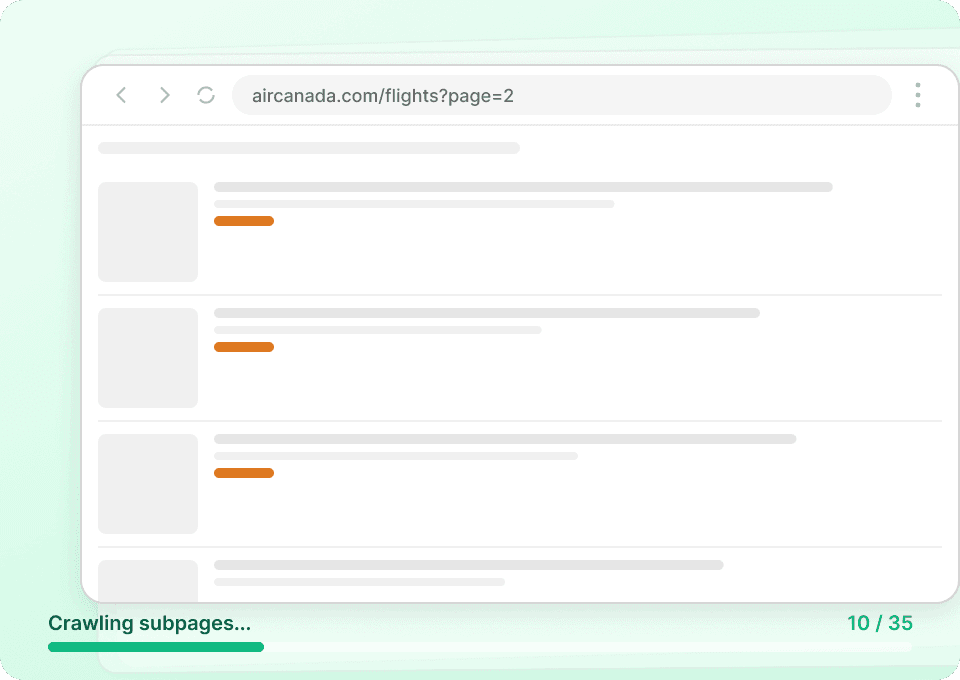
Air Canada flight की पूरी details पाएं
Air Canada की listing pages अक्सर ज़रूरी details नहीं दिखातीं। Thunderbit हर flight के subpage पर अपने आप जाता है और baggage allowance, fare conditions, cabin class जैसी अतिरिक्त जानकारी निकालकर उसे flight number, price और दूसरे core fields के साथ नए columns में जोड़ देता है।
Air Canada से आगे भी scrape करें
हर travel site के लिए अलग tool सीखने की क्या ज़रूरत? Thunderbit Air Canada पर out of the box काम करता है, और popular platforms के लिए इसके 50+ pre-built templates मौजूद हैं। आज Air Canada flights scrape करें, फिर उसी tool से दूसरे travel sites से भी डेटा निकालें — किसी नए software की ज़रूरत नहीं।
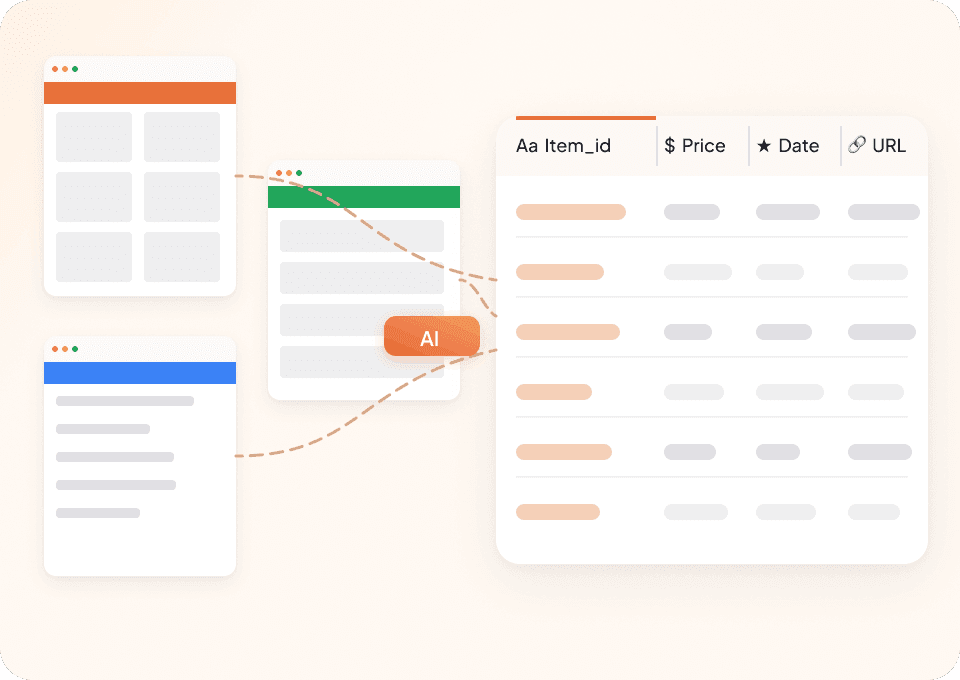
Thunderbit पारंपरिक Air Canada scrapers से अलग क्यों है?
Website बदलने पर भी aircanada data को आसानी से निकालें।
पारंपरिक scrapers
काम करने का पुराना तरीकाThunderbit AI
ज़्यादा स्मार्ट तरीका







अक्सर पूछे जाने वाले प्रश्न
संबंधित उपयोग के मामले
Thunderbit के web scraper के और उपयोग के मामले देखें।

Substack स्क्रैपर
सिर्फ 2 क्लिक में Substack के सब्सक्राइबर काउंट, आर्टिकल टाइटल और पब्लिकेशन डिस्क्रिप्शन निकालें — फिर उन्हें Excel, Google Sheets या Notion में एक्सपोर्ट करें। किसी कोड की जरूरत नहीं; Thunderbit का AI पूरी structuring अपने आप कर देता है।
और जानें ->
Carousell स्क्रैपर
Carousell की listings — item titles, descriptions, prices, और seller details — सिर्फ 2 clicks में extract करें, फिर डेटा सीधे Excel, Google Sheets, या Notion में export करें। किसी code या मुश्किल setup की ज़रूरत नहीं।
और जानें ->
United Airlines स्क्रैपर
सिर्फ 2 क्लिक में United Airlines से फ्लाइट नंबर, प्रस्थान समय, आगमन हवाई अड्डे और कीमतें निकालें — फिर उन्हें तुरंत Excel, Google Sheets या Notion में एक्सपोर्ट करें। बाकी काम Thunderbit AI अपने आप संभाल लेता है।
और जानें ->
Steam Scraper
सिर्फ 2 क्लिक में Steam गेम के नाम, कीमतें और यूज़र रिव्यू स्कोर निकालें—कोई कोडिंग नहीं चाहिए। साफ़ डेटा को सीधे Excel, Google Sheets या Notion में एक्सपोर्ट करें और तुरंत विश्लेषण शुरू करें।
और जानें ->
वीडियो स्क्रैपर
Thunderbit का Video Scraper आपको AI की मदद से सिर्फ कुछ क्लिक में वीडियो और क्रिएटर डेटा निकालने देता है। वीडियो लिस्टिंग, परफॉर्मेंस मेट्रिक्स और प्रोफ़ाइल डिटेल्स स्क्रैप करें, फिर ट्रैकिंग और इन्फ्लुएंसर रिसर्च के लिए डेटा को Excel, Google Sheets, Airtable या Notion में एक्सपोर्ट करें।
और जानें ->
PubMed स्क्रैपर
Thunderbit का PubMed स्क्रैपर AI की मदद से PubMed सर्च रिज़ल्ट्स और आर्टिकल पेजों से structured data निकालना आसान बनाता है। ट्रेंडिंग मेडिकल रिसर्च, क्लिनिकल ट्रायल एविडेंस, abstracts, authors, affiliations, publication dates और links को scrape करके Excel, Google Sheets, Airtable या Notion में export करें।
और जानें ->क्या आप अपनी data extraction को तेज़ करना चाहते हैं?
Join 200,000+ professionals already using Thunderbit to automate their web scraping workflows.
फ्री ट्रायल 8 webpages के लिए unlimited credits देता है।



