

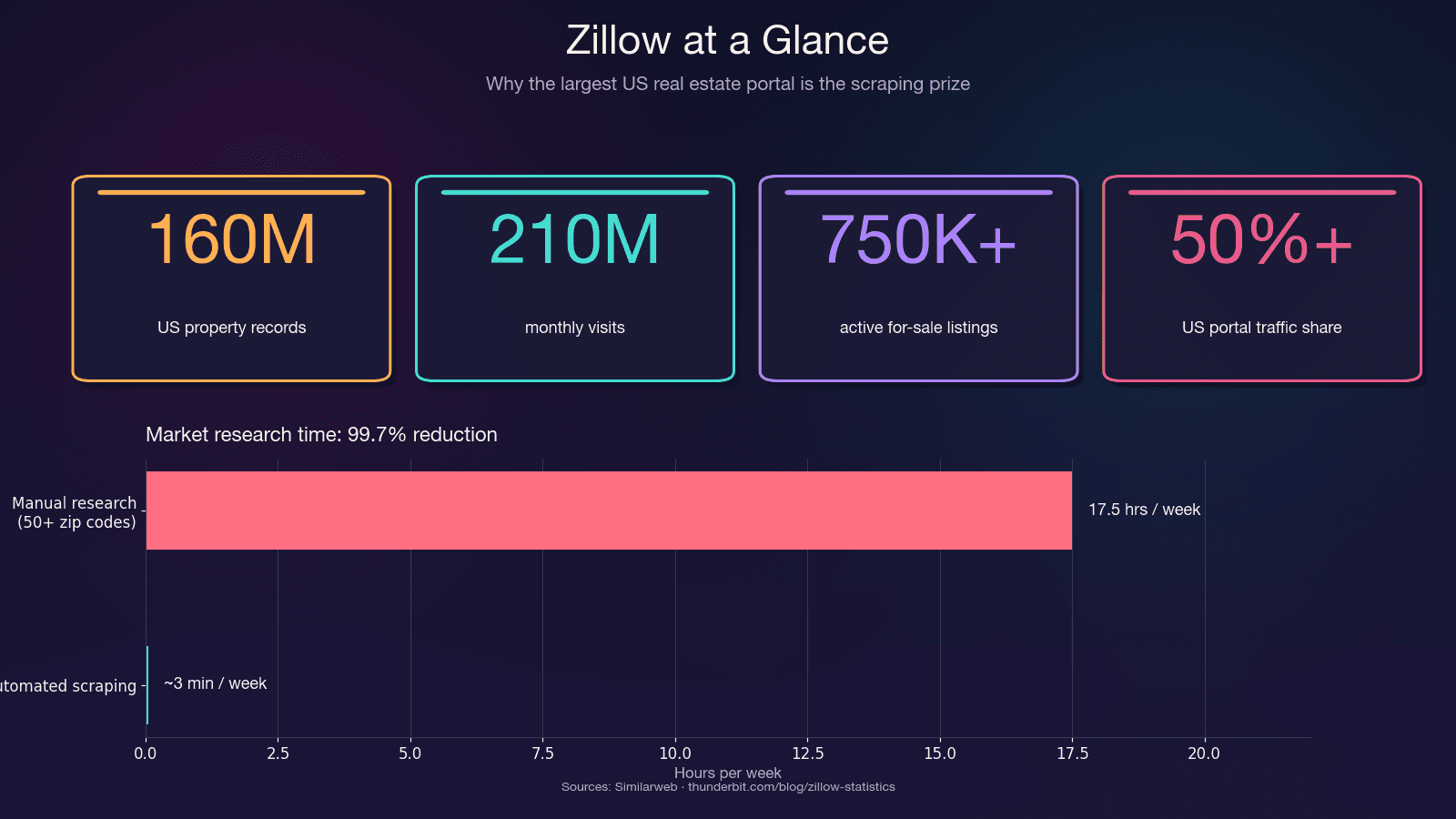
Zillow के पास 160 मिलियन US property records हैं, और इस data को बड़े पैमाने पर निकालना real estate data कामों में सबसे ज़्यादा मांगी जाने वाली — और सबसे ज़्यादा झुंझलाहट वाली — tasks में से एक है। अगर आपने कभी Zillow को scrape करने की कोशिश की हो और listing data की जगह CAPTCHA page देखकर रुक गए हों, तो आप अकेले नहीं हैं।
मैंने Zillow scraping के अलग-अलग तरीकों पर काफ़ी समय research और testing में लगाया है — Python के साथ भी, और Thunderbit में बने no-code tools के साथ भी। यह guide दोनों रास्तों को cover करती है। चाहे आपको anti-bot strategies के साथ पूरा Python walkthrough चाहिए हो, या बस lunch तक 200 listings spreadsheet में चाहिए हों, यहाँ आपके लिए section मौजूद है। हम देखेंगे कि Zillow data क्यों अहम है, site अंदर से कैसे बनी है, step-by-step Python tutorial, scrapers क्यों टूटते हैं, और price monitoring के लिए recurring scrapes को कैसे automate करें।
आखिर Zillow Data Scrape क्यों करें?
Zillow US residential real estate data का सबसे बड़ा repository है। यह 210 million monthly visits लाता है और लगभग 750,000+ active for-sale listings के साथ-साथ 1.9 million rental listings host करता है। यह platform US real estate portal traffic का 50% से भी ज़्यादा capture करता है — अगले competitor से दोगुने से भी अधिक।
Python code में उतरने से पहले यह समझना ज़रूरी है कि Zillow को Python से scrape करना ही एकमात्र option नहीं है, और गलत method चुनने से घंटों बर्बाद हो सकते हैं। httpx और BeautifulSoup जैसे Python tools के लिए intermediate skills चाहिए, headers और proxies को manually handle करना पड़ता है, speed मध्यम रहती है (1–3 seconds per page), और frequent maintenance की ज़रूरत होती है, हालांकि ये free हैं; Selenium या Playwright JavaScript render करके anti-bot handling बेहतर करते हैं, लेकिन ये धीमे होते हैं (5–15 seconds per page) और फिर भी high-maintenance रहते हैं; ScraperAPI या ScrapFly जैसी scraping APIs built-in anti-bot support के साथ तेज़ होती हैं और upkeep मध्यम होता है, लेकिन इनकी लागत $30–599 प्रति माह हो सकती है; Bridge Interactive के जरिए Zillow का official API तेज़ और कम maintenance वाला है, लेकिन सीमित है और लगभग $500 प्रति माह पड़ता है; और Thunderbit जैसे no-code tools beginner-friendly, fast, maintenance-free होते हैं क्योंकि ये AI adaptation का use करते हैं, और आमतौर पर freemium model देते हैं।
सिर्फ time savings ही अपने आप में बहुत बड़े हैं। 50+ zip codes में manual research में 15–20 घंटे प्रति सप्ताह लग सकते हैं। Automated scraping वही काम मिनटों में कर देता है — यानी time में 99.7% की कटौती।
Zillow को Scrape करने के सारे तरीके: Python vs. API vs. No-Code (तुलना)
Python code में जाने से पहले जान लें कि "Python से Zillow scrape करना" ही एकमात्र option नहीं है। गलत method चुनने से घंटों की बर्बादी होती है। यहाँ side-by-side comparison दिया गया है ताकि आप खुद सही विकल्प चुन सकें:
| तरीका | Skill Level | Anti-Bot Handling | Speed | Maintenance | Cost |
|---|---|---|---|---|---|
| Python + httpx/BeautifulSoup | Intermediate | Manual (headers, proxies) | Moderate (1–3s/page) | High (selectors टूट सकते हैं) | Free |
| Python + Selenium/Playwright | Intermediate | Better (JS render करता है) | Slow (5–15s/page) | High | Free |
| Scraping API (ScraperAPI, ScrapFly) | Intermediate | Built-in | Fast | Medium | $30–599/mo |
| Zillow Official API (Bridge Interactive) | Beginner–Intermediate | N/A | Fast | Low | ~$500/mo, limited access |
| No-Code Tool (Thunderbit) | Beginner | Built-in (AI adapt करता है) | Fast | None (AI page को दोबारा पढ़ता है) | Freemium |
अगर आपको अभी data चाहिए और code नहीं लिखना, तो Thunderbit से शुरू करें। अगर आप plumbing समझना चाहते हैं या full customization चाहिए, तो Python walkthrough आगे पढ़ें।
2 मिनट में तरीका: Thunderbit से Zillow Scrape करें (No Code)
Python deep-dive से पहले, यह रास्ता उन लोगों के लिए है जिन्हें जल्दी Zillow data चाहिए — न Python setup, न proxy configuration, न selector maintenance। हमने Thunderbit में यह workflow खास तौर पर structured real estate data निकालने के लिए बनाया है, बिना engineering overhead के।
Difficulty: Beginner Time Required: ~2 minutes What You'll Need: Chrome browser, Thunderbit Chrome Extension (free tier works)
Step 1: Thunderbit Install करें और Zillow खोलें
Chrome Web Store से Thunderbit extension install करें। Zillow search results page खोलें — उदाहरण के लिए, Houston, TX में homes search करें।
Step 2: "AI Suggest Fields" पर क्लिक करें
Thunderbit sidebar खोलें और "AI Suggest Fields" पर क्लिक करें। AI page को पढ़कर columns auto-suggest करता है: price, address, beds, baths, square footage, Zestimate, listing URL, और बहुत कुछ। मेरे tests में यह आम तौर पर बिना किसी manual configuration के 20+ fields detect कर लेता है।
Step 3: "Scrape" पर क्लिक करें
Scrape button दबाएँ। Data extension के अंदर structured table में भर जाता है। Thunderbit Zillow की pagination को automatically handle करता है — click-based और infinite scroll दोनों।
Step 4: Subpage Scraping से Enrich करें
Tax history, school ratings, या price history जैसे detail-page data चाहिए? अपनी table को enrich करने के लिए "Scrape Subpages" इस्तेमाल करें। Thunderbit हर listing URL follow करके extra fields निकाल लेता है — अतिरिक्त code की ज़रूरत नहीं।
Step 5: Export करें
Google Sheets, Excel, Airtable, या Notion में export करें। Export free है।
Zillow के लिए Thunderbit क्यों अच्छा काम करता है?
असल फायदा इसकी resilience है। Thunderbit की AI हर scrape पर page structure को fresh पढ़ती है। जब Zillow अपना layout बदलता है (जो अक्सर होता है), तब कोई brittle CSS selector fix नहीं करना पड़ता। AI अपने-आप adapt कर जाती है। यह coded scrapers की उस "inherently fragile" समस्या को सचमुच हल करता है जो बहुत सारे users को परेशान करती है।
Zillow से क्या-क्या Data निकाला जा सकता है? (20+ Fields)
ज़्यादातर guides सिर्फ price और address लेकर रुक जाती हैं। Zillow listings में actually उससे कहीं ज़्यादा extractable data होता है — यहाँ reference table है:
| Field | कहाँ मिलता है | Extraction Difficulty |
|---|---|---|
| List Price | Search + Detail | Easy |
| Address / Zip | Search + Detail | Easy |
| Zestimate | Search + Detail | Easy |
| Price History (हर event) | Detail | Hard (nested JSON) |
| Tax History | Detail | Hard (nested JSON) |
| Beds / Baths / Sqft | Search + Detail | Easy |
| Year Built | Detail | Easy |
| HOA Fee | Detail | Medium |
| Walk Score / Transit Score | Detail (iframe) | Hard (JS rendering की जरूरत) |
| School Ratings | Detail | Medium |
| Lot Size | Detail | Easy |
| Days on Zillow | Search | Easy |
| Listing Agent / Brokerage | Search + Detail | Medium |
| MLS # | Detail | Easy |
| Property Type | Search + Detail | Easy |
| Latitude / Longitude | __NEXT_DATA__ JSON | Medium |
| Description Text | Detail | Easy |
| Photo URLs | Search + Detail | Medium |
| Rent Zestimate | Detail | Medium |
| Nearby Comparable Sales | Detail | Hard |
"Hard" fields — price history, tax history, comparable sales — detail pages पर nested JSON में रहते हैं। नीचे Python section में दिखाया गया है कि इन्हें ठीक कैसे निकालना है। और अगर code छोड़ना चाहते हैं, तो Thunderbit का AI Suggest Fields इनमें से ज़्यादातर columns auto-detect कर लेता है, और उसकी Subpage Scraping detail-page fields अपने-आप pull कर लेती है।
Zillow Scrape करने के लिए Python Environment कैसे सेट करें
Difficulty: Intermediate Time Required: Setup के लिए ~5 minutes, full tutorial के लिए ~30 minutes What You'll Need: Python 3.8+, Chrome browser (pages inspect करने के लिए), एक text editor या IDE
ज़रूरी libraries install करें:
pip install httpx beautifulsoup4 pandas lxml
हर package क्या करता है:
- httpx —
requestsसे बेहतर performance वाला HTTP client और async support - beautifulsoup4 + lxml — HTML parsing
- pandas — CSV/Excel में data export
- Optionally: अगर JavaScript-heavy pages render करनी हों तो selenium या playwright
Scrape करने से पहले Zillow की Page Structure समझें
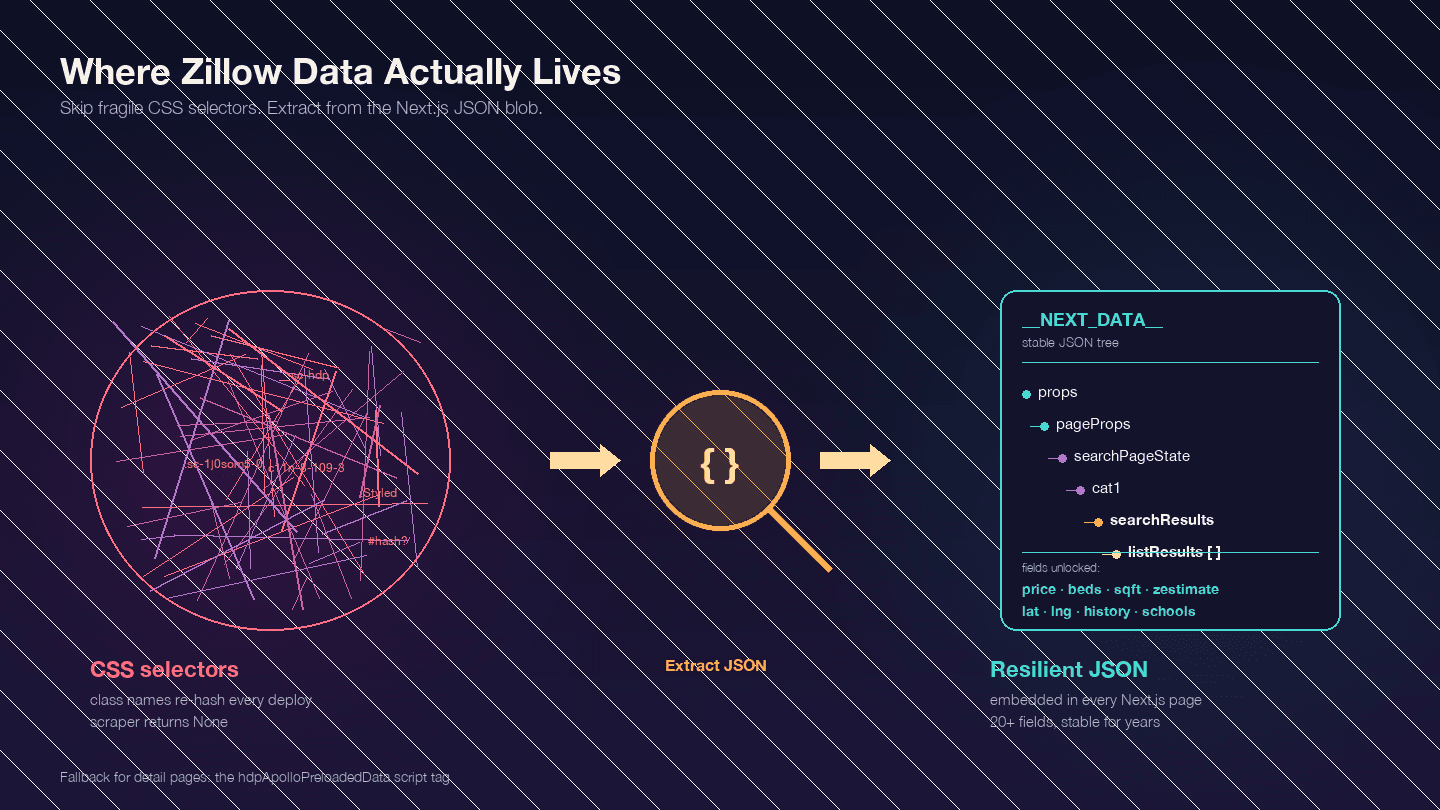
Code लिखने से पहले यह सबसे important बात है। Zillow एक Next.js application है — इसकी पुष्टि Zillow employees की engineering posts से होती है। इसका मतलब है कि आपको चाहिए वाला ज़्यादातर data visible HTML elements में नहीं होता। वह <script id="__NEXT_DATA__"> नाम के JSON blob में embedded रहता है।
किसी भी Zillow property page को खोलें, F12 दबाएँ, Elements में जाएँ और __NEXT_DATA__ खोजें। वहाँ आपको एक बड़ा JSON object मिलेगा जिसमें listing data होता है — prices, coordinates, property details, price history, tax records, school ratings, और बहुत कुछ।
यह क्यों महत्वपूर्ण है? Zillow के CSS class names hashed होते हैं (styled-components द्वारा generate किए गए) और हर deployment के साथ बदल जाते हैं। StyledPropertyCardHomeDetailsList-c11n-8-109-3__sc-1j0som5-0 जैसी class अगले हफ्ते पूरी तरह अलग hash ले सकती है। CSS selectors पर आधारित कोई भी scraper नियमित रूप से टूटेगा।
__NEXT_DATA__ JSON approach कहीं अधिक stable है क्योंकि यह HTML structure पर depend ही नहीं करता।
Search results के लिए key JSON paths:
| Path | Content |
|---|---|
props.pageProps.searchPageState.cat1.searchResults.listResults | Search results की array |
props.pageProps.searchPageState.cat1.searchResults.mapResults | Map-view results |
props.pageProps.searchPageState.cat1.searchList.totalPages | उपलब्ध total pages |
Detail pages के लिए कुछ __NEXT_DATA__ इस्तेमाल करते हैं और कुछ hdpApolloPreloadedData script tag का alternative format। नीचे दिया गया code दोनों को handle करता है।
Step-by-Step: Python से Zillow कैसे Scrape करें
Step 1: Instant Block से बचने के लिए HTTP Headers सेट करें
Zillow पर bare httpx.get() भेजने पर listing data की जगह CAPTCHA page मिलता है। Zillow PerimeterX (HUMAN Security) को Cloudflare के साथ use करता है — दोनों scraping benchmarks में 8/10 difficulty माने जाते हैं। यह system आपके TLS fingerprint, HTTP headers, और IP reputation को जांचता है।
2025 में काम करने वाले minimum headers ये हैं:
import httpx

headers = {
    "User-Agent": "Mozilla/5.0 (Windows NT 10.0; Win64; x64) AppleWebKit/537.36 "
                   "(KHTML, like Gecko) Chrome/124.0.0.0 Safari/537.36",
    "Accept": "text/html,application/xhtml+xml,application/xml;q=0.9,"
              "image/avif,image/webp,*/*;q=0.8",
    "Accept-Language": "en-US,en;q=0.9",
    "Accept-Encoding": "gzip, deflate, br",
    "Sec-Ch-Ua": '"Chromium";v="124", "Google Chrome";v="124", "Not-A.Brand";v="99"',
    "Sec-Ch-Ua-Platform": '"Windows"',
    "Sec-Fetch-Dest": "document",
    "Sec-Fetch-Mode": "navigate",
    "Sec-Fetch-Site": "none",
    "Sec-Fetch-User": "?1",
    "Upgrade-Insecure-Requests": "1",
}
Sec-Ch-Ua headers बहुत महत्वपूर्ण हैं। कई tutorials इन्हें छोड़ देते हैं — और यही कारण है कि उनका code PerimeterX के खिलाफ काम नहीं करता।
Step 2: Zillow Search Results Scrape करें
Zillow search URLs एक predictable pattern follow करते हैं। Houston, TX के लिए:
- Page 1:
https://www.zillow.com/houston-tx/ - Page 2:
https://www.zillow.com/houston-tx/2_p/ - Page 3:
https://www.zillow.com/houston-tx/3_p/
हर page पर लगभग 41 listings होती हैं। Zillow results को 20 pages तक cap करता है (~820 listings)। बड़े datasets के लिए आपको geography के हिसाब से split करना होगा (इस पर आगे बात करेंगे)।
__NEXT_DATA__ JSON से data निकालकर search results scrape करने का code यह है:
from bs4 import BeautifulSoup
import json
import time
import random

def scrape_zillow_search(url):
    """Zillow search results page से listing data scrape करें."""
    response = httpx.get(url, headers=headers, timeout=15)

    if response.status_code != 200:
        print(f"Got status {response.status_code} for {url}")
        return []

    soup = BeautifulSoup(response.text, "lxml")
    script_tag = soup.find("script", {"id": "__NEXT_DATA__"})

    if not script_tag:
        print("No __NEXT_DATA__ found — likely blocked by CAPTCHA")
        return []

    next_data = json.loads(script_tag.string)

    try:
        results = (
            next_data["props"]["pageProps"]["searchPageState"]
            ["cat1"]["searchResults"]["listResults"]
        )
    except KeyError:
        print("Unexpected JSON structure — Zillow may have changed its format")
        return []

    listings = []
    for item in results:
        listing = {
            "zpid": item.get("zpid"),
            "address": item.get("addressStreet"),
            "city": item.get("addressCity"),
            "state": item.get("addressState"),
            "zipcode": item.get("addressZipcode"),
            "price": item.get("unformattedPrice") or item.get("price"),
            "beds": item.get("beds"),
            "baths": item.get("baths"),
            "sqft": item.get("area"),
            "zestimate": item.get("zestimate"),
            "days_on_zillow": item.get("daysOnZillow"),
            "listing_url": item.get("detailUrl"),
            "img_src": item.get("imgSrc"),
            "property_type": item.get("hdpData", {}).get("homeInfo", {}).get("homeType"),
            "latitude": item.get("latLong", {}).get("latitude"),
            "longitude": item.get("latLong", {}).get("longitude"),
        }
        listings.append(listing)

    return listings
Multiple pages scrape करने के लिए, delays के साथ loop चलाएँ:
all_listings = []
base_url = "https://www.zillow.com/houston-tx/"

for page in range(1, 6):  # पहले 5 pages
    url = base_url if page == 1 else f"{base_url}{page}_p/"
    print(f"Scraping page {page}...")

    page_listings = scrape_zillow_search(url)
    all_listings.extend(page_listings)

    # 3-7 seconds के बीच random delay
    delay = random.uniform(3, 7)
    time.sleep(delay)

print(f"Total listings scraped: {len(all_listings)}")
आपको all_listings में structured listing data जुड़ता हुआ दिखना चाहिए। अगर results खाली मिलें, तो नीचे दिए गए "Why Scrapers Break" section को देखें।
Step 3: Zillow Property Detail Pages Scrape करें
Search results basics देते हैं। Detail pages में deeper data होता है: price history, tax history, school ratings, agent info, और property descriptions। Step 2 से मिला हर listing URL एक detail page की ओर ले जाता है।
Zillow detail pages दो संभावित data formats use करते हैं। दोनों को handle करने वाला code यह है:
def scrape_zillow_detail(url):
    """Zillow listing page से detailed property data scrape करें."""
    response = httpx.get(url, headers=headers, timeout=15)

    if response.status_code != 200:
        return None

    soup = BeautifulSoup(response.text, "lxml")

    # पहले __NEXT_DATA__ try करें (सबसे common)
    script_tag = soup.find("script", {"id": "__NEXT_DATA__"})
    if script_tag:
        next_data = json.loads(script_tag.string)
        try:
            cache_str = next_data["props"]["pageProps"]["componentProps"]["gdpClientCache"]
            cache = json.loads(cache_str)
            first_key = next(iter(cache))
            prop = cache[first_key]["property"]
            return extract_property_fields(prop)
        except (KeyError, StopIteration):
            pass

    # Fallback: hdpApolloPreloadedData
    apollo_tag = soup.find("script", {"id": "hdpApolloPreloadedData"})
    if apollo_tag:
        raw = json.loads(apollo_tag.string)
        api_cache = json.loads(raw["apiCache"])
        for key, value in api_cache.items():
            if "ForSale" in key or "property" in str(value)[:100]:
                prop = value.get("property", value)
                return extract_property_fields(prop)

    return None


def extract_property_fields(prop):
    """Zillow property JSON object से structured fields निकालें."""
    return {
        "zpid": prop.get("zpid"),
        "zestimate": prop.get("zestimate"),
        "rent_zestimate": prop.get("rentZestimate"),
        "description": prop.get("description"),
        "year_built": prop.get("yearBuilt"),
        "lot_size": prop.get("lotSize"),
        "hoa_fee": prop.get("monthlyHoaFee"),
        "mls_id": prop.get("mlsid"),
        "broker_name": prop.get("brokerName") or prop.get("attributionInfo", {}).get("brokerName"),
        "price_history": [
            {
                "date": event.get("date"),
                "event": event.get("event"),
                "price": event.get("price"),
            }
            for event in prop.get("priceHistory", [])
        ],
        "tax_history": [
            {
                "year": record.get("time"),
                "tax_paid": record.get("taxPaid"),
                "value": record.get("value"),
            }
            for record in prop.get("taxHistory", [])
        ],
        "schools": [
            {
                "name": school.get("name"),
                "rating": school.get("rating"),
                "distance": school.get("distance"),
            }
            for school in prop.get("schools", [])
        ],
    }
अपनी listing URLs को delays के साथ loop करें:
detail_data = []
for listing in all_listings[:10]:  # पहले 10 से test करें
    detail_url = listing.get("listing_url")
    if not detail_url:
        continue

    if not detail_url.startswith("http"):
        detail_url = f"https://www.zillow.com{detail_url}"

    print(f"Scraping detail: {detail_url}")
    detail = scrape_zillow_detail(detail_url)

    if detail:
        detail_data.append({**listing, **detail})

    time.sleep(random.uniform(3, 8))
इस step के बाद आपके पास हर property के लिए search-level और detail-level data दोनों वाले dictionaries की list होनी चाहिए।
Step 4: Multiple Pages Scrape करने के लिए Pagination Handle करें
20-page cap से ज़्यादा listings वाले areas के लिए geography के हिसाब से split करना पड़ता है। Zillow का internal API mapBounds parameters accept करता है। Strategy: map को quadrants में बाँटें और हर हिस्से को अलग scrape करें।
def split_bounds(bounds):
    """Map bounds को 4 quadrants में split करें."""
    mid_lat = (bounds["north"] + bounds["south"]) / 2
    mid_lng = (bounds["east"] + bounds["west"]) / 2

    return [
        {"north": bounds["north"], "south": mid_lat, "east": bounds["east"], "west": mid_lng},
        {"north": bounds["north"], "south": mid_lat, "east": mid_lng, "west": bounds["west"]},
        {"north": mid_lat, "south": bounds["south"], "east": bounds["east"], "west": mid_lng},
        {"north": mid_lat, "south": bounds["south"], "east": mid_lng, "west": bounds["west"]},
    ]
ज़्यादातर use cases — किसी खास area में 50–200 listings की monitoring — के लिए standard URL pagination काफी होती है। Quadrant वाला तरीका city-wide या state-wide scrapes के लिए है।
Step 5: Scraped Zillow Data Export करें
pandas से सब कुछ CSV में save करें:
import pandas as pd

df = pd.DataFrame(detail_data)
df.to_csv("zillow_houston_listings.csv", index=False)
print(f"Exported {len(df)} listings to zillow_houston_listings.csv")
JSON export के लिए:
with open("zillow_houston_listings.json", "w") as f:
    json.dump(detail_data, f, indent=2)
अगर आप export step को पूरी तरह skip करना चाहते हैं, तो Thunderbit Google Sheets, Airtable, और Notion में export free में कर देता है — यह तब बहुत useful है जब data तुरंत collaborative format में चाहिए।
Zillow Scrapers क्यों टूटते हैं (और Resilient Scraper कैसे बनाएं)
यह survival guide है।
मेरे अनुभव में Zillow पर scrapers तीन खास वजहों से टूटते हैं — और हर एक का concrete fix है।
PerimeterX और CAPTCHAs: Requests खाली Data क्यों लौटाते हैं
Zillow का PerimeterX integration कई signals एक साथ check करता है: TLS fingerprint, HTTP headers, IP reputation, और request patterns। जब यह automation detect करता है, तो listing data की जगह "Press & Hold" CAPTCHA page return करता है।
Exact failure scenario: आप default Python headers के साथ request भेजते हैं। Response HTML में property data की जगह PerimeterX challenge scripts होते हैं — और आपका BeautifulSoup parse कोई __NEXT_DATA__ tag नहीं पाता।
Fix: Step 1 वाले पूरे browser-mimicking headers का use करें। अगर आप कुछ दर्जन से ज़्यादा requests कर रहे हैं, तो proxy rotation भी चाहिए (नीचे cover है)। Heavy-duty scraping के लिए curl_cffi जैसी library पर विचार करें जिसमें impersonate="chrome" हो — यह एकमात्र Python HTTP client है जो real Chrome TLS fingerprint के काफ़ी करीब जा सकता है।
Dynamic CSS Selectors: BeautifulSoup क्यों None लौटाता है
अगर आप .list-card-price जैसे CSS selectors या hashed class names इस्तेमाल कर रहे हैं, तो Zillow नई code deployment पर आपका scraper तोड़ देगा।
Zillow styled-components use करता है, जो StyledPropertyCardHomeDetailsList-c11n-8-109-3__sc-1j0som5-0 जैसी class names generate करते हैं। hash वाला हिस्सा हर build के साथ बदल जाता है।
Fix: CSS selectors बिल्कुल इस्तेमाल न करें। ऊपर दिए गए code की तरह __NEXT_DATA__ JSON blob से data निकालें। यह approach वर्षों से stable है क्योंकि JSON structure HTML markup की तुलना में बहुत कम बदलता है।
अगर HTML parsing ज़रूरी हो, तो data-test attributes देखें (जैसे data-test="property-card") या [class*="PropertyCard"] जैसे substring class matching का use करें। लेकिन JSON extraction ज़्यादा भरोसेमंद रास्ता है।
Proxy Rotation और Exponential Backoff: IP Ban के बाद भी चलने वाला Code
Datacenter IPs Zillow द्वारा immediately blocklisted कर दिए जाते हैं। भरोसेमंद access के लिए residential proxies चाहिए। Safe rate: प्रति IP 3–8 seconds में 1 request, और लगभग 500 requests/hour से कम रखें।
यहाँ exponential backoff और jitter वाला retry decorator है:
import random
import time

def backoff_with_jitter(attempt, base_delay=2, max_delay=60):
    """AWS-style full jitter exponential backoff."""
    delay = min(max_delay, base_delay * (2 ** attempt))
    return random.uniform(0, delay)

def fetch_with_retry(url, max_retries=5):
    for attempt in range(max_retries):
        try:
            response = httpx.get(url, headers=headers, timeout=15)
            if response.status_code == 200:
                return response
            if response.status_code in (403, 429):
                delay = backoff_with_jitter(attempt, base_delay=5)
                print(f"Blocked ({response.status_code}). Retrying in {delay:.1f}s...")
                time.sleep(delay)
                continue
        except Exception as e:
            if attempt == max_retries - 1:
                raise
            time.sleep(backoff_with_jitter(attempt))
    return None
और एक simple proxy rotation pool:
class ProxyPool:
    def __init__(self, proxies):
        self.proxies = proxies
        self.index = 0
        self.failures = {}

    def get_next(self):
        proxy = self.proxies[self.index % len(self.proxies)]
        self.index += 1
        return {"http://": proxy, "https://": proxy}

    def report_failure(self, proxy):
        self.failures[proxy] = self.failures.get(proxy, 0) + 1
        if self.failures[proxy] > 3:
            self.proxies.remove(proxy)

# Usage:
pool = ProxyPool(proxies=[
    "http://user:pass@residential1.example.com:8080",
    "http://user:pass@residential2.example.com:8080",
])
Proxy providers के लिए, DataImpulse residential proxies लगभग ~$1/GB पर देता है (सबसे सस्ता option), जबकि IPRoyal और Smartproxy $4–7/GB पर अच्छे mid-range विकल्प हैं।
Zero-Maintenance Alternative
अगर आप नियमित रूप से Zillow scrape करते हैं और टूटे selectors या proxy pools को ठीक करते-करते थक गए हैं, तो Thunderbit की AI हर scrape पर fresh page structure पढ़ती है। न selectors का maintenance, न proxy configuration। यह सचमुच उस fragility problem को हल करता है जो coded scrapers को बार-बार headache बनाती है।
Zillow Scraping को Automate करें: Scheduling और Price Monitoring
जिन real estate investors से मैंने बात की है, वे यही चाहते हैं, और कोई भी दूसरी Zillow scraping guide इसे cover नहीं करती: price tracking के लिए recurring automated scrapes।
Python Users के लिए: Cron Jobs और Price Change Detection
ऐसा cron job सेट करें जो आपका scraper weekly चलाए और price changes flag करे:
import pandas as pd
from datetime import datetime

def detect_price_changes(new_data, historical_file, threshold=0.05):
    """नई scrape को historical data से compare करें, threshold से ऊपर changes flag करें."""
    try:
        old = pd.read_csv(historical_file)
    except FileNotFoundError:
        new_data.to_csv(historical_file, index=False)
        print("First run — baseline data saved.")
        return pd.DataFrame()

    merged = new_data.merge(old, on="zpid", suffixes=("_new", "_old"))
    merged["price_change_pct"] = (
        (merged["price_new"] - merged["price_old"]) / merged["price_old"]
    )
    alerts = merged[merged["price_change_pct"].abs() > threshold]

    # Timestamp के साथ new data append करें
    new_data["scraped_at"] = datetime.now().isoformat()
    new_data.to_csv(historical_file, mode="a", header=False, index=False)

    return alerts
इसको weekly Monday runs के लिए अपनी crontab में जोड़ें, सुबह 6 बजे:
0 6 * * 1 cd /path/to/scraper && python zillow_monitor.py
एक practical example: 50 Austin, TX listings को weekly monitor करें। हर Monday script current prices scrape करता है, उन्हें पिछली week से compare करता है, और 5% से ज़्यादा price drop वाली entries का CSV निकालता है।
Non-Coders के लिए: Thunderbit Scheduled Scraper
Thunderbit का Scheduled Scraper आपको interval को plain language में describe करने देता है ("every Monday at 9am"), अपने Zillow search URLs input करने देता है, और Schedule पर click करने देता है। Data हर run पर Google Sheets में auto-export हो जाता है। न Python, न cron, न server maintenance। यह खास तौर पर real estate agents या operations teams के लिए उपयोगी है जिन्हें engineering support के बिना consistent price monitoring चाहिए।
Zillow को जिम्मेदारी से Scrape करने के Tips
सीमाओं के सही side पर रहने के लिए कुछ बातें:
- सिर्फ publicly available data scrape करें। Login walls या authentication के पीछे के pages access न करें।
- Reasonable request rates रखें। Requests के बीच 3–8 seconds। Server पर ज़रूरत से ज़्यादा load न डालें।
- Personal/private user data scrape न करें। Listings पर दिखने वाले agent names और brokerage info public होते हैं; user account data नहीं।
- Data को ethically store और use करें। Market research, investment analysis, और lead generation legitimate uses हैं। Spam नहीं।
- Legal context: hiQ v. LinkedIn ruling ने स्थापित किया कि publicly accessible data scraping CFAA का उल्लंघन नहीं है। Meta v. Bright Data (2024) ruling ने similar principles बनाए रखे। फिर भी, Zillow की ToS automated access को restrict करती है, और वे legal action की बजाय IP bans और CAPTCHAs से enforcement करते हैं। हमेशा current guidance देखें और robots.txt का सम्मान करें।
Python से Zillow Scrape करने का सही तरीका चुनें
आपके लिए सबसे अच्छा रास्ता आपकी situation पर निर्भर करता है:
जल्दी data चाहिए, code नहीं? Thunderbit आपको लगभग 2 मिनट में Zillow search page से structured spreadsheet तक पहुँचा देता है। AI layout changes के साथ adapt करती है, pagination संभालती है, और export free है। Chrome Extension install करें और Zillow search page पर try करें।
पूरा control चाहिए? इस guide का Python code use करें। Stability के लिए CSS selectors की बजाय __NEXT_DATA__ JSON से data निकालें। Proper browser-mimicking headers सेट करें। Reliability के लिए residential proxies rotate करें और exponential backoff use करें।
Scale बढ़ाना है? ScrapFly (Zillow पर 99% success rate) या ScraperAPI जैसी scraping APIs proxy और CAPTCHA infrastructure आपके लिए handle करती हैं, volume के हिसाब से $30–599/month में।
Time के साथ prices track करने हैं? Price change detection script के साथ cron job सेट करें, या zero-maintenance approach के लिए Thunderbit का Scheduled Scraper use करें।
Data वहाँ है। सवाल सिर्फ इतना है कि उसे निकालने में आप कितना engineering time लगाना चाहते हैं। Web data को spreadsheets में लाने के बारे में और जानने के लिए हमारा scraping data from websites into Excel guide देखें या latest platform data के लिए हमारा Zillow statistics roundup पढ़ें। आप Thunderbit YouTube Channel पर tutorials भी देख सकते हैं।
Zillow Scraping के लिए Thunderbit आज़माएँ Get Started Free
FAQs
क्या Python से Zillow मुफ्त में scrape किया जा सकता है?
हाँ — httpx, BeautifulSoup, और pandas सब free और open-source हैं। बदले में समय देना होगा: headers, proxy rotation, और selector maintenance आपको खुद संभालनी पड़ेगी। शुरुआती setup में 4–8 घंटे और जब Zillow अपनी site बदलता है तब monthly 4–10 घंटे maintenance के लिए लगाने पड़ सकते हैं। अगर आप coding overhead पूरी तरह से बचना चाहते हैं, तो Thunderbit का free tier भी available है।
क्या Zillow का official API है?
Zillow ने अपना free public API September 2021 में बंद कर दिया था। अब access Bridge Interactive के through मिलता है, जिसके लिए approval चाहिए, लगभग $500/month खर्च आता है, और यह licensed real estate professionals के लिए बनाया गया है। ज़्यादातर users — investors, researchers, market analysis करने वाले agents — के लिए scraping practical alternative है। Zillow अभी भी zillow.com/research/data/ पर free research data downloadable CSVs के रूप में publish करता है, जिसमें Zillow Home Value Index और Zillow Observed Rent Index शामिल हैं।
Zillow scrape करते समय block होने से कैसे बचें?
तीन चीज़ें: (1) realistic browser headers इस्तेमाल करें, जिनमें Sec-Ch-Ua शामिल हो — यही header ज़्यादातर tutorials छोड़ देते हैं, और PerimeterX पहले इसी को check करता है; (2) residential proxies rotate करें — datacenter IPs तुरंत blocklist हो जाते हैं; (3) HTML selectors की बजाय __NEXT_DATA__ JSON से data निकालें ताकि layout changes से breakage न हो। Request rate प्रति IP 3–8 seconds रखें। या Thunderbit जैसे tool का उपयोग करें जो anti-bot protection automatically संभालता है।
बिना coding के Zillow scrape करने का सबसे अच्छा तरीका क्या है?
Thunderbit का AI Web Scraper सबसे तेज़ रास्ता है। Chrome Extension install करें, Zillow search page खोलें, "AI Suggest Fields" पर क्लिक करके columns auto-detect करें, फिर "Scrape" दबाएँ। Google Sheets, Excel, Airtable, या Notion में बिना code export करें। AI हर बार page को fresh पढ़ती है, इसलिए Zillow layout update करने पर भी यह नहीं टूटता।
Zillow अपनी website structure कितनी बार बदलता है, और इसका scrapers पर क्या असर पड़ता है?
Zillow अक्सर updates deploy करता है — कभी-कभी weekly भी। क्योंकि वे styled-components use करते हैं, CSS class names हर deployment के साथ बदल जाते हैं, और CSS selectors पर बने scrapers बार-बार टूटते हैं। Python के लिए सबसे resilient approach __NEXT_DATA__ JSON blob से extraction है, जिसकी structure HTML markup से बहुत कम बदलती है। Zero-maintenance approach के लिए Thunderbit की AI हर scrape पर page structure दोबारा पढ़ती है और layout changes के साथ automatically adapt करती है।
Learn More




