
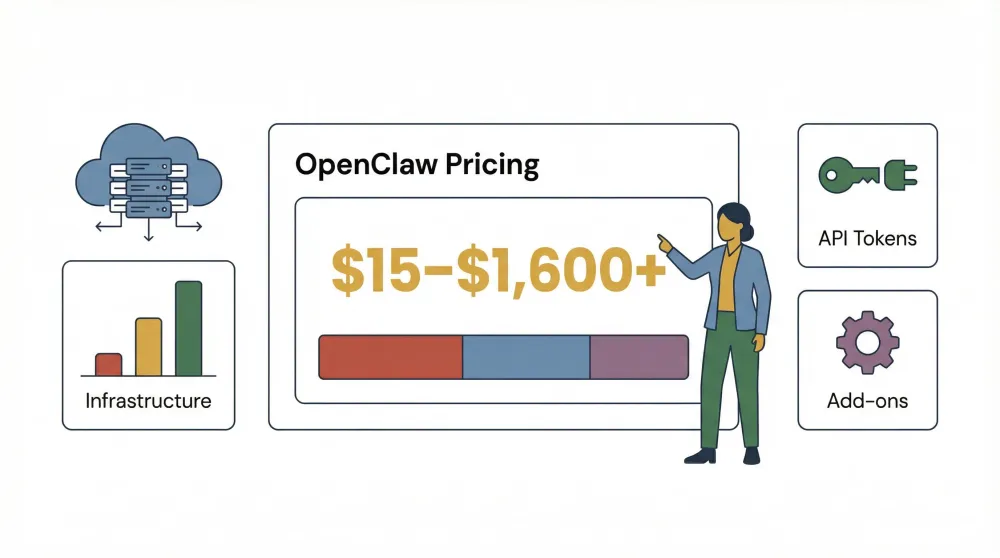
OpenClaw AI ऑटोमेशन की दुनिया में “ऐसा एजेंट जो सच में काम करता है” के तौर पर चर्चा में रहा है—चाहे इनबॉक्स मैनेज करना हो, ब्राउज़र ऑटोमेशन चलाना हो, या वह भी आपके पसंदीदा चैट ऐप से। लेकिन अगर आपने कभी यह जानने की कोशिश की है कि OpenClaw का असली खर्च कितना बैठता है, तो आप अकेले नहीं हैं। मैंने फोरम पर कई ऐसे पोस्ट देखे हैं जहाँ लोगों को लगा कि वे इसे मुफ़्त में चला रहे हैं, लेकिन बाद में अचानक बिल देखकर वे चौंक गए—जैसे वह यूज़र जिसने रातों-रात $141 जोड़ लिए, या दूसरा जिसने पहले ही दिन $250 के टोकन फूंक दिए। भ्रम क्यों? OpenClaw ओपन सोर्स है और इसे इंस्टॉल करना “फ़्री” है, लेकिन असली खर्च इन्फ्रास्ट्रक्चर, API उपयोग और वैकल्पिक सपोर्ट से आता है।
अगर आप OpenClaw को अपने लिए, अपनी टीम के लिए, या अपनी कंपनी के लिए देख रहे हैं, तो आपको एक साफ़ और व्यावहारिक गाइड चाहिए कि वास्तव में कितना भुगतान करना होगा—और क्यों। चलिए OpenClaw pricing, openclaw cost, openclaw subscription plans और openclaw license fees को समझते हैं, ताकि आप समझदारी से बजट बना सकें और किसी भी अचानक आने वाले झटके से बच सकें।
OpenClaw क्या है? एक त्वरित परिचय
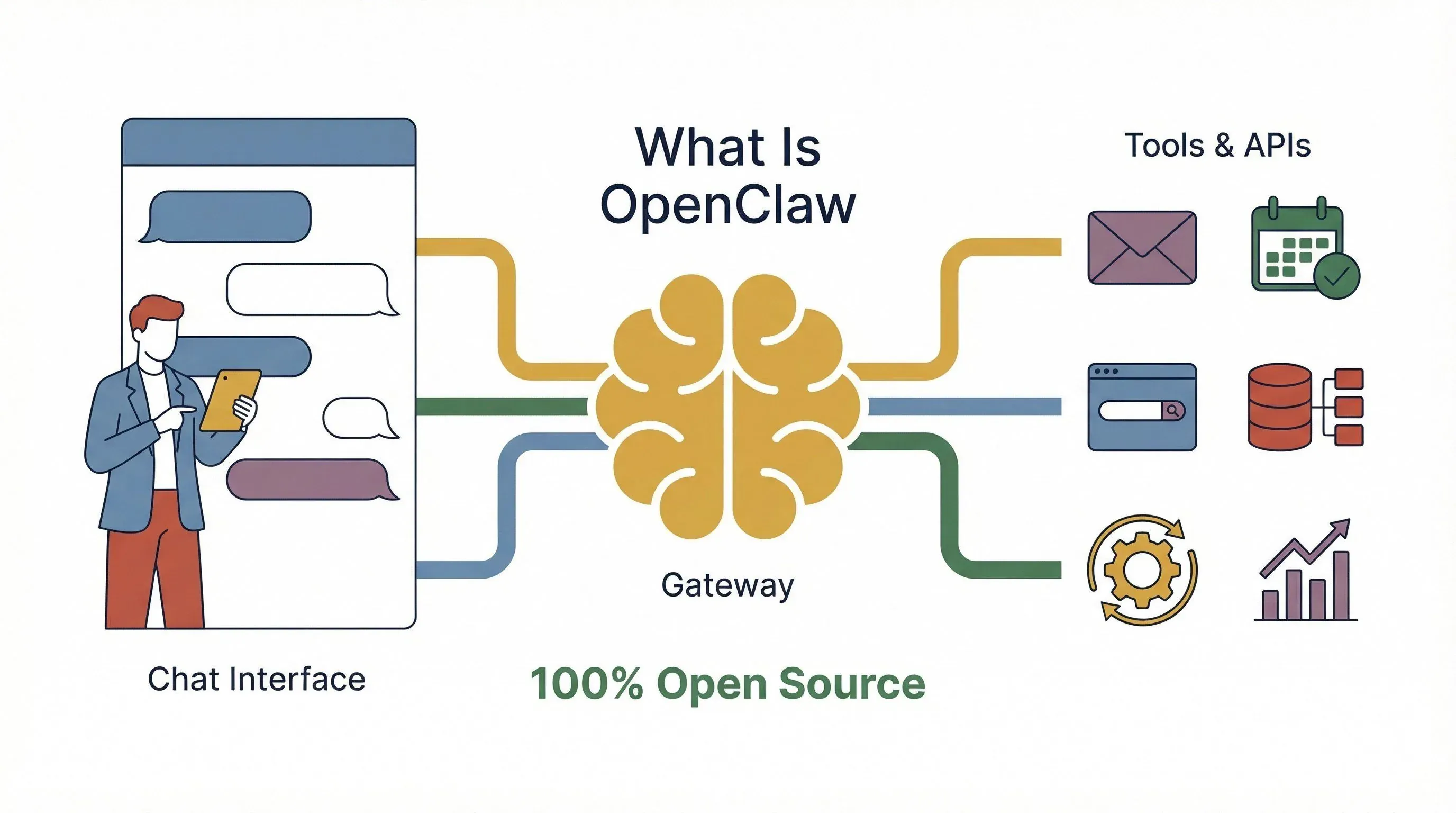
मूल रूप से, OpenClaw एक ओपन-सोर्स, सेल्फ-होस्टेड AI एजेंट प्लेटफ़ॉर्म है, जिसे असली दुनिया के कामों को ऑटोमेट करने के लिए बनाया गया है। इसे ऐसे डिजिटल असिस्टेंट की तरह सोचिए जो हमेशा तैयार रहता है—ईमेल पढ़ सकता है, मीटिंग शेड्यूल कर सकता है, वेब से डेटा ला सकता है, और दर्जनों टूल्स के साथ काम कर सकता है—सब कुछ आपके चैट ऐप या वेब इंटरफ़ेस से संचालित। एक साधारण चैटबॉट के मुकाबले, OpenClaw एक पूरा “एजेंट + गेटवे” सिस्टम है: आप गेटवे (दिमाग) को अपने सर्वर या क्लाउड पर चलाते हैं, और वही संदेशों को रूट करता है, वर्कफ़्लो ऑटोमेट करता है, और बाहरी APIs से जुड़ता है।
सबसे बड़ा आकर्षण? लचीलापन और नियंत्रण। आप तय करते हैं कि कौन-सा मॉडल (OpenAI, Anthropic, Google Gemini, आदि) आपके एजेंट को शक्ति देगा, कौन-से प्लगइन्स या “skills” इंस्टॉल करेंगे, और अपने मौजूदा सिस्टम्स के साथ इसे कैसे इंटीग्रेट करेंगे। सॉफ़्टवेयर खुद MIT-licensed है—यानी आप इसे मुफ़्त में इस्तेमाल, संशोधित और वितरित कर सकते हैं। लेकिन, जैसा कि हम आगे देखेंगे, “मुफ़्त” का मतलब हमेशा शून्य लागत नहीं होता।
OpenClaw की कीमत की संरचना: आपकी लागत सच में किस पर निर्भर करती है?
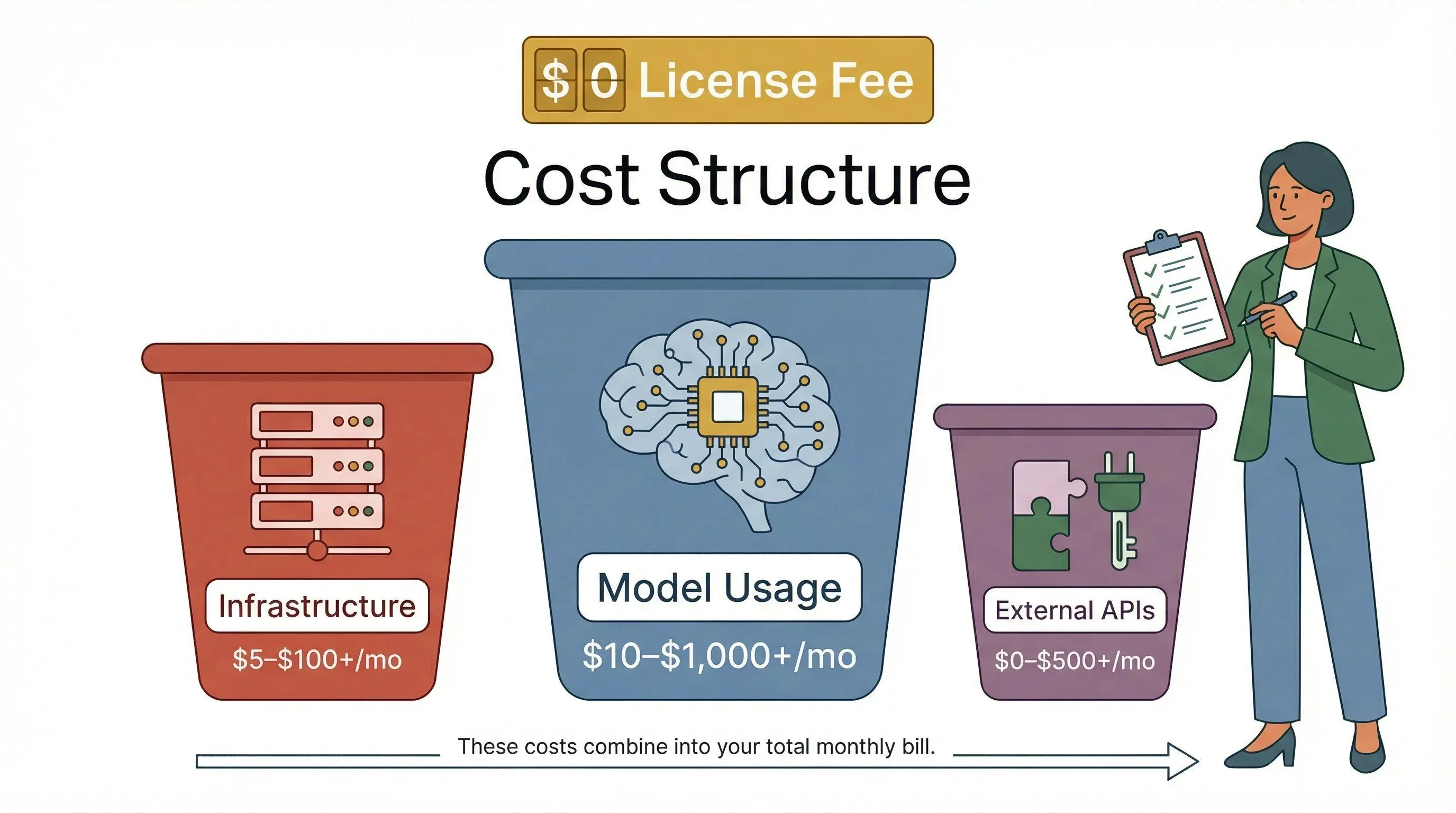
पहली बात जो समझनी चाहिए: OpenClaw का सॉफ़्टवेयर मुफ़्त है, लेकिन इसे असल दुनिया में चलाना मुफ़्त नहीं। OpenClaw की वास्तविक लागत तीन मुख्य हिस्सों में बँटती है:
| लागत श्रेणी | आप किस चीज़ के लिए भुगतान कर रहे हैं | आम “छिपे हुए” कारण जो लागत बढ़ा देते हैं |
|---|---|---|
| इन्फ्रास्ट्रक्चर | सर्वर/VPS (क्लाउड या लोकल), स्टोरेज, नेटवर्किंग, बैकअप, मॉनिटरिंग | कमज़ोर मशीनें, अतिरिक्त VM, बैकअप या मॉनिटरिंग जैसे ऐड-ऑन (docs.openclaw.ai) |
| मॉडल/प्रोवाइडर उपयोग | हर उत्तर के लिए LLM टोकन, टूल उपयोग, API कॉल्स (OpenAI, Anthropic, Google, आदि) | पर्सिस्टेंट कॉन्टेक्स्ट, टूल आउटपुट, हमेशा चालू “हार्टबीट” गतिविधि, मल्टी-एजेंट ऑर्केस्ट्रेशन (docs.openclaw.ai) |
| वैकल्पिक बाहरी APIs | सर्च, वेब फ़ेच/स्क्रैप, एम्बेडिंग्स, स्पीच/TTS, पेड SaaS APIs कॉल करने वाले skills | एम्बेडिंग्स, वेब फ़ेच, वॉइस आदि जैसे गैर-चैट फ़ीचर्स के लिए भुगतान (docs.openclaw.ai) |
इसलिए, आप भले ही “मुफ़्त” में शुरुआत कर सकते हों, लेकिन आपका मासिक बिल इस बात पर निर्भर करेगा कि आप प्लेटफ़ॉर्म का कितना उपयोग करते हैं, कौन-से मॉडल कनेक्ट करते हैं, और इसे कैसे होस्ट करते हैं।
मुफ़्त बनाम पेड: क्या OpenClaw सच में मुफ़्त है?
OpenClaw का MIT लाइसेंस का मतलब है कि सॉफ़्टवेयर इस्तेमाल करने के लिए कोई अनिवार्य लाइसेंस फीस नहीं है। आप इसे इंस्टॉल कर सकते हैं, चला सकते हैं, और बिना डेवलपर्स को एक पैसा दिए इसमें बदलाव भी कर सकते हैं। हालांकि, “मुफ़्त” केवल कोड तक सीमित है। जैसे ही आप OpenClaw चलाना शुरू करते हैं—खासकर वास्तविक, हमेशा-चालू ऑटोमेशन के लिए—खर्च इन कारणों से बढ़ने लगते हैं:
- क्लाउड/सर्वर होस्टिंग (जब तक आप इसे अपने हार्डवेयर पर न चलाएँ)
- API उपयोग (हर बार जब एजेंट सोचता है, काम करता है, या किसी टूल को कॉल करता है, मॉडल प्रोवाइडर आपसे शुल्क लेता है)
- वैकल्पिक मैनेज्ड होस्टिंग या सपोर्ट (अगर आप सेटअप, अपडेट या ट्रबलशूटिंग किसी और से करवाना चाहते हैं)
कुछ फ़ीचर्स—जैसे बेसिक चैट, सरल ऑटोमेशन, और लोकल skills—अपनी इन्फ्रास्ट्रक्चर लागत के अलावा बिना अतिरिक्त खर्च के चल सकते हैं। लेकिन जो भी चीज़ किसी पेड API (LLM, वेब सर्च, स्पीच-टू-टेक्स्ट, आदि) को छूती है, वह आपके बिल में दिखेगी।
OpenClaw सब्सक्रिप्शन प्लान: व्यक्तियों, टीमों और एंटरप्राइज़ के लिए विकल्प
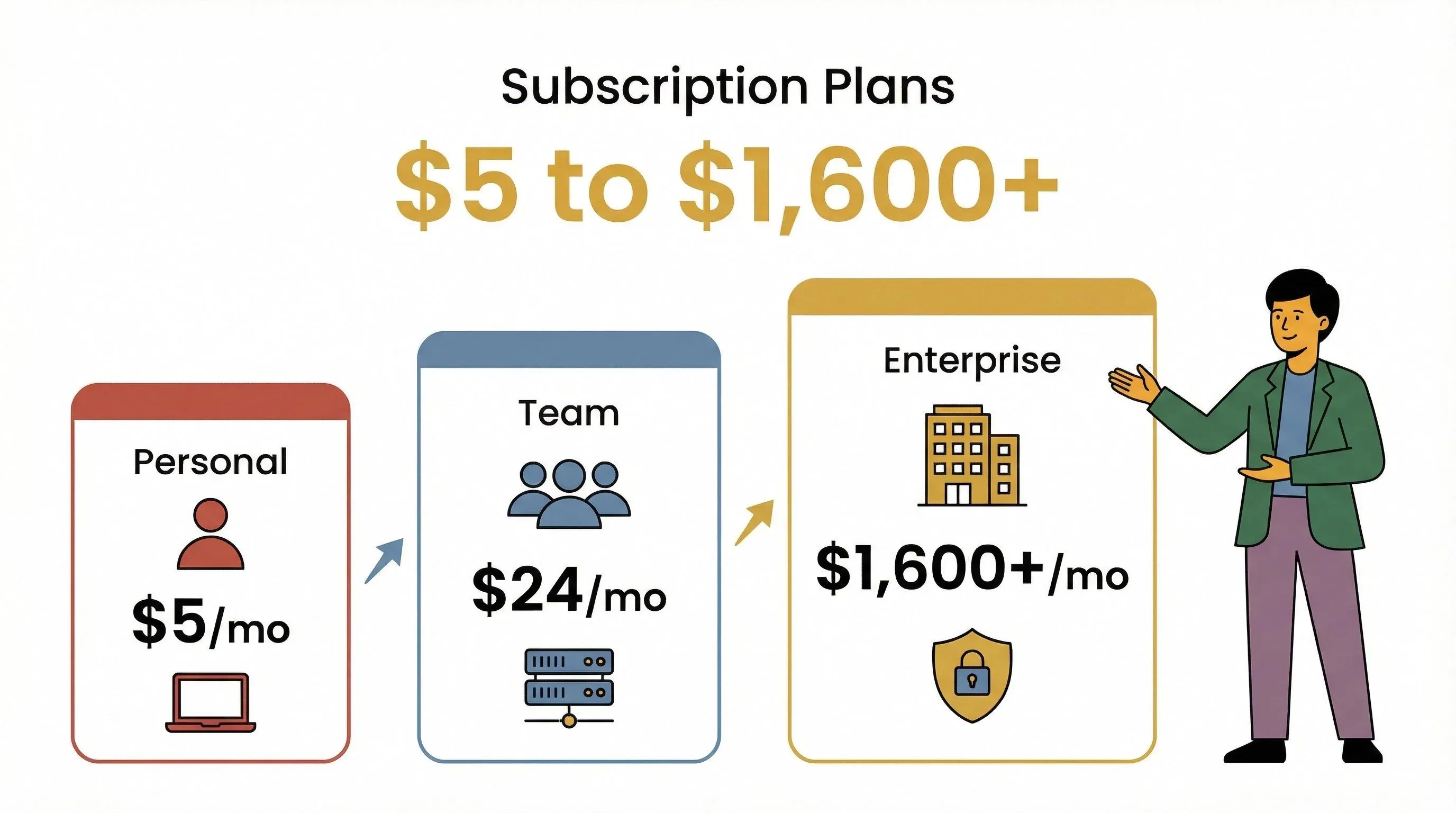
SaaS प्लेटफ़ॉर्म्स के उलट, जो तय किए हुए सब्सक्रिप्शन प्लान देते हैं, OpenClaw के ओपन-सोर्स कोर में कोई आधिकारिक “प्लान” नहीं है। इसके बजाय, बाज़ार ने मैनेज्ड होस्टिंग, सपोर्ट पैकेज और पहले से कॉन्फ़िगर किए गए डिप्लॉयमेंट्स के रूप में विकल्प भर दिए हैं। स्थिति कुछ इस तरह है:
एंट्री-लेवल (पर्सनल) OpenClaw सब्सक्रिप्शन प्लान
सोलो यूज़र्स या हॉबीस्ट्स के लिए आप यह कर सकते हैं:
- OpenClaw को सेल्फ-होस्ट करें एक सस्ते VPS पर (जैसे Hetzner पर $5/माह या GCP पर $5–12/माह)
- अपने खुद के API keys उपयोग करें OpenAI, Anthropic, या Google Gemini के लिए (नीचे टोकन प्राइसिंग देखें)
- सभी ओपन-सोर्स फ़ीचर्स तक पहुँच बिना किसी लाइसेंस फीस के
कुछ मैनेज्ड प्रोवाइडर्स व्यक्तियों के लिए “ज़ीरो सेटअप” VM भी देते हैं, जैसे OpenClawCloud (बेसिक के लिए मुफ़्त, Plus के लिए $9.99/माह, और Pro के लिए $39.99/माह जिसमें $40 Claude Sonnet क्रेडिट शामिल है)। इन प्लान्स में आम तौर पर शामिल होता है:
- OpenClaw पहले से इंस्टॉल किया हुआ डेडिकेटेड VM
- SSH एक्सेस, बैकअप, कॉन्फ़िग एक्सपोर्ट
- टियर के अनुसार रेट लिमिट और उपयोग सीमा
टीम और व्यवसायिक OpenClaw सब्सक्रिप्शन प्लान
छोटी टीमों या व्यवसायों के लिए आपको चाहिए होगा:
- ज़्यादा शक्तिशाली इन्फ्रास्ट्रक्चर (बड़ा VPS या क्लाउड इंस्टेंस, आम तौर पर $24/माह और ऊपर)
- ऊँची API कॉल लिमिट (मध्यम टीमों के लिए $100–$500/माह तक मॉडल उपयोग की अपेक्षा करें)
- सहयोग के लिए टूल्स (मल्टी-यूज़र एक्सेस, साझा मेमोरी, ऑडिट लॉग्स)
- वैकल्पिक मैनेज्ड होस्टिंग (xCloud मैनेज्ड होस्टिंग के लिए $24/माह से शुरू होता है; API keys आपको खुद लाने होंगे)
कुछ मैनेज्ड सेवाएँ, जैसे openclaw24.com, पूरा ऑप्स और इम्प्लीमेंटेशन सपोर्ट देती हैं, जिसमें एकमुश्त सेटअप फीस (€1,500–€7,000) और चल रही मैनेजमेंट फीस (€500–€1,500/माह), साथ ही कस्टम एंटरप्राइज़ विकल्प शामिल हैं।
एंटरप्राइज़ और हाई-वॉल्यूम OpenClaw लाइसेंस फीस
बड़े पैमाने के डिप्लॉयमेंट या रेगुलेटेड उद्योगों के लिए आपको चाहिए होगा:
- कस्टम इन्फ्रास्ट्रक्चर (डेडिकेटेड सर्वर, हाई-अवेलेबिलिटी क्लस्टर, उन्नत सुरक्षा)
- एंटरप्राइज़ सपोर्ट कॉन्ट्रैक्ट्स (SLA, इन्सिडेंट रिस्पॉन्स, कंप्लायंस ऑडिट)
- कस्टम API कोटा (बल्क प्राइसिंग के लिए मॉडल प्रोवाइडर्स के साथ बातचीत)
- सुरक्षा और मॉनिटरिंग ऐड-ऑन (आइसोलेशन, सैंडबॉक्सिंग, खर्च नियंत्रण)
एंटरप्राइज़ प्राइसिंग आम तौर पर केस-दर-केस बातचीत से तय होती है, लेकिन मैनेज्ड सर्विस प्रोवाइडर्स और AWS Marketplace वेंडर्स (जैसे Mach11) सपोर्ट पैकेज और पहले से बने इमेज दे सकते हैं, जबकि इन्फ्रास्ट्रक्चर का बिल अलग से आएगा।
OpenClaw की लागतें पारदर्शी और लचीली क्यों हैं
OpenClaw की सबसे बड़ी खूबियों में से एक इसकी पारदर्शी, उपयोग-आधारित लागत संरचना है। कुछ ऑटोमेशन प्लेटफ़ॉर्म्स की तरह नहीं, जो आपको छिपी हुई फीस में उलझा दें या हर फ़ीचर पर अपसेल करें—OpenClaw की लागतें हैं:
- पूर्वानुमेय: आप केवल अपने उपयोग के लिए भुगतान करते हैं—कंप्यूट, स्टोरेज और API कॉल्स के लिए (docs.openclaw.ai)
- कोई छिपी लाइसेंस फीस नहीं: MIT लाइसेंस का मतलब है कि सॉफ़्टवेयर के लिए कोई अचानक शुल्क नहीं (github.com)
- स्पष्ट API प्राइसिंग: आप यह ठीक-ठीक देख सकते हैं कि हर मॉडल या टूल कॉल की लागत कितनी है, और OpenClaw प्रति-सेशन और प्रति-संदेश लागत की दृश्यता भी देता है (docs.openclaw.ai)
इसकी तुलना Zapier या Make जैसे प्लेटफ़ॉर्म्स से करें, जो टास्क/क्रेडिट के आधार पर कीमत तय करते हैं और अक्सर polling या background checks के लिए भी शुल्क लेते हैं, या ChatGPT Business या Claude Team जैसे AI SaaS सूट्स से, जो वास्तविक उपयोग चाहे जितना हो, प्रति सीट शुल्क लेते हैं।
OpenClaw लागत का ब्योरा: इन्फ्रास्ट्रक्चर, API उपयोग और छिपे हुए खर्च
अब इसे ठोस रूप में समझते हैं। आपके उपयोग के प्रोफ़ाइल के अनुसार हर महीने क्या भुगतान हो सकता है, इसका एक side-by-side ब्योरा यहाँ है:
| यूज़र प्रोफ़ाइल | इन्फ्रास्ट्रक्चर (VPS/क्लाउड) | मॉडल/API उपयोग (LLM टोकन, टूल्स) | वैकल्पिक ऐड-ऑन (बैकअप, मॉनिटरिंग, सपोर्ट) | आम मासिक कुल |
|---|---|---|---|---|
| पर्सनल/हॉबी | $5–$12 | $10–$50 | $0–$10 | $15–$60 |
| टीम/छोटा व्यवसाय | $24–$50 | $100–$500 | $10–$100 | $134–$650 |
| एंटरप्राइज़ | $100+ (डेडिकेटेड) | $1,000+ | $500+ | $1,600+ |
मॉडल/API उपयोग: असली लागत बढ़ाने वाला कारक
यहीं से मामला दिलचस्प होता है। OpenClaw मॉडल-एग्नोस्टिक है, इसलिए आपका API खर्च इस बात पर निर्भर करता है कि आप कौन-सा LLM उपयोग करते हैं और कितना ऑटोमेशन करते हैं। लोकप्रिय मॉडलों की मौजूदा टोकन प्राइसिंग पर एक त्वरित नज़र (developers.openai.com, anthropic.com, ai.google.dev):
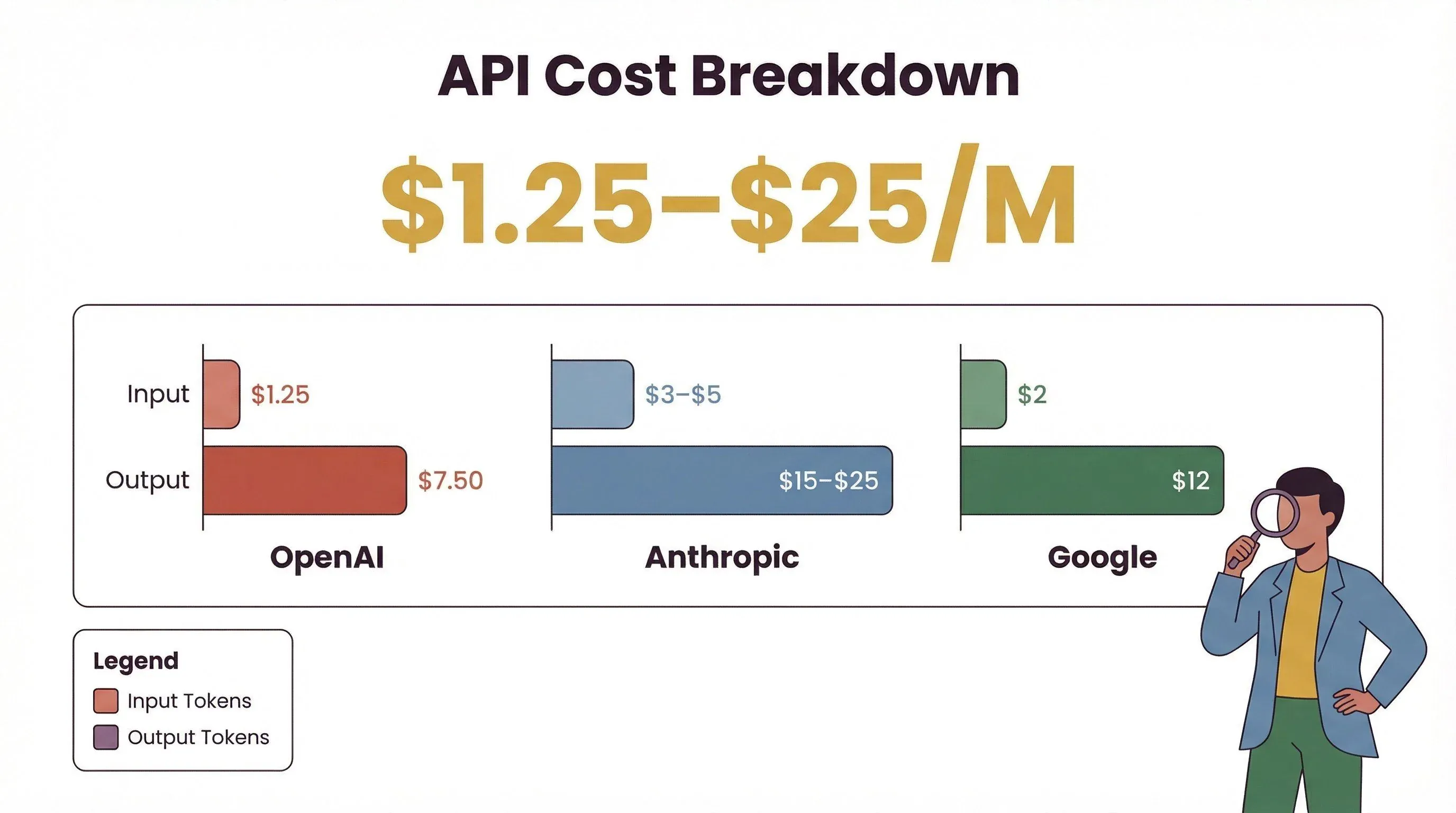
| प्रोवाइडर | मॉडल परिवार | इनपुट ($/M टोकन) | आउटपुट ($/M टोकन) |
|---|---|---|---|
| OpenAI | GPT‑5.5 (अप्रैल 2026 में लॉन्च) | $5.00 | $30.00 |
| OpenAI | GPT‑5.4 | $2.50 | $15.00 |
| Anthropic | Claude Opus 4.6 | $5.00 | $25.00 |
| Anthropic | Claude Sonnet 4.6 | $3.00 | $15.00 |
| Gemini 3.1 Pro (≤200K कॉन्टेक्स्ट) | $2.00 | $12.00 |
मई 2026 तक की मानक कीमतें। Batch और Flex प्रोसेसिंग मोड गैर-रीयलटाइम वर्कलोड्स के लिए OpenAI की मानक दरों पर लगभग 50% छूट लागू करते हैं, और Anthropic का Batch API Claude के लिए भी 50% छूट देता है। Gemini 3.1 Pro की प्रति-टोकन दर 200K इनपुट टोकन से ऊपर लगभग दोगुनी हो जाती है।
उदाहरण लागत परिदृश्य (मानक कीमत पर GPT‑5.4 — अगर आप काम को OpenAI के Batch या Flex क्यू से चला सकते हैं, तो इनकी आधी मानिए):
- हल्का उपयोग (10M इनपुट + 1M आउटपुट टोकन/माह): लगभग $40/माह
- मध्यम उपयोग (100M इनपुट + 10M आउटपुट टोकन/माह): लगभग $400/माह
- भारी उपयोग (300M इनपुट + 6.5M आउटपुट टोकन/माह): लगभग $847.50/माह
यह न मानें कि Anthropic और Google हमेशा ज़्यादा महंगे होते हैं। आज की दरों पर, Gemini 3.1 Pro इनपुट और आउटपुट दोनों में GPT‑5.4 से थोड़ा सस्ता है, और Claude Sonnet 4.6 लगभग बराबर है (+20% इनपुट, समान आउटपुट)। सचमुच महंगे विकल्प Claude Opus 4.6 (~GPT‑5.4 इनपुट से 2×, आउटपुट से 1.67×) और GPT‑5.5 (हर जगह GPT‑5.4 का 2×) हैं — इनका चुनाव तभी करें जब आपको उनकी reasoning क्षमता सच में चाहिए।
छिपे हुए (या नज़रअंदाज़ किए गए) खर्च
भले ही आप मॉडल उपयोग पर नियंत्रण रख लें, यह न भूलें:
- सुरक्षा आइसोलेशन: व्यक्तिगत लैपटॉप पर OpenClaw चलाना जोखिम भरा है; बेहतर अभ्यास है अलग सर्वर या hardened VM का उपयोग (digitalocean.com)
- मॉनिटरिंग और इन्सिडेंट रिस्पॉन्स: प्रोडक्शन डिप्लॉयमेंट्स में मॉनिटरिंग, लॉगिंग, और कभी-कभी खर्च नियंत्रण के लिए पेड टूल्स की ज़रूरत होती है (trust.openclaw.ai)
- बैकअप और स्टोरेज: आपके एजेंट की मेमोरी सुरक्षित रखने के लिए अतिरिक्त स्टोरेज और बैकअप लागत आती है
- थर्ड-पार्टी skills: कुछ प्लगइन्स या skills के लिए अपने अलग पेड API keys की आवश्यकता हो सकती है
ओपन सोर्स बनाम पेड सब्सक्रिप्शन: आपके लिए कौन-सा सही है?
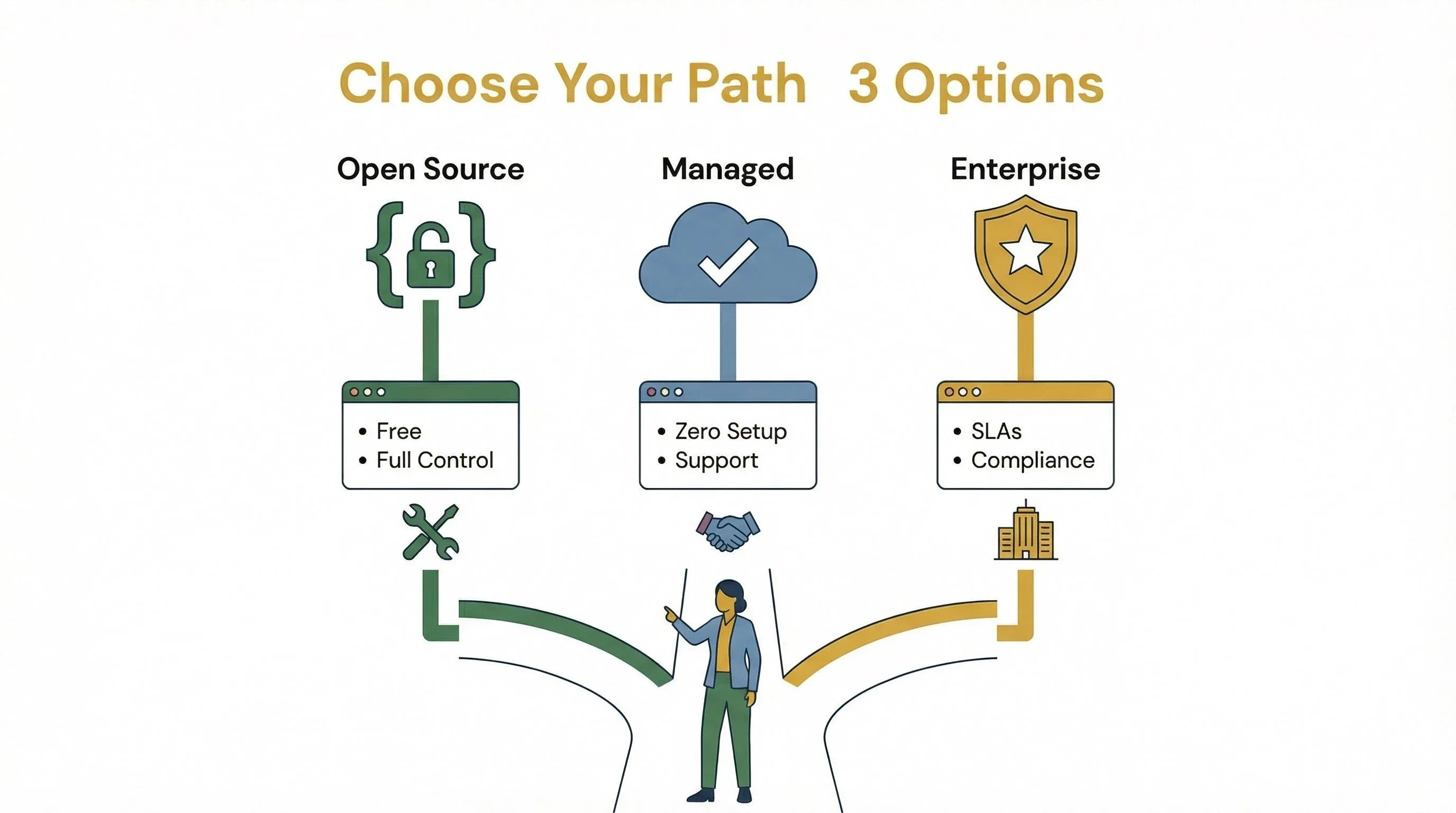
तो, आपको ओपन सोर्स के साथ रहना चाहिए या मैनेज्ड होस्टिंग/सपोर्ट के लिए भुगतान करना चाहिए? यहाँ एक त्वरित तुलना है:
| विकल्प | फ़ायदे | नुकसान |
|---|---|---|
| ओपन सोर्स | मुफ़्त सॉफ़्टवेयर, पूरा नियंत्रण, कस्टमाइज़ेबल | सब कुछ आपको संभालना होगा (सेटअप, अपडेट, सुरक्षा) |
| मैनेज्ड होस्टिंग | ज़ीरो सेटअप, पूर्वानुमेय शुल्क, सपोर्ट शामिल | मासिक लागत, उपयोग सीमा या रेट लिमिट हो सकती है |
| एंटरप्राइज़ लाइसेंस | SLA, कंप्लायंस, कस्टम सपोर्ट, उन्नत फ़ीचर्स | ज़्यादा लागत, आम तौर पर बातचीत की आवश्यकता |
अगर आप तकनीकी हैं और अधिकतम लचीलापन चाहते हैं, तो सेल्फ-होस्टिंग बढ़िया है। अगर आप समय, विश्वसनीयता को महत्व देते हैं, या तेज़ी से स्केल करना है, तो मैनेज्ड प्लान या एंटरप्राइज़ सपोर्ट की कीमत वाजिब हो सकती है।
एंटरप्राइज़ और कस्टम डिप्लॉयमेंट के लिए OpenClaw लाइसेंस फीस
ज़्यादातर यूज़र्स के लिए OpenClaw का MIT लाइसेंस मतलब है कोई लाइसेंस फीस नहीं। लेकिन एंटरप्राइज़ या रेगुलेटेड उद्योगों के लिए आप यह चाह सकते हैं:
- कस्टम सपोर्ट कॉन्ट्रैक्ट्स (SLA, इन्सिडेंट रिस्पॉन्स, कंप्लायंस ऑडिट)
- एंटरप्राइज़ फ़ीचर्स (उन्नत सुरक्षा, मॉनिटरिंग, कस्टम इंटीग्रेशन)
- डेडिकेटेड इन्फ्रास्ट्रक्चर (प्राइवेट क्लाउड, ऑन-प्रिमाइसेस, HA क्लस्टर)
ये आम तौर पर सीधे मैनेज्ड सर्विस प्रोवाइडर्स के साथ या AWS Marketplace विक्रेताओं के माध्यम से बातचीत करके तय किए जाते हैं। मैनेज्ड ऑप्स के लिए $500–$1,500/माह, साथ में इन्फ्रास्ट्रक्चर और API उपयोग, की अपेक्षा करें।
अपनी ज़रूरतों के साथ OpenClaw सब्सक्रिप्शन प्लान का मिलान कैसे करें
सही OpenClaw सेटअप कैसे चुनें? यहाँ एक व्यावहारिक निर्णय तालिका है:
| ज़रूरत/परिदृश्य | सुझाया गया प्लान/सेटअप |
|---|---|
| अकेले प्रयोग, हॉबी प्रोजेक्ट्स | सस्ते VPS पर सेल्फ-होस्ट करें, अपने खुद के API keys लाएँ |
| छोटी टीम, मध्यम ऑटोमेशन | मैनेज्ड होस्टिंग (OpenClawCloud, xCloud), BYO API keys |
| बढ़ता व्यवसाय, विश्वसनीयता | सपोर्ट सहित मैनेज्ड होस्टिंग, ऊँची API quotas |
| एंटरप्राइज़, कंप्लायंस ज़रूरी | कस्टम एंटरप्राइज़ लाइसेंस/सपोर्ट, डेडिकेटेड इन्फ्रास्ट्रक्चर |
चुनाव के लिए चेकलिस्ट:
- आपकी टीम कितनी तकनीकी है? (ज़्यादा तकनीकी = सेल्फ-होस्टिंग आसान)
- क्या आपको 24/7 विश्वसनीयता या SLA चाहिए? (मैनेज्ड या एंटरप्राइज़ चुनें)
- आप कितना ऑटोमेशन अपेक्षित करते हैं? (टोकन उपयोग का अनुमान लगाएँ, इन्फ्रा का आकार तय करें)
- क्या आपको उन्नत सुरक्षा या कंप्लायंस चाहिए? (एंटरप्राइज़ फ़ीचर्स/सपोर्ट)
OpenClaw की पारदर्शी प्राइसिंग क्यों महत्वपूर्ण है
OpenClaw अपनी स्पष्ट, उपयोग-आधारित प्राइसिंग के लिए अलग दिखता है — कोई छिपी हुई फीस नहीं, कोई ज़बरदस्ती अपग्रेड नहीं, और कोई प्रति-सीट शुल्क नहीं, जब तक आप मैनेज्ड सेवाएँ नहीं लेते। इससे बजट बनाना आसान होता है और ज़रूरत बदलने पर स्केल करना भी। इसके उलट, कई प्रतिस्पर्धी आपको सीट-आधारित प्राइसिंग में बाँध देते हैं — ChatGPT Business वार्षिक बिलिंग पर $20/सीट/माह, मासिक पर $25 है (OpenAI ने इसे अप्रैल 2026 में घटाया), और Claude Team भी वही $20 वार्षिक / $25 मासिक है, वह भी 5-सीट न्यूनतम के साथ। Zapier या Make जैसे ऑटोमेशन प्लेटफ़ॉर्म इसके बजाय टास्क या क्रेडिट के आधार पर शुल्क लेते हैं, और अक्सर अतिरिक्त उपयोग फीस तभी दिखाई देती है जब आप पहले ही प्रतिबद्ध हो चुके होते हैं।
OpenClaw के साथ नियंत्रण आपके हाथ में है: आप तय करते हैं कितना ऑटोमेट करना है, कौन-से मॉडल उपयोग करने हैं, और अपने इन्फ्रास्ट्रक्चर को कैसे संभालना है।
निष्कर्ष: OpenClaw की कीमत से अधिकतम मूल्य कैसे पाएँ
संक्षेप में: OpenClaw का सॉफ़्टवेयर मुफ़्त है, लेकिन इसे चलाना मुफ़्त नहीं। आपकी वास्तविक लागत इन्फ्रास्ट्रक्चर, API उपयोग, और आपके चुने गए किसी भी वैकल्पिक सपोर्ट या मैनेज्ड होस्टिंग से आती है। अच्छी बात? OpenClaw की प्राइसिंग पारदर्शी और लचीली है, जिससे आप बिना छिपी फीस या लॉक-इन के, सोलो टिंकरर से लेकर एंटरप्राइज़ पावरहाउस तक स्केल कर सकते हैं।
सबसे अधिक मूल्य पाने के लिए:
- अपने टोकन उपयोग का अनुमान लगाएँ और अपने बजट के अनुसार सही मॉडल/प्रोवाइडर चुनें
- ऐसा इन्फ्रास्ट्रक्चर चुनें जो आपकी विश्वसनीयता और सुरक्षा ज़रूरतों से मेल खाए
- अपने खर्च पर नज़र रखें (OpenClaw के बिल्ट-इन उपयोग टूल्स मदद करते हैं)
- ज़रूरत बढ़ने पर सेटअप दोबारा देखें—ज़रूरत के अनुसार सेल्फ-होस्टेड से मैनेज्ड या एंटरप्राइज़ पर जाएँ
असली लागत चालकों को समझकर और अपने प्लान को अपनी ज़रूरतों के अनुसार मिलाकर, आप किसी भी अप्रिय आश्चर्य के बिना OpenClaw की शक्ति का उपयोग कर सकते हैं।
अक्सर पूछे जाने वाले सवाल
1. क्या OpenClaw वाकई इस्तेमाल करने के लिए मुफ़्त है?
OpenClaw का सॉफ़्टवेयर MIT-licensed है और इसे इंस्टॉल, उपयोग और संशोधित करना मुफ़्त है। लेकिन इसे चलाने के दौरान आपको इन्फ्रास्ट्रक्चर (क्लाउड/सर्वर) और API उपयोग (LLM टोकन, टूल्स) के लिए भुगतान करना होगा।
2. OpenClaw की सबसे बड़ी लागत किससे आती है?
मुख्य लागतें इन्फ्रास्ट्रक्चर (VPS या क्लाउड सर्वर) और API उपयोग (LLM टोकन, टूल कॉल्स, बाहरी APIs) से आती हैं। भारी उपयोगकर्ताओं के लिए API/मॉडल खर्च आसानी से होस्टिंग लागत से अधिक हो सकता है।
3. क्या OpenClaw में कोई छिपी हुई फीस है?
OpenClaw अपनी पारदर्शी, उपयोग-आधारित प्राइसिंग के लिए जाना जाता है। हालांकि, अगर आप टोकन उपयोग, background activity, या बैकअप और मॉनिटरिंग जैसे ऐड-ऑन पर नज़र नहीं रखते, तो लागत धीरे-धीरे बढ़ सकती है।
4. सेल्फ-होस्टेड और मैनेज्ड OpenClaw प्लान में क्या अंतर है?
सेल्फ-होस्टेड का मतलब है कि आप OpenClaw को अपने इन्फ्रास्ट्रक्चर पर चलाते हैं और सब कुछ खुद संभालते हैं। मैनेज्ड प्लान (थर्ड-पार्टी प्रोवाइडर्स से) मासिक शुल्क पर सेटअप, अपडेट और सपोर्ट संभालते हैं, लेकिन API उपयोग का भुगतान फिर भी आपको करना होता है।
5. सही OpenClaw सब्सक्रिप्शन या लाइसेंस कैसे चुनूँ?
अपने प्लान को अपनी तकनीकी क्षमता, ऑटोमेशन की ज़रूरत और विश्वसनीयता की आवश्यकताओं के अनुसार मिलाइए। अकेले उपयोगकर्ता कम लागत में सेल्फ-होस्ट कर सकते हैं; टीमों और एंटरप्राइज़ को मैनेज्ड होस्टिंग या कस्टम सपोर्ट कॉन्ट्रैक्ट्स से फ़ायदा हो सकता है। आश्चर्य से बचने के लिए हमेशा अपने अपेक्षित उपयोग का अनुमान लगाइए।
AI ऑटोमेशन, वेब स्क्रैपिंग और प्रोडक्टिविटी टूल्स पर और गाइड चाहिए? व्यावहारिक टिप्स और AI-संचालित वर्कफ़्लोज़ में नवीनतम गहराई से जानने के लिए Thunderbit Blog देखें।
AI वेब स्क्रैपिंग के लिए Thunderbit आज़माएँ
AI वेब स्क्रैपिंग के लिए Thunderbit आज़माएँ Get Started Free
और जानें




