

Thunderbit’s Workable Scraper helps you turn Workable-powered career pages into clean, structured datasets using AI. You can extract job listings plus full job descriptions, requirements, and metadata, then export to Excel, Google Sheets, Airtable, or Notion in a couple of clicks. It’s built for speed and accuracy, with AI that understands page layout and structures the data for you.
🤖 What is Workable Scraper
The Workable Scraper is an AI Web Scraper that lets you scrape data from Workable career pages and job listings without writing code. You simply open a Workable-hosted jobs page, click AI Suggest Columns, and then click Scrape to collect structured data like job title, location, department, employment type, and the full job description.
With Thunderbit (an AI web scraper Chrome extension), you can also use pagination scraping for multi-page job boards and subpage scraping to visit each job detail page and enrich your table automatically.
🧲 What can you scrape with Workable
Workable career pages are commonly used by companies to publish open roles. With Thunderbit’s AI Web Scraper (https://thunderbit.com/), you can extract both the listing-level fields (what you see on the jobs index) and the detail-level fields (what you see after clicking a job).
Below are two common, high-value scraping workflows.
🏥 Scrape Healthcare & Hospice Staffing Index
This use case focuses on building a staffing index from a Workable career page like Phoenix Home Care and Hospice jobs. You can use it to track hiring demand by location, department, and role type, then share the dataset with your recruiting, operations, or workforce planning team.
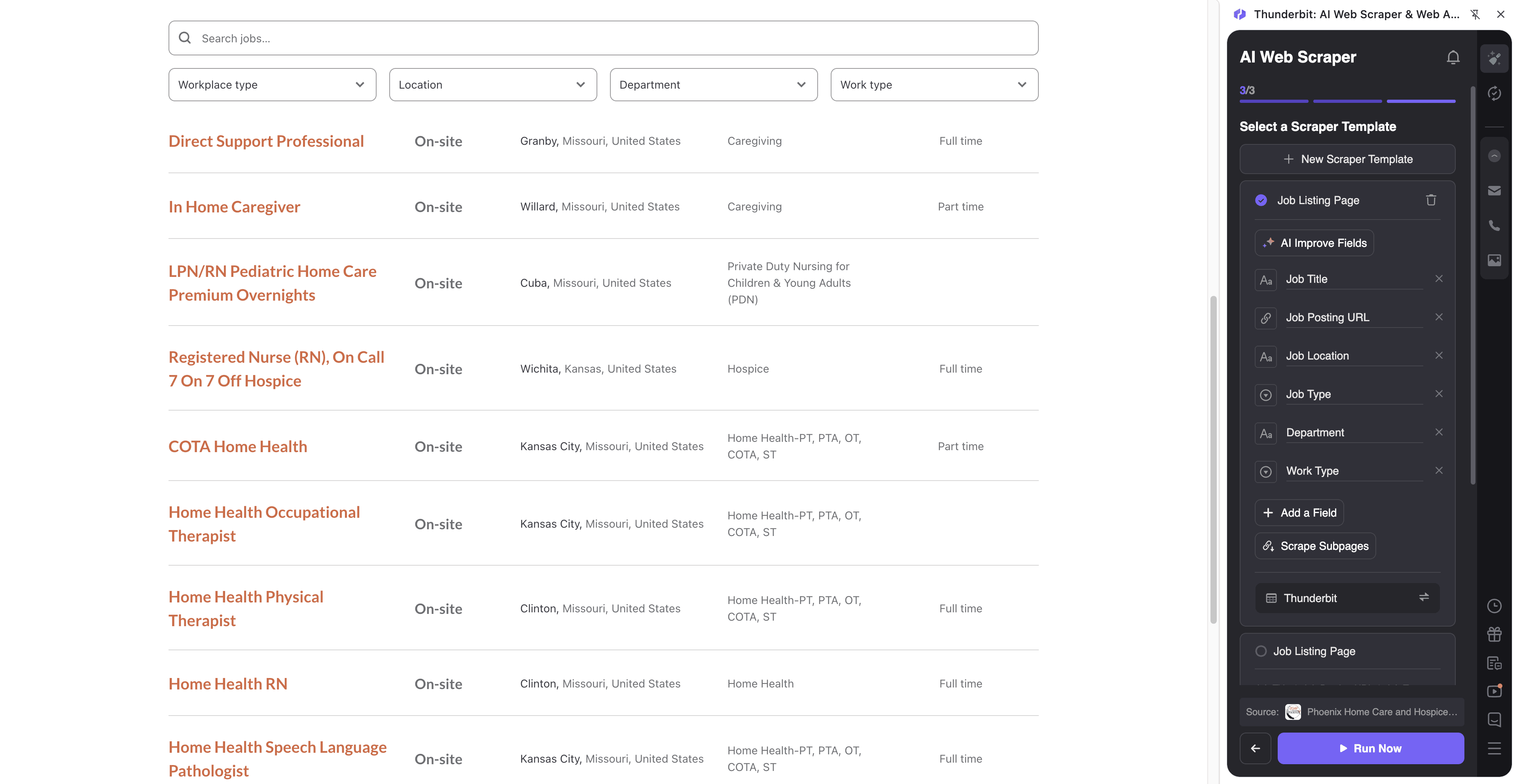
Steps:
- Download the Thunderbit Chrome Extension and register an account.
- Go to the destination page, for example: Phoenix Home Care and Hospice careers.
- Click AI Suggest Columns to let AI recommend the best column names and data types.
- Click Scrape to run the scraper, then export to Excel, Google Sheets, Airtable, or Notion.
Column names
| Column | Description |
|---|---|
| 🧾 Job Title | The role name as shown on the listing (e.g., RN, CNA, Care Coordinator). |
| 🌍 Location | City/region listed for the role (or “Remote” when applicable). |
| 🏢 Department / Team | Department label if shown (clinical, operations, admin, etc.). |
| 🕒 Employment Type | Full-time, part-time, contract, per diem, or other type when available. |
| 🔗 Job URL | Direct link to the job detail page for subpage enrichment and sharing. |
| 📅 Posted Date | The date the job was posted (if available on the page). |
| 🧠 Key Qualifications | A summarized or extracted set of requirements from the job description. |
| 📝 Full Job Description | The complete job description text from the job detail page (best via subpage scraping). |
📊 Scrape AI-Driven FinTech Talent Analysis
This use case is designed for analyzing hiring patterns on a Workable page like Amartha careers. You can build a talent dataset for market research, recruiting strategy, or competitive analysis—especially useful when you want to compare roles across teams, locations, and seniority.
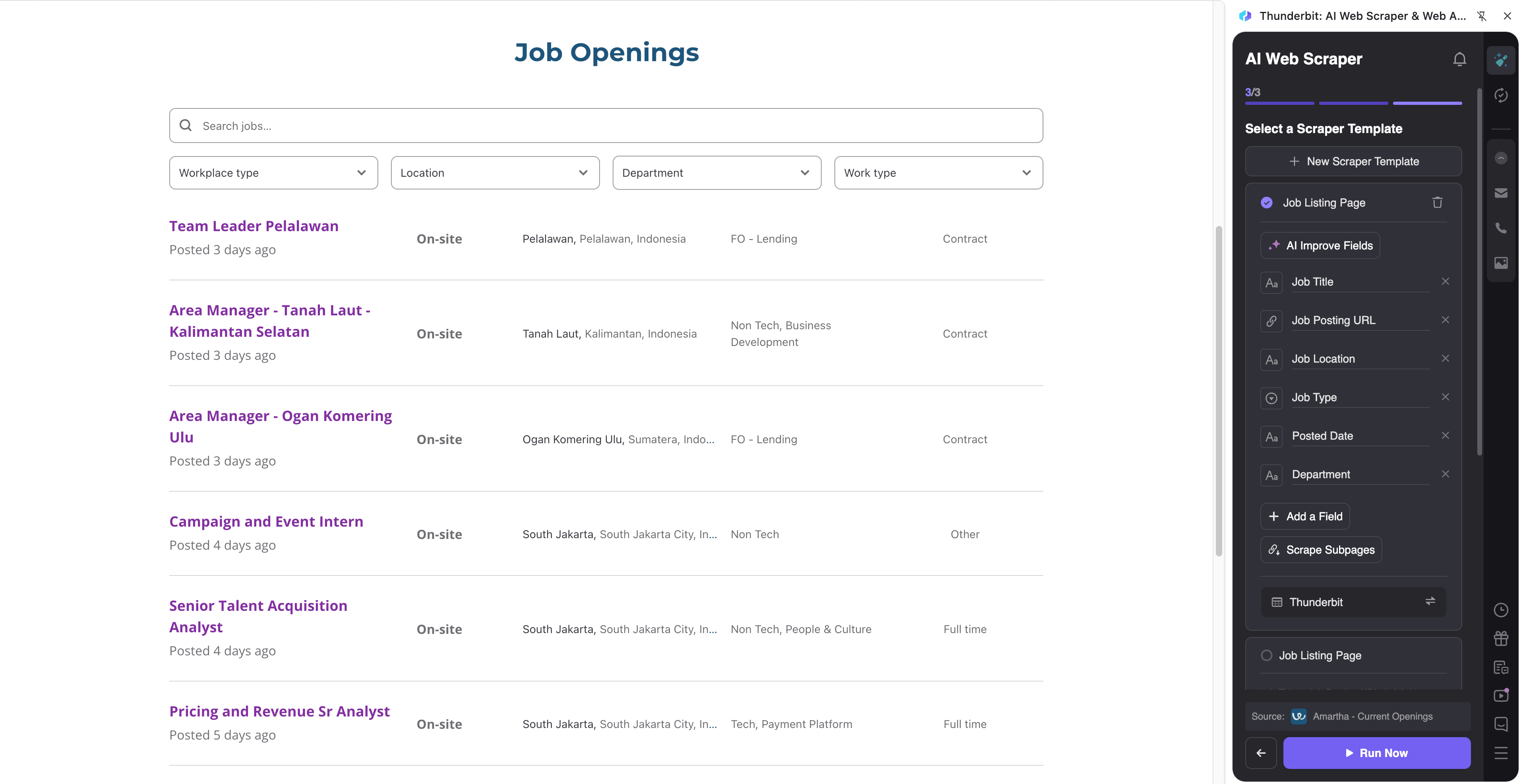
Steps:
- Download the Thunderbit Chrome Extension and register an account.
- Go to the destination page, for example: Amartha jobs.
- Click AI Suggest Columns to generate recommended fields for this specific page layout.
- Click Scrape to collect the data and export it to your preferred tool.
Column names
| Column | Description |
|---|---|
| 💼 Job Title | The role title (useful for grouping by function like Data, Risk, Product, Engineering). |
| 🧭 Seniority / Level | Level indicators when present (e.g., Junior, Senior, Lead) or inferred via AI field prompts. |
| 📍 Location | Job location(s) listed on the posting. |
| 🧩 Function / Department | Team or department label when available. |
| 🏷️ Work Type | On-site, hybrid, remote (if shown). |
| 🔗 Job URL | The job detail page link for subpage scraping and deduplication. |
| 🧾 Responsibilities | Extracted responsibilities section from the job description. |
| 🧰 Skills / Keywords | Extracted skills (e.g., Python, SQL, AML, KYC, LLM) for talent analysis. |
| 📝 Full Job Description | Full text from the job detail page for search, tagging, and analysis. |
🎯 Why Use Workable Tool
Scraping Workable job pages is useful when you need structured hiring data for analysis, outreach, or reporting. Instead of copying and pasting job posts one by one, you can build a dataset you can filter, sort, and refresh.
Common reasons you might scrape Workable include:
- Recruiting & staffing teams: Build a live index of open roles across multiple Workable career pages, then prioritize outreach by location, department, or urgency.
- Sales teams: Identify hiring signals (new departments, rapid expansion, new locations) and enrich your lead lists. You can pair this with Thunderbit’s free Email Extractor and Phone Number Extractor when contact info is publicly available.
- Market research & analysts: Track hiring trends by function (AI, data, compliance, nursing, hospice care) and compare companies over time.
- Operations leaders: Monitor headcount demand and role mix across regions to support workforce planning.
Thunderbit’s subpage scraping is especially helpful for Workable because the listing page often shows only partial info. Thunderbit can visit each job detail page and append fields like responsibilities, qualifications, and full descriptions into the same table.
If you’re new to scraping, these guides can help:
- How to Scrape Any Website Using AI
- What Is Data Scraping and How to Do It in 2025
- What Is List Crawling and How to Do It Using AI
- How to Scrape Website Data into Excel using AI
🧩 How to Use Workable Chrome Extension
- Install the Thunderbit Chrome Extension: Get it from the Chrome Web Store and create your account in minutes.
- Navigate to a Workable career page: Open a listing page like Phoenix Home Care and Hospice or Amartha.
- Activate AI-Powered Scraper: Click AI Suggest Columns to generate fields, then adjust column names or data types if needed (text, date, URL, etc.).
- Scrape + enrich with subpages: Click Scrape for the listing page, then use Scrape Subpages to pull full job descriptions and structured sections from each job detail page.
Tip: If the page has multiple pages or infinite scroll, Thunderbit supports pagination scraping so you can capture the full set of roles.
💳 Pricing for Workable
Thunderbit uses a credit system designed to be simple:
- 1 credit = 1 output row in your results table.
- The AI-powered scraping experience (AI Suggest Columns, AI field structuring) is included, and data export is free (Excel, CSV, JSON, Google Sheets, Airtable, Notion).
You can start without a paid plan:
- Free tier: scrape 6 pages per month
- Free trial: scrape 10 pages for free to test your workflow before upgrading
If you scrape Workable job listings regularly (for example, monitoring multiple companies weekly), a paid plan gives you more monthly credits. The yearly plan is typically the most cost-effective because it includes a discount compared to paying month-to-month.
You can review options on the Thunderbit Pricing page.
| Tier | Monthly Price | Yearly Price (per month) | Yearly Total Price | Credits (Monthly) | Credits (Yearly) |
|---|---|---|---|---|---|
| Free | Free | Free | Free | 6 pages | N/A |
| Starter | $15 | $9 | $108 | 500 | 5,000 |
| Pro 1 | $38 | $16.5 | $199 | 3,000 | 30,000 |
| Pro 2 | $75 | $33.8 | $398 | 6,000 | 60,000 |
| Pro 3 | $125 | $68.4 | $796 | 10,000 | 120,000 |
| Pro 4 | $249 | $137.5 | $1,592 | 20,000 | 240,000 |
❓ FAQ
-
What is the AI Powered Workable Scraper?
The AI Powered Workable Scraper is a tool that extracts job listings and job detail data from Workable-powered career pages and turns it into a structured table. Instead of manually copying job titles, locations, and descriptions, you click AI Suggest Columns and Scrape, and Thunderbit’s AI organizes the data for export. -
What is Thunderbit?
Thunderbit is an AI web scraper Chrome extension that helps you scrape data from websites, PDFs, and images and export it into tools you already use. It’s built for business workflows like lead generation, recruiting research, ecommerce operations, and market analysis, with features like subpage scraping and scheduled scraping. -
Can I scrape full job descriptions from Workable, not just the listing page?
Yes. Many Workable listing pages show only the job title and location, while the full description lives on the job detail page. Thunderbit supports subpage scraping, which visits each job URL and appends fields like responsibilities, qualifications, and full description into your main results table. -
How do I scrape multiple pages of jobs on a Workable career site?
Thunderbit supports pagination scraping, including click-to-next pagination and infinite scroll patterns when they appear. After you set up your columns once, you can scrape across pages to capture the full set of open roles, rather than only what’s visible on the first page. -
What columns should I extract for recruiting analytics or talent market research?
For analytics, you typically want Job Title, Location, Department, Employment Type, Posted Date, and Job URL, plus detail-page fields like Responsibilities and Skills/Keywords. Thunderbit’s AI can suggest a strong default schema, and you can add a Field AI Prompt to standardize items like seniority or skill tags. -
Can I export Workable scraped data to Google Sheets or Airtable?
Yes. Thunderbit supports free export to Excel/CSV/JSON and direct export to Google Sheets, Airtable, and Notion. This is useful when you want to share a live hiring tracker with your team or connect the dataset to downstream reporting. -
What’s the difference between Cloud Scraping and Browser Scraping for Workable pages?
Cloud Scraping runs faster and can process many pages in batches, which is great for public job boards. Browser Scraping runs inside your Chrome session, which is helpful if a page requires access through your logged-in browser context or if you need to scrape exactly what you see in your session. -
How much does it cost to scrape Workable job pages with Thunderbit?
Thunderbit charges by credits, where 1 credit equals 1 output row. You can scrape 6 pages per month for free, and the free trial lets you scrape 10 pages to validate your workflow. If you scrape frequently, paid plans provide more credits, and yearly billing is usually the better value. -
Is it okay to scrape Workable job listings?
You should only scrape data you have the right to access and use, and you should follow applicable laws, privacy requirements, and the website’s terms. In practice, many teams scrape publicly available job listings for analysis and tracking, but you’re responsible for using the data appropriately and respectfully.
📚 Learn More
- Get started with the extension: Thunderbit Chrome Extension Download Page
- Explore product details: Thunderbit Official Website
- Read more tutorials and use cases: Thunderbit Blog
- Helpful guides:
If you want to build a clean job dataset from any Workable career page, install Thunderbit, click AI Suggest Columns, and scrape in minutes.