技術スタックチェッカー

WebサイトURLを解析し、フレームワーク、CMS、分析ツール、ホスティングを検出します。結果はカテゴリ別に整理され、取得できる場合はバージョンも表示されます。競合比較やツール選定の妥当性確認をすばやく行えます。

Webサイトの技術スタックを、もっと速く見つけようThunderbit を使えば、Webサイト、サブページ、PDF、ドキュメント、画像から構造化データを数クリックで抽出できます。収集作業を自動化し、結果は Sheets、Airtable、Notion にエクスポートできます。
chrome-web-store
インストール元Chrome Web Store

Webサイトの技術スタックを、もっと速く見つけよう

Thunderbit は、Webページやサブページだけでなく、PDF、ドキュメント、画像まで対象に、サイトの技術シグナルを大規模に収集できます。取得した情報を構造化テーブルに変換し、AI が要約・分類・整形することで、複数サイトにまたがる調査結果の一貫性を保てます。 データセットは Google Sheets、Airtable、Notion に出力でき、共有や進捗管理もスムーズです。さらに、Scheduled Scraper を使えば定期チェックで変化を追跡でき、取得から出力までノーコードで運用できます。

Thunderbit で技術スタックを確認する方法

step_01.png
STEP 1ダウンロードしてインストールThunderbit Chrome 拡張機能を Thunderbit Chrome Extension ダウンロードページ からダウンロードしてインストールします。インストール後、ログインするか無料アカウントを作成して始めましょう。
step_02.png
STEP 2拡張機能を開くThunderbit Chrome 拡張機能を開き、Technology Stack Checker ツールを選択します。「Enter a Website URL」タブに、有効で完全なURL(http:// または https:// を含む)を貼り付けます。たとえば https://example.com のように入力してください。ツールは入力した正確なサイトを解析するため、URL が正しいことを確認してください。
step03.png
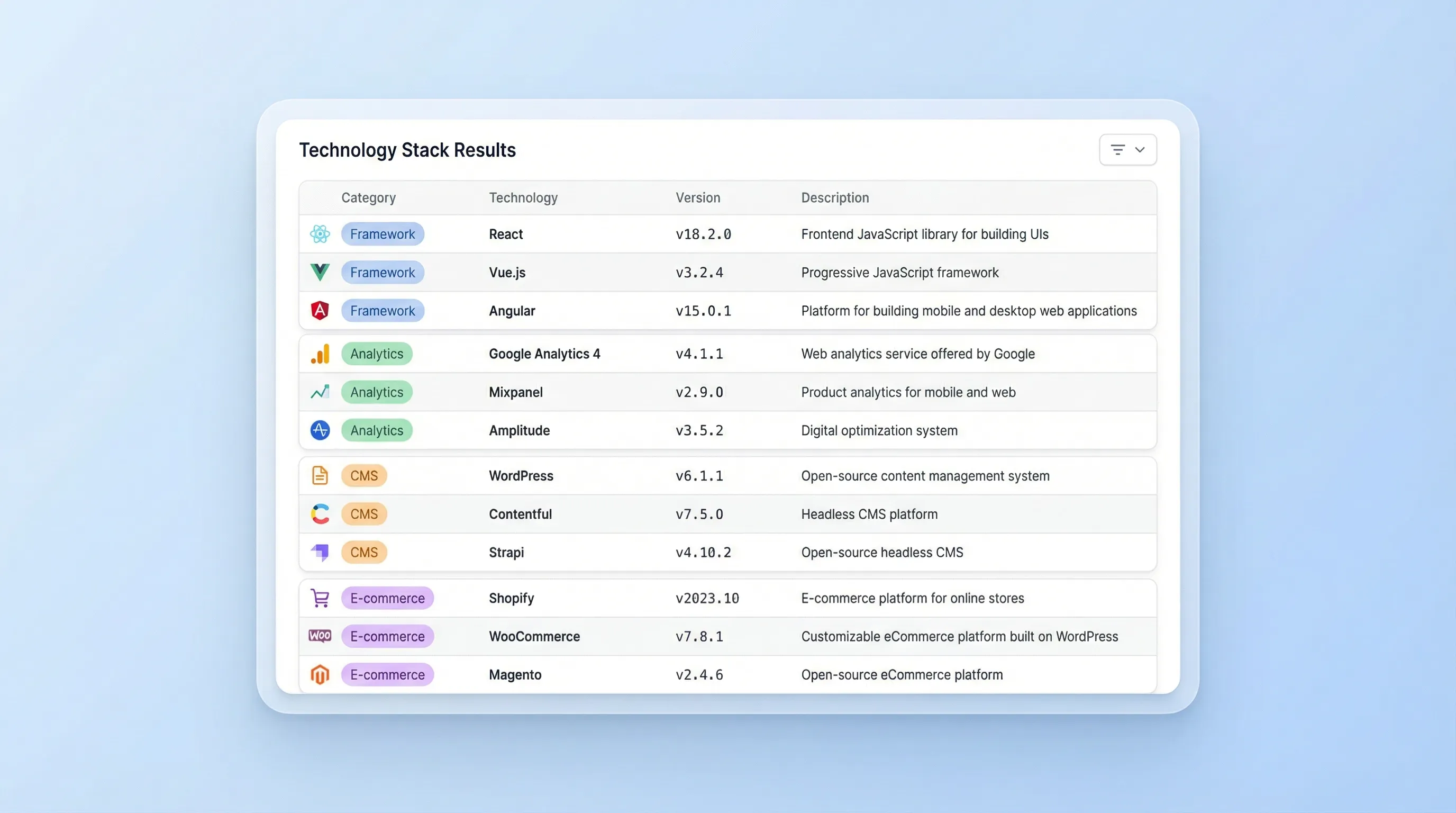
STEP 3「Check technology stack」ボタンをクリック「Check technology stack」ボタンをクリックして解析を実行します。Thunderbit は、検出された技術をカテゴリ別にまとめたテーブルを返します。各項目には Technology 名、Version(取得できる場合)、簡単な Description が含まれます。結果を確認したら、Excel、Google Sheets、Airtable、Notion にエクスポートするか、CSV または JSON でダウンロードして共有や追加分析に活用できます。

URLからWebサイトの技術スタックを確認する方法

Webサイトの技術スタックを解析する

Technology Stack Checker は、WebサイトURLをスキャンし、フレームワーク、プログラミング言語、CMSプラットフォーム、分析タグ、ホスティングのシグナル、EC関連コンポーネントなど、裏側で動いている技術を特定します。営業、マーケティング、プロダクトチームが、見込み客や競合の技術背景をソースコードまで掘り下げずに素早く把握したいときに最適です。結果は見やすく整理されているため、サイトの仕組みをひと目で理解できます。
無料で始める
section1_analyze_tech_stack.png

カテゴリ別・バージョン付きで技術を検出する

このツールは、検出結果を種類ごとにまとめたカテゴリ別テーブルで返します。Technology 名、取得できる場合は Version、そして簡潔な Description が含まれるため、サイト比較を一貫して行えます。競合分析で傾向を見つけたり、調査時の仮説検証を行ったりするのにも便利です。代理店のリード選別、パートナー部門の互換性確認、EC事業者による利用プラットフォームや計測ツールの確認にも役立ちます。
無料で始める
section2_detect_technologies.png

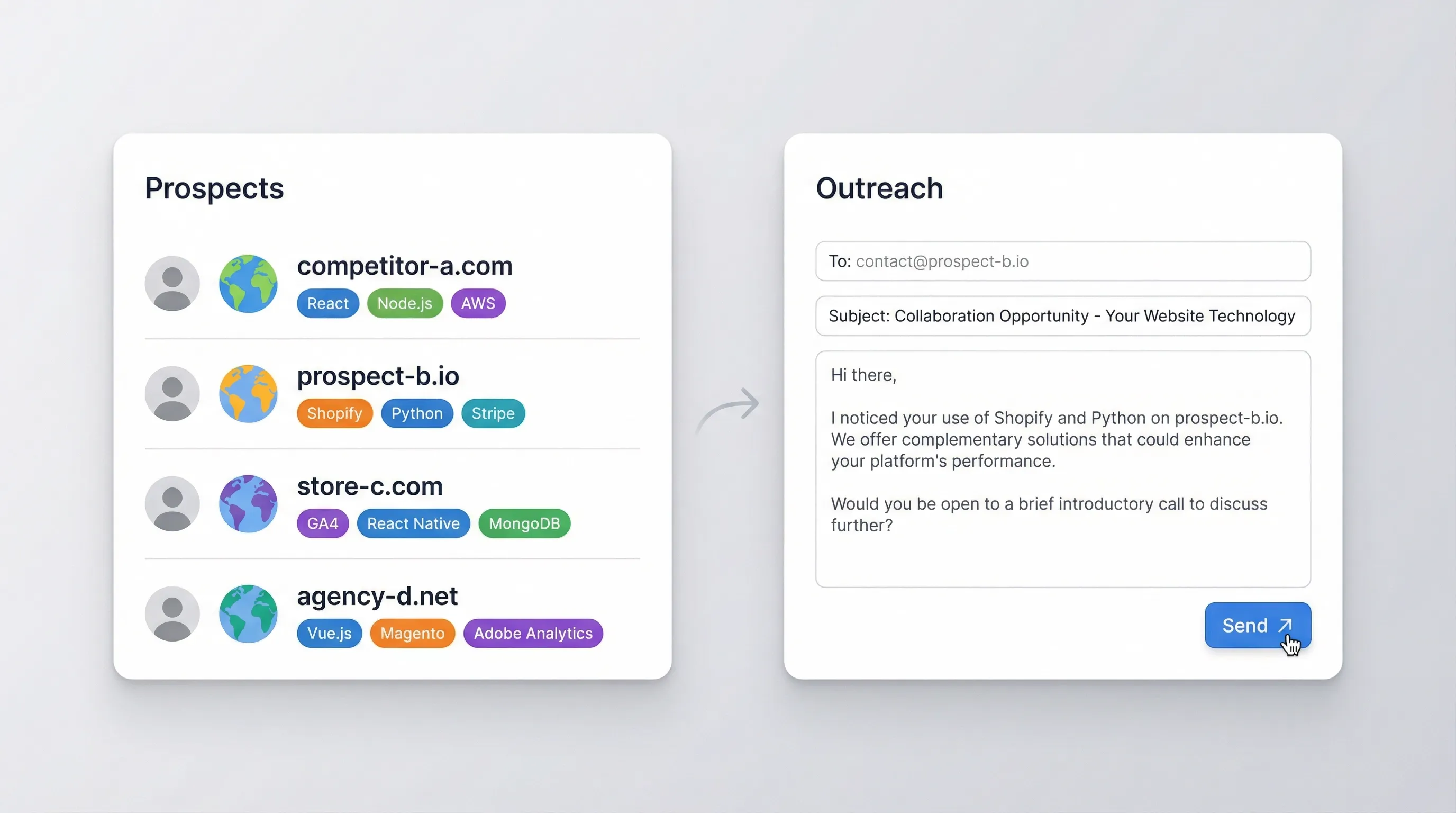
競合や見込み客を調査して、営業活動に活かす

検出したスタックをもとに、訴求内容を調整し、優先度の高いアカウントを見極められます。営業チームは、相手企業が現在どの技術を使っているかを把握し、それに合わせて連携提案や移行提案ができます。マーケティング担当は、分析ツールやタグマネージャーを確認することで、計測環境の成熟度を把握できます。代理店は、提案前にCMSやECプラットフォームでインバウンドリードを絞り込めます。構造化された出力により、アカウント調査の再現性あるワークフローを作りやすくなります。
無料で始める
section3_research_competitors.png

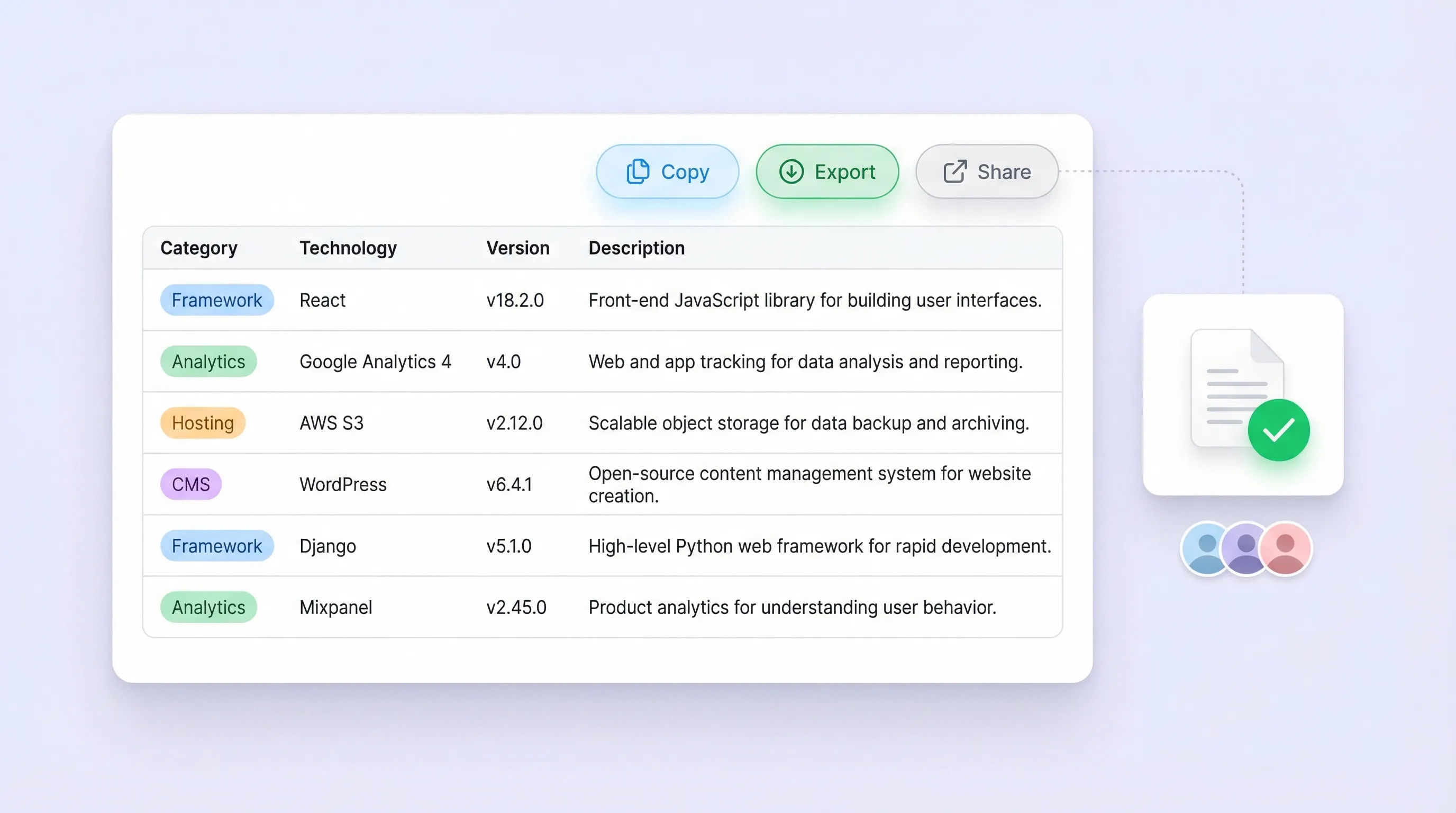
共有しやすい技術一覧を作成して計画に活かす

結果を、チームで共有できる軽量な技術一覧として活用すれば、監査、ベンダー比較、導入計画の整理に役立ちます。出力は Category、Technology、Version、Description で構成されたテーブルなので、ドキュメントにそのまま貼り付けたり、時系列で管理したりしやすい形式です。競合分析の標準化、連携候補の絞り込み、各サイトの構築メモの管理にも使えます。
無料で始める
section4_shareable_inventory.png

もっと無料ツールを見る

コールドメールテンプレート生成ツール

件名とそのまま送れる本文付きのコールドメールを、相手に合わせて自動作成。役職・会社・目的に応じて内容を最適化し、返信率の向上につなげます。

CSV から Excel への変換ツール

CSV ファイルを XLS または XLSX に素早く変換。行・列・値をそのまま保ち、見やすいスプレッドシートに仕上げます。

Pinterestスクレイパー

公開ボードから画像URL、タイトル、メタデータを整理された一覧として抽出します。クリーンな形式で書き出せるので、分析や保存にも便利です。

職務記述書ジェネレーター

役割の情報をもとに、整った職務記述書を作成。募集要項の表現を統一し、採用スピードを高めます。

Cron式ジェネレーター

シンプルな画面で、タスクスケジューリングに使える正しいcron式を作成できます。わかりやすく、そのまま使える出力で、時間を節約し入力ミスも減らせます。

AI営業メール自動生成ツール

無料のAIセールスメールジェネレーターを使えば、わずか数秒でパーソナライズされた営業メールを作成できます。営業チームや起業家に最適なツールです。今すぐお試しください。ThunderbitのAIツールで営業活動をさらに強化しましょう。

要約ジェネレーター

長文の記事やドキュメントから、100文字以内の明確なパラグラフに要点をまとめて、素早く内容を把握できる要約を自動生成します。

YouTube文字起こし抽出ツール

URLから動画の文字起こし(字幕)を抽出し、タイムスタンプ付きの読みやすいテキストとして取得できます。メモ作成、リサーチ、コンテンツ確認用に、字幕をコピーまたはダウンロード可能です。

今すぐもっとツールを探す

Thunderbitについてのユーザーの声

Taryn W.Growth Strategist@Thunderbit has changed how I run competitor research. I click 'AI Suggest Fields,' and it builds a clean table across paginated results—no coding, no CSS. Huge time-saver when analyzing product data from long-tail marketplaces.
Miles T.Sales Development ConsultantI use Thunderbit to grab emails and phone numbers from directories. It extracts clean contact info in one click, and exporting to Sheets or Notion takes seconds. No extra setup, no coding—just usable data ready to work with.
Rhea C.E-commerce AnalystThunderbit helps me monitor SKU data across multiple pages. I scrape the listings, then use Subpage Scraping to pull full product specs, pricing, reviews, and stock. The AI organizes everything into columns I define.
Cassian B.Real Estate AdvisorThunderbit's Scheduled Scraper makes real estate tracking easier. I describe the interval in plain English, and it automatically pulls updated listings, prices, and links without touching the setup again. Simple and very practical.
Dorian B.Content & SEO SpecialistI use Thunderbit's Field AI Prompts to clean and tag scraped blog content. It extracts titles, authors, and even suggests categories. Works great across dynamic sites and subpages—perfect for building structured SEO datasets.
Lina K.Marketplace Operations LeadWe track SKUs from niche stores using Thunderbit. Cloud Scraping handles 50 pages at a time, and for login-required sites, we switch to browser mode. It’s fast, flexible, and doesn’t need ongoing maintenance or manual edits.
Jorge F.Inbound Sales ManagerThunderbit’s AI Autofill is a lifesaver. After scraping contact info, I use it to fill lead forms directly in my browser. I just select the tab, and it fills everything using the scraped row. No manual input needed.
Alina D.Freelance ResearcherI rely on Thunderbit for extracting data from PDFs, image-based sites, and infinite scroll pages. It handles messy formats with AI and delivers ready-to-export tables I can send to Google Sheets or Airtable in seconds.
Taryn W.Growth Strategist@Thunderbit has changed how I run competitor research. I click 'AI Suggest Fields,' and it builds a clean table across paginated results—no coding, no CSS. Huge time-saver when analyzing product data from long-tail marketplaces.
Miles T.Sales Development ConsultantI use Thunderbit to grab emails and phone numbers from directories. It extracts clean contact info in one click, and exporting to Sheets or Notion takes seconds. No extra setup, no coding—just usable data ready to work with.
Rhea C.E-commerce AnalystThunderbit helps me monitor SKU data across multiple pages. I scrape the listings, then use Subpage Scraping to pull full product specs, pricing, reviews, and stock. The AI organizes everything into columns I define.
Cassian B.Real Estate AdvisorThunderbit's Scheduled Scraper makes real estate tracking easier. I describe the interval in plain English, and it automatically pulls updated listings, prices, and links without touching the setup again. Simple and very practical.
Dorian B.Content & SEO SpecialistI use Thunderbit's Field AI Prompts to clean and tag scraped blog content. It extracts titles, authors, and even suggests categories. Works great across dynamic sites and subpages—perfect for building structured SEO datasets.
Lina K.Marketplace Operations LeadWe track SKUs from niche stores using Thunderbit. Cloud Scraping handles 50 pages at a time, and for login-required sites, we switch to browser mode. It’s fast, flexible, and doesn’t need ongoing maintenance or manual edits.
Jorge F.Inbound Sales ManagerThunderbit’s AI Autofill is a lifesaver. After scraping contact info, I use it to fill lead forms directly in my browser. I just select the tab, and it fills everything using the scraped row. No manual input needed.
Alina D.Freelance ResearcherI rely on Thunderbit for extracting data from PDFs, image-based sites, and infinite scroll pages. It handles messy formats with AI and delivers ready-to-export tables I can send to Google Sheets or Airtable in seconds.

よくある質問

AIでデータを抽出
Google Sheets、Airtable、Notionへ簡単にデータを転送
Chrome Store Rating
PRODUCT HUNT#1 Product of the Week