
मुझे आज भी याद है, जब मैंने पहली बार सेल्स लीड्स, कस्टमर नोट्स और मॉनिटर पर चिपके “रिमाइंडर” वाले पोस्ट-इट्स से भरी एक स्प्रेडशीट संभालने की कोशिश की थी। हालत बिल्कुल बिल्लियों को हांकने जैसी थी—और बिल्लियाँ भी ऐसी, जिन्हें व्यवस्था से एलर्जी हो, और रिमाइंडर बार-बार गिर जाते हों। लेकिन आज Customer Relationship Management (CRM) की दुनिया पूरी तरह बदल चुकी है। अब Thunderbit जैसे AI-powered टूल्स की मदद से, छोटी-सी टीम भी Fortune 500 जैसी प्रोफेशनल तरीके से ग्राहक डेटा मैनेज कर सकती है—न खोई हुई लीड्स, न चिपचिपे नोट्स।
CRM सिर्फ एक बढ़िया सा सॉफ़्टवेयर नहीं है; यह आधुनिक बिज़नेस के लिए रिश्ते बनाने, ग्रोथ बढ़ाने और ग्राहकों को बार-बार वापस लाने की रीढ़ है। इस गाइड में मैं समझाऊँगा कि CRM असल में क्या है, यह क्यों ज़रूरी है, और नए टूल्स—जिनमें Thunderbit जैसे AI web scrapers भी शामिल हैं—कस्टमर ढूँढने, उन्हें nurture करने और जीतने के तरीके को कैसे बदल रहे हैं। चाहे आप sales leader हों, startup founder हों, या बस खोए हुए emails के पीछे भागते-भागते थक गए हों, चलिए CRM की दुनिया में चलते हैं—और देखते हैं कि इसे अपने लिए कैसे काम में लाया जाए।
CRM का अर्थ: CRM क्या है और यह क्यों महत्वपूर्ण है?
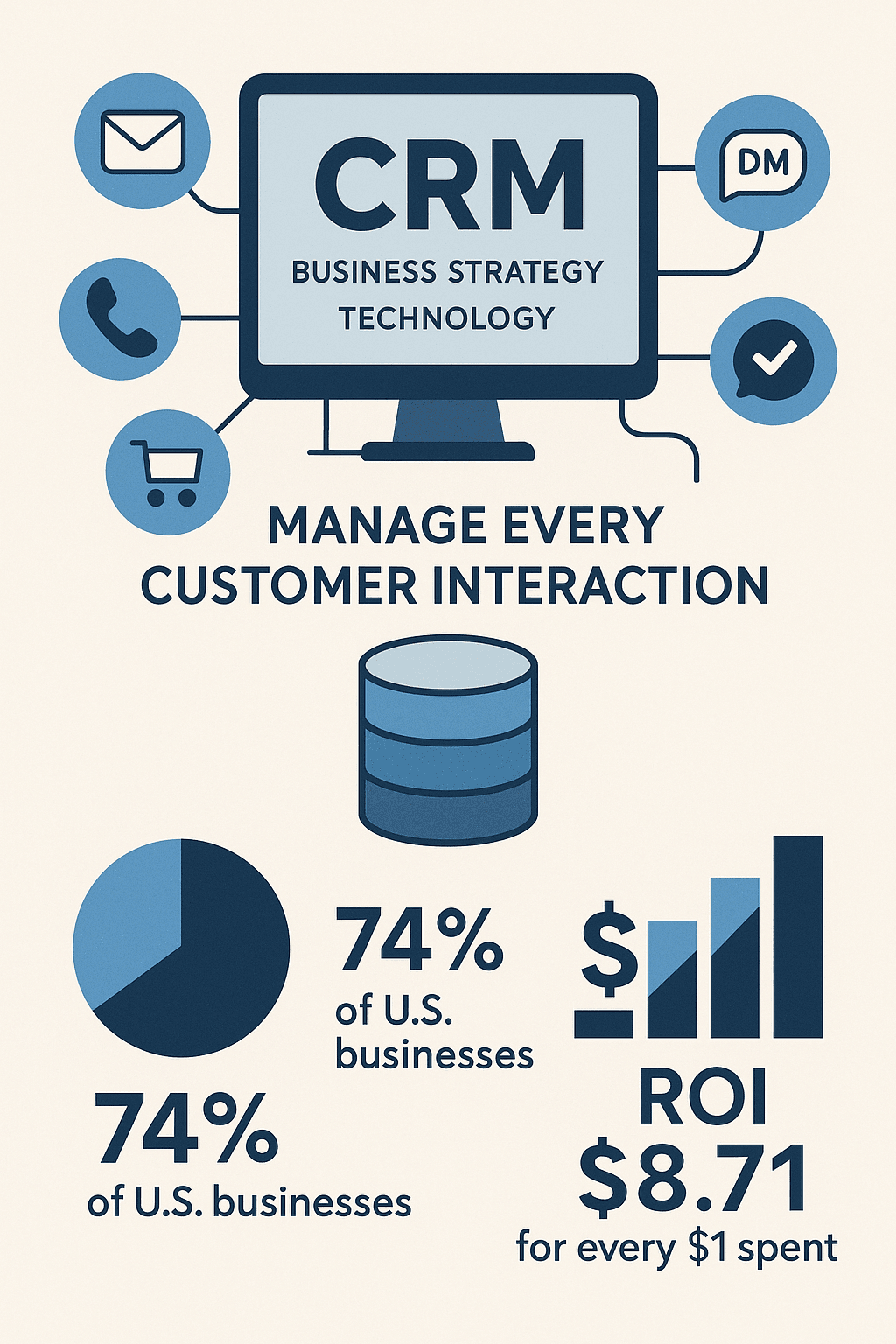
सबसे पहले मूल बातों से शुरू करते हैं। CRM का मतलब है Customer Relationship Management, लेकिन असल में इसमें दो चीज़ें एक साथ जुड़ी होती हैं: एक business strategy और उसे support करने वाली technology। इसका मूल उद्देश्य है आपकी company और customers/prospects के बीच होने वाली हर interaction—emails, calls, purchases, support tickets, social media DMs, जो भी हो—को एक ही व्यवस्थित जगह पर संभालना।
CRM को अपनी company की collective memory समझिए। बिखरी हुई spreadsheets या किसी एक व्यक्ति की हर client के कुत्ते का नाम याद रखने की अद्भुत क्षमता पर निर्भर रहने के बजाय, CRM आपके customer data और touchpoints को एक जगह केंद्रीकृत कर देता है। यह सिर्फ दिखावे की बात नहीं है: 74% अमेरिकी businesses अब customer interactions को manage करने के लिए CRM system का उपयोग करते हैं, और average ROI है हर $1 पर $8.71।
लेकिन CRM सिर्फ software तक सीमित नहीं है। यह एक सोच है—customer को business के केंद्र में रखना, data की मदद से service को personal बनाना, और यह सुनिश्चित करना कि कोई भी opportunity छूट न जाए। ऐसी दुनिया में जहाँ 70% customers उम्मीद करते हैं कि आप उनकी history जानें, उससे पहले कि वे “hello” कहें, CRM वही तरीका है जिससे आप यह उम्मीद पूरी करते हैं।
CRM System बनाम CRM Software: टूल्स को समझना
यहाँ थोड़ा फर्क समझना ज़रूरी है। लोग अक्सर “CRM system” और “CRM software” को एक ही मान लेते हैं, लेकिन इनमें subtle difference है:
- CRM System: customer relationships को manage करने का overall approach, strategy और processes। जैसे: “हम नई leads पर 24 घंटे के भीतर follow-up करते हैं।”
- CRM Software: वह technology जो इन processes को support करती है—जहाँ आप leads दर्ज करते हैं, reminders लगाते हैं और outcomes track करते हैं।
अधिकतर लोग जब कहते हैं “हम नया CRM ले रहे हैं,” तो उनका मतलब software से होता है। लेकिन असली कमाल तब होता है जब software और strategy एक साथ काम करते हैं।
CRM Software के प्रकार
- Cloud-based CRM: ऑनलाइन hosted, कहीं से भी accessible—अब 87% CRM usage cloud में है।
- On-premise CRM: आपके अपने servers पर installed, उन businesses के लिए जिन्हें extra security या IT control चाहिए।
- Industry-specific CRM: real estate, retail, hospitality जैसी खास industries के लिए tailored।
Leading CRM Platforms
- Salesforce: सबसे बड़ा नाम, और इसका 19.5% global market share है।
- HubSpot, Zoho, Pipedrive, Freshsales: छोटे और mid-sized businesses में लोकप्रिय, अक्सर free tiers और आसान interfaces के साथ।
संक्षेप में: CRM software tool है, लेकिन आपका CRM system playbook है। दोनों ज़रूरी हैं।
हर बिज़नेस को जानने चाहिए CRM Software के Key Features
Modern CRM tools features से भरे होते हैं, लेकिन कुछ बुनियादी capabilities ऐसी हैं जो असली फर्क लाती हैं:
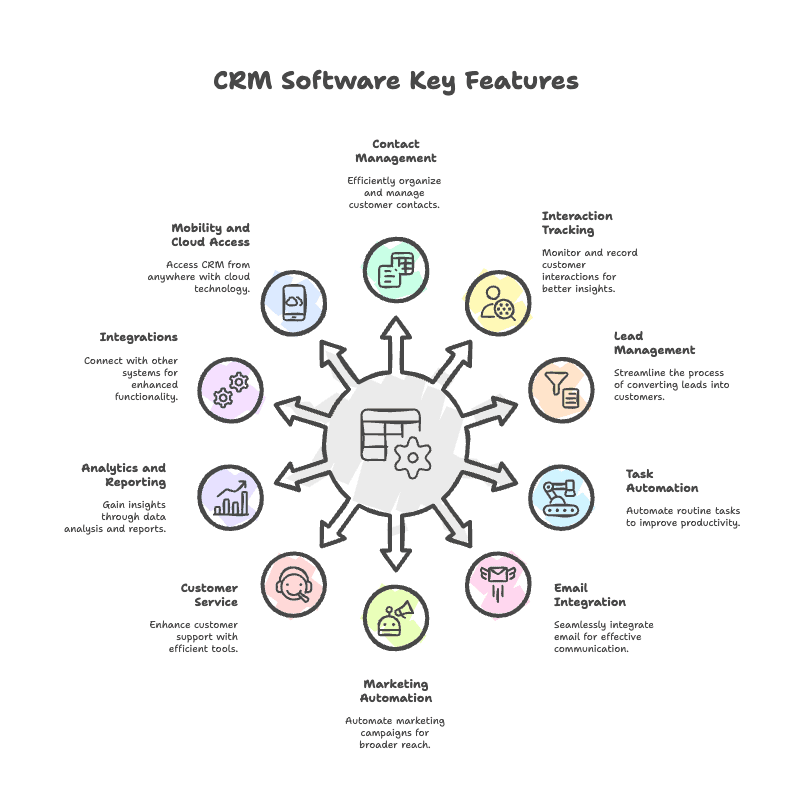
1. Contact और Account Management
सभी customer info—names, emails, phone numbers, company details—एक ही जगह रखता है। अब “latest spreadsheet किसके पास है?” वाला झंझट नहीं।
2. Interaction Tracking (Customer History)
हर email, call, meeting और support ticket का रिकॉर्ड रखता है। कोई भी वहीं से काम आगे बढ़ा सकता है जहाँ पिछली बार छोड़ा गया था, जिससे experience seamless बनता है।
3. Lead और Sales Pipeline Management
पहले contact से लेकर closed deal तक leads को track करता है, साफ pipeline stages और lead scoring के साथ, ताकि सबसे गर्म prospects को priority दी जा सके। CRM लागू करने के बाद businesses में औसतन 29% sales revenue increase देखा गया है।
4. Task Management और Automation
रिमाइंडर और repetitive tasks automate करता है—जैसे follow-up emails भेजना या quote का जवाब न आने पर task बनाना। Sales teams में 34% productivity boost देखा गया है।
5. Email Integration और Communication Tools
Emails और meetings automatically log करता है, ताकि कुछ भी छूटे नहीं।
6. Marketing Automation और Campaign Management
Contacts को segments में बाँटता है, targeted campaigns चलाता है, और engagement track करता है। CRM data से चलने वाली personalized campaigns में 14% higher click-through rate मिलता है।
7. Customer Service और Support Management
Support tickets और customer issues track करता है, जिससे resolution तेज़ होता है और satisfaction बेहतर होती है।
8. Analytics और Reporting
Sales forecasts से लेकर customer retention तक हर चीज़ के लिए dashboards और reports। CRM analytics इस्तेमाल करने वाली companies में 42% better sales forecast accuracy देखी गई है।
9. Integrations और Extendability
Email, marketing, e-commerce, accounting और अन्य tools से connect करता है। 46% businesses कहते हैं कि CRM के ज़रिए customer data को centralize करना बहुत मददगार है।
10. Mobility और Cloud Access
Mobile apps या web portals से team कहीं से भी CRM access कर सकती है। Mobile CRM इस्तेमाल करने वाली sales teams quota 65% of the time, vs. 22% without हासिल करती हैं।
अच्छे CRM features सिर्फ sales के लिए नहीं होते—वे पूरी company को customer के इर्द-गिर्द जोड़ते हैं।
CRM के Business Benefits: Lead Generation से Customer Loyalty तक
CRM लागू करना सिर्फ data organize करना नहीं है—यह आपके business को बदल देना है। यहाँ देखिए CRM अलग-अलग departments में कैसे value देता है:
| Department/Function | CRM इस्तेमाल करने के फायदे |
|---|---|
| Sales Team | ज़्यादा organized pipeline, बेहतर conversions, 29% sales revenue increase, बेहतर forecasting. |
| Marketing Team | बेहतर targeting, campaign ROI में सुधार, ज़्यादा warm leads, 14% higher email click rates. |
| Customer Support | तेज़, ज़्यादा personalized service, 49% बेहतर support, 47% बेहतर retention. |
| Operations/Management | दक्षता, collaboration, real-time dashboards, internal communications का सरलीकरण. |
| Customer Loyalty | मज़बूत रिश्ते, 27% retention increase, ज़्यादा referrals. |
निष्कर्ष? CRM सिर्फ sales tool नहीं, बल्कि company-wide growth engine है।
CRM Lead Generation और Sales Growth को कैसे बढ़ाता है
अब बात करते हैं किसी भी business की जीवनरेखा की: leads. CRM systems इस तरह बनाए गए हैं कि leads को capture, nurture और convert किया जा सके—वो भी बिना किसी lead को हाथ से निकलने दिए।
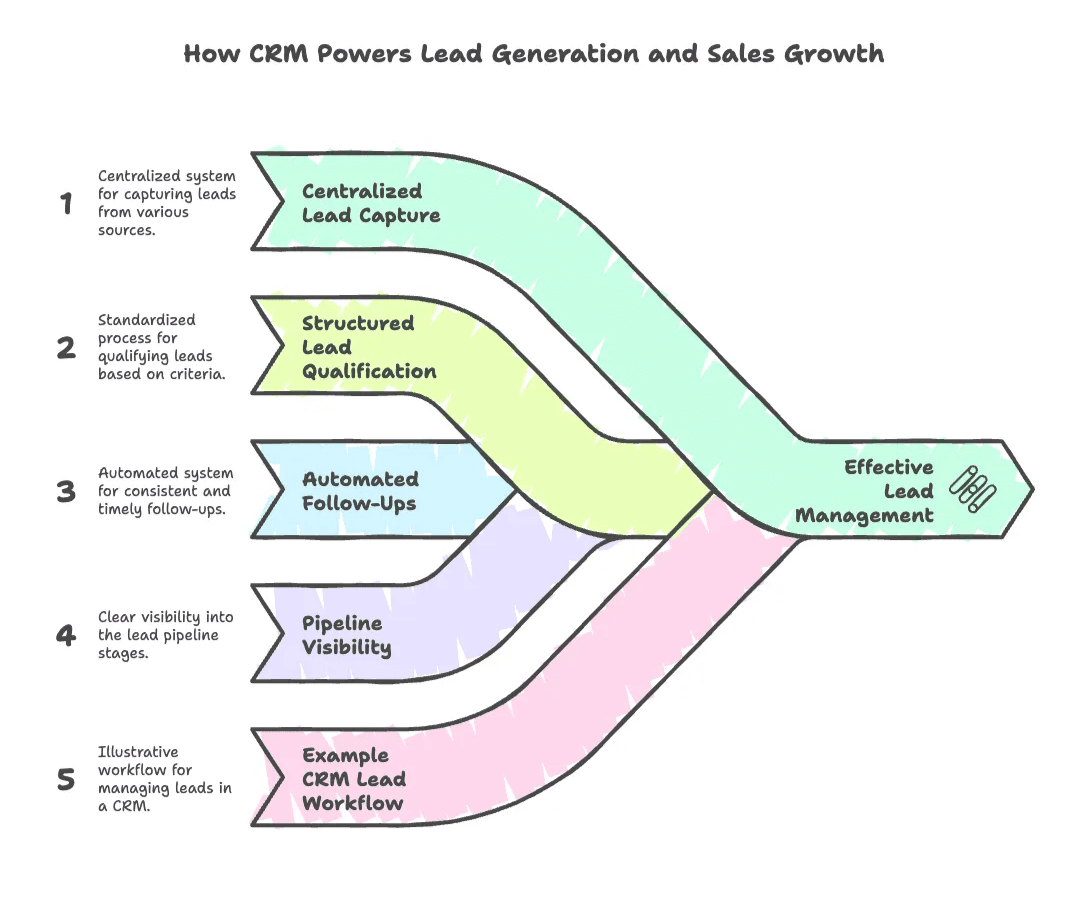
Centralized Lead Capture
सभी leads—चाहे वे web forms, imports, events या social media से आए हों—एक ही system में आते हैं। अब “लगता है वह lead पिछले हफ़्ते मेरी inbox में थी...” जैसी उलझन नहीं।
Structured Lead Qualification
Custom fields और lead scoring आपकी team को सबसे promising prospects पर ध्यान लगाने में मदद करते हैं। CRM reps को बताता है कि किसे अगला call करना है और कैसे approach करना है।
Automated Follow-Ups
CRM reminders और follow-up emails automate करता है, ताकि हर lead को वह attention मिले जिसके वे हकदार हैं। तेज़ और व्यवस्थित follow-up वाली companies में conversion rates काफी बेहतर होते हैं।
Pipeline Visibility
Visual sales pipelines दिखाते हैं कि हर deal किस stage में है। Managers bottlenecks पहचान सकते हैं, revenue forecast कर सकते हैं, और reps को real time में coach कर सकते हैं।
CRM Lead Workflow का उदाहरण
ज़रा यह सोचिए: एक website visitor ebook डाउनलोड करता है। CRM एक lead बनाता है, उसे एक rep को assign करता है, और welcome email trigger करता है। Rep call करता है, notes दर्ज करता है, demo schedule करता है, और CRM हर step track करता है। अगर deal बंद हो जाती है, तो उसे “Won” mark कर दिया जाता है। अगर नहीं, तो marketing उस lead को nurture कर सकती है। इस पूरे समय हर interaction log होता रहता है, जिससे full transparency रहती है।
नतीजा? CRM इस्तेमाल करने वाली कंपनियाँ 29% sales increase और 34% productivity boost देखती हैं।
Thunderbit + CRM: AI Web Scraper के साथ CRM Data को Supercharge करना
अब चलिए practical बात करते हैं। सबसे अच्छा CRM भी उतना ही अच्छा होता है जितना data आप उसमें डालते हैं। यहीं पर Thunderbit काम आता है—एक ऐसा tool जिसे मेरी टीम और मैंने CRM data entry और enrichment को जितना हो सके आसान बनाने के लिए बनाया है।
CRM Data Gaps भरना
Prospect emails या company info जैसे data को manually ढूँढना और डालना घंटों खा सकता है। Thunderbit आपके AI-powered research assistant की तरह काम करता है, जो websites, PDFs और images से structured data automatically निकालता है। उदाहरण के लिए, अगर target companies के key contacts missing हैं, तो Thunderbit उनकी websites या directories पर जाकर addresses, phone numbers, executive names और बहुत कुछ निकाल सकता है।
Online Sources से Lead Generation
Sales teams company websites, directories और B2B databases में leads खोजने में बहुत समय लगाते हैं। Thunderbit यह काम automate करता है: यह public web pages से names, titles, company info, emails, phone numbers और social links जैसे prospect details निकाल सकता है। Website Contact Scraper उन pages को structured lead lists में बदलने के लिए एक practical starting point है।
Subpage Scraping और Data Enrichment
Thunderbit का Subpage Scraping feature बहुत समय बचाता है। मान लीजिए आपके पास company या prospect pages की एक list है—Thunderbit हर page पर जाकर emails, phone numbers निकाल सकता है और AI की मदद से data enrich कर सकता है (जैसे job titles को categorize करना या company industry infer करना)। यह ऐसा है जैसे कोई AI intern सारा भारी काम कर दे—बस coffee break के बिना।
अपने CRM में Export करना
Thunderbit data को सीधे Excel, Google Sheets, Airtable या Notion में बिना extra charge export करने देता है। वहाँ से आप इसे अपने CRM में import कर सकते हैं, या Zapier जैसे tools के साथ automatic syncing सेट कर सकते हैं।
CRM Data को Fresh रखना
क्या आप जानते हैं कि 30% B2B customer data हर साल stale हो जाता है? Thunderbit public info को दोबारा scrape करके और records अपडेट करके आपके CRM को समय-समय पर refresh करने में मदद कर सकता है—अब outdated contacts के पीछे भागने की ज़रूरत नहीं।
Scale और Speed
Thunderbit का cloud scraping बड़े lists को संभाल सकता है—एक बार में 50 pages तक scrape कर सकता है। जिस prospect list को manually बनाने में दिन लगते, वह अब मिनटों में बन सकती है।
Real-World Use Cases
- Sales: Startup directories या LinkedIn से CEOs scrape करें, contact info से enrich करें, और CRM में import करें।
- Marketing: बेहतर targeting के लिए CRM contacts को social links से enrich करें।
- Operations: Competitor sites से pricing या product info scrape करें, और reference के लिए CRM में log करें।
Thunderbit कैसे काम करता है, इसके बारे में और जानने के लिए हमारा blog on scraping website data into Excel देखें।
Thunderbit AI Web Scraper के साथ अपने CRM को और ताकतवर बनाइए Get Started Free
मैं आपको Thunderbit और LinkedIn के साथ इस्तेमाल होने वाला एक typical workflow दिखाता हूँ:
LinkedIn Lead Generation और Data Enrichment के लिए Thunderbit का उपयोग
- अपना target तय करें: LinkedIn पर search करें, जैसे “California में software companies के Marketing Directors।”
- Thunderbit activate करें: Results page पर Thunderbit Chrome Extension खोलें। Thunderbit की AI बताती है कि कौन-से fields extract करने हैं—Name, Title, Company, LinkedIn URL, आदि।
- List scrape करें: “Scrape” पर क्लिक करें। Thunderbit हर profile का data pull करता है, pagination की ज़रूरत हो तो उसे भी संभालता है।
- Subpage Scraping: इन profile URLs को Thunderbit के LinkedIn Profile Scraper में वापस डालें। Thunderbit हर profile visit करता है, emails, phones, company details और बहुत कुछ निकालता है।
- Review और Export: Data check करें, फिर उसे Google Sheets या CSV में export करें।
- CRM में import करें: अपने CRM की import function से columns map करें और leads जोड़ें।
- Follow-up और Sync: Outreach शुरू करें, या Zapier जैसी automation platforms से ongoing syncs (जैसे weekly scrapes) सेट करें।
नतीजा? आपके CRM में एक high-quality, enriched lead list तैयार—और घंटों की manual copy-paste की झंझट खत्म।
और विस्तृत guides के लिए हमारा step-by-step LinkedIn scraping tutorial देखें।
CRM Data Enrichment के लिए Thunderbit Chrome Extension आज़माएँ
CRM Success के लिए Best Practices: Data Quality, Automation और Team Adoption
CRM उतना ही अच्छा है जितना उसे आप इस्तेमाल करते हैं। मैंने जो सीखा है, वह यहाँ है—कभी-कभी कठिन तरीके से:
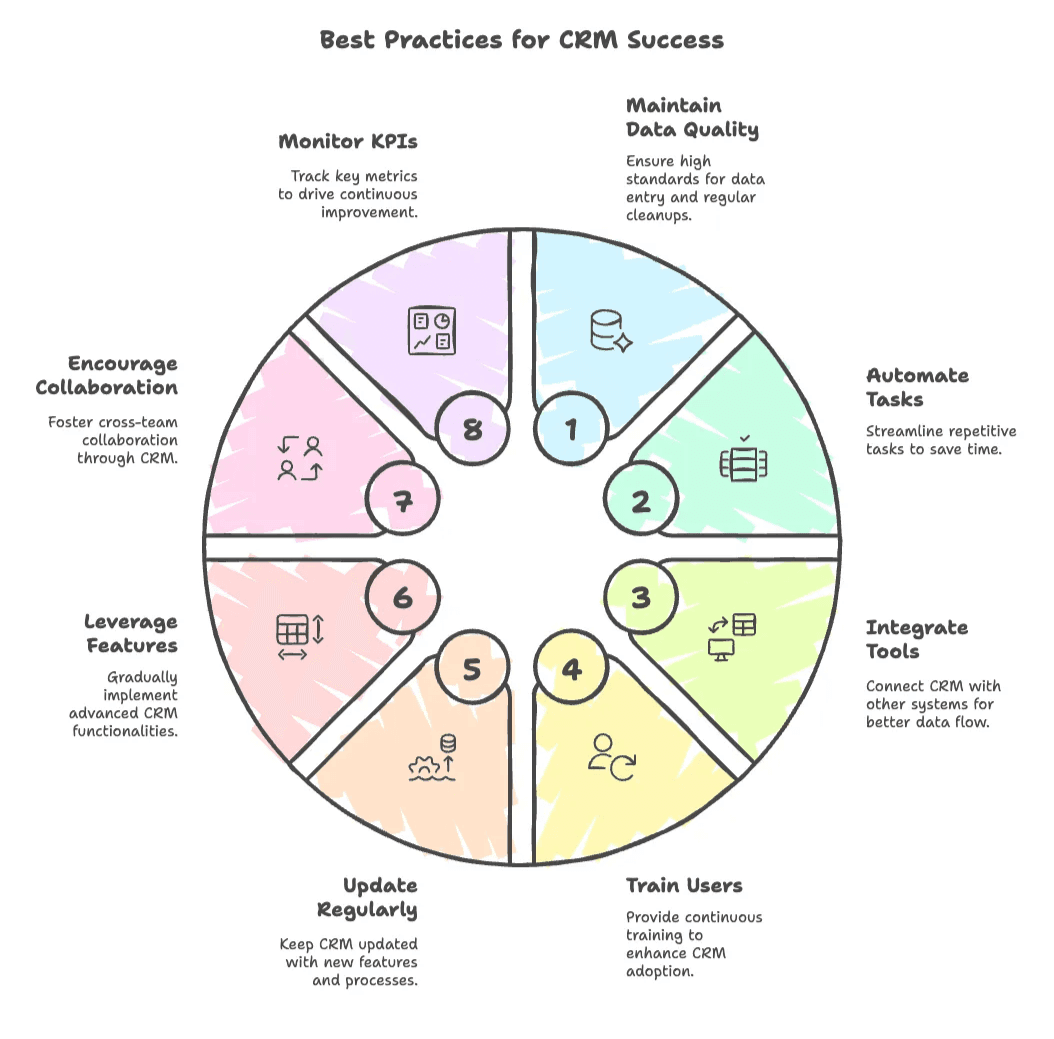
1. Data Quality ऊँची रखें
- Data entry के लिए standards तय करें (required fields, consistent formats)।
- नियमित data cleanup schedule करें—याद रखिए, हर साल 30% data stale हो जाता है।
- Thunderbit जैसे AI tools का उपयोग करके records refresh और enrich करें।
2. Repetitive Tasks को Automate करें
- Lead capture, follow-up reminders और email logging automate करें।
- Deal stages के आधार पर tasks trigger करने के लिए workflow rules use करें।
- CRM automation हर user के लिए 5–10 घंटे प्रति सप्ताह बचा सकती है।
3. दूसरे Tools के साथ Integrate करें
- CRM को email, marketing, support और e-commerce systems से जोड़ें।
- Thunderbit, Google Sheets और अपने CRM के बीच data sync करने के लिए Zapier जैसे platforms का उपयोग करें।
- 49% businesses ने CRM को अन्य apps से जोड़ने के बाद data quality में सुधार देखा।
4. User Training और Adoption में निवेश करें
- Training को लगातार जारी रखें—दिखाएँ कि CRM हर role को कैसे आसान बनाता है।
- दूसरों की मदद के लिए CRM champions नियुक्त करें।
- Usage पर नज़र रखें और जहाँ ज़रूरत हो, system को सरल करें।
- “अगर CRM में नहीं है, तो हुआ ही नहीं”—इस बात को team mantra बना लें।
5. नियमित रूप से Update और Maintain करें
- Pipeline stages, fields और processes की हर quarter समीक्षा करें।
- Software updates और नए features के साथ बने रहें।
- नए hires को अच्छी तरह onboard करें।
6. Advanced Features का धीरे-धीरे उपयोग करें
- AI features, custom fields और advanced integrations को pilot करें।
- Automated reports और dashboards सेट करें।
7. Cross-Team Collaboration बढ़ाएँ
- CRM को सभी customer-facing teams का hub बनाइए।
- @mentions, shared notes और joint reviews का उपयोग करें।
8. Adoption KPIs को Monitor और Improve करें
- Key metrics track करें: data completeness, usage rates, pipeline accuracy।
- Continuous improvement के लिए feedback loops बनाएँ।
Best practices पर और जानने के लिए हमारा AI के साथ list crawling पर blog देखें।
अपने Business के लिए सही CRM Software कैसे चुनें
CRM चुनना डेटिंग जैसा लग सकता है—options बहुत हैं, लेकिन सही match चाहिए। CRM software evaluate करने के लिए मेरी checklist यह है:
1. अपनी ज़रूरतें साफ करें
- आप कौन-सी समस्याएँ हल करना चाहते हैं? Lead management, support tracking, unified data?
- आपको कितने users, contacts और integrations चाहिए?
- एक simple requirements doc लिखें।
2. Ease of Use
- क्या interface सहज है? क्या आपकी team इसे बिना “CRM-ology” में PhD के चला सकती है?
- Trials में end users को शामिल करें।
3. Features और Customizability
- क्या इसमें आपकी ज़रूरी sales, marketing और support features हैं?
- क्या आप custom fields, pipelines या modules जोड़ सकते हैं?
- क्या एक मजबूत mobile app है?
4. Scalability
- क्या यह आपके साथ grow करेगा? User limits, data limits और pricing देखें।
5. Integration Capabilities
- क्या यह email, calendar, marketing और support tools के साथ अच्छे से काम करता है?
- क्या आप आसानी से import/export कर सकते हैं? क्या API या Zapier support है?
- Thunderbit जैसे data enrichment tools के साथ यह कितना अच्छा काम करता है?
6. Pricing और Total Cost
- जैसे-जैसे users या contacts बढ़ेंगे, असली लागत कितनी होगी?
- storage, support या integrations के लिए hidden fees तो नहीं?
- याद रखिए, CRM हर $1 खर्च पर $8–9 ROI दे सकता है।
7. Vendor Support और Ecosystem
- Support कितना responsive है? Training resources उपलब्ध हैं?
- Product नियमित रूप से अपडेट होता है?
- क्या strong user community या app marketplace है?
8. Commit करने से पहले Test Drive करें
- Free trials या demos का उपयोग करें।
- Sample data import करें, real workflows आज़माएँ, और team से feedback लें।
9. Thunderbit के साथ Integration
- क्या आप Thunderbit से enriched data आसानी से import कर सकते हैं?
- क्या CRM bulk imports और deduplication को अच्छी तरह संभालता है?
- क्या smooth syncing के लिए Google Sheets integration है?
और गहराई से समझने के लिए best web scraping tools पर हमारा guide देखें।
CRM Data के लिए सर्वश्रेष्ठ Web Scraping Tools Get Started Free
निष्कर्ष: CRM और Smart Data Tools के साथ Growth Unlock करना
बड़ी तस्वीर यह है: CRM सिर्फ एक software खरीदना नहीं है—यह growth, customer loyalty और operational efficiency की strategy है। CRM इस्तेमाल करने वाली कंपनियाँ sales goals exceed करने की 86% अधिक संभावना रखती हैं, और इसका ROI अपने आप बोलता है।
लेकिन असली secret sauce क्या है? CRM को Thunderbit जैसे smart data tools के साथ जोड़ना। CRM structure देता है; Thunderbit उसे rich, up-to-date data से भर देता है। साथ मिलकर, ये tools आपको ज़्यादा customers ढूँढने, nurture करने और जीतने में मदद करते हैं—वो भी manual काम में डूबे बिना।
अगर आप अभी भी CRM को लेकर दुविधा में हैं, तो सोचिए आप क्या खो रहे हैं: छूटी हुई leads, missed follow-ups, और बिखरा हुआ data। अब एक ऐसे भविष्य की कल्पना कीजिए जहाँ हर lead nurture हो, हर customer पहचाना जाए, और आपकी team के पास real-time insights तुरंत उपलब्ध हों। यही CRM advantage है।
अगले कदम:
- अगर आपके पास CRM नहीं है, तो इस guide की मदद से एक चुनें और trial शुरू करें।
- अगर है, तो अपने data quality और workflows का audit करें—कहाँ automate या enrich किया जा सकता है?
- Thunderbit Chrome Extension आज़माएँ और देखें कि AI-powered data enrichment आपके CRM को कैसे और ताकतवर बना सकता है।
CRM एक journey है, one-time project नहीं। इसे लगातार refine करते रहिए, data ताज़ा रखिए, और team को engaged रखिए। सही tools और strategy के साथ, आप हर customer interaction को growth के अवसर में बदल देंगे।
अपनी team को सशक्त बनाइए, उन्हें data के बोरिंग काम से मुक्त कीजिए, और customer को हर चीज़ के केंद्र में रखिए—यही CRM का वादा है। और Thunderbit की थोड़ी-सी मदद से, आप CRM-powered success की राह पर बहुत आगे बढ़ जाएँगे।
FAQs
1. CRM क्या है और यह businesses के लिए क्यों महत्वपूर्ण है?
CRM का मतलब है Customer Relationship Management, और यह business strategy तथा उसे support करने वाले software—दोनों को दर्शाता है। यह companies को सभी customer interactions को एक centralized system में manage करने में मदद करता है, जिससे organization, personalization और customer satisfaction बेहतर होती है। CRM customer relationships बढ़ाने, sales drive करने और team collaboration सुधारने के लिए बेहद महत्वपूर्ण है।
2. CRM software में किन key features को देखना चाहिए?
ज़रूरी CRM features में contact और account management, interaction tracking, lead और sales pipeline management, task automation, email integration, marketing campaign tools, customer service management, analytics, और mobile/cloud access शामिल हैं। ये features sales, marketing और support teams के काम को आसान बनाते हैं।
3. CRM software किसी company के अलग-अलग departments को कैसे फायदा देता है?
CRM systems departments के across productivity और results बेहतर करते हैं। Sales teams को बेहतर pipeline visibility मिलती है और वे अधिक deals बंद करती हैं; marketing teams ज़्यादा targeted campaigns चला सकती हैं; support teams issues जल्दी हल करती हैं; और management को forecasting और coordination में लाभ मिलता है। अंततः CRM पूरी company में customer retention और loyalty बढ़ाता है।
4. CRM data management में Thunderbit की क्या भूमिका है?
Thunderbit एक AI-powered web scraper है जो CRM systems को उच्च-गुणवत्ता वाले lead data से enrich करता है। यह LinkedIn से contact details इकट्ठा करने, पुराने records अपडेट करने और websites से structured data scrape करने जैसे काम automate करता है। Thunderbit Google Sheets और Airtable जैसे tools के साथ integrate करता है ताकि CRM platforms में आसानी से import हो सके और data fresh व complete रहे।
5. सफल CRM implementation के लिए best practices क्या हैं?
मुख्य CRM best practices में high data quality बनाए रखना, repetitive tasks automate करना, अन्य business tools के साथ integrate करना, users को नियमित रूप से training देना, processes अपडेट करना, advanced features का strategic उपयोग करना, और collaboration को बढ़ावा देना शामिल है। Adoption metrics track करना और workflows को लगातार बेहतर बनाना long-term CRM success सुनिश्चित करता है।
और जानें:
- Data Enrichment Explained: Types, Tools & Use Cases
- Lead Management Explained: Everything You Need to Know
- What is CRM (customer relationship management)? Full guide
- What is CRM? Definition + Benefits
CRM Data Enrichment के लिए Thunderbit आज़माएँ Get Started Free