

पिछली तिमाही, मेरे जानने वाले एक सेल्स रिप ने एक मिड-साइज़ हेल्थकेयर कंपनी में "VP of Technology" के साथ रिलेशन बनाने में पूरे छह हफ्ते लगा दिए। डेमो, फॉलो-अप, कस्टम प्रपोज़ल—सब कुछ किया। फिर कॉल आई: "यह तो बढ़िया लग रहा है, लेकिन मुझे इसे हमारी procurement समिति और department head को दिखाना होगा। मैं असल में ऐसी खरीद को मंज़ूरी नहीं देता/देती।" छह हफ्ते, बेकार।
ऐसी कहानी बहुत आम है, और डेटा भी यही बताता है। Gartner के शोध के मुताबिक, एक जटिल B2B खरीद प्रक्रिया में आम तौर पर छह से 10 decision makers शामिल होते हैं, और हर कोई अलग-अलग जानकारी के साथ आता है। 6sense का नया डेटा इस संख्या को और बढ़ाता है: औसत B2B buying group अब 11 लोगों की है, और खरीदार किसी सेलर से बात करने से पहले ही खरीद प्रक्रिया के लगभग 70% हिस्से तक पहुँच चुके होते हैं।
तो सवाल सिर्फ यह नहीं है कि “सही title किसके पास है?”—असल सवाल है “बजट किसके पास है, contract कौन साइन कर सकता है, और ‘हाँ’ कौन कह सकता है?” यह ब्लॉग बताता है कि असली decision makers को कैसे खोजें, validate करें, और map करें—चाहे job titles भ्रामक हों, org chart उलझा हुआ हो, या LinkedIn profile 2022 के बाद अपडेट ही न हुआ हो।
Decision Maker क्या होता है? (और Job Titles पूरी कहानी क्यों नहीं बताते)
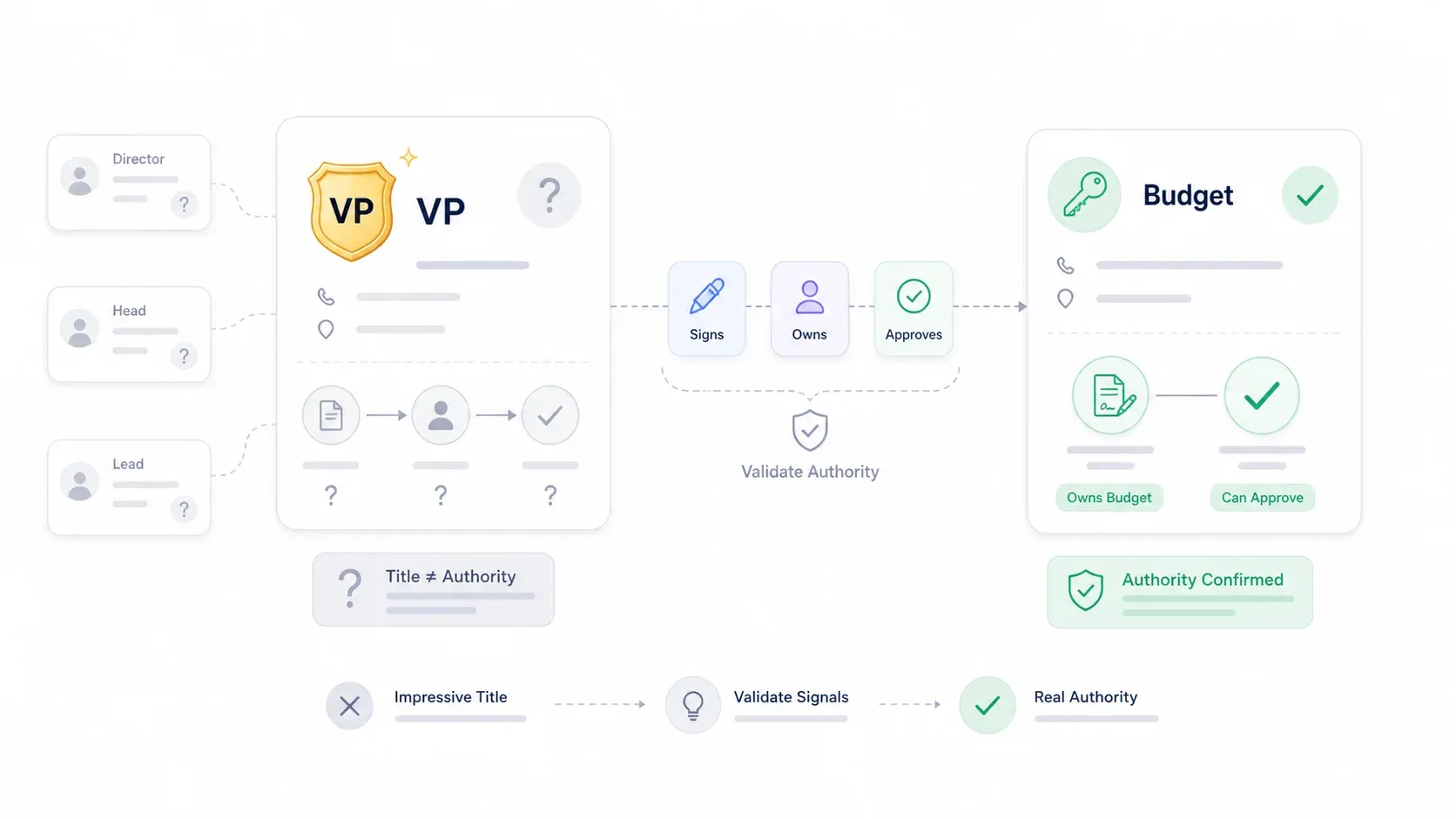
एक "decision maker" वह व्यक्ति होता है—या अक्सर, लोगों का समूह—जिसके पास किसी खरीद को मंज़ूरी देने का अधिकार और बजट होता है। सिद्धांत में बात आसान है। लेकिन व्यवहार में “C-suite contact ढूँढो और पिच करो” वाला पुराना तरीका अब पुराना पड़ चुका है और कई बार उल्टा नुकसान भी करता है।
बड़ी कंपनियों में एक ही title कई लोगों के पास हो सकता है। 200-person startup में "Director of Operations" का मतलब कुछ और होता है, जबकि Fortune 500 में वही title कुछ और। असली authority कई बार अप्रत्याशित जगहों पर होती है: department head जिसके पास line-item budget होता है, procurement lead जो किसी भी vendor को रोक सकता है, या technical architect जिसकी एक नकारात्मक राय deal को executive suite तक पहुँचने से पहले ही खत्म कर देती है।
Sales methodology की भाषा में (जैसे MEDDIC या MEDDICC), फर्क होता है Economic Buyer (वह व्यक्ति जो बदलाव के लिए पैसा दे सकता है), Champion (आपका अंदरूनी समर्थक), और अन्य stakeholders जैसे influencers, blockers, और technical evaluators के बीच। जो Champion आपके product को पसंद करता है लेकिन खर्च मंज़ूर नहीं कर सकता, वह decision maker नहीं है—वह ally है। Challenger Customer framework एक और उपयोगी नज़र देता है: Mobilizers consensus बनाते हैं और बदलाव आगे बढ़ाते हैं, Talkers accessible तो होते हैं लेकिन power नहीं रखते, और Blockers बदलाव का विरोध करते हैं। जो व्यक्ति आपके cold email का सबसे तेज़ जवाब देता है, वह अक्सर Talker होता है, Mobilizer नहीं।
AI की मदद से public pages से decision makers निकालें Get Started Free
आगे एक practical system है जिससे आप असली buyers को खोज और validate कर सकते हैं—सिर्फ impressive title वालों को नहीं।
2026 में Decision Makers को ढूँढना पहले से ज़्यादा मुश्किल क्यों है
पिछले पाँच सालों के मुकाबले अब असली decision makers को ढूँढना कई वजहों से कठिन हो गया है।
Title inflation हर जगह है। Dossifier's seniority guide के अनुसार, LinkedIn, company websites, और business cards पर titles अक्सर inconsistent, अस्पष्ट, या भ्रामक होते हैं। एक कंपनी में Director, दूसरी कंपनी के VP से ऊपर हो सकता है। Ravio के VP बनाम Director विश्लेषण में दिखाया गया है कि span of control, decision authority, और strategic impact कंपनी के stage और size के हिसाब से बहुत बदलते हैं। 135,000+ managers पर आधारित Pave benchmarks का विश्लेषण करने वाली एक LinkedIn post के मुताबिक, 3,000+ कर्मचारियों वाली कंपनी में एक VP के नीचे औसतन 115 direct/indirect reports हो सकते हैं—जबकि छोटी कंपनी में वही title सिर्फ कुछ लोगों को manage कर रहा होता है।
Flat org structures और remote teams reporting lines से authority का अंदाज़ा लगाना कठिन बना देते हैं। और privacy-conscious executives अपनी online presence भी सीमित रखते हैं—जिन सबसे powerful buyers से मैं मिला हूँ, उनमें से कुछ ने वर्षों से अपना LinkedIn तक अपडेट नहीं किया है।
गलत अनुमान की कीमत असली होती है। Salesloft बताता है कि reps कई बार negotiation करते हैं, discounts देते हैं, और तभी पता चलता है कि prospect को पहले “अपने boss से approval” लेना होगा। Upsales ने दस्तावेज़ किया है कि quarter-end का एक deal इसलिए गिर गया क्योंकि actual decision maker की buy-in ही नहीं थी। 6sense research दिखाती है कि buying-group size खरीद प्रक्रिया की लंबाई के 49% variation को समझाती है—इसलिए सभी stakeholders की पहचान न करना सिर्फ deal खोने का जोखिम नहीं बढ़ाता, बल्कि cycle भी लंबी कर देता है।
मैं सबसे ज़्यादा ये गलतियाँ देखता हूँ:
| गलती | क्यों फेल होती है | बेहतर तरीका |
|---|---|---|
| LinkedIn पर सिर्फ title से खोज करना | Titles inconsistent और अक्सर inflated होते हैं | Function, budget area, और recent initiatives के आधार पर खोजें |
| सबसे senior व्यक्ति को buyer मान लेना | C-suite sponsor हो सकता है, लेकिन evaluation वही न चलाए | Functional owner के साथ procurement/legal/security को भी ढूँढें |
| यह मान लेना कि एक champion अंदर सब कुछ बंद कर देगा | Champions के पास अक्सर final authority नहीं होती | Champion, Economic Buyer, Influencer, और Blocker को map करें |
| Procurement को अंत तक अनदेखा करना | Paper process ready buyer को रोक सकता है | Purchasing path के बारे में शुरू में ही पूछें |
| “VP” को budget power का सबूत मान लेना | कंपनी के size और industry के हिसाब से VP level बदलता रहता है | Approval limits और reporting structure validate करें |
Title ≠ Authority: असली बजट पावर किसके पास है, इसे Validate करने का Framework
Name और title ढूँढना पहला कदम है। लेकिन यह जाँचना कि उस व्यक्ति के पास सचमुच purchasing authority है या नहीं, वहीं ज़्यादातर sales teams चूक जाती हैं—और यहीं असली leverage मिलता है।
मेरा अनुभव कहता है कि कोई एक signal निर्णायक नहीं होता। लेकिन तीन या उससे ज़्यादा positive authority signals का pattern एक मजबूत संकेत है। मैं यह framework recommend करता हूँ:
| Signal | असल authority का संकेत | सिर्फ influencer होने का संकेत |
|---|---|---|
| Contracts या purchase orders साइन करता/करती है | ✅ हाँ | ❌ नहीं |
| Relevant budget area का मालिक है या उस पर publicly बात करता/करती है | ✅ हाँ | ❌ बहुत कम |
| Vendor partnership press releases में नाम आता है | ✅ हाँ | ❌ नहीं |
| SEC filings, annual reports, या board materials में नाम है | ✅ हाँ | ❌ आम तौर पर नहीं |
| Vendor demos में शामिल होता/होती है | ⚠️ संभव है | ✅ संभवतः |
| LinkedIn पर strategy, budgets, या procurement के बारे में पोस्ट करता/करती है | ✅ हाँ | ❌ बहुत कम |
| "Director" या "Head" title है | ⚠️ हो सकता है | ⚠️ हो सकता है |
ऐसे Qualification Questions जो शोर को काट दें
Discovery calls में ये सवाल authority को तेज़ी से map करने में मदद करते हैं:
- "इसको आगे बढ़ाने से पहले और कौन-कौन शामिल होगा?"
- "अगर यह priority बन जाए, तो evaluation से signature तक approval process आम तौर पर कैसा होता है?"
- "आज इस समस्या के बजट का मालिक कौन है?"
- "क्या आपने इससे मिलती-जुलती solution पहले खरीदी है, और पिछली बार कौन शामिल था?"
- "अगर यह रुक जाए, तो आम तौर पर कहाँ अटकता है—budget, legal, security, procurement, या internal priority?"
ये trick questions नहीं हैं। ये economic buyer को enthusiastic influencer से अलग करने का सबसे तेज़ तरीका हैं। मेरे अनुभव में, जो व्यक्ति “approval process” वाले सवाल का विस्तार से जवाब दे सकता है, वह अक्सर buying committee के केंद्र के क़रीब होता है—or वही केंद्र होता है।
एक वास्तविक cautionary tale: Upsales बताता है कि एक sales rep को लगा quarter-end deal पक्का हो गया है, लेकिन actual decision maker ने इसलिए सब रोक दिया क्योंकि उन्हें शुरुआत से शामिल ही नहीं किया गया था। कंपनी अब कहती है कि उसके बंद होने वाले 10 में से 9 deals में कोई senior decision maker शुरू में ही जुड़ा हुआ था। सीख साफ है: हफ्तों की selling effort लगाने से पहले authority validate करें।
Industry के हिसाब से Decision-Maker Titles: बजट असल में कौन संभालता है
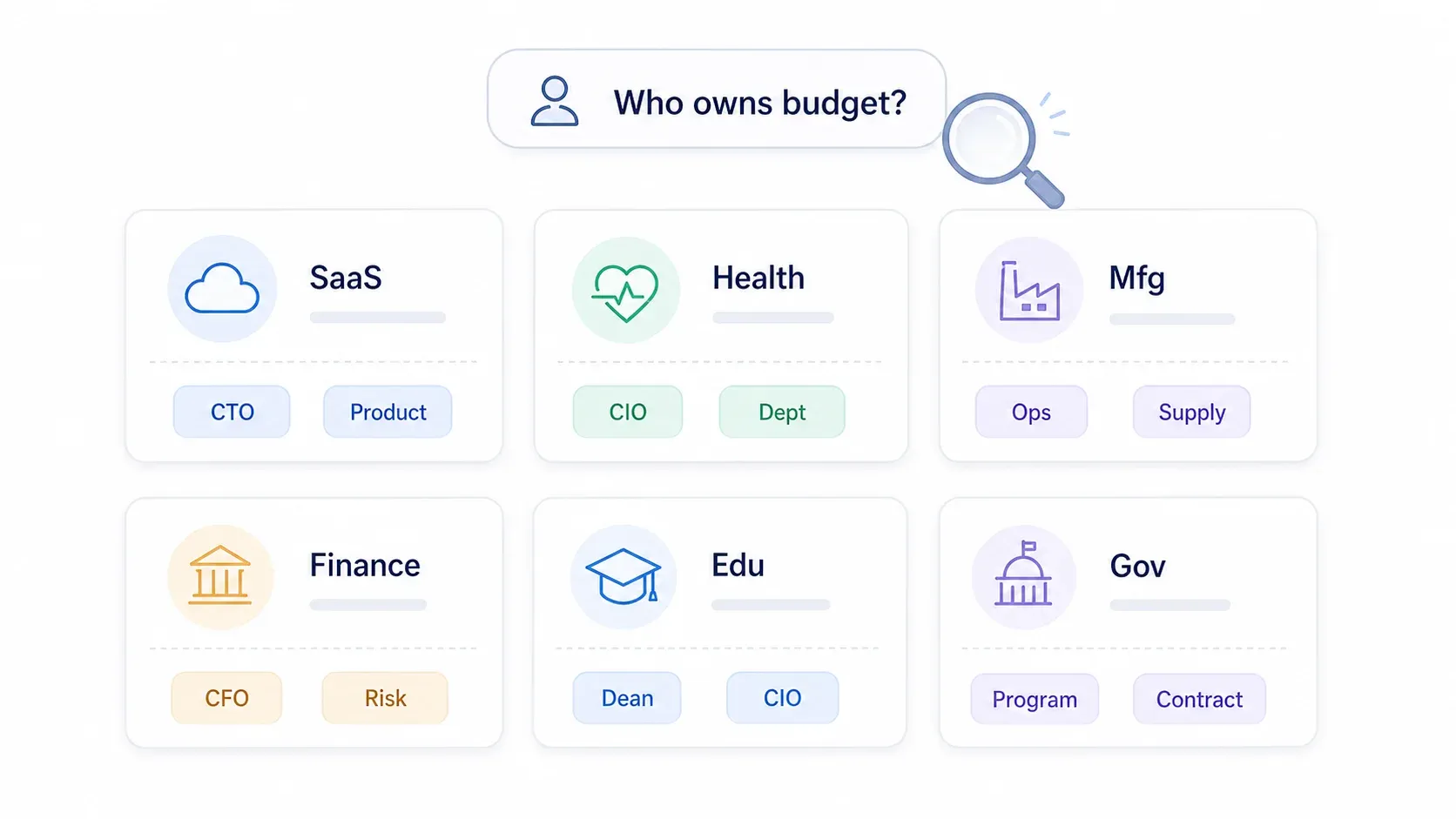
सामान्य “C-suite को target करो” सलाह इसलिए अधूरी है क्योंकि purchasing authority किसके पास है, यह industry, company size, और खरीदे जा रहे solution के type पर बहुत निर्भर करता है। मैंने research और real-world patterns के आधार पर एक reference matrix तैयार की है। इसे अपनी शुरुआती search hypothesis के रूप में use करें—खोज यहीं खत्म न करें।
| Industry | आम Decision Maker(s) | वे किसको report करते हैं | उन्हें कहाँ खोजें |
|---|---|---|---|
| SaaS / Tech | VP Engineering, Head of Product, CTO, CIO | CEO, COO, CPO | LinkedIn, GitHub, engineering blogs, conference talks |
| Healthcare | CIO, CMIO, CMO, Department Head, Procurement Director | Hospital CEO, COO, CFO | HIMSS, professional associations, PubMed |
| Manufacturing | Plant Manager, VP Operations, VP Supply Chain, Director of Quality | COO, CEO | Trade shows, plant leadership pages, industry directories |
| Financial Services | CFO, CIO, CISO, Head of Risk, Chief Compliance Officer | CEO, Board, Audit/Risk Committee | SEC filings, LinkedIn, risk conferences |
| Education | CIO, Dean, Department Chair, Provost, VP Administration | Provost, President, CFO | University websites, faculty pages, academic papers |
| Real Estate | Managing Broker, VP Acquisitions, Development Director, Asset Mgmt Director | CEO, Owner, Managing Principal | MLS networks, NAIOP/ULI events, brokerage leadership pages |
| Retail / Consumer Goods | Chief Merchandising Officer, VP Merchandising, VP Store Ops, CIO | CEO, COO, CMO | NRF events, retailer leadership pages, trade publications |
| Government / Public Sector | Program Manager, Contracting Officer, CIO, Technical Evaluator | Agency leadership, Procurement office | SAM.gov, agency procurement portals, budget documents |
महत्वपूर्ण बातें:
- Company size मायने रखती है। 50-person startup में CEO या founder अक्सर हर चीज़ मंज़ूर करता है। 10,000-person enterprise में authority department heads, procurement, security, legal, और finance के बीच बिखर जाती है।
- Deal size मायने रखता है। 5,000 डॉलर का tool manager मंज़ूर कर सकता है। 500,000 डॉलर की platform deal? वह VP या C-suite का मामला है। 6sense ने पाया कि 700K डॉलर से ऊपर वाले deals में औसतन 14 buying-group members होते हैं, जबकि छोटे deals में 10।
- Industry-specific procurement structures authority बदल देती हैं। उदाहरण के लिए healthcare में, Bain रिपोर्ट करता है कि centralized procurement decision-making हाल के वर्षों में दोगुनी हो गई है, यानी पहले जिन purchases को department head मंज़ूर करता था, अब वही authority procurement committee के साथ साझा हो सकती है।
LinkedIn पर न मिलने वाले Decision Makers को कैसे खोजें
ज़्यादातर guides LinkedIn पर बहुत निर्भर रहते हैं। और LinkedIn उपयोगी है—लेकिन कई असली buyers ने वर्षों से profile अपडेट नहीं की होती, platform पर सक्रिय नहीं होते, या जानबूझकर अपनी visibility सीमित रखते हैं। अगर आपकी पूरी prospecting strategy LinkedIn पर टिकी है, तो आप market का एक बड़ा हिस्सा छोड़ रहे हैं।
यहाँ वे alternative channels हैं जो मुझे सबसे प्रभावी लगे, और हर एक के लिए specific steps भी दिए गए हैं।
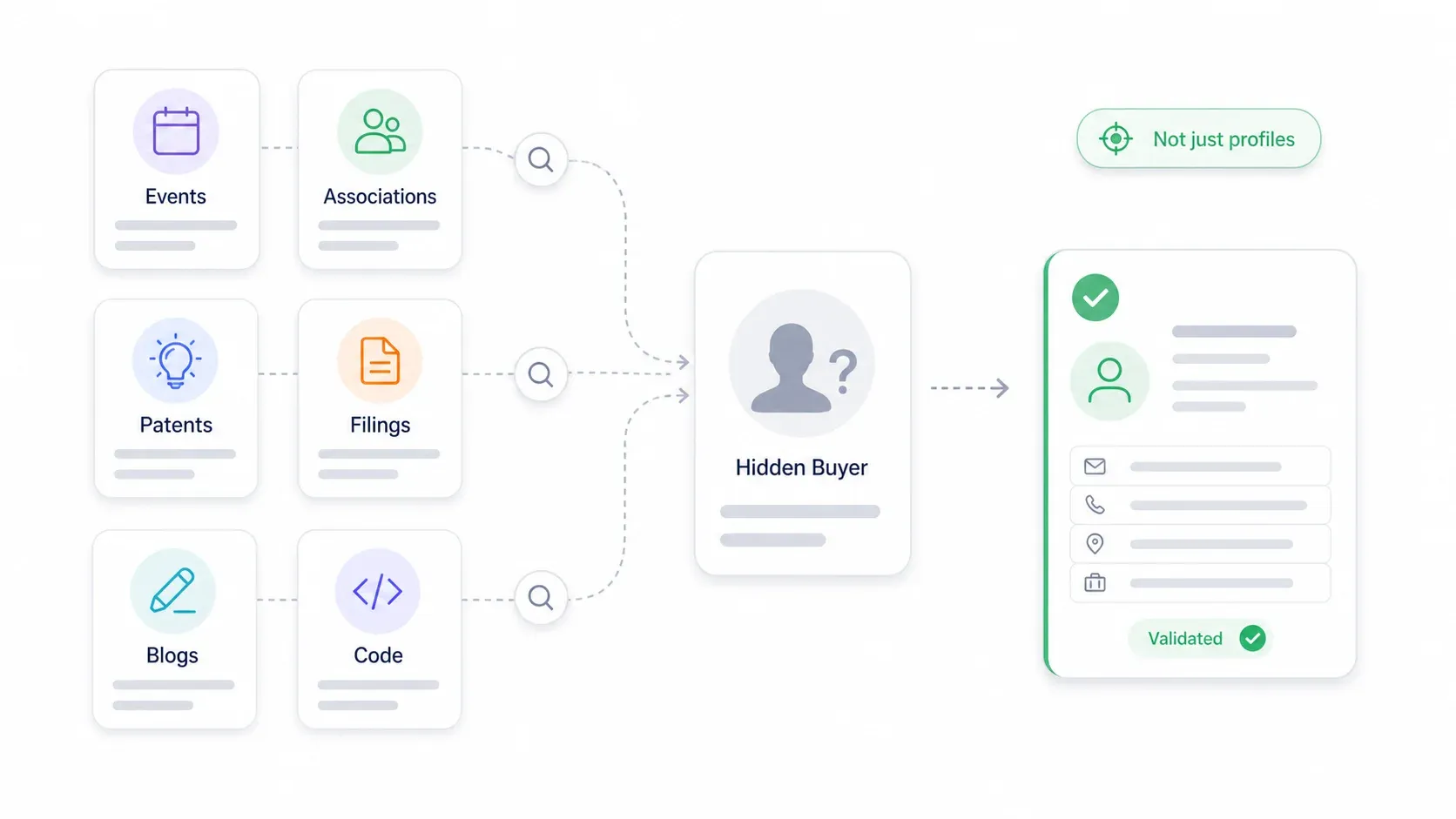
Conference Speaker Lists और Event Websites
Industry conferences speaker bios प्रकाशित करते हैं जिनमें names, titles, company affiliations, session topics, और कभी-कभी contact info भी होती है। ये speakers अक्सर senior leaders होते हैं जो strategic decisions लेते हैं—organizers keynote के लिए random mid-level managers को नहीं बुलाते।
- कैसे इस्तेमाल करें:
[industry] conference speakers [year] [buyer role]खोजें। SaaStr AI Annual 2026, HIMSS, और RSAC जैसे events detailed speaker pages प्रकाशित करते हैं। ऐसे session topics देखें जो आपकी solution area से मेल खाते हों (जैसे “procurement transformation,” “cybersecurity risk,” “revenue operations”)। - Validation tip: अगर कोई व्यक्ति कई events में speaker है, तो वह आम तौर पर असली decision-level leader होता है, सिर्फ attendee नहीं।
Professional Association Directories
Healthcare, legal, finance, engineering जैसे कई उद्योगों में member directories होते हैं जो professionals को role और organization के हिसाब से list करते हैं। LinkedIn पर न दिखने वाले titles के लिए ये खज़ाना हैं।
- कैसे इस्तेमाल करें: अपने target industry में top 2-3 associations पहचानें (जैसे healthcare IT के लिए HIMSS, security/compliance के लिए ISACA, supply chain के लिए CSCMP)। public member, speaker, और board pages देखें।
- Validation tip: association role को उस purchasing problem से जोड़ें जिसे आप solve करते हैं।
Patent Filings और Regulatory Documents
R&D, innovation, engineering, pharma, और manufacturing accounts के लिए patent databases inventors को name और company के साथ list करते हैं। USPTO Patent Public Search देता है, और WIPO Patentscope तथा EPO Espacenet जैसे international tools global filings कवर करते हैं।
- कैसे इस्तेमाल करें: company को assignee मानकर search करें, फिर inventor names निकालें। बार-बार दिखने वाले inventors या lab heads अक्सर technical purchases के key influencers या budget owners होते हैं।
- Public companies के लिए, SEC EDGAR proxy statements और 8-K filings के माध्यम से officers, board members, CFOs, और major vendor relationships दिखाता है।
Company Engineering Blogs और GitHub
Technical decision makers code ownership, architecture posts, और open-source contributions के ज़रिए influence दिखाते हैं। GitHub contribution graphs किसी repository के top 100 contributors दिखाते हैं।
- कैसे इस्तेमाल करें: कंपनी का public GitHub organization ढूँढें, repos को stars या relevance के हिसाब से sort करें, और top contributors तथा maintainers देखें। Engineering blog bylines के साथ cross-check करें।
- Validation tip: Contributors technical influencers होते हैं; budget authority को कंपनी की leadership page या discovery calls से अलग से validate करें।
Industry Publications और Journal Articles
Healthcare, pharma, academia, और manufacturing में decision influence अक्सर journal articles और trade publications में दिखता है। First authors अक्सर hands-on leads होते हैं; last authors अक्सर department heads या principal investigators होते हैं।
Quick-reference summary:
| Alternative Channel | सबसे अच्छा किसके लिए | डेटा कैसे निकालें | Validation Tip |
|---|---|---|---|
| Conference speaker lists | Technical और executive buyers | Speaker bios के लिए event websites scrape करें | Repeat appearances और session ownership देखें |
| GitHub / open-source repos | Engineering decision makers | Organization के top contributors देखें | Company site या blog पर role confirm करें |
| Patent filings (USPTO, EPO) | R&D / innovation leaders | Company के हिसाब से search करें, inventor names निकालें | बार-बार दिखने वाले inventors और leadership bios देखें |
| Professional association directories | Healthcare, legal, finance | Public member/speaker/board pages search करें | Association role को purchasing problem से मिलाएँ |
| Company engineering blogs | Technical buyers | Bylines, author pages, post topics निकालें | Relevant systems पर recurring authors खोजें |
| Regulatory filings (SEC, आदि) | C-suite, board, CFO, risk, legal | EDGAR, annual reports, proxy statements search करें | Filings का use authority के लिए करें, outreach tone के लिए नहीं |
| Government procurement portals | Public-sector buyers | SAM.gov, agency plans, award notices search करें | Program owner और contracting signer को अलग रखें |
Web Scraping से Scale पर Decision Makers कैसे खोजें
कंपनी websites, leadership pages, और directories को एक-एक करके manually देखना पाँच target accounts के लिए तो चल जाता है। 50 पर यह टूट जाता है। और 500 पर तो बिल्कुल अव्यावहारिक है।
Web scraping इस bottleneck को scalable process में बदल देता है। Leadership pages से names और titles manually copy करने में घंटे लगाने की बजाय, आप publicly available sources—company के "About Us" और "Team" pages, industry association directories, conference speaker pages, और business directories—से structured data मिनटों में निकाल सकते हैं।
Thunderbit में, मेरी टीम ने इसी workflow के लिए AI Web Scraper बनाया है। Decision-maker list बनाने का workflow इस तरह दिखता है।
- Difficulty: Beginner
- Time Required: लगभग 10 मिनट, 20-30 accounts के लिए
- What You'll Need: Chrome browser, Thunderbit extension (free tier काम करता है), target URL या URLs की list
Thunderbit AI Web Scraper आज़माएँ
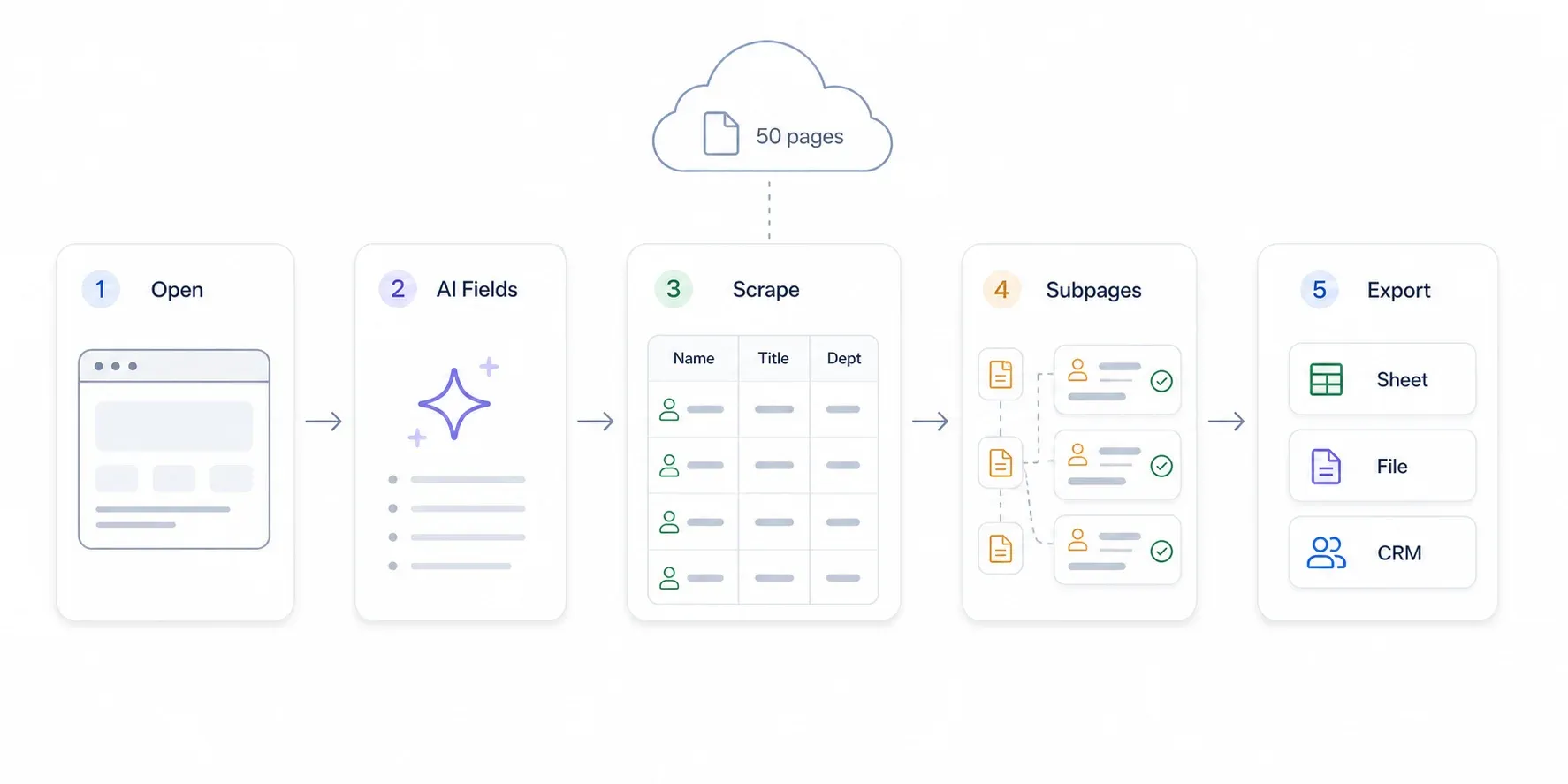
Step 1: Company की Leadership या Team Page खोलें
Chrome खोलें और किसी company की public leadership, team, या "About Us" page पर जाएँ। उदाहरण के लिए, किसी SaaS company का /about या /team page, किसी hospital की leadership directory, या किसी conference की speaker page।
आपको ऐसा page दिखना चाहिए जिसमें names, titles, और कभी-कभी bios, photos, या contact info भी हो।
Step 2: "AI Suggest Fields" पर क्लिक करें
Thunderbit sidebar खोलें और "AI Suggest Fields" पर क्लिक करें। Thunderbit का AI page को पढ़कर columns सुझाता है—आम तौर पर Name, Title, Department, Email, Phone, Bio, और LinkedIn URL।
सुझाए गए fields की review करें। जो columns चाहिए नहीं उन्हें हटा सकते हैं, या "+ Add Column" पर क्लिक करके plain English में बता सकते हैं कि क्या चाहिए (जैसे "Department" या "Reports To")।
आपको configured columns के साथ एक table preview दिखना चाहिए।
Step 3: "Scrape" पर क्लिक करें और Data देखें
नीला "Scrape" button दबाएँ। Thunderbit data को एक structured table में निकाल देता है। 10-20 names वाले typical leadership page के लिए इसमें लगभग 15-30 seconds लगते हैं।
Results की समीक्षा करें। अगर page में individual bio pages के links हैं, तो आप subpage scraping इस्तेमाल करके हर profile में और गहराई से जा सकते हैं—जिम्मेदारी के क्षेत्र, LinkedIn URLs, press mentions, या full bios जोड़ सकते हैं।
Step 4: कई Companies पर Scale करें
कई accounts के लिए list बनाने हेतु directory या list page से शुरू करें (जैसे industry association member list, conference exhibitor page, या business directory)। Company names और URLs scrape करें, फिर Thunderbit की subpage scraping से हर company के team page पर जाएँ और leadership data स्वतः निकालें।
इससे जो प्रक्रिया पहले दिन भर की manual research लेती थी, वह 10-minute workflow बन जाती है।
Step 5: Google Sheets, Excel, Airtable, या Notion में Export करें
"Export" पर क्लिक करें और अपनी destination चुनें: Google Sheets, Excel, Airtable, Notion, CSV, या JSON। आपकी structured decision-maker list CRM import या आगे enrichment के लिए तैयार है।
Thunderbit public pages पर free email और phone extractors भी देता है, जो उन budget-conscious SDRs के लिए मददगार है जो पाँच अंकों की annual database subscription justify नहीं कर सकते।
Thunderbit अन्य तरीकों से कैसे बेहतर है
| Method | Cost | Scale | Data Freshness | Setup Effort |
|---|---|---|---|---|
| Thunderbit AI Web Scraper | Free tier उपलब्ध; credit-based | High (दर्जनों sites तेज़ी से scrape करें) | Real-time (live pages पढ़ता है) | बहुत कम (2 clicks) |
| Paid databases (ZoomInfo, आदि) | $5K–$64K+/year tier और company size पर निर्भर | High | समय-समय पर update | Low–medium |
| Apollo | Free–$119/user/month tier के हिसाब से | High | Database + enrichment | Low |
| LinkedIn Sales Navigator | $99.99–$159.99/month प्रति license | Medium–high | Profile updates पर निर्भर | Medium |
| Manual research | Free (time cost) | बहुत कम | Real-time | बहुत ज़्यादा |
AI web scraping कैसे काम करता है, इसके बारे में और जानने के लिए हमारा AI web scraping guide या best AI web scrapers का roundup देखें।
Buying Committee को Map करना: "The" Decision Maker नहीं, बल्कि हर Stakeholder को कैसे खोजें
ज़्यादातर sales guides इस हिस्से को पूरी तरह skip कर देते हैं। Enterprise deals के लिए एक अकेला "decision maker" ढूँढना काफी नहीं है। Gartner के अनुसार 6 से 10 लोग शामिल होते हैं; 6sense के अनुसार औसतन 11। अगर आप सिर्फ एक contact पर निर्भर हैं, तो आप अंदाज़े पर चल रहे हैं।
हर Buying Committee में चार भूमिकाएँ होती हैं
मैं stakeholder mapping के लिए चार-role framework इस्तेमाल करता हूँ। यह MEDDIC, Challenger, और उन deals को देखते-देखते बनी समझ पर आधारित है जो इसलिए मर गईं क्योंकि किसी को map नहीं किया गया था—कुछ fancy नहीं, बस practical।
| Role | साधारण भाषा में मतलब | आम संकेत | Messaging Priority |
|---|---|---|---|
| Champion | आपका अंदरूनी समर्थक जो चाहता है कि आपका solution जीते | Context साझा करता है, दूसरों का परिचय कराता है, internal politics समझाता है | उन्हें internal selling materials और proof दें |
| Economic Buyer | बजट authority वाला व्यक्ति जो contract साइन करता है | Budget ownership, contract sign-off, executive sponsor | ROI, risk, strategic priority, cost of inaction |
| Influencer | Requirements और evaluation criteria तय करता है | Technical requirements लिखता है, demos में आता है, daily workflow संभालता है | Technical fit, ease of use, integration, implementation |
| Blocker | खरीद को धीमा, reject, या reshape कर सकता है | Security, compliance, legal, procurement, incumbent vendor owner | Risk reduction, governance, migration plan, references |
एक मज़बूत Champion के पास influence, Economic Buyer तक पहुँच, और initiative में व्यक्तिगत हित होता है। एक कमजोर Champion बस Talker होता है—मिलनसार, लेकिन action नहीं दिला सकता।
Stakeholder Map कैसे बनाएं
- अपने पहले contact से शुरू करें। पूछें: "इसको evaluate करने में और कौन शामिल होगा?" और "approval process कैसा दिखता है?"
- Company की team page और org structure research करें। Leadership profiles और bio details scrape करने के लिए Thunderbit इस्तेमाल करें।
- हर व्यक्ति को role दें: Champion, Economic Buyer, Influencer, या Blocker.
- हर stakeholder की priorities के हिसाब से outreach और messaging tailor करें। Economic Buyer को ROI और risk चाहिए। Influencer को technical fit चाहिए। Champion को अंदरूनी ammunition चाहिए। Blocker को risk controls और compliance answers चाहिए।
- हर call के बाद map अपडेट करें। लोग role बदलते हैं या नए blockers आते हैं, इसलिए stakeholder maps समय के साथ बदलते रहते हैं।
एक simple template:
| Champion | Economic Buyer | Influencers | Blockers / Risk Owners |
|---|---|---|---|
| Functional manager जिसे problem का दर्द महसूस हो रहा है | VP/C-suite/budget owner | End users, technical evaluators, department leads | Security, legal, procurement, finance, incumbent owner |
| Proof, deck, ROI story चाहिए | Business case और timing चाहिए | Fit, workflow, integration clarity चाहिए | Risk, compliance, और process answers चाहिए |
यह process iterative है। जैसे-जैसे आप account के बारे में और सीखते हैं, आपका map बदलना चाहिए।
Step-by-Step Guide: किसी भी Account के लिए Decision Makers कैसे खोजें
ऊपर की सारी बातें एक unified workflow में जुड़ती हैं। मैं एक नए account को शुरू से ऐसे ही approach करूँगा।
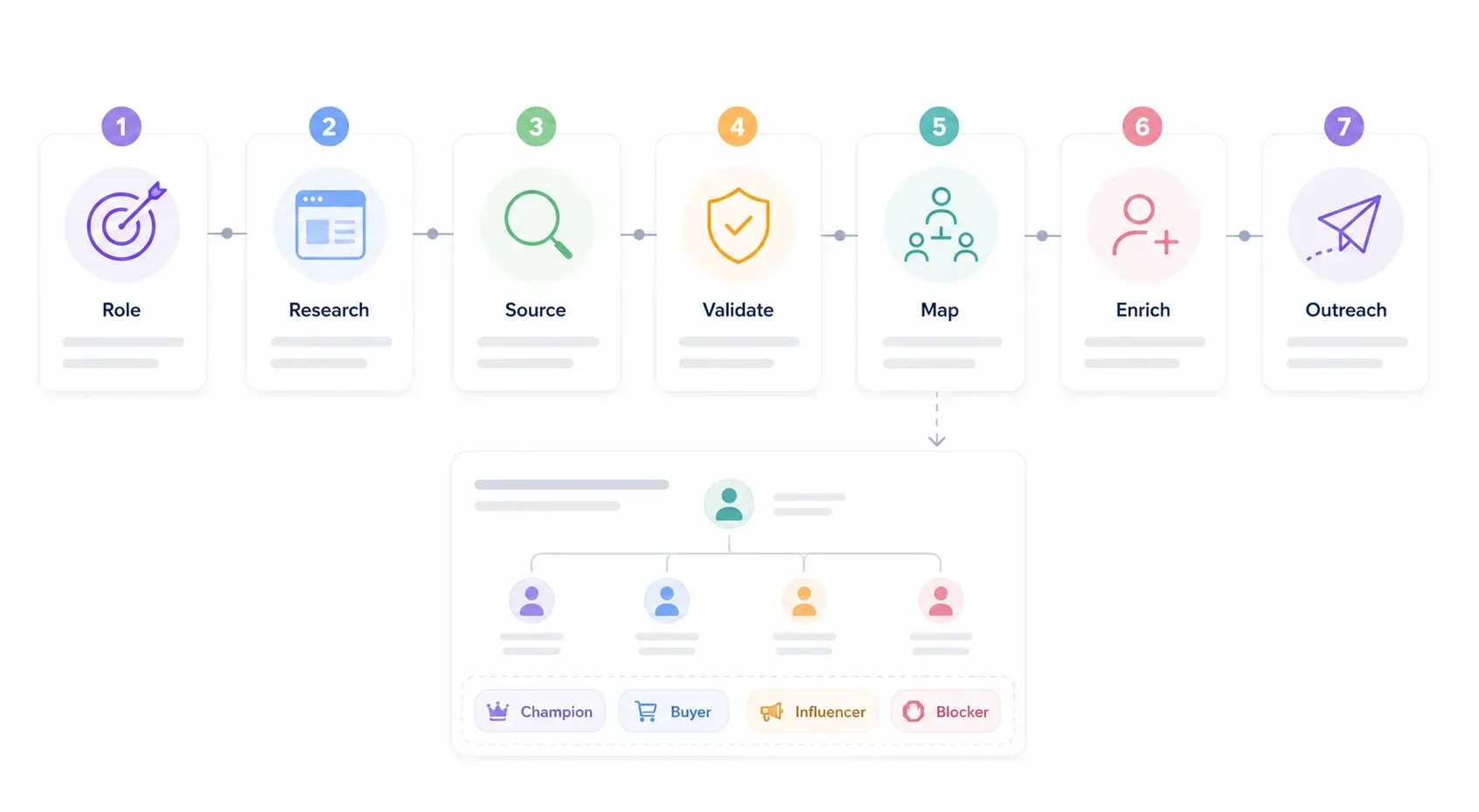
Step 1: अपना Target Role तय करें (सिर्फ title नहीं)
खोजने से पहले, वह function बताइए जिसकी आपको ज़रूरत है: "वह व्यक्ति जो [आपके product category] को चुनने और मंज़ूर करने का जिम्मेदार है।" ऊपर दिए industry matrix से 3-5 title variations लिखें। उदाहरण के लिए, अगर आप financial services firm को security tool बेच रहे हैं, तो आपकी list में CISO, Head of Risk, VP Information Security, Chief Compliance Officer, और CIO शामिल हो सकते हैं।
Step 2: Company को Online Research करें
Company website (About Us, Leadership, Team pages), LinkedIn company page, और publicly available org charts देखें। अगर आप कई accounts पर काम कर रहे हैं, तो Thunderbit से team pages bulk में scrape करें।
Step 3: Alternative Channels से Names जुटाएँ
अगर आपका target LinkedIn या company website पर नहीं है, तो conference speaker lists, professional directories, patent filings, regulatory documents, या industry publications आज़माएँ (ऊपर alternative channels section देखें)।
Step 4: Checklist से Authority Validate करें
Signal framework लागू करें: contract-signing signals, press release mentions, procurement पर LinkedIn activity, और past vendor decision involvement देखें। कोई एक signal proof नहीं है—तीन या उससे ज़्यादा signals का pattern खोजें।
Step 5: Buying Committee को Map करें
Qualification questions और अतिरिक्त research की मदद से Champion, Economic Buyer, Influencer(s), और संभावित Blockers पहचानें। अपना stakeholder map बनाइए।
Step 6: Data को Enrich और Organize करें
अपनी validated decision-maker list को Google Sheets, CRM, या Airtable में export करें। Missing contact details भरने के लिए Thunderbit के free email और phone extractors इस्तेमाल करें। जैसे-जैसे और जानकारी मिले, list को updated रखें।
CRM hygiene tip: "job title" से अलग एक field में "role in buying committee" रखें। Economic Buyer Confirmed, Champion Confirmed, Procurement Involved, Source URL, और Last Verified Date जैसे fields जोड़ें। approval path के discovery answers को exact रूप में दर्ज करें। Funding rounds, reorgs, या executive changes के बाद contacts refresh करें।
Step 7: Stakeholder Role के हिसाब से Outreach Tailor करें
हर role के लिए message customize करें:
- Economic Buyer: Business case, financial upside, risk reduction, strategic timing, cost of inaction.
- Influencer: Workflow pain, technical proof, integration details, implementation plan, peer examples.
- Champion: Internal ammunition—short business case, ROI calculator, security FAQ, one-page comparison, ऐसा email text जिसे वे forward कर सकें.
- Blocker: Risk controls, compliance, procurement path, migration plan, references.
Gatekeepers को पार करके Decision Makers तक कैसे पहुँचें
सही लोगों की पहचान करने के बाद भी, आपको उनसे संपर्क करना होता है। जो tactics सच में काम करते हैं:
Access नहीं, मदद माँगें। "मैं समझना चाहता/चाहती हूँ कि [specific problem] से जुड़े decisions कौन संभालता है। क्या आप सही व्यक्ति हैं, या कोई और बेहतर होगा जिससे बात की जाए?" यह gatekeeper के ज्ञान का सम्मान करता है और अक्सर hard pitch से तेज़ रास्ता देता है।
Referrals का उपयोग करें। Norwest की 2025 B2B benchmark report में पाया गया कि 65% respondents ने ग्राहकों या network से मिली warm referrals को top tactic माना—personalized emails (28%), phone/voicemail (26%), या LinkedIn messaging (23%) से कहीं आगे। अगर कंपनी में आपका कोई भी परिचित है, चाहे junior contact ही क्यों न हो, introduction माँगें।
Multiple channels इस्तेमाल करें। सिर्फ email पर निर्भर न रहें। High-value targets के लिए LinkedIn messages, phone calls, और direct mail तक combine करें। RAIN Group का शोध दिखाता है कि 82% buyers उन sellers से meetings accept करते हैं जो proactively पहुँचते हैं—but multichannel prospecting single-channel प्रयासों से लगातार बेहतर है।
अपनी outreach का timing सही रखें। Gong के 100,000+ connected B2B sales calls के विश्लेषण में prospect के time zone में 10-11 AM और 4-5 PM के बीच strong connection rates पाए गए, और Wednesday तथा Thursday अक्सर सबसे अच्छे दिन बताए गए।
Timing triggers पर नज़र रखें। Decision makers कुछ windows में ज़्यादा accessible होते हैं: funding round के तुरंत बाद, budget planning season में, जब उन्होंने नया role शुरू किया हो, या public expansion / regulatory change के बाद।
Gatekeeper के साथ rapport बनाइए। Administrative assistants और operations managers अक्सर buying process के बारे में किसी और से ज़्यादा जानते हैं। ईमानदार और respectful रहें—वे आपके सबसे बड़े ally भी हो सकते हैं, और सबसे बड़ी बाधा भी।
निष्कर्ष और Key Takeaways
2026 में decision makers ढूँढना title-search का नहीं, authority-validation और committee-mapping का काम है। जो teams deals close करती हैं, वे LinkedIn से आगे जाती हैं, specific signals से असली budget power validate करती हैं, पूरे buying committee को map करती हैं, और web scraping जैसे tools से यह सब scale पर करती हैं।
मुख्य बातें:
- Titles शुरुआती बिंदु हैं, proof नहीं। Authority को हमेशा signal checklist से validate करें।
- ज़्यादातर B2B deals में 6-11+ stakeholders होते हैं। हर account के लिए Champion, Economic Buyer, Influencers, और Blockers map करें।
- LinkedIn पर्याप्त नहीं है। Hidden buyers खोजने के लिए conference speaker lists, association directories, patent filings, regulatory documents, GitHub, और engineering blogs का उपयोग करें।
- Web scraping दिनों का manual research मिनटों में बदल देता है। Thunderbit का AI Web Scraper public pages से structured decision-maker data दो clicks में निकाल देता है—ना code, ना templates, ना पाँच-अंकीय database subscription।
- Outreach को role के हिसाब से tailor करें। Economic Buyer, Influencer, Champion, और Blocker—सबको अलग message चाहिए।
Decision-Maker Research के लिए AI Web Scraper आज़माएँ Get Started Free
क्या आप stale databases की बजाय live public sources से अपनी अगली decision-maker list बनाना चाहते हैं? Thunderbit का free tier आज़माएँ और देखें कि आप “मेरे पास target accounts की list है” से “यह रहा मेरा stakeholder map, outreach के लिए तैयार” तक कितनी तेज़ी से पहुँच सकते हैं। आप walkthrough videos के लिए हमारा YouTube channel भी देख सकते हैं, या अगर आपको ज़्यादा credits चाहिए तो Thunderbit pricing explore करें।
FAQs
1. अगर मैंने कभी contact न किया हो, तो किसी company में decision makers कैसे ढूँढूँ?
Company website से शुरू करें—Leadership, Team, और About Us pages देखें। फिर LinkedIn पर functional roles खोजें (सिर्फ titles नहीं)। अगर वहाँ भी जानकारी कम मिले, तो conference speaker lists, professional association directories, patent filings, SEC/regulatory filings, और industry publications तक विस्तार करें। Outreach effort लगाने से पहले signal checklist (contract-signing history, budget ownership, press release mentions) से authority validate करें।
2. अगर company में कई decision makers हों तो?
मानकर चलिए कि होंगे। Gartner के अनुसार complex B2B purchases में 6-10 decision makers होते हैं; 6sense औसत 11 बताता है। चार-role framework से सभी stakeholders map करें: Champion (internal advocate), Economic Buyer (budget authority), Influencer (requirements shaping), और Blocker (potential objection-raiser)। अपने messaging को हर role के अनुसार ढालें।
3. बिना बड़े budget के decision makers खोजने के लिए कौन से tools उपयोग कर सकता हूँ?
Free resources के साथ आप हैरानीजनक रूप से दूर तक जा सकते हैं: company websites, Google, LinkedIn (free version), conference speaker pages, professional association directories, USPTO patent search, SEC EDGAR, और GitHub। Thunderbit का free tier और free email/phone extractors आपको paid database subscription के बिना public data scrape और structure करने देते हैं। Apollo, Sales Navigator, और ZoomInfo जैसे paid tools scale जोड़ते हैं, लेकिन शुरुआत के लिए ज़रूरी नहीं हैं।
4. कैसे पता चले कि कोई असली decision maker है या सिर्फ influencer?
Authority signals का pattern देखें: क्या वे contract या purchase orders साइन करते हैं? क्या वे vendor partnerships से जुड़ी press releases में दिखते हैं? क्या वे budgets, strategy, या procurement के बारे में पोस्ट करते हैं? क्या वे past vendor selections में शामिल रहे हैं? संदेह हो तो discovery call में सीधे पूछें: "इस budget का owner कौन है?" और "approval process कैसा है?"
5. LinkedIn पर active न रहने वाले decision makers कैसे खोजें?
कई असली buyers के LinkedIn profiles पुराने या बहुत minimal होते हैं। Alternative sourcing channels में conference speaker lists (bios के लिए event websites scrape करें), professional association directories, patent filings (USPTO, EPO), SEC/regulatory filings, company engineering blogs, और GitHub contribution graphs शामिल हैं। Thunderbit इन public sources से names, titles, और contact info scale पर निकालने में मदद कर सकता है—manual research को two-click operation में बदलते हुए।
और जानें




