
मुझे आज भी वह दिन याद है जब किसी ने पहली बार मुझसे पूछा था, "Shuai, क्या तुम इस साइट से डेटा स्क्रैप कर सकते हो?" उस वक्त वेब स्क्रैपिंग एक ऐसी खास टेक्निक थी जिसके बारे में बस गिने-चुने डेवलपर्स ही जानते थे—Python और BeautifulSoup ही काफी थे। लेकिन आज आकर फ्रीलांस वेब स्क्रैपिंग का बाज़ार एक $1 बिलियन+ इंडस्ट्री बन चुका है, और 2030 तक इसके फिर से दोगुना होने की पूरी संभावना है। रिमोट काम तेज़ी से बढ़ रहे हैं, और क्लाइंट अब सिर्फ़ "एक चलने वाली स्क्रिप्ट" नहीं चाहते—उन्हें जल्दी मिलने वाले, सीधे इस्तेमाल करने लायक बिज़नेस सॉल्यूशंस चाहिए (और हाँ, CSV भी!)।
असल बात यह है कि फ्रीलांस वेब स्क्रैपिंग डेवलपर की भूमिका अब पूरी तरह बदल गई है। अब मामला सिर्फ़ कोड लिखने तक सीमित नहीं रह गया है। आपसे उम्मीद की जाती है कि आप शुरुआत से अंत तक सब कुछ संभालें—ज़रूरतें समझना, डेटा निकालना, उसे साफ़ करना, सही फ़ॉर्मेट में देना, और यहाँ तक कि कानूनी जोखिमों को भी संभालना। Thunderbit जैसे टूल्स ने स्पीड और क्वालिटी का स्तर ऊपर उठा दिया है, इसलिए उम्मीदें लगातार बढ़ती जा रही हैं। चाहे आप अनुभवी स्क्रैपर हों या अभी शुरुआत कर रहे हों, आइए समझते हैं कि इस नए दौर में सफल होने के लिए क्या चाहिए। मैं आपको असली अनुभव, काम के टिप्स, और यह भी बताऊँगा कि Thunderbit कैसे आपका गुप्त हथियार बन सकता है।
आज एक फ्रीलांस वेब स्क्रैपिंग डेवलपर असल में क्या करता है?
साफ़ कहूँ तो 2025 का फ्रीलांस वेब स्क्रैपिंग डेवलपर पाँच साल पहले वाले डेवलपर से बिल्कुल अलग है। तब सिर्फ़ एक Python स्क्रिप्ट दे देना काफी था। अब आपसे उम्मीद की जाती है कि आप पहले Zoom कॉल से लेकर आख़िरी Google Sheets डिलीवरी तक पूरी प्रोसेस खुद संभालें।
यह बदलाव क्यों आया? क्योंकि वेब स्क्रैपिंग की मांग ज़बरदस्त तरीके से बढ़ी है। वैश्विक वेब स्क्रैपिंग सॉफ़्टवेयर बाज़ार 2032 तक $2.5 बिलियन तक पहुँचने की राह पर है, और 65% कंपनियाँ पहले ही AI और एनालिटिक्स के लिए वेब स्क्रैपिंग इस्तेमाल कर रही हैं। ई-कॉमर्स, रियल एस्टेट, फाइनेंस—हर इंडस्ट्री को डेटा चाहिए, और रिमोट गिग्स Upwork और Freelancer पर हर तरफ़ मिलते हैं। लेकिन मुकाबला भी उतना ही कड़ा है।
अब क्लाइंट्स की उम्मीदें सिर्फ़ "कोड" से कहीं आगे बढ़ चुकी हैं:
- बिज़नेस गोल्स समझना (सिर्फ़ HTML स्ट्रक्चर नहीं—उन्हें यह डेटा क्यों चाहिए?)
- साफ़ संवाद ("मेरी मशीन पर तो चल रहा है" अब नहीं चलेगा)
- साफ़, सीधे इस्तेमाल लायक डेटा डिलीवरी
- कानूनी अनुपालन और जोखिम प्रबंधन
- निरंतर सहायता
संक्षेप में, आपको एक ही इंसान में इंजीनियर, कंसल्टेंट, प्रोजेक्ट मैनेजर और डेटा इंजीनियर—सब कुछ बनना पड़ता है। जो फ्रीलांसर यह "फुल-साइकल" वैल्यू देते हैं, उन्हें बार-बार काम मिलता है और प्रीमियम रेट भी।
वेब स्क्रैपिंग जॉब्स के लिए कौन-सी स्किल्स चाहिए? Python काफी नहीं है
Python, BeautifulSoup, और Playwright अब बेसिक ज़रूरतें हैं। लेकिन रिमोट और ग्लोबल प्रोजेक्ट्स जीतने के लिए आपको इससे बड़ा स्किल सेट चाहिए।
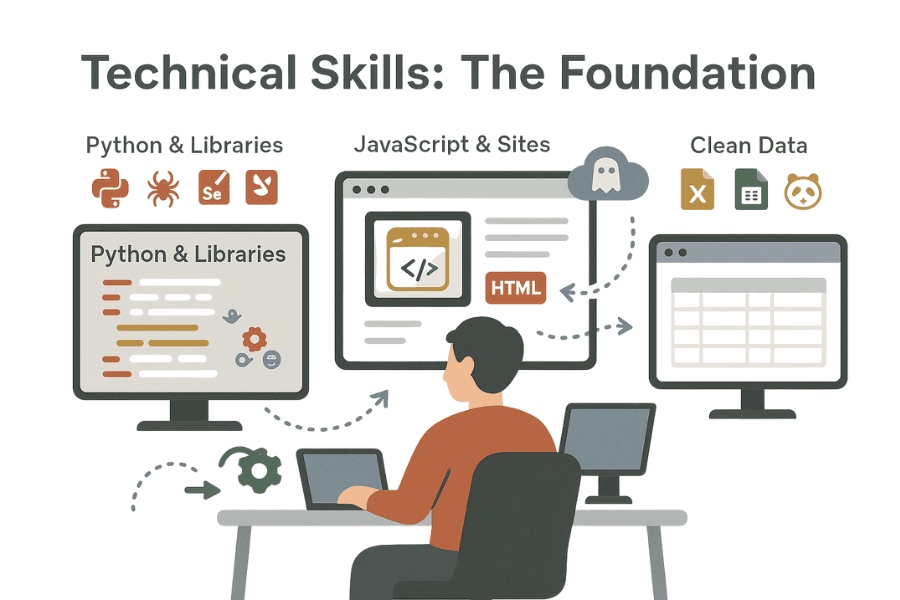
तकनीकी स्किल्स: नींव
- Python और लाइब्रेरीज़: लगभग 70% वेब स्क्रैपर्स Python इस्तेमाल करते हैं, और BeautifulSoup, Scrapy, Selenium, तथा Playwright सबसे पसंदीदा टूल्स हैं।
- JavaScript और डायनामिक साइट्स: आज की वेबसाइटें डायनामिक रेंडरिंग के लिए JavaScript पर बहुत निर्भर रहती हैं, इसलिए headless browsers और डायनामिक कंटेंट संभालना ज़रूरी है।
- APIs और ऑटोमेशन: web scraper APIs और automation frameworks के साथ काम करना आपको आगे रखता है।
- डेटा क्लीनिंग: Pandas, Excel, या Google Sheets से साफ़-सुथरा डेटा देना जितना आप सोचते हैं, उससे कहीं ज़्यादा अहम है।
नए अलग पहचान बनाने वाले पहलू
यहाँ वे बातें हैं जिन्हें ज़्यादातर फ्रीलांसर नज़रअंदाज़ कर देते हैं:
- कम्युनिकेशन: क्या आप तकनीकी बातें साफ़-साफ़ समझा सकते हैं? क्या kickoff call में requirements ठीक से पकड़ लेते हैं? यही एक बार के काम को लंबे कॉन्ट्रैक्ट में बदलता है।
- प्रोजेक्ट मैनेजमेंट: डेडलाइन निभाना, scope changes को शांत तरीके से संभालना—भरोसेमंद होना ही आपकी पहचान बनता है।
- टूल्स में लचीलापन: कोड के अलावा क्या आप Thunderbit जैसे no-code टूल्स और web scraper APIs का इस्तेमाल करके जल्दी काम कर सकते हैं?
- कानूनी अनुपालन और नैतिकता: 73% कंपनियाँ ethical scraping को प्राथमिकता देती हैं। GDPR और robots.txt की समझ ज़रूरी है।
Thunderbit (और ऐसे टूल्स) क्यों महत्वपूर्ण हैं
Thunderbit जैसे AI-powered टूल्स productivity के लिए गेम-चेंजर हैं। अब selectors लिखने या pagination debug करने में घंटों बर्बाद नहीं करने पड़ते।
- requirements का prototype मिनटों में बनाइए
- non-technical क्लाइंट्स को भी आसानी से सर्व कीजिए
- ज़्यादा वैल्यू डिलीवर करने पर ध्यान दीजिए—और ज़्यादा प्रोजेक्ट्स संभालिए
आज का आदर्श फ्रीलांस वेब स्क्रैपिंग डेवलपर एक हाइब्रिड प्रोफ़ाइल है: थोड़ा इंजीनियर, थोड़ा कंसल्टेंट, थोड़ा बिज़नेस पार्टनर।
Thunderbit: फ्रीलांस वेब स्क्रैपिंग डेवलपर का गुप्त हथियार
मैंने सालों तक SaaS और ऑटोमेशन टूल्स बनाए हैं, और चीज़ों को आसान और तेज़ बनाना ही मेरे काम का असली मकसद रहा है। इसी वजह से मैंने Thunderbit बनाया—ताकि वेब स्क्रैपिंग के दर्द वाले हिस्सों को खत्म किया जा सके, खासकर फ्रीलांसरों के लिए।
Thunderbit एक AI web scraper Chrome extension है, जो आपको "मुझे यह डेटा चाहिए" से लेकर "लो आपका spreadsheet" तक कुछ ही क्लिक में पहुँचा देता है। न selector tuning की झंझट, न debugging की परेशानी। आइए देखें यह फ्रीलांस डेवलपर्स को तेज़ और बेहतर डिलीवरी में कैसे मदद करता है।
Thunderbit - AI वेब स्क्रैपर Get Started Free
Thunderbit के AI फीचर्स इस तरह बनाए गए हैं कि आप बिज़नेस-रेडी डेटा तेज़ी से दे सकें।
AI Suggest Fields: selector का अंदाज़ा लगाना खत्म
आप जानते हैं यह पूरी प्रक्रिया—HTML inspect करना, CSS selectors का अंदाज़ा लगाना, और उम्मीद करना कि साइट का layout न बदले। Thunderbit का AI Suggest Fields इसे बदल देता है। एक क्लिक में AI पेज का विश्लेषण करता है, सबसे सही columns सुझाता है, और हर field के लिए custom extraction prompts तैयार करता है।
- स्पीड: जो काम पहले एक घंटा लेता था, अब मिनटों में हो जाता है
- एक्यूरेसी: AI वे fields भी पकड़ लेता है जो आप मिस कर सकते हैं, जिससे डेटा में gaps कम होते हैं
- क्लाइंट डेमो: तुरंत sample extraction दिखाकर भरोसा बनाएँ
यह फीचर अकेले ही setup time को काफी कम कर सकता है। यह ऐसा है जैसे आपके पास 24/7 काम करने वाला एक assistant हो जो कभी सोता नहीं।
Subpage और Cloud Scraping: जटिल काम भी आसान
असली प्रोजेक्ट्स शायद ही कभी सिर्फ़ "इस एक table को scrape करो" तक सीमित रहते हैं।
- subpages खोलना (product details, user profiles)
- pagination संभालना (infinite scroll, "next" buttons)
- सैकड़ों या हज़ारों pages पर बड़े पैमाने पर scraping
Thunderbit का Subpage Scraping AI को हर subpage पर खुद जाने और extra details निकालने देता है—किसी custom crawler की ज़रूरत नहीं।
Cloud Scraping के साथ आप server side पर एक साथ 50 pages तक fetch कर सकते हैं।
- तेज़ डिलीवरी: बड़े प्रोजेक्ट्स भी कभी-कभी एक घंटे में पूरे हो सकते हैं
- कम मेहनत: proxies, rate limits, और retries अपने-आप संभल जाते हैं
- Browser Mode: जिन साइट्स पर login या संवेदनशील डेटा चाहिए, वहाँ क्लाइंट के अपने browser session का उपयोग करके सुरक्षित scraping करें
Templates, Exports, और बहुत कुछ
- One-Click Templates: Amazon, Zillow, Instagram, और Shopify जैसी लोकप्रिय साइट्स के लिए तैयार templates मौजूद हैं—बस लागू करें और शुरू हो जाएँ
- Free Data Exports: CSV में डाउनलोड करें या सीधे Google Sheets, Excel, Airtable, या Notion में export करें—कोई extra शुल्क नहीं
- Scheduled Scrapers: बार-बार चलने वाले runs सेट करें (daily, weekly) और एक बार के काम को subscription revenue में बदल दें
Thunderbit 34 भाषाओं को सपोर्ट करता है, इसलिए आप Tokyo से लेकर São Paulo तक के ग्लोबल प्रोजेक्ट्स पूरे भरोसे के साथ ले सकते हैं।
Thunderbit AI Web Scraper को मुफ्त में आज़माएँ
रिमोट वेब स्क्रैपिंग गिग्स पाने के लिए ग्लोबल स्ट्रैटेजीज़
काश किसी ने मुझे पहले बताया होता: पूरी दुनिया आपका संभावित क्लाइंट है। रिमोट वेब स्क्रैपिंग गिग्स सिर्फ़ US और UK तक सीमित नहीं हैं—एशिया-पैसिफ़िक और लैटिन अमेरिका जैसे बाज़ार भी तेज़ी से बढ़ रहे हैं। फ्रीलांस वर्कफ़ोर्स लगातार फैल रही है, सिर्फ़ US में ही 73 मिलियन से अधिक फ्रीलांसर हैं, और South Africa तथा Canada जैसे देशों में भी दो अंकों की बढ़ोतरी दिख रही है।
ग्लोबल डिमांड कैसे पकड़ें
- मल्टीलिंगुअल क्षमता का फायदा उठाएँ: Thunderbit की 34-भाषा सपोर्ट के साथ आप जर्मन रियल एस्टेट डेटा, जापानी ई-कॉमर्स scraping, या ब्राज़ीली सोशल मीडिया extraction के लिए पूरे आत्मविश्वास से pitch कर सकते हैं।
- प्लैटफ़ॉर्म्स पर अलग दिखें: Upwork, Freelancer, और niche job boards पर अपनी multilingual और multi-format delivery skills को साफ़-साफ़ दिखाएँ।
- अंतरराष्ट्रीय अनुभव दिखाएँ: अगर आपने पहले विदेशी भाषा वाली साइट्स scrape की हैं, तो उसे अपने प्रोफ़ाइल में ऊपर रखें। संबंधित case studies तुरंत credibility बनाती हैं।
अलग कैसे दिखें
- तेज़ जवाब दें: टाइम ज़ोन अलग होने के बावजूद, अपनी availability साफ़ बताना बहुत मदद करता है।
- Sample delivery दें: Thunderbit से target site का sample data तुरंत बनाइए—इससे भरोसा बढ़ता है और जीतने की संभावना भी।
- Compliance पर ज़ोर दें: कई क्लाइंट कानूनी जोखिम को लेकर चिंतित रहते हैं। अपनी ethical, compliant approach को एक साफ़ selling point बनाइए।
रिमोट वर्क के दौर में geography अब बाधा नहीं रही। सही टूल्स और रणनीति के साथ आप Silicon Valley से Shanghai तक क्लाइंट्स हासिल कर सकते हैं।
Pricing और Delivery: फ्रीलांस वेब स्क्रैपिंग डेवलपर के रूप में कमाई बढ़ाना
आइए पैसे की बात करें। वेब स्क्रैपिंग प्रोजेक्ट्स की pricing करना चुनौतीपूर्ण हो सकता है, लेकिन सही तरीका आपकी आय और क्लाइंट संतुष्टि—दोनों बढ़ा सकता है।
आम pricing मॉडल
- Hourly: आमतौर पर रेट $30–$100+/hour के बीच होते हैं, जो जटिलता और स्किल लेवल पर निर्भर करते हैं।
- Project-based: हर deliverable के लिए एक तय शुल्क। क्लाइंट्स को लागत की साफ़ तस्वीर पसंद आती है।
- Value-based: उस value के आधार पर कीमत तय करें जो डेटा देता है (जैसे 50 घंटे के manual काम की बचत, revenue growth में मदद)।
Thunderbit आपकी pricing power कैसे बढ़ाता है
Thunderbit के साथ आपको स्पीड और क्वालिटी—दोनों में बढ़त मिलती है:
- तेज़ डिलीवरी: जो प्रोजेक्ट्स पहले दिनों में होते थे, अब घंटों में पूरे हो जाते हैं
- कम errors: debugging कम, rework कम
- Recurring service opportunities: scheduled scraping सेट करें और subscription ऑफर करें (जैसे $200/month)
क्लाइंट्स तेज़ी, भरोसेमंद डिलीवरी, और लगातार support के लिए premium देने को तैयार रहते हैं। खुद को घंटों के हिसाब से नहीं, बल्कि उस value के हिसाब से price करें जो आप दे रहे हैं।
Value को कैसे समझाएँ
- ROI से शुरुआत करें: बताइए कि डेटा कैसे revenue बढ़ाता है, समय बचाता है, या जोखिम घटाता है
- स्पष्ट रहें: setup, maintenance, updates, और site बदलने पर आप क्या करेंगे—यह साफ़ बताइए
- Service tiers दें: Basic (एक बार का काम), Standard (cleaning और analysis के साथ), Premium (recurring updates और priority support)
याद रखिए: क्लाइंट code के लिए पैसे नहीं दे रहे। वे results के लिए भुगतान कर रहे हैं।
Data Compliance और Risk Management: भरोसा और लंबे रिश्ते बनाना
कठोर सच्चाई यह है: compliance में एक भी चूक किसी client relationship को तुरंत खत्म कर सकती है। 68% कंपनियाँ data collection की legality को लेकर चिंतित हैं, इसलिए risk management optional नहीं—ज़रूरी है।
Best practices
- Terms of Service का सम्मान करें: हमेशा target site की ToS जाँचें। संदेह हो तो client से सलाह लें या अनुमति लें।
- डेटा सुरक्षा कानूनों का पालन करें: GDPR, CCPA और ऐसे ही नियमों के लिए सिर्फ़ public, non-sensitive data का इस्तेमाल करें। consent के बिना personal data न लें।
- Browser-based scraping अपनाएँ: Thunderbit का Browser Mode क्लाइंट के अपने login session का उपयोग करके ethical scraping करने देता है।
- Rate limits का ध्यान रखें: सर्वर पर बहुत ज़्यादा requests न भेजें। Thunderbit का Cloud Mode इसे अपने-आप संभालता है, फिर भी जाँच करना अच्छा रहता है।
Compliance कैसे बताएं
अपने proposals में एक सीधा statement जोड़ना बहुत असर डालता है:
"सभी data collection संबंधित data privacy laws और site policies के अनुरूप की जाती है। हम सिर्फ़ publicly available information पर काम करते हैं। जहाँ login ज़रूरी हो, वहाँ ethical extraction के लिए क्लाइंट की अधिकृत access का उपयोग किया जाता है।"
यह एक पैराग्राफ़ आपको सिर्फ़ coder नहीं, बल्कि एक professional के तौर पर अलग दिखाता है।
एक बार के प्रोजेक्ट्स से Subscription Revenue तक: Client Success को ऑटोमेट करें
अगर आपको स्थिर आय चाहिए, तो कुंजी है एक बार के प्रोजेक्ट्स को recurring services में बदलना।
कैसे करें
- Scheduled scrapers: Thunderbit के scheduler से daily, weekly, या monthly runs सेट करें
- नियमित deliverables: weekly price monitoring, daily social media analytics, या monthly market reports ऑफर करें
- Retainer model: setup fee के साथ monthly maintenance fee लें। कई क्लाइंट ongoing data delivery के लिए $100–$400/month देने को तैयार रहते हैं।
असली उदाहरण
एक फ्रीलांसर ने daily e-commerce price extraction प्रोजेक्ट को auto-updating dashboard और monthly contract में बदल दिया। Thunderbit ने automation संभाल ली, इसलिए रोज़ाना मेहनत बहुत कम रही—लेकिन आय लगातार बनी रही।
Pro Tip
हर one-off delivery के बाद हमेशा recurring service की पेशकश करें। ज़्यादातर क्लाइंट्स ने यह सोचा ही नहीं होता कि ongoing data कितना valuable हो सकता है।
अपना ब्रांड बनाइए: फ्रीलांस वेब स्क्रैपिंग मार्केट में अलग पहचान कैसे बनाएं
भीड़भाड़ वाले फ्रीलांस बाज़ार में आपका ब्रांड ही आपको यादगार बनाता है। रिमोट और ग्लोबल गिग्स के लिए एक standout प्रोफ़ाइल बनाने का तरीका यह है।
करने योग्य कदम
- अपनी प्रोफ़ाइल को निखारें: Upwork, LinkedIn, और अपनी personal site पर तकनीकी स्किल्स के साथ business impact भी दिखाएँ
- अपना काम दिखाएँ: case studies, client testimonials, और sample data प्रकाशित करें। असर को संख्याओं में दिखाएँ—कितनी revenue बढ़ी, कितने घंटे बचे
- कंटेंट बनाइए: अपने blog या LinkedIn पर web scraping की चुनौतियों, compliance, और success stories पर लिखिए (यह लेख उसका एक उदाहरण है!)
- कम्युनिटीज़ में भाग लें: Reddit, LinkedIn groups, और web scraping forums पर सवालों के जवाब दें। open-source contributions भी मदद करती हैं
- टेक और बिज़नेस दोनों स्किल्स दिखाइए: क्लाइंट एक partner चाहते हैं, सिर्फ़ vendor नहीं। दिखाइए कि आप उनके goals समझते हैं और actionable data दे सकते हैं
Thunderbit ब्लॉग Get Started Free
यह इंडस्ट्री लगातार बदलती रहती है। Thunderbit जैसे नए टूल्स सीखते रहें, कानूनी बदलावों पर नज़र रखें, और नई techniques आज़माते रहें—यही आपको आगे रखता है।
निष्कर्ष: फ्रीलांस वेब स्क्रैपिंग में सफलता का आपका रोडमैप
फ्रीलांस वेब स्क्रैपिंग बाज़ार तेज़ी से बढ़ रहा है, लेकिन अपेक्षाएँ भी उतनी ही बढ़ रही हैं। आपका action plan यह है:
- Full-cycle value दें: सिर्फ़ coder नहीं, problem-solver बनें
- अपनी स्किल्स बढ़ाएँ: पारंपरिक टूल्स (Python, APIs) और आधुनिक AI platforms (जैसे Thunderbit) दोनों में महारत हासिल करें
- Compliance को प्राथमिकता दें: ethical, transparent practices से भरोसा बनाएँ
- Recurring मॉडल अपनाएँ: automation करें और subscription-based data services ऑफर करें
- अपना ब्रांड बनाइए: online presence, portfolio, और continuous learning में निवेश करें
जो फ्रीलांसर ऐसा करते हैं, वे सिर्फ़ टिकते नहीं—वे बेहतर क्लाइंट्स पाते हैं, ऊँची rates वसूलते हैं, और टिकाऊ बिज़नेस बनाते हैं।
चाहे आप अभी शुरुआत कर रहे हों या अगले स्तर पर जाना चाहते हों, यह याद रखें: फ्रीलांस वेब स्क्रैपिंग में सफलता सिर्फ़ डेटा निकालने की नहीं है—यह अवसर निकालने की भी बात है। सीखते रहिए, खुद को ढालते रहिए, और लगातार value दीजिए। क्लाइंट्स और सफलता अपने-आप आएँगे।
क्या आप अपने फ्रीलांस वेब स्क्रैपिंग करियर को तेज़ करना चाहते हैं?
Thunderbit को मुफ्त में आज़माइए, Chrome extension देखें, और और भी टिप्स व गाइड्स के लिए Thunderbit Blog एक्सप्लोर करें।
और अगर कभी रात 2 बजे selectors debug करते-करते थक जाएँ... तो याद रखें, अब AI आपके साथ है (या कम से कम, एक कॉफ़ी ले लीजिए)।
अनुशंसित पढ़ाई:
- डेटा स्क्रैपिंग क्या है और 2025 में इसे कैसे करें
- AI का उपयोग करके वेबसाइट डेटा को Excel में कैसे स्क्रैप करें
- 6 Web Scraping Tools जिनका मैं वास्तव में उपयोग करता हूँ: ईमानदार तुलना (2026)
- AI का उपयोग करके किसी भी वेबसाइट को कैसे स्क्रैप करें
आपकी अगली बड़ी जीत के लिए शुभकामनाएँ। आपका डेटा हमेशा साफ़ रहे, क्लाइंट्स खुश रहें, और आपकी scripts अगली site redesign के बाद भी मज़बूती से चलती रहें!
Thunderbit को मुफ्त में आज़माएँ
AI वेब स्क्रैपर आज़माएँ Get Started Free
अक्सर पूछे जाने वाले सवाल
1. आधुनिक फ्रीलांस वेब स्क्रैपिंग डेवलपर को कौन-सी स्किल्स चाहिए?
Python और BeautifulSoup से आगे, आपको Scrapy, Selenium, और Playwright जैसी libraries की ज़रूरत होगी, साथ ही JavaScript-heavy sites को संभालने, APIs के साथ काम करने, और Pandas या Excel से डेटा साफ़ करने की क्षमता भी चाहिए। कम्युनिकेशन, प्रोजेक्ट मैनेजमेंट, और कानूनी अनुपालन की समझ भी उतनी ही महत्वपूर्ण है। Thunderbit जैसे no-code/AI टूल्स में महारत आपको बहुत बड़ी प्रतिस्पर्धी बढ़त देती है।
2. पिछले कुछ वर्षों में फ्रीलांस वेब स्क्रैपिंग डेवलपर की भूमिका कैसे बदली है?
यह साधारण script delivery से बदलकर end-to-end solutions देने की भूमिका बन गई है: बिज़नेस गोल्स समझना, साफ़ डेटा देना, कानूनी अनुपालन सुनिश्चित करना, और ongoing support देना। आज के फ्रीलांसर कंसल्टेंट और प्रोजेक्ट मैनेजर की भूमिका भी निभाते हैं।
3. Thunderbit क्या है और यह फ्रीलांस वेब स्क्रैपिंग डेवलपर्स की कैसे मदद करता है?
Thunderbit एक AI-powered वेब स्क्रैपर Chrome extension है। इसमें AI field suggestions, subpage और cloud scraping, लोकप्रिय साइट्स के लिए तैयार templates, और multilingual support मिलता है। तेज़ prototype से लेकर जटिल प्रोजेक्ट्स और scheduled automation तक, यह फ्रीलांसरों को ज़्यादा काम, ज़्यादा कुशलता से करने में मदद करता है।
4. फ्रीलांसर वेब स्क्रैपिंग प्रोजेक्ट्स से आय कैसे अधिकतम कर सकते हैं?
Hourly, project-based, और value-based—इन pricing models का मिश्रण इस्तेमाल करें। Thunderbit जैसे टूल्स आपको तेज़ी और कम errors के साथ delivery करने में मदद करते हैं। recurring scraping services और subscription-based data delivery की पेशकश करें। ROI स्पष्ट रूप से बताइए और tiered service packages दें ताकि margin बढ़ सके।
5. वेब स्क्रैपिंग में compliance और risk management के लिए best practices क्या हैं?
हमेशा target site के Terms of Service देखें और GDPR तथा CCPA जैसे data protection laws का पालन करें। जब तक स्पष्ट consent न हो, सिर्फ़ public, non-sensitive data ही scrape करें। ethical और authorized access के लिए Thunderbit का Browser Mode इस्तेमाल करें। rate limits का सम्मान करें और clients को अपनी compliance approach स्पष्ट रूप से बताइए।