

अमेज़न का मार्केटप्लेस एक दैत्य है—और हर साल यह और बड़ा, तेज़, और सच कहें तो थोड़ा ज़्यादा डरावना होता जा रहा है। 2025 में, Amazon की नेट बिक्री बढ़कर $716.9 billion हो गई — जो पिछले साल के $638.0 billion से 12% अधिक है — और पूरे मार्केटप्लेस में बिकने वाली भुगतानित यूनिट्स में से लगभग 60% स्वतंत्र थर्ड-पार्टी सेलर्स द्वारा बेची गईं। इसका मतलब है बहुत ज़्यादा प्रतिस्पर्धा, बहुत ज़्यादा अवसर, और—अगर आप अभी भी केवल बुनियादी बिक्री रिपोर्ट्स पर निर्भर हैं—तो बहुत सारे छूटे हुए संकेत।
मैंने वर्षों तक ब्रांड्स और सेलर्स को ट्रैफ़िक और रैंक जैसी सतही मेट्रिक्स से आगे बढ़ने में मदद की है। असली जादू कहाँ है? वह Amazon बिक्री डेटा में है जिसे आप शायद नज़रअंदाज़ कर रहे हैं। सही एनालिटिक्स (और थोड़ी-सी ऑटोमेशन) के साथ आप ट्रेंड्स को मुख्यधारा में आने से पहले पहचान सकते हैं, स्टॉक खत्म होने या ज़्यादा भर जाने से पहले इन्वेंट्री ऑप्टिमाइज़ कर सकते हैं, और कच्चे डेटा को एक रणनीतिक ग्रोथ इंजन में बदल सकते हैं। आइए देखें कि यह असल में कैसे करना है—न डेटा साइंस की PhD, न अंतहीन CSV डाउनलोड, और न ही आँखों पर पट्टी बाँधकर काम करना।
अमेज़न बिक्री विश्लेषण के लिए Thunderbit आज़माएँ
Amazon बिक्री डेटा आपकी ग्रोथ का इंजन क्यों है (सिर्फ एक स्कोरकार्ड नहीं)
अगर आप ज़्यादातर Amazon सेलर्स जैसे हैं, तो सुबह आपका पहला पड़ाव Seller Central का डैशबोर्ड होता है: कल की बिक्री, आज का ट्रैफ़िक, शायद रैंकिंग पर एक तेज़ नज़र। लेकिन बात यह है—ये नंबर सिर्फ़ हिमखंड की चोटी हैं। Amazon बिक्री डेटा, सही तरीके से इस्तेमाल करने पर, आपके व्यवसाय का एक बहुआयामी नक्शा है: यह सिर्फ़ यह नहीं दिखाता कि क्या हुआ, बल्कि यह भी कि क्यों हुआ और आगे क्या होने की संभावना है।
पारंपरिक मॉनिटरिंग वैसी है जैसे अपनी कार का स्पीडोमीटर देखना; आपको पता चलता है कि आप कितनी तेज़ चल रहे हैं, लेकिन यह नहीं कि ईंधन खत्म होने वाला है, कोई गड्ढा आने वाला है, या आप गलत मोड़ लेने वाले हैं। असली Amazon बिक्री विश्लेषण ऐसा है जैसे आपके पास लाइव ट्रैफ़िक, मौसम और वैकल्पिक रास्तों के सुझावों वाला GPS हो।
आइए कुछ अहम Amazon बिक्री डेटा पॉइंट्स को तोड़कर समझें और देखें कि वे आपके व्यवसाय के लिए वास्तव में क्या मतलब रखते हैं:
| मेट्रिक | यह आपको क्या बताती है | व्यावसायिक प्रभाव |
|---|---|---|
| बिक्री गति | हर SKU कितनी तेज़ी से बिक रहा है | मांग का अनुमान, रीस्टॉक की योजना, विजेताओं की पहचान |
| इन्वेंट्री टर्नओवर | स्टॉक कितनी जल्दी बिककर फिर से भरता है | नकदी प्रवाह ऑप्टिमाइज़ करें, ओवरस्टॉक/स्टॉकआउट से बचें |
| दोहराई गई खरीद दर | % ग्राहक जो दोबारा खरीदते हैं | वफ़ादारी मापें, रिटेंशन के लीवर पहचानें |
| सप्लाई के दिन | मौजूदा स्टॉक कितने समय चलेगा | स्टॉकआउट का अनुमान, रीऑर्डर का समय तय करें |
| रिटर्न दर | कितनी यूनिट्स वापस की गईं | गुणवत्ता संबंधी समस्याएँ पहचानें, भविष्य के रिटर्न घटाएँ |
| मार्केट बास्केट विश्लेषण | कौन-से उत्पाद साथ में खरीदे जाते हैं | बंडलिंग के अवसर, क्रॉस-सेल रणनीतियाँ |
| खोज इंप्रेशन | आपके उत्पाद कितनी बार देखे जाते हैं | मांग के शुरुआती संकेत, कीवर्ड ऑप्टिमाइज़ेशन |
जो ब्रांड बढ़ते हैं और जो ठहर जाते हैं, उनके बीच फर्क क्या है? जीत उन्हीं की होती है जो एक-ही-मेट्रिक वाले स्नैपशॉट से हटकर समग्र, पूर्वानुमानात्मक एनालिटिक्स की ओर बढ़ते हैं। वे सिर्फ़ प्रतिक्रिया नहीं देते—वे पहले से अंदाज़ा लगाते हैं।
Amazon बिक्री विश्लेषण से ग्राहक इरादा और बाज़ार ट्रेंड्स कैसे समझें
अब चीज़ें दिलचस्प होती हैं। Amazon बिक्री विश्लेषण सिर्फ़ ऑर्डर गिनने के बारे में नहीं है—यह समझने के बारे में है कि ग्राहक क्यों खरीदते हैं, कब खरीदते हैं, और क्या उन्हें और खरीदने के लिए प्रेरित कर सकता है।
उदाहरण के लिए, Amazon के Brand Analytics dashboards आपको दोबारा खरीदने के व्यवहार और मार्केट बास्केट ट्रेंड्स देखने देते हैं। हो सकता है आपको पता चले कि जो ग्राहक आपका protein powder खरीदते हैं, वे अक्सर उसी समय एक खास shaker bottle भी खरीदते हैं। यह एक क्रॉस-सेल अवसर है जो बस आपका इंतज़ार कर रहा है।
या शायद आपकी बिक्री हर अक्टूबर में बढ़ जाती है, लेकिन सिर्फ़ कुछ खास SKUs के लिए। सही एनालिटिक्स के साथ आप इन मौसमी पैटर्न्स को पहचान सकते हैं, इन्वेंट्री प्लान कर सकते हैं, और यहाँ तक कि प्रतिस्पर्धियों के समझने से पहले लक्षित प्रमोशंस लॉन्च कर सकते हैं।
विज़ुअलाइज़ेशन टिप: मुझे सीज़नैलिटी पहचानने के लिए हीटमैप्स बहुत पसंद हैं—रो में SKUs, कॉलम में हफ़्ते या महीने, और बिक्री मात्रा के लिए रंग की तीव्रता। यह समय के साथ आपके व्यवसाय की “साँस” लेते हुए तस्वीर देखने जैसा है।
एनालिटिक्स आपको कमज़ोर प्रदर्शन करने वाले SKUs की पहचान करने में भी मदद कर सकता है। हो सकता है कोई उत्पाद बहुत सारे इंप्रेशंस ला रहा हो, लेकिन कन्वर्ज़न कम हों। यह संकेत है कि आपको अपनी लिस्टिंग, प्राइसिंग, या इमेज़ेज़ पर फिर से नज़र डालनी चाहिए।
वास्तविक दुनिया का उदाहरण: मैंने ऐसे ब्रांड्स देखे हैं जिन्होंने उच्च दोहराई गई खरीद दर वाले SKUs पर ज़्यादा ध्यान दिया, और रिटेंशन कैंपेन तथा subscribe-and-save ऑफ़र्स में निवेश किया। नतीजा? ज़्यादा स्थिर राजस्व और अधिक ग्राहक lifetime value।
API इंटीग्रेट करके Amazon बिक्री रिपोर्ट्स को ऑटोमेट करें: रियल-टाइम इनसाइट्स के लिए
सच कहें तो: मैनुअल रिपोर्टिंग productivity की दुश्मन है। Amazon की अपनी documentation मानती है कि कुछ ऑर्डर रिपोर्ट्स केवल 30 दिनों के लिए उपलब्ध होती हैं, और पूरे साल की रिपोर्ट तैयार करने में घंटों लग सकते हैं। अगर आप CSV डाउनलोड कर रहे हैं, स्प्रेडशीट्स मर्ज कर रहे हैं, और रोज़मर्रा के बदलावों के साथ तालमेल बिठाने की कोशिश कर रहे हैं, तो आप एक कठिन लड़ाई लड़ रहे हैं।
यहीं ऑटोमेशन काम आता है। Amazon के Selling Partner API (SP-API) को इंटीग्रेट करके आप रियल-टाइम बिक्री डेटा सीधे अपने एनालिटिक्स टूल्स में ला सकते हैं—न मैनुअल डाउनलोड, न पुराना डेटा।
Thunderbit के साथ Amazon रिपोर्टिंग ऑटोमेट करें Get Started Free
Thunderbit के साथ वर्कफ़्लो इस तरह दिखता है:
- Amazon API से कनेक्ट करें: Thunderbit आपको SP-API ऑनबोर्डिंग (OAuth, permissions, आदि) में मार्गदर्शन करता है, ताकि आप सुरक्षित रूप से बिक्री, ऑर्डर और इन्वेंट्री डेटा तक पहुँच सकें।
- डेटा संग्रह ऑटोमेट करें: घंटेवार, दैनिक, साप्ताहिक—अपनी ज़रूरत के अनुसार scheduled pulls सेट करें, ताकि आपके डैशबोर्ड हमेशा अपडेट रहें।
- रियल टाइम में विश्लेषण करें: Thunderbit डेटा को सीधे आपके पसंदीदा टूल्स (Excel, Google Sheets, BI dashboards) में भेज देता है, ताकि आप ट्रेंड्स पकड़ें और तेज़ी से कार्रवाई करें।
मैनुअल बनाम ऑटोमेटेड रिपोर्टिंग:
| वर्कफ़्लो | लगा समय | डेटा ताज़गी | त्रुटि का जोखिम | कार्रवाई-योग्यता |
|---|---|---|---|---|
| मैनुअल डाउनलोड | अधिक | कम | अधिक | देरी से |
| API ऑटोमेशन | कम | अधिक | कम | तुरंत |
अपने Amazon बिक्री रिपोर्ट प्रोसेस को ऑटोमेट करना सिर्फ़ समय बचाने के बारे में नहीं है—यह सुनिश्चित करने के बारे में है कि आप कोई महत्वपूर्ण संकेत कभी न चूकें।
अधिक सूक्ष्म डेटा की ओर बढ़ना: उन्नत मेट्रिक्स से सफलता का अनुमान
अगर आप “क्या हुआ” से “आगे क्या होगा” तक पहुँचना चाहते हैं, तो आपको डेटा को अधिक बारीकी से देखना होगा। ऊपरी-स्तर के बिक्री नंबर अच्छे हैं, लेकिन असली इनसाइट्स SKU-स्तर, ग्राहक-स्तर, और यहाँ तक कि event-level डेटा से मिलती हैं।
सोचिए: अगर आप सिर्फ़ कुल बिक्री देखते हैं, तो हो सकता है आप यह चूक जाएँ कि एक SKU आपकी सारी ग्रोथ चला रहा है जबकि दूसरा चुपचाप मार्जिन खा रहा है। या यह कि नए product line में आपकी रिटर्न दर बढ़ रही है।
यहाँ कुछ उन्नत मेट्रिक्स हैं जो आपके predictive analytics को काफ़ी मज़बूत बना सकते हैं:
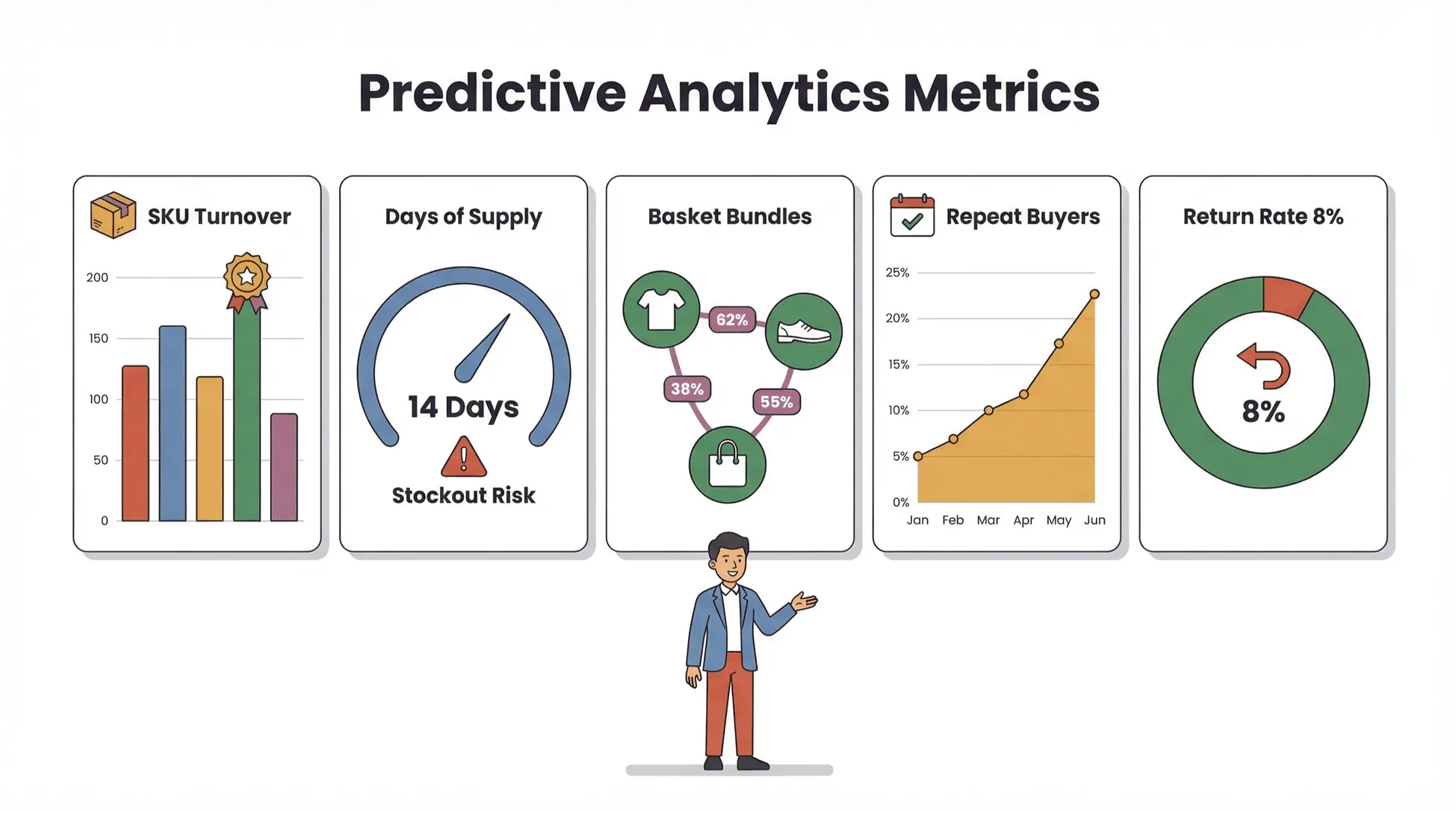
- SKU-स्तरीय इन्वेंट्री टर्नओवर: कौन-से उत्पाद सबसे तेज़ी से बिक रहे हैं? कौन-से ओवरस्टॉक या स्टॉकआउट के जोखिम में हैं?
- ग्राहक रिटर्न दर: क्या कुछ उत्पादों या समय अवधियों में ज़्यादा रिटर्न आ रहे हैं? क्या यह गुणवत्ता की समस्या है या अपेक्षाओं का मेल नहीं?
- खरीद आवृत्ति: आपके सबसे अच्छे ग्राहक कितनी बार खरीदते हैं? क्या आप उन्हें और बार खरीदने के लिए प्रेरित कर सकते हैं?
- SKU के अनुसार सप्लाई के दिन: हर उत्पाद खत्म होने में कितने दिन बचे हैं? क्या आप किसी बिक्री उछाल को मिस करने के जोखिम में हैं?
- मार्केट बास्केट विश्लेषण: कौन-से उत्पाद अक्सर साथ खरीदे जाते हैं? क्या आप इन्हें बंडल या क्रॉस-प्रमोशन कर सकते हैं?
Thunderbit के साथ आप इस स्तर का विवरण निकाल सकते हैं—कोडिंग की ज़रूरत नहीं। AI-संचालित extraction engine Amazon रिपोर्ट्स, dashboards, और यहाँ तक कि subpages से भी सूक्ष्म डेटा खींच सकता है, फिर उसे विश्लेषण के लिए संरचित कर सकता है।
कार्रवाई में predictive analytics: बिक्री गति और सप्लाई के दिनों को मॉडल करके आप यह अनुमान लगा सकते हैं कि कब रीऑर्डर करना है, कितना खरीदना है, और मार्केटिंग बजट कहाँ लगाना है। यह आपके Amazon व्यवसाय के लिए एक crystal ball जैसा है (धुंध और संदिग्ध भविष्यवाणी के बिना)।
Thunderbit: गहरे Amazon बिक्री विश्लेषण तक पहुँचने का सबसे तेज़ तरीका (कोडिंग की ज़रूरत नहीं)
अब उस मुद्दे पर बात करते हैं जिसे सब जानते हैं लेकिन अक्सर टालते हैं: ज़्यादातर सेलर्स के पास डेटा टीम नहीं होती, और न ही इतना समय कि वे सिर्फ़ अपने Amazon बिक्री डेटा को समझने के लिए Python सीखें। यही कारण है कि हमने Thunderbit बनाया।
Thunderbit एक AI-संचालित वेब स्क्रैपर Chrome Extension है, जो आपको कुछ ही क्लिक में Amazon बिक्री डेटा निकालने, संरचित करने और विश्लेषण करने देता है। न कोड, न टेम्प्लेट, न सिरदर्द।
यह इस तरह काम करता है:
- AI फ़ील्ड सुझाए: Thunderbit आपका Amazon डैशबोर्ड या रिपोर्ट पेज पढ़ता है और निकालने के लिए सबसे प्रासंगिक कॉलम सुझाता है—बिक्री, इन्वेंट्री, दोहराई गई खरीद दर, जो चाहें।
- Subpage Scraping: और गहराई चाहिए? Thunderbit हर SKU या ऑर्डर subpage पर अपने-आप जा सकता है और आपके dataset को सूक्ष्म जानकारी से समृद्ध कर सकता है।
- कहीं भी Export करें: डेटा मिलने के बाद उसे सीधे Excel, Google Sheets, Airtable, या Notion में export करें। अब copy-paste का अंतहीन झंझट नहीं।
- Scheduled Scraping: नियमित डेटा pulls सेट करें ताकि आपकी रिपोर्ट्स हमेशा ताज़ा रहें—साप्ताहिक business reviews या दैनिक inventory checks के लिए बिल्कुल सही।
- Cloud बनाम Browser Scraping: सार्वजनिक पेजों के लिए गति से काम लें (एक बार में 50 पेज तक)। लॉग-इन Seller Central डेटा के लिए सुरक्षा और पहुँच के लिए browser mode इस्तेमाल करें।
Thunderbit पर दुनिया भर के 100,000 से अधिक उपयोगकर्ता भरोसा करते हैं, और Amazon के लगातार बदलते interface के साथ तालमेल बनाए रखने के लिए इसे नियमित रूप से अपडेट किया जाता है।
उपयोगकर्ता कहानी: एक सेलर ने मुझे बताया कि पहले वह हर हफ़्ते रिपोर्ट डाउनलोड और मर्ज करने में घंटों लगाता था। Thunderbit के साथ, उसने एक scheduled scrape सेट किया, Google Sheets में export किया, और अब उसे हर दिन एक dashboard मिलता है—बिना किसी मैनुअल काम के।
Thunderbit Chrome एक्सटेंशन डाउनलोड करें
Amazon बिक्री डेटा को रणनीतिक व्यावसायिक संपत्ति में बदलना
तो आपके पास डेटा है—अब क्या? असली मूल्य कच्चे नंबरों को actionable strategy में बदलने में है।
Thunderbit आपको डेटा संग्रह से निर्णय-निर्माण तक आगे बढ़ने में इस तरह मदद करता है:
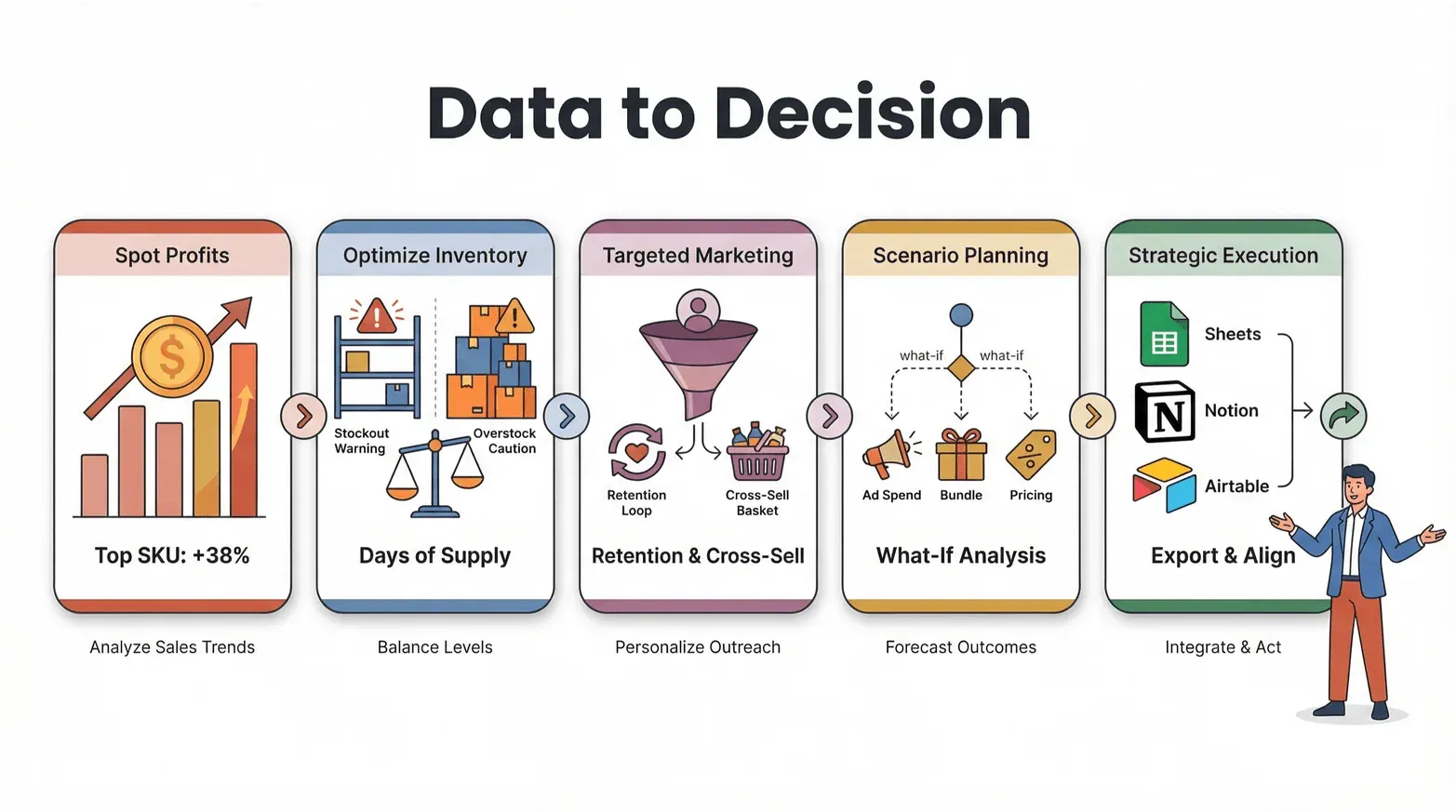
- मुनाफ़े के अवसर पहचानें: बिक्री गति और मार्जिन डेटा का उपयोग करके अपने सबसे लाभदायक SKUs पहचानें। विजेताओं पर और ध्यान दें, कमज़ोर उत्पादों को घटाएँ।
- इन्वेंट्री ऑप्टिमाइज़ करें: स्टॉकआउट (छूटी हुई बिक्री) और ओवरस्टॉक (फँसी हुई नकदी) से बचने के लिए सप्लाई के दिन और टर्नओवर दरों पर नज़र रखें।
- लक्षित मार्केटिंग: दोहराई गई खरीद दर और मार्केट बास्केट डेटा का विश्लेषण करके retention campaigns और cross-sell offers बनाइए।
- परिदृश्य योजना: सूक्ष्म डेटा के साथ आप “क्या होगा अगर” विश्लेषण चला सकते हैं—अगर ad spend बढ़ाएँ, उत्पादों को bundle करें, या प्राइसिंग बदलें तो क्या होगा?
- रणनीतिक निष्पादन: अपने इनसाइट्स टीम के टूल्स—Sheets, Notion, Airtable—में export करें, ताकि सभी एक ही पेज पर हों और कार्रवाई के लिए तैयार रहें।
निष्कर्ष: Amazon बिक्री विश्लेषण सिर्फ़ पिछले समय की रिपोर्टिंग नहीं है। यह एक feedback loop बनाने के बारे में है, जहाँ हर डेटा पॉइंट ज़्यादा स्मार्ट, तेज़, और अधिक लाभदायक निर्णयों को प्रेरित करता है।
चरण-दर-चरण गाइड: Thunderbit के साथ Amazon बिक्री विश्लेषण में महारत
क्या आप हाथ-पाँव खोलकर काम करने के लिए तैयार हैं? यहाँ Thunderbit का उपयोग करके Amazon बिक्री विश्लेषण में महारत हासिल करने के लिए एक व्यावहारिक walkthrough है—सेटअप से लेकर उन्नत विश्लेषण तक।
चरण 1: Amazon अकाउंट कनेक्ट करें और Thunderbit सेट अप करें
- Thunderbit इंस्टॉल करें: Thunderbit Chrome Extension डाउनलोड करें और उसे अपने toolbar पर pin करें।
- Seller Central में लॉग इन करें: Chrome में अपना Amazon Seller Central या Vendor Central dashboard खोलें।
- Thunderbit लॉन्च करें: Thunderbit icon पर क्लिक करें। लॉग-इन डेटा के लिए सुरक्षित पहुँच हेतु browser mode इस्तेमाल करें।
- डेटा सुरक्षा: Thunderbit कभी आपके credentials स्टोर नहीं करता—cloud scraping (सार्वजनिक पेजों के लिए) चुनने पर छोड़कर, डेटा आपके browser में स्थानीय रूप से प्रोसेस होता है।
चरण 2: Amazon बिक्री रिपोर्ट्स निकालें और अनुकूलित करें
- AI फ़ील्ड सुझाए: अपने लक्षित Amazon रिपोर्ट या डैशबोर्ड पर “AI Suggest Fields” पर क्लिक करें। Thunderbit पेज स्कैन करेगा और कॉलम्स (sales, inventory, returns, आदि) सुझाएगा।
- कॉलम कस्टमाइज़ करें: ज़रूरत के अनुसार कॉलम जोड़ें, हटाएँ, या उनका नाम बदलें। आप साफ़ exports के लिए data types (text, number, date, आदि) निर्दिष्ट कर सकते हैं।
- Subpage Scraping: गहरी इनसाइट्स के लिए subpage scraping सक्षम करें ताकि व्यक्तिगत SKU या order pages से डेटा निकाला जा सके।
चरण 3: डेटा संग्रह और शेड्यूलिंग ऑटोमेट करें
- Scrapes शेड्यूल करें: दैनिक, साप्ताहिक, या कस्टम अंतराल पर recurring scrapes सेट करें। आसान सेटअप के लिए Thunderbit प्राकृतिक भाषा scheduling (“हर सोमवार सुबह 9 बजे”) का उपयोग करता है।
- Cloud बनाम Browser: सार्वजनिक डेटा के लिए cloud mode का उपयोग करें (तेज़, एक बार में 50 पेज तक)। Seller Central के लिए authenticated access हेतु browser mode अपनाएँ।
- प्रगति पर नज़र रखें: Thunderbit रियल-टाइम प्रगति दिखाता है और किसी भी समस्या (जैसे login timeout या page change) के बारे में आपको अलर्ट करता है।
चरण 4: विश्लेषण करें, विज़ुअलाइज़ करें, और इनसाइट्स पर कार्रवाई करें
- डेटा export करें: अपने संरचित डेटा को सीधे Excel, Google Sheets, Airtable, या Notion में भेजें। आप इसे CSV या JSON के रूप में भी डाउनलोड कर सकते हैं।
- डैशबोर्ड बनाएँ: ट्रेंड्स को विज़ुअलाइज़ करने के लिए pivot tables, charts, और heatmaps का उपयोग करें—SKU के अनुसार बिक्री, seasonality, इन्वेंट्री जोखिम, आदि।
- कार्रवाई करें: इनसाइट्स टीम के साथ साझा करें, मार्केटिंग और इन्वेंट्री रणनीतियाँ समायोजित करें, और प्रमुख मेट्रिक्स (जैसे कम स्टॉक या बढ़ती रिटर्न दर) के लिए alerts सेट करें।
प्रो टिप: उन्नत उपयोगकर्ताओं के लिए, Thunderbit हर फ़ील्ड के लिए custom AI prompts सपोर्ट करता है—ताकि आप डेटा को तुरंत label, categorize, या translate भी कर सकें।
डेटा से पूर्वानुमानात्मक विकास तक: Amazon सेलर्स के लिए मुख्य सीखें
आइए मुख्य बातों को दोहराएँ:
- Amazon बिक्री विश्लेषण आपका ग्रोथ इंजन है: ट्रैफ़िक और रैंक से आगे बढ़ने पर आपके व्यवसाय का 360° दृश्य खुलता है—ग्राहक इरादा, इन्वेंट्री स्वास्थ्य, और बाज़ार ट्रेंड्स।
- सूक्ष्म डेटा = पूर्वानुमान क्षमता: SKU-स्तर, ग्राहक-स्तर, और event-level मेट्रिक्स मांग का अनुमान लगाने, इन्वेंट्री ऑप्टिमाइज़ करने, और नए अवसर खोजने में मदद करते हैं।
- ऑटोमेशन अनिवार्य है: मैनुअल रिपोर्टिंग धीमी, त्रुटिपूर्ण, और आपको अंदाज़े के सहारे छोड़ देती है। API इंटीग्रेशन और Thunderbit जैसे टूल्स आपका डेटा ताज़ा और actionable रखते हैं।
- Thunderbit इसे आसान बनाता है: AI-संचालित extraction, subpage scraping, और no-code automation के साथ कोई भी Amazon बिक्री विश्लेषण में महारत हासिल कर सकता है—तकनीकी कौशल की ज़रूरत नहीं।
- इनसाइट्स को कार्रवाई में बदलें: अपनी एनालिटिक्स का उपयोग प्राइसिंग, इन्वेंट्री, और मार्केटिंग निर्णयों को चलाने के लिए करें, जो predictive, data-driven growth को आगे बढ़ाएँ।
जो ब्रांड Amazon बिक्री डेटा को सिर्फ़ एक स्कोरकार्ड नहीं, बल्कि एक रणनीतिक संपत्ति मानते हैं—वही आज के अत्यधिक प्रतिस्पर्धी मार्केटप्लेस में जीतते हैं।
निष्कर्ष और अगले कदम
Amazon बिक्री विश्लेषण में महारत हासिल करना सिर्फ़ बड़े ब्रांड्स, डेटा टीम्स और शानदार डैशबोर्ड्स वालों के लिए नहीं है। सही टूल्स और सही सोच के साथ, कोई भी सेलर प्रतिक्रियात्मक रिपोर्टिंग से निकलकर पूर्वानुमानात्मक, रणनीतिक विकास की ओर बढ़ सकता है।
मैं यह सुझाव देता हूँ:
- Thunderbit का मुफ़्त trial आज़माएँ: Chrome extension डाउनलोड करें और देखें कि अपने Amazon बिक्री डेटा को निकालना और विश्लेषण करना कितना आसान है।
- अपना मौजूदा analytics workflow जाँचें: आप अभी कहाँ मैनुअल डाउनलोड या सतही मेट्रिक्स पर निर्भर हैं?
- एक quick win पहचानें: शायद अपनी साप्ताहिक बिक्री रिपोर्ट को ऑटोमेट करना, या अपने शीर्ष SKUs के लिए दोहराई गई खरीद दरों में गहराई से जाना।
- और संसाधन देखें: web scraping, analytics, और automation पर गहराई से पढ़ने के लिए Thunderbit Blog देखें। आपको ये भी पसंद आ सकते हैं: AI का उपयोग करके 2025 में Amazon Products और Reviews को कैसे Scrape करें और AI का उपयोग करके Website Data को Excel में कैसे Scrape करें।
Amazon selling का भविष्य उन्हीं का है जो डेटा को कार्रवाई में बदल सकते हैं—ट्रेंड्स का अनुमान लगाकर, संचालन ऑप्टिमाइज़ करके, और प्रतिस्पर्धा से पहले अवसर पकड़कर। Thunderbit के साथ, वह भविष्य आपकी पहुँच में है।
FAQs
1. Amazon बिक्री डेटा और Amazon बिक्री विश्लेषण में क्या अंतर है?
Amazon बिक्री डेटा से आशय कच्चे नंबरों से है—ऑर्डर, राजस्व, इन्वेंट्री, आदि—जबकि Amazon बिक्री विश्लेषण उस डेटा से इनसाइट्स निकालने की प्रक्रिया है ताकि निर्णय लिए जा सकें। एनालिटिक्स आपको “क्या हुआ” से “यह क्यों हुआ” और “अब क्या करना है” तक ले जाती है।
2. मैं Amazon बिक्री रिपोर्ट जनरेशन को कैसे ऑटोमेट कर सकता हूँ?
आप Amazon के Selling Partner API (SP-API) के साथ इंटीग्रेशन करके या Thunderbit जैसे टूल्स का उपयोग करके Amazon बिक्री रिपोर्ट जनरेशन ऑटोमेट कर सकते हैं। Thunderbit आपको recurring data pulls शेड्यूल करने, सूक्ष्म डेटा निकालने, और उसे सीधे अपने analysis tools में export करने देता है—मैनुअल डाउनलोड की ज़रूरत नहीं।
3. मुझे किन उन्नत Amazon बिक्री मेट्रिक्स को ट्रैक करना चाहिए?
बेसिक बिक्री और ट्रैफ़िक से आगे बढ़कर बिक्री गति, इन्वेंट्री टर्नओवर, दोहराई गई खरीद दर, सप्लाई के दिन, रिटर्न दर, और मार्केट बास्केट विश्लेषण जैसे मेट्रिक्स पर ध्यान दें। ये मेट्रिक्स मांग का अनुमान लगाने, इन्वेंट्री ऑप्टिमाइज़ करने, और विकास के अवसर पहचानने में मदद करते हैं।
4. अगर मैं तकनीकी नहीं हूँ, तो क्या मैं Thunderbit का उपयोग कर सकता हूँ?
बिल्कुल। Thunderbit व्यावसायिक उपयोगकर्ताओं के लिए बनाया गया है—कोडिंग की ज़रूरत नहीं। बस Chrome Extension इंस्टॉल करें, AI Suggest Fields का उपयोग करके अपनी रिपोर्ट परिभाषित करें, और कुछ क्लिक में अपना डेटा export करें। इसका interface सहज है, और शुरुआत करने में मदद के लिए पर्याप्त documentation और support भी उपलब्ध है।
5. मैं Amazon बिक्री डेटा को actionable business strategies में कैसे बदलूँ?
सबसे पहले सूक्ष्म डेटा (SKU-स्तर, ग्राहक-स्तर, आदि) निकालें, फिर एनालिटिक्स का उपयोग करके ट्रेंड्स, bottlenecks, और अवसर पहचानें। Thunderbit के साथ आप डेटा को विज़ुअलाइज़ कर सकते हैं, scenario analyses चला सकते हैं, और इनसाइट्स टीम के साथ साझा कर सकते हैं—कच्चे नंबरों को लक्षित, लाभदायक कार्रवाइयों में बदलते हुए।
बुनियादी रिपोर्ट्स से आगे बढ़कर predictive growth खोलने के लिए तैयार हैं? Thunderbit डाउनलोड करें और आज ही अपनी Amazon बिक्री विश्लेषण यात्रा शुरू करें। और टिप्स व ट्यूटोरियल्स के लिए Thunderbit Blog देखें।
पूर्वानुमानात्मक Amazon ग्रोथ के लिए Thunderbit आज़माएँ Get Started Free
और जानें
- AI के साथ Amazon Product Data को कैसे Scrape करें: एक व्यावहारिक गाइड
- AI का उपयोग करके 2025 में Amazon Products और Reviews को कैसे Scrape करें
- Amazon Prices को मॉनिटर करना कैसे मास्टर करें: एक संपूर्ण गाइड
- Amazon Prices को Google Sheets में आसानी से कैसे Scrape करें
- कुशल डेटा निष्कर्षण के लिए Amazon Web Scraper का उपयोग कैसे करें




