ज़्यादातर लोग मानते हैं कि बस proxy IP लगा देने से कोई भी वेबसाइट scrape की जा सकती है, किसी भी geo-restricted page तक पहुंचा जा सकता है, या पचास social media accounts बिना किसी दिक्कत के चलाए जा सकते हैं। ऐसा नहीं है। (ज़रा भी नहीं।)
2026 में proxy का परिदृश्य पहले से कहीं ज़्यादा जटिल — और व्यावसायिक रूप से महत्वपूर्ण — हो गया है। व्यापक proxy servers market का आकार लगभग USD 1.9 billion in 2026 आंका गया है, और 2031 तक यह करीब 6.5% CAGR से बढ़ने की उम्मीद है। इसकी वजह web scraping, price monitoring, ad verification, और बड़े पैमाने पर data harvesting हैं। फिर भी, “मैंने कुछ proxies खरीद लिए” और “मुझे भरोसेमंद data मिल रहा है” के बीच की दूरी पहले से ज़्यादा है, क्योंकि anti-bot systems लगातार अधिक sophisticated होते जा रहे हैं। यह guide बताती है कि proxies असल में क्या हैं, सही type कैसे चुनें (2026 की वास्तविक pricing के साथ), इन्हें set up कैसे करें, किन वजहों से block लग सकता है, कब आपको proxy management की ज़रूरत ही नहीं पड़ सकती, और billing से जुड़े वे traps जिनमें experienced buyers भी फंस जाते हैं। Sales, ops, ecommerce, market research — आपका domain कोई भी हो, यह वही practical reference है जो मुझे इस space में शुरुआत करते समय चाहिए थी।
Proxies क्या हैं और ये असल में कैसे काम करते हैं?
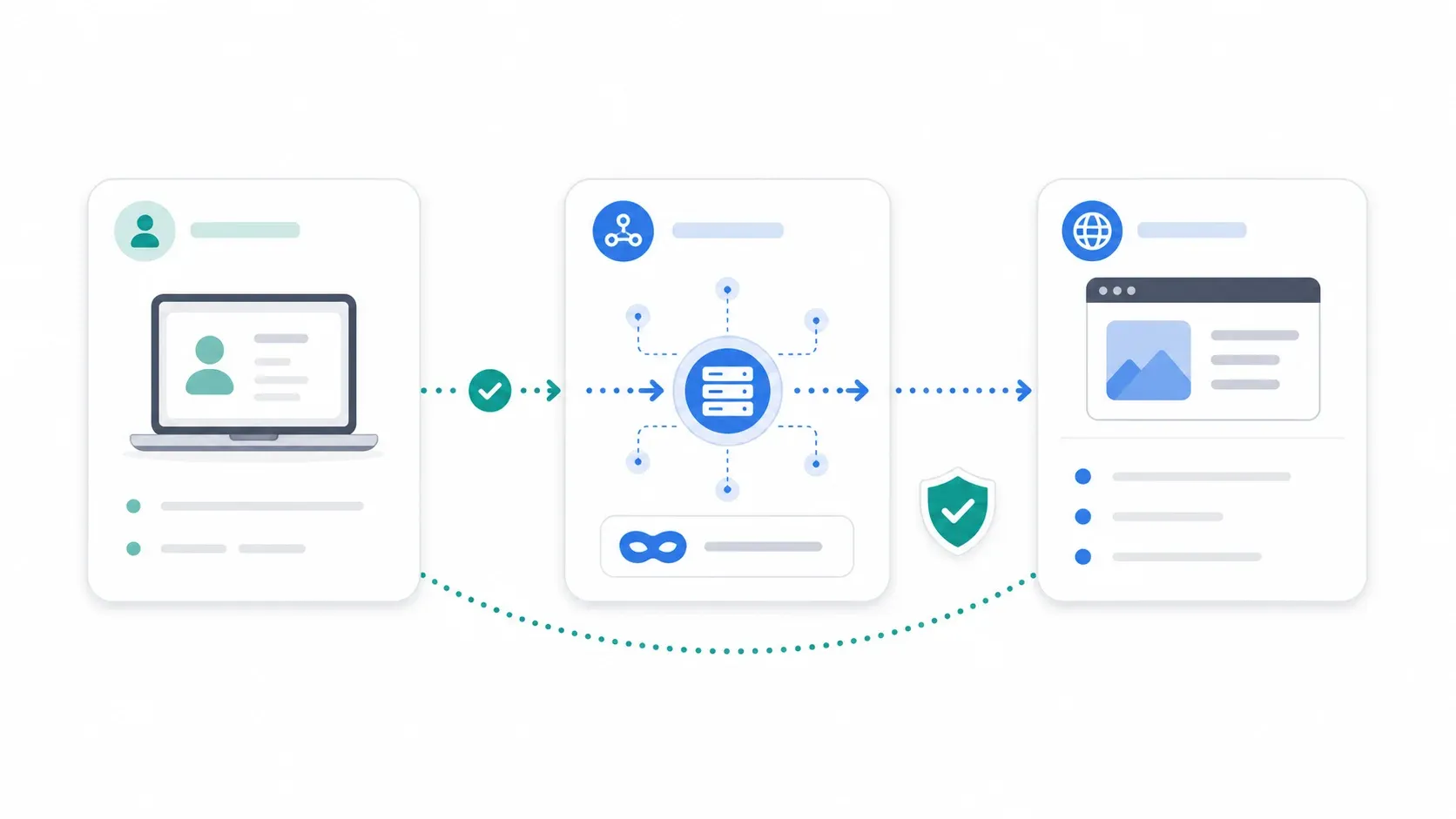
Proxy server आपके device (या scraping tool) और जिस website को आप visit कर रहे हैं, उसके बीच एक intermediary की तरह काम करता है। जब आप proxy इस्तेमाल करते हैं, आपकी request पहले proxy तक जाती है, proxy उसे target website तक forward करता है, website response proxy को भेजती है, और proxy वह response वापस आपके पास लाता है। Target site को आपका IP नहीं, proxy का IP दिखाई देता है।
इसे ऐसे समझिए जैसे आप अपना mail किसी P.O. box के ज़रिए लेते हैं। भेजने वाले को आपका home address नहीं दिखता — सिर्फ P.O. box दिखता है।
बुनियादी flow कुछ ऐसा होता है:
Your device / scraper → Proxy server → Target website
                                ↓
Your device / scraper ← Proxy server ← Target website
एक बेहद अहम बात: proxies application level पर काम करते हैं। ये किसी specific browser, app, या scraping library का traffic route करते हैं — पूरे device traffic को अपने आप नहीं। यह VPN से अलग है, जो आम तौर पर पूरे system traffic को wrap कर देता है। VPN comparison हम अभी आगे करेंगे।
कुछ आम misconceptions, जिन्हें अभी साफ कर देना चाहिए:
- “Proxies मुझे invisible बना देते हैं।” वे आपका IP छिपाते हैं, लेकिन browser fingerprint, TLS handshake, DNS leaks, cookies, या behavioral patterns को अपने आप नहीं छिपाते। BrowserLeaks सिर्फ IP और location ही नहीं, बल्कि WebRTC, DNS, TLS, और HTTP/2 fingerprint data भी दिखाता है — और यही चीज़ें proxy के बावजूद आपकी पहचान उजागर कर सकती हैं।
- “Residential proxies block नहीं हो सकते।” हाँ, इन्हें flag करना कठिन है। लेकिन immune? बिल्कुल नहीं। Anti-bot vendors behavior और device consistency भी score करते हैं, सिर्फ IP source नहीं।
- “ज़्यादा बार rotating करना हमेशा बेहतर है।” बहुत तेज़ rotation अनैसर्गिक लग सकती है, sessions तोड़ सकती है, और IP reputation जल्दी खराब कर सकती है।
- “Free proxies business use के लिए ठीक हैं।” Browserless ने 2026 test में कई public free proxy lists पर 5% से कम success rate पाया। यह typo नहीं है।
Proxy बनाम VPN: आपको असल में किसकी ज़रूरत है?
हर proxy article को यह तुलना देनी चाहिए। ज़्यादातर इसे छोड़ देते हैं। Proxies और VPNs दोनों आपका दिखने वाला IP address बदलते हैं। समानता यहीं खत्म हो जाती है।
| Dimension | Proxy | VPN |
|---|---|---|
| Encryption | बदलता है। HTTPS proxy proxy तक encrypt करता है; HTTP proxy traffic को खुला भेजता है | हमेशा — full encrypted tunnel |
| Traffic Scope | per-app, per-browser, या per-tool | system-wide (पूरे device का traffic) |
| Speed Impact | आम तौर पर तेज़ (कम overhead) | थोड़ा धीमा (encryption cost) |
| Best For | scraping, geo-unblocking, multi-accounting, ad verification, price monitoring | privacy, public Wi-Fi safety, corporate remote access |
| Cost Shape | per-GB, per-IP, या per-port (variable) | आम तौर पर long-term plans में $2–4/month flat |
| Operational Complexity | ज़्यादा — IP type, rotation, sessions, bans संभालने पड़ते हैं | सामान्य browsing के लिए कम |
Norton की 2026 VPN pricing guide के मुताबिक सबसे सस्ते long-term VPN plans करीब $1–4/month तक जाते हैं। दूसरी ओर, proxy providers अक्सर GB, IP, या port के हिसाब से बिल करते हैं। इसलिए Reddit पर लोग अक्सर कहते हैं कि proxies consumer perspective से “कम काम” करते हुए भी ज़्यादा महंगे लगते हैं।
कब Proxy चुनें और कब VPN?
Proxy चुनें जब:
- आप scale पर websites scrape कर रहे हों और requests के बीच IP rotate करना हो
- आपको geo-specific data चाहिए हो (जैसे Texas में बैठकर Germany की prices देखना)
- आप multiple accounts संभाल रहे हों और हर account को अलग user की तरह दिखाना हो
- आप ad verification कर रहे हों और exit IP location पर granular control चाहिए हो
VPN चुनें जब:
- आप public Wi-Fi पर पूरे device traffic को सुरक्षित रखना चाहते हों
- आपको encryption के साथ corporate remote access चाहिए हो
- goal privacy-first browsing हो, data extraction नहीं
दोनों इस्तेमाल करें जब:
- आप corporate network से scraping operations चला रहे हों, जहाँ हर traffic encrypted होना चाहिए, लेकिन IP rotation के लिए per-tool proxy routing भी चाहिए
अगर आपका primary goal structured data extraction है — product listings, contact info, search results — तो आगे पढ़ते रहिए। नीचे एक section है जहाँ शायद आपको proxy management की ज़रूरत ही न पड़े।
Proxies के प्रकार: आसान भाषा में समझें
“Proxy” एक umbrella term है जिसमें 10+ अलग-अलग types आते हैं, और गलत type चुनना इस space की सबसे common — और सबसे महंगी — गलती है। इन्हें architecture/purpose और IP source के आधार पर अलग समझना बेहतर है।
Forward, Reverse, और Transparent Proxies
- Forward proxy: clients के सामने होता है, outbound requests route करता है। जब लोग “proxy” कहते हैं, अक्सर यही मतलब होता है। Scraping, geo-access, और account management के लिए यही इस्तेमाल होता है।
- Reverse proxy: servers के सामने होता है, inbound traffic handle करता है। Websites इन्हें इस्तेमाल करती हैं (जैसे Cloudflare, Nginx)। आप, बतौर scraper या business user, reverse proxy नहीं खरीदते — websites इन्हें deploy करती हैं।
- Transparent proxy: end user को पता चले बिना काम करता है। अक्सर organizations इसे content filtering या caching के लिए इस्तेमाल करती हैं। Data collection के लिए इसे खरीदना आम बात नहीं है।
Anonymous बनाम High-Anonymity (Elite) Proxies
- Anonymous proxies आपका असली IP छिपाते हैं, लेकिन यह बता सकते हैं कि आप proxy इस्तेमाल कर रहे हैं (जैसे
X-Forwarded-Forheaders से)। - High-anonymity (elite) proxies आपका IP भी छिपाते हैं और proxy उपयोग का संकेत भी नहीं देते। ये पहचान बताने वाले headers पूरी तरह हटा देते हैं।
यह कब मायने रखता है? Anonymous proxies basic geo-access या कम संवेदनशील scraping के लिए ठीक हैं। Elite proxies तब चाहिए जब target site के anti-bot measures कड़े हों और आपको एक सामान्य user जैसा दिखना हो।
SOCKS5 Proxies: जब HTTP Proxies काफी न हों
SOCKS5 proxies, HTTP/HTTPS proxies की तुलना में lower network level पर काम करते हैं। ये सिर्फ web requests ही नहीं, किसी भी तरह का traffic संभाल सकते हैं — इसलिए non-browser applications, UDP traffic, या ऐसे tools के लिए उपयोगी हैं जिन्हें अधिक flexible routing चाहिए। AIMultiple के 2026 SOCKS5 benchmark के अनुसार Bright Data, Oxylabs, Decodo, NetNut, और IPRoyal जैसे बड़े providers कुछ plans में SOCKS5 support देते हैं।
Tradeoff यह है कि SOCKS5 को standard HTTP proxy की तुलना में थोड़ा अधिक configuration चाहिए, और हर tool इसे out of the box support नहीं करता।
Residential vs. Datacenter vs. ISP vs. Mobile Proxies: 2026 pricing के साथ निर्णय framework
हर proxy buyer का एक ही सवाल होता है: “मुझे कौन-सा type खरीदना चाहिए, और इसकी कीमत कितनी होगी?”
नीचे official provider pages से निकाली गई 2026 की current prices दी गई हैं — अनुमान नहीं, असली numbers।
Residential Proxies: भरोसा ज़्यादा, कीमत भी ज़्यादा
Residential proxies उन IPs का उपयोग करते हैं जो real households को real ISPs द्वारा दिए जाते हैं, इसलिए websites इन्हें भरोसेमंद मानती हैं — traffic घर से browsing करने वाले normal consumer जैसा दिखता है।
- Best for: aggressive anti-bot वाले sites (ecommerce, social media, travel platforms), geo-specific market research
- Downsides: per GB महंगे, datacenter से धीमे
- 2026 pricing examples:
- Bright Data: pay-as-you-go करीब ~$8/GB list, promotional करीब ~$4/GB, volume tiers में ~$3/GB तक
- Oxylabs: $6/GB starter, $5/GB basic, $4/GB advanced, $2.50/GB corporate
- Decodo: 3GB पर $3.75/GB, 50GB पर $3.00/GB, headline claims में $2/GB से plans
- IPRoyal: residential proxies $1.75/GB से शुरू
Practical range: mainstream plans में लगभग USD $2–8/GB। Budget providers और promotions इसे और नीचे ला सकते हैं; enterprise commitments effective rate और कम कर सकते हैं।
Residential proxies rotating sessions भी support करते हैं (हर request या हर interval पर नया IP — stateless scraping के लिए best) और sticky sessions भी (एक तय duration तक वही IP — logged-in flows या multi-step actions के लिए best)।
Datacenter Proxies: तेज़ और सस्ते, लेकिन detect करना आसान
Datacenter proxies cloud hosting providers से आते हैं — तेज़ और सस्ते, लेकिन real ISPs से जुड़े नहीं होते। Anti-bot systems इन्हें ASN के आधार पर आसानी से flag कर देते हैं।
- Best for: कम protected sites की high-volume scraping, SEO rank monitoring, simple availability checks
- Downsides: defended targets (social media, marketplaces) पर block होने की संभावना ज़्यादा
- 2026 pricing examples:
- Bright Data: datacenter proxies लगभग ~$0.90/IP से
- Oxylabs: datacenter proxies लगभग ~$1.20/IP (pay-per-IP, fair use के तहत unlimited bandwidth)
ISP Proxies: बीच का संतुलन
ISP proxies datacenter जैसे environments में रहते हैं, लेकिन real ISPs के नाम पर registered IPs इस्तेमाल करते हैं — यानी datacenter speed के साथ ISP-level trust।
- Best for: long-lived sessions, social media management, multi-accounting
- 2026 pricing examples:
- Oxylabs: ISP proxies $1.60/IP starter, $1.30/IP advanced, $1.20/IP premium
- Bright Data: ISP proxies लगभग ~$1.30/IP से
यही वह जवाब है जो forums में बार-बार पूछे जाने वाले सवाल “ISP और residential में असली फर्क क्या है?” का देता है। फर्क hosting location और IP registration का है। ISP proxies persistent sessions के लिए तेज़ और ज़्यादा stable होते हैं; residential proxies rotation-heavy scraping के लिए ज़्यादा IP diversity देते हैं।
Mobile Proxies: block करना सबसे मुश्किल
Mobile proxies carrier networks (4G/5G) के ज़रिए route होते हैं। हज़ारों legitimate users एक ही carrier NAT ranges शेयर करते हैं, इसलिए एक exit IP को block करने का मतलब असली लोगों को भी प्रभावित करना हो सकता है। Websites यह जानती हैं और सीधे action लेने से हिचकती हैं।
- Best for: social media automation, ad verification, ban-sensitive accounts
- Downsides: सबसे महंगा विकल्प, speed कम, availability सीमित
- 2026 pricing: Decodo mobile proxies $2.25/GB से दिखाता है। व्यवहार में provider और plan के हिसाब से USD $4–25/GB या per-IP/month pricing की उम्मीद रखें।
एक consolidated decision table
| Proxy Type | Best For | Anonymity/Trust | Speed | 2026 Cost Signal | Detection Risk | Session Pattern |
|---|---|---|---|---|---|---|
| Residential | Ecommerce, travel, social, geo research | High | Medium | $2–8/GB common | Medium-low | Rotating or sticky |
| Datacenter | SEO monitoring, simple scraping, volume | Low-medium | High | ~$0.90–1.20/IP | High on defended sites | Dedicated/shared |
| ISP | Account stability, multi-accounting, long sessions | Medium-high | High | ~$1.20–1.60/IP | Medium | Sticky/static |
| Mobile | Social media, ad verification, ban-sensitive | Very high | Low-medium | $4–25/GB or per IP/month | Low (but not immune) | Sticky/rotating |
| SOCKS5 | Non-browser apps, UDP, flexible routing | Depends on IP source | Depends | Usually a protocol option | Depends | Depends |
नोट: Pricing अक्सर बदलती रहती है। खरीदने से पहले हमेशा provider pages चेक करें।
3 सवालों वाला decision tree: आपके लिए कौन-सा proxy type सही है?
-
मैं proxy किसलिए इस्तेमाल कर रहा हूँ?
- Scraping → residential या datacenter (target defense level पर निर्भर)
- Multi-accounting → mobile या ISP
- Basic privacy/geo-access → anonymous या elite
-
क्या मुझे session persistence चाहिए?
- हाँ (logged-in flows, carts, account management) → sticky sessions
- नहीं (stateless scraping, SERP checks) → rotating sessions
-
मेरा budget per GB कितना है?
- कम → datacenter
- मध्यम → ISP या residential
- लचीला → mobile
Proxies को सेटअप और इस्तेमाल कैसे करें: step-by-step
- Difficulty: Beginner
- Time Required: ~15–20 minutes for first setup
- What You'll Need: proxy provider account, Chrome browser (या आपकी पसंद का scraping tool), और test करने के लिए एक target URL
Step 1: Proxy Provider और Plan चुनें
Review aggregator rankings अक्सर pay-to-play होती हैं। Reddit sentiment और community forums आपको ज़्यादा ईमानदार तस्वीर देते हैं। मूल्यांकन के लिए ये criteria देखें:
- IP pool size और geographic coverage
- Supported session types (rotating, sticky, both)
- Bandwidth limits और billing model (per-GB, per-IP, flat rate)
- Trial availability — monthly contract लेने से पहले हमेशा trial या pay-as-you-go plan से शुरू करें
Step 2: Browser या Tool में Proxies Configure करें
Browser-based use के लिए सबसे आम तरीका proxy management extension है। FoxyProxy Chrome के लिए एक लोकप्रिय open-source option है। Setup flow:
- Chrome Web Store से FoxyProxy install करें
- FoxyProxy options खोलें
- Manual proxy configuration चुनें
- Provider dashboard से Host/IP और port डालें
- ज़रूरत हो तो username और password जोड़ें
- FoxyProxy mode को proxy के ज़रिए traffic route करने के लिए switch करें
Scraping tools (Puppeteer, Playwright, custom scripts) में आम तौर पर proxy credentials इस format में pass किए जाते हैं:
http://username:password@host:port
socks5://username:password@host:port
ज़्यादातर proxy providers अपने service और common tools के लिए अलग setup guides देते हैं।
Step 3: Proxy Connection Test करें
कोई भी real workload चलाने से पहले ये चार चीज़ें verify करें:
- WhatIsMyIPAddress.com जैसे IP-checking site पर जाएँ और confirm करें कि आपका IP बदल चुका है
- Proxy location को अपने intended geo-target से match करके देखें
- BrowserLeaks से WebRTC leaks, DNS leaks, TLS fingerprint data, और अन्य signals चेक करें जो आपकी असली identity उजागर कर सकते हैं
- ज़्यादा advanced fingerprint checks के लिए PixelScan आज़माएँ, ताकि browser fingerprint proxy location के हिसाब से consistent है या नहीं, यह पता चले
अगर आपका IP बदल गया है लेकिन BrowserLeaks WebRTC leak दिखाकर आपका real IP बता रहा है, तो आपका proxy setup अधूरा है। आगे बढ़ने से पहले leaks ठीक करें।
Step 4: Proxies Rotate करें और Sessions Manage करें
- Stateless scraping के लिए: rotation intervals set करें — हर N requests या हर N minutes पर नया IP। कई providers backconnect endpoints देते हैं जो rotation अपने आप संभालते हैं।
- Multi-accounting या logged-in sessions के लिए: sticky sessions का उपयोग करें ताकि हर account लगातार एक ही IP इस्तेमाल करे। Session duration provider options के हिसाब से सेट करें (आमतौर पर residential sticky sessions के लिए 1–30 minutes)।
Provider-managed rotation (backconnect) और manual rotation का फर्क ज़रूरी है। Backconnect endpoints सरल होते हैं — आप एक gateway URL hit करते हैं और provider background में IP rotate करता रहता है। Manual rotation में आपको IPs की सूची बनाकर खुद उन्हें cycle करना पड़ता है।
Step 5: Monitor करें और Troubleshoot करें
- अचानक blocks, CAPTCHAs, या 403/429 status codes पर नज़र रखें — इसका मतलब है rotation speed बदलनी होगी, proxy type switch करना होगा, या request rate कम करनी होगी
- Billing surprises से बचने के लिए provider dashboard में bandwidth usage track करें
- खासकर residential proxies पर sticky sessions drop होने पर ध्यान दें। Reddit threads इसे बार-बार एक real operational issue बताते हैं, सिर्फ beginners की गलती नहीं।
Proxies block क्यों होते हैं: anti-bot systems आपको कैसे पकड़ते हैं
कई सालों से सिर्फ proxy IP काफी नहीं है। बिल्कुल नहीं। Cloudflare, DataDome, और F5/PerimeterX जैसे modern anti-bot systems layered detection का उपयोग करते हैं, जो सिर्फ यह देखने से कहीं आगे जाता है कि IP datacenter का है या नहीं।
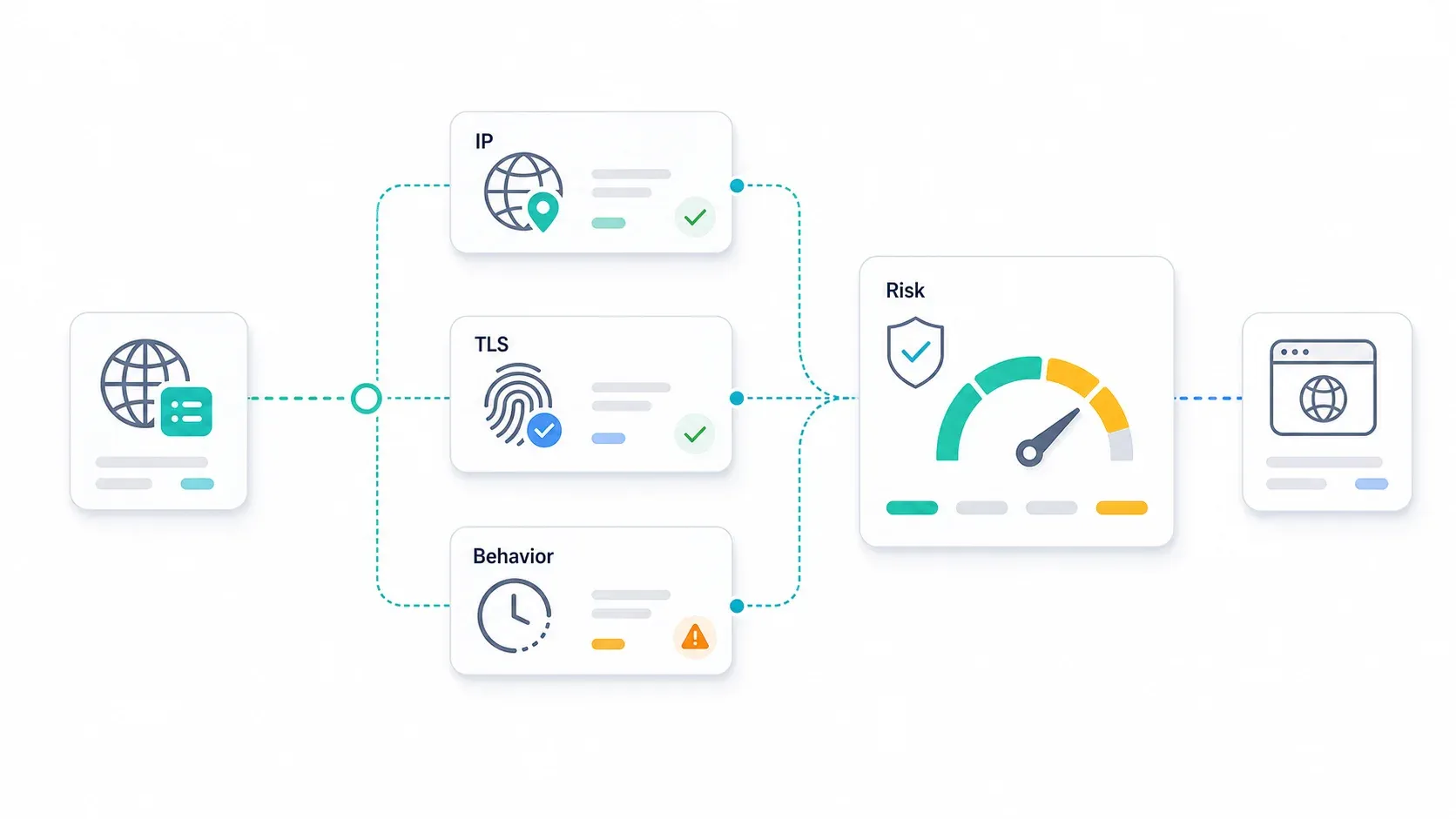
Layer 1: IP reputation scoring
Websites और anti-bot vendors IP addresses को इन आधारों पर trust scores देते हैं:
- क्या IP datacenter ASN का हिस्सा है (आसानी से flag)
- क्या IP किसी ज्ञात proxy provider range में है
- IP की उम्र और abuse history
- Residential “cleanliness” scores — residential IPs भी aggressive उपयोग होने पर flag हो सकते हैं
DataDome की bot mitigation guide साफ कहती है कि IP filtering सिर्फ एक हिस्सा है, पूरी detection stack का। Residential और mobile IPs का baseline trust ऊँचा होता है, लेकिन वे कोई free pass नहीं हैं।
Layer 2: Browser और TLS fingerprinting
Perfect IP होने पर भी आपका client आपको पकड़वा सकता है। Anti-bot systems ये चीज़ें inspect करते हैं:
- Canvas और WebGL fingerprints — rendering differences असली browser/OS बता देते हैं
- TLS JA3/JA4 hashes — TLS handshake खुद fingerprint बनाता है। Cloudflare JA4 को TLS, HTTP, और SSH protocols की broader suite का हिस्सा बताता है
- HTTP/2 और HTTP/3 settings — Scrapfly की 2026 guide बताती है कि बड़े anti-bot vendors protocol-level fingerprints को layered detection stacks में कैसे मिलाते हैं
- Screen resolution, timezone, locale, fonts — अगर ये proxy location के typical user से मेल नहीं खाते, तो आप flag हो सकते हैं
TLS fingerprinting पर academic work भी लगातार यह साबित कर रहा है कि handshake-level signals का इस्तेमाल bots और real users में फर्क करने के लिए किया जा रहा है।
Layer 3: Behavioral analysis
F5 का PerimeterX Bot Defender behavioral analysis और predictive threat detection पर ज़ोर देता है। Anti-bot systems ये चीज़ें track करते हैं:
- Request timing patterns — बिल्कुल regular intervals (जैसे हर 2.000 seconds) bot होने का सीधा संकेत हैं
- Mouse movement और scroll behavior — या इनकी अनुपस्थिति
- Navigation flow — real users 500 product pages एक के बाद एक बिना category link पर क्लिक किए नहीं देखते
- Request bursts — 10 seconds में 100 requests मारना तुरंत पकड़ में आ जाता है
Block होने से बचने की practical checklist
- Proxy country को browser timezone, locale, और language settings से match करें
- Mobile user agent के साथ desktop screen resolution न रखें
- Headers, TLS version, browser version, और user agent में consistency रखें
- Logged-in या multi-step actions के लिए sticky sessions इस्तेमाल करें
- Exact request intervals से बचें — realistic, clustered variation जोड़ें
- Proxy type upgrade करने से पहले speed कम करें। अक्सर request rate proxy spend से ज़्यादा महत्वपूर्ण होता है
- Paid campaign चलाने से पहले BrowserLeaks से WebRTC और DNS leaks test करें
- जब sticky session बीच action में drop हो जाए, तो पूरा setup बदलने से पहले तय करें कि यह provider quality issue है या detection response
Scraping के लिए कब proxies चाहिए — और कब AI Scraping API यह काम कर देता है
Web scraping और data collection, proxy information ढूँढने की सबसे बड़ी वजह है। Proxy buyers का बड़ा हिस्सा असल में data extraction problem हल करने के लिए infrastructure खरीद रहा होता है — और बहुतों को पता ही नहीं होता कि एक सरल रास्ता भी है।
आपको proxies तब भी चाहिए जब…
- आप custom Puppeteer या Playwright automation चला रहे हों, जहाँ session requirements खास हों
- आप long-lived social media sessions चला रहे हों (दिनों या हफ्तों तक multiple accounts manage करना)
- आप geo-specific ad verification कर रहे हों, जहाँ exit IP location पर granular control चाहिए
- आप ऐसे internal tools बना रहे हों जिन्हें persistent authenticated sessions चाहिए
इन मामलों में proxy management काम का हिस्सा है। यहाँ कोई shortcut नहीं है।
आपको proxy management की ज़रूरत नहीं भी पड़ सकती जब…
- आपका लक्ष्य structured data extraction है: product listings, contact info, search results, real estate data
- आप proxy rotation और CAPTCHA-solving debug करने में data analyze करने से ज़्यादा समय लगा रहे हों
- आपको raw HTML नहीं, बल्कि clean JSON या Markdown output चाहिए
यही वह जगह है जहाँ AI-native scraping APIs काम आते हैं। ये backend पर anti-bot evasion, JS rendering, और CAPTCHA solving संभाल लेते हैं — ताकि आपको proxy pool, rotation logic, या residential IP plan configure न करना पड़े।
Thunderbit का API, MCP Server, और CLI data extraction में proxy management की जगह कैसे लेते हैं
यहाँ scope के बारे में ईमानदार रहना sales pitch से ज़्यादा महत्वपूर्ण है। Thunderbit हर use case के लिए proxy replacement नहीं है। इसकी ताकत वहाँ है जहाँ काम है “structured data reliably निकालना” — न कि “network identity पर पूरा manual control देना।”
Data extraction workflows के लिए हमारे tools ये सुविधाएँ देते हैं:
- Open API:
POST /extractके साथ JSON Schema structured data लौटाता है।POST /distillpages को clean Markdown में बदलता है। दोनों JS rendering, anti-bot evasion, और CAPTCHAs को संभालते हैं, बिना आपके proxy pools configure किए।suggest_fieldsfree है;distill1 credit लेता है;extractहर call पर 20 credits लेता है। - MCP Server:
thunderbit_extractऔरthunderbit_distilltools AI agents (Claude, Cursor) को task के बीच scrape करने देते हैं — research agents और data enrichment pipelines के लिए ideal। - CLI:
npx @thunderbit/thunderbit-cli extract <url> --schema schema.jsonterminal, CI, या cron से चलता है। Browser नहीं, proxy config नहीं। - Chrome Extension: Non-technical users के लिए Thunderbit Chrome Extension एक 2-click option देती है, जो proxy और anti-bot complexity को पीछे संभाल लेती है।
| Dimension | Managing Your Own Proxies | Thunderbit API / MCP / CLI |
|---|---|---|
| Setup time | Provider account, proxy type, credentials, browser/tool config, rotation rules | API key या MCP/CLI setup, फिर extract/distill calls |
| Maintenance | Bans, IP quality, sessions, CAPTCHAs, bandwidth, provider changes monitor करना | Credits, schema quality, API/job status monitor करना |
| Anti-bot handling | आपको proxies, browser stack, fingerprinting, rate limits coordinate करने पड़ते हैं | Thunderbit supported use cases के लिए abstract करता है |
| Output | आम तौर पर HTML या raw responses; parser आपको बनाना पड़ता है | Structured JSON, Markdown, या schema-based fields |
| Best for | Custom automation, account sessions, ad verification, exact exit IP control | Structured public-data extraction और AI-agent research workflows |
| Cost model | Per GB/IP/port plus scraper infrastructure | Credit-based extraction/distillation |
Ecommerce price monitoring, directories से lead generation, या real estate listing aggregation जैसे workflows में API approach infrastructure headaches की एक पूरी category खत्म कर देती है। और गहराई में जाना हो तो Thunderbit blog पर हमारे AI web scraping, web scraping without coding, और the best AI web scrapers guides देखें।
Proxy billing traps: आपका unused bandwidth क्यों गायब हो जाता है (और overpaying से कैसे बचें)
Proxy billing वह जगह है जहाँ industry सच में confusing हो जाती है — और जहाँ buyers सबसे ज़्यादा नुकसान खाते हैं। Forum threads ऐसे users से भरे हैं जिन्हें expired bandwidth, throttled “unlimited” plans, और रातोंरात गायब हो जाने वाले providers ने चौंका दिया।
Common proxy billing models और उनके tradeoffs
| Billing Model | How It Works | Watch Out For |
|---|---|---|
| Per-GB metered | इस्तेमाल हुए bandwidth पर pay करें | Rates proxy type के हिसाब से बहुत बदलते हैं; budget overshoot करना आसान |
| Per-IP/port flat rate | हर IP पर pay करें, अक्सर “unlimited” bandwidth के साथ | Fair-use caps, throttling, या heavy use पर suspension |
| Unlimited bandwidth | Flat monthly fee | ToS में छिपी speed throttling या fair-use limits लगभग हमेशा होती हैं |
| Pay-as-you-go | Top up करें और consumption के हिसाब से use करें | आम तौर पर per-GB सबसे महंगा; testing के लिए अच्छा |
Residential providers आपका unused traffic क्यों expire कर देते हैं
ज़्यादातर residential proxy providers 30-day traffic expiration cycles इस्तेमाल करते हैं। 10GB खरीदिए, 3GB इस्तेमाल कीजिए, और बचे हुए 7GB अक्सर month-end पर गायब हो जाते हैं। यह सिर्फ लालच नहीं है — peering और bandwidth costs rollover plans को महंगा बनाते हैं। लेकिन जब आप $5/GB दे रहे हों, तो यह बहुत चुभता है।
कुछ providers अब rollover या non-expiring traffic देते हैं:
- IPRoyal बताता है कि residential proxy traffic “never expires” और on-demand adjustable purchasing support करता है
- ProxyEmpire rollover data का दावा करता है, जिसमें unused GBs आगे carry forward हो जाते हैं
- DataImpulse $1/GB residential traffic को non-expiring bandwidth के साथ market करता है
Tip: bandwidth को छोटे increments में खरीदें ताकि waste कम हो। 5GB top-up जो आप 30 दिनों में सच में use करेंगे, 50GB plan से बेहतर है जिसका आधा expire हो जाए।
Provider evaluation checklist (marketing claims से आगे)
किसी भी proxy provider को commit करने से पहले यह check करें:
- Trial availability और refund policy — अगर trial नहीं है, तो यह yellow flag है
- Community reputation — r/proxies और r/webscraping जैसे subreddits पर Reddit sentiment review sites से ज़्यादा भरोसेमंद है। Provider name के साथ “scam,” “exit scam,” या “billing” search करें ताकि असली शिकायतें सामने आएँ
- Uptime SLAs और actual uptime track record — marketing number नहीं, historical data माँगें
- IP pool transparency — क्या residential IPs ethically sourced opt-in programs से हैं, या P2P SDK botnets से? Bright Data अपनी sourcing/trust page पर transparent residential IP sourcing बताता है। Google's Threat Intelligence Group ने 2026 में एक बड़े residential proxy network के disruption की रिपोर्ट की थी, जिसे bad actors ने allegedly इस्तेमाल किया था — यह याद दिलाने के लिए कि हर IP pool एक जैसा नहीं होता
- Geographic coverage claims बनाम reality — claimed country coverage पर आधारित plan लेने से पहले trial से test करें
- Exit scam history — क्या provider पर अचानक shutdown या fund disappearance के आरोप लगे हैं?
आम proxy pitfalls और उनसे कैसे बचें
नीचे दी गई गलतियाँ पहली बार use करने वालों और experienced proxy users, दोनों को फँसाती हैं।
Pitfall 1: Business tasks के लिए free proxies इस्तेमाल करना
Free proxies धीमे, अविश्वसनीय, और अक्सर आपका traffic log करते हैं। कुछ ads या malware भी inject करते हैं। Browserless की 2026 testing में public free proxy lists पर 5% से कम success rate मिला। Credentials, sensitive data, या production workflows से जुड़े किसी भी काम में free proxies कभी न इस्तेमाल करें।
Pitfall 2: Proxy type को use case से mismatch करना
Social media scraping के लिए datacenter proxies (high block rate) या basic SEO monitoring के लिए महंगे mobile proxies (budget waste) — यही दो सबसे आम mismatches हैं। ऊपर दिया decision tree फिर से देखें — वह किसी कारण से वहाँ है।
Pitfall 3: Fingerprint consistency को नज़रअंदाज़ करना
IP rotate करना लेकिन browser fingerprint वही रखना, पूरी मेहनत बेकार कर देता है। आपका timezone, language, screen resolution, और user agent proxy की geo-location से मेल खाना चाहिए। एक “German residential IP” से request, en-US locale, Pacific timezone, और ऐसी Chrome version के साथ जो अभी exist ही नहीं करती, तुरंत flag हो जाएगी।
Pitfall 4: IP बहुत तेज़ या बहुत धीमी rotation करना
बहुत तेज़ rotation suspicious लगती है और IP reputation को जल्दी खत्म कर सकती है। बहुत धीमी rotation किसी एक IP पर बहुत ज़्यादा requests डाल देती है। सही balance target site की anti-bot sensitivity पर निर्भर करता है — conservative शुरुआत करें (हर 5–10 requests पर एक rotation) और block rates के हिसाब से adjust करें।
Pitfall 5: Sticky session drops को नज़रअंदाज़ करना
Sticky sessions का बीच में drop होना Reddit proxy threads में बार-बार शिकायत का विषय है। पूरे setup को बदलने से पहले तय करें कि drop provider quality issue है (support से संपर्क करें, दूसरे provider पर test करें) या detection response (fingerprint consistency check करें, speed कम करें)।
Proxy setup at a glance: summary table
| Proxy Type | Best For | Anonymity Level | Speed | 2026 Cost Signal | Detection Risk | Session Type |
|---|---|---|---|---|---|---|
| Residential | Ecommerce, travel, social, geo research | High | Medium | $2–8/GB | Medium-low | Rotating or sticky |
| Datacenter | SEO monitoring, simple scraping | Low-medium | High | ~$0.90–1.20/IP | High on defended sites | Dedicated/shared |
| ISP | Account stability, multi-accounting | Medium-high | High | ~$1.20–1.60/IP | Medium | Sticky/static |
| Mobile | Social media, ad verification | Very high | Low-medium | $4–25/GB | Low | Sticky/rotating |
| SOCKS5 | Non-browser apps, UDP, flexible routing | Depends on source | Depends | Protocol option | Depends | Depends |
| Rotating | Stateless scraping, broad crawls | Depends on source | Depends | Provider-managed | Lower if paced | New IP per request/interval |
| Dedicated | Stable tasks, predictable routing | Depends | High | Per IP/port | Shared can inherit issues | Static |
इस table को bookmark कर लीजिए। यह आपको सबसे महंगी proxy mistakes से बचाएगी।
निष्कर्ष और मुख्य बातें
2026 में proxies पहले से कहीं ज़्यादा powerful और complex हैं। बुनियादी निर्णय नहीं बदले, लेकिन execution requirements बदल गए हैं:
- समझें कि आपको किस type का proxy चाहिए। Residential, datacenter, ISP, और mobile proxies अलग-अलग उद्देश्यों के लिए हैं — और गलत चुनाव पैसा बर्बाद करता है या block करवा देता है।
- Proxy type को use case और budget से match करें। Decision tree का उपयोग करें। SEO rank checks के लिए mobile proxies न खरीदें, और social media scraping के लिए datacenter proxies न लगाएँ।
- Fingerprint consistency के साथ proper setup करें। IP rotation के साथ timezone, locale, user agent, और TLS fingerprint का मेल न हो तो यह सिर्फ security theater बन जाता है।
- Billing पर नज़र रखें। Unused bandwidth expiration, fair-use caps, और proxy types के बीच per-GB cost differences budget को जल्दी बिगाड़ सकते हैं।
- सोचें कि क्या AI scraping API proxy management को पूरी तरह हटा सकता है। Structured data extraction — product listings, contact info, search results — के लिए Thunderbit's API and CLI जैसे tools पूरे proxy/anti-bot stack को abstract कर देते हैं और आपको सीधा clean data देते हैं।
Anti-bot systems आगे भी evolve होते रहेंगे। रुझान साफ है: infrastructure complexity को abstract करने वाले AI-powered tools जीत रहे हैं, और जो teams इन्हें अपनाती हैं वे data analyze करने में ज़्यादा समय और proxy configurations debug करने में कम समय लगाती हैं। अगर आप curious हैं, तो Thunderbit Chrome Extension में free tier मौजूद है जिसे आप try कर सकते हैं, और हमारे YouTube channel पर common extraction workflows के walkthroughs मिलेंगे।
कोई एक “best” proxy नहीं होता। सबसे अच्छा proxy वही है जो आपके काम के लिए सबसे सही हो — और अब आपके पास उसे चुनने का framework है।
FAQs
1. क्या proxies इस्तेमाल करना legal है?
ज़्यादातर jurisdictions में proxies legal tools हैं। Legal issue इस बात पर निर्भर करता है कि आप उनसे क्या करते हैं — publicly available data scraping आम तौर पर ठीक है, लेकिन हमेशा website terms of service, access controls, और GDPR जैसी data privacy regulations का सम्मान करें। यह legal advice नहीं है; अगर आपका use case sensitive data या regulated industries से जुड़ा है, तो professional सलाह लें।
2. 2026 में proxies की कीमत कितनी है?
यह type पर निर्भर करता है। Datacenter proxies आम तौर पर ~$0.90–1.20/IP में मिलते हैं। Residential proxies मुख्यधारा plans में अक्सर $2–8/GB होते हैं। ISP proxies लगभग ~$1.20–1.60/IP के बीच रहते हैं। Mobile proxies सबसे महंगे होते हैं — $4–25/GB या per-IP/month। Pricing provider, pool size, और commitment length के हिसाब से काफी बदलती है — खरीदने से पहले हमेशा current provider pages देखें।
3. क्या मैं web scraping के लिए free proxy इस्तेमाल कर सकता हूँ?
किसी serious business use के लिए यह recommended नहीं है। Free proxies अविश्वसनीय, धीमे, और अक्सर logging, ad injection, या malware के ज़रिए आपका data compromise करते हैं। Browserless की 2026 testing में public free proxy lists पर 5% से कम success rate मिला। Production scraping के लिए paid provider लें, या ऐसी API इस्तेमाल करें जो proxy management को पूरी तरह abstract कर दे।
4. Proxy और VPN में क्या फर्क है?
Proxy आम तौर पर किसी specific browser, app, या tool का traffic route करता है और हमेशा connection encrypt नहीं करता। VPN पूरे device traffic को system-wide encrypt करता है। Proxies scraping, geo-unblocking, और multi-accounting के लिए बेहतर हैं। VPNs privacy, public Wi-Fi safety, और corporate remote access के लिए बेहतर हैं। इस लेख में ऊपर दी गई comparison table देखें।
5. मुझे अपनी proxies खुद manage करने के बजाय AI scraping API कब इस्तेमाल करनी चाहिए?
जब आपका लक्ष्य structured data extraction हो — product listings, contact info, search results, real estate data — और आप data analyze करने की बजाय proxy rotation, CAPTCHA-solving, और ban avoidance में ज़्यादा समय लगा रहे हों। Thunderbit जैसी AI scraping APIs backend पर anti-bot evasion, JS rendering, और CAPTCHAs संभालती हैं, और आपको clean structured data देती हैं बिना proxy infrastructure manage किए। Custom browser automation, long-lived authenticated sessions, या exact exit IP control के लिए आपको अभी भी अपनी proxies की ज़रूरत पड़ सकती है।
Learn More