
Walmart.com पर 500 मिलियन से अधिक ऑनलाइन आइटम हैं, लगभग $50 अरब की ई-कॉमर्स से जुड़ी शुद्ध बिक्री है, और रिटेल में सबसे आक्रामक anti-bot सुरक्षा प्रणालियों में से कुछ भी यही इस्तेमाल करता है। अगर आपने कभी Walmart से प्रोडक्ट डेटा—जैसे कीमतें, स्टॉक स्तर, या सेलर जानकारी—स्क्रैप करने की कोशिश की है, तो शायद आपको खाली फ़ील्ड या CAPTCHA पेज मिला होगा, न कि वह डेटा जिसकी आपको ज़रूरत थी।
मैंने हफ्तों तक 9 अलग-अलग Walmart scraping tools टेस्ट किए—no-code Chrome extensions से लेकर enterprise-grade APIs तक। मेरा लक्ष्य सीधा था: यह पता लगाना कि 2026 में कौन-से टूल वास्तव में उपयोगी Walmart product data लौटाते हैं, और कौन-से सिर्फ आपके credits खर्च करते हैं। इसका जवाब काफी हद तक इस बात पर निर्भर करता है कि आप कौन हैं—50 SKUs ट्रैक करने वाला solo seller, pipeline बना रहा developer, या हर दिन हज़ारों प्रोडक्ट मॉनिटर करने वाली enterprise टीम। नीचे मैं बताऊँगा कि क्या काम किया, क्या नहीं, और अपनी स्थिति के लिए सही टूल कैसे चुनें।
Walmart को स्क्रैप करना ज़्यादातर रिटेल साइट्स से ज़्यादा कठिन क्यों है
ज़्यादातर लोग मान लेते हैं कि Walmart को स्क्रैप करना किसी भी अन्य रिटेल साइट को स्क्रैप करने जैसा है। ऐसा नहीं है। scraping industry के स्रोत Walmart की anti-bot stack को आम तौर पर 9/10 कठिनाई रेट देते हैं, और इसके पीछे वाजिब कारण हैं।
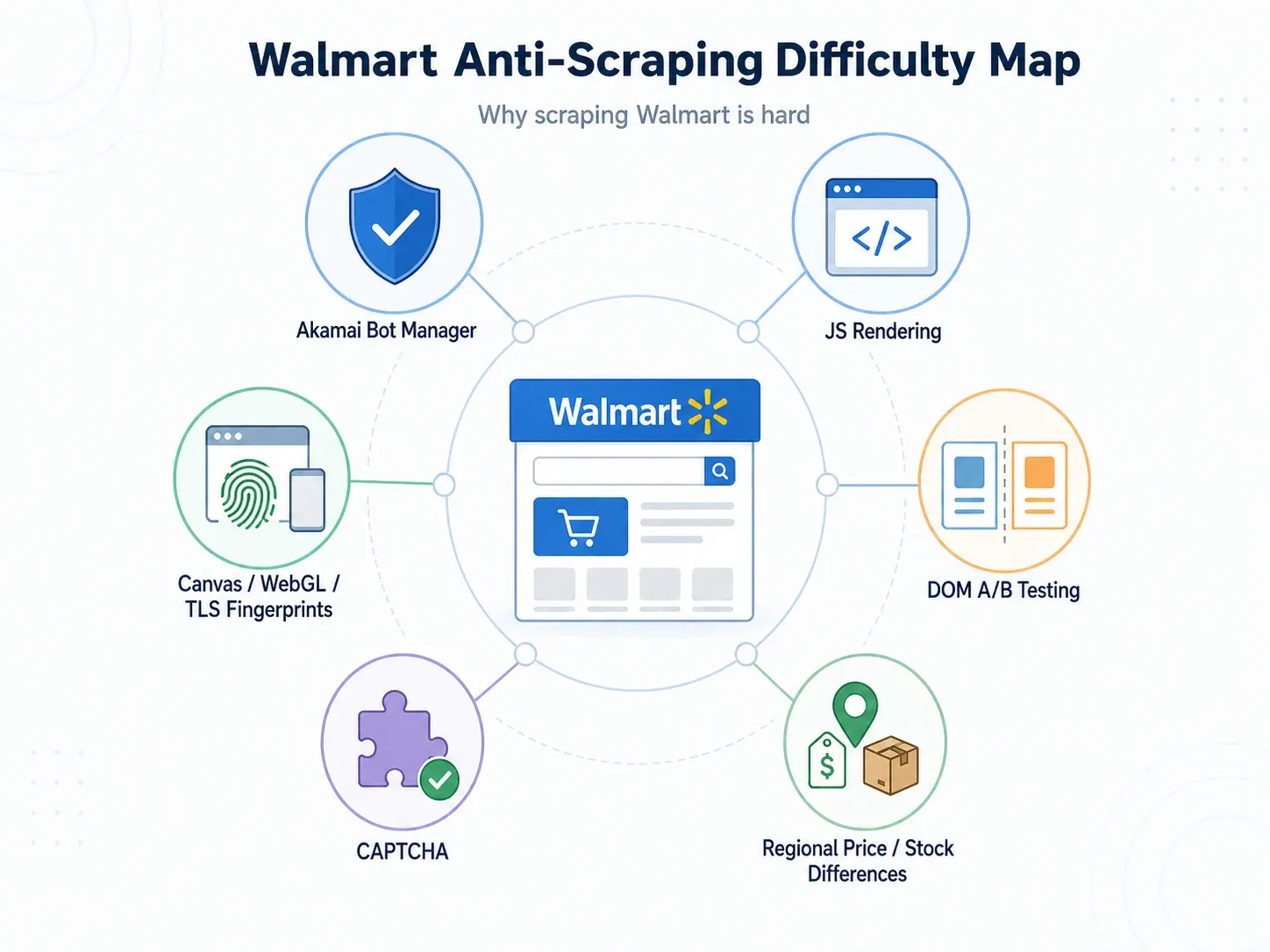
असल में आपको इनसे जूझना पड़ता है:
- Akamai Bot Manager: Walmart Akamai के Bot Manager का उपयोग करता है, जो AI/ML-आधारित व्यवहार विश्लेषण, browser/device fingerprinting, HTTP anomaly detection, और user-interaction signals के आधार पर requests को स्कोर करता है। Akamai रोज़ 40 अरब bot requests प्रोसेस करता है और हर दिन 946 TB नए security data का विश्लेषण करता है।
- JavaScript-rendered content: कीमतें, fulfillment options, seller info, और stock status अक्सर शुरुआती HTML में दिखते ही नहीं हैं। उन्हें देखने के लिए full browser render चाहिए।
- Canvas/WebGL/TLS fingerprinting: जैसा कि एक production thread में कहा गया, "Walmart सिर्फ आपका IP नहीं fingerprint करता—canvas, WebGL, timing, TLS भी." सिर्फ standard proxy rotation काफी नहीं है।
- बार-बार होने वाले A/B test DOM बदलाव: Walmart लगातार layout experiments चलाता है। सोमवार को price पकड़ने वाला CSS selector बुधवार तक empty string लौटा सकता है—बिना किसी साफ़ error के।
- CAPTCHA interception: कुछ scrapers चुपचाप CAPTCHA challenge page को ingest कर लेते हैं और उसे "success" मान लेते हैं, जिससे आपको बेकार डेटा मिल जाता है।
व्यावहारिक नतीजा? जो scraper ज़्यादातर रिटेल साइट्स पर "काम करता" दिखता है, वह Walmart पर अक्सर चुपचाप fail हो जाता है—HTTP 200 response के साथ लेकिन missing या गलत data लेकर।
Anti-Bot Challenge Matrix
| चुनौती | क्या होता है | इसे संभालने वाले टूल |
|---|---|---|
| JS rendering की ज़रूरत | Basic HTTP खाली HTML shell लौटाता है | Thunderbit, Bright Data, Oxylabs, Zyte, ScraperAPI, ScrapingBee, Decodo |
| Canvas/WebGL fingerprinting | proxies होने पर भी bot detection | Bright Data, Decodo, Zyte, Oxylabs |
| Selector टूटना (A/B tests) | data fields खाली/गलत लौटते हैं | Thunderbit (AI हर बार page fresh पढ़ता है), Zyte AI, Bright Data/Oxylabs structured APIs |
| CAPTCHA interception | parser चुपचाप CAPTCHA page ingest कर लेता है | ScraperAPI, Bright Data, Oxylabs, ScrapingBee |
| Regional price/inventory | कीमत zip/store context पर निर्भर करती है | Bright Data geo-targeting, Oxylabs, Decodo, ScraperAPI, ScrapingBee |
इन Walmart Scrapers को टेस्ट करते समय मैंने क्या देखा
हर Walmart scraper एक ही समस्या हल नहीं करता। 30 prices चेक करने वाला solo seller, रोज़ 10,000 SKUs मॉनिटर करने वाली enterprise टीम के बराबर नहीं है। मैंने सभी 9 टूल्स पर ये चीज़ें आंकी:
- Anti-bot success rate: क्या यह असली product data लौटाता है, या सिर्फ खाली fields के साथ HTTP 200?
- Field completeness: क्या यह title, price, availability, seller, rating, review count, UPC, images, fulfillment options, और specs निकाल सकता है?
- JS rendering: क्या यह Walmart की client-side rendering को संभालता है?
- Billing model: Pay-per-success (blocked requests पर भुगतान नहीं) बनाम pay-per-request (fail होने पर भी credits खत्म) ।
- Setup burden: No-code (click and go) बनाम API (integration के लिए code लिखना)।
- Maintenance burden: Fixed selectors Walmart पर अक्सर टूटते हैं। AI/semantic extraction या vendor-maintained endpoints इससे राहत देते हैं।
- Export/output: Business users को Sheets/Excel/Airtable/Notion चाहिए। Developers को JSON/CSV/webhooks चाहिए।
- Scalability: एक बार की research, daily monitoring, और bulk catalog datasets अलग-अलग काम हैं।
- Free tier: $0 में आप वास्तव में क्या हासिल कर सकते हैं?
Independent benchmarks ने expectations calibrate करने में मदद की। AIMultiple का 2026 Walmart benchmark ने 200 URLs पर 2,000 total requests टेस्ट किए और structured output, field coverage, तथा response time की तुलना की। ScrapingTest का 2026 benchmark Walmart को Akamai target के रूप में चिह्नित करता है और 10 providers की success rate और speed की तुलना करता है। Bright Data के Walmart ranking article में reviewed tools के बीच response times 2.31 s से 11.12 s तक और field counts 300 से कम से लेकर 650+ प्रति product page तक रिपोर्ट किए गए हैं।
9 सबसे अच्छे Walmart Scrapers एक नज़र में
| टूल | प्रकार | Anti-Bot हैंडलिंग | Free Tier | शुरुआती कीमत | किसके लिए सबसे अच्छा | Code चाहिए? |
|---|---|---|---|---|---|---|
| Thunderbit | Chrome extension / AI scraper | Browser/cloud scraping, AI adaptive extraction | 6 pages/mo (trial के साथ 10) | ~$9/mo | Non-technical teams | नहीं |
| Bright Data | Walmart API / dataset / scraping browser | Managed unblocking, JS, CAPTCHA, geo | Trial/credits | ~$0.75/1K successful requests | Enterprise scale | वैकल्पिक |
| Oxylabs | Web Scraper API | JS rendering, proxy/unblocking, parser | Up to 2,000 trial results | $49/mo | Data completeness | हाँ |
| Decodo | eCommerce scraping API | JS, premium modes, anti-bot | 2K regular या 667 premium+JS | ~$9/mo | Best value API | ज़्यादातर हाँ |
| Zyte API | Generic scraping API | Automated tiering, browser requests | $5 credit | From $0.06/1K | Fast API workflows | हाँ |
| ScraperAPI | Walmart endpoints / REST API | Proxy rotation, render, premium modes | 7-day / 5,000 credits | $49/mo | Budget developers | हाँ |
| Apify | Actor marketplace / platform | Actor/proxies पर निर्भर | $5/mo platform credit | $49/mo + usage | Custom workflows | वैकल्पिक |
| Octoparse | No-code desktop/cloud scraper | Visual selectors, cloud/proxy add-ons | Free plan (limited) | $69/mo Standard | Beginners | नहीं |
| ScrapingBee | Walmart API / HTML API | JS, premium/stealth proxies, CAPTCHA | 1,000 credits | $49/mo | Lightweight API projects | हाँ |
Pricing अप्रैल 2026 तक की है; खरीदने से पहले सत्यापित कर लें।
1. Thunderbit
Thunderbit एक AI-powered Chrome extension और web scraper है, जिसे ऐसे business users के लिए बनाया गया है जिन्हें Walmart से structured data चाहिए—बिना code लिखे, selectors configure किए, या proxies संभाले।
इसका workflow सचमुच दो क्लिक का है। Walmart search results page या product listing खोलिए, "AI Suggest Fields" पर क्लिक कीजिए, और Thunderbit visible page पढ़कर columns सुझा देता है: Product Name, Price, Rating, Stock Status, Seller, Review Count, Image URL, Product URL. फिर "Scrape" पर क्लिक कीजिए और table भर जाता है। और समृद्ध data चाहिए? "Scrape Subpages" पर क्लिक कीजिए और Thunderbit हर product page पर जाकर specs, UPC, detailed descriptions, और भी बहुत कुछ निकाल लेता है।
Walmart के लिए इसका सबसे बड़ा differentiator है adaptive extraction। Traditional scrapers fixed CSS selectors या XPath पर निर्भर होते हैं—जो Walmart के A/B test चलाते ही या DOM अपडेट करते ही टूट जाते हैं। Thunderbit का AI page structure को हर बार नए सिरे से पढ़ता है और content को position के बजाय semantic रूप से समझता है। मेरे परीक्षण में इसका मतलब था कि Walmart layout बदलने के बाद मुझे टूटे हुए selectors ठीक नहीं करने पड़े—जो selector-based tools में एक बड़ी maintenance headache होती है।
AI से Walmart डेटा स्क्रैप करें Get Started Free
Walmart Scraping के लिए मुख्य सुविधाएँ
- AI Suggest Fields: Walmart pages पढ़कर column names और data types अपने-आप बनाता है—manual selector setup की ज़रूरत नहीं।
- Subpage scraping: listing page scrape करें, फिर हर row को individual product pages से detailed specs के साथ enrich करें।
- Pagination और infinite scroll: Walmart के paginated search results और "load more" patterns को संभालता है।
- Scheduled scraping: रोज़ या हफ़्तेवार price/stock monitoring के लिए recurring runs सेट करें।
- Free exports: Excel, CSV, Google Sheets, Airtable, Notion—कोई hidden download fees नहीं।
- Browser + cloud modes: logged-in/store-specific content के लिए browser scraping; तेज़ public page runs के लिए cloud scraping (एक बार में 50 pages तक)।
- Free email और phone extractors: अगर आप Walmart Marketplace seller pages से contact info निकाल रहे हैं, तो उपयोगी।
- 34-language support.
फ़ायदे और कमियाँ
| फ़ायदे | कमियाँ |
|---|---|
| Zero setup, no code | भारी monitoring के लिए free tier छोटा है |
| AI layout changes के अनुसार adapt करता है—selector maintenance नहीं | यह dedicated enterprise Walmart-only API नहीं है |
| Sheets, Excel, Airtable, Notion में free exports | बड़े subpage/pagination कामों के लिए paid plan चाहिए |
| Subpage scraping listing data को समृद्ध करता है | Enterprise API vendors की तुलना में टूल नया है |
| अलग-अलग workflows के लिए browser और cloud modes |
कीमत: Free tier (6 pages/month, trial के साथ 10)। Paid plans लगभग $9/month से शुरू। 1 credit = 1 output row।
किसके लिए सबसे अच्छा: Non-technical teams—sales ops, ecommerce operators, VAs, small sellers—जो बिना code लिखे या infrastructure संभाले Walmart product data spreadsheet में चाहते हैं।
Walmart scraping के लिए Thunderbit आज़माएँ
2. Bright Data
Bright Data सबसे व्यापक enterprise Walmart data platform है—सिर्फ एक API नहीं। यह एक dedicated Walmart Scraper API, pre-collected Walmart datasets (267M+ records), JS/CAPTCHA handling के लिए Scraping Browser, और AI/LLM workflows के लिए MCP Server प्रदान करता है।
Benchmark testing में Bright Data ने Scrape.do के एक independent benchmark में 11 providers के बीच 98.44% success rate बताया। इसका pay-per-success model मतलब है कि Walmart request block करने पर आपको भुगतान नहीं करना पड़ता। Scale पर यह अंतर बहुत मायने रखता है।
Walmart Scraping के लिए मुख्य सुविधाएँ
- Dedicated Walmart endpoint: URL, final price, SKU, currency, GTIN, specifications, image URLs, और top reviews जैसे fields के साथ structured JSON output।
- Pre-collected datasets: Walmart product data तक bulk historical access।
- Scraping Browser: JS rendering, CAPTCHA solving, और fingerprint evasion संभालता है।
- City-level geo-targeting: regional pricing intelligence के लिए महत्वपूर्ण।
- Proxy network: 150M+ residential IPs।
- MCP Server: LLM/AI agent integration के लिए।
फ़ायदे और कमियाँ
| फ़ायदे | कमियाँ |
|---|---|
| Benchmark में सबसे ऊँची success rate | Premium pricing और complexity |
| Pay-per-success billing | कई product lines confusing हो सकती हैं |
| Regional pricing के लिए geo-targeting | Enterprise plans के लिए minimum spend |
| Bulk historical access के लिए datasets |
कीमत: Walmart Scraper API लगभग $0.75/1K successful requests से शुरू। Datasets लगभग $50/100K records से। Enterprise plans में minimums हैं।
किसके लिए सबसे अच्छा: Enterprise teams जिन्हें scale पर maximum reliability, geo-targeting, और structured Walmart data चाहिए।
3. Oxylabs
Oxylabs एक मजबूत enterprise विकल्प है, जिसमें data completeness पर ज़ोर है। इसकी Web Scraper API सीधे Walmart targets सूचीबद्ध करती है: Walmart Product (59 parsed data points), Walmart Search (58 parsed data points), और Walmart URL के लिए raw HTML या parsed output।
Benchmark summaries में Oxylabs को high field depth के लिए जाना गया है—कुछ tests में Walmart product page पर लगभग 620+ fields। इसका free trial 2,000 results तक देता है, और paid plans $49/month से शुरू होते हैं।
Walmart Scraping के लिए मुख्य सुविधाएँ
- High field count: Walmart product page पर 59 parsed data points।
- Anti-bot handling: Akamai और HUMAN Security layers को संभालता है।
- Multiple output formats: Parsed JSON और raw HTML।
- Scalable API architecture.
फ़ायदे और कमियाँ
| फ़ायदे | कमियाँ |
|---|---|
| गहरी data extraction (59+ fields) | कीमत अधिक |
| भरोसेमंद anti-bot handling | API integration के लिए code चाहिए |
| अच्छा trial (2,000 results) | Non-technical users के लिए सीखने की कठिनाई अधिक |
| Enterprise support |
कीमत: Free trial 2,000 results तक। Paid $49/month से। JS rendering लगभग $0.35/1K results।
किसके लिए सबसे अच्छा: वे teams जिन्हें API के ज़रिए maximum field coverage और structured Walmart data चाहिए।
4. Decodo
Decodo (पहले Smartproxy) मध्यम-स्तर के Walmart scraping के लिए कीमत और performance का सबसे अच्छा संतुलन देता है। इसका eCommerce Scraper API Walmart को ready-made templates, anti-bot bypassing, और JS rendering के साथ सपोर्ट करता है।
Free plan आपको 2K regular requests या 667 premium+JS requests देता है—इतना कि commit करने से पहले यह जाँचा जा सके कि Walmart pages उपयोगी data लौटाते हैं या नहीं। Paid plans लगभग $9/month से शुरू होते हैं, और mid-tier pricing regular requests के लिए $0.30/1K तक कम हो सकती है।
Walmart Scraping के लिए मुख्य सुविधाएँ
- किफ़ायती per-request pricing।
- Templates वाले eCommerce-focused API।
- CAPTCHA और anti-bot handling।
- Geolocation targeting।
- Testing के लिए free starter plan।
फ़ायदे और कमियाँ
| फ़ायदे | कमियाँ |
|---|---|
| प्रतिस्पर्धी कीमत | Bright Data की तुलना में कम Walmart-specific features |
| कीमत के हिसाब से अच्छा performance | Code चाहिए |
| Testing के लिए उदार free plan | Mode multipliers effective cost बढ़ा सकते हैं |
| mid-scale projects के लिए अच्छा | Enterprise leaders से छोटा proxy network |
कीमत: Free plan (2K regular requests)। Paid लगभग $9/month से।
किसके लिए सबसे अच्छा: वे teams जो enterprise pricing के बिना सक्षम Walmart API चाहते हैं—खासकर mid-scale monitoring या catalog building के लिए।
5. Zyte API
Zyte benchmark summaries में सबसे तेज़ विकल्प है, Walmart pages पर रिपोर्ट की गई 2.31-second median response time और 96.22% success rate के साथ। इसकी API automated tiering इस्तेमाल करती है—हर request के लिए datacenter, residential, या rendering technologies चुनती है—इसलिए आपको केवल ज़रूरत के हिसाब से शुल्क देना पड़ता है।
नए users को $5 का free credit मिलता है। Pricing $0.06/1K successful responses से शुरू होती है, जबकि browser-tier requests महँगी पड़ती हैं।
Walmart Scraping के लिए मुख्य सुविधाएँ
- तेज़ response times (~2–3 seconds median).
- Ecommerce data के लिए AI-structured extraction.
- Flexible pay-per-request pricing with auto-tiering.
- JS-rendered Walmart pages के लिए browser requests.
फ़ायदे और कमियाँ
| फ़ायदे | कमियाँ |
|---|---|
| benchmarks में सबसे तेज़ response time | Free tier छोटा |
| AI extraction capabilities | Bright Data की तुलना में कम Walmart-specific tooling |
| Flexible pricing | Technical setup चाहिए |
| real-time monitoring के लिए अच्छा | Auto-tiering से exact costs अनुमान लगाना कठिन |
कीमत: $5 free credit। $0.06/1K successful responses से; browser tiers अधिक।
किसके लिए सबसे अच्छा: real-time monitoring pipelines बनाने वाले developers जिन्हें speed और flexible pricing चाहिए।
6. ScraperAPI
ScraperAPI के developer offerings में Walmart के लिए सबसे स्पष्ट विकल्पों में से एक है। इसका Walmart Scraper product pages, search, categories, और reviews के लिए structured endpoints देता है—synchronous और async options के साथ।
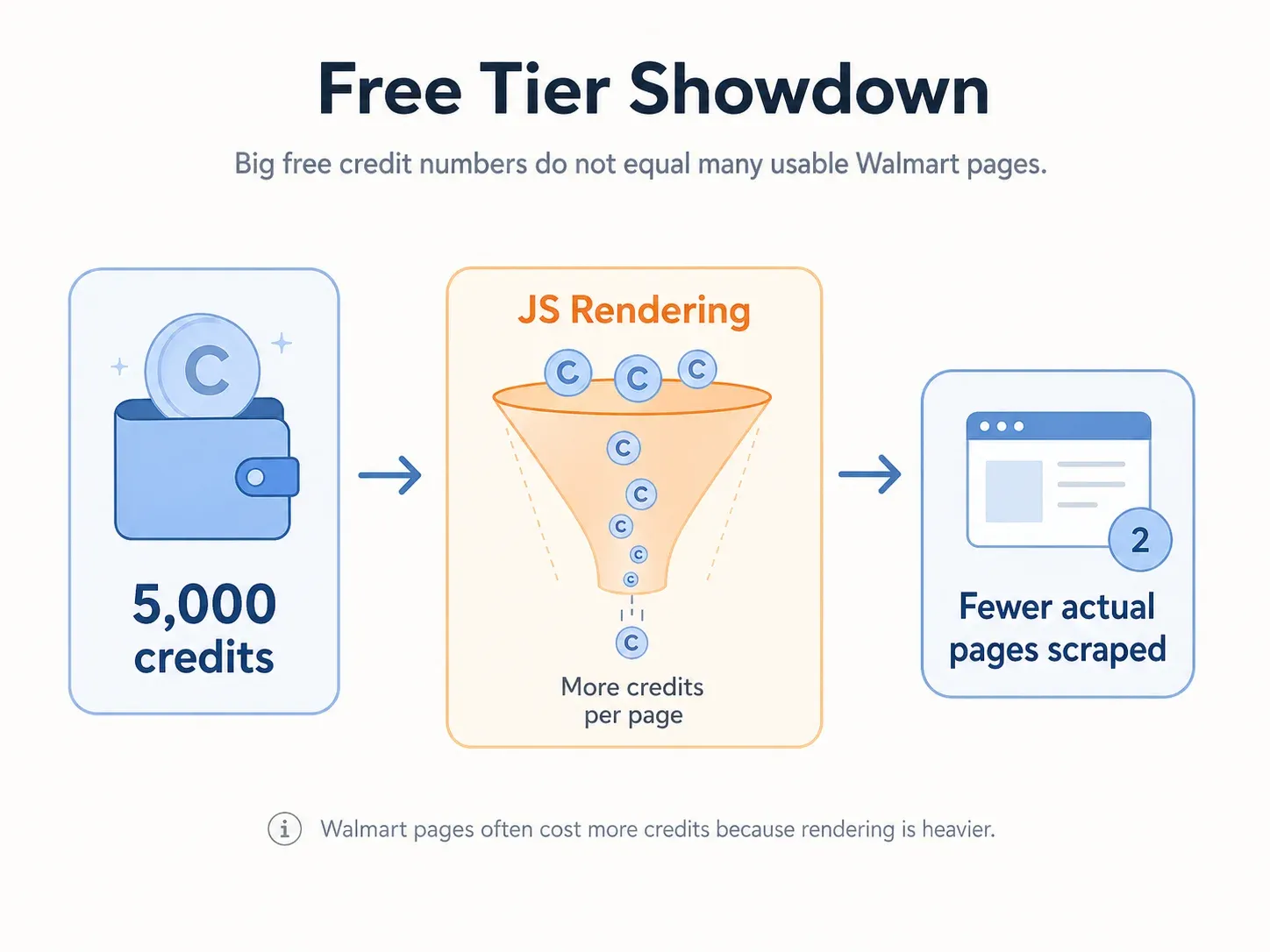
7-day trial में 5,000 credits मिलते हैं, और paid plans $49/month से शुरू होकर 100,000 credits देते हैं। लेकिन एक बात ध्यान रखने वाली है: ScraperAPI का credit system basic requests के लिए 1 credit, JS rendering के लिए 10, premium+render के लिए 25, और ultra premium+render के लिए 75 तक लेता है। Walmart लगभग हमेशा JS rendering मांगता है, इसलिए आपका वास्तविक page count raw credit number से काफी कम होगा।
Walmart Scraping के लिए मुख्य सुविधाएँ
- Dedicated Walmart endpoints (product, search, category, reviews).
- Simple REST API integration.
- Automatic proxy rotation and CAPTCHA handling.
- JavaScript rendering.
- Geolocation targeting.
फ़ायदे और कमियाँ
| फ़ायदे | कमियाँ |
|---|---|
| शुरुआती कीमत किफ़ायती | Walmart पर credits तेज़ी से खत्म होते हैं (JS = 10+ credits/page) |
| अच्छी docs के साथ सरल API | Walmart पर enterprise tools की तुलना में सफलता दर कम |
| Dedicated Walmart endpoints | failed requests पर भी credits खर्च होते हैं |
| Free trial |
कीमत: 7-day trial (5,000 credits)। Paid $49/month से।
किसके लिए सबसे अच्छा: वे developers जो उचित कीमत पर सीधा Walmart API चाहते हैं—लेकिन credit multiplier math समझते हैं।
7. Apify
Apify एक platform और actor marketplace है, कोई एकल scraper नहीं। यहाँ आपको automation-lab/walmart-scraper (~$0.004/product plus run fees), Axesso Walmart lookup/search actors, और community developers द्वारा संभाले गए अन्य pre-built Walmart actors मिल सकते हैं।
Free plan में $5/month usage credits मिलते हैं। Paid plans $49/month से शुरू होकर pay-as-you-go compute जोड़ते हैं। Platform scheduling, batch processing, webhooks, dataset exports, और API clients सपोर्ट करता है।
Walmart Scraping के लिए मुख्य सुविधाएँ
- Marketplace में pre-built Walmart scraper actors.
- Tasks चलाने के लिए scalable cloud platform.
- Custom integrations और pipeline building के लिए APIs.
- Scheduling और batch processing.
- Multiple export formats (JSON, CSV, Excel).
फ़ायदे और कमियाँ
| फ़ायदे | कमियाँ |
|---|---|
| Flexible और customizable | Actor quality maintainer के अनुसार अलग-अलग होती है |
| Walmart actors के साथ अच्छा marketplace | भारी usage पर costs बढ़ते हैं |
| Scalable cloud infrastructure | Custom actors के लिए अधिक technical knowledge चाहिए |
| Developer-friendly APIs | Proxy/anti-bot handling actor configuration पर निर्भर है |
कीमत: Free plan ($5/month credits)। Starter $49/month + usage।
किसके लिए सबसे अच्छा: वे teams जिन्हें scheduling, batch processing, और API integration के साथ custom Walmart scraping workflows चाहिए।
8. Octoparse
Octoparse classic point-and-click no-code scraper है। इसका visual workflow builder आपको Walmart page पर elements चुनने, extraction rules configure करने, और scrapers को cloud या local रूप से चलाने देता है। तेज़ setup के लिए यह एक Walmart Product Scraper template भी देता है।
Free plan में limited local extraction और export शामिल है। Paid plans $69/month (Standard, billed annually) से शुरू होते हैं।
Walmart Scraping के लिए मुख्य सुविधाएँ
- Point-and-click visual workflow builder.
- Cloud-based और local scraping options.
- Recurring monitoring के लिए scheduled scraping.
- Walmart सहित template library.
- Multiple export formats (CSV, Excel).
फ़ायदे और कमियाँ
| फ़ायदे | कमियाँ |
|---|---|
| Coding की ज़रूरत नहीं | Walmart के layout बदलने पर fixed selectors टूट जाते हैं |
| Beginners के लिए visual interface | Cloud execution धीमी |
| Free plan पर उदार row limits | Teams के लिए महँगा |
| Scheduled scraping | Thunderbit की तुलना में कम AI adaptation |
कीमत: Free plan (limited)। Paid $69/month Standard से।
किसके लिए सबसे अच्छा: Beginners जो visual, no-code interface चाहते हैं और Walmart layouts बदलने पर selectors maintain करने को तैयार हैं।
Octoparse और Thunderbit के बीच मुख्य अंतर: दोनों no-code हैं, लेकिन Thunderbit AI की मदद से page changes के अनुसार अपने-आप adapt करता है, जबकि Octoparse fixed selectors पर निर्भर करता है जिन्हें Walmart का DOM बदलने पर manually अपडेट करना पड़ता है।
9. ScrapingBee
ScrapingBee developers के लिए एक हल्का API है जो भारी platform के बिना simple proxy rotation और JS rendering चाहता है। यह general HTML API और product तथा search extraction के लिए dedicated Walmart Scraper API, दोनों देता है।
Free tier में 1,000 credits मिलते हैं। Paid plans $49/month (Freelance, 250,000 credits) से शुरू होते हैं। लेकिन ScrapingBee का credit system बिना JS वाले classic requests के लिए 1 credit, JS rendering के लिए 5, premium without JS के लिए 10, premium with JS के लिए 25, और stealth mode के लिए 75 तक लेता है। क्योंकि Walmart न्यूनतम JS rendering मांगता है, आपका प्रभावी free tier लगभग 200 pages के आसपास होता है—या इससे भी कम, अगर premium/stealth चाहिए।
Walmart Scraping के लिए मुख्य सुविधाएँ
- Proxy rotation के साथ सरल REST API.
- JavaScript rendering (Walmart के लिए आवश्यक).
- Geolocation targeting.
- CAPTCHA handling.
- Walmart-specific API endpoints.
फ़ायदे और कमियाँ
| फ़ायदे | कमियाँ |
|---|---|
| सरल API | Walmart पर credits तेज़ी से खत्म होते हैं (JS = 5+ credits/page) |
| JS rendering संभालता है | Walmart के लिए सीमित free tier |
| Geolocation support | Code चाहिए |
| उचित entry price | enterprise tools की तुलना में कम Walmart-specific optimization |
कीमत: 1,000 free credits। Paid $49/month से।
किसके लिए सबसे अच्छा: वे developers जिन्हें Walmart projects के लिए हल्का, सरल API चाहिए—और जो commit करने से पहले credit math मॉडल कर सकते हैं।
कौन-सा Walmart Scraper आपके workflow के लिए सही है
मुझे कोई भी competitor article ऐसा नहीं मिला जो tools को use case के हिसाब से साफ़-साफ़ बाँटता हो। यह वही decision table है जो शुरुआत में मेरे पास होना चाहिए था:
| उपयोग मामला | सर्वश्रेष्ठ टूल(s) | क्यों |
|---|---|---|
| तेज़ product research (<100 items, no code) | Thunderbit, Octoparse | 2-click setup, visual interface, Sheets में export |
| Scale पर price monitoring (1,000+ SKUs daily) | Bright Data, Oxylabs | Pay-per-success, structured output, high success rates |
| Dropshipping catalog building | Thunderbit, Apify | Subpage scraping listings को enrich करता है; template-based batch runs |
| Competitive intelligence (pricing + reviews) | Zyte, Decodo, Bright Data | API pipelines, structured fields, recurring analysis |
| Data pipeline बना रहा developer | ScraperAPI, ScrapingBee, Zyte | Simple REST APIs, raw response control, code-first |
| Enterprise regional price intelligence | Bright Data, Oxylabs | Geo-targeting, infrastructure, enterprise support, datasets |
Thunderbit स्वाभाविक रूप से non-technical ecommerce operators और छोटी teams के लिए उपयुक्त है जिन्हें बिना code लिखे product data चाहिए। इसका "AI Suggest Fields" Walmart pages पढ़कर automatically columns सुझाता है, और subpage scraping हर item page से detailed product specs जोड़कर listing page को समृद्ध कर सकता है।
DIY Scraper बनाम Scraping API बनाम No-Code Tool: Walmart स्क्रैपिंग की असली लागत
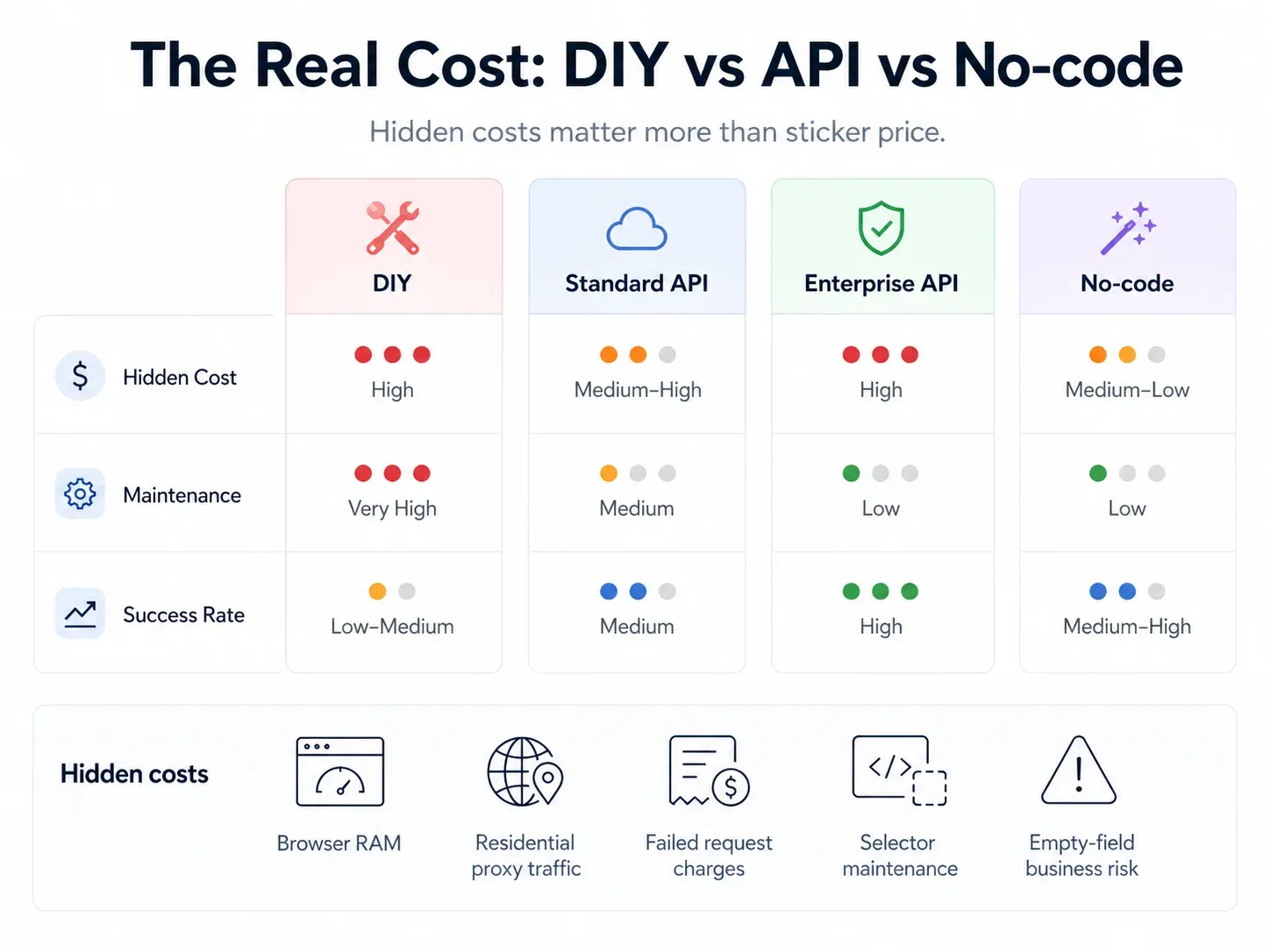
मुझे forums में यह सवाल लगातार दिखता है: "क्या मुझे अपना खुद का Walmart scraper बनाना चाहिए या किसी tool के लिए भुगतान करना चाहिए?" जवाब आपकी असली लागतों पर निर्भर करता है—सिर्फ subscription price पर नहीं।
| तरीका | प्रारंभिक लागत | मासिक चलने की लागत (1,000 pages/day) | Maintenance | अनुमानित सफलता दर |
|---|---|---|---|---|
| DIY (Playwright + residential proxies) | $0 (open source) | $200–500+ (proxies + server + browser infra) | HIGH (weekly fixes) | ~70–85% |
| Scraping API (ScraperAPI, ScrapingBee) | $0 (free tier) | $49–149/mo | LOW | ~85–95% |
| Enterprise API (Bright Data, Oxylabs) | $0 (trial) | $300–1,000+/mo | VERY LOW | ~95–99% |
| No-code tool (Thunderbit, Octoparse) | $0 (free tier) | $9–99/mo | AI tools के लिए NONE (AI adapt करता है) | ~85–95% |
छिपी हुई लागतें जिन्हें लोग अक्सर नहीं गिनते:
- RAM: हर Chromium instance लगभग 150–300 MB RAM खा जाता है। 1,000 concurrent pages पर आपका infrastructure bill paid API लागतों के बराबर हो सकता है।
- Proxy complexity: Residential proxies GB के हिसाब से बिल होते हैं, request के हिसाब से नहीं। JS-heavy Walmart pages अपेक्षा से ज़्यादा खर्च कर सकते हैं।
- Failed requests: कुछ APIs blocked requests पर भी credits खा जाते हैं।
- Silent failures: खाली price या missing stock value business failure है, भले scraper उसे "success" बताए।
- Developer time: Walmart layout बदलने के बाद टूटे selectors ठीक करने में लगा समय भी असली लागत है।
ज़्यादातर teams के लिए, जब तक आपके पास dedicated scraping engineers और पहले से मौजूद infrastructure नहीं है, paid tool लेना ही बेहतर होता है।
निकाला गया Walmart data वास्तव में कैसा दिखता है
जिन competitor articles को मैंने देखा, उनमें से किसी ने भी actual data preview नहीं दिखाया। नीचे एक सामान्य Walmart product scrape का उदाहरण है—spreadsheet form में (जो Thunderbit आउटपुट करता है) और API JSON में (जो developer tools लौटाते हैं):
Spreadsheet Output (Thunderbit)
| Product Name | Price | Availability | Seller | Rating | Reviews | Image URL | UPC | Fulfillment |
|---|---|---|---|---|---|---|---|---|
| Great Value Sparkling Water 12pk | $4.98 | In stock | Walmart.com | 4.6 | 1,284 | https://i5.walmartimages.com/...jpg | 078742000000 | Pickup / Delivery |
| onn. Wireless Earbuds | $19.88 | Available online | Walmart.com | 4.3 | 3,912 | https://i5.walmartimages.com/...jpg | 681131000000 | Shipping / Pickup |
API JSON Response (Developer Tools)
{
  "title": "onn. Wireless Earbuds",
  "url": "https://www.walmart.com/ip/example",
  "price": 19.88,
  "currency": "USD",
  "availability": "In stock",
  "seller": "Walmart.com",
  "rating": 4.3,
  "review_count": 3912,
  "sku": "123456789",
  "gtin": "681131000000",
  "images": ["https://i5.walmartimages.com/...jpg"],
  "fulfillment": {
    "shipping": true,
    "pickup": true,
    "delivery": "store-dependent"
  }
}
Benchmark किए गए APIs में आम तौर पर समर्थित core fields हैं: title, URL, price, currency, image, review count, availability, breadcrumb, और rating। Source: AIMultiple Walmart benchmark.
Thunderbit के लिए visual workflow है: AI Suggest Fields columns प्रस्तावित करता है → Scrape table भरता है → Google Sheets, Excel, Airtable, या Notion में export। JSON parsing की ज़रूरत नहीं।
Free Tier मुकाबला: आप Walmart से $0 में वास्तव में क्या स्क्रैप कर सकते हैं?
अगर आप student हैं, solo seller हैं, या सिर्फ़ शुरुआत कर रहे हैं, तो यहाँ हर टूल का free tier Walmart पर वास्तव में क्या देता है:
Budget users के लिए मुख्य insight: Thunderbit का free export (Excel, Google Sheets, Airtable, Notion) मतलब free tier पर भी आपको साफ़ output मिलता है, बिना hidden download fees के—कुछ API-based tools इसके लिए extra charge लेते हैं। साथ ही इसके email और phone extractors पूरी तरह free हैं अगर आप marketplace pages से seller contact info निकाल रहे हैं।
Side-by-side: 9ों Walmart Scrapers की तुलना
| टूल | प्रकार | Anti-Bot हैंडलिंग | Free Tier | शुरुआती कीमत | किसके लिए सबसे अच्छा | Code चाहिए? |
|---|---|---|---|---|---|---|
| Thunderbit | Chrome extension / AI scraper | AI adaptive, browser/cloud | 6 pages/mo | ~$9/mo | Non-technical teams | नहीं |
| Bright Data | Walmart API / dataset / browser | Managed unblocking, geo, CAPTCHA | Trial | ~$0.75/1K success | Enterprise scale | वैकल्पिक |
| Oxylabs | Web Scraper API | JS, proxy, parser | 2,000 trial results | $49/mo | Data completeness | हाँ |
| Decodo | eCommerce API | JS, premium, anti-bot | 2K regular | ~$9/mo | Best value API | ज़्यादातर हाँ |
| Zyte | Generic API | Auto-tiering, browser | $5 credit | $0.06/1K | Fast API | हाँ |
| ScraperAPI | Walmart endpoints / REST | Proxy, render, premium | 5,000 credits (7-day) | $49/mo | Budget developers | हाँ |
| Apify | Actor marketplace | Actor-dependent | $5/mo credits | $49/mo + usage | Custom workflows | वैकल्पिक |
| Octoparse | No-code desktop/cloud | Visual selectors | Free plan | $69/mo | Beginners | नहीं |
| ScrapingBee | HTML/Walmart API | JS, premium, CAPTCHA | 1,000 credits | $49/mo | Lightweight API | हाँ |
अगर आपको enterprise reliability चाहिए, तो Bright Data या Oxylabs चुनें। अगर आप Walmart के लिए सबसे तेज़ no-code setup चाहते हैं, तो Thunderbit आज़माएँ। अगर आप बजट पर काम करने वाले developer हैं, तो ScraperAPI या Decodo मज़बूत शुरुआती विकल्प हैं।
निष्कर्ष: अपनी ज़रूरत के लिए सबसे अच्छा Walmart scraper कैसे चुनें
Walmart उन सबसे कठिन retail sites में से एक है जिन्हें भरोसेमंद तरीके से स्क्रैप किया जा सके। सही टूल आपकी use case, बजट, और technical skill level पर निर्भर करता है। यहाँ persona के हिसाब से मेरी त्वरित सिफारिश है:
- Non-technical teams जिन्हें तेज़ नतीजे चाहिए → Thunderbit. दो क्लिक, AI-powered, Sheets/Excel/Airtable/Notion में export।
- Scale पर maximum reliability चाहने वाली enterprise teams → Bright Data या Oxylabs. Pay-per-success, geo-targeting, structured endpoints।
- Data pipelines बनाने वाले developers → ScraperAPI, ScrapingBee, या Zyte. Simple REST APIs, code-first।
- Budget-conscious users जिन्हें best value चाहिए → Decodo या Thunderbit का free tier।
- Custom workflow builders → actor-based composability के लिए Apify।
मेरी सलाह: free tier से शुरू करें और जांचें कि टूल वास्तव में आपकी ज़रूरत वाले Walmart fields लौटाता है या नहीं। तब तक paid plan न लें जब तक आपने अपनी specific product categories पर output quality validate न कर ली हो—क्योंकि Walmart की defenses अलग-अलग pages पर अलग तरह से असर करती हैं।
अगर आप बिना code की एक लाइन लिखे देखना चाहते हैं कि AI-powered Walmart scraping कैसा दिखता है, तो Thunderbit का free trial आज़माएँ. मेरे अनुभव में, साफ़ Walmart data को spreadsheet में लाने का यह सबसे कम-friction तरीका है। और अगर आप ज़्यादा developer-type हैं, तो ऊपर दिए गए API-based tools आपको ज़रूरी control और scale देते हैं।
खुश स्क्रैपिंग—और आपकी prices हमेशा current रहें और आपके fields कभी खाली न हों।
FAQs
1. क्या Walmart product data स्क्रैप करना कानूनी है?
सार्वजनिक रूप से उपलब्ध product data स्क्रैप करना आम तौर पर login-gated या personal data स्क्रैप करने की तुलना में कम जोखिम वाला माना जाता है। हालांकि, Walmart की Terms of Use स्पष्ट रूप से robots, spiders, या automated devices का उपयोग बिना लिखित सहमति content retrieve या index करने के लिए प्रतिबंधित करती है। उपयोगकर्ताओं को terms of service, robots.txt, rate limits का सम्मान करना चाहिए, और personal या copyrighted content स्क्रैप करने से बचना चाहिए। व्यावसायिक उपयोग के लिए legal counsel से सलाह लें।
2. क्या Walmart को स्क्रैप करने के लिए coding skills चाहिए?
नहीं। Thunderbit और Octoparse जैसे tools पूरी तरह no-code interfaces देते हैं—click, configure, export। ScraperAPI, ScrapingBee, और Zyte जैसे API tools के लिए बुनियादी coding चाहिए। Bright Data और Oxylabs जैसे enterprise platforms API access के साथ dashboard/template options भी देते हैं।
3. Walmart अपनी website layout कितनी बार बदलता है?
काफ़ी बार। Walmart नियमित रूप से A/B tests चलाता है और अपनी DOM structure अपडेट करता रहता है। Community reports बार-बार selector breakage और layout changes के बाद blank-field failures का ज़िक्र करते हैं। यही कारण है कि AI-powered tools जो हर बार page fresh पढ़ते हैं (जैसे Thunderbit) या vendor-maintained structured endpoints (जैसे Bright Data, Oxylabs) fixed-selector approaches की तुलना में कम maintenance मांगते हैं।
4. Walmart product pages से मैं कौन-सा data निकाल सकता हूँ?
सामान्य fields में शामिल हैं: product name, URL, price (current और was/rollback), availability, seller, ratings, review count, image URLs, UPC/GTIN, SKU/item ID, specifications, fulfillment options (shipping, pickup, delivery), variants, breadcrumb/category, और कभी-कभी location data उपलब्ध होने पर store/aisle context।
5. त्वरित tests के लिए सबसे अच्छा free Walmart scraper कौन-सा है?
Non-technical users के लिए Thunderbit (6 free pages, trial के साथ 10) और Octoparse (local extraction के साथ free plan) शुरू करने के लिए सबसे आसान हैं। Developers के लिए ScraperAPI (5,000 credits), ScrapingBee (1,000 credits), Decodo (2K requests), और Zyte ($5 credit) सभी उपयोगी free tiers देते हैं—लेकिन याद रखें कि JS rendering की ज़रूरत के कारण Walmart pages simple static sites से ज़्यादा credits खाती हैं।
Thunderbit के साथ AI Walmart Scraping आज़माएँ Get Started Free
और जानें