
You sign up for ScraperAPI, see "100,000 credits" on your Hobby plan, and start scraping. Three days later, your dashboard shows 80% of those credits are gone — and you've scraped maybe 6,000 pages. What happened? What happened is the credit multiplier system, and it's the single most important thing about ScraperAPI that almost no review actually explains. I've spent weeks digging through ScraperAPI's documentation, pulling real pricing data from five competing providers, and reading every Reddit thread and Capterra review I could find. This ScraperAPI review is the one I wish existed when our team first started evaluating scraping APIs. I'll walk through the real math on credits, show you where ScraperAPI performs well (and where it completely fails), aggregate what actual users are saying across G2, Capterra, and Reddit, and — honestly — help you figure out whether you even need a scraping API at all.
What Is ScraperAPI and Who Is It Built For?
ScraperAPI is a web scraping API that handles the messy infrastructure behind large-scale scraping: proxy rotation across 40 million+ IPs in 50+ countries, automatic CAPTCHA solving, JavaScript rendering, and automatic retries. You send it a URL via a simple API call, and it returns the HTML (or parsed JSON, if you use their structured data endpoints). The company was founded in 2018 by Daniel Ni, is headquartered in Las Vegas, and now serves over 10,000 brands including Deloitte, Sony, and Alibaba — processing 36 billion API requests per month.
The primary audience is developer teams and technical ops building custom scraping pipelines. If you don't write code, ScraperAPI is not designed for you (more on that later).
Core feature set: proxy rotation, JavaScript rendering, geotargeting, structured data endpoints for popular sites, and automatic retries for failed requests.
But here's the thing most reviews gloss over: the headline credit numbers on ScraperAPI's pricing page are deeply misleading if you don't understand how multipliers work. So that's where we'll start.
How ScraperAPI's Credit System Actually Works (The Part Most Reviews Skip)
ScraperAPI bills on a credit system. The basic premise is simple: 1 API request = 1 credit. Except that's almost never what actually happens. The real credit cost depends on two things: the domain you're scraping, and the feature flags you enable. And these costs stack in ways that are not intuitive.
The Credit Multiplier Table Every User Should See Before Signing Up
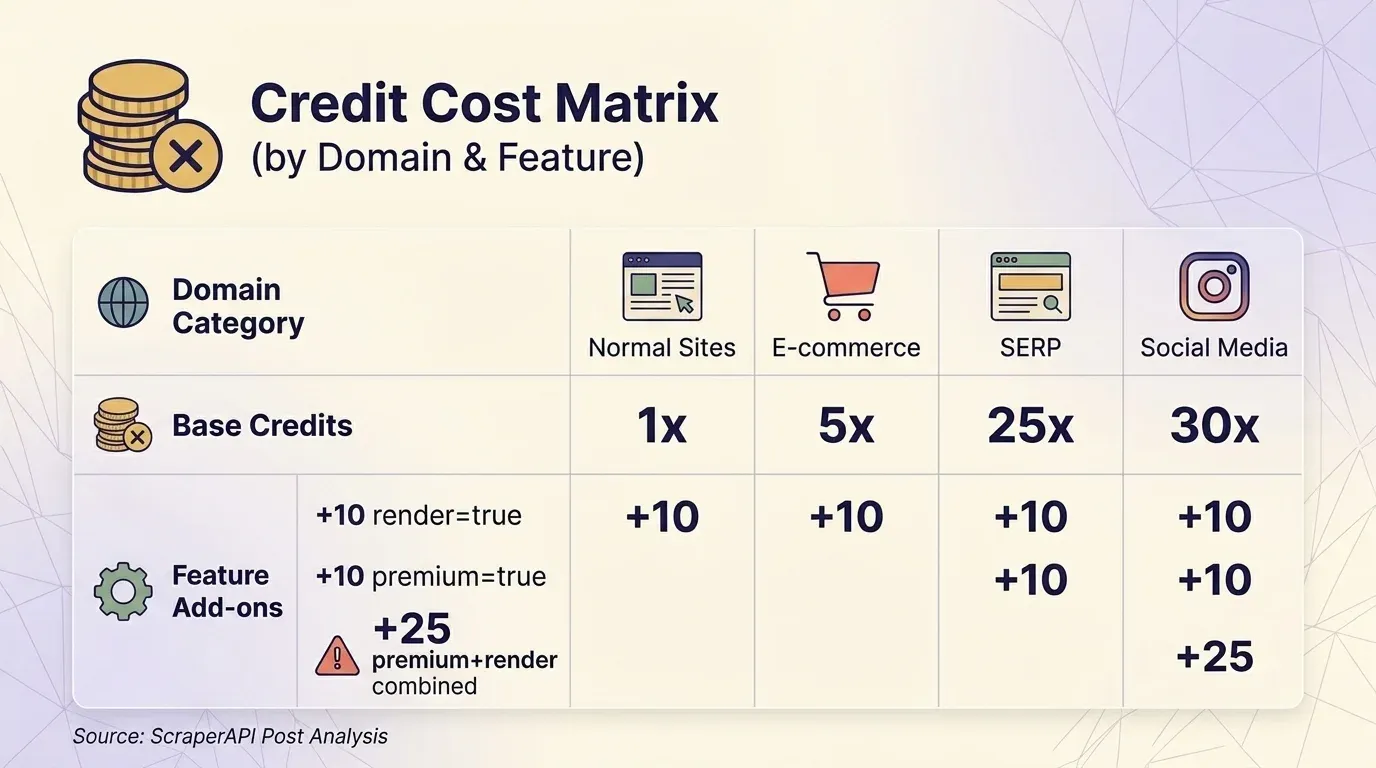
Before you even toggle a single parameter, the type of website you're scraping determines your base credit cost:
| Domain Category | Base Credits per Request | Examples |
|---|---|---|
| Normal websites | 1 | Blogs, news sites, simple HTML |
| E-commerce | 5 | Amazon, eBay, Walmart |
| SERP (search engines) | 25 | Google, Bing |
| Social media | 30 |
On top of that, feature flags add extra credits:
| Parameter | Extra Credits | Notes |
|---|---|---|
render=true (JS rendering) | +10 | All plans |
screenshot=true | +10 | All plans |
premium=true (premium proxy) | +10 | All plans |
ultra_premium=true | +30 | Paid plans only |
| Anti-bot bypass (Cloudflare, DataDome, PerimeterX) | +10 each | Auto-detected — you don't choose this |
premium=true + render=true combined | +25 | NOT +20 |
ultra_premium=true + render=true combined | +75 | NOT +40 |
That last row is the kicker. Combining features costs MORE than the sum of the individual costs. Premium proxy (+10) plus JavaScript rendering (+10) should logically cost +20 extra credits, but ScraperAPI charges +25. Ultra-premium (+30) plus JavaScript rendering (+10) should cost +40, but it's actually +75 — nearly double. This non-linear stacking is not prominently documented, and it's the primary reason users report credits vanishing faster than expected.
Parameters that cost zero extra credits: wait_for_selector, country_code, session_number, device_type, output_format, keep_headers=true, autoparse=true.
What Each Plan Actually Gets You: Free Through Enterprise
Here are ScraperAPI's current plan tiers:
| Plan | Monthly Price | Annual (per mo) | API Credits | Concurrent Threads | Geotargeting |
|---|---|---|---|---|---|
| Free | $0 | — | 1,000 | 5 | No |
| Hobby | $49 | $44 | 100,000 | 20 | US & EU only |
| Startup | $149 | $134 | 1,000,000 | 50 | US & EU only |
| Business | $299 | $269 | 3,000,000 | 100 | Country-level (50+ countries) |
| Scaling | $475 | $427 | 5,000,000 | 200 | Country-level |
| Enterprise | Custom | Custom | 5,000,000+ | 200+ | Country-level |
Now, here's the effective cost per 1,000 requests at each tier, factoring in multipliers:
| Plan | Standard (1×) | JS Rendering (10×) | E-commerce (5×) | SERP (25×) | Ultra-Premium + JS (75×) |
|---|---|---|---|---|---|
| Hobby ($49) | $0.49 | $4.90 | $2.45 | $12.25 | $36.75 |
| Startup ($149) | $0.15 | $1.49 | $0.75 | $3.73 | $11.18 |
| Business ($299) | $0.10 | $1.00 | $0.50 | $2.49 | $7.48 |
| Scaling ($475) | $0.10 | $0.95 | $0.48 | $2.38 | $7.13 |
A $49/month plan advertised as "100,000 credits" delivers only 1,333 actual requests when scraping protected sites with ultra-premium plus JavaScript rendering. That works out to $36.75 per 1,000 pages — more expensive than many fully managed scraping services.
Why Credits Disappear Faster Than You Expect
Three things catch users off guard.
First: domain-based pricing is automatic. You don't opt into the 5× Amazon multiplier or the 25× Google multiplier. It's applied the moment ScraperAPI detects the domain. Same with anti-bot bypass credits (+10 for Cloudflare, DataDome, PerimeterX) — these are added automatically when detected.
Second: credits do NOT roll over. Unused credits expire at the end of each billing cycle. No accumulation.
And third — this one stings — Pay-As-You-Go is only available on the Scaling plan ($475/month) and above. If you're on Hobby, Startup, or Business and you exhaust credits mid-cycle, you're simply cut off until the next billing period. Your only option is upgrading to the next tier.
One user on Reddit reported being quoted $3,600 for 60 million credits at 1 credit per Amazon request, but after paying, a 5-credit multiplier was applied without upfront disclosure. Their 60M plan was effectively worth only 12M requests — an 80% shortfall from what they expected.
The DataPipeline Credit Trap
ScraperAPI's no-code DataPipeline feature (scheduled scraping with webhook delivery) uses a separate, significantly higher credit schedule. A basic normal request costs 6 credits in DataPipeline versus 1 credit via the standard API:
| Request Type | Standard API | DataPipeline | Ratio |
|---|---|---|---|
| Basic normal request | 1 | 6 | 6× |
| E-commerce basic | 5 | 10 | 2× |
| SERP basic | 25 | 30 | 1.2× |
| Ultra-premium + JS (normal) | 75 | 80 | 1.07× |
Users who set up no-code pipelines expecting standard credit costs discover they're burning 6× credits on basic requests. This is documented, but you have to dig for it.
Real Cost Per Request: ScraperAPI vs. the Competition
Headline pricing is meaningless without accounting for multipliers. I pulled current pricing from five providers and standardized the comparison at the ~$300/month tier across three common scenarios.
Basic HTML Scrape (No JS, No Premium Proxy)
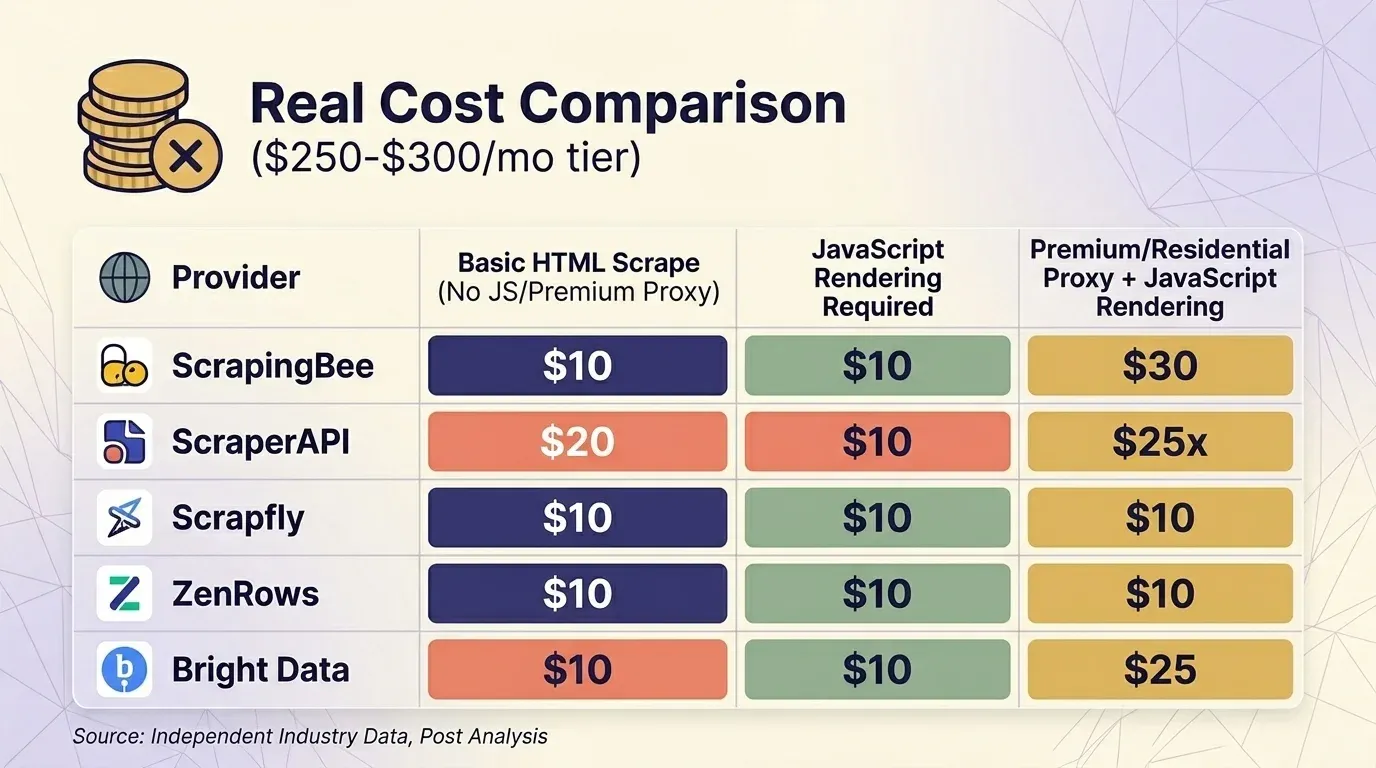
| Provider | Plan | Credits per Request | Actual Requests | Cost per 1K |
|---|---|---|---|---|
| ScrapingBee | Business $249 | 1 | 3,000,000 | $0.08 |
| ScraperAPI | Business $299 | 1 | 3,000,000 | $0.10 |
| Scrapfly | Startup $250 | 1 | 2,500,000 | $0.10 |
| ZenRows | Business $300 | $0.28/1K | ~1,071,000 | $0.28 |
| Bright Data | PAYG | $1.50/1K | ~200,000 | $1.50 |
JavaScript Rendering Required
| Provider | Plan | Credits per Request | Actual Requests | Cost per 1K |
|---|---|---|---|---|
| ScrapingBee | Business $249 | 5 (default on) | 600,000 | $0.42 |
| Scrapfly | Startup $250 | 6 | 416,667 | $0.60 |
| ScraperAPI | Business $299 | 10 | 300,000 | $1.00 |
| ZenRows | Business $300 | 5× | ~214,000 | $1.40 |
| Bright Data | PAYG | flat | ~200,000 | $1.50 |
Premium/Residential Proxy + JavaScript Rendering (Protected Sites)
| Provider | Plan | Credits per Request | Actual Requests | Cost per 1K |
|---|---|---|---|---|
| Bright Data | PAYG | flat | ~200,000 | $1.50 |
| ScrapingBee | Business $249 | 25 | 120,000 | $2.08 |
| ScraperAPI | Business $299 | 25 | 120,000 | $2.49 |
| Scrapfly | Startup $250 | 31 | 80,645 | $3.10 |
| ZenRows | Business $300 | 25× | ~42,857 | $7.00 |
Bright Data's Web Unlocker is the only provider that does not charge extra for JavaScript rendering — all requests cost the same flat rate. At the ~$300 tier, ScrapingBee and ScraperAPI are competitive for protected-site scraping, while ZenRows is the most expensive.
One important behavioral note: ScrapingBee enables JavaScript rendering by default at 5× cost. If you're comparing ScrapingBee and ScraperAPI head-to-head, make sure you're comparing the same rendering settings.
An independent analysis by Scrape.do found ScraperAPI costs $8.49 per 1,000 requests on average — "more than every other provider tested" — with an average response time of 15.7 seconds, making it "one of the slowest providers available." That's worth knowing before you commit.
Site-Specific Success Rates: Where ScraperAPI Shines and Where It Struggles
No scraping API works equally well on every website. Independent benchmarks from Scrapeway (April 2026) tell a sharply bimodal story.
Performance by Site Category
| Target Site | Success Rate | Avg Speed | Cost per 1K (Business Plan) |
|---|---|---|---|
| Zillow | 100% | 10.5s | $0.49 |
| Etsy | 99% | 4.8s | $4.90 |
| Amazon | 98% | 6.5s | $2.45 |
| 95% | 17.8s | $14.70 | |
| Walmart | 93% | 11.4s | $2.45 |
| Indeed | 90% | 15.8s | $4.90 |
| StockX | 84% | 3.9s | $4.90 |
| Realtor.com | 12% | 11.8s | $0.49 |
| 0% | — | — | |
| Booking.com | 0% | — | — |
| Twitter/X | 0% | — | — |
Overall average success rate: 62.8–63.7%, slightly above the industry average of 58.2–59.5%. Average response time: 5.2–7.3 seconds, better than the industry average of 9.8 seconds.
Where ScraperAPI Performs Well
ScraperAPI is genuinely strong on e-commerce (Amazon, Walmart, Etsy) and real estate (Zillow). The structured data endpoints for these sites return parsed JSON with high reliability. If your primary use case is scraping Amazon product pages or Google SERPs, ScraperAPI is a reasonable choice.
Where ScraperAPI Falls Short
Social media is a dead zone. Instagram, Twitter/X, and Booking.com all show 0% success rates in independent testing. LinkedIn works at 95%, but at 30 credits per request, the cost is steep.
Login-required sites are explicitly off-limits. ScraperAPI supports session persistence via the session_number parameter, but it forbids scraping data behind login walls. It cannot handle form filling, two-factor authentication, or complex auth flows.
Stale data on protected targets. ScraperAPI applies a 10-minute forced result cache on difficult targets, meaning if you're scraping time-sensitive data (pricing, stock levels), you may receive results that are up to 10 minutes old.
In Proxyway's 2025 benchmark, ScraperAPI had the worst success rate among all providers on Google at 81.72%.
Site Category Performance Summary
| Site Category | ScraperAPI Performance | Known Issues | Potential Alternative |
|---|---|---|---|
| Amazon / e-commerce | ✅ Strong (SDP endpoints) | Credit-heavy at scale | Thunderbit templates (1-click, no credits per row for template) |
| Google SERPs | ✅ Strong | Geotargeting costs extra; lowest Google success rate in one benchmark | — |
| Real estate (Zillow) | ✅ Excellent (100%) | — | — |
| Instagram / social media | ❌ 0% success | Complete failure | Playwright + proxies (DIY) |
| JS-heavy SPAs | ⚠️ Moderate | Requires 10× credit headless rendering | Scrapfly, ZenRows |
| Sites requiring login | ❌ Forbidden by ToS | No session/auth support | Thunderbit browser scraping (uses your login session) |
| Booking.com / travel | ❌ 0% success | Complete failure | Bright Data |
What Real Users Say: A G2, Capterra, and Reddit Sentiment Summary
I pulled feedback from three platforms. Here are the current ratings:
| Platform | Rating | Reviews |
|---|---|---|
| G2 | 4.4/5 | 16 |
| Capterra | 4.6/5 | 62 |
| Trustpilot | 4.5/5 | 43 |
Capterra sub-ratings: Ease of Use 4.9/5, Customer Service 4.6/5, Features 4.5/5, Value for Money 4.5/5.
Sentiment Summary by Theme
| Theme | Positive Signals | Negative Signals |
|---|---|---|
| Ease of setup / docs | "Super easy to set up. You can start scraping in minutes." — Latenode community; Capterra Ease of Use 4.9/5 | — |
| Pricing transparency | "Affordable entry tier" (multiple Capterra reviews) | "Breakdown of credit costs can be confusing" — John S., Founder, Capterra (Feb 2025); "Prices increased by 1000% and quality degraded" — CTO, Online Media, Capterra (Sep 2022) |
| Reliability | "Works great for Amazon/Google" (G2, Capterra) | "ScraperAPI becomes shaky for heavy duty jobs" — emcarter, Latenode; "80% failure rate on some targets" (Reddit) |
| Customer support | "Responsive team" (Capterra) | User reported being quoted one price, then billed at 5× the rate with no upfront disclosure (Reddit) |
| Value over time | Only charges for successful (200/404) requests | "If you're running large-scale operations, the expenses can add up quickly" and building custom infrastructure is "more cost-effective in the long run" — mikezhang, Latenode |
The takeaway: ScraperAPI is well-regarded for ease of initial setup and performs reliably on popular, well-supported targets. The complaints cluster around pricing surprises (multipliers, unexpected increases) and reliability on harder targets.
ScraperAPI's Structured Data Endpoints: Worth the Premium Credits?
ScraperAPI offers 18 structured data endpoints across 5 platforms, returning parsed JSON instead of raw HTML:
- Amazon (3 endpoints): Product details by ASIN, search results, competitor offers. Returns 18+ fields including pricing, ratings, descriptions, reviews, BSR, images, seller info. Supports 21 regional marketplaces.
- Google (5 endpoints): SERP (organic results, knowledge graph, videos, related questions, pagination), Shopping, Maps, News, Jobs.
- Walmart (4 endpoints): Product, Search, Category, Reviews.
- eBay (2 endpoints): Product, Search.
- Redfin (4 endpoints): Search, Agent Details, Rental Properties, For Sale.
SDEs are available on all plans, including Free. ScraperAPI claims a 99.99% success rate for supported SDE domains — though independent benchmarks paint a more nuanced picture depending on the site.
Data Completeness
The Amazon SDP is ScraperAPI's strongest offering. It returns a comprehensive set of fields: price, reviews, BSR, variants, images, seller info, and more. The Google SERP SDP returns organic results, ads, featured snippets, and People Also Ask. The data completeness is genuinely good for these two platforms.
Credit Efficiency: SDP vs. DIY Parsing
On the Business plan ($299/month, 3M credits), scraping 10,000 Amazon products via the SDE costs 50,000 credits (5 credits each) — about $5 worth of the plan. Building your own parser with a standard request (1 credit each) would cost only 10,000 credits, but you'd invest developer time building and maintaining the parser.
For small teams without developers, SDEs save real time.
For teams with engineering capacity scraping at scale, the 5× credit premium is hard to justify.
How SDPs Compare to No-Code Scraper Templates
This comparison matters more than most reviews let on. Thunderbit offers instant scraper templates for Amazon, Shopify, Zillow, and 50+ other sites that require zero coding and zero per-row credit cost for the template itself.
Try Thunderbit Templates for 1-Click Scraping
| Factor | ScraperAPI SDP (Amazon) | Thunderbit Amazon Template |
|---|---|---|
| Setup time | 30–60 min (code + API integration) | ~2 minutes (install extension, open Amazon, click template) |
| Cost per 1,000 products (Business plan) | ~$5 (50,000 credits at $0.10/credit) | ~$16.50 (1,000 rows × 1 credit at $0.0165/credit on Pro) |
| Fields returned | 18+ (comprehensive) | Product name, price, rating, reviews, images, URL, and more |
| Export options | JSON (requires code to parse) | Excel, CSV, Google Sheets, Airtable, Notion — 1 click |
| Maintenance | ScraperAPI maintains the SDP | Thunderbit team maintains templates |
| Technical skill | Python/Node.js required | None |
For developer teams running high-volume Amazon scraping, ScraperAPI's SDP is more cost-efficient per product at scale. For business users who need Amazon data in a spreadsheet without writing code, Thunderbit is dramatically faster to set up and use.
Do You Even Need a Scraping API? The No-Code Path Most Reviews Ignore
Many people searching for a "Scraper API review" haven't committed to an API-based workflow yet. They're figuring out whether they need one at all.
A surprising number don't. The web scraping API market is a $2.03 billion industry growing at 14–18% CAGR, but that growth is driven largely by enterprise engineering teams — not by the sales ops manager who needs 500 leads from a website.
Scraping API vs. No-Code Tool: A Side-by-Side Decision Framework
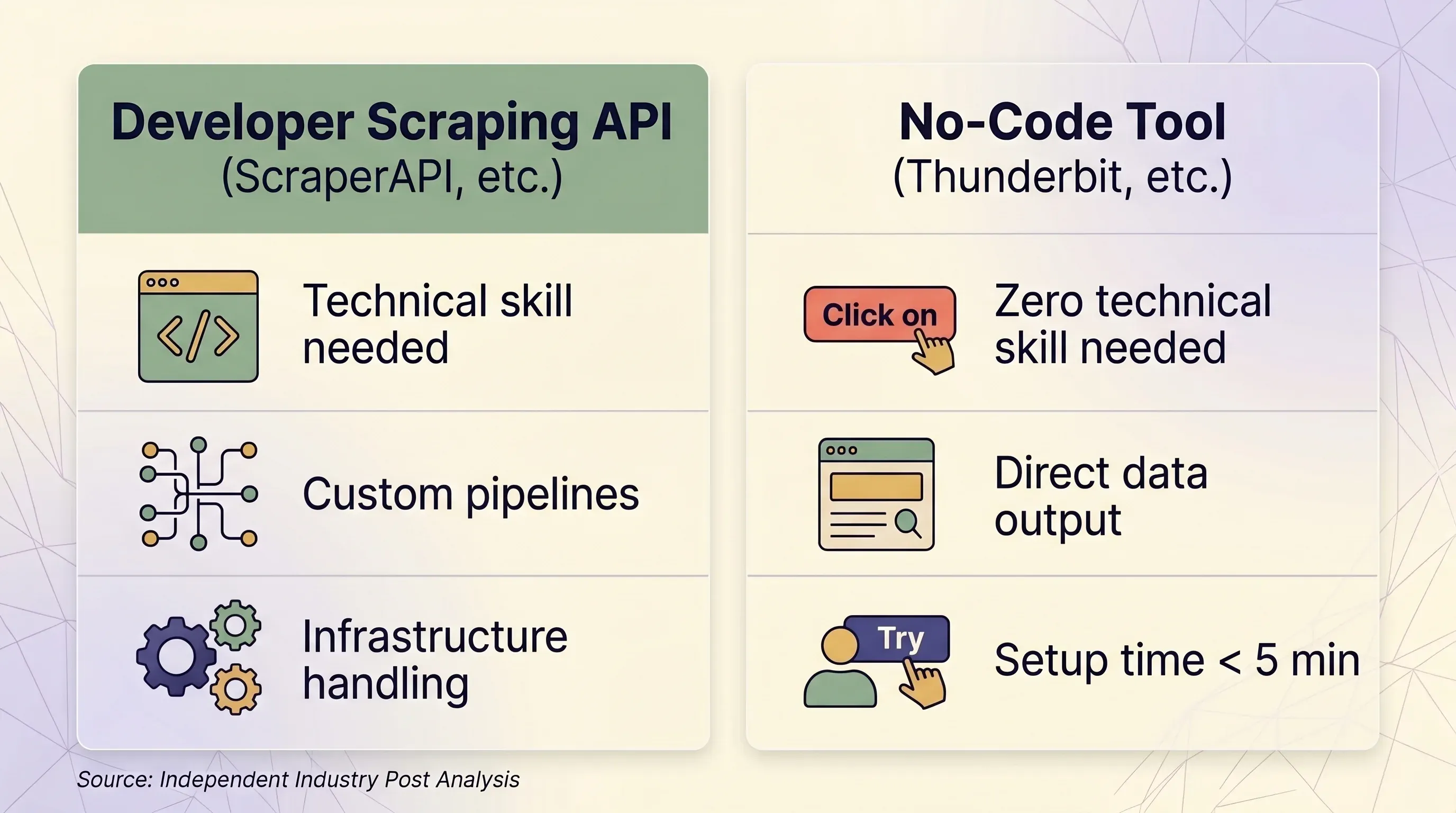
| Factor | Scraping API (ScraperAPI, etc.) | No-Code Tool (Thunderbit, etc.) |
|---|---|---|
| Best for | Developers building data pipelines at scale | Business users, marketers, sales teams, researchers |
| Technical skill needed | Python/Node.js, HTTP concepts, JSON parsing | None — point-and-click in browser |
| Setup time | 1–2 hours minimum (code + test + debug) | Under 5 minutes |
| Anti-bot handling | Premium proxies (10–75 credits/request) | Real browser session — naturally bypasses fingerprinting |
| Login-required sites | ❌ Forbidden by ScraperAPI ToS | ✅ Browser Scraping uses your existing session |
| Scale (pages/day) | 100K–3M+ requests/month | Ad-hoc, typically under 1,000 pages/day |
| Data output | Raw HTML or JSON (requires parsing code) | Structured rows/columns — ready to use |
| Export | JSON, CSV (via code) | Excel, CSV, Google Sheets, Airtable, Notion, Word, JSON |
| Maintenance | Must update selectors, retry logic, infrastructure | None — AI re-reads page structure each time |
| Pricing unit | Per-request credits (variable: 1–75 credits/request) | Per-row credits (1 credit = 1 row, 2 for subpages) |
| Entry price | $49/month for 100K credits | $9/month for 5,000 credits (yearly) |
| Free tier | 1,000 credits/month, 5 concurrent | 6 pages/month, 30 credits/page |
| Pricing predictability | Low — multipliers create surprise costs | High — 1 row always = 1 credit |
When a Scraping API Makes Sense
- You have a developer or engineering team
- You need to scrape 100K+ pages per day programmatically
- You need deep customization of request headers, sessions, and retry logic
- Your targets are well-supported (Amazon, Google, Walmart, Zillow)
When a No-Code Tool Like Thunderbit Makes More Sense
- You're in sales, e-commerce ops, marketing, or real estate — not engineering
- You need data from dozens of different sites without building custom parsers for each
- You want direct export to Excel, Google Sheets, Airtable, or Notion
- You need to scrape sites that require login (Thunderbit's browser scraping uses your session)
- You want AI to read the page fresh each time — no code maintenance when sites change layouts
- You need subpage scraping: Thunderbit can visit each detail page and enrich rows automatically
The Thunderbit Chrome Extension workflow is genuinely simple: install the extension, navigate to any page, click "AI Suggest Fields," click "Scrape," and export. The AI figures out what data is on the page and suggests columns — you don't have to write selectors or code. For more on how this works, check out our beginner's guide to web scraping.
62% of businesses experienced cloud cost overruns in 2024, and companies using usage-based pricing without proper safeguards see 23% higher churn rates due to bill shock. The predictability of a per-row credit model is worth considering if you've been burned by variable API costs before.
Try Thunderbit's AI Web Scraper
ScraperAPI Pros and Cons at a Glance
| Pros | Cons |
|---|---|
| Strong proxy infrastructure (40M+ IPs, 50+ countries) | Confusing credit multiplier system — combining features costs more than the sum |
| Excellent documentation and easy initial setup (Capterra Ease of Use: 4.9/5) | Credits do NOT roll over month to month |
| Reliable on Amazon, Google, Zillow, Etsy | 0% success on Instagram, Twitter/X, Booking.com |
| Only charges for successful requests (200/404) | 404 responses do consume credits |
| 18 structured data endpoints with parsed JSON output | Login-required sites explicitly forbidden |
| Available on all plans including Free | Pay-As-You-Go only on Scaling ($475/mo) and above |
| 7-day no-questions-asked refund policy | 10-minute forced cache on difficult targets — stale data risk |
| 30–35% YoY revenue growth suggests active development | DataPipeline costs up to 6× standard API credits |
| — | Geotargeting beyond US & EU requires Business plan ($299/mo) |
| — | No proactive usage alerts — must manually check dashboard |
Practical Tips for Getting the Most Out of ScraperAPI (If You Decide to Use It)
Monitor Your Credit Consumption Daily
ScraperAPI's dashboard provides usage statistics including average latency, domains scraped, and concurrency metrics. However, there are no proactive usage alerts — no email or SMS when credits are running low. You have to check manually. Analytics history is limited to 2 weeks on Hobby/Startup plans and 6 months on Business+.
Set a calendar reminder to check your dashboard every day during the first month. You need to build intuition for how fast credits burn on your specific targets.
Start with the Free Tier to Test Your Target Sites
Use the 1,000 free credits (plus a 7-day trial with 5,000 credits) to test success rates on your specific target sites before committing to a paid plan. Document which sites need JavaScript rendering or premium proxies so you can estimate realistic monthly costs with multipliers applied.
Disable Premium Features Unless the Target Requires Them
ScraperAPI does NOT auto-enable premium proxies or JavaScript rendering — you must explicitly set render=true, premium=true, or ultra_premium=true. But domain-based pricing IS automatic: Amazon always costs 5 credits, Google always costs 25, LinkedIn always costs 30. Anti-bot bypass credits (+10 for Cloudflare, DataDome, PerimeterX) are also added automatically when detected. Know this before you run a batch.
Use Structured Data Endpoints for Supported Sites
If you're scraping Amazon or Google, the SDEs save development time even if they cost more credits. For unsupported sites, evaluate whether a no-code tool would be faster and cheaper than building a custom parser.
Have a Backup Plan for Unreliable Targets
If ScraperAPI's success rate on a specific site is below 90%, consider routing those requests through a different provider or using a browser-based tool. For sites requiring login, ScraperAPI simply won't work — you'll need a tool like Thunderbit that operates within your browser session.
Know the Gotchas
- 404 responses consume credits — ScraperAPI charges for both 200 and 404 status codes
- Cancelled requests are charged if you cancel before the 70-second processing window completes
- 10-minute forced caching on difficult targets — you may get stale data
- Pay-As-You-Go is only on Scaling ($475/month) and above — lower-tier users who exhaust credits are cut off
- Geotargeting beyond US & EU requires the Business plan ($299/month)
Key Takeaways: Is ScraperAPI the Right Tool for You?
Here's where I landed after all the research:
- ScraperAPI is a solid choice for developer teams scraping high-volume, well-supported targets like Amazon, Google, Walmart, and Zillow. The structured data endpoints are genuinely useful, the proxy infrastructure is large, and the documentation is above average.
- The credit multiplier system is the biggest risk. If you don't understand how multipliers stack, you will overspend. The gap between advertised credits and actual requests can be 5–75×. Run the math for your specific use case before committing to a paid plan.
- Reliability is site-dependent. ScraperAPI is excellent on e-commerce and real estate, mediocre on job boards and social media, and completely useless on Instagram, Twitter/X, and Booking.com. Don't assume uniform performance.
- For non-technical teams, ScraperAPI is the wrong tool. If you're in sales, marketing, or ops and need structured data without writing code, a no-code tool like Thunderbit gets you there in two clicks — with AI-powered field detection, direct spreadsheet export, subpage enrichment, and no maintenance overhead. Check out the Thunderbit Chrome Extension or watch tutorials on the Thunderbit YouTube Channel.
- For developers on a budget, test ScraperAPI's free tier on your specific targets, then compare effective per-request costs against ScrapingBee, Scrapfly, and Bright Data before choosing. The cheapest option depends entirely on your use case and feature requirements.
Want to see how the numbers work for your specific scraping needs? Start with ScraperAPI's free tier to test your target sites, or install Thunderbit to see how far two clicks can take you. For more on pricing, check out our plans.
FAQs
Is ScraperAPI free?
Yes, ScraperAPI offers a free tier with 1,000 API credits per month and a 7-day trial with 5,000 credits. However, credit multipliers for JavaScript rendering, premium proxies, or high-cost domains (Amazon = 5×, Google = 25×, LinkedIn = 30×) mean your real capacity may be far lower than 1,000 requests. On the free tier, ultra-premium proxies are not available.
How much does ScraperAPI cost per request?
It depends heavily on the feature flags and target domain. A standard request to a simple HTML site costs 1 credit. An Amazon request costs 5 credits. A Google SERP request costs 25 credits. Adding JavaScript rendering adds 10 credits. Combining ultra-premium proxy with JavaScript rendering costs 75 credits per request. On the Hobby plan ($49/month, 100K credits), that's anywhere from $0.00049 per request (standard) to $0.0368 per request (ultra-premium + JS). See the full cost tables above for details.
Is ScraperAPI good for scraping Amazon?
ScraperAPI's Amazon Structured Data endpoint is one of its strongest features, with a 98% success rate in independent benchmarks and comprehensive parsed JSON output (18+ fields). However, each Amazon request costs 5 credits minimum, so costs add up at scale. For smaller teams that want Amazon data in a spreadsheet without code, Thunderbit's Amazon template offers a 1-click alternative with direct export.
What are the best ScraperAPI alternatives?
For developers: ScrapingBee (cheapest for basic HTML), Scrapfly (good JavaScript rendering), Bright Data (best for protected sites — flat rate regardless of rendering), and ZenRows. For non-technical users: Thunderbit — a no-code, AI-powered Chrome extension with direct export to Excel, Google Sheets, Airtable, and Notion. See our comparison of the best AI web scrapers for a deeper look.
Can ScraperAPI scrape sites that require login?
ScraperAPI supports session persistence via the session_number parameter (same IP across multiple requests), but it explicitly forbids scraping data behind login walls. It cannot handle form filling, two-factor authentication, or complex auth flows. For login-required sites, browser-based tools like Thunderbit — which uses your existing browser session to scrape what you can see — are the more reliable option.
Learn More




