
अब लगभग आधा इंटरनेट ट्रैफ़िक बॉट्स से आता है। इनमें से ज़्यादातर बड़े पैमाने पर लिंक, डेटा और URLs स्क्रैप कर रहे हैं। अगर आप अभी भी यह काम हाथ से कर रहे हैं, तो आप पीछे छूट रहे हैं।
मैंने 12 link extractor टूल्स को परखा — AI-पावर्ड Chrome एक्सटेंशन से लेकर Python libraries तक — यह देखने के लिए कि जब आपको तेज़ी से हज़ारों URLs निकालने हों, तो कौन-सा टूल सच में काम करता है।
जो मैंने पाया, वो यहाँ है।
लिंक एक्सट्रैक्टर क्यों ज़रूरी हैं
सच कहें तो, web डेटा से भरा पड़ा है, और बिज़नेस उस अव्यवस्था को काम की जानकारी में बदलने की दौड़ में हैं। Link extractors और URL extractors अब उन टीमों के लिए बेहद अहम हैं जो यह करना चाहती हैं:
- लीड्स बनाना: सेल्स टीमें डायरेक्टरी या LinkedIn से मिनटों में company profile links निकाल सकती हैं, फिर उन URLs को ऐसे टूल्स में डाल सकती हैं जो contact information निकालते हैं। अब घंटों की क्लिकिंग नहीं करनी पड़ेगी।
- कंटेंट इकट्ठा करना और SEO बेहतर करना: मार्केटर्स किसी ब्लॉग के सभी article URLs इकट्ठा कर सकते हैं, प्रतिस्पर्धियों के backlinks मॉनिटर कर सकते हैं, या broken links के लिए site structure की जाँच कर सकते हैं।
- प्रतिस्पर्धियों पर नज़र रखना और मार्केट रिसर्च करना: operations टीमें नए products, pricing pages, या press releases के links अपने-आप इकट्ठा कर सकती हैं — और बिना मेहनत के competition पर नज़र बनाए रख सकती हैं।
- वर्कफ़्लोज़ ऑटोमेट करना और समय बचाना: modern link scrapers bulk URLs संभाल लेते हैं, subpages क्रॉल करते हैं, और data को CSV, Excel, Google Sheets, Notion जैसी structured formats में export करते हैं। मतलब अब न copy-paste का झंझट, न messy text files की सफ़ाई।
जब हर दिन दसियों अरब web pages crawl किए जाते हैं, तो यह काम हाथ से करना practical ही नहीं है। सही link extractor ऐसा है जैसे आपके पास एक supercharged assistant हो — जो कभी थकता नहीं, कोई link नहीं छोड़ता, और coffee break भी नहीं माँगता।
हमने सबसे अच्छे Link Extractors कैसे चुने
इतने सारे टूल्स में सही link extractor चुनना tech conference में speed-dating जैसा लग सकता है — हर कोई खुद को “the one” बताता है, लेकिन सच में काम कुछ ही करते हैं। मैंने टॉप 12 को ऐसे short-list किया:
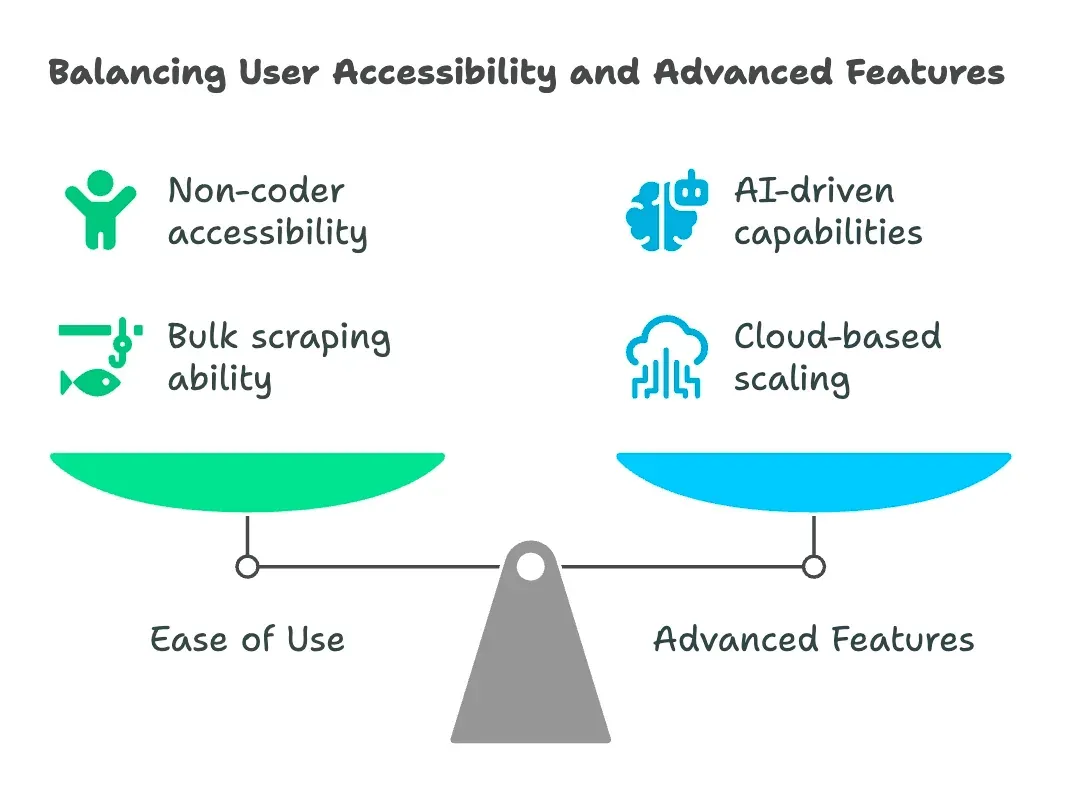
- Use करना कितना आसान है: क्या non-coders इसे regex में PhD लिए बिना चला सकते हैं? No-code और low-code टूल्स को extra अंक मिले।
- Bulk & Multi-Level Scraping: क्या यह एक साथ सैकड़ों URLs संभाल सकता है? क्या यह subpages crawl करता है और links को अपने-आप follow करता है?
- Export & Integration: क्या यह CSV, Excel, Google Sheets, Notion, Airtable, या API के ज़रिए export करता है? जितना कम manual काम, उतना बेहतर।
- User Type & Flexibility: क्या यह business users, analysts, या developers के लिए है? कुछ टूल्स सबके लिए हैं, कुछ ज़्यादा niche हैं।
- Advanced Features: AI-based पहचान, scheduling, cloud scaling, data cleaning, और common websites के लिए templates।
- Pricing & Scalability: Free tier, pay-as-you-go, या enterprise? मैंने देखा कि आपके पैसे के बदले क्या मिलता है।
मैंने browser extensions से लेकर enterprise platforms तक सब कुछ शामिल किया है, इसलिए चाहे आप solo founder हों या Fortune 500 data team, आपको उपयुक्त विकल्प मिल जाएगा।
Thunderbit: Business Users के लिए सबसे Smart Link Extractor
चलो सबसे ऊपर से शुरू करते हैं। Thunderbit link extraction के लिए मेरी पहली सिफ़ारिश है — और सिर्फ़ इसलिए नहीं कि मैंने इसे बनाने में मदद की। Thunderbit एक AI-powered web scraper Chrome Extension है, जिसे उन business users के लिए बनाया गया है जिन्हें तेज़ और भरोसेमंद नतीजे चाहिए।
Thunderbit को अलग क्या बनाता है? यह ऐसा है जैसे आपके पास एक AI intern हो जो सच में सुनता हो। आप अपनी ज़रूरत को plain language में बता सकते हैं (“इस page से सारे product links और prices निकालो”), और बाकी काम Thunderbit की AI खुद समझ लेती है। selectors से जूझने या scripts लिखने की ज़रूरत नहीं।
लेकिन यहीं तक बात खत्म नहीं होती:
- Bulk URL Support: एक URL डालें या सैकड़ों की list — Thunderbit सबको एक ही बार में संभाल लेता है।
- Subpage Navigation: क्या आपको list page से links निकालकर फिर हर detail page पर जाकर और URLs चाहिए? Thunderbit की multi-layer scraping logic यह काम आसान कर देती है।
- Structured Export: links निकल जाने के बाद आप fields का नाम बदल सकते हैं, उन्हें categorize कर सकते हैं, और सीधे Google Sheets, Notion, Airtable, Excel, या CSV में export कर सकते हैं। post-processing की परेशानी नहीं।
AI की मदद से किसी भी website से link scrape करें Get Started Free
Thunderbit पर दुनिया भर के 30,000 से ज़्यादा users भरोसा करते हैं — sales teams से लेकर real estate agents और indie e-commerce shops तक। और हाँ, इसमें free tier भी है (6 pages तक scrape करें, या trial boost के साथ 10 तक), इसलिए आप इसे बिना जोखिम आज़मा सकते हैं।
Thunderbit Link Extractor मुफ़्त में आज़माएँ
Thunderbit की खास खूबियाँ
अब देखते हैं कि Thunderbit को वास्तव में अलग क्या बनाता है:
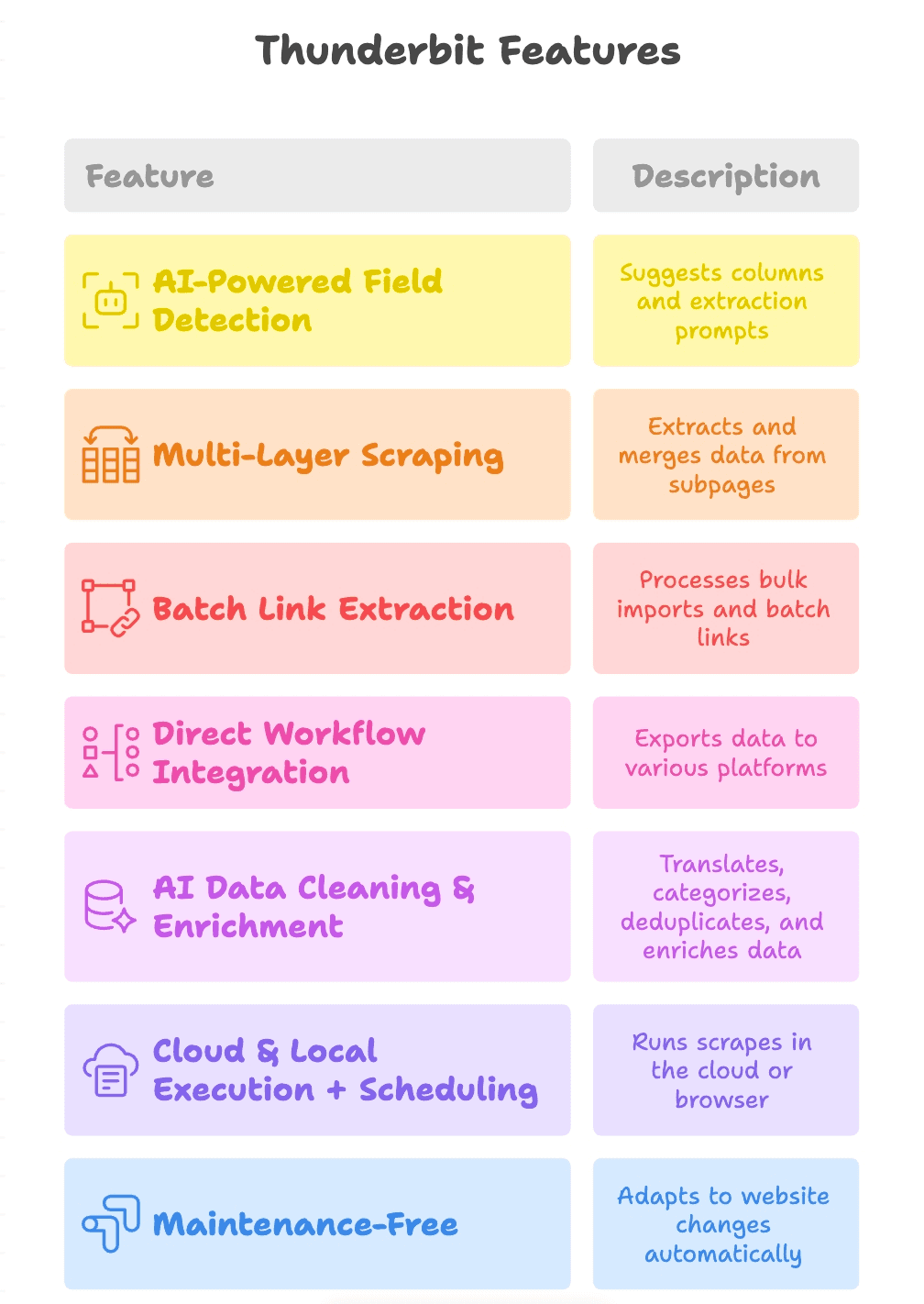
- AI-Powered Field Detection: बस “AI Suggest Fields” पर क्लिक करें, और Thunderbit page पढ़कर columns सुझा देता है (जैसे “Product Link,” “PDF URL,” “Contact Email”), साथ ही हर field के लिए extraction prompts भी बना देता है।
- Multi-Layer Scraping: Thunderbit main page से subpages तक links follow कर सकता है (जैसे product detail pages या PDF downloads), और और भी links निकालकर सबको एक ही table में मिला सकता है।
- Batch Link Extraction: चाहे आप एक page scrape करें या हज़ार, Thunderbit bulk imports और batch link extraction को आसानी से संभाल लेता है।
- Direct Workflow Integration: results सीधे Google Sheets, Notion, Airtable में export करें, या CSV/Excel के रूप में डाउनलोड करें। आपका data वहीं पहुँचता है जहाँ आपकी team को चाहिए।
- AI Data Cleaning & Enrichment: Thunderbit scrape करते समय translation, categorization, deduplication, और data enrichment भी कर सकता है — यानी output raw dump नहीं, उपयोग के लिए तैयार data होता है।
- Cloud & Local Execution + Scheduling: तेज़ी के लिए cloud में run करें, या ऐसे sites के लिए browser में जिनमें login चाहिए। recurring jobs schedule करके data को fresh रखें।
- Maintenance-Free: website में बदलाव होने पर Thunderbit की AI खुद adapt कर लेती है, इसलिए broken scrapers ठीक करने में कम और नतीजे पाने में ज़्यादा समय लगता है।
Octoparse: सभी के लिए No-Code Link Scraper
Octoparse no-code scraping की दुनिया का एक classic tool है। यह एक desktop app है (Windows/Mac) जिसमें visual, point-and-click interface मिलता है। आप webpage खोलते हैं, जिन links की ज़रूरत है उन पर क्लिक करते हैं, और बाकी काम Octoparse समझ लेता है।
- Beginners के लिए बढ़िया: coding की ज़रूरत नहीं। बस क्लिक करें, extract करें, और चल पड़ें।
- Pagination & Dynamic Content संभालता है: Octoparse “Next” buttons क्लिक कर सकता है, scroll कर सकता है, और sites में login भी कर सकता है।
- Cloud Scraping & Scheduling: Paid plans में jobs को cloud में चलाना और recurring tasks schedule करना संभव है।
- Export Options: Data को CSV, Excel, JSON में डाउनलोड करें या databases में push करें।
Free plan छोटे कामों के लिए काफ़ी उदार है (10 tasks और 50,000 rows/month तक), लेकिन भारी उपयोगकर्ताओं को paid plan चाहिए होगा (लगभग $75/month से शुरू)।
Apify: Custom Workflows के लिए Flexible URL Extractor
Apify web scraping का Swiss Army knife है। इसमें pre-built “actors” (scraping tools) का marketplace भी है, और आप JavaScript या Python में अपनी scripts भी लिख सकते हैं।
- Pre-Built & Customizable: आम tasks के लिए community actors इस्तेमाल करें, या अपने custom workflows बनाएँ।
- Bulk & Scheduled Scraping: URLs queue करें, jobs parallel में चलाएँ, और recurring scrapes schedule करें।
- API-First: JSON, CSV, Excel, या Google Sheets में export करें, और अपने data pipeline में integrate करें।
- Pay-As-You-Go: हर महीने free credits, फिर usage-based billing।
Apify semi-technical teams और developers के लिए आदर्श है, जिन्हें flexibility और scalability चाहिए।
Bright Data URL Scraper: Enterprise-Grade Link Scraping
Bright Data बड़े पैमाने पर scraping की ज़रूरत वाले enterprises के लिए बनाया गया है। उनका Data Collector हाई-वॉल्यूम jobs के लिए preset URL Scraper देता है।
- Massive Scale संभालता है: हज़ारों या लाखों pages scrape करें, और block होने से बचने के लिए मज़बूत proxy infrastructure का इस्तेमाल करें।
- Preset Templates: e-commerce, social, real estate, और अन्य use cases के लिए ready-made scrapers।
- Enterprise Features: compliance tools, expert support, और advanced anti-blocking।
- Pricing: लगभग $350 में 100,000 page loads से शुरू — यह साफ़ तौर पर बड़े बिज़नेस के लिए है।
अगर आप startup हैं, तो यह शायद ज़रूरत से ज़्यादा हो सकता है। लेकिन mission-critical, high-volume scraping के लिए Bright Data एक powerhouse है।
WebHarvy: Point-and-Click आसान Link Extractor
WebHarvy एक Windows desktop app है, जो अपने built-in browser में links पर click करके ही उन्हें scrape करने देती है।
- बहुत आसान: किसी link पर click करें, और WebHarvy extraction के लिए उससे मिलते-जुलते सभी elements highlight कर देता है।
- Regular Expression Support: common tasks के लिए built-in patterns, coding की ज़रूरत नहीं।
- Excel, CSV, JSON, XML, SQL में Export: उन business users के लिए बढ़िया जो familiar formats में data चाहते हैं।
- One-Time License: एक बार भुगतान, हमेशा उपयोग।
छोटे व्यवसायों, researchers, या किसी भी व्यक्ति के लिए बढ़िया जो बिना coding के जल्दी links निकालना चाहता है।
Web Scraper (Chrome Extension): ब्राउज़र में तेज़ Link Scraping
Web Scraper Chrome Extension एक मुफ़्त, open-source टूल है जो आपके browser को scraper में बदल देता है।
- Sitemaps Define करें: इसे बताइए कि कहाँ जाना है और क्या निकालना है।
- Pagination & Multi-Level Crawling संभालता है: categories, subcategories, और detail pages crawl कर सकता है।
- CSV/XLSX में Export: डेटा सीधे ब्राउज़र से डाउनलोड करें।
- Community Templates: लोकप्रिय sites के लिए बहुत-से shared sitemaps उपलब्ध हैं।
यह quick, one-off jobs या budget पर चलने वाले students और small teams के लिए बिल्कुल सही है।
ScraperAPI: Developers के लिए Scalable Link Scraper
ScraperAPI उन developers के लिए है जो proxies, blocks, या CAPTCHAs की चिंता किए बिना web pages बड़े पैमाने पर fetch करना चाहते हैं।
- API-Driven: एक URL भेजें, और बदले में HTML या scraped data पाएँ।
- Scale & Anti-Bot Measures संभालता है: proxy rotation, JS rendering, और CAPTCHA solving built-in।
- आपके Code के साथ Integrate होता है: Python, Node.js, या किसी भी भाषा के साथ उपयोग करें।
- Pricing: Free tier (~1000 API calls), फिर request के हिसाब से भुगतान।
Custom crawlers या उन स्थितियों के लिए शानदार जब scale पर reliability और speed चाहिए।
ParseHub: Advanced Selection वाला Visual Link Scraper
ParseHub एक desktop app है (Windows, Mac, Linux) जो visual तरीके से scraping projects बनाने देता है।
- Advanced Selection & Navigation: click, loop, और conditions के आधार पर links निकालें — यहाँ तक कि dynamic या hidden elements से भी।
- Nested Pages संभालता है: categories crawl करें, फिर detail pages, फिर और links निकालें।
- CSV, Excel, JSON में Export: Paid plans में cloud runs और API access मिलता है।
- Free Plan: 5 projects, और हर run में 200 pages तक।
ParseHub marketers और researchers का पसंदीदा है, जिन्हें बिना code के power चाहिए।
Scrapy: Developers के लिए Python Link Extractor
Scrapy Python developers के लिए gold standard है, जिन्हें पूरा control चाहिए।
- Code-First: Custom spiders बनाकर किसी भी scale पर links crawl और extract करें।
- Distributed Crawling संभालता है: efficient, asynchronous, और बहुत ज़्यादा customizable।
- CSV, JSON, XML, या Database में Export: output पर आपका पूरा control रहता है।
- Open-Source & Free: लेकिन अपना environment खुद manage करना होगा।
अगर आप Python में सहज हैं, तो Scrapy जितना ताकतवर tool मिलना मुश्किल है।
Diffbot: Structured Data के लिए AI-Powered Link Scraper
Diffbot web scraping की “AI brain” जैसा है। यह pages का analysis करके structured data लौटाता है — links सहित — और इसके लिए manual setup की ज़रूरत नहीं पड़ती।
- Automatic Content Recognition: URL डालिए, और structured data (articles, products, links आदि) वापस पाइए।
- Crawlbot & Knowledge Graph: पूरी site crawl करें, या उनके विशाल web index को query करें।
- API-Driven: BI tools या data pipeline के साथ integrate करें।
- Enterprise Pricing: लगभग $299/month से शुरू, लेकिन आपको कीमत के बदले value मिलती है।
उन enterprises के लिए सबसे अच्छा जो scrapers manage किए बिना साफ़, structured data चाहते हैं।
Cheerio: Node.js के लिए Lightweight Link Scraper
Cheerio Node.js के लिए तेज़, jQuery जैसी HTML parser library है।
- बहुत तेज़: HTML को मिलीसेकंड्स में parse करता है।
- Familiar Syntax: अगर आपको jQuery आता है, तो Cheerio भी आसान लगेगा।
- Static Pages के लिए बढ़िया: JS render नहीं करता, लेकिन server-rendered content के लिए परफेक्ट है।
- Open-Source & Free: requests के लिए axios या fetch के साथ इस्तेमाल करें।
उन developers के लिए आदर्श जो custom scripts बना रहे हैं और speed के साथ simplicity चाहते हैं।
Puppeteer: Advanced Link Scraping के लिए Browser Automation
Puppeteer एक Node.js library है जो headless mode में Chrome को control करती है।
- Full Browser Automation: pages लोड करें, click करें, scroll करें, और एक असली user की तरह interact करें।
- Dynamic Content & Logins संभालता है: JavaScript-heavy sites या complex workflows के लिए परफेक्ट है।
- Fine Control: elements के लिए wait करें, screenshots लें, network requests intercept करें।
- Open-Source & Free: लेकिन resource-intensive है और lightweight tools से धीमा हो सकता है।
जब आपको ऐसे sites से links scrape करने हों जो basic scrapers के साथ आसानी से काम नहीं करते, तब Puppeteer इस्तेमाल करें।
एक नज़र में तुलना: आपकी ज़रूरत के लिए कौन-सा Link Extractor सही है?
यहाँ सभी 12 tools की quick comparison दी गई है:
| टूल | किसके लिए सबसे अच्छा | Bulk & Subpage Support | Data Export Options | Pricing |
|---|---|---|---|---|
| Thunderbit | Non-coders, business users | हाँ (AI, multi-level) | Excel, CSV, Sheets, Notion, Airtable | Free trial, लगभग ~$9/mo से |
| Octoparse | No-code users, analysts | हाँ | CSV, Excel, JSON, cloud storage | Free tier, ~$75/mo |
| Apify | Semi-tech, developers | हाँ | CSV, JSON, Sheets via API | Free credits, usage-based |
| Bright Data | Enterprise | हाँ (high volume) | CSV, JSON, NDJSON via API | ~$350/100k pages |
| WebHarvy | Non-coders, desktop users | हाँ | Excel, CSV, JSON, XML, SQL | Paid license |
| Web Scraper Extension | कोई भी, तेज़/मुफ़्त काम | हाँ | CSV, XLSX | मुफ़्त, open-source |
| ScraperAPI | Developers, API users | हाँ | JSON (HTML via API) | Free 1k requests, paid tiers |
| ParseHub | Non-coders, advanced users | हाँ | CSV, Excel, JSON, API | Free 5 projects, paid |
| Scrapy | Developers, Python users | हाँ | CSV, JSON, XML, DB | मुफ़्त, open-source |
| Diffbot | Enterprise, AI users | हाँ (AI crawl) | JSON (structured data via API) | ~$299/mo+ |
| Cheerio | Developers, Node.js users | हाँ (custom code) | Custom (JSON, etc.) | मुफ़्त, open-source |
| Puppeteer | Developers, complex sites | हाँ (full automation) | Custom (scripted output) | मुफ़्त, open-source |
अपने बिज़नेस के लिए सही Link Scraper कैसे चुनें
तो, चुनाव कैसे करें? मेरा आसान सा तरीका यह है:
- कोडिंग स्किल नहीं है? Thunderbit, Octoparse, ParseHub, WebHarvy, या Web Scraper extension से शुरुआत करें।
- Custom workflows चाहिए? Apify, ScraperAPI, या Cheerio developers के लिए बढ़िया हैं।
- Enterprise scale चाहिए? Bright Data या Diffbot आपके लिए बने हैं।
- Python या Node.js developer हैं? Scrapy (Python) या Cheerio/Puppeteer (Node.js) आपको पूरा control देते हैं।
- Sheets/Notion में सीधे export चाहिए? Thunderbit सबसे अच्छा विकल्प है।
टूल को अपनी technical comfort, data volume, और integration ज़रूरतों से match करें। ज़्यादातर tools free trials देते हैं, इसलिए प्रयोग करने से न हिचकें।
और web scraping guides देखें Get Started Free
2026 में Link Extraction के लिए Thunderbit की खास Value
आइए फिर से देखें कि Thunderbit को वास्तव में अलग क्या बनाता है:
- AI-Powered Simplicity: जो चाहिए, उसे simple English में बताइए — बाकी काम Thunderbit की AI करेगी।
- Multi-Layer Scraping: main pages से links निकालें, subpages पर जाएँ, और और URLs पकड़ें — सब एक ही flow में।
- Bulk Import & Batch Processing: सैकड़ों URLs paste करें, bulk में links निकालें, और structured data तुरंत export करें।
- Workflow Integration: सीधे Google Sheets, Notion, Airtable में export करें, या CSV/Excel डाउनलोड करें।
- Zero Maintenance: website में बदलाव होने पर Thunderbit की AI खुद adjust कर लेती है, इसलिए आपको बार-बार broken scrapers ठीक नहीं करने पड़ते।
Thunderbit “सिर्फ data scrape करने” और “ऐसा data पाने” के बीच की दूरी कम करता है जिसे आप सच में इस्तेमाल कर सकें। यह वही tool है जो काश मुझे सालों पहले मिलता, जब मैं manual data tasks में डूबा हुआ था।
Thunderbit के साथ मुफ़्त Link Extraction शुरू करें
निष्कर्ष: Links को smarter तरीके से स्क्रैप करें और अपना workflow बेहतर बनाएँ
Web data business growth का ईंधन है — और सही link extractor आपका engine है। चाहे आप lead lists बना रहे हों, प्रतिस्पर्धियों पर नज़र रख रहे हों, या research को automate कर रहे हों, यहाँ आपके skillset और ज़रूरत के हिसाब से एक tool मौजूद है।
अगर आप देखना चाहते हैं कि modern link extraction कैसा दिखता है, तो Thunderbit का free trial आज़माएँ। मुझे लगता है आप हैरान रह जाएँगे कि सिर्फ़ कुछ clicks में आप कितना कुछ कर सकते हैं। और अगर Thunderbit बिल्कुल सही fit न हो, तो इस list में से कुछ और tools भी आज़माएँ — boring काम automate करने और असली ज़रूरी चीज़ों पर ध्यान देने का इससे बेहतर समय कभी नहीं था।
Happy scraping — और आपके links हमेशा clean, structured, और action-ready रहें। अगर आप web scraping में और गहराई से जाना चाहते हैं, तो और guides और tips के लिए Thunderbit Blog देखें।
Thunderbit Link Extractor मुफ़्त में आज़माएँ Get Started Free
FAQs
1. Link extractors क्यों ज़रूरी हैं?
लगभग आधा internet traffic bots से आता है और businesses data को बड़े पैमाने पर scrape कर रहे हैं — ऐसे में link extractors web chaos को actionable insights में बदलने के लिए बेहद ज़रूरी हैं। ये lead generation, content aggregation, SEO audits, और competitor monitoring जैसे काम automate करके बहुत समय और मेहनत बचाते हैं।
2. Thunderbit को दूसरे link extractors से अलग क्या बनाता है?
Thunderbit AI का इस्तेमाल करके scraping को आसान बनाता है — बस plain language में अपना लक्ष्य बताइए, और बाकी काम यह खुद कर लेता है। यह bulk URL input, multi-layer scraping, smart field detection, और Google Sheets तथा Notion जैसे platforms में seamless export सपोर्ट करता है। यह non-coders और business users के लिए ideal है, जिन्हें technical झंझट के बिना powerful results चाहिए।
3. क्या developers और custom workflows के लिए link extractor tools उपलब्ध हैं?
हाँ। Apify, ScraperAPI, Cheerio, Puppeteer, और Scrapy जैसे tools developers के लिए बने हैं। ये scripting, API integration, और complex scraping tasks, बड़े jobs, तथा advanced automation को संभालने की flexibility देते हैं।
4. बिना coding अनुभव वाले users के लिए सबसे अच्छे tools कौन से हैं?
Thunderbit, Octoparse, ParseHub, WebHarvy, और Web Scraper Chrome extension non-technical users के लिए top picks हैं। ये visual interfaces, pre-built templates, और AI-driven features के साथ link extraction को सबके लिए आसान बनाते हैं।
5. अपनी ज़रूरत के हिसाब से सही link extractor कैसे चुनूँ?
अपनी technical skills, data volume, और export needs पर ध्यान दें। Non-coders को Thunderbit या Octoparse जैसे tools चुनने चाहिए, जबकि developers Scrapy या Puppeteer पसंद कर सकते हैं। Enterprises को बड़े पैमाने के काम के लिए Bright Data या Diffbot देखना चाहिए। सबसे अच्छा fit समझने के लिए हमेशा free trial से शुरुआत करें।




