
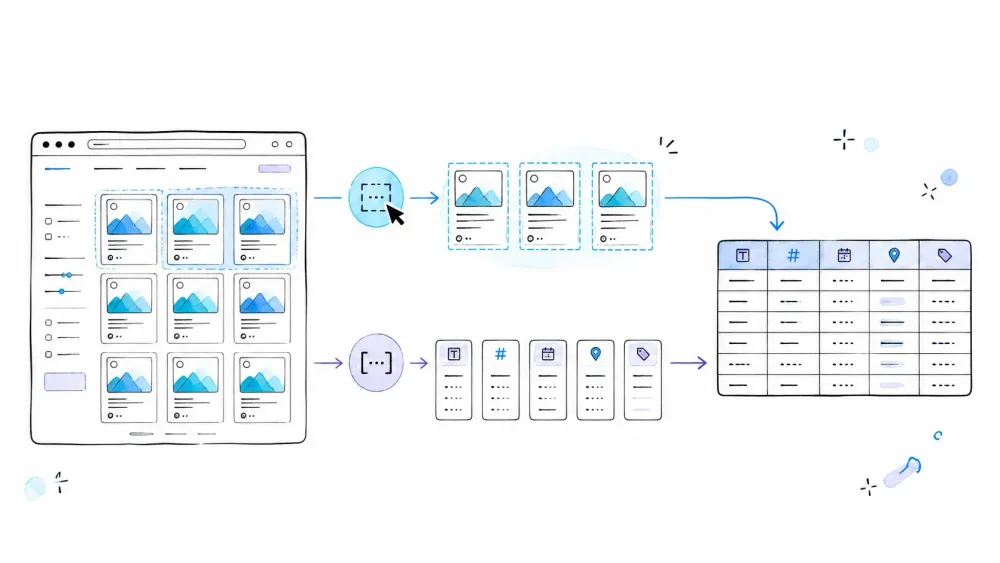
Web data is everywhere, but getting it into a clean spreadsheet still feels like it should be easier than it is. According to Asana's 2023 Anatomy of Work Index, knowledge workers spend 58% of their day on "work about work" — repetitive coordination, manual processes, and overhead that eats into actual productive time.
Two browser-extension tools come up a lot when people search for no-code scraping: Thunderbit and Listly. Both promise easy data extraction without writing code. Both have Chrome extensions with 100,000+ users listed on the Web Store. But after spending real time digging into both products — their docs, pricing pages, help centers, user reviews, and feature sets — I can tell you they approach the problem in fundamentally different ways. Here is my honest, side-by-side breakdown to help you figure out which one actually fits your workflow.
Why Thunderbit vs Listly Even Matters (and Who Benefits Most)
If you're a sales rep building lead lists, an ops analyst tracking competitor prices, a researcher pulling product catalogs, or anyone who regularly needs structured data from websites without touching code, these are the differences that matter.
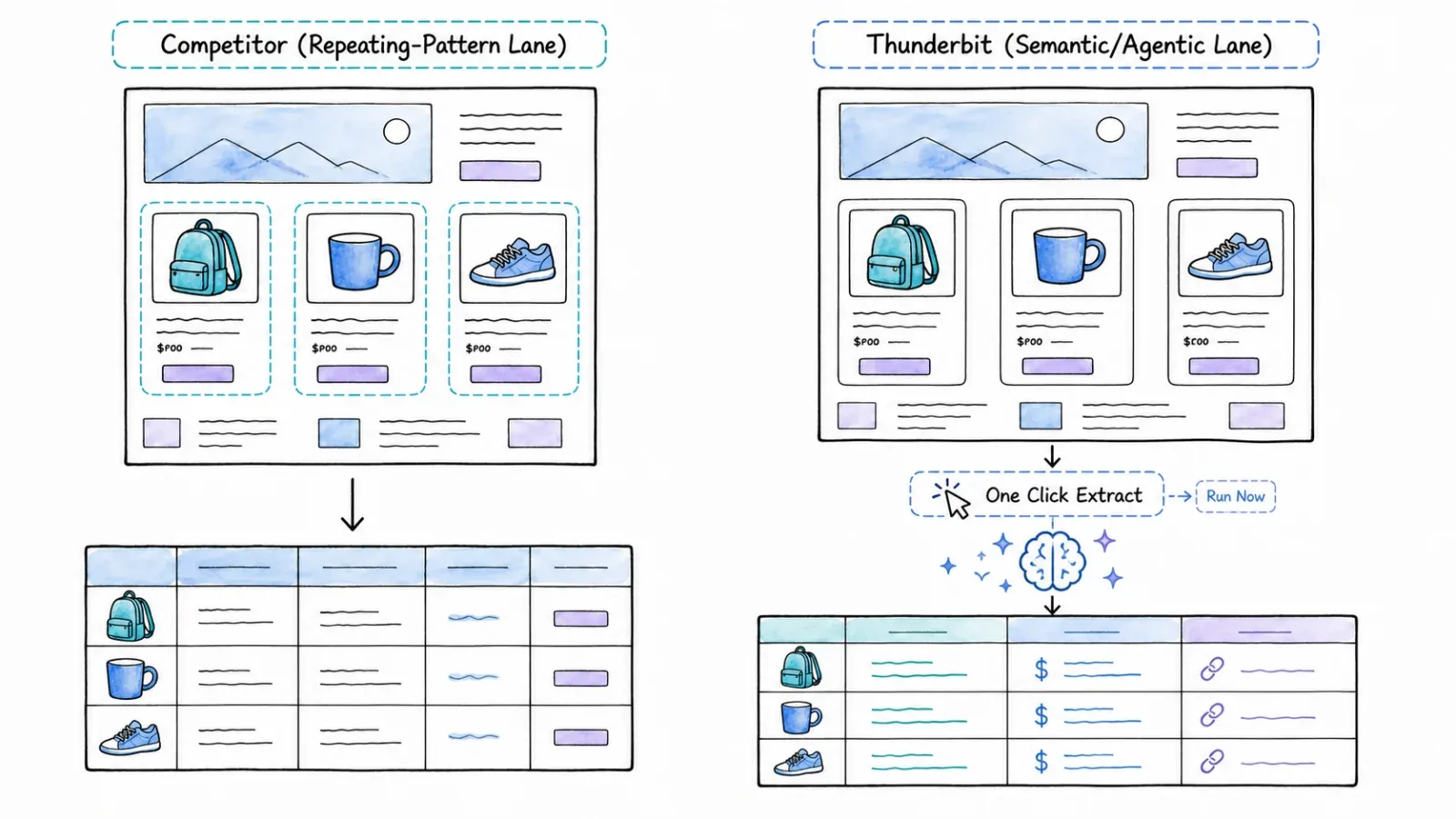
Both tools are Chrome extensions marketed as no-code scrapers, which makes them easy to confuse at first glance. They even share the same Chrome Web Store "users" bracket (100,000+). But the underlying extraction philosophy, feature depth, pricing model, and sweet spots are quite different. Listly is a repeating-pattern and element-oriented tool; Thunderbit is a semantic, AI-first field-and-table tool. That distinction shapes everything downstream — flexibility, site coverage, learning curve, and where each tool hits its ceiling. Thunderbit is an agentic web scraper.
Thunderbit is an agentic web scraper: on a compatible, authorized page, click One Click Extract and the agent detects, reads, and analyzes the page to decide what to extract. Run Now starts immediately, but if you do nothing the task starts automatically—so the default experience needs only one intentional click, with no code, selectors, or schema setup.
What Is Listly? A Quick Overview
Listly (listly.io — not to be confused with the defunct list.ly curation service) is a no-code browser and server web-data extraction product built around repeated structures. It's operated by a Korean company (Listly Co., Ltd.) and supports Chrome, Edge, and Naver Whale.
The core browser workflow is straightforward: open a page, click the Listly extension, choose Whole (automatic structure detection) or Parts (manual element selection), review the result, and export to Excel or Google Sheets. Listly isn't limited to literal <table> HTML elements — it can detect lists, cards, and other repeating patterns. Parts mode lets you pick specific properties like text, links, image URLs, numbers, or raw HTML.
On paid plans, Listly expands into serious automation territory: server-side execution, pagination templates, Deep Extract for following links into detail pages, URL groups, scheduling, proxies, and a beta API. Its Chrome Web Store rating sits at 4.7/5 from 952 reviews — a substantial sample that reflects solid user satisfaction for its core use case.
What Is Thunderbit? A Quick Overview

Thunderbit is an AI web scraping and automation platform with a browser extension for Chrome and Edge, built for business users and developers. I work on the Thunderbit team, so I'll be upfront about that — but I'll also be honest about where the tool has limitations.
The core extension workflow centers on One Click Extract: open a page, click the button, and the agent determines the structured output from what it recognizes on the page. The agent prepares the extraction automatically; optional field instructions can refine transformations, while Run Now starts immediately and otherwise the task auto-starts. No CSS selectors, no manual column mapping.
Beyond the core workflow, Thunderbit offers pagination and subpage enrichment on compatible pages, dedicated Email/Phone/Image extractors, AI extraction from supported PDFs and images, direct export to Excel, Google Sheets, Airtable, and Notion, and scheduled extraction on supported plans. For developers, there's a separate Open API, MCP Server, and CLI. Thunderbit has 195 Chrome Web Store reviews — a smaller sample, as the product is newer in its current form.
The Core Difference: Repeating-Pattern Detection vs. AI-Driven Field Suggestion
This is the conceptual heart of the comparison, and it's the thing no other article I've found explains well. These two tools don't just have different features — they have different mental models for what "extracting data" means.
Listly thinks in structures. It looks at the page and asks: "Where are the repeating patterns? Which table, list, or card group should I capture?" The user's job is to select the right detected structure (or manually pick elements with Parts) and review the output.
Thunderbit thinks in output columns. It looks at the page and asks: "What meaningful data fields exist here, and what should the spreadsheet look like?" The agent determines the schema automatically; optional transformation instructions remain available when a specialized output needs extra guidance.
Consider an e-commerce category page with product cards — each card has a title, price, rating, image, and link. Listly's Whole mode would detect the repeating card structure and offer to extract whatever properties it identifies. Thunderbit's One Click Extract would propose columns like "Product Name," "Price," "Rating," "Image URL," and "Product Link" — and you could add a field instruction like "Convert price to USD" or "Categorize as Electronics/Clothing/Other."
| Dimension | Listly | Thunderbit |
|---|---|---|
| Primary abstraction | Repeating page structures and selected elements | Desired output fields and semantic meaning |
| Default automation | Whole detects patterns; Parts captures chosen elements | One Click Extract proposes a schema |
| User controls | Region/element selection, extraction properties | Field names, examples, natural-language field prompts |
| Best-fit page shapes | Tables, lists, cards, repeating patterns | Product cards, directories, profiles, search results, tables, files/images |
| Standard coding requirement | No code for Whole/Parts; advanced pagination may use CSS or JavaScript | No selectors for core AI workflow |
| Value transformation during extraction | Deterministic property extraction (LLM functions marked Coming soon) | Field prompts for translate/categorize/format/summarize/calculate |
Both tools are genuinely no-code for standard use. The "how" is just different. Listly's no-code means point-and-click on detected structures. Thunderbit's no-code means the AI handles field detection and you steer it with plain English. Neither requires programming knowledge for typical jobs — but if you need advanced Listly pagination, you may encounter CSS selectors, and ActionScript is JavaScript.
Listly: Repeating-Pattern and Element Workflow
The typical Listly flow: open a page, click the extension, and Whole mode highlights detected structures. You pick the one you want, review the result table, adjust if needed, and export. For more control, Parts mode lets you click specific elements and choose extraction properties (text, link, image URL, number, HTML attribute, etc.).
Strengths: Extremely fast when the page has a clean repeating structure. Minimal cognitive load — you see the table, you grab it. The Whole/Parts paradigm is intuitive for anyone who's ever copy-pasted from a web page.
Where it gets harder: If the page doesn't have an obvious repeating pattern, or if the data you want is scattered across non-uniform elements, Whole may not detect it cleanly. Parts gives you more control but requires more manual selection.
Thunderbit: One Click Extract Workflow
The typical Thunderbit flow: open a page and click One Click Extract; the agent analyzes the page and the task starts automatically unless you choose Run Now for an immediate start. The AI reads the page's content and proposes a structured output schema — not just "grab everything in this repeating block," but "here are the meaningful data fields I found."
Strengths: Works on a wider variety of page layouts, including pages without obvious repeating structures. Field-level instructions let you transform data during extraction (translate product descriptions, categorize listings, normalize prices). You don't need to know anything about the page's HTML.
Where it gets harder: agent-detected fields can be missed or misclassified. For high-stakes work, validate the output after extraction; optional field controls can refine unusual cases. The AI is good, but it's not infallible — and on very unusual page layouts, you may need to manually add fields or adjust prompts.
Thunderbit vs Listly: Feature-by-Feature Comparison
Now the detailed breakdown. I've verified these against both products' official documentation as of August 2026, but features and plan gates can change — always check the live product pages.
Extraction Flexibility and Page Coverage
Listly handles tables, lists, cards, and other repeating patterns well. Its Whole mode is genuinely flexible within that paradigm — it's not limited to literal HTML <table> tags. But it's fundamentally structure-oriented: it needs a recognizable repeating pattern to work with.
Thunderbit's AI-driven approach covers a broader range of page types, including product cards, directory listings, search results, profiles, and supported file/image inputs. The trade-off is that high-stakes output still benefits from validation, with optional refinement for unusual cases.
Pagination and Multi-Page Scraping
| Capability | Thunderbit | Listly |
|---|---|---|
| Simple pagination | AI detection on compatible pages | Load More on Light; Business pagination templates |
| Infinite scroll | Starter/Pro | Load More on Light; server auto-scroll on Business |
| Multi-tab collection | Normal browser jobs and bulk paths | Dedicated Tabs mode on Light+ |
| Linked detail pages | Scrape Subpages on Starter/Pro (2 credits/row) | Deep Extract on Light+ (launched July 2026) |
| Bulk URL list | Starter/Pro, up to 2,000 URLs | URL Groups on Business |
| Server/cloud execution | Cloud Mode for public/scheduled/bulk jobs | Business server execution |
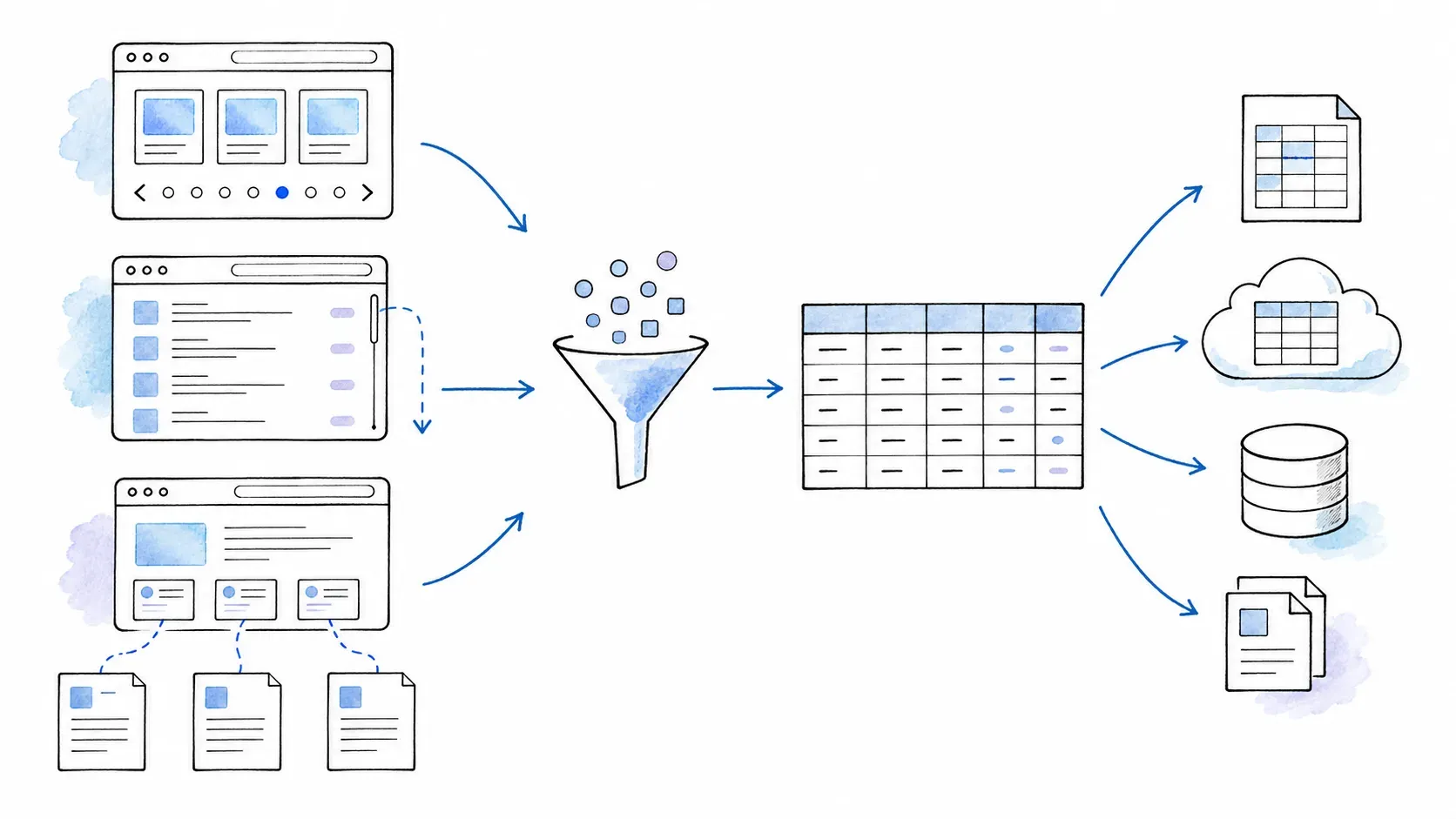
Both products have real pagination and multi-page capabilities. The differences are in mechanism and plan gate. Thunderbit's pagination is AI-detected on compatible pages; Listly splits the work across Load More, Business pagination templates (which may require CSS selectors), auto-scroll/click, and Groups. Listly's dedicated Tabs mode for multi-tab collection is a nice touch that Thunderbit doesn't replicate directly.
Deep Extract is new for Listly (July 2026) and competes with Thunderbit's Scrape Subpages. Both let you follow links from a list into detail pages. Exact compatibility and credit accounting differ and should be tested on your target site.
Email, Phone, and Contact Extraction
Thunderbit has dedicated Email and Phone Number extractors available as free tools in the current plan matrix. These are purpose-built for contact data — not just "grab whatever text is visible."
Listly can collect visible email and phone text when those values appear in the selected structure, but I didn't find a dedicated contact-extractor workflow in current Listly documentation. It works, but it's incidental rather than intentional.
Document and Image Extraction
Thunderbit supports AI extraction from supported PDFs, scanned PDFs, and images (OCR) on eligible plans. This is semantic extraction — reading structured data from a document or image, not just downloading a file.
Listly can extract image URLs and bulk-download images, which is useful but different. No current Listly source I reviewed documents PDF or image-understanding extraction.
Scheduling and Monitoring
| Plan Level | Thunderbit | Listly |
|---|---|---|
| Free | 1 scheduled scraper, daily minimum | No schedule |
| Entry paid | Starter: 5 schedules, hourly minimum | Light: no schedule |
| Automation tier | Pro: 25 schedules, 5-minute minimum | Business: daily/weekly/monthly scheduling |
| Enterprise | Custom | Minutely/hourly, advanced schedule, auto-retry |
Thunderbit's scheduling starts on the Free plan (one daily schedule), which is worth noting. Listly gates scheduling entirely to Business and above. For recurring monitoring workflows, this is a meaningful difference at the entry level.
Thunderbit vs Listly: Pricing and Free-Tier Reality Check
Pricing is volatile. I checked both products' pricing pages on August 13, 2026, but you should verify before making a decision. The billing units are also fundamentally different, which makes direct cost comparison tricky.
What You Get for Free
| Thunderbit Free | Listly Free | |
|---|---|---|
| Extraction allowance | 6 pages/month, max 30 credits/page | 10 Basic URLs/month |
| Export destinations | Excel, Google Sheets, Airtable, Notion, CSV | Excel, Google Sheets |
| Scheduling | 1 daily schedule | None |
| Pagination | Up to 3 pages | Not on Free |
| Contact tools | Email/Phone/Image extractors included | No dedicated tools |
| Subpages | Not on Free | Not on Free |
| Templates | Yes | Limited |
Thunderbit's free tier is more feature-rich (scheduling, contact tools, more export destinations), but the 6-page/month limit is tight. Listly's 10 Basic URLs/month is also limited. Neither free tier is generous enough for regular production use — they're evaluation tiers.
Paid Plans at a Glance
Listly:
| Plan | Monthly | Annual billing | Basic URLs | Advanced URLs | Key Unlocks |
|---|---|---|---|---|---|
| Light | $30/mo | $25/mo ($300/yr) | Unlimited | 500/mo | Deep Extract, Load More, Tabs, Databoard |
| Business | $90/mo | $75/mo ($900/yr) | Unlimited | 1,000/mo | Server execution, URL groups, schedules, pagination, proxies, beta API |
| Enterprise | Custom | Custom | Unlimited | Unlimited | Dedicated infrastructure, advanced schedules, Website Unblocker |
Extra Advanced URLs: 1,000 for $10 on paid plans.
Thunderbit:
| Plan | Monthly | Annual | Credits |
|---|---|---|---|
| Starter | $15/mo | $108/yr | 500 credits/mo or 5,000 annual |
| Pro Tier 1 | $38/mo | $288/yr | 3,000 credits/mo or 30,000 annual |
| Pro Tier 2 | $75/mo | $576/yr | 6,000/mo or 60,000/yr |
| Pro Tier 3 | $125/mo | $1,152/yr | 10,000/mo or 120,000/yr |
| Pro Tier 4 | $249/mo | $2,304/yr | 20,000/mo or 240,000/yr |
| Business | Custom | Custom | Custom |
Check the current Thunderbit pricing page and Listly pricing page for the latest details.
Why You Can't Directly Compare Cost Per Page
This matters more than most comparison articles acknowledge. Thunderbit's paid credits primarily count output rows (with subpage-enabled rows costing 2 credits). Listly's Basic/Advanced units primarily count successfully processed pages/URLs, not returned rows. A page with 100 product listings, a 100-page crawl with one result per page, and a list-to-detail job all produce wildly different relative economics. I can't honestly say one is cheaper than the other without knowing your specific job shape.
Export and Integration Ecosystem: Where Does Your Data Go?
For many users, export destinations are the actual deciding factor. If your workflow ends in Airtable or Notion, the tool that can send data there directly wins.
| Destination/Format | Thunderbit | Listly |
|---|---|---|
| Excel/XLSX | ✅ | ✅ (all plans) |
| Google Sheets | ✅ (direct) | ✅ (direct, all plans) |
| CSV | ✅ | Business API/results path |
| JSON | ✅ | Business beta API |
| Airtable | ✅ (direct export) | ❌ (not found) |
| Notion | ✅ (direct export) | ❌ (not found) |
| API | Open API with page-unit billing | Business beta data API |
| MCP/CLI | MCP Server and CLI | Not found |
| Image download | Image extractor + supported image context | Image URL extraction and bulk downloader |
Thunderbit has a clear edge in export destinations — Airtable, Notion, and the developer surfaces (API, MCP, CLI) are genuine differentiators. Listly covers the basics well (Excel and Google Sheets on all plans) and adds CSV/JSON through its Business API, but if your stack includes Airtable or Notion, that's a gap.
Thunderbit vs Listly: When to Pick Which Tool (Scenario-Based Decision Matrix)
What most people actually need isn't a pros-and-cons list — it's an answer to "I have this specific job. Which tool should I use?" Here's my evidence-based matrix.
| Scenario | Better Fit | Why |
|---|---|---|
| Fast spreadsheet pull from a clean repeated list/table/card | Listly | Whole/Parts and direct Excel/Sheets are its core workflow. Fast, intuitive, minimal setup. |
| agent-detected semantic output columns from any page | Thunderbit | One Click Extract is the central workflow; Listly's model is structure/element oriented. |
| Translate, categorize, or format values during extraction | Thunderbit | Field AI Prompts are released and working; Listly's LLM Data Analysis is marked Coming soon. |
| Multi-tab browser collection | Listly | Dedicated Tabs workflow on Light+. |
| Follow links from a list into detail pages | Both | Thunderbit Scrape Subpages (Starter+); Listly Deep Extract (Light+, new). Test on your target site. |
| Pagination and infinite scroll | Both | Different mechanisms and plan gates. Thunderbit uses AI detection; Listly offers Load More, pagination templates, auto-scroll. |
| Recurring server monitoring | Both | Thunderbit schedules start on Free; Listly Business adds server schedules with proxies. |
| Dedicated email/phone extraction | Thunderbit | Explicit free contact tools. Listly can grab visible contacts but lacks a dedicated extractor. |
| PDF/scanned PDF/image OCR extraction | Thunderbit | Supported on eligible plans. No equivalent Listly feature found. |
| Direct Airtable or Notion destination | Thunderbit | Native export destinations. Not listed for Listly. |
| Server job with explicit selectors/JavaScript | Listly Business/Enterprise | Pagination templates, ActionScript, headers/cookies, speed controls, and proxies provide granular operational control. |
| Developer or AI-agent pipeline | Compare APIs | Thunderbit offers Open API/MCP/CLI; Listly Business has beta CSV/JSON API. Different billing and capabilities. |
A few scenarios deserve extra commentary. For e-commerce monitoring, both tools can handle product pages — but Thunderbit's agentic extraction and built-in transformation instructions (normalize prices, categorize products) give it an edge when you need clean, analysis-ready output. For quick research where the data is already in a visible table, Listly's Whole mode is hard to beat for sheer speed.
For lead generation workflows specifically, Thunderbit's dedicated email and phone extractors plus direct Airtable export create a more complete pipeline. Listly can collect visible contact info, but you'd need to do more manual work to get it into a CRM-ready format.
Where Each Tool Hits Its Ceiling: Honest Limitations
Every scraping tool has blind spots. Here's what I've found about the real boundaries of each product.
Dynamic and JavaScript-Heavy Pages
Both tools' browser extensions operate on the rendered page content in the active browser session. If a page loads data dynamically via JavaScript, both can see what's already rendered.
Thunderbit's Cloud Mode offers managed rendering for public/bulk/scheduled work, and the vendor describes proxy rotation, geo-routing, and anti-bot infrastructure. These are vendor claims — they improve coverage on many sites but don't guarantee success on every target.
Listly's Business and Enterprise tiers add server execution, proxies, and a managed Website Unblocker option. Listly's own documentation acknowledges popups, bot detection, connection failures, IP blocks, and structural mismatches as potential issues.
Neither tool bypasses every CAPTCHA, login wall, or bot defense.
Bulk URL and Large-Scale Scraping
Thunderbit supports bulk URL processing (up to 2,000 URLs in the extension) on Starter/Pro, plus asynchronous batch workflows through the API. Listly offers URL Groups on Business with server execution.
Both have practical scale limits tied to plan tier, page weight, target-site behavior, and execution time. Listly documentation suggests approximate boundaries around 100 pages for some pagination workflows and 300 pages for some group operations, depending on page complexity. Thunderbit's Cloud Mode can process up to 50 pages concurrently per the vendor, but real throughput depends on the target site.
Anti-Bot Protections and Site Compatibility
Both tools will encounter sites that block or limit extraction. Thunderbit's managed rendering and anti-bot handling work on supported, authorized pages — not universally. Listly Business includes shared/datacenter proxies; Enterprise adds custom proxies and a managed unblocker. Neither product should be described as having universal access.
If you're targeting a site with aggressive anti-bot measures, test both tools on that specific site before committing to a paid plan. This is true for any scraping tool, not just these two.
Thunderbit vs Listly: Side-by-Side Summary Table
This is the cheat sheet — screenshot it if you need a quick reference.
| Feature/Dimension | Thunderbit | Listly |
|---|---|---|
| Extraction model | One Click Extract → agent-selected semantic columns | Whole/Parts → repeating patterns and elements |
| Page-type flexibility | Broad (cards, directories, profiles, files, images) | Repeating structures (tables, lists, cards) |
| Pagination | AI detection on compatible pages | Load More (Light), pagination templates (Business) |
| Subpage enrichment | Scrape Subpages (Starter/Pro, 2 credits/row) | Deep Extract (Light+, new July 2026) |
| Email/phone extraction | Dedicated free tools | Can capture visible contacts; no dedicated tool |
| PDF/image extraction | Supported on eligible plans | Image download only; no PDF/OCR |
| Field-level AI instructions | Translate, categorize, format, summarize, calculate | Coming soon (LLM Data Analysis) |
| Scheduling | Free: 1 daily; Starter: 5 hourly; Pro: 25 at 5-min | Business: daily/weekly/monthly; Enterprise: minutely/hourly |
| Export destinations | Excel, Sheets, CSV, JSON, Airtable, Notion | Excel, Sheets (all plans); CSV/JSON (Business API) |
| Free-tier limit | 6 pages/month, 30 credits/page | 10 Basic URLs/month |
| Entry paid price | $15/mo (Starter) | $30/mo (Light) |
| Bulk URL support | Up to 2,000 URLs (Starter/Pro) | URL Groups (Business) |
| Cloud/server execution | Cloud Mode for public/bulk/scheduled | Business server execution |
| Developer surfaces | Open API, MCP Server, CLI | Business beta API |
| Chrome Store reviews | 195 reviews | 952 reviews |
| Multi-tab collection | Standard browser jobs | Dedicated Tabs mode (Light+) |
| Advanced server automation | Cloud Mode with managed rendering | ActionScript, pagination templates, proxies, cookies |

My Honest Take: Which Tool Should You Choose?
After digging through both products' documentation, pricing, help centers, and user reviews, here's where I land.
Choose Listly if:
- Your data is in clean repeating structures (tables, lists, cards) and you want the fastest path to a spreadsheet.
- You need multi-tab browser collection (Tabs mode is a genuine differentiator).
- You want granular server-side automation with explicit selectors, ActionScript, and proxy control on Business/Enterprise.
- You're comfortable with a structure-oriented mental model and don't need agentic extractions or per-field transformations.
Choose Thunderbit if:
- You work with a variety of page types and want AI to propose the output schema for you.
- You need field-level transformation during extraction (translate, categorize, format, summarize).
- You need dedicated email/phone extraction tools.
- You need to extract structured data from PDFs or images.
- Your workflow ends in Airtable or Notion (direct export).
- You want scheduling starting on the free plan.
- You need developer surfaces (API, MCP, CLI) for programmatic or AI-agent workflows.
Neither tool is universally better. A sales team piping leads into Airtable with email/phone enrichment is going to have a much better time with Thunderbit. A data analyst who needs to quickly grab a visible table from 10 browser tabs and drop it into Excel might prefer Listly. The scenario matters more than the feature list.
My recommendation: try both free tiers on a page that represents your actual workflow. Listly's free plan gives you 10 Basic URLs/month; Thunderbit's free plan gives you 6 pages/month with contact tools and a daily schedule. Ten minutes of hands-on testing will tell you more than any comparison article — including this one.
Frequently Asked Questions
Do I need coding skills to use Thunderbit or Listly?
No. Both are no-code tools for standard use. Listly uses point-and-click structure detection (Whole/Parts); Thunderbit uses One Click Extract. Neither requires CSS selectors or programming for typical extraction jobs. The exception: some advanced Listly pagination templates may involve CSS selectors, and ActionScript is JavaScript — but those are power-user features on Business+ plans.
Can Thunderbit and Listly export to Google Sheets?
Yes, both support direct Google Sheets export on all plans. Thunderbit also supports Excel, CSV, JSON, Airtable, and Notion. Listly supports Excel and Google Sheets on all plans, with CSV and JSON available through its Business beta API. Verify current export options on each tool's official site, as these can change.
Which tool is better for scraping product data from e-commerce sites?
It depends on the page layout and what you need. Thunderbit is generally a stronger fit when product data is in card layouts (not HTML tables), when you need agent-detected columns, field transformations (price normalization, category tagging), or when you want to follow product links into detail pages. Listly works well when the product data is in a clear repeating structure and you want a fast spreadsheet grab. For e-commerce monitoring with scheduling and enrichment, Thunderbit's broader feature set gives it an edge — but test both on your target site.
Can I use Thunderbit or Listly to extract data from PDFs or images?
Thunderbit supports AI extraction from supported PDF, scanned PDF, and image inputs on eligible plans (Starter/Pro). This is semantic extraction — reading structured data from documents or images via OCR. Listly can extract image URLs and bulk-download image files, but no PDF or image-understanding extraction feature was found in current Listly documentation.
Is there a free plan for both tools?
Yes. Thunderbit Free currently includes 6 pages/month (max 30 credits/page), 1 daily schedule, email/phone/image tools, and export to Excel, Sheets, Airtable, and Notion. Listly Free currently includes 10 Basic URLs/month with Excel and Google Sheets export. Neither free tier is designed for production-volume work — they're for evaluation. Plan details are volatile, so check the official Thunderbit pricing and Listly pricing pages before deciding.
Further Reading
A few related reads if you want to go deeper:
- AI Web Scraping: What It Is and How It Works
- Best AI Web Scrapers in 2026
- Web Scraping Without Coding
- AI for Sales: How to Use AI to Build Better Lead Lists
- Try the Thunderbit Chrome Extension or explore Listly's extension directly.
Learn More




