
Data is the new oil, but let’s be real—most of us don’t want to spend our days digging through digital sludge. In 2025, data scraping has become the go-to tool for business teams who want to turn the endless sprawl of the web into actionable insights, not just more noise. I’ve seen firsthand how a smart scraping strategy can transform a team’s workflow—whether you’re hustling for leads, tracking competitors, or just trying to keep your pricing one step ahead of the pack. But here’s the catch: scraping isn’t just about grabbing data. It’s about doing it right—clean, compliant, and aligned with your business goals.
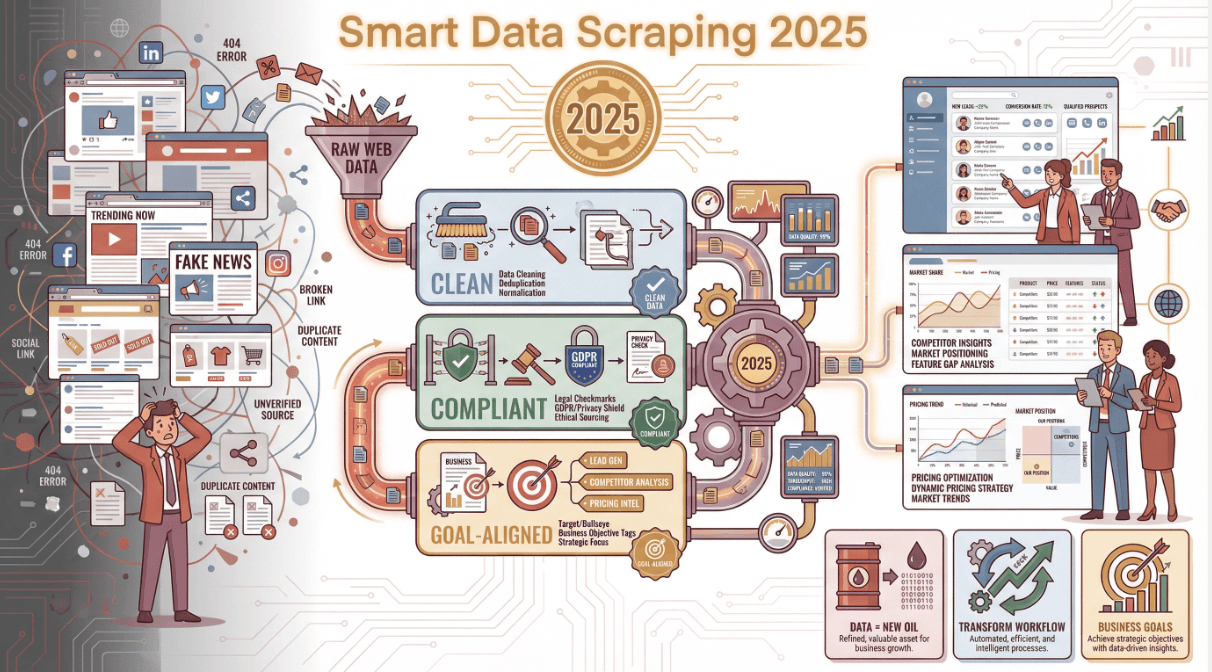
If you’re tired of copy-paste marathons or you’ve ever wondered why your “scraped” spreadsheet is full of holes and duplicates, this guide is for you. I’ll break down the best practices I’ve learned (sometimes the hard way), show you how to avoid the classic pitfalls, and share how tools like Thunderbit are making high-quality data scraping accessible to everyone—even if you don’t know a line of code.
Why Data Scraping Matters for Modern Businesses
Let’s start with the big picture: why is data scraping such a big deal for business teams today? Well, the numbers speak for themselves. The global market for web scraping software topped $5 billion in 2023, and it’s growing at over 40% a year. Nearly 70% of digital businesses now rely on public web data for market intelligence, and about 65% of enterprises use some form of web data extraction tool. In fact, almost half of all internet traffic in 2023 was generated by bots—scrapers and crawlers, not humans.
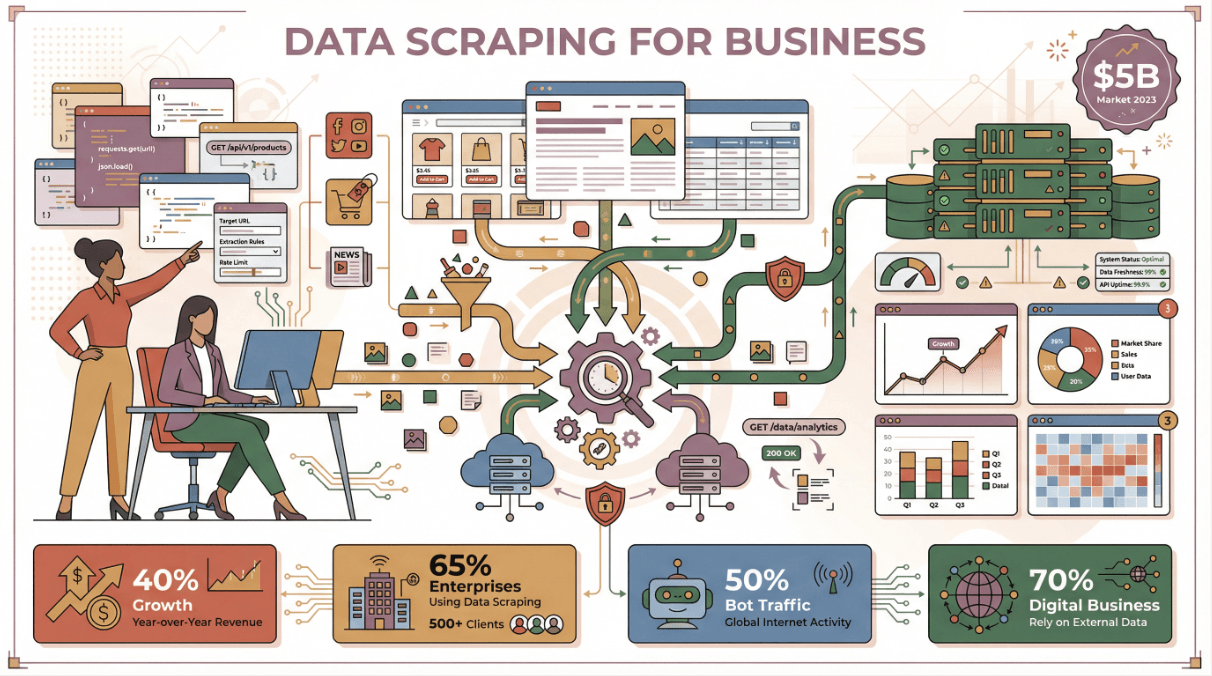
But it’s not just about the volume. The real value comes from what you do with that data:
| Department | Scraping Application | Business Impact (ROI) |
|---|---|---|
| Sales & Marketing | Scrape directories/social media for new leads | Fills pipeline with qualified leads, cuts prospecting time by 30–40% (scrapingapi.ai) |
| E-commerce Ops | Monitor competitor pricing/product listings | Enables dynamic pricing, boosts sales (John Lewis saw a 4% sales increase browsercat.com) |
| Market Research | Aggregate reviews, ratings, trends | Uncovers new trends and customer sentiment faster than traditional research |
| Finance & Strategy | Collect news, filings, public datasets | Feeds decision-makers with up-to-date intelligence |
When you get scraping right, you’re not just saving time—you’re making smarter, faster decisions. Companies like John Lewis and ASOS have seen real revenue gains by automating competitor monitoring and tailoring campaigns with scraped data (browsercat.com).
Data Scraping Best Practices Across Different Scenarios
Data scraping isn’t one-size-fits-all. The best approach depends on your business goal—whether that’s market research, lead generation, or competitor intelligence. Let’s break down what works in each scenario.
Data Scraping for Market Research
Market research is all about seeing the big picture—and that means casting a wide net. The best practice here is to aggregate data from multiple sources: product reviews, social media, forums, and pricing pages. For example, fashion brands scrape social chatter and retail sites to spot new trends before they hit mainstream (dataforest.ai).
Tips for Market Research Scraping:
- Diversify sources: Don’t rely on just one site—combine reviews, ratings, and forum discussions.
- Structure your data: Collect metadata (like date, rating, category) so you can slice and dice later.
- Track over time: Schedule regular scrapes (weekly/monthly) to spot shifts and trends.
Example: A cosmetics brand scrapes social media and beauty retailers to catch a spike in “hyaluronic acid” mentions, letting them pivot their marketing before competitors even notice.
Data Scraping for Sales Lead Generation
For sales teams, scraping is a shortcut to a full pipeline—if you do it right. The key is targeting reliable, public sources (think business directories, LinkedIn, association lists) and focusing on quality over quantity.
Best Practices:
- Validate contact info: Use email/phone verifiers, deduplicate, and check formats.
- Stay compliant: Only scrape public, professional data. Avoid personal identifiers unless you have a lawful basis (datacamp.com).
- Test before scaling: Run a small scrape, check for quirks, then go big.
Pitfall to avoid: One lead gen company scraped personal data without safeguards—hello, compliance nightmare and wasted effort (grepsr.com). Scrape smart, scrape responsibly.
Data Scraping for Competitor Intelligence
Want to know what your rivals are up to? Scraping lets you monitor prices, stock, new launches, and even hiring trends. The secret sauce is defining exactly what you want to track (SKUs, prices, reviews, job postings) and automating subpage navigation to get the full picture.
Best Practices:
- Automate subpage scraping: Use tools that can follow links (like “Scrape Subpages” in Thunderbit) to grab details from product or job pages.
- Schedule regular checks: Frequency matters—daily for prices, weekly for blog posts.
- Export and compare: Store historical data to spot trends and react fast.
Pro tip: Use browser-based scrapers (like Thunderbit’s Chrome extension) to mimic real user behavior and avoid getting blocked by anti-bot systems (zenrows.com).
Avoiding Common Data Scraping Pitfalls to Ensure Quality
Even the best scraping plan can go sideways if you hit these classic traps. Here’s how to dodge them and keep your data clean.
Handling Dynamic Web Pages
Modern sites love JavaScript, infinite scroll, and “Load More” buttons. A basic scraper might only see the tip of the iceberg.
How to handle it:
- Use browser-based or AI-powered scrapers that execute JavaScript and wait for content to load (octoparse.com).
- Check for hidden APIs—sometimes the data is loaded from a background endpoint you can call directly.
- Always sanity-check your results—if you expect 100 items and get 10, something’s off.
Thunderbit, for example, loads pages like a real browser and handles dynamic content out of the box.
Navigating Anti-Scraping Measures
Sites are getting smarter about blocking bots—think CAPTCHAs, IP bans, and rate limiting. If your scraper suddenly stops working, this is probably why.
Best Practices:
- Throttle your requests: Slow down, randomize intervals, and don’t hammer the site.
- Use browser mode for sensitive sites: Thunderbit’s browser mode mimics your real browsing, making it less likely to get blocked.
- Check robots.txt and terms of service: If a site says “no scraping,” think twice or ask for permission (datacamp.com).
Ensuring Data Completeness and Accuracy
Bad data is worse than no data. Don’t just trust your scraper—validate, clean, and check everything.
Checklist:
- Validate formats: Are emails valid? Are prices numbers? Are dates consistent?
- Deduplicate: Remove repeats based on unique IDs or URLs.
- Handle missing data: Flag blanks, fill in where possible, or rescrape if needed.
- Routine audits: Spot-check a sample each run. If something looks weird, fix it before it snowballs.
Poor data quality can cost companies millions a year, so don’t skip this step.
How Thunderbit Simplifies Data Scraping for Business Teams
Now, let’s talk about making all this easy. At Thunderbit, we built our AI-powered Chrome extension for business users who want results without technical headaches. Here’s how Thunderbit changes the game (okay, not “game-changer,” but you get the idea):
Try Thunderbit Chrome Extension for Free
Thunderbit’s AI-Powered Workflow
- AI Suggest Fields: Land on any page, click “AI Suggest Fields,” and Thunderbit reads the site, proposing the best columns to extract—no setup, no code.
- 2-Click Scraping: Adjust fields if you want, then hit “Scrape.” Thunderbit grabs all the data, handles pagination, and even follows subpages if you need more depth.
- Instant Export: Send your data straight to Excel, Google Sheets, Airtable, or Notion—no copy-paste or manual cleanup.
I’ve watched non-technical teammates go from “I don’t know where to start” to “I just scraped 500 competitor prices” in under five minutes.
Multi-Source and Multi-Language Data Scraping
Thunderbit isn’t just for websites. You can scrape data from PDFs, images, and documents—thanks to built-in OCR and AI. And with support for 34 languages, it’s perfect for global teams or anyone working with international data.
Example: Need to scrape a Japanese supplier’s product catalog? Thunderbit can extract and translate the data on the fly, structuring it for your analysis.
Data Cleaning and Preparation: Turning Raw Data into Business Value
Scraping is only half the battle. Raw data is messy—duplicates, weird formats, missing info. The real magic happens when you clean, label, and structure that data for business use.
What Is Data Scraping and How to Do It in 2025 Learn more about data scraping best practices and tools. Get Started Free
Automating Data Labeling and Categorization
Thunderbit’s Field AI Prompt lets you automate a ton of this work:
- Categorize products: “Label each item as Electronics, Apparel, or Home Goods based on the name.”
- Translate fields: Instantly convert scraped text into English (or any of 34 languages).
- Format and validate: Standardize dates, prices, or phone numbers as you scrape.
Data cleaning checklist:
- Scan for obvious issues (misaligned columns, encoding errors).
- Deduplicate rows.
- Standardize formats (dates, prices, categories).
- Handle missing values (fill, flag, or drop).
- Validate with business rules (e.g., price ranges).
- Enrich if needed (add industry, region, etc.).
- Document your process for transparency.
By automating these steps, you turn a messy export into a decision-ready dataset—without hours of spreadsheet wrangling.
Legal and Ethical Considerations in Data Scraping
Let’s get serious for a second. Just because you can scrape data doesn’t mean you should—at least not without thinking about privacy, copyright, and compliance.
Key Regulations to Know
- GDPR/CCPA: If you’re scraping anything that could identify a person, you need a lawful basis. Stick to public, professional data and avoid sensitive info.
- Terms of Service: Many sites prohibit scraping in their ToS. Always check before you start.
- Copyright: Facts aren’t copyrightable, but the way data is presented might be. Don’t scrape and republish full articles or creative content without rights.
Best Practices:
- Only collect what you need (data minimization).
- Respect robots.txt and site guidelines.
- Be transparent about your data sources.
- Anonymize or secure any scraped data with personal info.
- Build an internal policy so everyone on your team knows the rules.
If in doubt, ask for permission or use an official API. It’s better to lose a little data than to end up in legal hot water.
Continuous Improvement: Monitoring and Optimizing Data Scraping Projects
Websites change, business needs evolve, and what worked last month might break tomorrow. Treat scraping as a living process:
- Monitor data quality: Track completeness, accuracy, and freshness. Set up alerts if your scraper suddenly pulls fewer records or weird results.
- Tie to business outcomes: Measure how scraped data impacts your KPIs—leads generated, sales won, pricing wins.
- Optimize frequency: Don’t scrape more often than you need (it’s easier on the site and your infrastructure).
- Stay agile: Be ready to update your scraper when sites change. Document what works and what doesn’t for faster fixes next time.
The best teams treat scraping as a data pipeline, not a one-off project. The more you iterate, the more value you’ll unlock.
Conclusion: Key Takeaways for Data Scraping Success
Let’s recap the essentials:
- Start with your business goal: Don’t scrape for the sake of scraping—know what you want to achieve.
- Pick the right tool: AI-powered scrapers like Thunderbit make it easy for anyone to get high-quality data, fast.
- Tailor your approach: Different scenarios (market research, sales, competitor intel) need different strategies.
- Prioritize data quality: Validate, clean, and structure your data before using it.
- Stay compliant and ethical: Respect privacy, copyright, and site rules.
- Keep improving: Monitor, optimize, and adapt as you go.
Ready to make data scraping work for your team? Download Thunderbit’s Chrome extension and see how easy it can be to turn the web into your own business intelligence engine. And if you want to dive deeper, check out the Thunderbit Blog for more tips, guides, and real-world examples.
Start Scraping with Thunderbit
FAQs
1. What is data scraping, and why is it important for business teams?
Data scraping is the automated extraction of information from websites, PDFs, or documents. It’s crucial for business teams because it turns public web data into actionable insights for sales, marketing, and operations—fueling better decisions and faster workflows.
2. What are the most common mistakes in data scraping?
Classic pitfalls include missing dynamic content (like infinite scroll pages), ignoring anti-scraping measures (leading to blocks), and failing to validate or clean the data (resulting in duplicates or errors). Always use tools that handle dynamic sites and build in validation steps.
3. How does Thunderbit simplify data scraping for non-technical users?
Thunderbit uses AI to suggest fields, handle dynamic content, and automate subpage scraping. With just two clicks, you can extract structured data and export it to Excel, Google Sheets, Airtable, or Notion—no coding or setup required.
4. How can I ensure my data scraping is legal and ethical?
Stick to public, non-sensitive data, respect privacy laws (like GDPR/CCPA), and always check a site’s terms of service. Avoid scraping personal identifiers unless you have a lawful basis, and use official APIs when available.
5. What should I do after scraping data to make it useful?
Clean, deduplicate, and structure your data. Use AI tools (like Thunderbit’s Field AI Prompt) to label, translate, and categorize fields. Always validate your results before using them for business decisions.
Try AI Web Scraper Get Started Free
Learn More




