
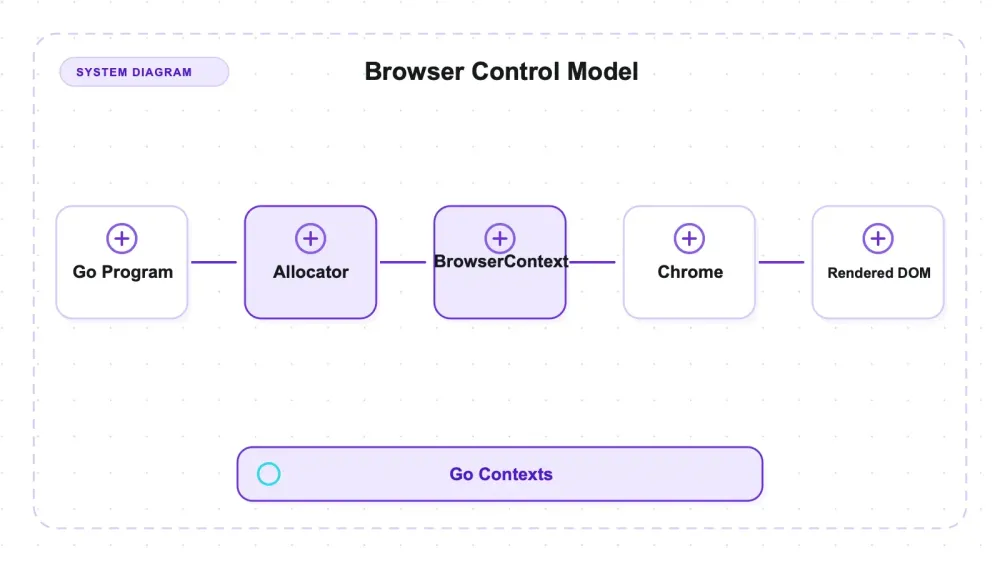
chromedp is a pure-Go library, MIT-licensed, that drives a real Chrome over the Chrome DevTools Protocol. It reads the DOM after the page's JavaScript runs from inside a Go program, without a separate WebDriver or Node runtime. The Go module compiles into the application, but the runnable system still requires an external Chrome executable whose lifetime is governed through Go contexts.
Installing it was one go get plus a Chrome I had to supply myself: build an allocator, derive a context, hand Run a list of actions. On this macOS arm64 host with a warm on-disk headless shell, a fresh process through the first script result had a 102 ms median. That is a local baseline, not a general claim that startup is never a bottleneck. On a fixture that injects a link 800 milliseconds after load, two of four read strategies returned before the link existed.
The browser was real, the content was there, and the code simply wasn't waiting for it. That gap is the most useful thing chromedp taught me, and it isn't a bug — it's the difference between "I rendered the page" and "I waited for the thing I actually wanted," a distinction the folklore around headless browsers flattens into nothing. The wait strategy, not the browser, decides whether you get the data. Every number here comes from a local fixture I control, with ground truth registered before any run, and the raw summaries sit in the chromedp folder of our benchmark repo.
What chromedp actually is
The chromedp stack is short by design. No Selenium server. No WebDriver shim. No Node runtime hiding under the hood. Your Go program opens a WebSocket to a Chrome instance and speaks CDP to it directly, which is roughly the same wire protocol Puppeteer uses, minus the JavaScript.
The repo sat at 13,212 stars and 178 open issues when I checked on July 27, 2026, under an MIT license. The version I tested is v0.16.0, which is the newest tag in the repo. Worth flagging before it confuses you: GitHub's Releases page still shows v0.15.1 (published 2026-04-01) as the latest release object, while go get github.com/chromedp/chromedp@latest resolves to v0.16.0. Go modules and GitHub release objects have drifted apart here. Not broken, just annoying when you're trying to figure out what you're running.
The mental model is Go contexts all the way down. You build an allocator context (which knows how to start Chrome), derive a browser context from it, and then call chromedp.Run(ctx, actions...) with a list of Actions. A child context of a browser context is a new tab. Cancel a context and the thing it represents goes away. If you've done any Go concurrency work this feels immediately familiar, and if you haven't, our guide to getting started with web scraping in Go is a gentler on-ramp than chromedp's godoc.
One boundary to set early: chromedp hands you a rendered DOM. It does not hand you structured data. Whatever you pull out of that DOM — fields, tables, prices — is code you write and maintain. It's a driver, not a scraper framework.
The machinery under the hood
Everything in chromedp is an Action, and Run executes a slice of them in order against a target. Navigate, Click, Evaluate, OuterHTML, WaitVisible — all the same interface, all composable, all just CDP commands wearing Go types. That uniformity is the library's best design decision, because it means the sugar and the raw protocol live at the same level.
Which matters, because the sugar is thin on purpose. chromedp is built on cdproto, a generated set of typed Go bindings covering the whole DevTools Protocol surface, and the chromedp godoc documents both layers side by side. When the convenience action doesn't exist, you drop to the domain call — network.Enable(), page.CaptureScreenshot(), runtime.Evaluate() — inside the same Run. There's no wall between "the nice API" and "the real API," which is not true of every browser driver.
The wait actions are where the day-to-day judgment lives, and there are more of them than people use:
| Wait action | What it blocks on |
|---|---|
WaitReady(sel) | until the node is attached to the DOM |
WaitVisible(sel) | until the node is actually visible |
WaitNotPresent(sel) / WaitNotVisible(sel) | the inverses, useful for spinners |
Poll(js, res) | evaluate a JavaScript predicate on an interval until it's true |
Process management is the other piece of machinery worth knowing, because it decides whether your program leaves a browser running behind it. chromedp starts Chrome via Go's exec.CommandContext. Cancelling that context kills the process. That single implementation detail explains both the good behavior and the sharp edge I hit in testing.
Setup is a Go binary plus a Chrome you have to supply
go get github.com/chromedp/chromedp resolved cleanly to v0.16.0 with no drama, and the dependency tree contains no cgo imports. So the "pure Go, no external dependencies" line you'll see repeated is true — about the Go module.
It is not true about the runtime. chromedp drives an external Chrome, and with no Chrome on the box a run fails immediately. Every measurement I took supplied the exact executable through chromedp.ExecPath, pointed at a Chrome for Testing 151.0.7922.10 headless shell. That's not a criticism — driving a browser requires a browser — but "no external dependencies" and "you must ship a 155 MB Chrome alongside your binary" are two very different deployment stories, and only one of them shows up in the README.
A second setup landmine cost me time and is worth knowing before you write any code. chromedp issue #1591 reports the Go 1.25+ go test runner cancelling NewExecAllocator mid-start; the identical code runs fine as a compiled binary. I built a probe binary with go build and ran that for every measurement rather than driving anything through go test. Go here was 1.26.5, macOS arm64. If your first chromedp experience is a test file that dies during Chrome startup, that's the issue to read before you start blaming your own code.
Hands-on: four ways to read the same page, two of them empty
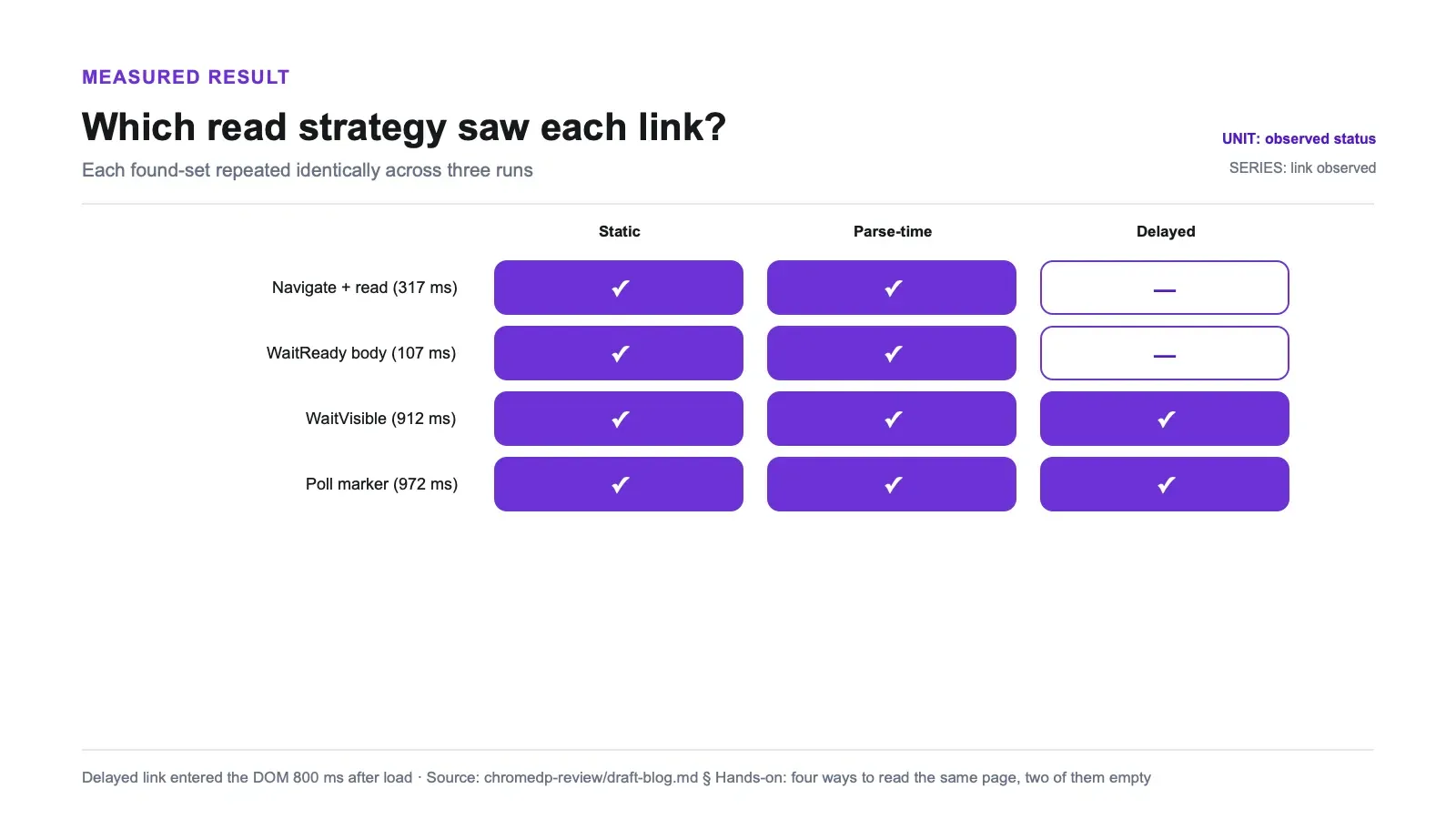
The fixture is a local server on 127.0.0.1 serving three classes of content that differ only in when they enter the DOM: a static <a> in the served bytes, an <a> created by an inline <script> during initial parse, and an <a> created by setTimeout a configurable number of milliseconds after the load event. The markers and hrefs for the two script-created links are assembled from string fragments in JavaScript, so no contiguous literal exists anywhere in the served bytes. A "found" therefore proves Chrome executed JavaScript, not that something read HTML.
Recall gets computed in Python against pre-registered ground-truth markers, not inside the Go probe, so the probe can't cheat by knowing the answer. Each strategy ran three times; the found-sets were identical all three times.
| Read strategy | Static HTML link | Injected at parse | Injected 800 ms after load | Elapsed |
|---|---|---|---|---|
Navigate + read, no wait | found | found | missed | 317 ms |
WaitReady("body") | found | found | missed | 107 ms |
WaitVisible("#delayed-injected") | found | found | found | 912 ms |
| Poll until the marker appears | found | found | found | 972 ms |
Two rows come back with two links out of three. The naive read misses because Navigate returns on the load event and the third link doesn't exist yet. WaitReady("body") misses for a subtler reason that's worse in practice: body is attached at load, so the wait is satisfied instantly and you feel like you did the responsible thing. It returned in 107 ms, faster than the no-wait path, and gave you the same incomplete page.
To confirm the mechanism rather than assume it, I swept the injection delay and re-ran both extremes (recall-summary.json):
| Injection delay after load | No-wait read sees it | WaitVisible sees it | WaitVisible elapsed |
|---|---|---|---|
| 0 ms | yes (race) | yes | 109 ms |
| 100 ms | no | yes | 208 ms |
| 400 ms | no | yes | 519 ms |
| 800 ms | no | yes | 911 ms |
| 1500 ms | no | yes | 1625 ms |
WaitVisible's elapsed time tracks the injection delay on this fixture — 100 to 208, 400 to 519, 800 to 911, 1500 to 1625 — evidence that it blocked until the node appeared rather than reading early. The 0 ms row is the boundary: setTimeout(…, 0) can fire before the immediate read, so the no-wait path can catch it. At 100 ms and above in this sweep, the no-wait path missed it in every run.
In production, the same timing mistake can yield valid HTML with zero extracted rows and exit 0 unless the pipeline checks output cardinality. That is a plausible failure mode supported by the fixture behavior, not an incident measured here. Rendering is only half the requirement; the read must wait for an application-level condition tied to the desired data.
WaitReady and WaitVisible aren't ranked — they answer different questions
The common phrasing is that WaitVisible is "more reliable" than WaitReady. That's imprecise enough to be harmful. On a page with a node attached to the DOM but styled display: none, the two diverge cleanly (waitsem-summary.json, three identical runs):
| Target node | Action | Outcome | Time |
|---|---|---|---|
attached, display:none | WaitReady | returns | ~6 ms |
attached, display:none | WaitVisible | times out, context deadline exceeded | 4000 ms |
| visible node | WaitVisible, default query | returns | 4–12 ms |
| visible node | WaitVisible, ByID | returns | 1–2 ms |
| visible node | WaitVisible, ByQuery | returns | 1 ms |
WaitReady means attached. WaitVisible means visible. Ask the wrong one and you either sail past content that never rendered, or block for your entire timeout on a node that was never going to be visible in the first place. The deadline behavior itself is clean — a proper context deadline exceeded at exactly 4 s, no hang, no zombie state — which is more than some drivers manage.
One reported trap failed to show up. Issue #440 reports WaitVisible("#id") hanging with the default query, and it did not reproduce on v0.16.0 — default query, ByID, and ByQuery all returned on the visible node in every run. Not reproduced is not the same as fixed: that's one selector shape on one page, which doesn't clear the issue.
The defer cancel() you skipped is holding up the roof
Process counts, not return values. Every lifecycle run used a unique --user-data-dir and counted actual Chrome browser processes with pgrep, filtering out renderer children. Each path ran three times (lifecycle-summary.json).
| Exit path (macOS, 3 runs each) | What happened to the spawned chrome-headless-shell | Timing |
|---|---|---|
| Cancel the context and the allocator | gone | 13, 13, and 12 milliseconds |
| Exit the Go process without cancelling | survives your program — zero browser processes before, one after the probe exited; orphaned three runs out of three | — |
Cancelling is clean, fast, exactly what exec.CommandContext promises. (Every orphan got force-killed by the harness afterward; the host was swept clean.)
This is known, documented, platform-scoped behavior — the measurement is mine, the discovery isn't. chromedp's tracker has covered it from several angles: #774 describes the same non-exit on FreeBSD, #752 reports hanging Chromium processes on macOS, and #562 plus #1566 spell out the mechanism. What I added is the process count and the timing on both sides of the contrast, which those qualitative reports don't provide.
The mechanism itself is a build-tag story worth knowing. In the v0.16.0 source, allocate_linux.go sets Pdeathsig = SIGKILL on the child process, so Linux gets a kernel-level parent-death signal. allocate_other.go, which is what macOS compiles, makes that call a no-op. There is no equivalent signal on darwin, so nothing kills Chrome when your program exits. Meanwhile the godoc prose reads as a general promise — the default command "sends SIGKILL to any open browsers when the Go program exits" — with the Linux scoping living only in build-tagged source you'd have to go read. Calling that documentation over-promise is fair; calling it a chromedp bug is not.
The practical consequence stands either way: on macOS, defer cancel() is load-bearing. Skip it and every run leaks a browser process. I did not test Linux, so I'm not generalizing the orphan result there — the source implies Linux behaves differently, and implication is not measurement.
Cold start, concurrency, and the boring stuff that decides your deploy
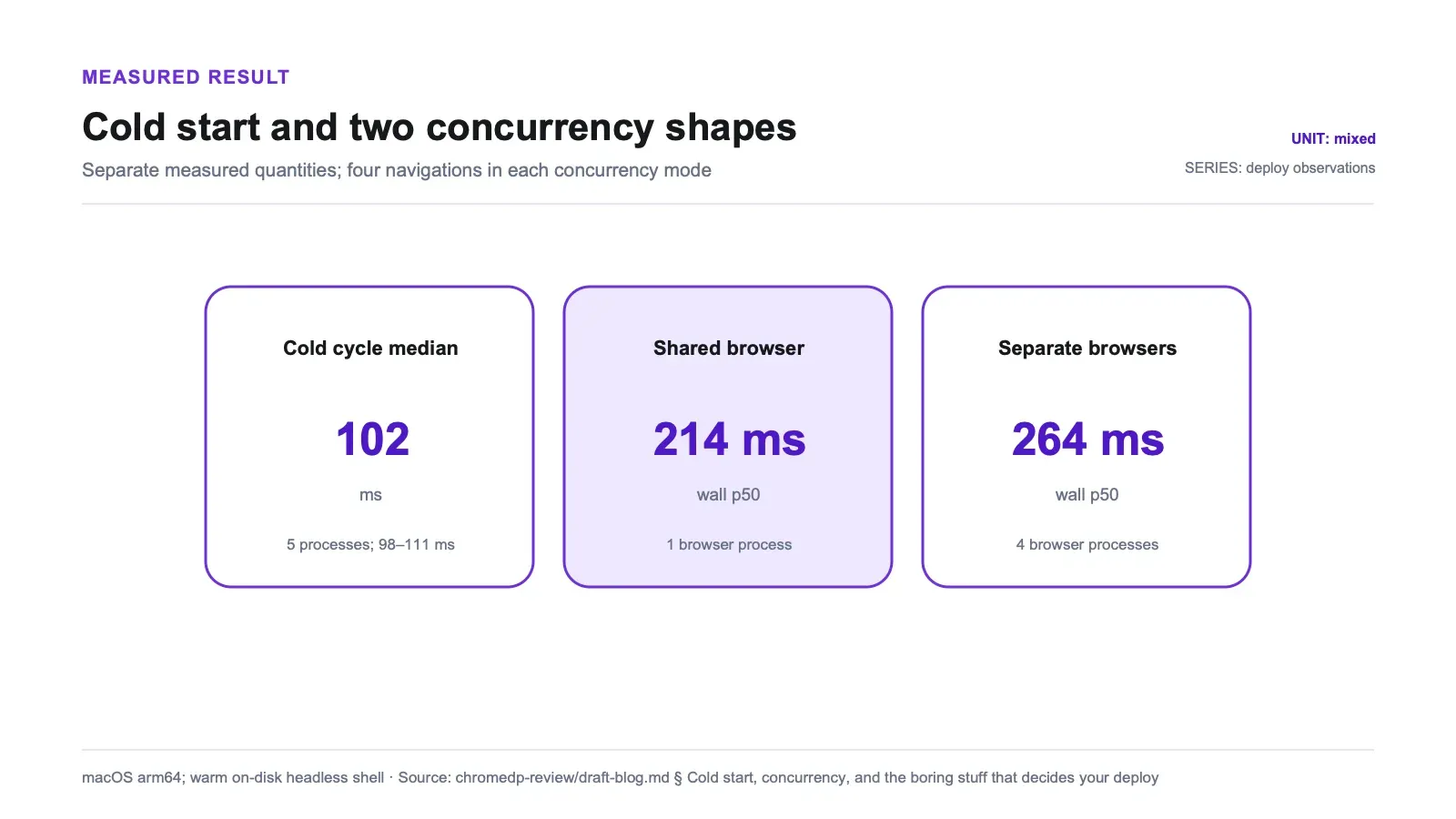
102 ms was the median from fresh process, allocator, context, localhost navigation, and first Evaluate across five processes, ranging from 98 to 111 ms (coldstart-summary.json). On this macOS arm64 fixture with a warm on-disk headless shell, startup was small relative to the delayed-content wait. Containers, cold filesystems, CI, serverless environments, and production navigation were not measured.
On concurrency, chromedp gives you two shapes — one browser with several child contexts (tabs), or several independent browsers. Four navigations, three runs each (concurrency-summary.json):
| Mode | Wall time (p50) | Range | Peak Chrome browser processes |
|---|---|---|---|
| Shared browser, 4 child contexts | 214 ms | 209–219 | 1 |
| 4 separate browsers | 264 ms | 261–278 | 4 |
The measured finding is process count: one Chrome browser process versus four for these four trivial local navigations. The wall-time ranges did not overlap but remain directional rather than a throughput benchmark. RSS and PSS were not measured, so this test does not establish a memory saving.
The small error-path probe is not detailed enough here to support a robustness claim: the draft does not identify whether HTTP status, navigation error, event, or harness logic surfaced each condition. Treat 500/dead-link handling as unreported until the exact API result and raw artifact are published.
Untested, and therefore outside what these numbers cover: Linux lifecycle behavior, concurrency beyond N=4 or with real per-page work, memory deltas (I counted processes, not RSS), network interception and request capture, and the open WaitReady timeout reports in #168 and #1593 — those describe intermittent timeouts, while what I measured is wait semantics, a different question. One machine, one Chrome build.
chromedp isn't the only Go CDP driver on this bench: rod went through the identical fixture, harness, host, and Chrome build in the same sitting, and gets its own write-up.
Pros and cons
Pros:
- Genuine CDP access — the convenience actions and the raw
cdprotodomain calls compose in the sameRun, so you never hit an API ceiling. - Local cold-cycle baseline of 102 ms p50 with a 98–111 ms spread on the tested macOS fixture.
- Cancel reaps Chrome in ~13 ms, consistently, on every run.
- Child contexts share one browser process for N tabs (1 process versus 4 for separate browsers).
- Deterministic in testing — recall sets, wait semantics, and lifecycle outcomes were identical across three repetitions each.
- Clean deadline handling:
WaitVisibleon an unreachable condition returned a propercontext deadline exceededat exactly 4 s rather than hanging. - Pure-Go module (no cgo), MIT licensed; an external Chrome executable is still required at runtime.
Cons:
- Requires an external Chrome at runtime; the "no dependencies" reputation is about the Go module only.
WaitReady("body")is a trap that feels correct and silently misses post-load content — it returned in 107 ms with an incomplete page.- The naive
Navigate+ read path misses anything injected ≥ ~100 ms after load, deterministically, with no error. - On macOS, exiting without
cancel()orphans the browser (3/3 runs). Known and platform-scoped, but easy to trip. - godoc's SIGKILL-on-exit wording reads as universal when the mechanism is Linux-only build-tagged source.
go teston Go 1.25+ can cancel allocator startup (#1591); build a binary instead.- It returns a DOM, not structured data — every field you want is parsing code you own and maintain.
- Latest tag (v0.16.0) is ahead of the latest GitHub Release object (v0.15.1), which makes version-checking briefly confusing.
Who chromedp is for, and who should skip it
If your service is already Go and you need a real browser inside it, chromedp is close to the obvious choice. No Node process to supervise, no WebDriver server to keep alive, one compiled binary plus a Chrome you ship or install. The context model maps onto Go's concurrency primitives so directly that browser lifetimes end up governed by the same defer discipline as everything else in your codebase. And if you need something the convenience API doesn't cover — CDP network events, precise page-lifecycle hooks, protocol-level tricks — you drop into cdproto without leaving the library.
It's also a good fit when you want explicit control over waiting. The wait actions are primitives, not heuristics; they do exactly what they say, which is a feature once you accept that choosing correctly is now your job.
Skip it if your team doesn't write Go — the language commitment is the real cost, not the library. Skip it if you want auto-waiting ergonomics that guess correctly on your behalf, because chromedp will not guess; it will do precisely what you asked and return whatever the page had at that moment. Skip it, or budget seriously for it, if what you actually need is structured records rather than a DOM: every field is a selector you write, test, and repair when the site changes. And if "just get me the data from these 500 URLs" is the whole requirement, standing up browser orchestration in Go is a lot of machinery for the ask. Our browser automation guide walks through when that machinery earns its keep and when it doesn't.
Alternatives, including where our own stack fits
Within the browser-driver category, rod is another Go CDP driver, while Playwright and Puppeteer are Node-side options covered in our Playwright versus Puppeteer breakdown. Their waiting contracts are not interchangeable. Playwright auto-waits for actionability before many actions; that still does not tell it when application data has finished arriving after the action. chromedp gives you lower-level wait primitives and leaves both actionability and application-level readiness conditions to the caller. If you're surveying the broader field, our rundown of open-source scrapers we've tested covers static crawlers and extraction libraries on the other side of this line.
Related review: Browserless review.
A managed extraction service is a different category. It trades browser and selector control for outsourced rendering and schema shaping. That can be useful when the deliverable is structured records rather than a DOM, while chromedp is the better fit when the browser must remain under your Go service's control. We build Thunderbit, one such service, but did not run it against this fixture; this test therefore supports no equivalence, latency, extraction-quality, or cost comparison with chromedp.
Try Thunderbit for Web Data Extraction
Verdict
Should you use chromedp? Yes, if you write Go and want a real browser under your control. In this local fixture it reached the first script result in 102 ms p50, reaped Chrome in about 13 ms after cancellation, and used one browser process for four concurrent tabs. Those are bounded observations, not universal performance promises; the durable attraction is direct CDP access from Go when the convenience layer runs out.
Just size the claims correctly, because the reputation oversells two things. "Pure Go, no dependencies" describes the module; at runtime you're shipping and managing a Chrome binary. And "use a headless browser and you'll get the dynamic content" is only true when your wait is keyed to the node you want — a naive read and WaitReady("body") both handed me a page missing content that was injected 800 ms after load, silently, every single time. On macOS, defer cancel() is not a style preference; drop it and you leak a browser per run, which is known platform behavior but still your problem to handle. Get those three things right and chromedp is one of the more predictable browser drivers I've measured. Get them wrong and it will fail quietly, which is the worst way for a scraper to fail.
Try Thunderbit for Web Data Extraction Get Started Free
FAQs
Does chromedp actually see JavaScript-rendered content?
Yes — but only with a wait keyed to the node you want. On a fixture where a link was injected 800 ms after the load event, Navigate plus a read missed it and WaitReady("body") missed it too, while WaitVisible on that node and a JavaScript poll both recovered it, in three out of three runs each. Sweeping the delay, the no-wait read missed the node at every setting from 100 ms up. Rendering is necessary; waiting correctly is what makes it sufficient.
What's the difference between WaitReady and WaitVisible?
WaitReady blocks until the node is attached to the DOM. WaitVisible blocks until it's actually visible. On a node that's attached but styled display: none, WaitReady returned in about 6 ms while WaitVisible blocked all the way to the 4-second context deadline and returned a clean context deadline exceeded. Neither is "more reliable" — they answer different questions, and picking the wrong one is the real trap.
Do I really need defer cancel() with chromedp?
On macOS, yes. Cancelling the context and allocator reaped the spawned Chrome in 12–13 ms in every run; exiting the Go process without cancelling left an orphaned browser process behind in all three runs. This is known, platform-scoped behavior — chromedp's tracker documents the same non-exit pattern on other non-Linux systems, and the parent-death kill that handles it lives in Linux-only build-tagged source. I did not test Linux, so treat the orphan result as macOS-scoped.
Does chromedp need Chrome installed separately?
Yes. The Go module itself is pure Go with no cgo, but it drives an external browser and fails immediately without one. I supplied a Chrome for Testing 151.0.7922.10 headless shell explicitly through chromedp.ExecPath. The upside is that the startup cost is small: a full cold cycle to the first script result had a median of 102 ms across five fresh processes, ranging 98–111 ms.
Should I share one browser across tabs or spin up separate browsers? Prefer child contexts when minimizing browser-process count is the goal. Four localhost navigations through one browser used 1 Chrome browser process; four separate browsers used 4. Wall time also favored the shared setup (214 ms versus 264 ms median), but four trivial local pages are not a throughput benchmark. Memory was not measured. Separate browsers can still be the right choice when you need stronger session isolation, different proxies, or a smaller crash blast radius; those trade-offs were outside this test.




