
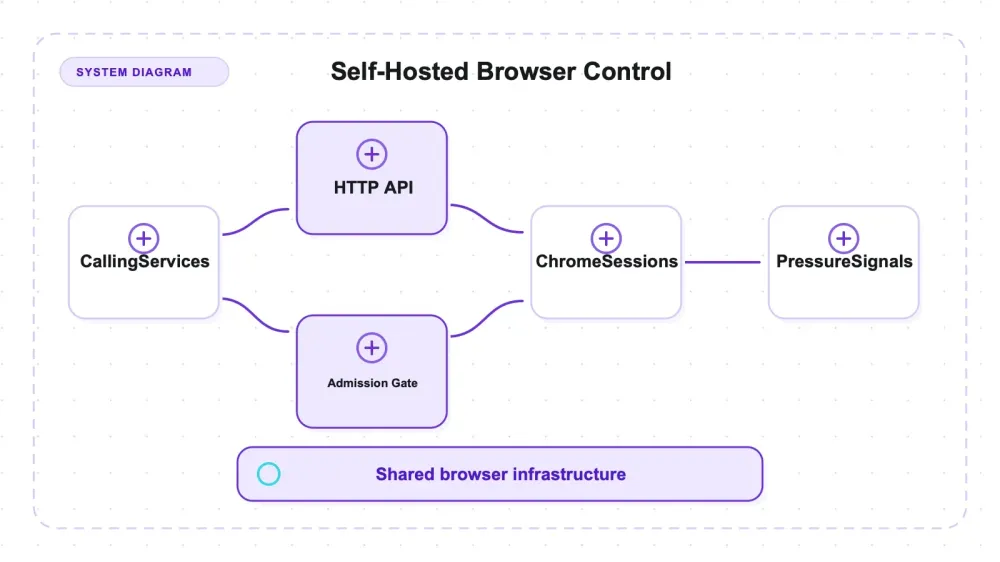
Browserless is headless Chrome packaged as a service you host yourself. Its Docker container stays running, accepts work over HTTP or WebSocket, and enforces shared admission limits instead of being imported into each caller. In the REST tests here, the service held zero Chrome processes at idle, created Chrome processes while a request was active, and returned to zero afterward. What is pooled is service capacity and queueing, not a verified set of pre-warmed browser processes.
I ran v2.55.0 against a controlled local fixture — startup decomposed into stages, admission control at three configurations, endpoint fidelity against known ground truth, a 30-session soak, and the timeout boundary. The useful behavior was operational rather than a speed upgrade: admission limits matched the client-visible responses, and the sharp edges were mostly deployment-shaped.
The most useful result wasn't a latency number. Browserless doesn't make Chrome start faster — it puts a door policy on Chrome: a fixed number of sessions inside, a queue behind them, and an HTTP 429 for everyone else. That ceiling moved from 4 to 8 to 10 when I changed two environment variables, and the container's own accounting agreed with my client's status codes on every single request.
What Browserless actually is
The category is where people trip. Browserless is not a library you import and call. It's a Docker image — ghcr.io/browserless/chromium — that you run as a long-lived service. It brokers browser work and exposes it two ways: REST endpoints (/content, /scrape, /screenshot, /pdf, plus /function and /unblock) and a CDP/WebSocket surface that Puppeteer and Playwright can connect() to.
I tested the REST surface. The WebSocket path is real and widely used, and I didn't measure it.
The version under test was v2.55.0, checked July 27, 2026.
| Item | Value |
|---|---|
| Image version | v2.55.0, published July 14, 2026 |
| Chrome | 149.0.7827.0 |
| Node | 24.18.0 |
| Base image | Ubuntu 24.04 |
| GitHub stars | roughly 13,525, as of July 27, 2026 |
Star counts drift; treat that as a point-in-time reading.
The license gate: SSPL-1.0 or commercial
The repository offers Browserless under SSPL-1.0 or a Browserless commercial license. Read the exact current repository LICENSE and Browserless's official open-source deployment guidance before choosing a path. This article did not perform a legal analysis of commercial products, closed-source applications, CI systems, hosted services, or internal deployments, so it does not assign those scenarios to a license. Have counsel or whoever owns software licensing evaluate the deployment and distribution model.
Browserless also sells hosted plans. Pricing and usage-unit definitions are volatile and were not part of this self-hosted test, so verify them on the official site rather than treating a dated table here as procurement evidence.
How the session model works under the hood
The measured REST path behaved like per-request browser work, but this harness did not trace Browserless internals deeply enough to distinguish a new browser process from every possible context-reuse strategy. What it did establish is simpler: zero Chrome processes at idle, 11 chrome-family processes during an active request, and zero after the sequential run. There was no evidence of a pre-warmed browser pool in this configuration.
The long-lived Node service admits a bounded number of browser jobs, queues another bounded set, and rejects the rest. Treat that admission model as the architectural contract measured below. Do not infer process or context reuse from the word “pool”; the timing harness cannot prove it.
Admission control is two knobs:
CONCURRENT— how many sessions run at once.QUEUED— how many additional requests may wait for a slot.
The container's /config endpoint reported defaults of CONCURRENT=10, QUEUED=10, TIMEOUT=30000. Anything beyond CONCURRENT + QUEUED is refused immediately.
Auth is not optional. Browserless v2 always requires a token — if you don't set TOKEN, it generates a random one and prints it to stdout at startup. Every REST call carries ?token=.
For observability you get /pressure (running, queued, CPU, memory, recently rejected), /sessions, and /config. There's also a /metrics JSON export, but it needs METRICS_JSON_PATH set and I didn't use it. And the image runs dumb-init as PID 1, which is the documented answer to the zombie-process complaints that have followed containerized Chrome around for years.
Setup reality: one command, and four things nobody puts in the one command
The install line everyone quotes is genuinely one docker run. The stuff around it is what you should plan for.
The image is 4.34 GB. That's the number that should shape your expectations, not the startup latency. The manifest carries both linux/arm64 and linux/amd64; on my arm64 host Docker pulled the native arm64 variant. (Chrome's user-agent inside the container still reads X11; Linux x86_64 — that's Chrome's cosmetic UA on Linux, not emulation. uname -m says aarch64. People file bugs about this.)
I used --shm-size=2g for every measurement. The harness did not include a control run at Docker's default /dev/shm, so this article cannot call 2 GiB universally mandatory or quantify the failure point. Size it for your browser count and workload.
The token is a deployment concern, not a formality. Without it, anyone who can route to port 3000 owns a browser on your network.
Container networking is your problem. My fixture ran on the host, so the container reached it through host.docker.internal (colima maps that with --add-host host.docker.internal:host-gateway). I verified the container could actually reach the fixture with a raw curl before I trusted any measurement.
My environment: colima 0.10.3 (6 CPU / 11.6 GiB) with Docker 29.2.1 on macOS 26.5.2 arm64. The harness was Python 3 stdlib only. For PNG and PDF it checked file signatures, not decoder validity, dimensions, page count, completeness, or visual fidelity.
A minimal equivalent launch uses the pinned image, an explicit token, and the shared-memory allocation used here:
docker run --rm -p 3000:3000 --shm-size=2g \
  -e TOKEN=replace-with-a-secret \
  ghcr.io/browserless/chromium:v2.55.0
After /pressure?token=... responds, an authenticated POST /content?token=... with a JSON body containing the target URL exercises the REST path. Production callers also need bounded retry with jitter for 429 responses; retrying immediately just races the same full queue again.
The startup tax, decomposed
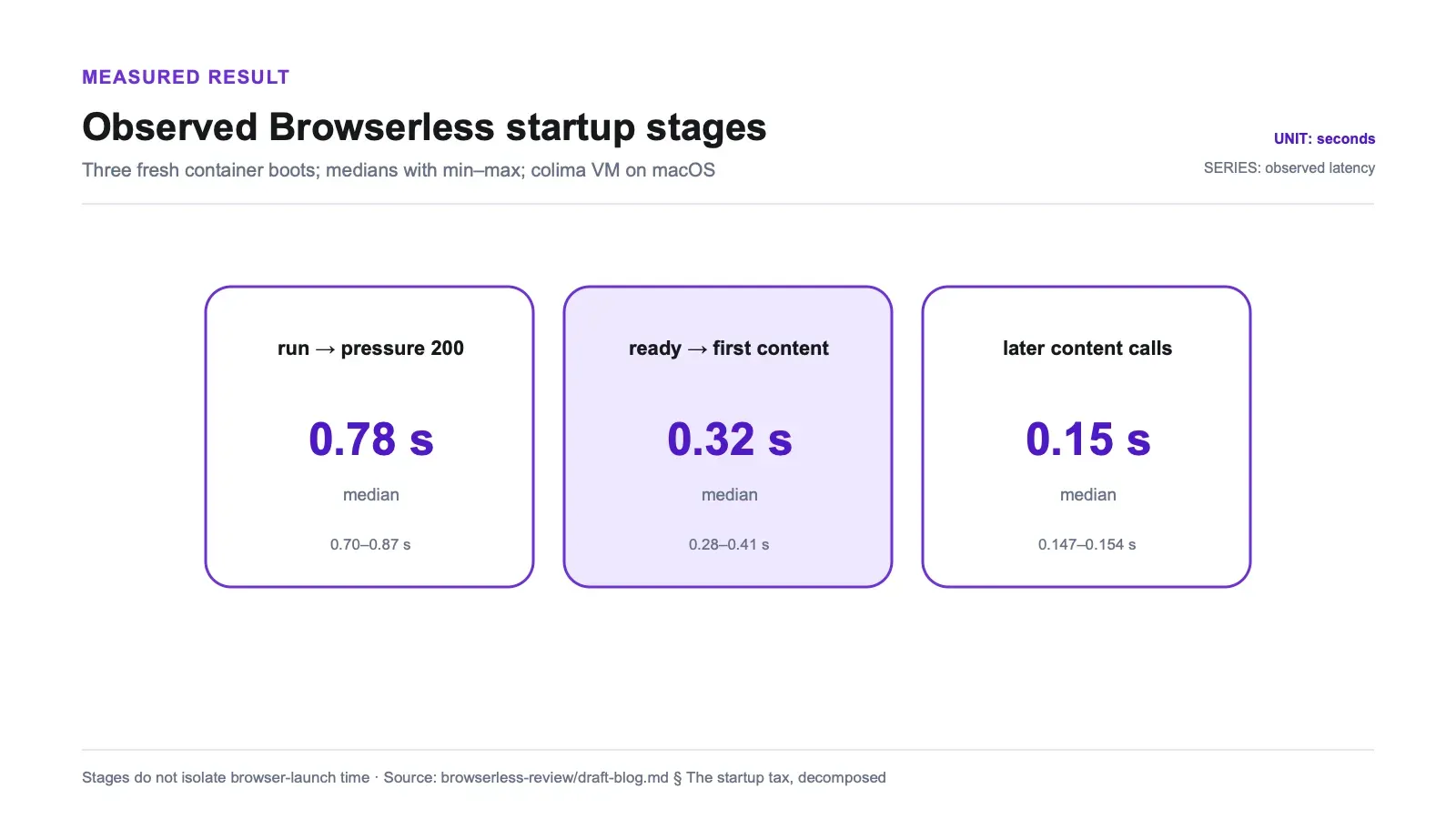
Three fresh docker run boots, medians with min–max:
| Stage | Median | Range | What it actually is |
|---|---|---|---|
docker run → /pressure returns 200 | 0.78 s | 0.70–0.87 s | HTTP endpoint responsive; browser launch not validated by this check |
ready → first /content render | 0.32 s | 0.28–0.41 s | observed first request: browser work + navigate + return HTML |
later /content calls | 0.15 s | 0.147–0.154 s | observed later-request latency in the same container |
The middle row is easy to overread. It does not measure browser launch in isolation and it does not show that Browserless starts Chrome faster than an in-process library. It is an HTTP round trip into a container plus browser work, navigation, and response transfer. The roughly 0.17-second first-to-later gap could include filesystem, OS, Chrome, Node, or container cache effects. Because Chrome processes were zero at idle and the harness captured no CDP trace or process timeline for these calls, it cannot attribute that gap to browser reuse or “amortized” launch cost.
Also: these are colima-VM numbers on macOS. Bare-metal Linux will differ. Don't quote 0.78 s at your SRE as if it's portable.
Hands-on: finding the ceiling, from both sides
The CONCURRENT + QUEUED → 429 contract is repeated everywhere and demonstrated nowhere.
The setup: a fixture route that sleeps 5 seconds server-side, so each request reliably occupies one session for a known duration. Then fire CONCURRENT + QUEUED + 4 requests simultaneously and see what comes back — while a separate sampler thread polls /pressure to read the container's own accounting.
| Config (CONCURRENT, QUEUED) | Fired | HTTP 200 | HTTP 429 | Server /pressure peak (running / queued / recentlyRejected) |
|---|---|---|---|---|
| (2, 2) | 8 | 4 | 4 | 2 / 2 / 4 |
| (3, 5) | 12 | 8 | 4 | 3 / 5 / 4 |
| (5, 5) | 14 | 10 | 4 | 5 / 5 / 4 |
Three things fell out of this.
The ceiling is exactly CONCURRENT + QUEUED, every time. Successful responses equalled 4, 8, and 10 — the configured sum in each case. The rejections equalled the overshoot, which was 4 in all three runs.
The ceiling moves. It's not a constant baked into the image; it's whatever you configure. Going 4 → 8 → 10 by changing environment variables is the part that makes this useful rather than trivia.
And the two signals are independent. My client's status codes came from real HTTP responses; /pressure came from the container's own internal accounting, polled by a different thread. They agreed in these three short runs. That makes /pressure a candidate production signal, not a complete autoscaling contract: scrape cadence, reset semantics, multi-replica aggregation, and behavior under longer mixed workloads still need validation.
One nuance the pass/fail counts hide. A queued request doesn't fail — it waits, and it can wait a while. At (2, 2) with 5-second work, the successful responses landed anywhere from 5.7 s to 11.0 s, median 8.3 s. End-to-end latency therefore reached roughly two session durations. The harness did not capture separate admission and execution timestamps, so it cannot assign the full delay to queue wait.
What this looks like on a real job
Say you're rendering 4,000 product pages to PDF nightly, and each page takes about 5 seconds. You set CONCURRENT=5, QUEUED=5. Your throughput ceiling is 5 pages per 5 seconds — one page per second — so the job takes about 67 minutes if you keep the pipe exactly full. That's arithmetic on measured behavior, not a benchmark, but it's the arithmetic you should be doing before you deploy.
Any request arriving after all running and queued slots are occupied can get a 429 immediately; simultaneous dispatch does not guarantee which ordinal request loses the race. A job runner should treat that response as backpressure and use bounded retry with jitter. Otherwise it risks dropping pages while higher-level job accounting continues — an operational risk, not a failure scenario demonstrated by this harness.
Hands-on: what the endpoints actually see
To test render fidelity honestly, the fixture page hides its marker text from anyone who isn't running a real browser. The visible string Runtime Injected Marker 88 is assembled from JavaScript fragments at load time, so no contiguous literal for it exists in any byte the server sends. A plain static fetch of that page returns 702 bytes containing neither marker.
| Endpoint | Result | Bytes |
|---|---|---|
/content | runtime-injected marker present, plus both static markers | 811 |
/scrape on #scrape-me (a JS-injected node) | returned SCRAPE_TARGET_VALUE_CC | 422 |
/screenshot | response with PNG signature 89 50 4E 47 | 18,621 |
/pdf | response with PDF signature %PDF- | 40,974 |
| all four, no token | HTTP 401 (not 403) | — |
/content returning 811 bytes with the injected marker means a real Chromium rendered the page before the HTML came back. /scrape pulled a value out of a node that doesn't exist until JavaScript runs. Both worked with zero client-side automation code — a single authenticated POST.
That's the actual pitch. In the same round of testing, a static crawler missed this class of content entirely, and the in-process browser libraries (chromedp, rod, Selenium) caught it only after I wrote an explicit wait. Browserless caught it with a curl-shaped request. You're trading automation code for deployment weight.
Two boundaries on that claim. The evidence covers my fixture's content classes, not a survey of the modern web. And /unblock, the anti-detection endpoint, was deliberately left alone — none of these results should be read as an anti-bot capability claim. /function, /download, and /performance also went untested.
Hands-on: a short residue check
Containerized Chrome has a reputation for leaving corpses behind, so I ran 30 sequential sessions with CONCURRENT=3 and counted processes inside the container.
Before trusting any of it, I calibrated the detector. While a session was in flight, the /proc enumerator read 11 chrome-family processes (browser, zygote, GPU, renderers, utilities). That matters: it proves the instrument can see Chrome, so its post-run zero is a measurement rather than blindness. A leak test that reports "0 processes" without proving it can count is worthless.
After 30 sessions: 0 chrome processes, 0 zombies. The only survivors were dumb-init, node, Xvfb, start.sh, and sh. /sessions read 0 at idle.
Container memory, from docker stats (the operator-visible number, not a single process's RSS):
| After N sessions | 0 | 5 | 10 | 15 | 20 | 25 | 30 |
|---|---|---|---|---|---|---|---|
| Container memory (MiB) | 294 | 300 | 301 | 302 | 302 | 303 | 303 |
Net growth across 30 sessions: about 9.5 MB, and the sampled curve plateaued after session 10. That is inconsistent with a simple linear per-session leak over this short window. Node warmup is one plausible explanation, not something this process count and memory series can prove.
Scope: 30 sequential sessions is a small soak, not an endurance or concurrency run. The long-standing EventEmitter listener warnings in the issue tracker are the kind of thing that may surface over hours and thousands of sessions, and I did not run that. The supported conclusion is only that no accumulating Chrome processes or zombies were observed in this window on v2.55.0.
The timeout boundary
TIMEOUT is documented as a knob. I wanted to see it fire.
| Case | Page hold | Status | Elapsed |
|---|---|---|---|
| Under budget | 2,000 ms | 200 | 2.406 s |
| Over budget | 15,000 ms | 408 | 5.007 s |
With TIMEOUT=5000, a session that tried to hold a page for 15 seconds returned HTTP 408 at 5.007 s rather than hanging. This single observation confirms enforcement near the configured boundary. It does not reveal the timer implementation or prove slot cleanup; a stronger test would repeat the trial, observe /sessions and /pressure returning to idle, then confirm that a following request acquires the freed slot.
The migration trap: PREBOOT is inert, and it doesn't tell you
Of everything I measured, this is the result I'd most want handed to me before an upgrade.
Browserless 2.0.0 removed PREBOOT and KEEP_ALIVE — the changelog says they were dropped for being confusing, doing little, and causing bugs. Reasonable call. The problem is what happens when a v1 config gets copy-pasted onto v2, which is the single most common way people upgrade.
I ran the container with -e PREBOOT=true and measured it against the default:
| Signal | PREBOOT=true | Default, flag unset |
|---|---|---|
| Ready time | 0.716 s | 0.776 s |
| Cold render | 0.314 s | 0.318 s |
| Warm render | 0.163 s | 0.150 s |
| Chrome processes at idle | 0 | 0 |
Every timing sits inside the default arm's own min–max band — it's noise, not an effect. And nothing was pre-warmed: the PREBOOT=true container sits at idle holding no browsers at all, identical to one without the flag. Two more signals, neither of them a number:
/configexposes noprebootkey at all. The keys areconcurrent,queued,timeout,token,maxCPU,maxMemory,retries, and friends.- No error. No warning. Nothing in the container logs.
So a v1 PREBOOT config on v2 is a silent no-op in ordinary startup and log checks. The missing /config key plus unchanged behavior is the detectable signal; Browserless does not emit an explicit rejection or warning. A migration check needs to inspect applied configuration rather than treating a green startup as proof that every environment variable took effect.
KEEP_ALIVE is the opposite case, and the two should not be lumped together. It was removed in the same release, but it is not silent — a spot probe of the container shows it logging Environment variable of "KEEP_ALIVE" is deprecated and ignored. right there in stdout. That's a proper operator-facing warning. I did not put KEEP_ALIVE through the same measured harness that PREBOOT went through, so I'm reporting it as a check rather than as a measurement. But the direction is clear enough to matter: only PREBOOT is the silent trap. Browserless is more honest about KEEP_ALIVE than a blanket "v2 ignores your v1 flags" summary would give it credit for.
Pros and cons
Pros
- Admission control that behaves exactly as documented and moves with configuration — proven at three different ceilings, on client status codes and the server's own accounting simultaneously.
/pressurematched client-visible running, queued, and rejected counts in three short runs; evaluate it as one candidate input for autoscaling and alerting.- Real Chromium rendering with zero client-side automation code: one authenticated POST surfaced JS-injected DOM that a static fetch of the same page cannot see.
- No accumulating Chrome processes observed in a 30-session sequential run; the post-run count was 0 Chrome processes and 0 zombies.
- One
TIMEOUTtrial returned 408 at 5.007 s against a 5.000 s budget; cleanup and slot release were not separately verified. - Auth on by default: all four REST endpoints return 401 without a token.
- One
docker runto a ready service in about 0.78 s, and a first render 0.32 s after that.
Cons
- 4.34 GB image. That's the honest headline cost, and it shows up in your registry, your CI cache, and your cold-deploy time.
- SSPL-1.0 or Browserless commercial license. Evaluate the exact current terms against your deployment and distribution model.
PREBOOTfrom v1 is accepted and silently ignored on v2 — no error, no warning, no/configkey.- You're operating a service, not adding a dependency: a container, a token, a network path, an admission ceiling, and upgrade responsibility.
- Queued requests pushed end-to-end latency to roughly two session durations in the
(2, 2)run; separate queue wait was not measured. - The measured REST timing includes an HTTP hop and does not isolate browser-launch cost or prove browser reuse.
Who should run it, and who shouldn't
Browserless earns its weight when more than one thing needs a browser. A rendering service shared across several apps, a team that wants screenshots and PDFs behind an HTTP endpoint instead of a Chrome dependency in every service, a job pipeline that genuinely needs a capacity ceiling with backpressure it can measure — that's the shape this fits. If you're already running Docker and someone owns the deploy, the operational story is clear: predictable admission, observable backpressure, and no accumulating Chrome processes or zombies observed in the 30-session sequential check.
It's also the right call if the alternative is every service in your stack installing its own Chromium. Centralizing that into one container with a token and a ceiling is a legitimately good architectural trade.
Skip it if you're writing one script. Pulling 4.3 GB and running a container so a single Python file can grab a rendered page is a lot of ceremony for a small job — a browser library in your process does that with no separate service deployment. Skip it if the SSPL terms don't work for your commercial product and you can't resolve them. Skip it if what you actually want is a browser that arrives pre-warmed with no cold cost, because PREBOOT won't give you that on v2. And skip it if your real problem is anti-bot handling, since that lives in an endpoint I deliberately didn't test and won't vouch for.
Alternatives, including where Thunderbit fits
The comparison worth drawing isn't Browserless against another container. It's about where the browser lives and who's responsible for keeping it alive.
Related review: Browsertrix Crawler review.
Related review: chromedp review.
| Browser library (chromedp, rod, Selenium, Playwright) | Browserless self-hosted | Thunderbit managed extraction | |
|---|---|---|---|
| Where the browser runs | In your process | In your container | Someone else's infrastructure |
| Setup cost | Package install | 4.3 GB image + container + token | API key |
| Timing measured here | Not measured in this article | 0.32 s first render after HTTP readiness; later calls 0.15 s median | Not measured in this article |
| What you write | Automation code with explicit waits | One authenticated POST | One HTTP call |
| What comes back | Whatever you script | HTML, signature-matching PNG/PDF responses, scraped nodes | Product-specific structured JSON or Markdown |
| Capacity limit | Your machine | CONCURRENT + QUEUED, then 429 | Provider's plan |
| Who's on call | You | You | Them |
If you want a browser inside your own process and don't mind writing the waits, a library is lighter and there's no deployment. I've written up that side in the Playwright versus Puppeteer comparison and the broader open-source scraping project roundup.
If you don't want to operate a browser at all, our own Thunderbit is one managed alternative. Browserless returns rendered material that your code interprets; Thunderbit can return Markdown or schema-matched data while the provider owns the rendering infrastructure. This article did not benchmark Thunderbit's latency, capacity, failure behavior, extraction quality, or cost, so the table describes responsibility boundaries rather than a performance comparison.
Related reading from the same testing round: the Crawl4AI review covers a browser-backed Markdown pipeline you run yourself, and the web scraping tools overview maps the wider category.
Try Thunderbit for Web Data Extraction
Verdict
Should you run Browserless? Yes, if several callers need browser work, someone can operate the container, and your license review approves the deployment model. In three synthetic admission runs, the accepted count matched CONCURRENT + QUEUED, overshoot received 429, and /pressure matched the client-visible counts. In a separate 30-session sequential check, no Chrome processes or zombies accumulated. One timeout trial returned 408 near the configured boundary. Those are useful bounded observations, not universal guarantees.
Size the commitment honestly, though. It's a 4.34 GB image and a service you operate, not a dependency you add; this test did not establish a speed comparison with an in-process browser library. What it buys is a browser you can ration: a known ceiling and measurable backpressure. In the 30-session sequential check, no accumulating Chrome processes or zombies were observed. The costs are deployment weight and a license you need to read. If you're rendering a handful of pages from one script, that trade doesn't pay. If you're running a rendering tier that multiple services depend on, it does — just check your v1 environment variables on the way in, because PREBOOT will sit there looking employed while doing absolutely nothing.
Try Thunderbit for Web Data Extraction Get Started Free
FAQs
Does Browserless make headless Chrome faster?
This test cannot answer that. The HTTP endpoint became responsive 0.78 s after docker run; the first /content call then took 0.32 s and later calls in the same container took about 0.15 s. Those figures combine an HTTP round trip, browser work, navigation, and response transfer. The harness did not isolate launch time, trace process reuse, or publish a comparable in-process benchmark. Use Browserless for a shared service boundary and admission control, then benchmark your own latency path.
What happens when you exceed Browserless's concurrency limit?
You get an immediate HTTP 429. The ceiling is exactly CONCURRENT + QUEUED, and I confirmed it at three configurations: (2,2) accepted 4 and rejected 4, (3,5) accepted 8 and rejected 4, (5,5) accepted 10 and rejected 4. The server's /pressure endpoint reported matching running, queued, and recentlyRejected counts every time. Worth knowing: queued requests don't fail, they wait — at (2,2) with 5-second work, successful responses took between 5.7 s and 11.0 s. Build your client to treat 429 as backpressure with retry and backoff.
Does PREBOOT still work in Browserless v2?
It does not. PREBOOT was removed in 2.0.0, and v2 accepts -e PREBOOT=true without any error or warning while doing nothing with it. I confirmed the inertness three ways: latency was indistinguishable from the default, an idle PREBOOT=true container had 0 chrome processes waiting, and /config doesn't expose a preboot key at all. If you migrated a v1 config, your instances are not pre-warmed. Note that KEEP_ALIVE, removed in the same release, does log a "deprecated and ignored" warning — so the silent-failure problem is specific to PREBOOT.
Is Browserless free for commercial use? The repository offers SSPL-1.0 or a Browserless commercial license, but this article does not map specific commercial or closed-source scenarios to either option. Review the current LICENSE and official deployment guidance, then have the person responsible for software licensing evaluate your deployment and distribution model.
Does Browserless leave zombie Chrome processes behind?
None accumulated in the short window tested. After 30 sequential sessions the container had 0 Chrome processes and 0 zombies, with only dumb-init, node, Xvfb, start.sh, and sh surviving. The detector counted 11 chrome-family processes while a session was live, so it was not blind. Container memory went from 294 MiB to 303 MiB and then plateaued in the samples. This is not a multi-hour, concurrent, or thousands-of-sessions endurance result.




