Indeed Job Scraper for hiring market research













Turn an Indeed search into a living job list
Capture the market once, then return to the same search for a fresh view.
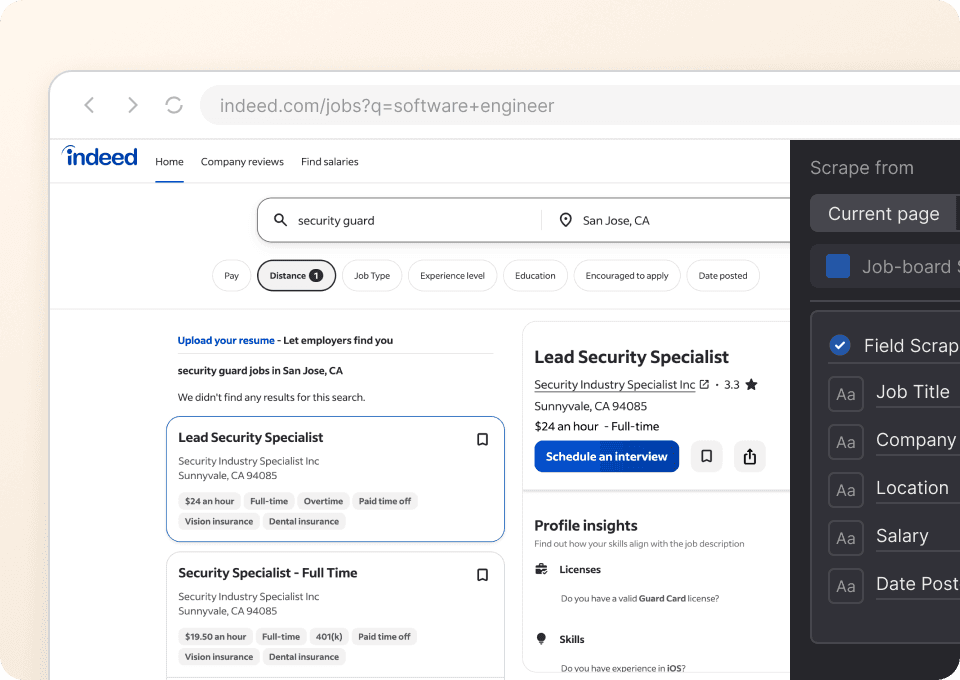
Extract job posts without setup
Run One Click Extract on the Indeed results you are viewing. Thunderbit recommends useful data types, and plain-English instructions handle any changes you want.
Process more listings in one run
Work through visible results and linked job pages so titles, pay, requirements, benefits, and source links can stay together in the same hiring dataset.

Watch the same market over time
Save a search and run it on a schedule. Compare job URLs and capture times to spot newly visible roles, removed posts, or changing salary ranges.

A job market changes faster than a spreadsheet
Reuse the search definition and compare dated snapshots instead of rebuilding the list.
Manual job-board tracking
A list that quickly loses contextThunderbit hiring watchlist
Search context and roles stay linkedWhat to include in an Indeed job dataset
These 30 data types cover visible search context, role details, qualifications, and application information when a posting provides them.
- Job URL
- Job Title
- Company Name
- Company Page URL
- Company Rating
- Job Location
- Remote Status
- Employment Type
- Shift and Schedule
- Salary Minimum
- Salary Maximum
- Salary Period
- Salary Currency
- Benefits
- Job Description
- Responsibilities
- Required Skills
- Required Education
- Required Experience
- Required Certifications
- Language Requirements
- Date Posted
- Application Deadline
- Easy Apply Status
- Apply URL
- Job ID
- Sponsored Label
- Search Query
- Search Location
- Captured At
Customers share their Thunderbit experience
See how users move from a live webpage to reusable data with One Click Extract and plain-language changes.








Indeed job-scraping questions
How to handle linked job posts, missing salary information, repeat searches, and access limits.
Broaden your view of the hiring market
Compare Indeed roles with employer reviews, company career pages, and other job boards without learning another extraction system.

ResearchGate Scraper
The Thunderbit ResearchGate Scraper lets you extract data from ResearchGate job listings and research publications. Use AI-powered field suggestions to quickly gather job titles, institutions, locations, publication titles, authors, and abstracts for research or analysis. Ideal for academics, job seekers, and institutions seeking structured ResearchGate data.
Learn more ->
The Org Scraper
The Thunderbit The Org Scraper lets you extract job listings and company data from The Org website using AI. Gather job titles, company names, locations, industries, and more for research, recruiting, or market analysis. Ideal for recruiters, analysts, and job seekers seeking structured data from The Org.
Learn more ->
タウンワーク Scraper
Thunderbit's タウンワーク scraper uses AI to extract job listings and detailed job information from タウンワーク in just a few clicks. Export structured data such as job titles, company names, locations, and descriptions directly to Excel, Google Sheets, Airtable, or Notion.
Learn more ->
FlexJobs Scraper
Thunderbit’s FlexJobs Scraper helps you extract remote job listings and career advice articles into structured data using AI. Scrape listing pages, then use subpage scraping to capture full job details or article content, and export to Excel, Google Sheets, Airtable, or Notion.
Learn more ->
We Work Remotely Scraper
Scrape remote job listings from We Work Remotely with Thunderbit’s AI Web Scraper Chrome Extension. Extract job titles, companies, locations, tags, posted dates, and job URLs, then use subpage scraping to pull full descriptions and apply links for a complete dataset.
Learn more ->
Working Nomads Scraper
Scrape remote job listings from Working Nomads with AI in just a couple of clicks. Extract job titles, companies, locations, categories, posted dates, and job URLs, then export to Excel, Google Sheets, Airtable, or Notion.
Learn more ->Ready to supercharge your data extraction?
Join 200,000+ professionals already using Thunderbit to automate their web scraping workflows.
Free trial provides unlimited credits for 8 webpages.



