ulta-beauty-scraper

Ulta Beauty स्क्रैपर


Thunderbit का Ulta Beauty स्क्रैपर आपको AI की मदद से Ulta से प्रोडक्ट लिस्टिंग और विस्तृत प्रोडक्ट डेटा निकालने देता है। AI Suggest Fields से कीमतें, रेटिंग, शेड्स, इंग्रीडिएंट्स और उपलब्धता जैसे फ़ील्ड कैप्चर करें, फिर pagination और subpages स्क्रैप करके अपनी टेबल को और समृद्ध बनाएं। नतीजों को Excel, Google Sheets, Airtable, Notion, CSV या JSON में एक्सपोर्ट करें।

5.0
मासिक यूज़र्स17.2k
AI-संचालित
ई-कॉमर्स
chrome-web-store
Add to Chromeफ्री टियर उपलब्ध
फ्री टियर उपलब्ध

Thunderbit का Ulta Beauty Scraper AI की मदद से Ulta के प्रोडक्ट पेजों को साफ़, व्यवस्थित और स्ट्रक्चर्ड डेटा में बदलने में मदद करता है। आप पहले प्रोडक्ट लिस्टिंग निकाल सकते हैं, फिर हर प्रोडक्ट के subpage पर जाकर ingredients, shades और availability जैसी डिटेल्स जोड़कर अपने डेटासेट को और बेहतर बना सकते हैं। के AI web scraper के साथ आप बस AI Suggest Fields और Scrape पर क्लिक करते हैं, और फिर Excel, Google Sheets, Airtable, Notion, CSV या JSON में एक्सपोर्ट कर देते हैं।

🛍️ Ulta Beauty Scraper क्या है

Ulta Beauty Scraper एक AI Web Scraper है, जो आपको की category, brand और collection pages से प्रोडक्ट डेटा स्क्रैप करने देता है। के जरिए आप बस Ulta का कोई पेज खोलें, AI Suggest Fields पर क्लिक करें ताकि AI डेटा को कॉलम्स में व्यवस्थित कर दे, फिर Scrape दबाकर रिज़ल्ट्स इकट्ठा कर लें।

यह pagination scraping (pagination पर क्लिक करना और infinite scroll) और subpage scraping भी सपोर्ट करता है—ताकि आप listing-level फ़ील्ड (नाम, कीमत, रेटिंग) के साथ-साथ detail-level फ़ील्ड (ingredients, shade range, size, availability) भी कैप्चर कर सकें।

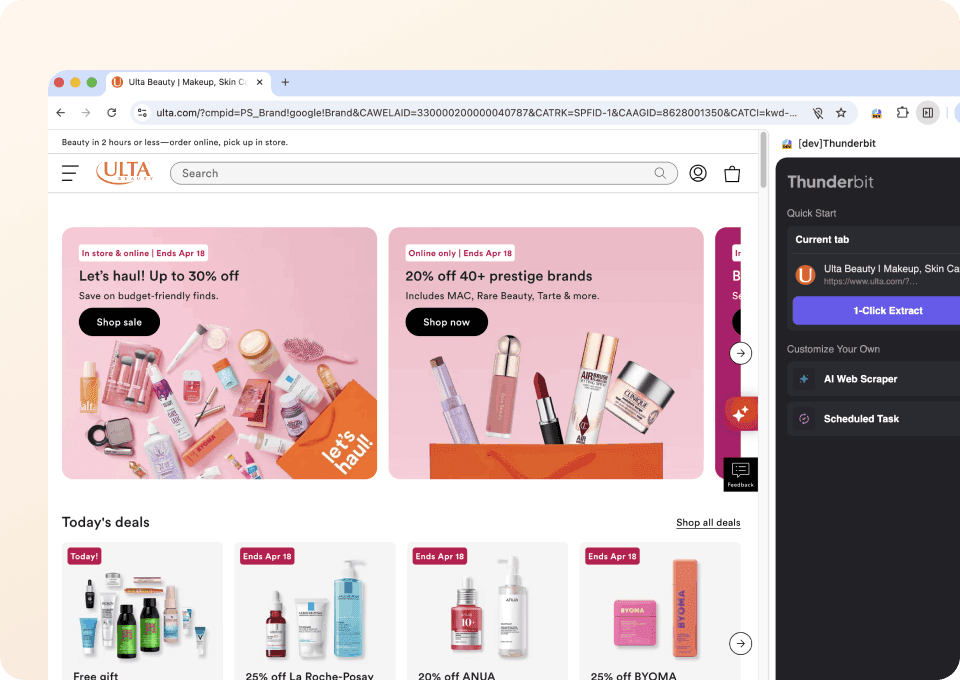
Ulta Beauty Homepage

🧴 Ulta Beauty से आप क्या-क्या स्क्रैप कर सकते हैं

नीचे Ulta के प्रोडक्ट डेटा को स्क्रैप करने के दो आम वर्कफ़्लो दिए गए हैं—जो ecommerce ops, pricing analysis, assortment tracking और competitive research में काम आते हैं।

Ulta Beauty Skincare Products स्क्रैप करें

इस वर्कफ़्लो से आप Ulta की skincare category page से cleanser listings स्क्रैप कर सकते हैं—जिसमें pricing, ratings और product URLs शामिल होंगे। इसके बाद Scrape Subpages का उपयोग करके हर प्रोडक्ट पेज से ingredients, size और अन्य डिटेल्स भी निकाल सकते हैं।

Target page:

Ulta Skincare Cleansers Listing

Steps:

  1. डाउनलोड करें और अकाउंट रजिस्टर करें।
  2. जिस पेज से डेटा चाहिए, वहाँ जाएँ—उदाहरण:
  3. AI Suggest Columns पर क्लिक करें—यह पेज के आधार पर कॉलम नाम और data types सुझाता है।
  4. Scrape पर क्लिक करके स्क्रैपर चलाएँ, फिर डेटा डाउनलोड/एक्सपोर्ट करें।

Column names

ColumnDescription
🧴 Product Nameलिस्टिंग में दिखने वाला प्रोडक्ट टाइटल (कैटलॉग मैचिंग के लिए उपयोगी)।
🔗 Product URLsubpage enrichment के लिए प्रोडक्ट डिटेल पेज का डायरेक्ट लिंक।
🏷️ Brandलिस्टिंग कार्ड पर दिखने वाला ब्रांड नाम।
💲 Priceवर्तमान सूचीबद्ध कीमत (यदि sale price दिखे तो उसे भी कैप्चर करें)।
🧾 List Priceडिस्काउंट होने पर ओरिजिनल कीमत (प्रमो ट्रैकिंग के लिए उपयोगी)।
Ratingलिस्टिंग में दिखने वाली औसत स्टार रेटिंग।
🧍 Review Countप्रोडक्ट से जुड़े कुल रिव्यू की संख्या।
🖼️ Image URLमुख्य प्रोडक्ट इमेज URL (Airtable/Notion के image fields के लिए उपयोगी)।
🧪 Key Ingredientsप्रोडक्ट subpage से निकाला गया ( Scrape Subpages का उपयोग करें)।
📦 Size / Volumenormalization के लिए प्रोडक्ट subpage से net weight/volume।
Availabilitysubpage से in stock / out of stock या availability संदेश।

Ulta Beauty Makeup Products स्क्रैप करें

इस वर्कफ़्लो से आप brand-filtered makeup listing (Rare Beauty) स्क्रैप कर सकते हैं और new arrivals, pricing changes, और shade availability ट्रैक कर सकते हैं। यह assortment monitoring और merchandising analysis के लिए खास तौर पर उपयोगी है।

Target page:

Ulta Rare Beauty Listing

Steps:

  1. डाउनलोड करें और अकाउंट रजिस्टर करें।
  2. जिस पेज से डेटा चाहिए, वहाँ जाएँ—उदाहरण:
  3. AI Suggest Columns पर क्लिक करके listing और product cards के लिए सुझाए गए फ़ील्ड जनरेट करें।
  4. Scrape पर क्लिक करके डेटा इकट्ठा करें, फिर अपने पसंदीदा टूल में एक्सपोर्ट करें।

Column names

ColumnDescription
💄 Product Nameलिस्टिंग में दिखने वाला मेकअप प्रोडक्ट नाम।
🏷️ Brandब्रांड नाम (जब आप कई ब्रांड स्क्रैप कर रहे हों तो उपयोगी)।
🔗 Product URLsubpage scraping के लिए प्रोडक्ट डिटेल पेज लिंक।
💲 Priceदिख रही वर्तमान कीमत (लागू हो तो sale price भी कैप्चर करें)।
Ratingलिस्टिंग कार्ड पर दिखने वाली स्टार रेटिंग।
🧍 Review Countदिखने वाले कुल रिव्यू की संख्या।
🎨 Shade Countशेड्स/वेरिएंट्स की संख्या (अक्सर subpage पर मिलती है)।
🎨 Shade Namesप्रोडक्ट subpage से निकाली गई शेड लिस्ट (multi-select friendly)।
🧾 Product Typeकैटेगरी/टाइप (foundation, blush, lip आदि), अक्सर subpage पर।
🧪 Ingredientscompliance checks के लिए प्रोडक्ट subpage से ingredient list।
🖼️ Image URLकैटलॉगिंग और creative review के लिए मुख्य इमेज URL।
Availabilitysubpage से stock status या availability संदेश।

📈 Ulta Beauty Tool क्यों इस्तेमाल करें

Ulta के प्रोडक्ट डेटा को स्क्रैप करना तब उपयोगी होता है जब आपको analysis, reporting और operations के लिए बार-बार इस्तेमाल होने वाले, स्ट्रक्चर्ड डेटासेट चाहिए।

Ulta स्क्रैप करने के आम कारण:

  • Ecommerce & merchandising teams: categories और brands में assortment changes, new arrivals और price movements ट्रैक करना।
  • Brand & competitive intelligence: competitor pricing, review velocity और product positioning मॉनिटर करना।
  • Marketing teams: analysis के लिए product feeds बनाना, top-rated items पहचानना, और products के claims/ingredients की तुलना करना।
  • Operations & analytics: manual copy/paste के बिना Sheets, Airtable या BI tools के लिए dashboards हेतु साफ़ डेटासेट बनाना।
  • Retail researchers: trend analysis के लिए स्ट्रक्चर्ड डेटा इकट्ठा करना (skincare ingredients, shade ranges, product formats)।

Thunderbit बिज़नेस वर्कफ़्लो के लिए बनाया गया है: AI डेटा को स्ट्रक्चर करता है, pagination scraping कई पेजों से डेटा लाता है, और subpage scraping हर row में गहरी प्रोडक्ट डिटेल्स जोड़ देता है।

🧩 Ulta Beauty Chrome Extension कैसे इस्तेमाल करें

  1. Thunderbit Chrome Extension इंस्टॉल करें: इसे से लें और पर अपना अकाउंट बनाएं।
  2. Ulta के किसी पेज पर जाएँ: या जैसी category/brand listing खोलें।
  3. AI-Powered Scraper चालू करें: AI Suggest Columns पर क्लिक करके फ़ील्ड जनरेट करें, फिर जरूरत हो तो column names और data types (Text, Number, URL, Image, Multi Select) एडजस्ट करें।
  4. Scrape और enrich करें: listing के लिए Scrape क्लिक करें, फिर Scrape Subpages से ingredients, shade lists, sizes आदि उसी टेबल में जोड़ें। Excel, Google Sheets, Airtable या Notion में एक्सपोर्ट करें।

अगर आप repeatable workflow बना रहे हैं, तो ये पढ़ना मददगार रहेगा:

  • More guides:

💳 Ulta Beauty के लिए Pricing

Thunderbit एक सरल credit system इस्तेमाल करता है: 1 credit = आपकी results table में 1 output row। अगर आप 100 products स्क्रैप करते हैं, तो लगभग 100 credits लगेंगे (subpage enrichment आमतौर पर existing rows को ही enrich करता है; अतिरिक्त rows तभी बढ़ती हैं जब आप अलग lists स्क्रैप करने का विकल्प चुनते हैं)।

फ्री में आप क्या ट्राय कर सकते हैं:

  • Free tier में आप हर महीने 6 pages स्क्रैप कर सकते हैं (page-based free usage)।
  • अगर आप free trial शुरू करते हैं, तो आप 10 pages मुफ्त स्क्रैप कर सकते हैं—यह Ulta category pages और subpage enrichment टेस्ट करने के लिए बढ़िया है।

Paid plans (monthly और yearly) आपके volume के साथ scale होते हैं। Yearly plan ज़्यादा किफायती होता है क्योंकि month-to-month भुगतान की तुलना में इसमें डिस्काउंट शामिल होता है।

लेटेस्ट विकल्प आप यहाँ देख सकते हैं:

TierMonthly PriceYearly PriceYearly Total PriceCredits (Monthly)Credits (Yearly)
FreeFreeFreeFree6 pagesN/A
Starter$15$9$1085005,000
Pro 1$38$16.5$1993,00030,000
Pro 2$75$33.8$3986,00060,000
Pro 3$125$68.4$79610,000120,000
Pro 4$249$137.5$1,59220,000240,000

❓ FAQ

  1. AI Powered Ulta Beauty Scraper क्या है?
    AI Powered Ulta Beauty Scraper, Thunderbit के अंदर एक वर्कफ़्लो है जो Ulta की product listings और product details को एक स्ट्रक्चर्ड टेबल में निकालता है। आप AI से price, rating और product URL जैसे फ़ील्ड पहचान सकते हैं, फिर subpages स्क्रैप करके ingredients, shades और availability जोड़कर हर row को enrich कर सकते हैं।

  2. Thunderbit क्या है?
    एक AI web scraper Chrome Extension है, जो कुछ ही क्लिक में वेबसाइट्स से स्ट्रक्चर्ड डेटा इकट्ठा करने में मदद करता है। यह उन बिज़नेस टीमों के लिए बनाया गया है जिन्हें scripts मेंटेन किए बिना Excel, Google Sheets, Airtable और Notion में भरोसेमंद exports चाहिए।

  3. क्या मैं Ulta पर listing pages और product detail pages—दोनों स्क्रैप कर सकता/सकती हूँ?
    हाँ। आम तौर पर आप पहले listing page स्क्रैप करके product cards कैप्चर करते हैं, फिर Scrape Subpages से हर product URL पर जाकर ingredients, size, shade names और availability जैसे deeper fields निकालते हैं। इससे डेटासेट एक जैसा रहता है और manual काम कम होता है।

  4. क्या Thunderbit Ulta category pages पर pagination सपोर्ट करता है?
    हाँ। Thunderbit pagination scraping सपोर्ट करता है—जिसमें click-based pagination और infinite scroll patterns शामिल हैं। Ulta में यह खास है क्योंकि categories और brand pages अक्सर कई पेजों में फैले होते हैं, और आप एक run में सैकड़ों products तक इकट्ठा करना चाह सकते हैं।

  5. Ulta product analysis के लिए कौन से data fields सबसे उपयोगी हैं?
    pricing और assortment tracking के लिए product name, brand, price, list price, rating, review count और product URL पर फोकस करें। deeper analysis के लिए subpages से ingredients, size/volume, shade count, shade names और availability जोड़ें ताकि normalization और comparisons आसान हों।

  6. क्या मैं Ulta डेटा को Google Sheets, Airtable या Notion में एक्सपोर्ट कर सकता/सकती हूँ?
    हाँ। Thunderbit Excel में free export सपोर्ट करता है और Google Sheets, Airtable व Notion में भी एक्सपोर्ट देता है। अगर आप image fields शामिल करते हैं, तो Thunderbit image URLs साथ ले जाता है—और Airtable/Notion जैसे टूल्स में इन्हें image-type fields के रूप में हैंडल करके देखना आसान हो जाता है।

  7. Thunderbit के साथ Ulta स्क्रैपिंग कितनी तेज़ होती है?
    कुछ पेजों के लिए runs आम तौर पर तेज़ होते हैं। स्पीड page size, pagination depth और subpage scraping ऑन करने पर निर्भर करती है। अगर पेज public हैं और login की जरूरत नहीं, तो Cloud Scraping तेज़ हो सकता है; और अगर आपको अपना session चाहिए, तो Browser Scraping बेहतर रहता है।

  8. क्या Ulta पर Thunderbit इस्तेमाल करने के लिए coding skills चाहिए?
    नहीं। Thunderbit non-technical workflows के लिए बनाया गया है: पेज खोलें, AI Suggest Columns क्लिक करें, फिर Scrape। चाहें तो आप columns customize कर सकते हैं और field instructions जोड़ सकते हैं, लेकिन scripts की जरूरत नहीं होती।

  9. क्या Ulta का product data स्क्रैप करना ठीक है?
    आपको हमेशा लागू कानूनों, Ulta की terms और अपनी organization की compliance requirements का पालन करना चाहिए। व्यवहार में, कई टीमें internal analysis के लिए publicly available product information स्क्रैप करती हैं—लेकिन डेटा का सही उपयोग और site policies का सम्मान करना आपकी जिम्मेदारी है।

📚 Learn More

  • एक्सटेंशन लें:
  • प्रोडक्ट अपडेट्स और गाइड्स देखें:
  • scraping की बुनियाद समझें:
  • list + pagination workflows बनाएं:
  • साफ़ डेटासेट एक्सपोर्ट करें:
  • plans देखें:
  • tutorials देखें:
AI से डेटा एक्सट्रैक्ट करें
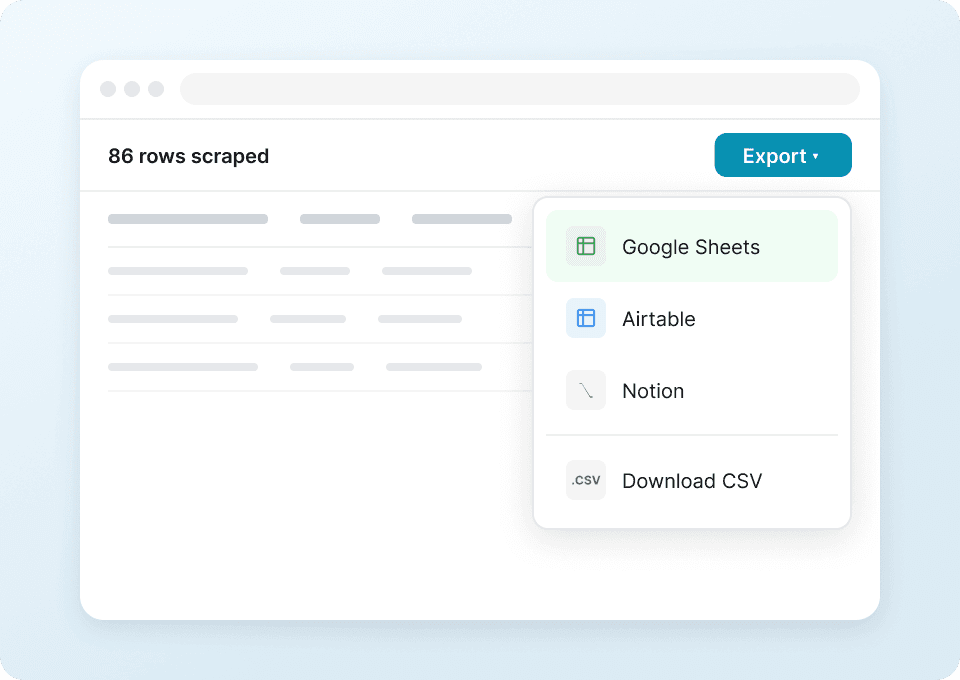
डेटा को आसानी से Google Sheets, Airtable या Notion में ट्रांसफर करें
Chrome Store Rating
PRODUCT HUNT#1 Product of the Week