अगर आपने कभी B2B sales को scale करने की कोशिश की है या कोई lead generation campaign चलाया है, तो आप उस एहसास को जानते होंगे: आप LinkedIn को घूर रहे होते हैं, हाथ में कॉफी लिए, और सोच रहे होते हैं कि इतने सारे profiles को आखिर real, qualified leads में कैसे बदला जाए—वो भी spreadsheets में copy-paste करते-करते पूरा हफ्ता गंवाए बिना। मैं यह खुद झेल चुका हूँ। और SaaS तथा automation tools बनाने में सालों बिताने वाले व्यक्ति के तौर पर (हाँ, बहुत सारी कॉफी भी पी है), मैं कह सकता हूँ: LinkedIn B2B lead generation का सबसे ताकतवर platform है—लेकिन तभी जब आप इसे सही तरीके से इस्तेमाल करना जानते हों, और boring कामों को automate करना जानते हों।
डेटा भी यही बताता है। LinkedIn के जरिए 80% B2B social media leads आते हैं, और 89% B2B marketers lead gen के लिए LinkedIn का इस्तेमाल करते हैं। LinkedIn के Lead Gen Forms की conversion rate लगभग 13% रहती है—जो landing pages के 4% average से काफी बेहतर है। लेकिन सच यह है: ज़्यादातर sales और operations teams अभी भी low response rates, सही prospects तक पहुँचने, और LinkedIn की limits से टकराए बिना outreach को scale करने में struggle करती हैं। इसी वजह से मैंने यह guide तैयार की है—ताकि आप साफ़ समझ सकें कि LinkedIn lead generation क्या है, इसे कैसे किया जाए, और 2025 में काम आने वाली 30 practical strategies क्या हैं (step-by-step examples के साथ)। साथ ही, मैं यह भी दिखाऊँगा कि automation कहाँ fit होती है: CRM hygiene, campaign follow-up, content operations, और LinkedIn के बाहर permitted data work में।
LinkedIn Lead Generation क्या है?
आसान शब्दों में: LinkedIn lead generation वह process है जिसमें LinkedIn platform का इस्तेमाल करके संभावित business leads को ढूँढ़ा, उनसे जुड़ा, और उन्हें nurture किया जाता है। यह सिर्फ connection requests भेजकर best की उम्मीद करने का नाम नहीं है। यह LinkedIn search, content, और networking features का इस्तेमाल करके सही लोगों—decision-makers, influencers, buyers—को identify करने और फिर ऐसे relationships बनाने की प्रक्रिया है जो sales, partnerships, या आपके business की किसी भी ज़रूरत में बदल सकें।
यह traditional lead generation से कैसे अलग है? फर्क यह है कि आप कहीं से खरीदी गई cold-call list पर निर्भर नहीं रहते। आप उस network में काम कर रहे होते हैं जहाँ लोग business करने की उम्मीद रखते हैं। खासकर B2B के लिए LinkedIn बेहद powerful है क्योंकि आप contact करने से पहले ही किसी व्यक्ति का title, company, और interests देख सकते हैं। यह sales के लिए X-ray vision जैसा है।
Modern Businesses के लिए LinkedIn Lead Generation क्यों ज़रूरी है
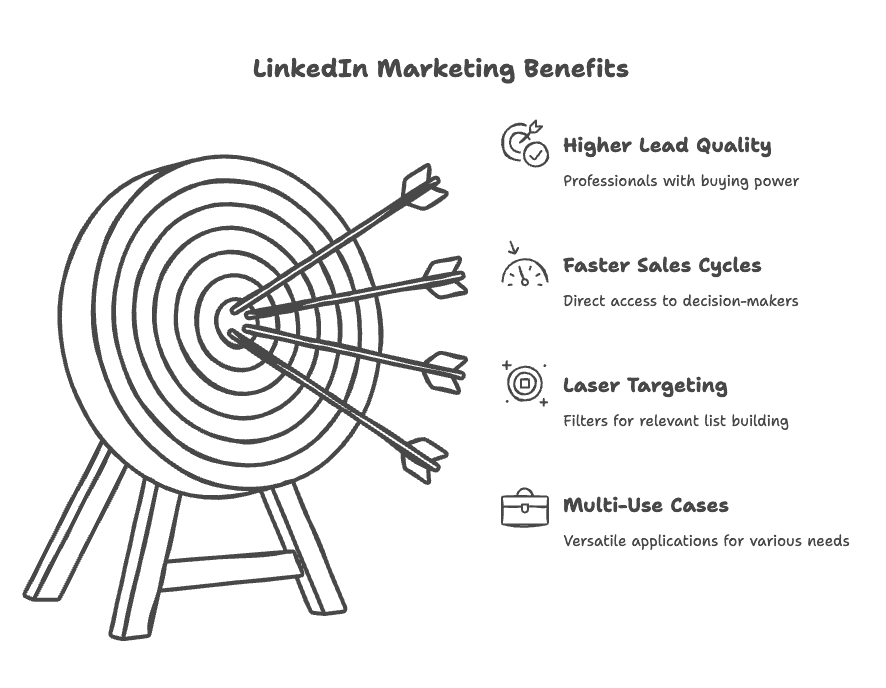
- ज़्यादा Quality Leads: LinkedIn users आम तौर पर professionals होते हैं और अक्सर buying power रखते हैं। आप बस messages को खाली जगह में नहीं फेंक रहे होते।
- तेज़ Sales Cycles: आप सीधे decision-makers तक पहुँच सकते हैं, बीच के “gatekeeper” step को बायपास करते हुए।
- सटीक Targeting: industry, job title, company size वगैरह के filters के साथ आप वास्तव में relevant lists बना सकते हैं।
- कई Use Cases: sales prospecting, hiring, partnerships, या clients के लिए lead generation campaign—LinkedIn हर जगह काम आता है।
यहाँ एक छोटा ROI snapshot है:
| Benefit | Teams पर असर |
|---|---|
| Lead Quality | ज़्यादा बेहतर (email/cold calling की तुलना में) |
| Response Rates | warm outreach के साथ 2-3x ज़्यादा |
| Targeting Precision | सबसे ऊपर (Sales Navigator में 30+ filters) |
| First Meeting तक Time | कम (buyers तक सीधा access) |
| Data Enrichment | आसान (public profiles, company info) |
| Automation Potential | मध्यम—platform-approved workflows का इस्तेमाल करें |
अगर आप lead generation agency चला रहे हैं या sales team manage कर रहे हैं, तो ये numbers सिर्फ impressive नहीं हैं—ये quota पूरा करने और चूक जाने के बीच का फर्क हैं।
LinkedIn से Leads कैसे Generate करें: ज़रूरी Basics
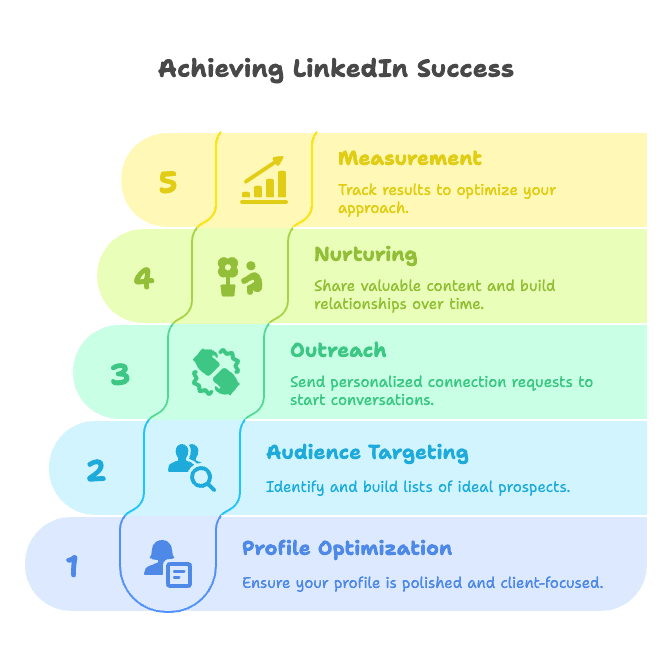
- Profile Optimization: अपना personal और company profile professional, भरोसेमंद, और client-focused बनाइए।
- Audience Targeting: LinkedIn search (या Sales Navigator) से अपने ideal prospects की lists बनाइए।
- Outreach: बातचीत शुरू करने के लिए personalized connection requests, messages, या InMails भेजिए।
- Nurturing: useful content शेयर कीजिए, thoughtful follow-up कीजिए, और समय के साथ रिश्ते बनाइए।
- Measurement: response rates, booked meetings, और closed deals ट्रैक करके approach को बेहतर बनाइए।
यहाँ sales और marketing दोनों की भूमिका होती है—sales का focus 1:1 outreach और relationship-building पर होता है, जबकि marketing content और campaigns के जरिए inbound leads लाती है।
Organic vs. Paid: आप organic तरीके से (content, networking, manual outreach के ज़रिए) या paid campaigns (LinkedIn Ads, Sponsored Content, Lead Gen Forms) के साथ leads ला सकते हैं। सबसे अच्छे teams दोनों का मिश्रण इस्तेमाल करते हैं।
2025 के लिए Top 30 LinkedIn Lead Generation Strategies
अब असली काम की बात। यहाँ 30 actionable LinkedIn lead generation strategies हैं, theme-wise grouped, step-by-step guides और real-world examples के साथ।
Profile Optimization और Authority Building
1. Lead Generation के लिए अपना LinkedIn Profile Optimize करें
पहला impression बहुत मायने रखता है। किसी से संपर्क करने से पहले यह सुनिश्चित कीजिए कि आपका profile आपके लिए काम कर रहा है—आपके खिलाफ नहीं। Professional photo लगाइए, ऐसी headline लिखिए जो आपके value proposition को बताए (सिर्फ job title नहीं), और ऐसा About section तैयार कीजिए जो आपके target client की problems को सीधे address करे। अपने profile को landing page की तरह सोचिए: results दिखाइए, case studies शेयर कीजिए, और media या certifications जोड़िए। बहुत से buyers आपके message का reply profile quality देखकर तय करते हैं (details here).
2. LinkedIn Influencer बनिए (Thought Leadership)
LinkedIn influencer बनने के लिए आपको 100,000 followers की ज़रूरत नहीं है। लगातार valuable content शेयर कीजिए—how-to guides, industry tips, mini case studies, या personal stories। एक अच्छा post भी 50,000+ views ला सकता है। “how-to” tutorials, storytelling posts, या “comment for content” offers जैसे formats आज़माइए (जैसे, “Comment ‘guide’ और मैं आपको अपना template भेज दूँगा”). समय के साथ inbound leads अपने आप आने लगेंगे।
Content और Engagement Tactics
3. Post Engagement को Warm Outreach में बदलिए
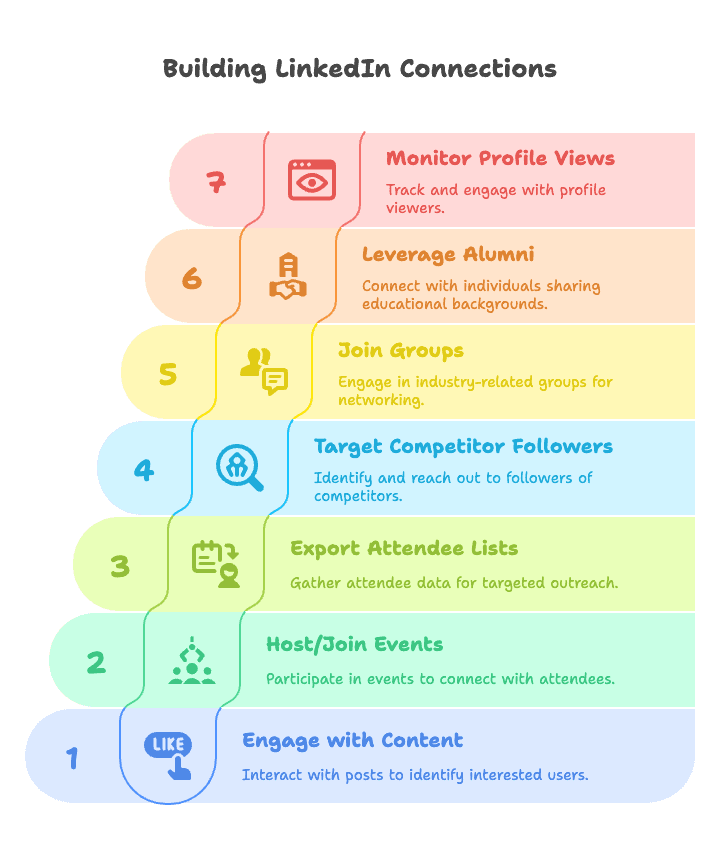
हर post जिस पर लोग engage करते हैं, एक signal होता है। Like या comment करने वाले लोग topic में रुचि दिखा रहे होते हैं, लेकिन इसका मतलब यह नहीं कि उन्हें bulk outreach list में डाल दिया जाए। Engagement को manually review कीजिए, अपने ICP से match करने वालों को प्राथमिकता दीजिए, और contextual message भेजिए जैसे: “Hi Jane, supply-chain post पर आपका comment देखा। Forecasting वाला point काफ़ी relevant लगा। इस quarter आपकी team इसे कैसे handle कर रही है?”
4. LinkedIn Events का फायदा उठाइए (Host करें या Join करें)
LinkedIn Live Event host कीजिए या relevant industry events में हिस्सा लीजिए। जब लोग RSVP करते हैं, तो वे interest दिखा रहे होते हैं। Event के बाद attendees को friendly follow-up भेजिए: “Topic पर हमारे LinkedIn Live में शामिल होने के लिए धन्यवाद। अगर आपके कोई सवाल हों या related problem पर और बात करनी हो, तो बेझिझक connect करें!” (how-to).
5. Event Attendees के साथ Follow Up करें
Relevant LinkedIn Events खोजिए और जो context वे देते हैं उसका उपयोग कीजिए। अगर attendee visibility और messaging options LinkedIn के अंदर उपलब्ध हों, तो shared event का ज़िक्र करते हुए selectively approach करें: “Hi John, देखा कि हम दोनों XYZ event के लिए sign up किए थे। Event आपको कैसा लगा?” इसे relationship-building की तरह रखिए, bulk extraction की तरह नहीं।
6. Competitors के Followers को Target करें
Sales Navigator के “Company Followers” filter का इस्तेमाल करके उन लोगों को पहचानिए जो competitor company pages follow करते हैं। Relevant leads को Sales Navigator या अपने approved CRM workflow में save कीजिए, फिर tailored pitch के साथ contact कीजिए: “मैंने देखा कि आप [Competitor] को follow करते हैं। अगर आप इस space में options देख रहे हैं, तो हम [key differentiator] ऑफर करते हैं…” (how-to).
7. LinkedIn Groups और Communities में सक्रिय हों
अपने target industry से जुड़े groups join कीजिए। पहले participate कीजिए, फिर उन members से connect कीजिए जिनसे आपने सच में interaction किया हो। Group को icebreaker की तरह इस्तेमाल कीजिए: “Hi, हम दोनों HR Innovators group में हैं—समान सोच वाले professionals से जुड़ना हमेशा अच्छा लगता है।” (tips)
8. Alumni और Shared Backgrounds खोजिए
अपनी school LinkedIn page पर “Alumni” tool का इस्तेमाल कीजिए या shared backgrounds (पिछले employers, volunteer orgs) खोजिए। किसी खास connection का ज़िक्र करना (“हम दोनों University X से graduated हुए थे—Go Wildcats!”) trust और reply rates बढ़ाता है (more).
9. “Who Viewed Your Profile” पर नज़र रखें
“Who viewed your profile” section नियमित रूप से देखें। अगर किसी ने आपका profile देखा है, तो हो सकता है वे interested हों। Friendly message भेजिए: “Hi, देखा कि आपने मेरा profile visit किया—देखने के लिए धन्यवाद! अगर [your domain] के बारे में कोई insight चाहिए या connect करना चाहें, तो बताइए।” (how-to)
Outreach और Messaging
10. Personalized Connection Requests और Messages लिखिए
Generic pitch छोड़ दीजिए। हर message को personalize कीजिए—बताइए कि आपने उन्हें कहाँ पाया, उनकी किसी संभावित समस्या से जोड़िए, value offer कीजिए, और बातचीत के लिए invite कीजिए। उदाहरण: “Hi Jane, मैंने देखा कि आपने B2B email open rates सुधारने वाले post को पसंद किया। जिन marketing directors से मैं बात करता हूँ, उनमें बहुतों को personalization को scale करना एक चुनौती लगता है। क्या Acme में भी यह आपके लिए issue है?” (templates)
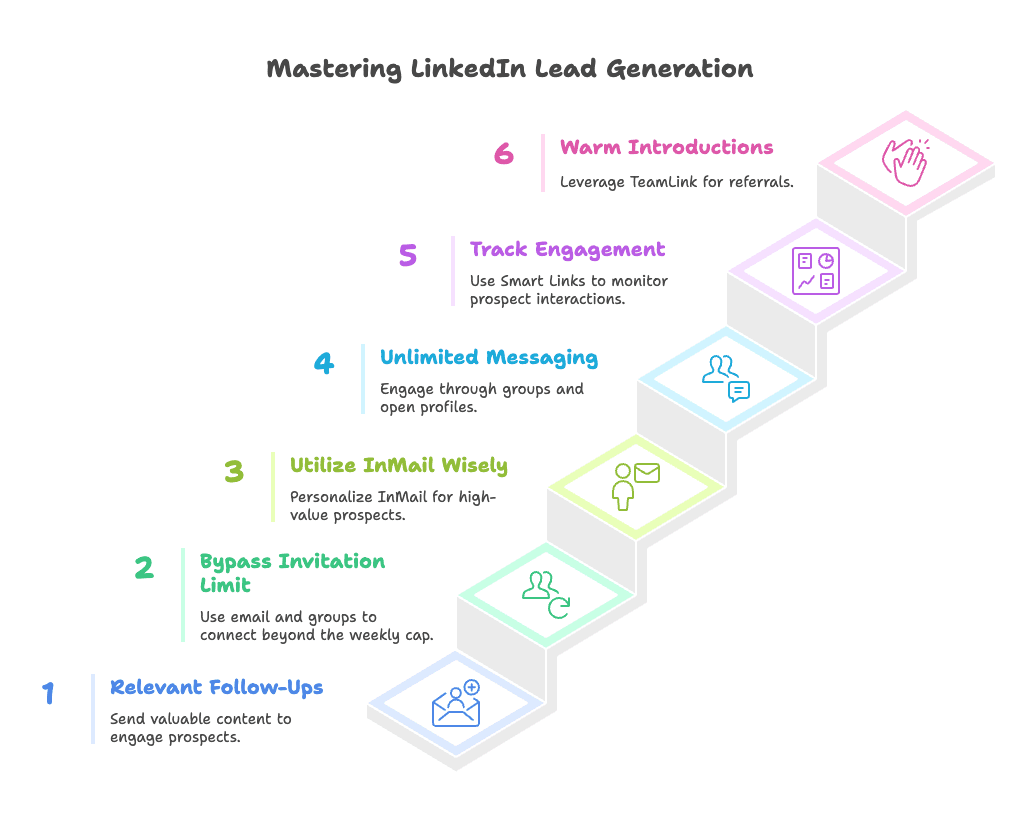
11. Relevant Follow-Ups भेजिए
बस “checking in” मत लिखिए। हर follow-up में value होनी चाहिए: कोई case study, testimonial, या उनकी company पर नई observation शेयर कीजिए। उन्हें spaced out भेजिए और initial message के बाद 2-3 follow-ups कीजिए (examples).
12. LinkedIn की Weekly Invitation Limit को समझदारी से संभालिए
LinkedIn ज़्यादातर users के लिए प्रति सप्ताह लगभग 100 connection requests की limit रखता है। इसे पार करने के लिए email invite का इस्तेमाल कीजिए (ये quota में count नहीं होते), Open Profiles का लाभ उठाइए, और groups या events के जरिए connect कीजिए (details).
13. LinkedIn InMail (Paid Messages) का समझदारी से इस्तेमाल करें
InMail credits का इस्तेमाल उन high-value prospects के लिए कीजिए जिन्हें आप किसी और तरह से नहीं पहुँचा सकते। हर InMail को personalize कीजिए और इसे आख़िरी विकल्प की तरह इस्तेमाल कीजिए। अगर recipient 90 दिनों में reply नहीं करता, तो LinkedIn credit वापस भी कर देता है (more).
14. Groups, Events, और Open Profiles के जरिए “Unlimited” Messaging
अगर आप किसी के साथ same group या event share करते हैं, तो आप अक्सर उन्हें सीधे message कर सकते हैं—बिना InMail credits या connection requests के। साथ ही, Open Profiles को कोई भी message कर सकता है (how-to).
15. Smart Links से Engagement Track करें
अगर आपके पास Sales Navigator Team है, तो content share करने के लिए Smart Links का इस्तेमाल कीजिए। जब कोई prospect link पर क्लिक करता है, तो आपको पता चलता है कि किसने access किया और उन्होंने क्या देखा—यानी focused follow-ups के लिए perfect (details).
16. TeamLink और Referrals से Warm Introductions लें
Sales Navigator में TeamLink का इस्तेमाल करके देखें कि क्या coworkers आपके targets से connected हैं, और intro माँगें। Warm introductions से मिले leads तेज़ी से move करते हैं और ज़्यादा responsive होते हैं (how-to).
Advanced Search और Targeting
17. Advanced Search और Sales Navigator Filters से Leads खोजिए
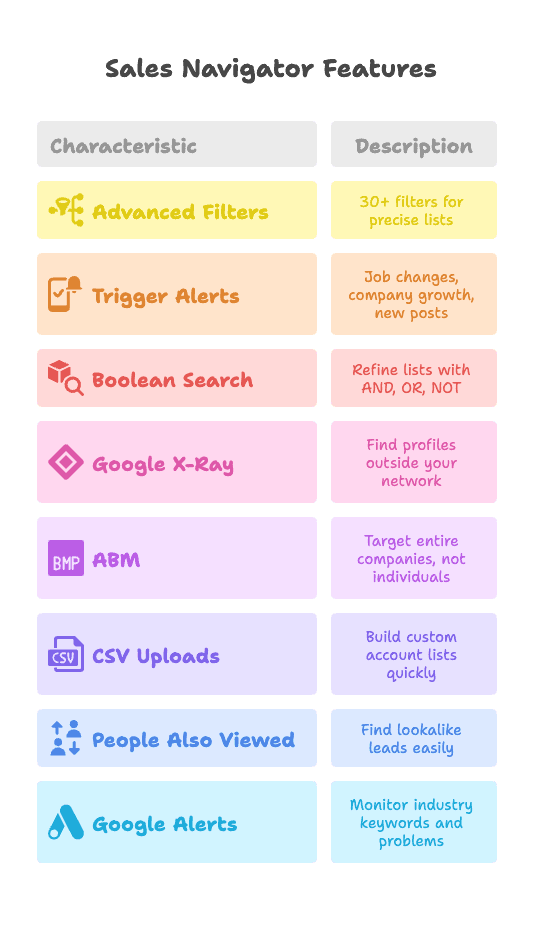
Sales Navigator में 30+ filters मिलते हैं—seniority, job title, industry, company size, geography, और बहुत कुछ। Precise lists बनाइए, searches save कीजिए, और जब नए लोग आपके criteria से match हों तो alerts पाइए (guide).
18. Trigger Events के लिए Sales Navigator Alerts सेट कीजिए
Saved leads की job changes, company growth, या नए posts पर नज़र रखें। सही समय पर relevant context के साथ संपर्क करें (“Promotion के लिए बधाई!”) (details).
19. LinkedIn के लिए Boolean Search और Google X-Ray में महारत हासिल कीजिए
LinkedIn में Boolean search (AND, OR, NOT) का इस्तेमाल करके अपनी lists को refine कीजिए। या Google X-Ray search (जैसे, site:linkedin.com/in "VP Marketing" "San Francisco") से network के बाहर public profiles खोजिए (how-to).
20. LinkedIn पर Account-Based Marketing (ABM)
सिर्फ individuals नहीं, पूरे companies को target कीजिए। Sales Navigator से account lists save कीजिए, सभी key personas पहचानिए, और अपनी team में messaging को coordinate कीजिए (guide).
21. CSV Uploads का इस्तेमाल करके Laser-Focused Account Lists बनाइए
Target companies की CSV Sales Navigator Team में upload करके custom Account List बनाई जा सकती है। उनके employees को तुरंत prospect करना शुरू कीजिए—manual search की ज़रूरत नहीं (how-to).
22. “People Also Viewed” और LinkedIn Suggestions का लाभ उठाइए
Profiles के “People also viewed” sidebar में lookalike leads देखें। LinkedIn की recommendation engine similar prospects के clusters तेज़ी से बनाने में मदद कर सकती है (tips).
23. LinkedIn के लिए Google Alerts और Social Listening का इस्तेमाल करें
अपनी industry के keywords पर Google Alerts सेट करें। जब कोई आपकी solution वाली problem पर post करे, तो मदद लेकर पहुँचिए। Buying signals पकड़ने के लिए LinkedIn hashtags follow कीजिए (how-to).
Automation और Scaling
24. सावधानी के साथ Prospecting Automate कीजिए (LinkedIn Automation Tools)
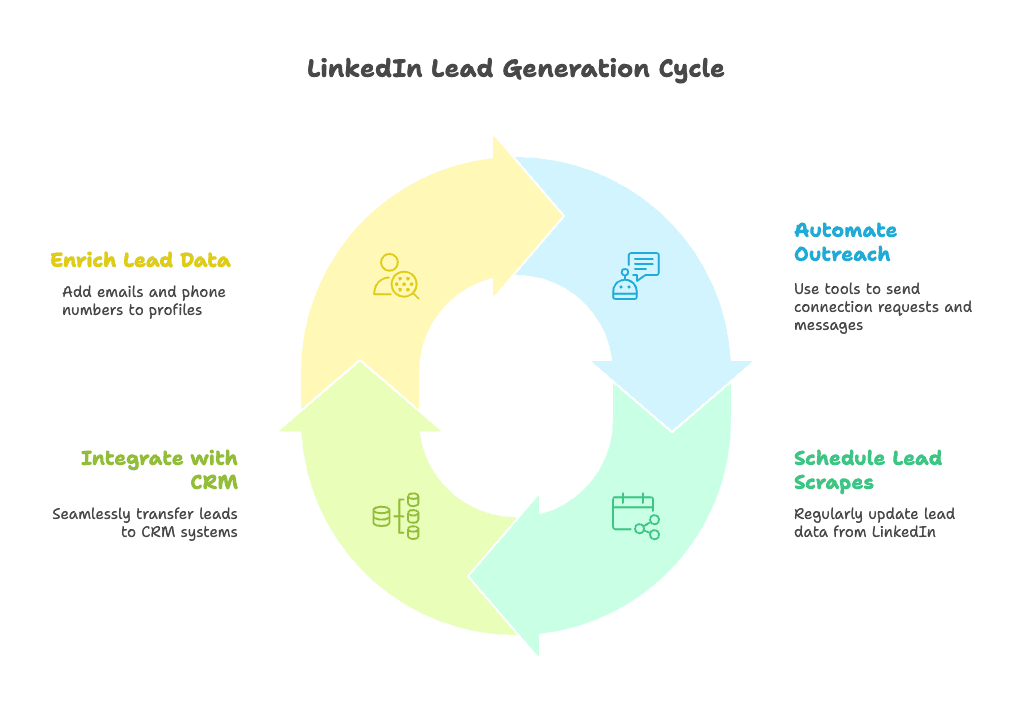
जब आपका messaging approach manual तरीके से काम करने लगे, तब LinkedIn की native features, approved CRM workflows, और clear human review के साथ धीरे-धीरे scale कीजिए। ऐसे connection requests, messages, profile visits, या scraping को automate करने से बचिए जो platform rules का उल्लंघन करते हों। मकसद consistency होना चाहिए, सिर्फ volume नहीं।
Saved searches, official alerts, CRM tasks, और recurring review blocks का इस्तेमाल करके lead process को fresh रखिए। LinkedIn के बाहर job boards या company websites के लिए automation का इस्तेमाल केवल वहीं करें जहाँ source इसकी अनुमति देता हो।
25. नियमित Lead Reviews शेड्यूल कीजिए
Saved searches, official alerts, CRM tasks, और recurring review blocks का इस्तेमाल करके lead process को fresh रखिए। LinkedIn के बाहर job boards या company websites के लिए automation का इस्तेमाल केवल वहीं करें जहाँ source इसकी अनुमति देता हो।
26. Campaign Responses को अपने CRM से जोड़िए
LinkedIn की native CRM integrations, Lead Gen Form connectors, या approved workflow tools का इस्तेमाल करके submitted campaign leads और rep activity को अपने CRM में भेजिए। Source, consent, campaign, और owner fields को साफ़ रखिए ताकि follow-up तेज़ और auditable हो।
27. Email Finding और Enrichment Tools का इस्तेमाल कीजिए
Outreach को जिम्मेदारी से scale करने के लिए, consented, domain-based, या licensed contact data के साथ CRM records enrich कीजिए—Snov.io, Hunter, या अपने approved data provider जैसे tools का उपयोग करके। LinkedIn और email touches को combine करने से response rates बढ़ सकती हैं (how-to).
Paid Campaigns और Lead Gen Forms
28. Sponsored Message Ads (InMail Ads) चलाइए
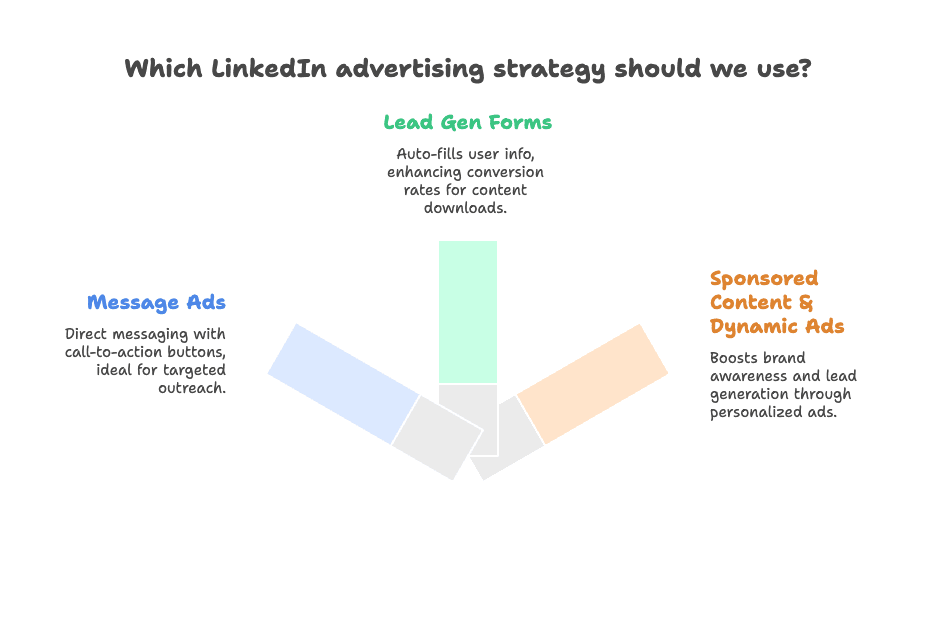
LinkedIn Message Ads का इस्तेमाल करके बड़े पैमाने पर direct messages भेजिए। ये users के inbox में call-to-action button के साथ दिखाई देते हैं। Job title, industry, या company list के आधार पर target कीजिए। Message छोटे और focused रखिए (examples).
29. LinkedIn Lead Gen Form Ads इस्तेमाल कीजिए
LinkedIn Lead Gen Forms, user के profile से contact info auto-fill कर देते हैं, जिससे form submit करना बेहद आसान हो जाता है। Conversion rates औसतन 13% रहती हैं। इनका इस्तेमाल content downloads, webinar signups, या demo requests के लिए कीजिए (how-to).
30. Sponsored Content और Dynamic Ads चलाइए
Feed में posts promote कीजिए या Dynamic Ads इस्तेमाल कीजिए (जो user के name/photo के साथ personalize होती हैं) ताकि ध्यान आकर्षित हो सके। Sponsored Content brand awareness और lead gen—दोनों के लिए शानदार है, खासकर जब इसे Lead Gen Forms के साथ जोड़ा जाए (details).
LinkedIn Lead Generation Solutions की तुलना: Manual बनाम Automated
चलो workflow design की बात करते हैं। आप सब कुछ हाथ से कर सकते हैं, LinkedIn के native paid और CRM tools का इस्तेमाल कर सकते हैं, या planning, personalization, और data cleanup में AI जोड़ सकते हैं।
| Approach | फायदे | कमियाँ | किसके लिए सबसे अच्छा |
|---|---|---|---|
| Manual Prospecting | सबसे ज़्यादा control, personalization | धीमा, error-prone, scale करना मुश्किल | छोटी teams, custom work |
| Native LinkedIn/CRM Workflows | platform के लिए बने, govern करना आसान | plan limits, admin setup, फिर भी human review चाहिए | sales teams, RevOps |
| AI-Assisted Operations | segmentation, message drafts, CRM cleanup, reporting में मदद | human checking ज़रूरी; consent या platform rules का विकल्प नहीं | sales/ops teams, agencies |
सबसे टिकाऊ तरीका best sense में boring है: targeting, relationship-building, ads, और forms के लिए LinkedIn का इस्तेमाल करें; governance के लिए CRM का; segmentation, message drafting, और QA के लिए AI का; और web extraction tools को उन sources तक सीमित रखें जहाँ extraction की अनुमति हो।
Thunderbit कहाँ फिट होता है: Adjacent Web Lead Workflows
अगर आप sales team का हिस्सा हैं—चाहे SaaS, agency, या services में—तो Thunderbit उन adjacent research sources में मदद कर सकता है जिन्हें आपकी team process करने की अनुमति रखती है: company websites, public directories, event pages जिन्हें आप control करते हैं, PDFs, और partner pages।
-
Use Case 1: Owned event pages process करें
अगर आपकी team webinar या event host करती है और उसे permitted attendee page access है, तो Thunderbit उस web page या PDF export को structured spreadsheet में बदलने में मदद कर सकता है, ताकि follow-up आसान हो सके।
-
Use Case 2: LinkedIn के बाहर target accounts research करें
Target accounts identify करने के बाद, Thunderbit public company-site context इकट्ठा कर सकता है—जैसे office locations, product pages, partner pages, hiring pages, या directory listings जहाँ extraction allowed हो।
-
Use Case 3: Permitted market signals ट्रैक करें
Account executives company career pages, public news pages, या industry directories पर नज़र रख सकते हैं जहाँ recurring extraction permitted हो। इससे restricted platform surfaces को छुए बिना account research fresh रहती है।
-
Use Case 4: Company context के साथ personalization करें
BDRs structured company-site data, product pages, case studies, या public bios का उपयोग करके अधिक specific outreach लिख सकते हैं—उसके बाद, जब lead approved path से पहले ही CRM में आ चुका हो।
-
Use Case 5: Owned sources से speed to lead बढ़ाइए
Inbound events, gated content downloads, या partner lists के साथ काम करने वाली SDR teams के लिए, Thunderbit CRM import से पहले data को जल्दी structure करने में मदद कर सकता है।
Thunderbit तब उपयोगी है जब source permitted हो और output को clean spreadsheet या CRM-ready table में बदलना हो। इससे reps का ध्यान उसी पर रहता है जो सच में matter करता है: conversations, relevance, और follow-up।
Thunderbit Adjacent Lead Research Workflows को कैसे Support करता है
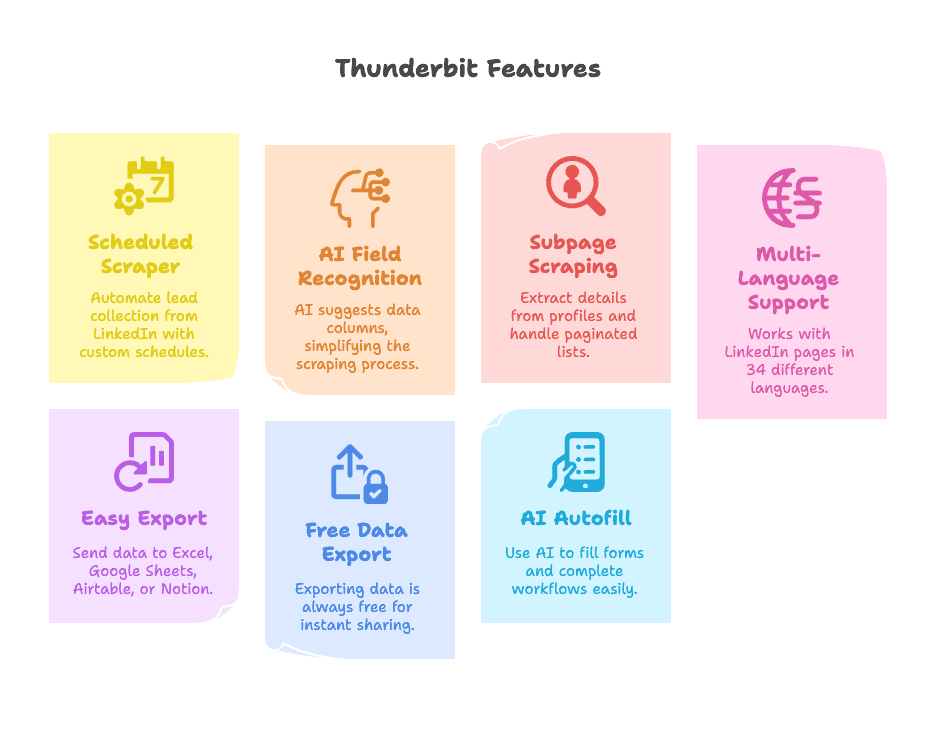
- Scheduled Scraper: Permitted company websites, public directories, event pages जिन्हें आप control करते हैं, और अन्य approved sources से recurring extraction automate कीजिए। बस schedule को plain English में बताइए (“हर सोमवार सुबह 9 बजे”) और बाकी Thunderbit संभाल लेता है।
- AI-Powered Field Recognition: “AI Suggest Fields” पर क्लिक कीजिए और Thunderbit page पढ़कर Name, Title, Company जैसी columns suggest करता है—selectors से झंझट नहीं।
- Subpage और Pagination Scraping: Thunderbit हर permitted listing page पर जा सकता है, अतिरिक्त details निकाल सकता है, और paginated या infinite-scroll lists संभाल सकता है।
- Multi-Language Support: Global teams के लिए उपयोगी, खासकर multilingual websites और directories के साथ।
- Easy Export: अपना data सीधे Excel, Google Sheets, Airtable, या Notion में भेजिए। Copy-paste की परेशानी खत्म।
- Free Data Export: Export हमेशा free है, इसलिए आप leads तुरंत team के साथ शेयर कर सकते हैं।
- AI Autofill: Forms भरने या workflows complete करने के लिए AI का इस्तेमाल कीजिए—CRM imports से लेकर online registrations तक हर जगह काम आता है।
इसे खुद देखना चाहते हैं? Thunderbit Chrome Extension डाउनलोड करें और इसे किसी permitted company directory, आपके control वाले event page, या public web source पर आज़माइए।
Permitted Web Lead Research के लिए Thunderbit आज़माएँ
2025 के लिए Lead Generation Campaign की Best Practices
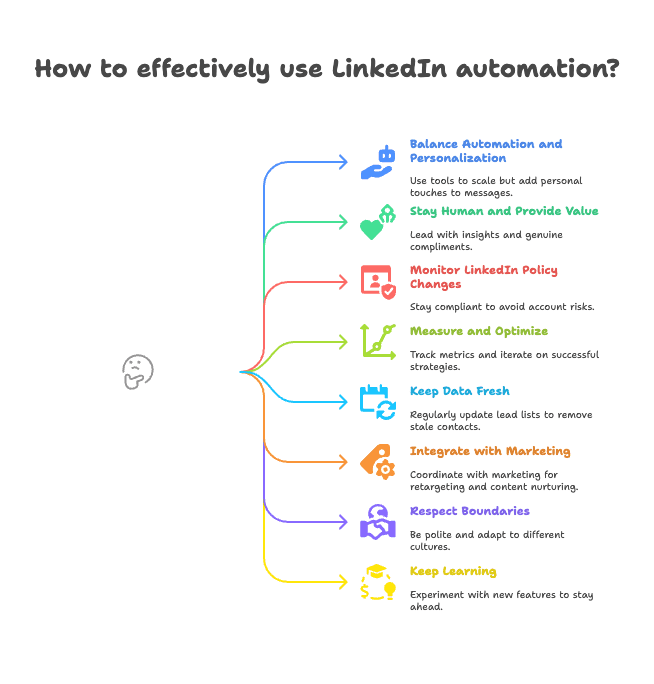
- Automation और Personalization में संतुलन रखिए: Scale करने के लिए tools इस्तेमाल करें, लेकिन messages में हमेशा personal touch जोड़िए। अपने leads को segment कीजिए और outreach को tailor कीजिए।
- Human बने रहिए और Value दीजिए: Insights, tips, या genuine compliments से शुरुआत कीजिए। सिर्फ बेचिए मत, educate भी कीजिए।
- LinkedIn Policy Changes पर नज़र रखिए: LinkedIn के बदलते rules के साथ compliant रहिए। Aggressive automation से account risk में मत डालिए।
- Measure और Optimize कीजिए: Key metrics (acceptance rate, reply rate, meetings booked) track कीजिए और जो काम करे, उसे दोहराइए।
- Data Fresh रखिए: Platform-native exports और CRM syncs पर भरोसा कीजिए ताकि lead lists updated रहें; LinkedIn के बाहर permitted sources के लिए scheduled extraction भी मददगार हो सकती है। Stale contacts नियमित रूप से हटाइए।
- Marketing के साथ Integrate कीजिए: Retargeting ads या content nurturing के लिए marketing टीम के साथ coordinate कीजिए।
- Boundaries का सम्मान कीजिए: Polite रहिए, spam मत कीजिए, और अलग-अलग regions या cultures के हिसाब से approach adjust कीजिए।
- सीखते रहिए: LinkedIn हमेशा बदल रहा है—नई features के साथ experiment कीजिए और आगे बने रहिए।
और best practices के लिए Thunderbit की lead generation techniques guide देखें।
निष्कर्ष: LinkedIn Lead Generation में सफलता कैसे पाएँ
Thunderbit के साथ Data Scraping के बारे में और जानें Get Started Free
LinkedIn B2B lead generation का platform इसलिए चुना जाता है क्योंकि यह काम करता है। सही strategies और tools के साथ आप इसे high-quality leads का consistent, scalable source बना सकते हैं—बिना अपनी team को थकाए या spreadsheets में डूबे। हमने 30 actionable tactics देखीं, profile optimization और advanced search tricks से लेकर automation और paid campaigns तक। असली secret क्या है? Smart strategy, consistent execution, native platform workflows, CRM hygiene, और यह समझना कि किससे contact करना सच में worthwhile है।
शुरुआत के लिए कुछ strategies चुनिए, अपने results मापिए, और धीरे-धीरे सुधार करते रहिए। और human element को हमेशा केंद्र में रखिए—technology आपके outreach को empower करे, replace नहीं। 2025 में वही teams जीतेंगी जो high-tech efficiency को high-touch authenticity के साथ जोड़ेंगी।
शुरू करने के लिए तैयार हैं? अपना profile optimize कीजिए, focused audience बनाइए, LinkedIn के native tools responsibly इस्तेमाल कीजिए, और अपना CRM साफ़ रखिए। Adjacent public-web research के लिए extraction tools का इस्तेमाल केवल उन्हीं sources पर करें जिन्हें process करने की अनुमति हो।
शुभकामनाएँ, और LinkedIn पर happy prospecting.
और tips तथा deep dives के लिए Thunderbit Blog देखें, जिसमें data scraping, list crawling, और scraping website data into Excel पर guides शामिल हैं।
Permitted Web Lead Research के लिए Thunderbit आज़माएँ Get Started Free
FAQs
1. B2B lead generation के लिए LinkedIn इतना powerful platform क्यों है?
LinkedIn B2B lead generation में इसलिए अलग है क्योंकि यह decision-makers तक सीधा access, उच्च-गुणवत्ता वाला professional audience, और advanced targeting features देता है। 80% से अधिक B2B social media leads LinkedIn से आने के कारण, यह sales cycles को छोटा करने और conversion rates बढ़ाने के लिए uniquely positioned है।
2. सफल LinkedIn lead generation campaign के मुख्य चरण क्या हैं?
ज़रूरी चरणों में LinkedIn profile को optimize करना, filters या Sales Navigator से सही audience target करना, personalized outreach messages भेजना, content और follow-ups के जरिए relationships nurture करना, और performance को लगातार measure करके approach को refine करना शामिल है।
3. Account risk पैदा किए बिना LinkedIn lead generation को scale कैसे करूँ?
LinkedIn की native features, approved CRM integrations, Lead Gen Forms, content workflows, और human-reviewed outreach का इस्तेमाल कीजिए। Third-party scraping या ऐसी automation से बचिए जो actions भेजती हो, profiles visit करती हो, या platform द्वारा अनुमति न दिए गए तरीके से data collect करती हो।
4. LinkedIn पर organic और paid lead generation में क्या फर्क है?
Organic lead generation content, networking, और manual outreach पर निर्भर करती है, जबकि paid strategies में LinkedIn Ads, Sponsored Content, और Lead Gen Forms इस्तेमाल होते हैं। दोनों के अपने फायदे हैं, और कई सफल teams reach और efficiency बढ़ाने के लिए hybrid approach अपनाती हैं।
5. इस sales workflow में web extraction tools कहाँ fit होते हैं?
Web extraction tools को adjacent, permitted research sources के लिए इस्तेमाल करें: company websites, directories, आपके control वाले event pages, PDFs, और अन्य sources जिन्हें आपकी team process कर सकती है। Platform targeting, messaging, ads, और lead-form workflows approved tools के अंदर ही रखें।