
मुझे आपको एक छोटी-सी कहानी सुनाने दीजिए। कई साल पहले, जब मैंने पहली बार ईकॉमर्स में काम शुरू किया था, तो मैं घंटों—कभी-कभी दिनों तक—Amazon से उत्पादों की कीमतें और रेटिंग्स स्प्रेडशीट में बड़े जतन से कॉपी किया करता था। फिर मैं उसे Python scripts से automate करने की कोशिश करता, लेकिन Amazon के अपनी वेबसाइट में ज़रा-सा बदलाव करते ही सब कुछ टूट जाता। ऐसा लगता था जैसे मैं एक कभी न खत्म होने वाला “Whac-A-Mole” खेल रहा हूँ, बस फर्क इतना था कि यहाँ तिलचट्टे HTML tags थे और हथौड़ा मेरा धैर्य।
अब आज की बात करें, तो चीज़ें बहुत बदल चुकी हैं। AI-powered टूल्स की बदौलत, Amazon product data को scrape करना अब सिर्फ developers या सबसे साहसी spreadsheet warriors के लिए नहीं रह गया है। इस guide में, मैं आपको बताऊँगा कि Amazon scraping कैसे काम करता है, यह क्यों महत्वपूर्ण है, और—सबसे अहम बात—कोई भी व्यक्ति (हाँ, अगर आपने कभी code की एक भी line नहीं लिखी हो तब भी) कैसे हमारे Thunderbit AI web scraper Chrome extension का इस्तेमाल करके बस कुछ clicks में rich Amazon product data निकाल सकता है।
Amazon Scraping क्या है? ईकॉमर्स insights तक आपका रास्ता
Amazon scraping का मतलब बस इतना है कि Amazon की website से product information—जैसे कीमतें, titles, ratings, images, और seller details—को automated तरीके से निकालना। हर detail को हाथ से copy-paste करने के बजाय, आप किसी tool या script से यह सारा data एक साथ खींच लेते हैं और उसे एक साफ़-सुथरी table या spreadsheet में व्यवस्थित कर देते हैं।
लोग ऐसा क्यों करते हैं? क्योंकि Amazon ईकॉमर्स का बादशाह है, जिसके पास अमेरिका के बाज़ार का लगभग 37.6% हिस्सा है और वहाँ 600 million से अधिक products listed हैं। सभी shoppers में से आधे से ज़्यादा (56%) अपनी product search Amazon से शुरू करते हैं। इसका मतलब है कि Amazon data—जैसे prices, reviews, best sellers वगैरह—ईकॉमर्स teams, sales, और researchers के लिए actionable insights का खज़ाना है।
Amazon को scrape करने के दो मुख्य तरीके हैं:
- पारंपरिक coding methods: Requests, BeautifulSoup, या Scrapy जैसी libraries के साथ Python scripts लिखना।
- No-code AI tools: Browser extensions या web apps (जैसे Thunderbit) का इस्तेमाल करना, जो AI से page को “पढ़” लेते हैं और आपके लिए data निकाल देते हैं।
ईकॉमर्स और sales teams के लिए Amazon Scraping क्यों महत्वपूर्ण है
Amazon उत्पादों और समीक्षाओं को कैसे स्क्रैप करें Get Started Free
आइए इसे व्यावहारिक रूप से समझते हैं। Amazon scraping की मेहनत क्यों करें? यहाँ कुछ वास्तविक use cases और उनसे मिलने वाले business benefits हैं:
| उपयोग-क्षेत्र | व्यावसायिक लाभ |
|---|---|
| कीमतों की निगरानी | प्रतिस्पर्धियों की कीमतें ट्रैक करें ताकि आप प्रतिस्पर्धी बने रहें और dynamic pricing strategies अपना सकें। |
| प्रतिस्पर्धी विश्लेषण | बाज़ार की खामियाँ पहचानने और अपनी product strategy को बेहतर बनाने के लिए competing products के features, ratings, और reviews का विश्लेषण करें। |
| उत्पाद शोध | ट्रेंड्स खोजने और अपने offerings को बेहतर बनाने के लिए best-sellers की पहचान करें और reviews का विश्लेषण करें। |
| लीड जनरेशन | partnership या outreach के अवसरों के लिए third-party sellers या brands खोजें। |
Amazon data collection को automate करके आप सिर्फ समय ही नहीं बचाते—आप बेहतर और तेज़ फैसले लेते हैं। जो काम पहले हाथ से करने में दिन लगते थे, वह अब मिनटों में हो सकता है, जिससे आपकी टीम strategy पर ध्यान दे सकती है, न कि थकाऊ काम पर। और up-to-date data के साथ, आप अपने competitors से पहले market changes पर प्रतिक्रिया दे सकते हैं।
Amazon Scraping समाधानों की तुलना: Python Scripts बनाम AI Tools
यहीं से चीज़ें दिलचस्प होती हैं। Amazon scraping के मामले में दो मुख्य खेमे हैं: पारंपरिक Python script वाले और AI-powered tools की नई पीढ़ी। आइए इनके बीच का अंतर देखते हैं:
| पहलू | पारंपरिक कोड (Python Scripts) | AI-संचालित टूल (Thunderbit) |
|---|---|---|
| तकनीकी कौशल | Programming knowledge और web scraping experience चाहिए। | कोडिंग की ज़रूरत नहीं; non-technical users के लिए बनाया गया है। |
| सेटअप समय | Setup लंबा होता है; scripts लिखने और test करने में प्रति site घंटों लग सकते हैं। | जल्दी सेटअप हो जाता है; अक्सर AI field detection के साथ बस 2-3 clicks। |
| मेंटेनेंस | बहुत अधिक—Amazon layout बदलते ही scripts टूट जाते हैं; आपको उन्हें ठीक और maintain करना पड़ता है। | कम—AI layout changes के साथ अपने-आप adapt हो जाता है; anti-blocking backend में संभाली जाती है। |
| लचीलापन | अधिकतम नियंत्रण; अगर आप code लिखने और उसे maintain करने को तैयार हैं, तो किसी भी data को scrape कर सकते हैं। | ज़्यादातर use cases के लिए पर्याप्त लचीला; pagination, subpages, और complex layouts out-of-the-box संभालता है। |
| स्केलेबिलिटी | अगर आप infrastructure (proxies, servers आदि) बनाते हैं, तो scale कर सकता है, लेकिन expertise चाहिए। | ज़्यादातर business needs के लिए आसानी से scale करने के लिए बनाया गया; बस ज़्यादा credits के लिए plan upgrade करें। |
| आउटपुट और इंटीग्रेशन | आउटपुट वही जो आप प्रोग्राम करें (CSV, Excel, database); integration manual या APIs के जरिए होता है। | CSV, Excel, Google Sheets, Airtable, Notion में one-click export—data types संरक्षित रहते हैं और workflow के लिए तैयार मिलता है। |
पारंपरिक coding आपको पूरा नियंत्रण देती है, लेकिन समय और लगातार maintenance की कीमत पर। Thunderbit जैसे AI-powered tools speed और usability को प्राथमिकता देते हैं, इसलिए ये business users के लिए बिल्कुल उपयुक्त हैं जो बिना झंझट परिणाम चाहते हैं।
Thunderbit से मिलिए: Amazon के लिए सबसे आसान AI Web Scraper
AI के साथ Amazon डेटा स्क्रैप करें Get Started Free
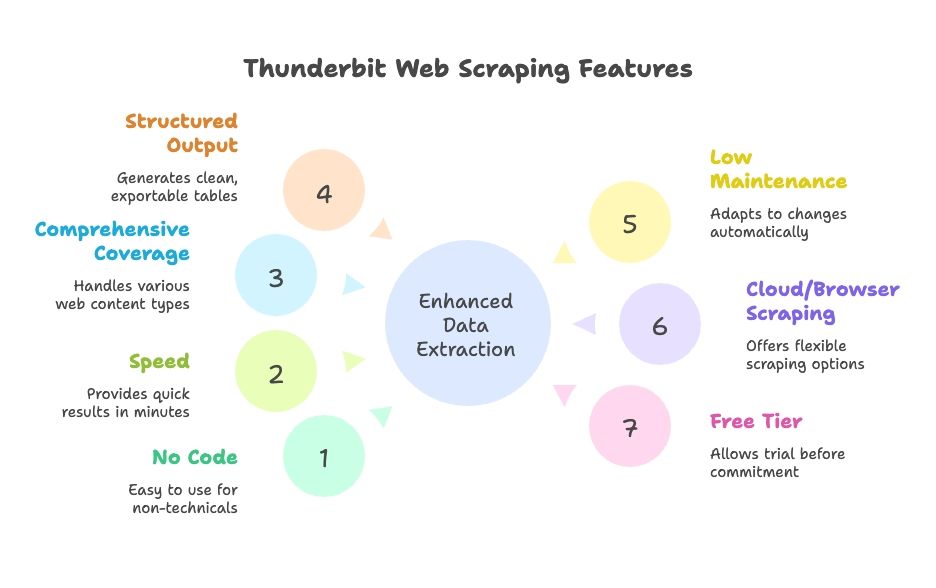
चलिये Thunderbit की बात करते हैं—हमारा AI Web Scraper Chrome Extension उन लोगों के लिए बनाया गया है जो Amazon data चाहते हैं, बिना headache के। मैंने Thunderbit की co-founding इसलिए की क्योंकि मैंने खुद देखा कि टीमें code से जूझने या टूटे हुए scrapers को patch करने में कितना समय बर्बाद करती हैं। Thunderbit का मकसद web data extraction को उतना ही आसान बनाना है जितना takeout ऑर्डर करना।
मुख्य विशेषताएँ:
- AI Suggest Fields: एक click में Thunderbit Amazon page scan करता है और Product Name, Price, Rating, Image, और Vendor जैसे columns सुझाता है। field names का अनुमान लगाने या HTML में भटकने की ज़रूरत नहीं।
- Subpage और Pagination Scraping: कई pages (pagination) पर scrape करें या richer data के लिए हर product के detail page (subpage) में जाएँ—navigation Thunderbit संभालता है।
- Instant Templates: Amazon के लिए, आप पहले से बने templates इस्तेमाल कर सकते हैं जिन्हें ठीक-ठीक पता होता है कि क्या निकालना है। Product details, reviews, या search results चाहिए? उसके लिए template मौजूद है।
- Data Type Recognition: Thunderbit text, numbers, images, और URLs के बीच अंतर समझता है, इसलिए आपका exported data साफ़ और analysis के लिए तैयार रहता है।
- Free Data Export: Excel, Google Sheets, Airtable, Notion, या CSV/JSON में export करें—बिना किसी अतिरिक्त शुल्क के।
- Multi-language Support: 34 भाषाओं में Amazon sites scrape करें।
- Scheduling: अपने data को ताज़ा रखने के लिए recurring scrapes सेट करें।
Thunderbit non-technical users के लिए बनाया गया है, लेकिन developers भी कहते हैं कि यह उन्हें prototyping और “messy” scraping jobs में समय बचाता है।
चरण-दर-चरण guide: Thunderbit के साथ Amazon product data scrape करना
तैयार हैं हाथ लगाने के लिए (बिना सच में गंदे हाथ किए)? Thunderbit का इस्तेमाल करके Amazon product data scrape करने का तरीका यह है:
1. Thunderbit Chrome Extension इंस्टॉल करें
Chrome Web Store पर जाएँ और अपने browser में Thunderbit जोड़ें। इंस्टॉल होने के बाद, toolbar में Thunderbit ⚡ icon दिखेगा। Sign in करें (Google या email, दोनों ठीक हैं), और आप तैयार हैं।
2. Amazon पर जाएँ और Thunderbit खोलें
Amazon का वह page खोलें जिसे आप scrape करना चाहते हैं—शायद “wireless headphones” का search results page या कोई खास product detail page। Sidebar खोलने के लिए Thunderbit icon पर क्लिक करें, फिर Web Scraper tool चुनें।
3. Product data auto-detect करने के लिए “AI Suggest Fields” का इस्तेमाल करें
AI Suggest Fields बटन पर क्लिक करें। Thunderbit का AI page scan करेगा और Product Name, Price, Rating, Number of Reviews, Product URL, और Image जैसे columns सुझाएगा। product detail page पर आपको Title, Price, Brand, SKU, और Availability जैसे fields भी दिख सकते हैं।
4. ज़रूरत के अनुसार fields समायोजित करें
कोई column जोड़ना या उसका नाम बदलना है? बस टाइप कर दीजिए। Seller name या ASIN चाहिए? नया column जोड़ें और बताइए कि आपको क्या चाहिए—Thunderbit का AI उसे लाने की कोशिश करेगा। आप हर field के लिए data types (text, number, image, URL) भी सेट कर सकते हैं। Advanced users के लिए AI Improve Columns feature data को तुरंत refine या transform करने देता है (जैसे सभी prices को USD में बदलना या keywords के आधार पर products को categorize करना)।
5. Pagination या subpage scraping सक्षम करें
अगर आप कई pages scrape करना चाहते हैं, तो pagination option चालू करें और तय करें कि कितने pages लेने हैं। Thunderbit अपने-आप “Next” पर क्लिक करेगा और हर page से results इकट्ठा करेगा। Subpages (जैसे product detail pages) के लिए subpage scraping चालू करें—Thunderbit हर product में जाएगा, extra fields निकालेगा, और फिर list पर लौट आएगा।
6. “Scrape” पर क्लिक करें और data आते देखें
Scrape button दबाएँ। Thunderbit real time में data highlight और extract करेगा, और ज़रूरत के अनुसार pages व subpages से गुज़रेगा। आपको हर product के लिए rows से भरती हुई एक table दिखाई देगी।
7. Data preview और verify करें
काम पूरा होने पर table review करें। अगर कोई field छूट गई हो या कुछ ठीक न लगे, तो columns में बदलाव करें और फिर से चलाएँ। आमतौर पर AI suggestions पहली ही बार में सही निकलती हैं।
8. Results को Excel, Google Sheets, Airtable, या Notion में export करें
Export या Download पर क्लिक करें। अपना format चुनें—CSV, Excel, Google Sheets, Notion, या Airtable। Thunderbit exports के लिए कोई शुल्क नहीं लेता, तो खुलकर इस्तेमाल कीजिए। आपका data साफ़ होगा और analysis के लिए तैयार रहेगा, जिसमें images, numbers, और links सही format में होंगे।
Pro Tips:
- बड़े scrapes (हज़ारों products) के लिए Amazon results को छोटे chunks में filter करें।
- recurring scrapes automate करने के लिए Thunderbit scheduling का उपयोग करें।
- अपने market के लिए सही Amazon locale (जैसे .com, .co.uk) पर होना सुनिश्चित करें।
और भी विस्तृत walkthrough के लिए, हमारे Amazon products और reviews scrape करने की विस्तृत guide देखें।
AI के साथ Amazon उत्पाद डेटा स्क्रैप करें
उन्नत Amazon Scraping: Pagination, Subpages, और Data Enrichment
Thunderbit सिर्फ basics तक सीमित नहीं है। अपने Amazon scraping को अगले स्तर पर कैसे ले जाएँ, यह देखिए:
कई pages (Pagination) scrape करना
Amazon search results paginated होते हैं—आमतौर पर प्रति page 50 products। Thunderbit की pagination feature आपको जितने pages चाहिए, उतने scrape करने देती है। बस pages की संख्या तय कर दीजिए, और बाकी Thunderbit संभाल लेगा, जिससे products की एक लगातार सूची मिल जाएगी।
Subpages (Linked Pages) scrape करना
Search results page पर जितना दिख रहा है, उससे ज़्यादा चाहिए? Thunderbit की subpage scraping हर product के detail page में जाकर specifications, reviews, या seller info जैसा enriched data निकालती है। Complete product catalog बनाने या seller trends का विश्लेषण करने के लिए यह बहुत उपयोगी है।
Data Enrichment और Transformation
Thunderbit का AI सिर्फ data copy ही नहीं करता—scrape करते समय उसे transform भी कर सकता है:
- Categorization: एक “Category” column जोड़ें और Thunderbit को title के keywords के आधार पर products classify करने के लिए कहें।
- Currency Conversion: prices को तुरंत आपकी पसंदीदा currency में बदल दें।
- Image Extraction: किसी column को “image” के रूप में चिह्नित करें और Thunderbit image URLs या files निकाल लेगा।
जटिल content को संभालना
Amazon pages कभी-कभी tricky हो जाते हैं—carousels, expandable sections, या paginated reviews। Thunderbit इन्हें संभालने के लिए headless browser technology और AI का उपयोग करता है, और reviews के लिए एक समर्पित Amazon Reviews Scraper template भी मौजूद है।
सीमाएँ और best practices
बहुत बड़े scrapes के लिए, अपने tasks को छोटे हिस्सों में बाँटें और off-peak hours में scrape करें। Thunderbit के anti-blocking उपाय आमतौर पर सब कुछ smooth रखते हैं, लेकिन अगर CAPTCHA आ जाए, तो आपको उसे हाथ से हल करना पड़ सकता है (कम होता है, पर होता है)।
सही Amazon scraping tool चुनना: Developers बनाम Business Users
तो आपके लिए कौन-सा तरीका सही है? यहाँ एक तेज़ decision guide है:
- Developers या engineering resources वाली teams:
- अधिकतम नियंत्रण, custom integrations, और बड़े-scale projects के लिए Python scripts या APIs को प्राथमिकता दें।
- Setup और ongoing maintenance में समय लगाने के लिए तैयार रहें।
- Business users, analysts, ecommerce ops, या sales:
- Thunderbit जैसे AI-powered, no-code tools से सबसे ज़्यादा लाभ मिलता है।
- दिनों की बजाय मिनटों में परिणाम मिलते हैं, और IT को शामिल करने की ज़रूरत नहीं पड़ती।
- बहुत कम effort में 80–90% use cases संभाल सकते हैं।
- Hybrid approach:
- कुछ teams AI tools से prototype बनाती हैं और अगर ज़रूरत बढ़ जाए तो code पर चली जाती हैं।
- Developers भी quick jobs या messy sites के लिए AI scrapers इस्तेमाल करते हैं।
मेरे अनुभव में, जब तक आप रोज़ लाखों pages scrape नहीं कर रहे या आपको deep, custom integrations की ज़रूरत नहीं है, Thunderbit जैसे AI tools लगभग आपकी हर ज़रूरत पूरी कर देंगे—और वह भी बिना headache के।
अपने Amazon data को export और इस्तेमाल करना: ईकॉमर्स teams के लिए next steps
एक बार आपने Amazon data scrape कर लिया, तो असली मज़ा शुरू होता है। Thunderbit आपके data को Excel, Google Sheets, Airtable, या Notion में export करना आसान बनाता है। आगे आप यह कर सकते हैं:
- Pricing Analysis: अपनी कीमतों की तुलना प्रतिस्पर्धियों से करें, समय के साथ बदलाव ट्रैक करें, और अपनी strategy समायोजित करें।
- Assortment और Inventory Decisions: यह पहचानें कि कौन-से best-sellers और trending products आपको stock करने चाहिए।
- प्रतिस्पर्धी Benchmarking: ratings, features, और बाज़ार की खामियों को visualise करने के लिए dashboards बनाएँ।
- Review और Sentiment Analysis: customer reviews का विश्लेषण करके pain points या highlight करने योग्य features पहचानें।
- Lead Generation: outreach के लिए sellers या brands की lists तैयार करें।
- Collaboration: Google Sheets या Notion में live databases अपनी टीम के साथ साझा करें।
- Automation: recurring scrapes schedule करें और alerts सेट करें (जैसे, अगर कोई competitor अपनी कीमत घटा दे)।
Thunderbit का export हमेशा free रहता है और सभी data types—text, numbers, images, links—को सुरक्षित रखता है, ताकि आप सीधे analysis या reporting में जा सकें।
Amazon Product Scraper Template आज़माएँ
मुख्य निष्कर्ष: AI के साथ स्मार्ट Amazon scraping
चलिये संक्षेप में दोहराते हैं:
- Amazon का data एक खज़ाना है ईकॉमर्स के लिए, लेकिन इसे हाथ से या पुराने scripts से scrape करना झंझट भरा है।
- Thunderbit जैसे AI-powered web scrapers Amazon data को हर किसी के लिए सुलभ बनाते हैं, सिर्फ developers के लिए नहीं।
- Thunderbit आसानी के लिए बना है: one-click field detection, automatic pagination और subpage scraping, और आपके पसंदीदा tools में direct export।
- Business teams समय बचाती हैं और बेहतर फैसले लेती हैं Amazon data collection को automate करके।
- अपनी ज़रूरत के हिसाब से सही tool चुनें: ultimate control के लिए code, speed और usability के लिए AI tools।
- सीखने का सबसे अच्छा तरीका है खुद आज़माना। Thunderbit डाउनलोड करें, कुछ Amazon data scrape करें, और देखें कि यह आपके workflow को कैसे बदल देता है।
Amazon product data big tech teams का गुप्त हथियार होना ज़रूरी नहीं है। AI और Thunderbit जैसे tools के साथ, कोई भी Amazon की अनगिनत shelves को actionable insights में बदल सकता है—ना code, ना stress, बस ज़्यादा समझदारी से काम।
Happy scraping—और आपके products हमेशा प्रतिस्पर्धा से एक कदम आगे रहें।
शुरू करने के लिए तैयार हैं?
- Thunderbit Chrome Extension डाउनलोड करें
- Thunderbit Blog पर और जानें
- हमारा Amazon Product Scraper Template आज़माएँ
Amazon के लिए AI Web Scraper आज़माएँ Get Started Free
FAQs
1. Amazon scraping क्या है, और यह ecommerce के लिए उपयोगी क्यों है?
Amazon scraping Amazon की website से product data—जैसे prices, ratings, reviews, और images—को automated तरीके से निकालना है। यह ecommerce teams के लिए महत्वपूर्ण है क्योंकि Amazon अमेरिका के ecommerce market का 37% से अधिक हिस्सा रखता है, जिससे इसका data competitor tracking, pricing analysis, product research, और lead generation के लिए अमूल्य हो जाता है।
2. Amazon scraping के लिए Python scripts और AI tools में मुख्य अंतर क्या हैं?
Python scripts पूरा नियंत्रण और customization देती हैं, लेकिन इनमें coding skills, setup time, और Amazon के layout बदलने पर ongoing maintenance चाहिए। दूसरी ओर, Thunderbit जैसे AI tools को कोड की ज़रूरत नहीं होती, वे बदलावों के साथ अपने-आप adapt हो जाते हैं, और non-technical users के लिए बस कुछ clicks में परिणाम देने के लिए बनाए गए हैं।
3. Thunderbit non-developers के लिए Amazon scraping को कैसे आसान बनाता है?
Thunderbit एक no-code Chrome extension है जो Amazon pages से data fields detect और extract करने के लिए AI का उपयोग करता है। यह pagination, subpage scraping, automatic field suggestions, Excel/Google Sheets में export, और recurring scrapes तक support करता है—इसलिए यह उन business users के लिए ideal है जिन्हें code लिखे बिना जल्दी और सटीक data चाहिए।
4. Thunderbit से scrape किए गए Amazon data का मैं क्या कर सकता हूँ?
आप competitor pricing का विश्लेषण कर सकते हैं, product trends monitor कर सकते हैं, seller leads निकाल सकते हैं, reviews से customer sentiment आँक सकते हैं, और dashboards या reports बना सकते हैं। Thunderbit Excel, Google Sheets, Notion, और Airtable जैसे tools में export support करता है, इसलिए आपका data तुरंत उपयोग और collaboration के लिए तैयार रहता है।
5. Thunderbit किसे इस्तेमाल करना चाहिए, और Python scraper कब बेहतर विकल्प है?
Thunderbit ecommerce professionals, analysts, और sales teams के लिए सबसे अच्छा है जो developers को शामिल किए बिना तेज़, भरोसेमंद data चाहते हैं। Python scrapers developers के लिए बेहतर हैं जिन्हें custom workflows, deep integrations, या बहुत बड़े पैमाने पर data scraping की ज़रूरत होती है।




