
मंगलवार को दोपहर से पहले ही मेरे OpenRouter डैशबोर्ड पर $47 खर्च दिख रहा था। मैंने मुश्किल से एक दर्जन कोडिंग टास्क किए थे — न कोई बड़ा काम, बस थोड़ा refactoring और कुछ bug fixes। तभी मुझे समझ आया कि OpenClaw की डिफ़ॉल्ट सेटिंग्स चुपचाप हर interaction, यहाँ तक कि background heartbeat pings भी, Claude Opus से route कर रही थीं — जबकि इसकी कीमत $15+ प्रति million tokens थी।
अगर तुमने भी ऐसे ही चौंकाने वाले बिल देखे हैं — और forums के हिसाब से ऐसे बहुत लोग हैं (एक यूज़र ने लिखा, "I already spend 40 dollars and doesn't even use it much") — तो यह गाइड तुम्हें वही full audit-and-optimize तरीका बताती है जिसका इस्तेमाल करके मैंने अपना monthly खर्च लगभग 90% तक घटाया। यह सिर्फ "सस्ता model लगा दो" वाली बात नहीं है, बल्कि यह समझने का systematic तरीका है कि tokens असल में कहाँ खर्च हो रहे हैं, उन्हें कैसे monitor करें, कौन-से budget models real agentic work में टिकते हैं, और आज ही इस्तेमाल करने लायक तीन copy-paste configs क्या हैं। पूरा काम एक ही afternoon में हो गया।
OpenClaw Token Usage क्या है (और डिफ़ॉल्ट में इतना ज़्यादा क्यों होता है)?
OpenClaw में हर AI interaction का billing unit token है। इन्हें छोटे-छोटे text chunks समझिए — लगभग 4 English characters प्रति token। तुम्हारा भेजा हर message, मिला हर response, और चलने वाली हर background process: सब tokens में bill होते हैं।
समस्या यह है कि OpenClaw की डिफ़ॉल्ट सेटिंग्स minimum cost नहीं, maximum capability के हिसाब से tuned हैं। Out of the box primary model anthropic/claude-opus-4-5 पर सेट होता है — यानी उपलब्ध सबसे महंगा विकल्प। Heartbeat pings भी Opus पर चलते हैं। Side tasks के लिए बनने वाले sub-agents भी Opus ही इस्तेमाल करते हैं। Heartbeat ping के लिए Opus चलाना ऐसा है जैसे Band-Aid लगाने के लिए neurosurgeon बुलाना। तकनीकी रूप से सही, लेकिन लागत के लिहाज़ से बेहिसाब महंगा।
ज़्यादातर users को पता ही नहीं चलता कि वे trivial background tasks के लिए premium rates चुका रहे हैं। डिफ़ॉल्ट configuration मानती है कि तुम हर काम के लिए, हर समय, सबसे अच्छा model चाहते हो — और उसी हिसाब से bill बनाती है।
OpenClaw Token Usage कम करने से सिर्फ पैसे नहीं बचते
सबसे obvious फायदा cost savings है। लेकिन इसके अलावा भी कुछ secondary benefits हैं जो समय के साथ और बढ़ते जाते हैं।
सस्ते models अक्सर तेज़ भी होते हैं। Gemini 2.5 Flash-Lite लगभग 214 tokens प्रति second की speed से चलता है, जबकि Opus करीब 51 पर — यानी हर interaction में लगभग 4x speed improvement। Cerebras पर GPT-OSS-120B 1,917 tokens प्रति second तक पहुँचता है, जो Opus से लगभग 35x तेज़ है। 50+ tool-calling turns वाले agentic loop में यह speed फर्क मिनटों में काम खत्म कर देता है, बजाय इसके कि हर round-trip पर Opus के painful 13.6-second time-to-first-token का इंतज़ार किया जाए।
तुम्हें rate limits से पहले ज़्यादा headroom भी मिल जाता है, throttled sessions कम होती हैं, और bill को लेकर घबराहट बढ़ाए बिना usage scale करने की गुंजाइश मिलती है।
अलग-अलग usage profiles के हिसाब से अनुमानित savings:
| User Profile | Estimated Monthly Spend (Default) | After Full Optimization | Monthly Savings |
|---|---|---|---|
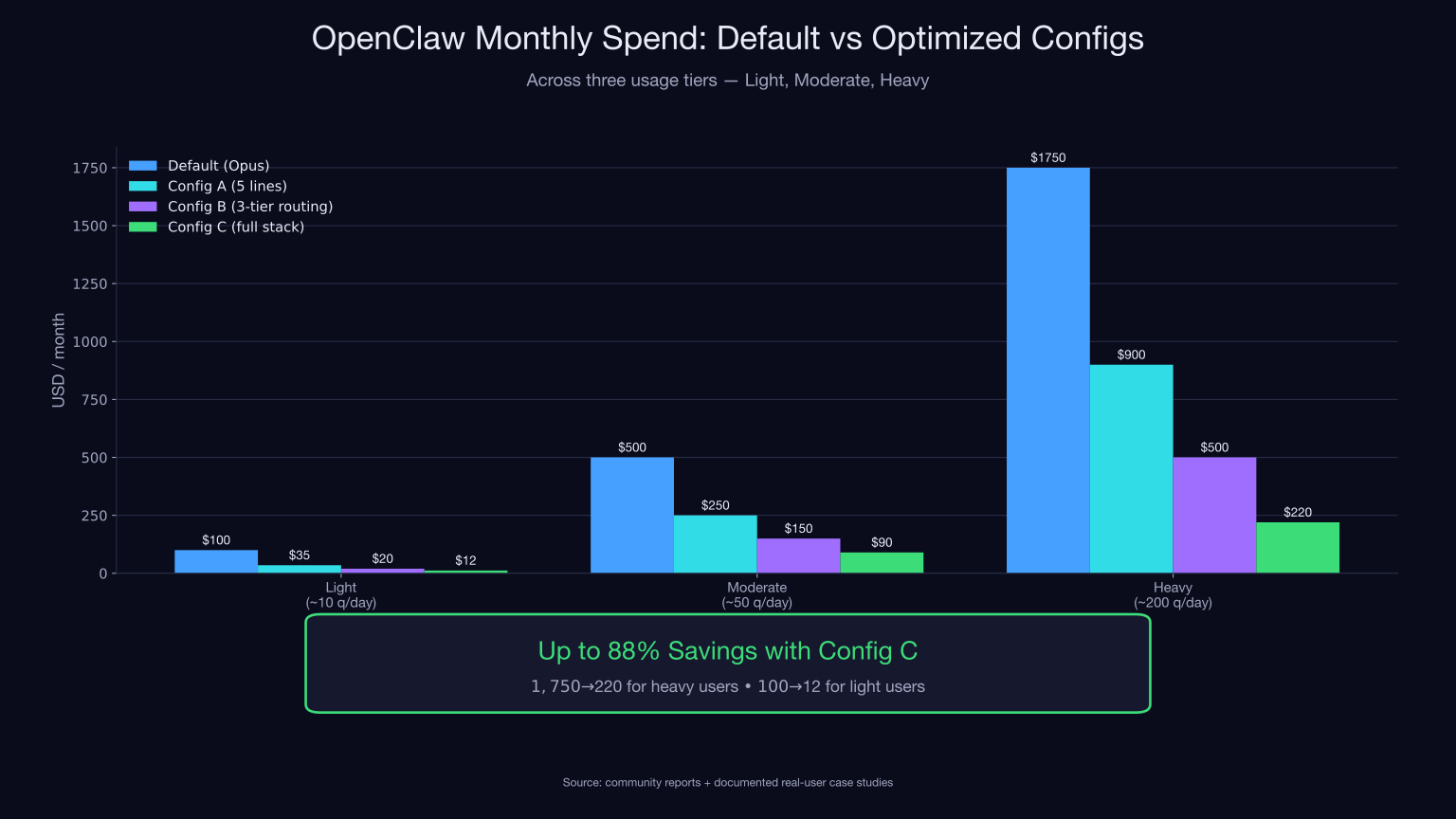
| हल्का उपयोग (~10 queries/day) | ~$100 | ~$12 | ~88% |
| मध्यम उपयोग (~50 queries/day) | ~$500 | ~$90 | ~82% |
| भारी उपयोग (~200+ queries/day) | ~$1,750 | ~$220 | ~87% |
यह कोई hypothetical आँकड़ा नहीं है। एक developer ने $600–750/month से $3–4/day तक का सफर documented किया — यानी सचमुच 90% कटौती — model routing और बाद में बताए गए hidden-drain fixes को जोड़कर।
OpenClaw Token Usage की anatomy: हर token असल में कहाँ जाता है
अधिकांश optimization guides इस हिस्से को छोड़ देती हैं, जबकि यहीं सबसे ज़्यादा फर्क पड़ता है। जिसे देख ही न सकें, उसे सुधारा नहीं जा सकता।
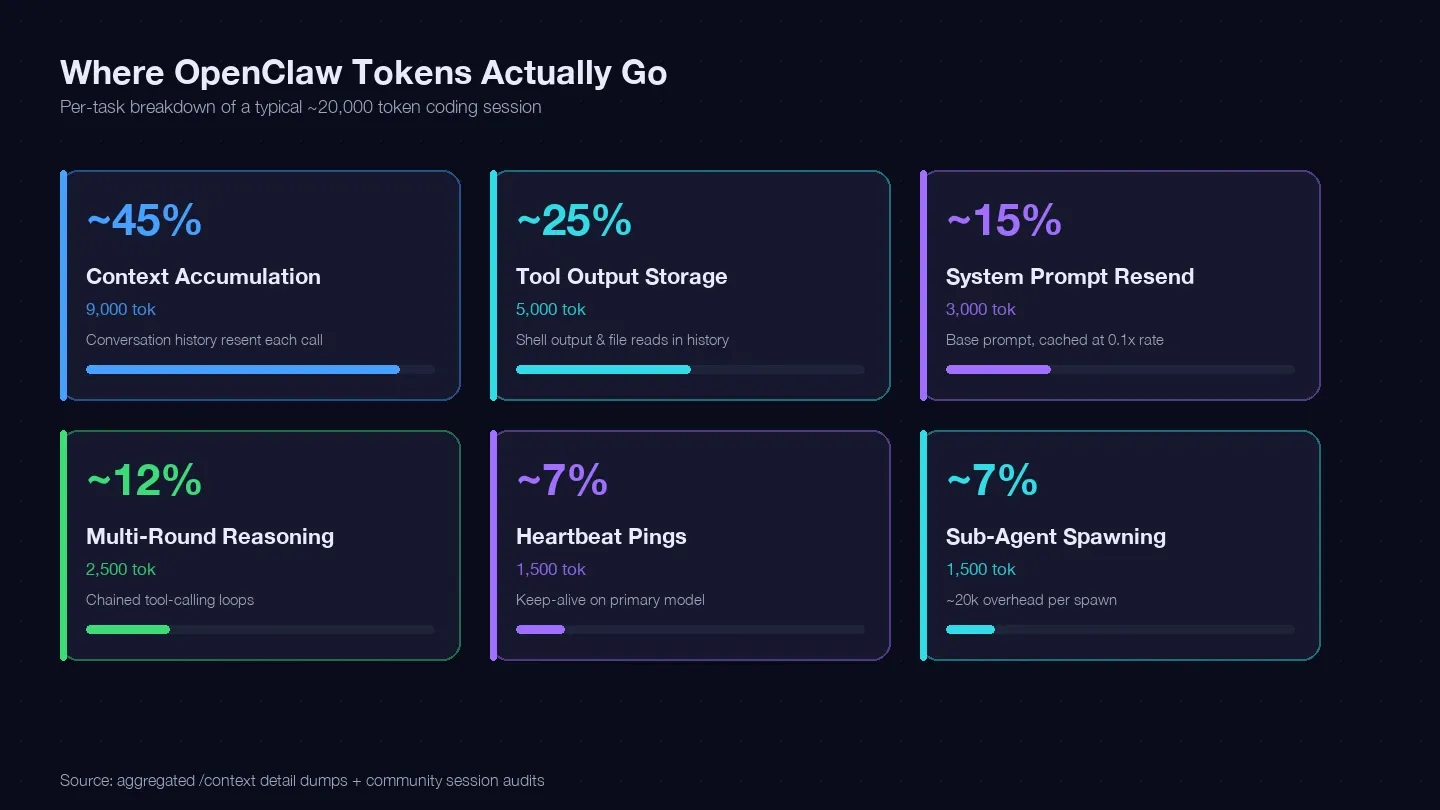
मैंने कई sessions audit किए और LaoZhang cost optimization guide तथा community /context dumps का मिलान करके एक typical single coding task के लिए token ledger तैयार किया। लगभग 20,000 tokens यहाँ खर्च हुए:
| Token Category | Typical % of Total | Example (1 coding task) | Can You Control It? |
|---|---|---|---|
| Context accumulation (हर call में conversation history दोबारा भेजना) | ~40–50% | ~9,000 tokens | हाँ — /clear, /compact, छोटे sessions |
| Tool output storage (shell output, file reads history में बने रहना) | ~20–30% | ~5,000 tokens | हाँ — छोटे reads, सीमित tool scope |
| System prompt resend (~15K base) | ~10–15% | ~3,000 tokens | आंशिक रूप से — cache reads 0.1x rate पर |
| Multi-round reasoning (chained tool-calling loops) | ~10–15% | ~2,500 tokens | Model choice + बेहतर prompts |
| Heartbeat / keep-alive pings | ~5–10% | ~1,500 tokens | हाँ — config change |
| Sub-agent calls | ~5–10% | ~1,500 tokens | हाँ — model routing |
सबसे बड़ा bucket — context accumulation — यानी तुम्हारी conversation history का हर API call के साथ फिर से भेजा जाना। एक real session dump में सिर्फ Messages bucket में ही 185,400 tokens दिखे, और model ने अभी जवाब भी नहीं दिया था। System prompt और tools ने ऊपर से ~35,800 tokens का fixed overhead और जोड़ दिया।
निष्कर्ष: अगर तुम unrelated tasks के बीच sessions clear नहीं करते, तो हर turn पर तुम अपनी पूरी conversation history दोबारा transmit करने के पैसे दे रहे हो।
OpenClaw Token Usage कैसे monitor करें (जो दिखेगा नहीं, उसे घटा नहीं सकते)
कुछ भी बदलने से पहले यह देखिए कि tokens कहाँ जा रहे हैं। बिना monitoring के सीधे "सस्ता model इस्तेमाल करो" पर कूदना वैसा ही है जैसे कभी वजन तौलने के बिना weight loss करना।
अपना OpenRouter Dashboard देखें
अगर तुम OpenRouter के through route करते हो, तो Activity page सबसे आसान no-setup dashboard है। तुम model, provider, API key और time period के हिसाब से filter कर सकते हो। Usage Accounting view हर request पर prompt, completion, reasoning और cached tokens को अलग-अलग दिखाता है। लंबे analysis के लिए Export button (CSV या PDF) भी मौजूद है।
क्या देखना है: कौन-सा model सबसे ज़्यादा tokens खा रहा है, और क्या heartbeat या sub-agent requests आश्चर्यजनक रूप से बड़े line items बन रहे हैं।
अपने Local API Logs की जाँच करें
OpenClaw session data को ~/.openclaw/agents.main/sessions/sessions.json में रखता है, जिसमें हर session के लिए totalTokens शामिल होता है। तुम real-time per-request logging के लिए openclaw logs --follow --json भी चला सकते हो।
एक ध्यान देने योग्य caveat: sessions.json का totalTokens compaction के बाद अपडेट नहीं होता, इसलिए dashboard में पुराने pre-compaction values दिख सकते हैं। Stored totals की बजाय /status और /context detail पर भरोसा करें।
Third-Party Tracking इस्तेमाल करें (मध्यम से भारी उपयोगकर्ताओं के लिए)
LiteLLM proxy 100+ providers के सामने OpenAI-compatible endpoint देता है और हर virtual key, model, user और team के हिसाब से spend automatically log करता है। इसकी सबसे काम की सुविधा: per-key hard budgets, जो /clear के बाद भी बने रहते हैं — कोई runaway sub-agent आपकी तय सीमा पार नहीं कर सकता।
Helicone और भी आसान है — एक one-line base-URL swap जो related requests को Sessions view में group कर देता है। "Fix this bug" जैसा prompt अगर 8+ sub-agent calls में फैलता है, तो वह एक ही session row में असली total cost के साथ दिखता है। Free tier: 10,000 requests/month।
OpenClaw के अंदर quick spot-checks
रोज़मर्रा की monitoring के लिए इन चार in-session commands का इस्तेमाल करें:
/status— context usage, last input/output tokens, estimated cost दिखाता है/usage full— हर response के नीचे usage footer/context detail— per-file, per-skill, per-tool token breakdown/compact [guidance]— optional focus string के साथ compaction force करता है
Config बदलने से पहले और बाद में /context detail चलाइए। उसी से पता चलेगा कि optimization ने वास्तव में काम किया या नहीं।
OpenClaw Cheapest Model मुकाबला: कौन-से budget LLMs सच में agentic work संभालते हैं
ज़्यादातर guides यहीं गलत हो जाती हैं। वे pricing table दिखाती हैं, सबसे सस्ती row चुनती हैं, और कहानी खत्म। लेकिन benchmarks real-world agentic performance का सही अंदाज़ा नहीं देते — और community ने यह बात बार-बार ज़ोर से कही है। एक user के शब्दों में: "benchmarks aren't doing any justice to understand which one works best for agentic AI."
मुख्य बात: सबसे सस्ता model हमेशा सबसे सस्ता outcome नहीं होता। जो model fail होकर चार बार retry कराता है, वह उस mid-tier model से महंगा पड़ता है जो पहली कोशिश में काम कर देता है। Production agent systems में 5–10% retry rate मानकर चलना चाहिए — और अगर पाँच LLM calls chained हैं और step four fail हो जाए, तो naive retry पूरे पाँचों steps दोबारा चलाता है।
यहाँ मेरी capability matrix है, जिसमें synthetic benchmarks की बजाय असली user reports पर आधारित "Real Agentic Score" दिया गया है:
| Model | Input $/1M | Output $/1M | Tool-Calling Reliability | Multi-Step Reasoning | Real Agentic Score (1–5) | Best For |
|---|---|---|---|---|---|---|
| Gemini 2.5 Flash-Lite | $0.10 | $0.40 | Mixed — कभी-कभी loops | Basic | ⭐2.5 | Heartbeats, simple lookups |
| GPT-OSS-120B | $0.04 | $0.19 | Adequate | Adequate | ⭐3.0 | Budget experimentation, speed-critical |
| DeepSeek V3.2 | $0.26 | $0.38 | Inconsistent (6 open issues) | Good | ⭐3.0 | Reasoning-heavy, minimal tool calling |
| Kimi K2.5 | $0.38 | $1.72 | Good (via :exacto) | Adequate | ⭐3.5 | Simple-to-mid coding |
| MiniMax M2.5 / M2.7 | $0.28 | $1.10 | Good | Good | ⭐4.0 | General coding daily driver |
| Claude Haiku 4.5 | $1.00 | $5.00 | Excellent | Good | ⭐4.5 | Reliable mid-tier fallback |
| Claude Sonnet 4.6 | $3.00 | $15.00 | Excellent | Excellent | ⭐5.0 | Complex multi-step tasks |
| Claude Opus 4.5/4.6 | $5.00 | $15.00 | Excellent | Excellent | ⭐5.0 | Reserve for hardest problems only |
Tool Calling के लिए DeepSeek और Gemini Flash पर एक चेतावनी
DeepSeek V3.2 कागज़ पर शानदार दिखता है — SWE-Bench पर 72–74%, और Sonnet से 11–36x सस्ता। लेकिन practice में छह अलग GitHub issues Cline, Roo Code, Continue और NVIDIA NIM में टूटे हुए tool-calling behavior का दस्तावेज़ीकरण करती हैं। Composio का head-to-head verdict: "DeepSeek V3.2 built parts of the app but stumbled on execution, speed, and reliability." Zvi Mowshowitz की संक्षिप्त राय: "okay and cheap, but."
Gemini 2.5 Flash में भी ऐसा ही gap है। Google AI Developers Forum का एक thread "Very frustrating experience with Gemini 2.5 function calling performance" इस वाक्य से शुरू होता है: "the function calling behavior of Gemini models has become completely unreliable and unpredictable."
OpenRouter ने एक अहम nuance बताया: "the propensity of a model to call tools and the accuracy of those calls can vary dramatically across hosts of the same weights." अगर तुम cheap models को OpenRouter के through route करते हो, तो :exacto tag देखें — एक silent provider swap भरोसेमंद cheap model को रातोंरात expensive retry loop में बदल सकता है।
किस model का कब इस्तेमाल करें
- Gemini Flash-Lite: Heartbeats, keep-alive pings, simple Q&A. Multi-step tool calling के लिए नहीं।
- MiniMax M2.5/M2.7: General coding tasks के लिए आपका daily driver। SWE-Pro 56.22, Terminal-Bench 2 57.0% Sonnet की कीमत के एक छोटे हिस्से पर।
- Claude Haiku 4.5: जब सस्ते models tool calls में फँसने लगें तो भरोसेमंद fallback। Sonnet से लगभग 3x सस्ता और tool-calling reliability बहुत अच्छी।
- Claude Sonnet 4.6: Complex multi-step agentic work। यहीं तुम्हें अपने पैसे का सही मूल्य मिलता है।
- Claude Opus: सबसे कठिन problems के लिए ही रखें। इसे किसी भी चीज़ का default मत बनाइए।
(Model pricing अक्सर बदलती रहती है — config तय करने से पहले OpenRouter या direct provider pages पर current rates ज़रूर verify करें।)
Hidden Token Drains जिनका ज़िक्र ज़्यादातर guides नहीं करतीं
Forum users बताते हैं कि कुछ specific features बंद करने से cost बहुत घटती है, लेकिन मुझे कोई भी ऐसी guide नहीं मिली जो सभी hidden drains और उनके असली token impact की एक unified checklist देती हो। पूरा breakdown यहाँ है:
| Hidden Drain | Token Cost per Occurrence | How to Fix | Config Key |
|---|---|---|---|
| Default heartbeat on Opus | ~100,000 tokens/run बिना isolation के | Haiku override + isolatedSession | heartbeat.model, heartbeat.isolatedSession: true |
| Sub-agent spawning | ~20,000 tokens per spawn काम शुरू करने से पहले | Sub-agents को Haiku पर route करें | subagents.model |
| Full codebase context loading | ~3,000–15,000 tokens per auto-explore | node_modules, dist, lockfiles के लिए .clawignore | .clawrules + .clawignore |
| Memory auto-summarize | ~500–2,000 tokens/session | Disable करें या frequency घटाएँ | memory: false या memory.max_context_tokens |
| Conversation history accumulation | ~500+ tokens/turn (cumulative) | Unrelated tasks के बीच नए sessions शुरू करें | /clear discipline |
| MCP server tool overhead | ~7,000 tokens 4 servers के लिए; 5+ के लिए 50,000+ | MCP को minimal रखें | Remove unused MCPs |
| Skill/plugin initialization | 200–1,000 tokens per loaded skill | Unused skills disable करें | skills.entries.<name>.enabled: false |
| Agent Teams (plan mode) | ~7x standard session cost | सिर्फ़ genuinely parallel work के लिए | Prefer sequential |
Heartbeat drain अलग से ध्यान देने लायक है। डिफ़ॉल्ट रूप से heartbeats हर 30 मिनट पर primary model (Opus) पर चलते हैं। isolatedSession: true सेट करने से यह ~100,000 tokens प्रति run से घटकर 2,000–5,000 tokens रह जाता है — यानी इस एक bucket पर 95–98% की कटौती।
दो मिनट से कम में सबसे ज़्यादा token बचाने वाले तीन quick wins
तीनों zero-risk हैं और दो मिनट से कम समय लेते हैं:
-
Unrelated tasks के बीच
/clearकरें (5 seconds). यही सबसे बड़ा token saver है। Forum consensus कहता है कि नया काम शुरू करने से पहले session history clear करने से 50–70% reduction मिल सकती है। याद है वो 185k-token Messages bucket?/clearउसे मिटा देता है। -
Grunt work के लिए
/model haiku-4.5इस्तेमाल करें (10 seconds). Tactical model switching routine tasks पर 60–80% cost reduction दे सकता है। Haiku ज़्यादातर straightforward coding, file lookups, और commit messages को आराम से संभाल लेता है। -
.clawrulesको <200 lines तक छोटा करें +.clawignoreजोड़ें (90 seconds). तुम्हारी rules file हर message के साथ लोड होती है। 200 lines पर यह लगभग 1,500–2,000 tokens प्रति turn खा सकती है; 1,000 lines पर यह हर request पर 8,000–10,000 tokens का स्थायी बोझ बन जाती है।node_modules/,dist/, lockfiles और generated code को बाहर करने वाली.clawignoreके साथ मिलाकर, एक developer ने इसी discipline से 92% token reduction का दावा किया।
Step-by-Step: OpenClaw Token Usage घटाने के लिए तीन ready-to-copy configs
नीचे तीन complete, annotated openclaw.json configs दिए गए हैं — "बस शुरू करें" से लेकर "पूरा optimization stack" तक। हर config में inline comments और monthly cost estimates शामिल हैं।
शुरू करने से पहले:
- Difficulty: Beginner (Config A) → Intermediate (Config B) → Advanced (Config C)
- Time Required: Config A के लिए ~5 minutes, Config C के लिए ~15 minutes
- What You'll Need: OpenClaw installed, एक text editor,
~/.openclaw/openclaw.jsonतक access
Config A: Beginner — बस पैसे बचाइए
पाँच lines। कोई complexity नहीं। Default model को Opus से Sonnet पर बदलता है, memory overhead बंद करता है, और heartbeats को Haiku पर isolate करता है।
// ~/.openclaw/openclaw.json
{
  "agents": {
    "defaults": {
      "model": { "primary": "anthropic/claude-sonnet-4-6" },  // Opus की जगह — तुरंत 3-5x savings
      "heartbeat": {
        "every": "55m",                // 1h cache TTL के साथ align करें ताकि cache hits बढ़ें
        "model": "anthropic/claude-haiku-4-5",  // pings के लिए Haiku, Opus नहीं
        "isolatedSession": true        // ~100k → 2-5k tokens per run
      }
    }
  },
  "memory": { "enabled": false }       // ~500-2k tokens/session बचाता है
}
इसे लागू करने के बाद क्या देखना चाहिए: /status को पहले और बाद में चलाएँ। per-request cost साफ़ तौर पर कम दिखनी चाहिए, और तुम्हारे OpenRouter Activity page पर heartbeat entries में Opus की जगह Haiku दिखना चाहिए।
| Usage Tier | Default (Opus) | Config A (Sonnet + Haiku heartbeats) | Savings |
|---|---|---|---|
| हल्का (~10 q/day) | ~$100 | ~$35 | 65% |
| मध्यम (~50 q/day) | ~$500 | ~$250 | 50% |
| भारी (~200 q/day) | ~$1,750 | ~$900 | 49% |
Config B: Intermediate — स्मार्ट तीन-स्तरीय routing
Real work के लिए primary Sonnet। Sub-agents और compaction के लिए Haiku। Claude throttled हो तो budget fallback के रूप में Gemini Flash-Lite। Fallback chains provider outages को अपने-आप संभाल लेते हैं।
{
  "agents": {
    "defaults": {
      "model": {
        "primary": "anthropic/claude-sonnet-4-6",
        "fallbacks": [
          "anthropic/claude-haiku-4-5",       // अगर Sonnet throttled हो
          "google/gemini-2.5-flash-lite"      // ultra-cheap last resort
        ]
      },
      "models": {
        "anthropic/claude-sonnet-4-6": {
          "params": { "cacheControlTtl": "1h", "maxTokens": 8192 }
        }
      },
      "heartbeat": {
        "every": "55m",                       // 55min < 1h cache TTL = cache hits
        "model": "google/gemini-2.5-flash-lite",  // हर ping पर कुछ pennies
        "isolatedSession": true,
        "lightContext": true                   // heartbeat calls में minimal context
      },
      "subagents": {
        "maxConcurrent": 4,                   // default 8 से कम
        "model": "anthropic/claude-haiku-4-5" // sub-agents को Sonnet की ज़रूरत नहीं
      },
      "compaction": {
        "mode": "safeguard",
        "model": "anthropic/claude-haiku-4-5", // compaction summaries Haiku से
        "memoryFlush": { "enabled": true }
      }
    }
  }
}
Expected result: तुम्हारे logs में sub-agent entries अब Haiku pricing दिखाएँगी। Heartbeats लगभग zero-cost के आसपास होंगे। तुम्हारा fallback chain यह सुनिश्चित करता है कि Claude outage से session रुके नहीं — यह gracefully Gemini पर degrade हो जाता है।
| Usage Tier | Default | Config B | Savings |
|---|---|---|---|
| हल्का | ~$100 | ~$20 | 80% |
| मध्यम | ~$500 | ~$150 | 70% |
| भारी | ~$1,750 | ~$500 | 71% |
Config C: Power User — पूरा optimization stack
Per-sub-agent model assignment, context compaction को Haiku पर pin करना, vision routing Gemini Flash पर, tight .clawrules + .clawignore, unused skills disable करना। यही वह config है जो तुम्हें 85–90% savings रेंज तक ले जाती है।
{
  "agents": {
    "defaults": {
      "workspace": "~/clawd",
      "model": {
        "primary": "anthropic/claude-sonnet-4-6",
        "fallbacks": [
          "openrouter/anthropic/claude-sonnet-4-6",  // backup के लिए अलग provider
          "minimax/minimax-m2-7",                     // सस्ता daily-driver fallback
          "anthropic/claude-haiku-4-5"                // आख़िरी विकल्प
        ]
      },
      "models": {
        "anthropic/claude-sonnet-4-6": {
          "params": { "cacheControlTtl": "1h", "maxTokens": 8192 }
        },
        "minimax/minimax-m2-7": {
          "params": { "maxTokens": 8192 }
        }
      },
      "heartbeat": {
        "every": "55m",
        "model": "google/gemini-2.5-flash-lite",
        "isolatedSession": true,
        "lightContext": true,
        "activeHours": "09:00-19:00"           // रात भर heartbeats नहीं
      },
      "subagents": {
        "maxConcurrent": 4,
        "model": "anthropic/claude-haiku-4-5"
      },
      "contextPruning": { "mode": "cache-ttl", "ttl": "1h" },
      "compaction": {
        "mode": "safeguard",
        "model": "anthropic/claude-haiku-4-5",
        "identifierPolicy": "strict",
        "memoryFlush": { "enabled": true }
      },
      "bootstrapMaxChars": 12000,              // default 20000 से कम
      "imageModel": "google/gemini-3-flash"    // vision tasks सस्ते model से
    }
  },
  "memory": { "enabled": true, "max_context_tokens": 800 },  // minimal memory
  "skills": {
    "entries": {
      "web-search":       { "enabled": false },
      "image-generation": { "enabled": false },
      "audio-transcribe": { "enabled": false }
    }
  }
}
Per-subagent override example — इसे ~/.openclaw/agents/lint-runner/SOUL.md में paste करें:
---
name: lint-runner
description: Runs lint/format checks and applies trivial fixes
tools: [Bash, Read, Edit]
model: anthropic/claude-haiku-4-5
---
Minimum-viable .clawignore — यह अकेला ही typical bootstraps को 150k characters से 30–50k के आसपास ले आता है:
node_modules/
dist/
build/
.next/
coverage/
.venv/
vendor/
*.lock
package-lock.json
yarn.lock
pnpm-lock.yaml
*.min.js
*.min.css
**/__snapshots__/
**/*.snap
| Usage Tier | Default | Config C | Savings |
|---|---|---|---|
| हल्का | ~$100 | ~$12 | 88% |
| मध्यम | ~$500 | ~$90 | 82% |
| भारी | ~$1,750 | ~$220 | 87% |
ये आँकड़े दो स्वतंत्र real-user reports से मेल खाते हैं: Praney Behl का documented $600–750/mo → $3–4/day (90% cut), और LaoZhang case studies जिनमें partial optimization से $943 → $347 (63%), $1,750 → $1,000 (64%), $200 → $70 (65%) दिखा।
/model Command का इस्तेमाल करके OpenClaw Token Usage को On-the-Fly नियंत्रित करें
/model command अगले turn के लिए active model बदल देती है, और आपके conversation context को सुरक्षित रखती है — न reset, न history loss। यही वह रोज़ की आदत है जो समय के साथ savings को और बढ़ाती है।
Practical workflow:
- मुश्किल multi-file refactor पर काम कर रहे हैं? Sonnet पर बने रहें।
- जल्दी से "यह regex क्या करता है?" पूछना है?
/model haiku, पूछिए, फिर वापस जाने के लिए/model sonnet। - Commit message या doc polish?
/model flash-lite, काम हो गया।
तुम openclaw.json में commands.aliases के तहत aliases सेट कर सकते हो ताकि छोटे नाम (haiku, sonnet, opus, flash) पूरे provider strings से map हो जाएँ। हर switch पर कुछ keystrokes बच जाते हैं।
गणित: Sonnet पर 50 queries/day लगभग $3/day पड़ती हैं। वही 50 queries अगर Haiku/Sonnet/Opus में 70/20/10 अनुपात में बाँटी जाएँ, तो खर्च लगभग $1.10/day रह जाता है। एक महीने में यह $90 → $33 बनता है — 63% सस्ता, बस tools नहीं, habits बदलकर।
Bonus: Thunderbit के साथ Providers के बीच OpenClaw Model Pricing ट्रैक करें
AI की मदद से providers के बीच model pricing ट्रैक करें Get Started Free
OpenRouter, direct Anthropic API, Google AI Studio, DeepSeek, MiniMax जैसे इतने सारे models और providers के साथ pricing अक्सर बदलती रहती है। Anthropic ने Opus output pricing रातोंरात लगभग 67% घटाई। Google ने दिसंबर 2025 में Gemini free-tier limits 50–80% तक trim कर दीं। हाथ से static pricing spreadsheet को अपडेट रखना हार मानने जैसी लड़ाई है।
Thunderbit इस काम को बिना किसी scraping code के हल करता है। यह एक AI web scraper Chrome extension है, जिसे इसी तरह के structured data extraction के लिए बनाया गया है।
मैं जो workflow इस्तेमाल करता हूँ:
- OpenRouter models page को Chrome में खोलिए और Thunderbit का "AI Suggest Fields" क्लिक कीजिए। यह page पढ़कर columns सुझाता है — model name, input price, output price, context window, provider.
- Scrape दबाइए, फिर सीधे Google Sheets में export कर दीजिए।
- एक scheduled scrape plain English में सेट करें — "हर Monday सुबह 9 बजे OpenRouter model list फिर से scrape करो" — और यह cloud में अपने-आप चल जाएगा।
इसके बाद तुम्हारा personal pricing tracker खुद अपडेट होता रहेगा। कोई model अगर अचानक 30% सस्ता हो जाए — या किसी provider पर Exacto tag आ जाए — तो वह Monday morning spreadsheet में अपने-आप दिख जाएगा। हमने अपने blog पर business के लिए AI data extraction के use cases पर और लिखा है।
Direct provider pages (Anthropic, Google, DeepSeek) पर pricing compare करनी हो? Thunderbit की subpage scraping हर model link को detail page तक follow करती है और per-provider rates निकालती है — खासकर तब जब तुम जानना चाहते हों कि Kimi K2.5 को OpenRouter से route करना NVIDIA Build के through direct जाने से सस्ता है या नहीं। Free tier और plan details के लिए Thunderbit pricing देखें।
OpenClaw Token Usage कम करने के लिए मुख्य निष्कर्ष
Framework है: Understand → Monitor → Route → Optimize.
सबसे अधिक असर डालने वाले कदम, क्रम में:
- Opus को default मत रखें। अपने primary model को Sonnet या MiniMax M2.7 पर बदलें। इससे अकेले ही 3–5x cost reduction मिलती है।
- Heartbeats को isolate करें।
isolatedSession: trueसेट करें और heartbeats को Gemini Flash-Lite पर route करें। इससे ~100k token drain घटकर ~2–5k रह जाता है। - Sub-agents को Haiku पर route करें। हर spawn लगभग 20k tokens context पहले ही लोड कर लेता है। इसे Opus पर मत चलाइए।
/clearका नियमित इस्तेमाल करें। यह free है, 5 seconds लेता है, और community consensus के मुताबिक किसी भी एक action से ज़्यादा बचत देता है।.clawignoreजोड़ें।node_modules, lockfiles और build artifacts को exclude करने से bootstrap context काफ़ी घटता है।/context detailसे पहले और बाद में monitor करें। अगर माप नहीं सकते, तो सुधार भी नहीं कर सकते।
सबसे सस्ता model task पर निर्भर करता है। Heartbeats के लिए Gemini Flash-Lite। Daily coding के लिए MiniMax M2.7। भरोसेमंद tool calling के लिए Haiku। Complex multi-step work के लिए Sonnet। सबसे कठिन problems के लिए Opus — और किसी चीज़ के लिए नहीं।
अधिकांश readers Config A या B के साथ एक ही afternoon में 50–70% savings देख सकते हैं। पूरे 85–90% savings के लिए model routing, hidden drain fixes, .clawignore, और session discipline — सबको साथ जोड़ना पड़ता है — लेकिन यह संभव है, और टिकाऊ भी है।
FAQs
1. OpenClaw की monthly cost कितनी होती है?
यह पूरी तरह आपकी configuration, usage volume, और model choices पर निर्भर करता है। Light users (~10 queries/day) आमतौर पर optimization के साथ $5–30/month खर्च करते हैं, जबकि defaults पर $100+ लग सकते हैं। Moderate users (~50 queries/day) $90–400/month के बीच रहते हैं। Heavy users defaults पर $600–2,000+/month तक जा सकते हैं — एक documented extreme $5,623 in a single month था। Anthropic की own internal telemetry median $13/developer/active-day दिखाती है।
2. कोडिंग के लिए सबसे सस्ता OpenClaw model कौन-सा है जो अच्छा भी काम करे?
MiniMax M2.5/M2.7 सबसे अच्छा general daily driver है — अच्छी tool-calling reliability, SWE-Pro 56.22, और लगभग $0.28/$1.10 प्रति million tokens। Heartbeats और simple lookups के लिए Gemini 2.5 Flash-Lite ($0.10/$0.40) से बेहतर सौदा ढूँढना मुश्किल है। Claude Haiku 4.5 ($1/$5) reliable mid-tier fallback है, जब तुम्हें Sonnet कीमत चुकाए बिना excellent tool-calling चाहिए।
3. क्या मैं OpenClaw के साथ free-tier models इस्तेमाल कर सकता हूँ?
तकनीकी रूप से हाँ। GPT-OSS-120B OpenRouter के :free tag और NVIDIA Build पर free है। Gemini Flash-Lite का free tier है (15 RPM, 1,000 requests/day)। DeepSeek signup पर 5M free tokens देता है। लेकिन free tiers में aggressive rate limits, धीमी speed, और availability की समस्याएँ होती हैं। नियमित उपयोग के लिए pennies per million tokens वाले cheap paid models कहीं ज़्यादा भरोसेमंद हैं।
4. क्या /model के साथ conversation के बीच model बदलने पर context खो जाता है?
नहीं। /model तुम्हारा पूरा session context सुरक्षित रखती है — अगला turn नए model पर जाता है लेकिन history intact रहती है। यह OpenClaw की concepts documentation में भी verified है और Claude Code में भी इसी तरह काम करता है। तुम बिना कुछ खोए Haiku और Sonnet के बीच आराम से स्विच कर सकते हो।
5. आज ही अपना OpenClaw bill घटाने का सबसे तेज़ तरीका क्या है?
Unrelated tasks के बीच /clear टाइप कीजिए। यह free है, पाँच सेकंड लेता है, और उस conversation history को मिटा देता है जो हर API call पर दोबारा भेजी जाती है। एक real session में 185,000 tokens की accumulated message history दिखी — और वही हर turn पर फिर से transmit और re-bill हो रही थी। नया काम शुरू करने से पहले इसे clear करना सबसे high-ROI habit है।
AI Web Scraping के लिए Thunderbit आज़माएँ Get Started Free