

The world is drowning in data. By the end of 2025, the global pile of digital content had reportedly hit 181 zettabytes, up from 149 ZB the year before — and IDC projects it climbing to 394 ZB by 2028. Most of it is unstructured: scattered across emails, PDFs, images, and web pages. If you’ve ever spent hours copying and pasting info from websites or documents, you know just how overwhelming and tedious manual data collection can be. In fact, the average business wastes 25 hours per week on manual data entry and reconciliation. That’s not just a productivity killer—it’s a recipe for errors, burnout, and missed opportunities.
So, how do we turn this data tsunami into a business advantage? Enter AI data extraction and a new generation of automated data extraction tools. As someone who’s spent years building SaaS and automation products, I’ve seen firsthand how machine learning for data extraction is transforming the way teams work—making it possible to capture, structure, and act on information at a scale and speed that was unthinkable just a few years ago.
Let’s break down what AI data extraction really means, how it’s different from the old-school manual grind, and why tools like Thunderbit are making it easier than ever for business users to harness the power of automation—no PhD required.
Demystifying AI Data Extraction: What Does It Really Mean?
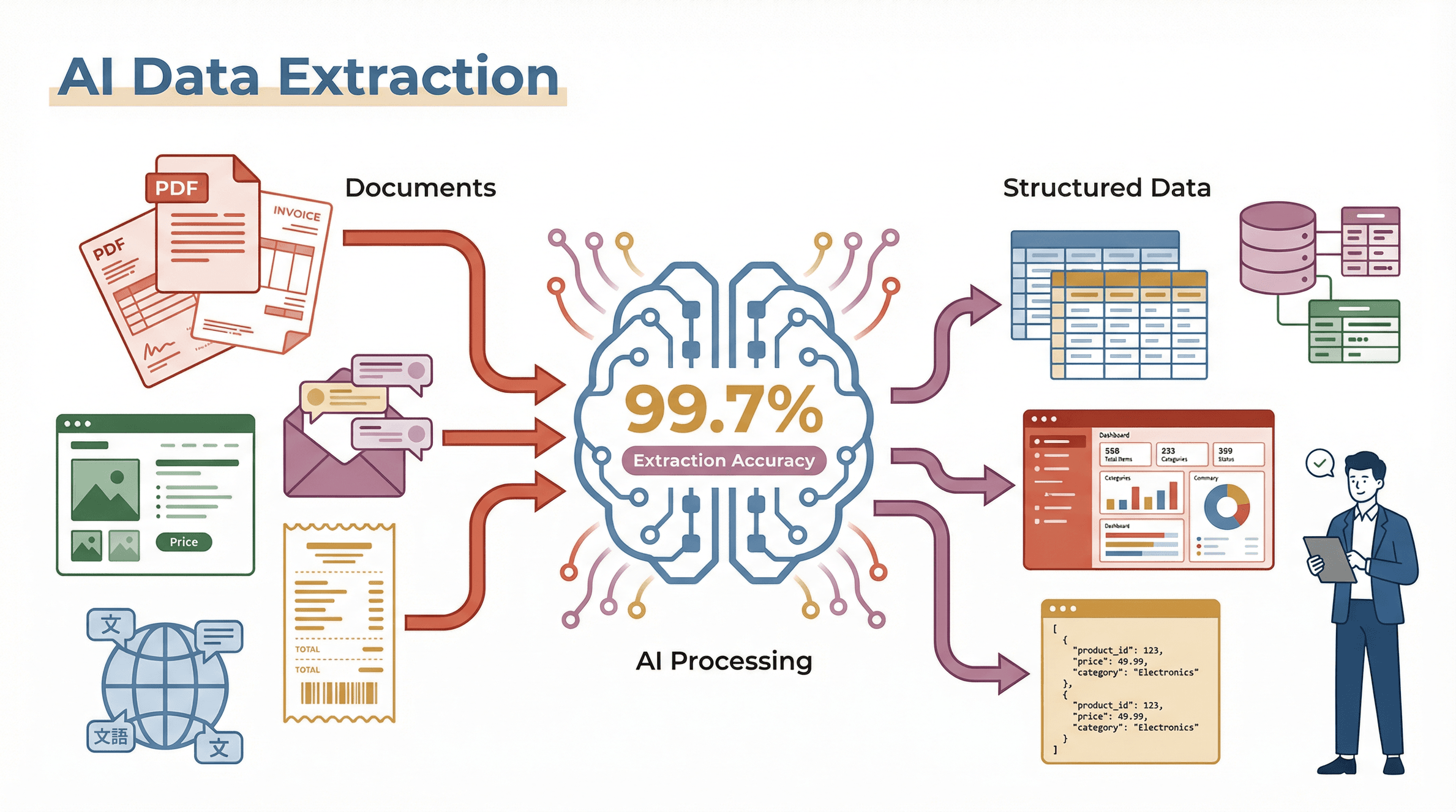 At its core, AI data extraction is about using artificial intelligence—especially machine learning and natural language processing—to automatically pull structured information from unstructured or semi-structured sources. Think of it as having a digital assistant that can “read” documents, images, or web pages, figure out what data you need, and organize it for you—without you having to spell out every rule or template.
Unlike traditional rule-based tools (which rely on rigid templates or code), AI-powered extraction understands context and meaning. For example, if you’re extracting totals from invoices, a rule-based tool might look for the word “Total” in a specific spot. But if the layout changes, it breaks. An AI extractor, on the other hand, can infer where the totals and dates are—even if the format is different—because it’s learned from vast amounts of data what those fields typically look like (Box).
What kinds of data sources can AI handle? Pretty much anything you throw at it:
- Web pages (product listings, directories, news, social media)
- PDFs and scanned documents (invoices, contracts, receipts)
- Images (photos of receipts, IDs, business cards)
- Emails, chat logs, and support tickets
- Multilingual content (AI can even translate on the fly)
The magic is that AI doesn’t just copy text—it interprets, structures, and even enriches the data, making it ready for analysis or automation.
AI Data Extraction vs. Manual Collection: The Essential Differences
Let’s be honest: manual data extraction is slow, error-prone, and just not scalable. I’ve seen teams spend days re-keying data from documents or websites, only to end up with typos, missed fields, and a lot of frustration. Even traditional rule-based tools (think: old-school OCR or template scrapers) struggle to keep up when formats change or data gets messy.
AI data extraction flips the script by using machine learning to recognize patterns, adapt to new layouts, and even learn from feedback. Here’s how the approaches stack up:
| Approach | How It Works | Pros | Cons | Best For |
|---|---|---|---|---|
| Manual | Human reads/copies data | Flexible, can handle anything | Slow, error-prone, expensive | One-off, complex tasks |
| Rule-Based | Templates, fixed rules, basic OCR | Fast for simple, stable data | Breaks with changes, rigid | Repetitive, static docs |
| AI-Driven | ML/NLP interprets content, learns | Fast, adaptive, accurate | Needs training, initial setup | Dynamic, varied data |
With AI, you’re not just automating the grunt work—you’re building a system that gets smarter over time, adapts to new formats, and delivers cleaner, more reliable data (Box).
How Automated Data Extraction Tools Adapt to Changing Data Sources
What Is Data Scraping and How to Do It in 2026 Learn more about the fundamentals of data scraping and how AI is changing the game. Get Started Free
Here’s the kicker: websites and documents change all the time. One week, the “Price” field is at the top; the next, it’s buried in a sidebar. If you’re using manual methods or rigid templates, you’re constantly playing catch-up.
Automated data extraction tools powered by AI—like Thunderbit—are built to handle this chaos. They use machine learning to parse page layouts, recognize new patterns, and auto-tag relevant fields, even as formats evolve. For example, Thunderbit’s “AI Suggest Fields” feature scans any web page and instantly recommends the best columns to extract, whether you’re looking at a product catalog, a list of leads, or a real estate directory (Thunderbit Blog).
Why does this matter? Because it means you’re not stuck rebuilding templates every time something changes. The AI adapts, so your workflows keep running—saving you hours of maintenance and reducing downtime.
The Power of Machine Learning for Data Extraction: Customization and Flexibility
One of the coolest things about modern AI data extraction is how customizable it’s become. Gone are the days when you had to settle for whatever the tool could scrape by default.
With Thunderbit’s Field AI Prompt feature, you can describe exactly what you want to extract, apply custom formatting, categorize data, or even translate content—all in plain English. For example:
- Sales teams can extract leads from a directory, then use AI prompts to tag each lead by region, score them based on keywords, or format phone numbers to E.164.
- Ecommerce ops can scrape product listings and use prompts to categorize SKUs, summarize descriptions, or flag out-of-stock items.
- Market researchers can pull reviews and have the AI summarize sentiment or extract only the most relevant quotes.
This kind of flexibility is only possible because machine learning models can interpret instructions, recognize context, and apply logic on the fly (Thunderbit Blog).
Thunderbit: The Most User-Friendly AI Data Extraction Tool
I’ll be blunt: most data extraction tools are either too technical or too limited for the average business user. That’s exactly why we built Thunderbit.
What makes Thunderbit different?
- Natural language operation: Just tell the AI what you want (“Extract all product names and prices”), and it figures out the rest.
- AI-suggested fields: Click “AI Suggest Fields,” and Thunderbit scans the page, recommending the best columns to extract.
- 2-Click Scraping: Approve the fields, hit “Scrape,” and you’re done. No coding, no templates, no headaches.
- Subpage and pagination scraping: Need data from detail pages or across multiple pages? Thunderbit’s AI handles it automatically.
- Automated scheduling: Set up recurring extractions (“every Monday at 9am”), and Thunderbit will run them in the cloud—even if your computer is off.
- Free export options: Instantly export your data to Excel, Google Sheets, Airtable, or Notion—no paywalls, no extra hoops (Thunderbit Blog).
Here’s a quick walkthrough of how easy it is:
- Open the Thunderbit Chrome extension (v4.4.1, last updated May 2026) on your target web page.
- Click “AI Suggest Fields.” The AI reads the page and suggests columns (e.g., Name, Price, URL).
- Tweak fields if needed (rename, add, or remove columns).
- Hit “Scrape.” Thunderbit extracts the data and displays it in a table.
- Export to your favorite tool with one click.
That’s it. No code, no setup, no maintenance. It’s designed for sales, marketing, and ops teams who just want results—fast.
Try Thunderbit AI Data Extraction Free
Real-World Impact: How AI Data Extraction Transforms Business Operations
Let’s get practical. What does all this mean for your business? Here are some real-world use cases and the outcomes teams are seeing:
| Use Case | Business Outcome |
|---|---|
| Lead Generation (Sales) | Build lead lists in minutes, not days; faster outreach; more accurate targeting |
| Invoice Processing (Finance) | Cut processing costs by up to 70%; reduce errors; speed up payment cycles |
| Market Research | Monitor competitors, track trends, and analyze reviews in real time; smarter, faster decisions |
| Compliance & Auditing | Scan contracts and forms for missing fields; reduce risk of fines; ensure 100% compliance checks |
| Customer Feedback Analysis | Aggregate and summarize feedback; identify issues faster; boost customer satisfaction by 45% |
| Ecommerce Price Monitoring | Track competitor prices daily; adjust pricing dynamically; prevent lost sales |
Pipeline 360's H2 2024 marketer survey found that 65% of B2B marketers spend more than 5 hours per week just keeping lead data clean, and 38% burn more than 10 hours on it. That's exactly the kind of repetitive lookup-and-cleanup work AI extraction absorbs — meaning the upside isn't a vague "productivity bump," it's reclaiming a chunk of every week back from manual data hygiene. Another company cut invoice processing costs from $15 to $5 per invoice (Artsyl Tech). Multiply those savings across a year, and you’re looking at serious ROI.
Defining the Future: Trends in AI Data Extraction Tools
 We’re just scratching the surface of what’s possible. Here’s where the field is heading:
- Predictive analytics: AI won’t just extract data—it’ll start to predict trends, flag anomalies, and suggest actions.
- Proactive data generation: Imagine AI agents that not only pull data but also generate reports, summaries, or even outreach emails automatically.
- Deeper integration: Expect to see AI extraction built right into your CRM, ERP, or analytics tools—no more jumping between apps.
- Generative AI: Large language models will handle even more complex tasks, like answering questions over extracted data or reasoning about context (Label Your Data).
- Multi-language and multi-format support: As global business grows, AI tools like Thunderbit are expanding to handle dozens of languages and every data format under the sun.
Gartner predicts that by 2030, 75% of all IT work will be done by humans augmented with AI. Data extraction is a big part of that story.
Choosing the Right Automated Data Extraction Tool for Your Business
With so many options out there, how do you pick the right tool? Here’s a quick checklist:
| Criteria | What to Look For |
|---|---|
| Ease of Use | Can non-technical users get results fast? Is there a natural language interface? |
| Adaptability | Does it handle changing formats, layouts, and data types? |
| Customization | Can you define custom extraction logic, prompts, or formatting? |
| Export Options | Does it export directly to Excel, Sheets, Airtable, Notion, etc.? |
| Automation | Can you schedule recurring extractions? Does it support cloud scraping for speed? |
| Support & Pricing | Is there a free tier? Responsive support? Affordable plans that scale with your needs? |
For most business users—especially in sales, marketing, and operations—Thunderbit checks all these boxes. It’s designed to be the most approachable, flexible, and powerful AI data extraction tool on the market.
Getting Started with Thunderbit: First Steps for Sales and Operations Teams
Ready to give it a spin? Here’s how to get started:
- Install the Thunderbit Chrome Extension. It’s free to try (scrape up to 6 pages, or 10 with a trial boost).
- Open your target web page (directory, product list, etc.).
- Click “AI Suggest Fields.” Let Thunderbit’s AI recommend the best columns.
- Adjust fields or add custom AI prompts as needed.
- Click “Scrape.” Watch as Thunderbit extracts and structures your data.
- Export your results to Excel, Google Sheets, Airtable, or Notion with one click.
- (Optional) Set up scheduling for recurring tasks, or use subpage scraping for deeper data.
Pro tip: Check out the Thunderbit Blog and YouTube Channel for tutorials, tips, and advanced use cases.
Explore Thunderbit Blog for More AI Data Extraction Tips
Conclusion: Unlocking Business Value with AI Data Extraction
Here’s the bottom line: AI data extraction is transforming business from the ground up. It’s not just about saving time (though you’ll save plenty)—it’s about unlocking new insights, reducing errors, and empowering teams to make smarter, faster decisions.
Manual data wrangling is a thing of the past. With automated data extraction tools and machine learning for data extraction, you can finally turn the data deluge into a competitive advantage. And with tools like Thunderbit, you don’t need to be a tech wizard to get started.
Ready to see what AI data extraction can do for your business? Install Thunderbit, try out the free tier, and start transforming the way you work—one click at a time.
Try Thunderbit AI Data Extraction Free Get Started Free
FAQs
1. What is AI data extraction, and how is it different from traditional methods?
AI data extraction uses machine learning and natural language processing to automatically pull structured information from unstructured sources (like web pages, PDFs, or images). Unlike manual or rule-based methods, AI can adapt to new formats, recognize context, and learn from feedback—making it faster, more accurate, and much more flexible (Box).
2. What kinds of data can automated data extraction tools handle?
Modern AI tools can extract data from web pages, PDFs, scanned images, emails, chat logs, and more. They can handle text, numbers, dates, images, emails, phone numbers, and even translate or categorize content on the fly (Apify).
3. How do AI-powered tools like Thunderbit adapt to changing websites or document layouts?
Thunderbit uses machine learning to read and interpret page layouts, so when a website or document format changes, the AI can still recognize and extract the right data—no need to rebuild templates or write new code (Thunderbit Blog).
4. Can I customize what data is extracted and how it’s formatted?
Absolutely. With features like Thunderbit’s Field AI Prompt, you can describe exactly what you want to extract, apply formatting, categorize, or even translate data—all using natural language instructions. This makes it easy to tailor extraction to your specific business needs.
5. How do I get started with AI data extraction for my team?
Start by identifying a high-impact use case (like lead generation or invoice processing), then try a user-friendly tool like Thunderbit. Install the Chrome extension, use AI to suggest fields, and export your results. Take advantage of free tiers and tutorials to experiment and scale up as you see results.
Curious to learn more? Dive into the Thunderbit Blog for deep dives, how-tos, and the latest in AI-powered automation. Happy extracting!
Learn More




