
There are over a hundred web scraping tools on the market right now, and somehow they all claim to be the easiest, fastest, and most reliable. Picking one feels a lot like ordering coffee in 2026 — too many options, unclear labels, and a sneaking suspicion that half of them are the same thing in different packaging.
But Thunderbit and ScrapingDog are genuinely not the same thing in different packaging. They're architecturally different products aimed at different people with different workflows. I've spent a lot of time digging into both — how they work under the hood, what they cost per page, and who actually benefits from each. Here is my honest breakdown so you can skip the confusion and land on the right tool for your situation.
Thunderbit vs ScrapingDog: Two Very Different Tools
Before comparing features, pricing, or performance, there's a fundamental distinction that most comparison articles skip entirely: Thunderbit and ScrapingDog belong to different categories of scraping tools.
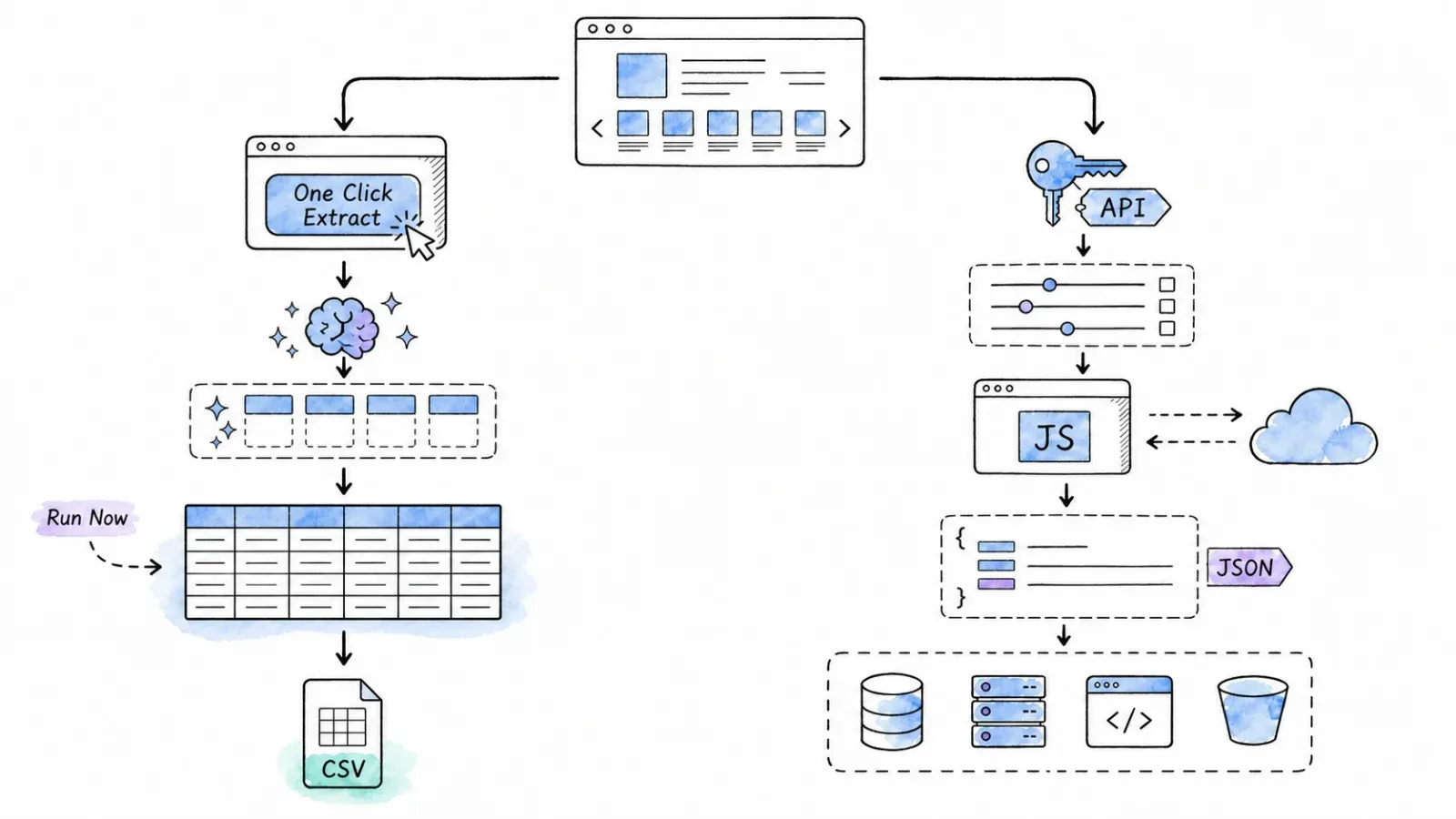
Thunderbit is a browser extension (Chrome and Edge) with agentic page analysis. You open a page, click One Click Extract, and the agent determines the output and starts automatically before you export structured data—all without writing a line of code. ScrapingDog is a server-side web scraping API. You send HTTP requests from your code, ScrapingDog manages proxies and rendering on its servers, and you get back HTML, JSON, Markdown, or structured data depending on the endpoint. Thunderbit is an agentic web scraper.
Thunderbit is an agentic web scraper: on a compatible, authorized page, click One Click Extract and the agent detects, reads, and analyzes the page to decide what to extract. Run Now starts immediately, but if you do nothing the task starts automatically—so the default experience needs only one intentional click, with no code, selectors, or schema setup.
This distinction matters because the comparison dimensions dominating most scraping-tool articles — proxy rotation quality, CAPTCHA bypass rates, headless-browser benchmarks — apply naturally to API-vs-API matchups but don't translate directly to a browser-extension model. Here's a quick architectural sketch:
| Dimension | Thunderbit (Browser Extension) | ScrapingDog (Web Scraping API) |
|---|---|---|
| Interaction model | Point-and-click in your browser | Send HTTP/API requests from code (or selected integrations) |
| Rendering | Uses the user's live browser session (Browser Mode) or Thunderbit cloud (Cloud Mode) | Server-side rendering with proxy/JS options |
| Proxy / IP management | Managed abstraction in cloud/API modes; browser mode uses user session | Managed rotating/premium proxies with granular controls |
| Output format | Structured fields via AI, ready for export | HTML, JSON, Markdown, summaries, or structured dedicated-endpoint JSON |
| Coding required | No (extension); optional for API/MCP/CLI | Yes for general API; selected no-code paths for dedicated endpoints |
Keep this table in mind. Every feature, price, and performance metric below lands differently once you see the architectural divide.
How Thunderbit Works
Thunderbit's core workflow is shorter than most people expect:
- Install the browser extension (Chrome or Edge) and sign in.
- Navigate to the page you want to scrape.
- Click One Click Extract — Thunderbit's AI reads the page and proposes a set of columns (e.g., Name, Price, URL, Description).
- Review, rename, add, remove, or instruct fields using natural-language Field AI Prompts (like "translate to Spanish" or "categorize as B2B/B2C").
- Click Scrape. Thunderbit handles compatible pagination, infinite scroll, or subpage enrichment.
- Review the resulting table, then export to Excel, CSV, JSON, Google Sheets, Airtable, or Notion.
No CSS selectors. No XPath. No API keys (unless you want them).
Because you stay in your live browser session, Thunderbit can also work on pages where you're logged in — useful for directories, dashboards, or gated content you're authorized to access.
Thunderbit also has an Open API, MCP server, and CLI for developers and agent workflows, but the primary audience here is the browser-extension user.
How ScrapingDog Works
ScrapingDog is an API-first platform. Here's the standard workflow:
- Sign up and get an API key.
- Write code (Python, Node.js, or another language) to send an HTTP request to ScrapingDog's
/scrapeendpoint with your target URL and configuration parameters. - ScrapingDog's servers fetch the page using managed rotating proxies, optional JavaScript rendering, premium proxy tiers, geo-targeting, custom headers, and wait parameters.
- You receive back HTML, JSON, Markdown, summaries, or extracted data depending on your configuration and endpoint.
- You parse, transform, and route the data to your database, file, or application.
ScrapingDog also offers dedicated APIs for specific high-demand targets — Google Search, Amazon, LinkedIn, Indeed, Instagram, YouTube, and others — that return pre-structured JSON. And it's worth noting that ScrapingDog has expanded beyond pure code-only usage: there's a Google Sheets add-on for selected dedicated APIs, an n8n integration, and no-code tutorials for automation platforms. These don't replicate Thunderbit's adaptive field-discovery workflow, but they do mean "requires coding" isn't an absolute anymore.
Who Is Each Tool Built For?
Features matter, but the better first filter is simpler: who are you, and what does your day look like?
Thunderbit: Built for Business Teams
Thunderbit fits people who need web data but don't write code for a living:
- Sales reps building lead lists from directories, company pages, or LinkedIn profiles
- Operations teams pulling supplier data, product specs, or contact details from public pages
- Researchers doing one-time or occasional data pulls from unfamiliar sites
- Marketers collecting competitor pricing, content, or review data for analysis
- Anyone who needs structured, export-ready data without writing a script or maintaining a pipeline
If your workflow is "I'm looking at a page and I want the data in a spreadsheet," Thunderbit is designed for that exact moment. Our team built it because we kept hearing from business users who were stuck between "learn Python" and "ask engineering for help."
ScrapingDog: Built for Developers and Data Engineers
ScrapingDog lands with technical users who need programmatic control:
- Backend engineers building automated data pipelines that run on a schedule
- Dev teams that need raw HTTP-level control over proxy type, geo, headers, rendering, and retries
- Applications that require structured JSON from dedicated target APIs (Google, Amazon, LinkedIn, etc.)
- Teams monitoring prices, SERPs, or product pages at large scale through code
- Data engineers integrating scraping into ETL workflows, databases, or dashboards
If your workflow is "I need to hit 50,000 URLs tonight and pipe the results into Postgres," ScrapingDog's API is built for that kind of orchestration.
Feature-by-Feature: Thunderbit vs ScrapingDog
With the architectural and audience context in place, here's where the feature-level differences show up.
AI-Powered Field Detection
This is the widest gap between the two products.
Thunderbit uses One Click Extract to automatically propose columns based on the page you're viewing. You see a table of proposed fields — Name, Price, Rating, URL, whatever the AI detects — and the agent can proceed automatically, while optional natural-language instructions remain available for specialized output. The AI handles the "what data is on this page and how do I extract it?" problem for you. For anyone who's ever stared at a page wondering which CSS selector to use, this is the whole point.
ScrapingDog's general API returns page content (HTML, Markdown, etc.) and leaves field definition to the developer. However, ScrapingDog now offers ai_extract_rules and ai_query options that let you define extraction rules or ask questions about the page content at the API level. Their dedicated endpoints (Google Search, Amazon, etc.) return pre-structured JSON with defined fields. The difference: Thunderbit’s extension analyzes the visible page agentically and starts automatically; ScrapingDog’s extraction is configured in code or pre-defined by endpoint.
Proxy and Anti-Bot Handling
ScrapingDog's bread and butter includes managed rotating proxies, premium proxy tiers, country/location targeting, session management, and server-side JavaScript rendering. You configure these per request. This is granular, powerful, and designed for developers who need to tune access strategies for different targets.
Thunderbit takes a different approach. In Browser Mode, you're using your own authenticated browser session — no proxy needed for pages you can already access. In Cloud Mode and via the Thunderbit API, Thunderbit provides managed rendering and anti-bot handling as an abstraction. You don't pick a proxy tier or configure headers; the platform handles it for supported, authorized pages.
Neither tool guarantees universal access, zero bans, or CAPTCHA bypass on every site. If someone promises that, they're selling you something else entirely.
Scheduling and Automation
ScrapingDog doesn't ship a built-in hosted scheduler. Developers typically orchestrate recurring scrapes using cron jobs, n8n, Make.com, or their own application logic — the API handles the requests, you handle the clock.
Thunderbit supports scheduled extraction within the product. Current plans allow recurring scrapers (Starter supports up to 5, Pro up to 25, with a five-minute minimum monitoring frequency on Pro). For backend or pipeline automation, Thunderbit's Open API, MCP server, and CLI provide programmatic access.
Supported Data Sources
Thunderbit's extension works on web pages you can open in your browser, plus PDFs and images with AI extraction. It adapts to diverse, unfamiliar page layouts without requiring custom configuration — you don't need a pre-built parser for a new site.
ScrapingDog's general API can target any URL accessible via HTTP. Its dedicated APIs provide pre-structured responses for specific high-demand sources like Google Search/Maps/News/Shopping, Amazon, Walmart, LinkedIn, Indeed, Instagram, YouTube, and others. These dedicated endpoints are a genuine strength for applications that need reliable structured data from specific platforms.
The tradeoff: Thunderbit adapts on the fly to new pages; ScrapingDog offers deeper, target-specific parsing for supported platforms.
What Happens After You Scrape: Exports and Downstream Workflows
Most comparison articles stop at extraction. But for non-technical users, the real question is what happens next — getting data into a format and destination you can actually use.
| Post-Extraction Step | Thunderbit | ScrapingDog |
|---|---|---|
| Structured output | AI-extracted fields, reviewable table | Structured JSON from dedicated endpoints; general API returns HTML/Markdown/summary/extracted data |
| Direct export to spreadsheets | Excel, CSV, Google Sheets | Google Sheets add-on for selected dedicated APIs; general API requires code |
| Direct export to Airtable / Notion | Supported destinations | Not built-in; user writes integration code or uses automation platform |
| API/webhook output | Open API with webhooks | Core product — JSON responses by design |
| Data transformation | AI field instructions (translate, categorize, format, normalize) during extraction | User handles post-processing in code; some AI extraction rules available |
Thunderbit: From Page to Spreadsheet in Clicks
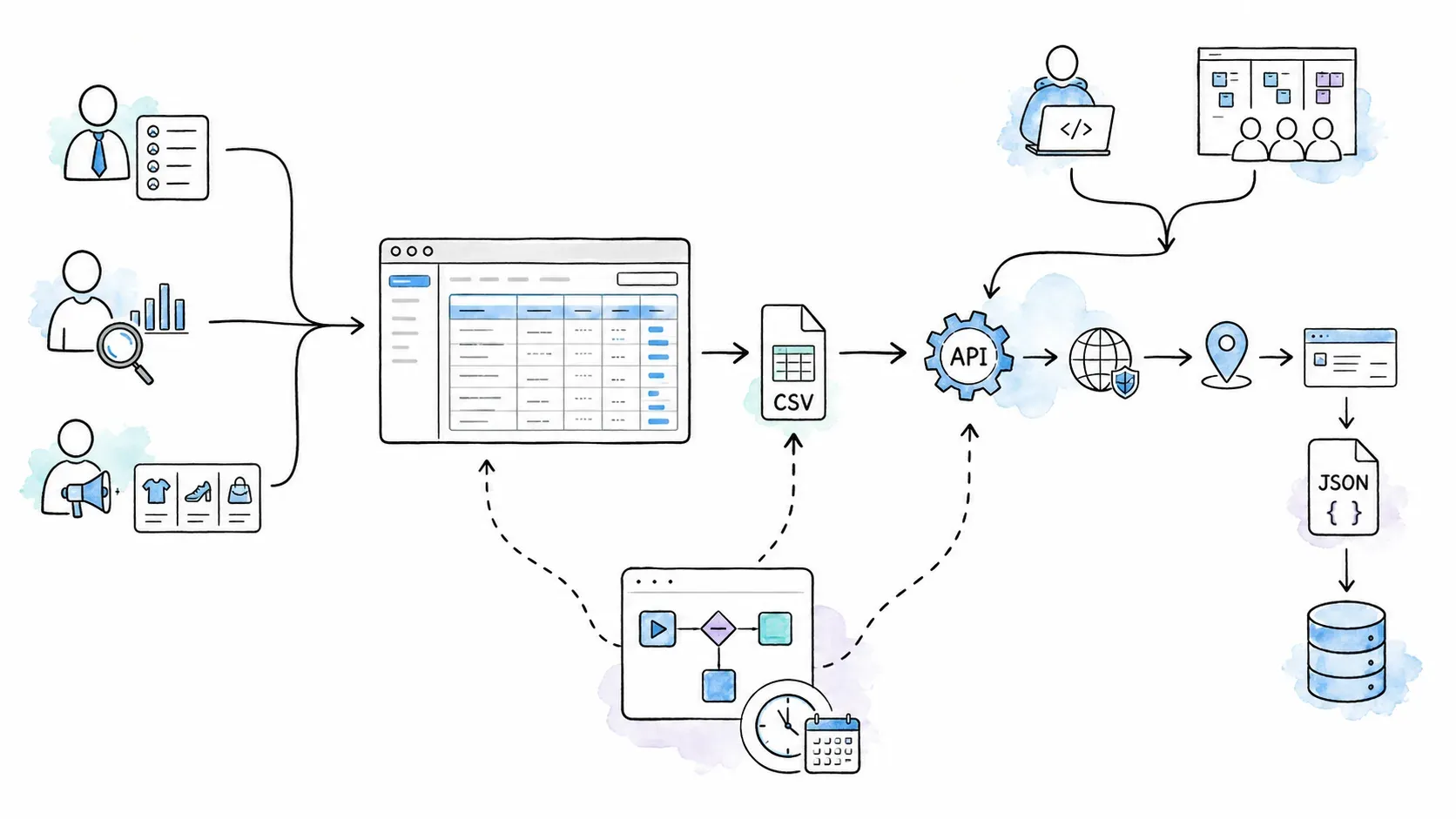
With Thunderbit, the data you see in the extension's table is already structured. You click Export and choose your destination — Excel, Google Sheets, Airtable, Notion, CSV, or JSON. AI field instructions let you transform data during extraction: translate a column, categorize entries, normalize formatting. No post-processing script required.
For many business users, that's the whole point. Page to spreadsheet in a few clicks. If you want to see it in action, our YouTube channel has walkthroughs.
ScrapingDog: Raw Output for Developer Pipelines
ScrapingDog's general API returns page content that developers parse and route using their own code. Dedicated endpoints return structured JSON, which is ideal for feeding into databases, dashboards, or custom pipelines. The Google Sheets add-on covers selected dedicated APIs, so there is a no-code spreadsheet path for specific use cases — but it's not the same as arbitrary-page-to-spreadsheet export.
For developers, this flexibility is a feature, not a limitation. You control every step of the data pipeline. For non-developers, it means more setup and maintenance.
Thunderbit vs ScrapingDog Pricing: What Does a Credit Actually Buy?
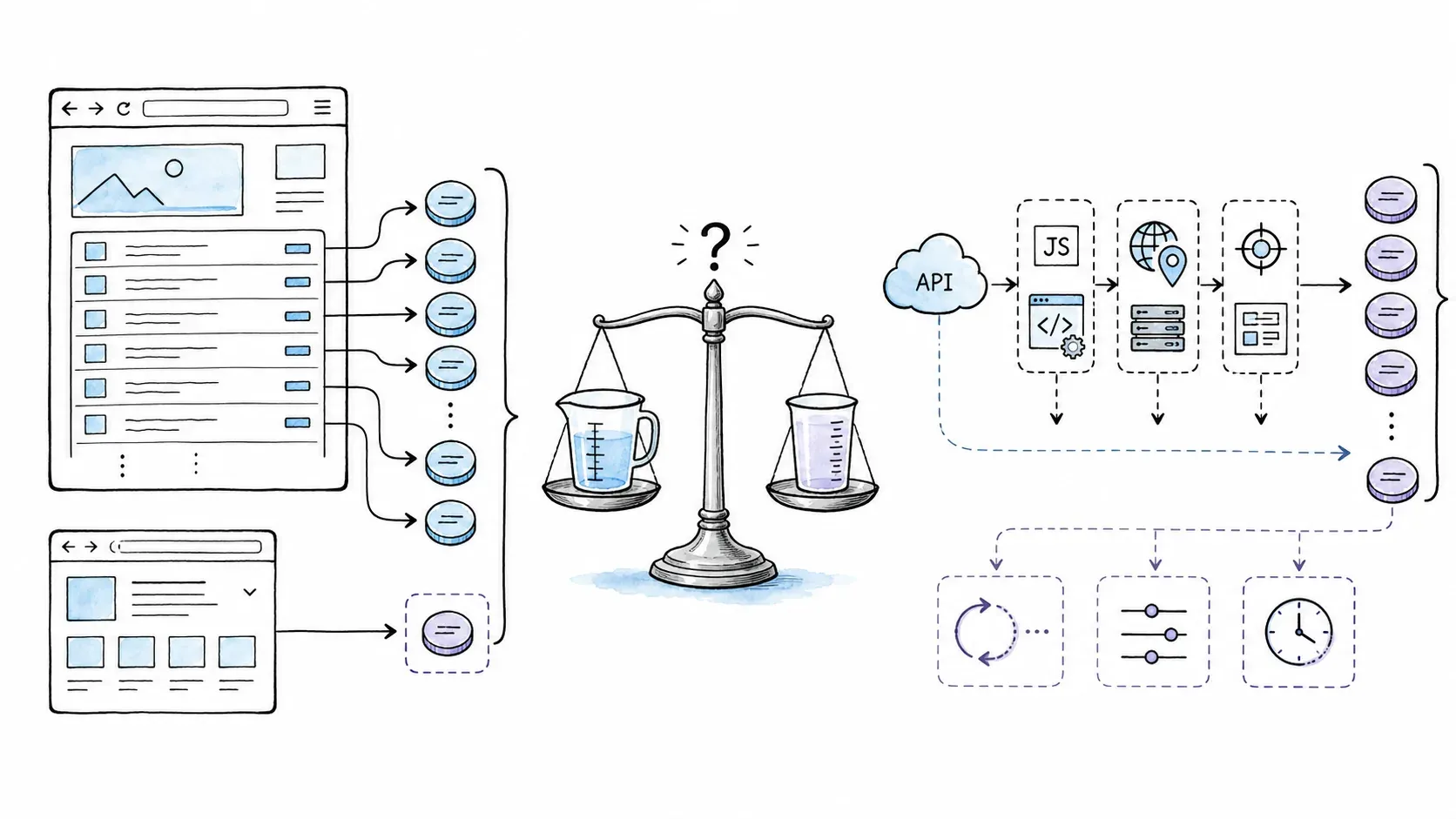
Both tools use credit-based pricing, but a "credit" means something fundamentally different in each system. Most comparisons list plan names and prices and call it a day — without explaining what you're actually paying for per page.
ScrapingDog charges per API request. The credit cost per request depends on configuration:
| Configuration | Credits/request |
|---|---|
| Basic/rotating | 1 |
| JavaScript rendering | 5 |
| Premium proxy | 10 |
| JavaScript + premium | 25 |
Dedicated endpoints have their own rates. Current public plans include:
| Plan | Monthly price | Credits | Concurrency |
|---|---|---|---|
| Free | $0 | 200 | 1 |
| Lite | $40 | 200,000 | 5 |
| Standard | $90 | 1,000,000 | 50 |
| Pro | $200 | 3,000,000 | 100 |
| Premium | $350 | 6,000,000 | 150 |
| Business | $500 | 9,000,000 | 200 |
Annual billing is advertised as 12 months for the cost of 10. Failed requests are not charged (per ScrapingDog's billing policy).
Thunderbit's no-code extension charges per output row, not per input page. One standard row = 1 credit. One subpage-enriched row = 2 credits. A single category page with 50 listings generates 50 credits, not 1. Current plans:
| Plan | Monthly price | Credits |
|---|---|---|
| Free | $0 | 6 pages/month (up to 30 credits/page) |
| Starter | $15 | 500 |
| Pro (tier 1) | $38 | 3,000 |
| Pro (tier 2) | $75 | 6,000 |
| Pro (tier 3) | $125 | 10,000 |
| Pro (tier 4) | $249 | 20,000 |
Thunderbit's separate API pricing uses different units: Distill at 1 unit/page, Extract at 20 units/page.
Normalizing Cost: An Honest Framework
Ugh, I wish I could give you a single "cost per page" number. But you can't do that comparison honestly without defining the exact workload. A ScrapingDog request that costs 1 credit (basic, no JS) and returns one page of HTML is not the same unit as a Thunderbit credit that represents one extracted row from a page that might contain 50 rows. And a ScrapingDog JS+premium request at 25 credits is a very different animal from a basic one.
Instead of fabricating a single number, here's the framework I'd use:
| Factor | Thunderbit | ScrapingDog |
|---|---|---|
| What does one "credit" buy? | One extracted output row | One API request (basic config) |
| JS rendering cost | Included in cloud/browser modes | 5x credits per request |
| Premium/protected targets | Managed abstraction | 10x–25x credits per request |
| Rows per page | Varies (could be 1–100+) | N/A — returns page content |
| Subpage enrichment | 2 credits/row | Separate request per subpage |
| Failed requests | Varies by mode | Not charged (per policy) |
⚠️ Pricing is volatile. Both tools update plans, credit costs, and features regularly. Verify current figures on Thunderbit's pricing page and ScrapingDog's pricing page before making any purchasing decision.
Free Tiers and Trial Options
ScrapingDog offers 200 free credits on signup — enough for 200 basic requests or 40 JS-rendered requests. Useful for testing the API, but limited for production work.
Thunderbit's free plan includes 6 pages/month with up to 30 credits per page. That's enough to test the One Click Extract workflow on a handful of pages and see if the extraction quality meets your needs. You can try it via the Chrome Extension or the Web App.
Rethinking "Performance": What to Measure for Each Tool
I need to be upfront about something most comparison articles gloss over.
If you search for ScrapingDog benchmarks, you'll find independent tests from sources like Proxyway and Scrapeway that measure API proxy performance — success rates, response times, cost per successful request. Proxyway's test across roughly 6,000 unique URLs reported a 43.84% aggregate success rate for ScrapingDog with wide variation by target (near 100% on Google, much lower on protected retail/jobs sites). Scrapeway's recent snapshot showed about 33% overall success with strong results on Amazon and LinkedIn.
You won't find Thunderbit in those benchmark tables. Not because it performs poorly, but because the test methodology — sending thousands of HTTP requests through a proxy API and measuring response codes — doesn't apply to a browser-extension workflow.
It's like benchmarking a bicycle against a boat on water speed. Different race entirely.
For ScrapingDog (API): Success Rate, Speed, and Uptime
For an API scraping tool, the metrics worth tracking:
- Success rate: % of requests returning valid, usable data (not just HTTP 200)
- Response time: average and p95/p99 latency per request
- Cost efficiency: cost per usable record, including retries and failed requests
- Uptime: ScrapingDog's SLA targets 99% monthly uptime with a service-credit mechanism
- Concurrency: how many parallel requests your plan supports
These vary significantly by target site, configuration, and time period. No single benchmark number tells the whole story.
For Thunderbit (Browser Extension with AI): Accuracy, Completeness, and Time-to-Data
For a browser AI extraction tool, different metrics apply:
- Field detection accuracy: does the AI correctly identify the relevant data fields on the page?
- Extraction completeness: does it capture all rows/records, or miss some?
- Time-to-data: how long from opening a page to having a validated, export-ready table?
- Layout adaptability: can it handle diverse, unfamiliar page structures without custom configuration?
- Credits per validated row: what's the actual cost for correct, usable output?
- Human review effort: how much editing or cleanup is needed after extraction?
Side-by-Side: What to Measure
| What to measure for an API tool (ScrapingDog) | What to measure for a browser AI tool (Thunderbit) |
|---|---|
| % of requests returning valid content | AI field-detection precision and recall |
| Response latency (avg, p95, p99) | Time from page open to validated export |
| Cost per usable record (incl. retries) | Credits per validated output row |
| Concurrency and rate limits | Pagination/subpage completion rate |
| Uptime/incident history | Layout adaptability across diverse sites |
| Engineering hours for setup/maintenance | Human review and edit effort |
That's a more honest basis for evaluation than any single benchmark number could provide.
Thunderbit vs ScrapingDog: Quick Comparison Table
The consolidated side-by-side, for those of you who scrolled straight here (no judgment):
| Dimension | Thunderbit | ScrapingDog |
|---|---|---|
| Tool type | Browser extension + Web App + API/MCP/CLI | Web scraping API + dedicated endpoints + selected integrations |
| Primary audience | Business users (sales, ops, marketing, researchers) | Developers and data engineers |
| Coding required | No (extension); optional for API/developer surfaces | Yes for general API; selected no-code paths for dedicated endpoints |
| agentic page analysis | One Click Extract with natural-language instructions | AI extract rules/query at API level; dedicated endpoints return structured JSON |
| Proxy handling | Managed abstraction (cloud/API); browser mode uses user session | Granular rotating/premium/geo proxy controls per request |
| Export destinations | Excel, CSV, JSON, Google Sheets, Airtable, Notion | JSON responses; Google Sheets add-on for selected dedicated APIs |
| Scheduling | Built-in recurring scrapers (plan-dependent) | User-orchestrated (cron, n8n, Make.com, etc.) |
| Pricing unit | Per output row (extension); per page/extract (API) | Per API request (credit cost varies by config) |
| Free tier | 6 pages/month | 200 credits |
| Best for | Ad-hoc extraction, business exports, non-technical users | Programmatic pipelines, high-volume API access, target-specific endpoints |
Choose the Right Tool: A Persona-Based Decision Guide
After all that analysis, here's the decision matrix I'd actually hand to a colleague. I've tried to be honest about where each tool fits — and where it doesn't.
| If you are… | Consider Thunderbit | Consider ScrapingDog |
|---|---|---|
| Marketer building a quick lead list from a directory | ✅ No-code, agentic page analysis, instant export to Sheets/Excel | ⚠️ Requires API setup or using a dedicated endpoint + Sheets add-on |
| Developer building an automated data pipeline | ⚠️ Extension isn't API-first; but Open API/MCP/CLI serve dev workflows | ✅ REST API designed for programmatic, high-volume workflows |
| Researcher doing a one-time data pull from an unfamiliar site | ✅ One Click Extract adapts to new pages without configuration | ⚠️ General API requires coding; dedicated endpoints only cover specific targets |
| Team monitoring prices/SERPs at scale | ⚠️ Built-in scheduling exists but isn't designed for massive-volume monitoring | ✅ API + developer-orchestrated scheduling for recurring bulk jobs |
| Sales ops enriching CRM contacts | ✅ Point-and-click extraction with CRM-ready exports (Sheets, Airtable, etc.) | ⚠️ Raw output needs transformation before CRM import (unless using a dedicated endpoint) |
| Google Sheets user needing data from a specific supported platform | ✅ Direct Sheets export from any compatible page | ✅ Native Sheets add-on for selected dedicated APIs (Google Maps, Amazon, etc.) |
A quick personal observation: when I talk to sales and ops teams, the recurring theme is "I don't want to file a ticket with engineering every time I need a list." That's the gap Thunderbit fills.
When I talk to developers, the theme is different: "I need control, I need scale, and I need to integrate this into my stack." That's ScrapingDog's lane.
Both are valid. Neither is wrong.
Conclusion: No-Code AI or Developer API — It Depends on You
The core difference was never about which tool is "better." It's about which workflow matches your reality.
Thunderbit is for business users who want structured, export-ready data from their browser without writing code — and for teams that want to move from "I see a page" to "the data is in my spreadsheet" in minutes. If that's you, try Thunderbit's free plan or install the Chrome Extension and see how One Click Extract works on a page you care about.
ScrapingDog is for developers and data engineers who need a programmable, server-side API with granular proxy controls, dedicated target endpoints, and the flexibility to build custom pipelines. If that's you, ScrapingDog's documentation is the place to start.
And if you're in an organization where both personas exist — sales needs ad-hoc lists while engineering needs a production pipeline — it's entirely reasonable to use different tools for different jobs. The best scraping tool is the one that fits your workflow, not the one with the longest feature list.
For more context on how AI web scraping works and where Thunderbit fits in the broader landscape, check out our guides on AI web scraping, web scraping without coding, and the best AI web scrapers.
FAQs: Thunderbit vs ScrapingDog
Can I use Thunderbit without any coding skills?
Yes. Thunderbit's browser extension is designed for non-technical users. One Click Extract proposes columns based on the page you're viewing, and you export structured data with a few clicks — no code, no selectors, no API keys required. For developer workflows, Thunderbit also offers an Open API, MCP server, and CLI, but the extension is the primary no-code surface.
Does ScrapingDog require coding?
For the general API, yes — you need to write code (Python, Node.js, etc.) to send requests and handle responses. However, ScrapingDog now offers a Google Sheets add-on for selected dedicated APIs, an n8n integration, and no-code tutorials for automation platforms. These cover specific use cases but don't replicate Thunderbit's adaptive, any-page field-discovery workflow.
Can Thunderbit handle large-scale, automated scraping?
The browser extension is best for agentic, one-click extraction — not for running 50,000 URLs overnight. For backend, pipeline, or high-volume automation, Thunderbit's Open API, MCP server, and CLI provide programmatic access with managed rendering, batching, and webhooks. Compare these developer surfaces directly against ScrapingDog's API if scale is your primary need.
Which tool is cheaper per page?
There's no universal answer because the tools use fundamentally different credit systems. Thunderbit charges per extracted output row; ScrapingDog charges per API request with variable credit costs based on configuration (1–25 credits per request). The real cost depends on your target sites, rendering needs, rows per page, and volume. Check Thunderbit's pricing and ScrapingDog's pricing for current figures, and use the normalization framework above to estimate your specific workload cost.
Can I export data from Thunderbit to my CRM?
Thunderbit supports CRM-ready exports to Excel, CSV, Google Sheets, Airtable, and Notion. These cover most CRM import workflows (e.g., export to CSV, then import into Salesforce or HubSpot). For direct programmatic integration, the Open API can feed data into custom CRM pipelines. Thunderbit does not currently offer a native one-click connector to specific CRM platforms — check the latest export options on the Thunderbit website for updates.
Learn More




