

Last Tuesday, I watched a colleague on our team try to scrape a list of 500 product pages for a competitive pricing project. Everything was humming along—until page 47, when the scraper hit a wall of 403 and 502 errors. She stared at the screen, refreshed, tried again, got a 429, and then just closed her laptop.
If that scenario sounds familiar, you're not alone. Proxy status error codes are one of the most common (and most frustrating) blockers for anyone collecting web data at scale—whether you're in sales, ecommerce, operations, or market research. And here's what bugs me about most guides on this topic: they all say the same thing. "Rotate your IPs." "Add delays." That's about as helpful as telling someone with a flat tire to "drive differently."
In this article, I'm going to give you something more useful: a quick-reference table for every proxy error code, a 10-second diagnostic flowchart, and a breakdown of 6 tools that actually solve these errors—with honest pros, cons, and pricing. We built Thunderbit to make web scraping painless for business teams, so I've seen these errors from every angle. Time to demystify them.
Try Thunderbit for effortless web scraping
What Are Proxy Status Error Codes (and Why They Keep Blocking Your Data)
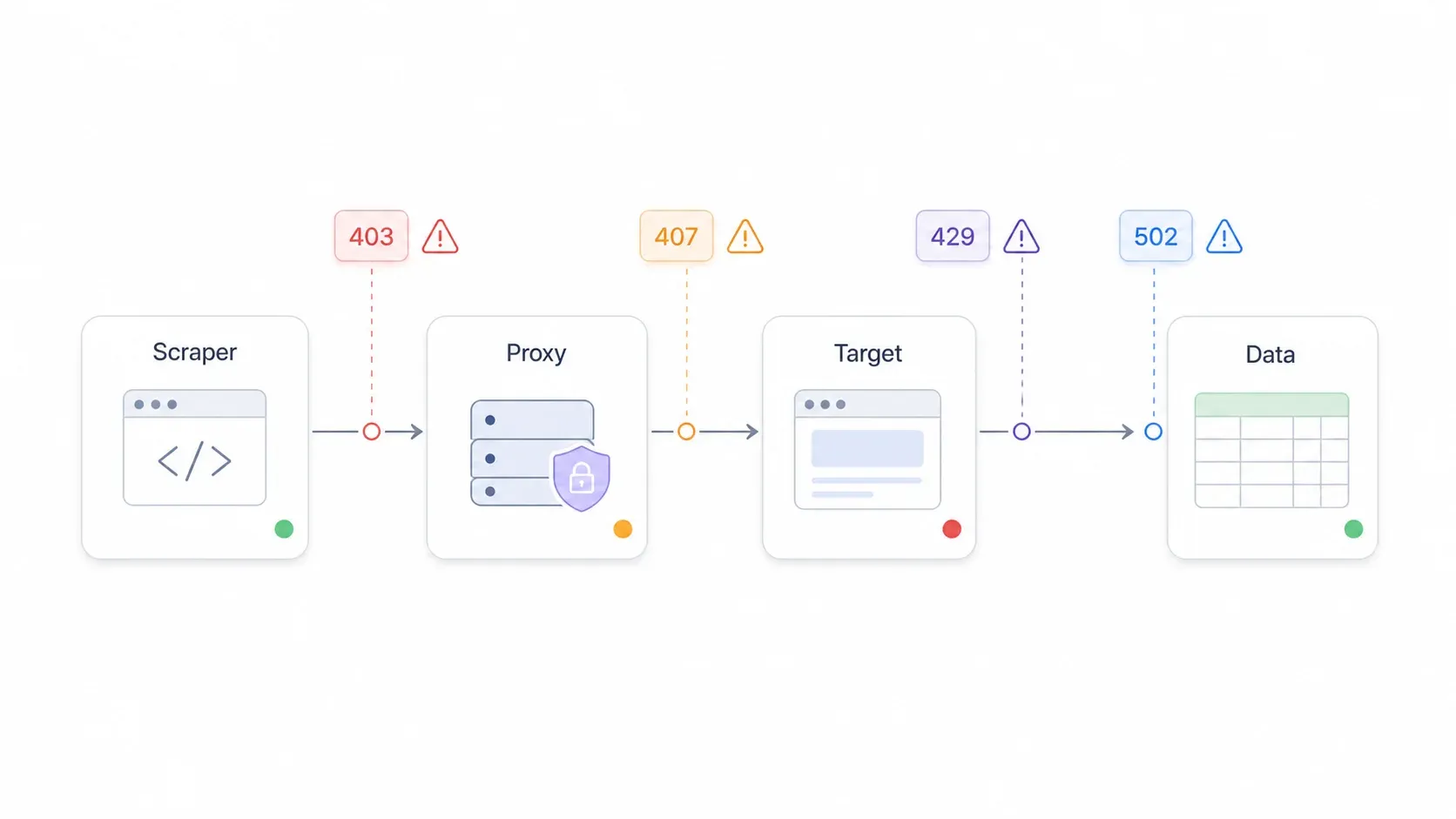
Proxy status error codes are HTTP response codes that pop up when something breaks in the chain between your computer (or scraping tool), the proxy server forwarding your request, and the target website you're trying to reach. Think of it as a three-way handshake where any party can say "nope."
The codes break into two big buckets:
- 4xx (Client-side errors): Something is wrong with your request, your credentials, your IP, or you're asking too often. These are the "you messed up" codes.
- 5xx (Server-side errors): The proxy server or the target website is having a bad day. These are the "it's not you, it's them" codes.
There's also a 3xx family (redirects), which can trip up scrapers when a site sends you to a login page, a consent wall, or a different URL entirely.
Why should you care? Because these errors don't just mean "try again." They interrupt lead scraping, price monitoring, competitor research, and every other data workflow your team depends on. According to a residential proxy benchmark from DataResearchTools, even top-tier proxy providers see about a 5.4% failure rate across 3.4 million requests—and that number climbs fast with cheaper or misconfigured setups. One industry estimate puts 429 Too Many Requests at about 40% of all proxy failures, with 403 Forbidden at roughly 25%.
A Reddit user summed up the pain perfectly: their scraper worked fine for over a month, then suddenly started returning 403s on two sites—"same code, same proxy setup"—and they had no idea if the IP pool was burned, the site changed, or they missed something obvious.
That confusion is the real enemy. The error codes themselves are actually pretty logical once you know what to look for.
Every Proxy Error Code at a Glance: The Quick-Reference Table
I looked at the top-ranking guides for proxy error codes, and not a single one in the top three gives you a scannable master table. Most force you to scroll through thousands of words to find your specific code. So here's the table I wish I'd had the first time I hit a 407 and spent 20 minutes Googling "what does proxy authentication required even mean."
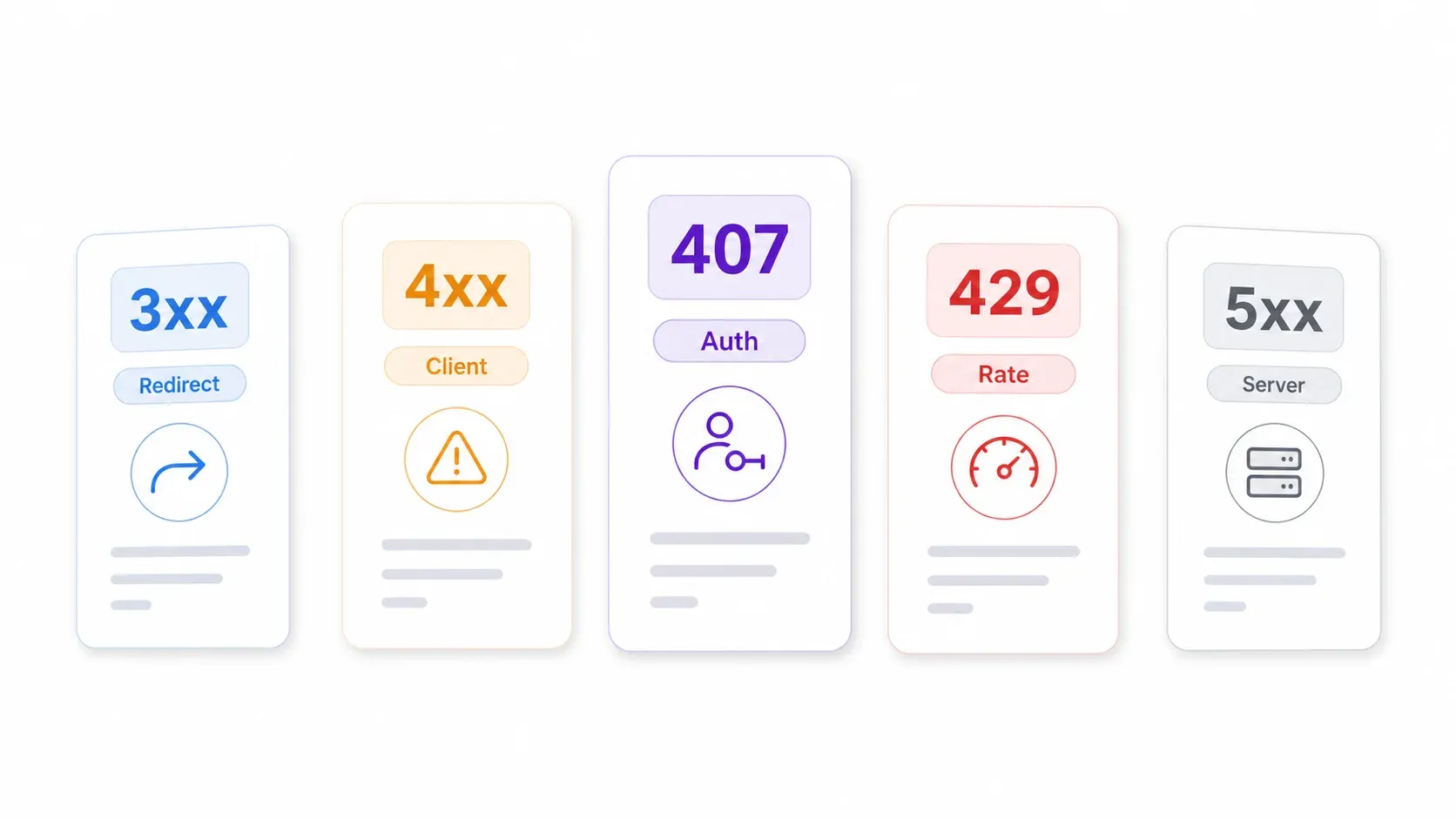
| Error Code | Name | Client or Server Side? | Most Likely Cause in Proxy Context | One-Line Fix | Prevention Tip |
|---|---|---|---|---|---|
| 301 | Moved Permanently | Redirect | Target URL permanently moved; scraper using old URL | Update target URL or follow redirects | Refresh source URL lists regularly |
| 302 | Found | Redirect | Temporary redirect to login, consent, locale, or bot-check page | Follow redirect and inspect the final URL/body | Log redirect chains; watch for login/consent pages |
| 307 | Temporary Redirect | Redirect | Temporary redirect preserving request method and body | Follow redirect without changing method/body | Ensure scraper doesn't convert POST to GET |
| 400 | Bad Request | Client | Malformed request, bad proxy URL, wrong protocol, invalid headers | Re-check request syntax, proxy host, port, protocol, headers | Test proxy config with provider's curl examples first |
| 401 | Unauthorized | Client/Target | Target website or API credentials missing or invalid | Refresh target-site token, login, or API key | Monitor credential expiry and login state |
| 403 | Forbidden | Client/Target | IP reputation, geo restriction, bot detection, or permissions block | Use higher-quality residential/mobile IPs, correct geo, realistic fingerprints | Pace requests; avoid burned IP pools |
| 404 | Not Found | Target | URL doesn't exist, product/page removed, or redirect path wrong | Remove or refresh dead URLs | Pre-validate URLs; recrawl sitemaps |
| 407 | Proxy Auth Required | Proxy/Client | Proxy username, password, zone, token, or IP whitelist wrong | Fix proxy credentials, zone string, or whitelist | Run a credential test before large jobs |
| 408 | Request Timeout | Client/Network | Target/proxy slow, timeout too short, or network path unstable | Increase timeout; retry once or twice | Track p95 latency; use longer timeouts for slow domains |
| 429 | Too Many Requests | Client/Target | Too many requests from same IP/session/account/fingerprint | Respect Retry-After; use exponential backoff with jitter; lower concurrency | Use domain-level rate limits and pacing before errors spike |
| 500 | Internal Server Error | Server | Target or proxy server hit an internal error | Retry with a cap; inspect response body if available | Add retry budget; alert when 500s persist |
| 502 | Bad Gateway | Server/Proxy | Proxy gateway got invalid response from upstream target or internal route | Retry through a different route/server/proxy zone | Monitor provider status; separate proxy vs. target failures |
| 503 | Service Unavailable | Server/Target | Target overloaded, in maintenance, or anti-bot layer refusing traffic | Wait, lower concurrency, retry later | Avoid peak times; add circuit breaker for repeated 503s |
| 504 | Gateway Timeout | Server/Proxy | Proxy gateway or upstream target didn't respond in time | Increase timeout, reduce page weight, or switch route | Split jobs into smaller batches; avoid heavy resource loading |
Sources: MDN HTTP response status codes, IANA HTTP Status Code Registry.
Bookmark this table. Print it. Tape it to your monitor. It'll save you more time than you think.
How to Diagnose Your Proxy Error in 10 Seconds (Decision Flowchart)
I've talked to dozens of business users who hit proxy errors and immediately jump to "I need new proxies." But the right first step is always diagnosis. Here's the decision tree I use—and that zero competing guides currently provide as a visual:
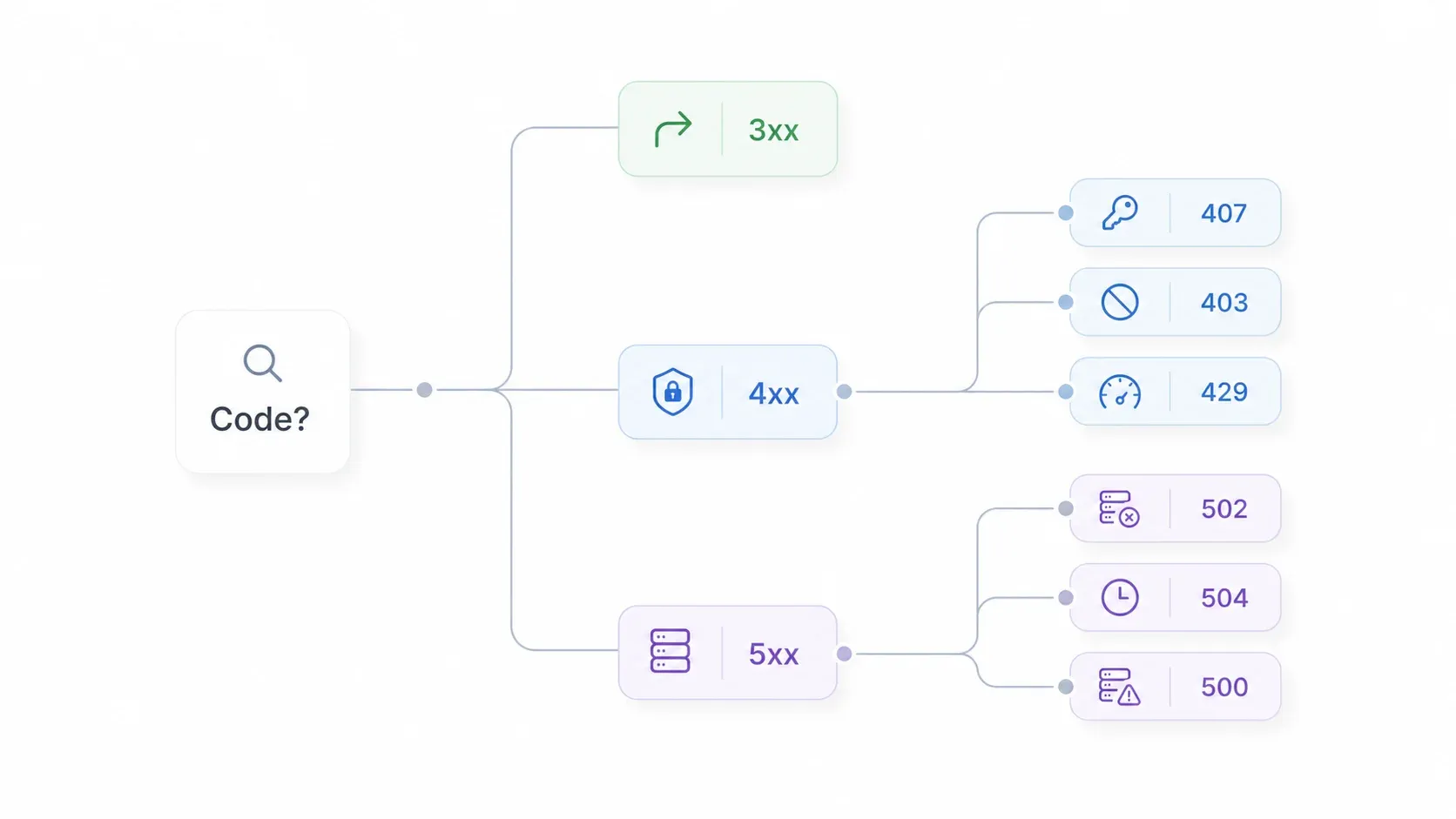
Step 1: Look at the first digit of your error code.
- 3xx? → Redirect issue. Follow the final URL. Check if the site is sending you to a login, consent, or geo page.
- 4xx? → Client-side problem. Go to Step 2.
- 5xx? → Server-side problem. Go to Step 3.
Step 2 (4xx errors):
- 407? → Proxy authentication. Check your proxy username, password, zone, token, or IP whitelist.
- 403? → Access blocked. Check IP reputation, geo, permissions, headers, and browser fingerprint.
- 429? → Rate limit. Respect
Retry-Afterheader. Lower concurrency. Use exponential backoff with jitter. - 400? → Bad request. Validate proxy URL, port, protocol, headers, and payload.
- 401, 404, 408? → Check target credentials, URL validity, and timeout settings.
Step 3 (5xx errors):
- 502 or 503? → Gateway or service issue. Retry, switch proxy route, check provider and target status pages.
- 504? → Timeout. Increase timeout, reduce page load, split batches, switch route.
- 500? → Internal error. Retry with a cap and log the response body.
This 10-second diagnostic saves you from the most common mistake: throwing new proxies at a problem that's actually a credentials typo (407), a dead URL (404), or a timeout setting (504).
And for what it's worth, this is exactly the kind of logic that Thunderbit's cloud scraping mode automates under the hood. When you use Thunderbit, it classifies errors—target forbidden, rate-limited, service failed, upstream timeout—and handles retries and route changes without you ever touching a proxy dashboard. More on that below.
Automate proxy error handling with AI scraping Get Started Free
What Makes a Good Tool for Solving Proxy Status Error Codes
Before I walk through the tools, here's the lens I used to evaluate them. These six criteria matter most for business users who want to collect data, not debug infrastructure.
| Criterion | Why It Matters |
|---|---|
| Auto-Retry / Error Handling | You shouldn't have to manually restart a failed scrape every time a page returns 429 or 502. |
| IP Rotation | Rotating IPs helps distribute request load and avoid IP-level bans. |
| Residential IP Access | Residential IPs look more like real users to protected sites, reducing blocks. |
| Rate-Limit Intelligence | Built-in pacing and backoff logic prevents 429 errors before they happen. |
| No-Code Usability | Sales, ecommerce, and ops teams rarely want to configure proxy zones, headers, and retry scripts. |
| Error Transparency | You need to know whether a failure was auth, block, rate limit, target down, or timeout—not just "error." |
Some tools on this list are full proxy providers. Others, like Thunderbit, abstract the proxy layer entirely so you never see it. Both approaches have their place, depending on your team's technical comfort and scale.
1. Thunderbit
Thunderbit is the tool I'd recommend to anyone who reads "proxy configuration" and immediately wants to close the browser tab. We built it as an AI web scraper Chrome extension that handles proxy management, IP rotation, auto-retry, and rate-limit pacing under the hood. Users never see or configure a proxy.
The workflow is genuinely two clicks: open the extension on any webpage, click "AI Suggest Fields" to let the AI figure out what data to extract, then click "Scrape." Thunderbit takes care of the rest. If you're scraping a list of 50 product pages and page 23 returns a 403, Thunderbit's cloud scraping mode retries with fresh infrastructure. If a target rate-limits you with a 429, it backs off and paces requests automatically. If a 502 or 504 pops up, it switches routes.
I've watched sales reps on our team use Thunderbit to pull lead lists from directories, and ecommerce managers use it to monitor competitor prices—without ever knowing what a 407 or 504 even is. That's the point.
Key Features for Handling Proxy Errors
- Auto-retry on errors: Cloud scraping retries failed pages automatically with rotating infrastructure. The Batch Extract API supports up to 50 URLs per batch with individual error handling per URL.
- AI-paced crawling: Built-in rate-limit management so you don't trigger 429 errors in the first place. The API documentation classifies errors like target-forbidden, target-rate-limited, service-failed, and upstream-timeout, with retry guidance for each.
- Browser and cloud modes: Cloud mode for public pages and large-scale jobs; browser mode for sites requiring your login session and cookies. (More on scraping modes here.)
- Error transparency: Users can see scraping status and specific error codes in the UI—no digging through log files.
- Free data export: Export to Excel, Google Sheets, Airtable, or Notion at no extra cost.
Pricing
Free tier available. Paid plans start from ~$9/month. See current pricing.
Best For
Sales teams scraping leads, ecommerce teams monitoring prices, operations teams collecting data—anyone who wants to avoid proxy headaches entirely. If your real job is collecting data, not debugging proxies, Thunderbit is the fastest path from "I need this data" to "I have this data."
On G2, reviewers consistently highlight the low learning curve and simple setup.
2. Bright Data
Bright Data is one of the largest proxy networks on the planet, and it's built for enterprise scraping at scale. If Thunderbit is the "never touch a proxy" option, Bright Data is the "configure every knob and dial" option.
Their Web Unlocker product handles proxy rotation, CAPTCHA solving, anti-bot challenges, and browser rendering in a single API call, claiming a 98% success rate. The dashboard and API let you configure proxy zones, retry logic, geo targeting, and more—but that power comes with complexity. Setting up Bright Data for the first time is not a 2-click affair.
Bright Data's documentation specifically lists 403, 429, and 502 as common error types Web Unlocker addresses, and the Proxy Manager provides request and response history logs for debugging.
Key Features for Handling Proxy Errors
- Built-in auto-retry on 4xx/5xx errors via Web Unlocker.
- Massive rotating IP pools: Residential, datacenter, ISP, and mobile proxy products.
- Rules-based rate-limit management: Configurable request pacing and retry budgets.
- Dashboard logs: Detailed proxy error reporting and request history.
Pricing
Pay-as-you-go and subscription options. Pricing varies by product (residential, datacenter, Web Unlocker, etc.) and changes frequently. Check their website for current pricing.
Best For
Enterprise teams with developer resources that need massive proxy pools, strict geo targeting, premium support, and fine-grained control. G2 reviews praise reliability and scale, though some note price and complexity.
3. Oxylabs
Oxylabs competes head-to-head with Bright Data in the enterprise proxy space. Their Web Unblocker product includes automated unblocking, CAPTCHA bypass, JavaScript rendering, full proxy management, advanced browser fingerprinting, and auto-retry—if a request fails, Web Unblocker selects another combination of client device parameters and retries.
Oxylabs' proxy response code documentation covers 400, 407, 500, 502, 522, and 525, which is helpful for debugging. The dashboard and API are powerful but require technical setup—similar to Bright Data.
Where Oxylabs tends to differentiate is in enterprise support experience and the breadth of its proxy product lineup (residential, datacenter, ISP, mobile, SERP, Web Unblocker).
Key Features for Handling Proxy Errors
- Auto-retry in Web Unblocker: Automatically retries with different parameters on failure.
- Large rotating IP pools: Residential, datacenter, ISP, and mobile options.
- Rules-based rate-limit management.
- Dashboard logs and response code documentation for error tracking.
Pricing
Pricing varies by product and commitment level. Check their website for current pricing.
Best For
Large-scale proxy management for teams that need granular control, a wide variety of proxy types, Web Unblocker, and enterprise-grade support. G2 reviewers praise unblocking performance but sometimes mention cost and learning curve.
What Patterns Emerge So Far
If you're keeping score, the first three tools split neatly into two camps. Thunderbit removes the proxy layer entirely—you never configure, rotate, or debug a proxy. Bright Data and Oxylabs give you the full proxy toolkit, but you (or your developer) need to configure it. Both approaches solve proxy errors, but the path looks very different depending on your team's technical depth.
Now, the next three tools are proxy providers with more specific niches: IP quality, budget pricing, and dedicated IPs.
4. NodeMaven
NodeMaven is a proxy provider built for developers who care about IP quality and reputation. Their standout feature is a proprietary IP Quality Filter that screens every IP for flags, abuse history, and quality before assigning it to your session.
Why does that matter for proxy errors? A lot of 403 blocks happen before the target even looks at your request content. If the IP itself is already flagged—associated with spam, bots, or datacenter hosting—the site rejects it on sight. NodeMaven's pitch is that by filtering out risky IPs, you avoid those reputation-based blocks in the first place.
That said, NodeMaven is API-focused. You'll need to integrate it with your scraping scripts or automation tools. Rate-limit management is more basic than what Bright Data or Oxylabs offer, and there's no visual scraping UI for non-technical users.
Key Features for Handling Proxy Errors
- IP Quality Filter: Proactive 403 prevention by screening IPs for flags and abuse.
- Residential and mobile proxy pools.
- Smart rotation and sticky session options (up to 24 hours, depending on configuration).
- Log files for error tracking (not a visual dashboard).
Pricing
Traffic-based pricing with roll-over options. Check their website for current pricing.
Best For
Developers and technical teams running multi-account workflows, login automation, or stealth scraping where IP reputation matters more than no-code simplicity. Third-party reviewers highlight clean IPs and stable performance.
5. IPRoyal
IPRoyal is the budget pick. If you need rotating residential proxies and your main constraint is cost, IPRoyal's pricing starts around $1.75/GB—significantly less than premium providers.
IPRoyal supports sticky and randomize rotation modes, which can help with both 403 bans and session continuity. But—and this is important—auto-retry and rate-limit management are largely on you. IPRoyal provides the proxies; you handle the error logic in your scripts or tools.
Error transparency is also more basic. You won't get the detailed dashboard logs that Bright Data or Oxylabs offer. Third-party reviews describe IPRoyal as affordable and flexible, but note a smaller pool and fewer advanced features than premium competitors.
Key Features for Handling Proxy Errors
- Rotating residential IP pools at competitive prices.
- Sticky and random rotation modes.
- Manual configuration for auto-retry (no built-in auto-retry).
- Basic error reporting.
Pricing
Residential proxies from ~$1.75/GB. Check their website for current pricing.
Best For
Budget-conscious users who need residential proxies and are comfortable with manual proxy configuration and scripting. G2 reviewers emphasize affordability and straightforward setup.
6. Proxy-Seller
Proxy-Seller specializes in dedicated (private) proxies—meaning you get a fixed IP that isn't shared with anyone else. This can reduce certain errors (like 403 bans from shared IP abuse), but it comes with a tradeoff: you don't get a large rotating pool by default.
Proxy-Seller offers residential, ISP, datacenter, and mobile proxy options. Their residential proxy API supports sticky, per-request, and time-based rotation (1–3,600 seconds). But auto-retry and rate-limit management are manual, and error transparency is basic.
Dedicated proxies make the most sense when you need a stable identity—like managing accounts, accessing a specific target consistently, or running workflows where changing IPs too often creates trust problems.
Key Features for Handling Proxy Errors
- Dedicated (private) IP addresses: No shared-IP reputation issues.
- Residential, ISP, datacenter, and mobile options.
- Manual configuration for error handling and rate limiting.
- Limited IP rotation (by design—dedicated IPs are meant to stay stable).
Pricing
Per-IP monthly pricing. Varies by proxy type and location. Check their website for current pricing.
Best For
Users who need a stable, dedicated IP for account management, consistent access to a specific target, or region-specific workflows—and are comfortable with manual proxy setup. Third-party reviews provide mixed but useful feedback on reliability and support.
How All 6 Tools Compare: Side-by-Side Proxy Error Fix Table
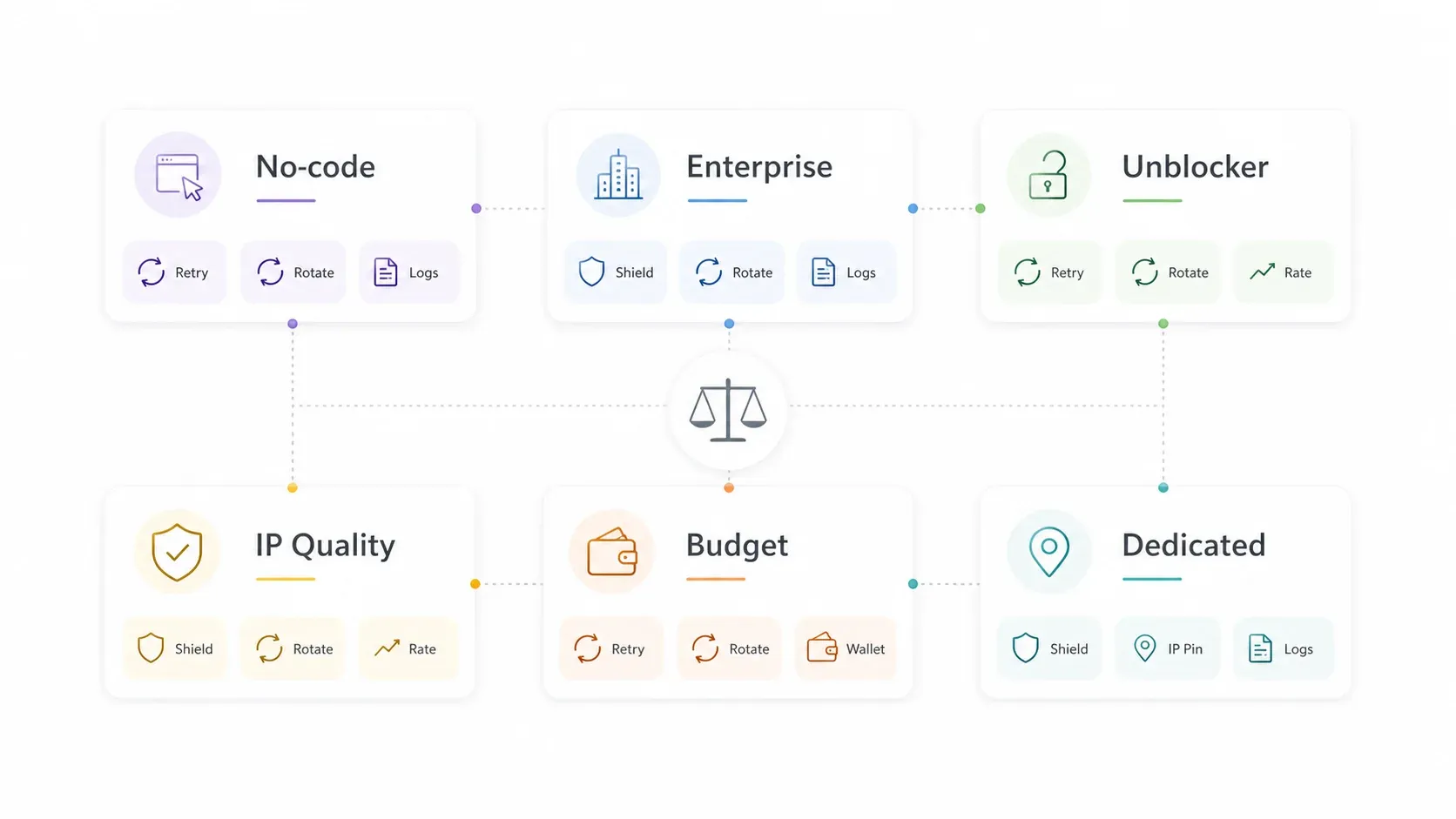
Here's the full comparison so you can match your situation to the right tool in one scan.
| Feature | Thunderbit | Bright Data | Oxylabs | NodeMaven | IPRoyal | Proxy-Seller |
|---|---|---|---|---|---|---|
| Auto-retry on errors | ✅ Cloud scraping retries automatically | ✅ Built-in via Web Unlocker | ✅ Built-in via Web Unblocker | ✅ (user-implemented in scripts) | ⚠️ Manual config | ⚠️ Manual config |
| IP Rotation | ✅ Managed in cloud mode | ✅ Rotating pools | ✅ Rotating pools | ✅ Rotation + sticky | ✅ Sticky/random | ⚠️ Limited (dedicated IPs) |
| Residential IPs | ✅ Managed internally | ✅ | ✅ | ✅ | ✅ | ✅ |
| Rate-limit management | ✅ AI-paced crawling | ✅ Rules-based | ✅ Rules-based | ⚠️ Basic | ❌ Manual | ❌ Manual |
| No-code usability | ✅ 2-click Chrome extension | ⚠️ Dashboard + API | ⚠️ Dashboard + API | ❌ API-focused | ❌ Manual setup | ❌ Manual setup |
| Error transparency | ✅ Visible in scraping UI | ✅ Dashboard logs | ✅ Dashboard logs | ✅ Log files | ⚠️ Minimal | ⚠️ Minimal |
| Best for | Non-technical scrapers who want zero proxy config | Enterprise scraping at scale | Large-scale proxy management | Devs needing IP reputation control | Budget residential proxies | Dedicated private proxies |
Quick decision guide:
- Want zero proxy configuration? → Thunderbit
- Enterprise team with developers? → Bright Data or Oxylabs
- Developer who needs IP quality control? → NodeMaven
- Budget-conscious and comfortable scripting? → IPRoyal
- Need a stable, dedicated IP? → Proxy-Seller
Why "Just Rotate IPs" Won't Solve Your 429 Errors
This is the section I've wanted to write for a long time, because every proxy error guide I've read gives the same vague advice for 429 Too Many Requests: "rotate IPs and add delays." Forum users echo this frustration—one wrote "slow down request frequency, add delays between calls, or rotate IPs" as if reciting an unhelpful mantra.
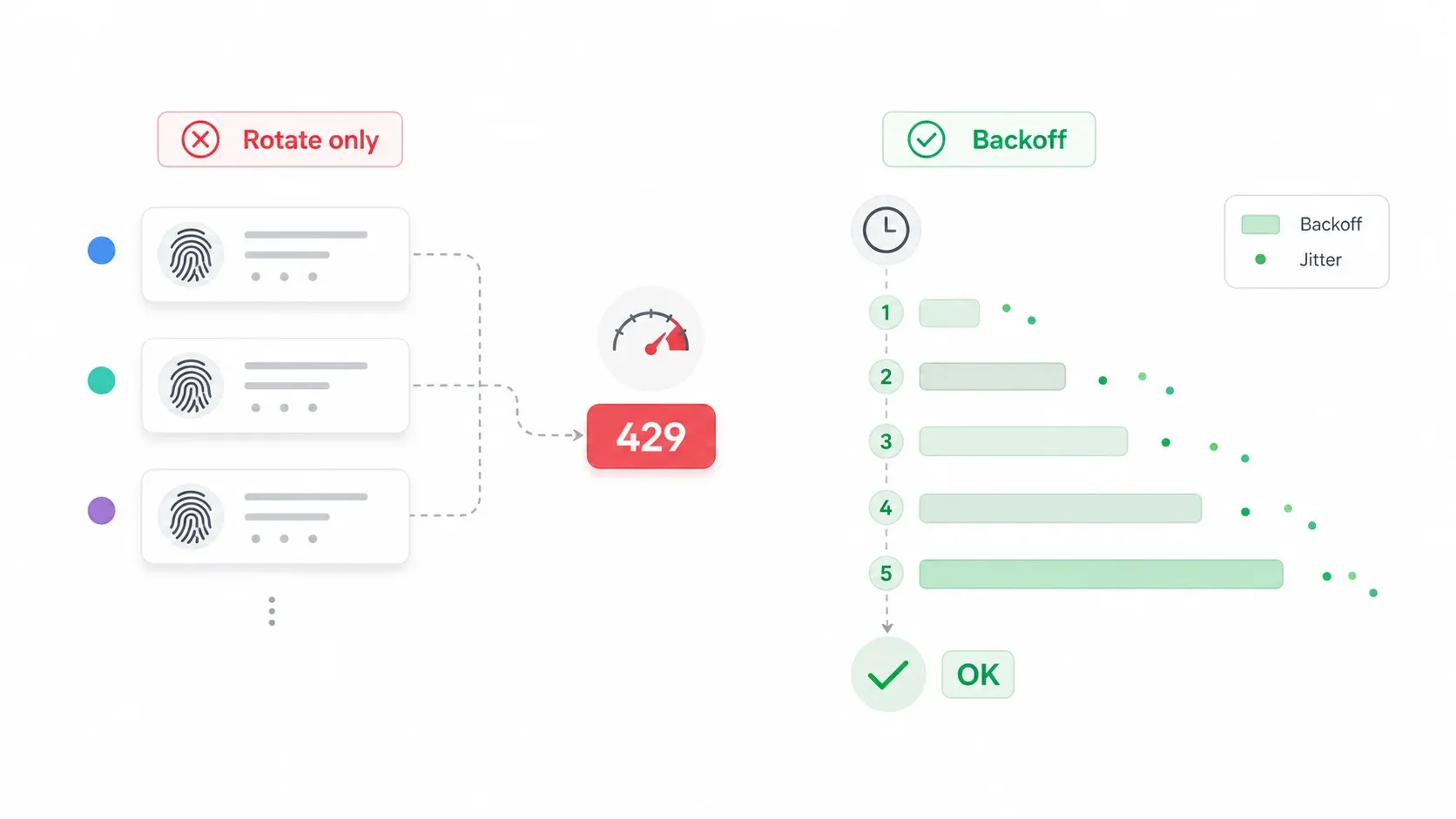
The problem is that IP rotation alone can actually make 429s worse. Here's why: if your request fingerprint—headers, timing, user-agent, session behavior—stays identical across every rotated IP, many modern anti-bot systems detect the pattern and apply stricter rate limits at the subnet or fingerprint level. You're changing the mask but keeping the same walk.
Exponential Backoff: The Right Way to Handle Rate Limits
Instead of a fixed delay, use exponential backoff with jitter. Here's the formula in plain terms:
wait_time = min(60 seconds, 1 second × 2^retry_number) + random(0 to 0.5 seconds)
In practice:
| Retry Attempt | Approximate Wait |
|---|---|
| 1 | ~1.0–1.5 seconds |
| 2 | ~2.0–2.5 seconds |
| 3 | ~4.0–4.5 seconds |
| 4 | ~8.0–8.5 seconds |
| 5 | ~16.0–16.5 seconds |
The jitter (random extra milliseconds) prevents synchronized retry bursts—a problem AWS's architecture team explains in detail. The cap at 60 seconds keeps you from waiting forever.
A conservative starting point for many public websites is about one request per second per IP, then adjust based on the target's Retry-After headers, observed 429 rate, and terms of service.
429 Fix Strategies Compared
| Strategy | Effectiveness | Best Use Case | Risk |
|---|---|---|---|
| Simple fixed delay | ⚠️ Low | Light testing, very small jobs | Doesn't adapt to server behavior |
| IP rotation only | ⚠️ Medium | Clear IP-level rate limits | Backfires if fingerprint stays identical |
| Exponential backoff with jitter | ✅ High | API and scraping workflows with variable rate limits | Requires engineering implementation |
| AI-paced / managed cloud crawling (e.g., Thunderbit) | ✅ Highest for non-technical users | Business teams that don't want retry logic | Depends on provider plan limits |
The best approach combines fingerprint rotation (headers, user-agent, session behavior) with intelligent pacing—or you use a tool like Thunderbit that handles all of this automatically. As Apify's anti-scraping guide explains, websites can rate-limit by IP address and block crawlers that send too many requests in a short time. The fix isn't just "more IPs"—it's smarter request behavior.
Tips to Prevent Proxy Status Error Codes Before They Happen
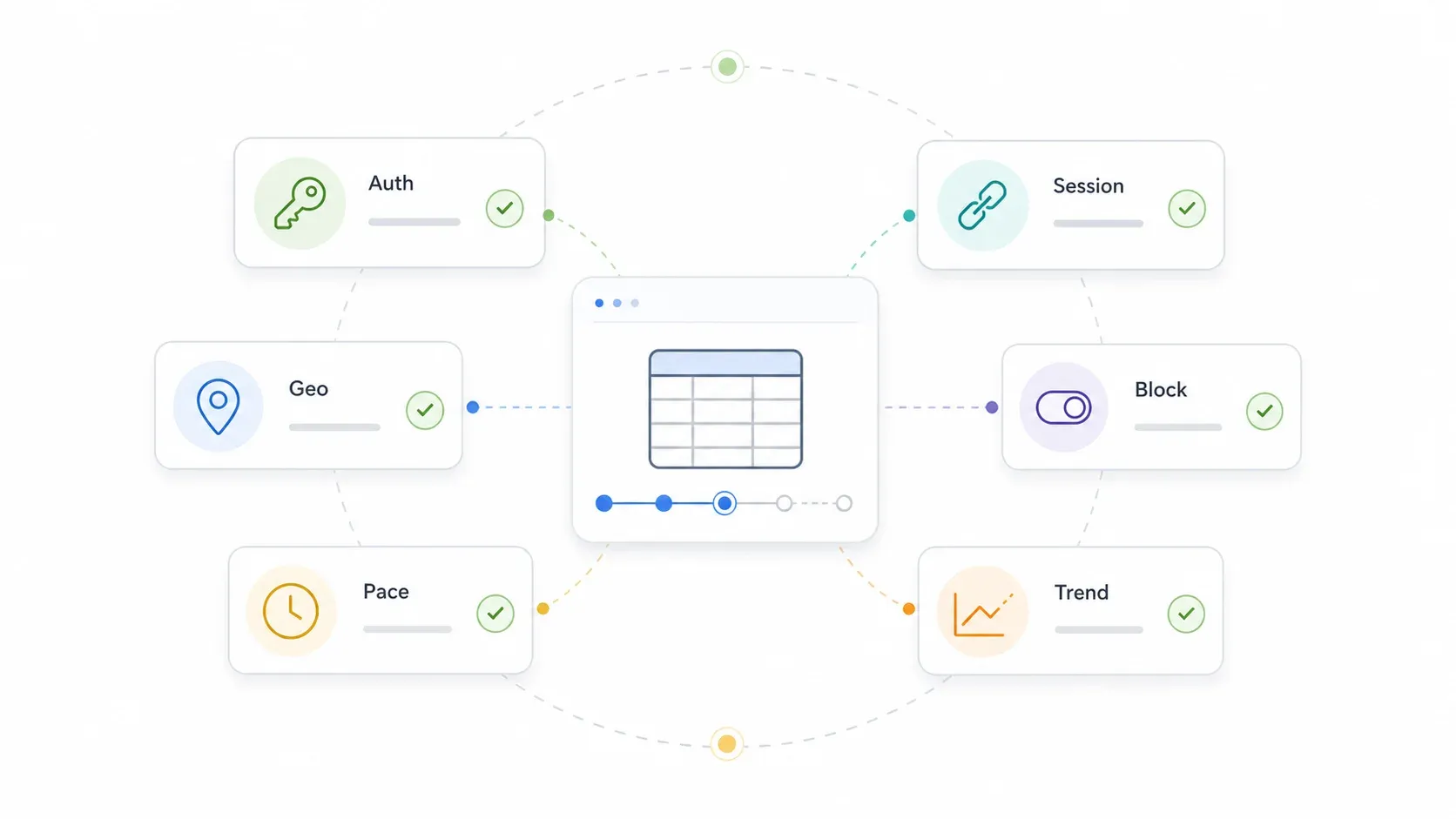
Prevention beats debugging every time. Here's my checklist, drawn from years of building scraping tools and watching users hit every error in the book:
- Validate your proxy config before launching a big job. Check host, port, protocol, username, password, zone, and IP whitelist. A 10-URL test run before a 10,000-URL job saves hours.
- Use residential or mobile IPs for strict consumer sites. Reserve datacenter IPs for targets that don't care (internal tools, APIs, tolerant sites).
- Match geo to the target content. A US-only page requested from the wrong country may redirect or block.
- Don't treat all 4xx codes the same. A 407 is almost always a proxy credential/setup problem—rotating IPs won't fix it. A 403 might be IP reputation, but it could also be missing headers or a permissions issue.
- Keep session behavior consistent for login workflows. Sticky sessions often look more trustworthy than a new IP on every request.
- Set domain-specific concurrency. Don't blast every site with the same thread count.
- Respect
Retry-Afterheaders when present. They're the target telling you exactly how long to wait. - Monitor error-rate trends, not just final success rate. Rising 429s mean slow down. Rising 403s suggest IP reputation or fingerprint problems. Rising 502/504s suggest route or provider instability.
- Clear browser cache and cookies when a target keeps redirecting to login, challenge, or consent pages.
- Block unnecessary resources (images, video, fonts) when appropriate—reduces bandwidth and timeout risk.
- Use a managed tool for non-technical workflows. If proxy orchestration isn't your core job, tools like Thunderbit or enterprise unlockers save real time. For more on data automation benefits, we've written about this extensively.
One less-obvious tip: separate target failure from proxy failure. A 502 might be the proxy gateway, but it can also be the target returning bad upstream responses. Log the response body, proxy zone, target URL, and timestamp so you can tell the difference.
Which Tool Should You Use to Solve Proxy Status Error Codes?
Proxy status error codes are confusing because they compress many root causes into short numbers. The real fix starts with diagnosis—matching your code to its category, then applying the right tool or technique.
Here's the summary:
- Non-technical users who want zero proxy config → Thunderbit. Install the Chrome extension, click twice, and let cloud scraping handle errors.
- Enterprise teams with developer resources → Bright Data or Oxylabs. Massive proxy pools, Web Unlocker/Unblocker, and granular control.
- Developers who need IP reputation control → NodeMaven. IP Quality Filters prevent 403s before they happen.
- Budget-conscious users comfortable with scripts → IPRoyal. Affordable residential proxies, manual error handling.
- Users who need a stable dedicated IP → Proxy-Seller. Dedicated/private proxies for account management or consistent access.
If your real job is collecting leads, prices, products, or market data—not debugging proxies—give Thunderbit's free trial a spin. I think you'll be surprised how much proxy pain just... disappears. And if you want to go deeper on web scraping tools and techniques, check out our guides on best web scraping tools, how to bypass Cloudflare scraping, and web scraping without getting blocked.
Happy scraping—and may your error logs stay blissfully empty.
Try Thunderbit to solve proxy errors with AI Get Started Free
FAQs
1. What is the most common proxy status error code?
403 Forbidden and 429 Too Many Requests are typically the most common proxy errors in web scraping and data collection. 403 usually means the target site blocked your IP or detected bot-like behavior. 429 means you sent too many requests too fast for the target's rate limits.
2. How do I know if a proxy error is on my side or the server's side?
Check the first digit of the error code. 4xx errors are client-side—something is wrong with your request, credentials, or rate. 5xx errors are server-side—the proxy server or target website is having trouble. For example, a 407 is a proxy authentication problem (your config), while a 502 is a gateway failure (the proxy or target server).
3. Can I solve proxy status error codes without writing code?
Yes. Tools like Thunderbit handle proxy management, retries, and error resolution automatically through a Chrome extension. You never configure a proxy, write retry logic, or interpret raw error codes. Enterprise tools like Bright Data and Oxylabs also automate much of the proxy/unblocking layer, though they require more technical setup.
4. What is the difference between a 403 and a 407 proxy error?
403 Forbidden means the target website is refusing your request—often because of an IP ban, geo restriction, or bot detection. 407 Proxy Authentication Required means your proxy server needs valid login credentials (username, password, zone, or token) before it will forward your request. Rotating IPs won't fix a 407; you need to fix your proxy authentication settings.
5. Why does IP rotation alone sometimes make 429 errors worse?
Because many modern anti-bot systems don't just track IP addresses—they also look at request fingerprints like headers, timing patterns, user-agent strings, and session behavior. If you rotate IPs but keep everything else identical, the target can detect the pattern and apply even stricter rate limits at the subnet or fingerprint level. The fix is to combine IP rotation with fingerprint variation, exponential backoff, and intelligent pacing—or use a managed tool like Thunderbit that handles all of this automatically.
Learn More




