

Last week I spent 40 minutes debugging a perfectly good Python script that worked fine on three test sites — only to realize the fourth site was behind Cloudflare. The scraper kept looping on a "Checking your browser…" page and returning nothing but challenge HTML. Sound familiar?
If you've hit that wall, you're not alone. Over 24 million active websites now use Cloudflare, including roughly 22% of all websites on the internet. That makes Cloudflare the most common barrier for anyone trying to collect web data — whether for lead generation, price monitoring, real estate research, or competitive analysis.
The problem is that most guides dump every bypass technique in a flat list without telling you which one to try first for your situation. This guide takes a different approach: a ranked decision tree, honest reliability estimates, and a no-code path that most articles completely ignore.
- Difficulty: Beginner to Intermediate (depending on which method you use)
- Time Required: ~10–30 minutes for the no-code path; varies for code-based methods
- What You'll Need: Chrome browser (for the no-code path), optionally Python 3.9+ (for code methods), and a target URL
What Is Cloudflare Protection (and Why Does It Block Your Scraper)?
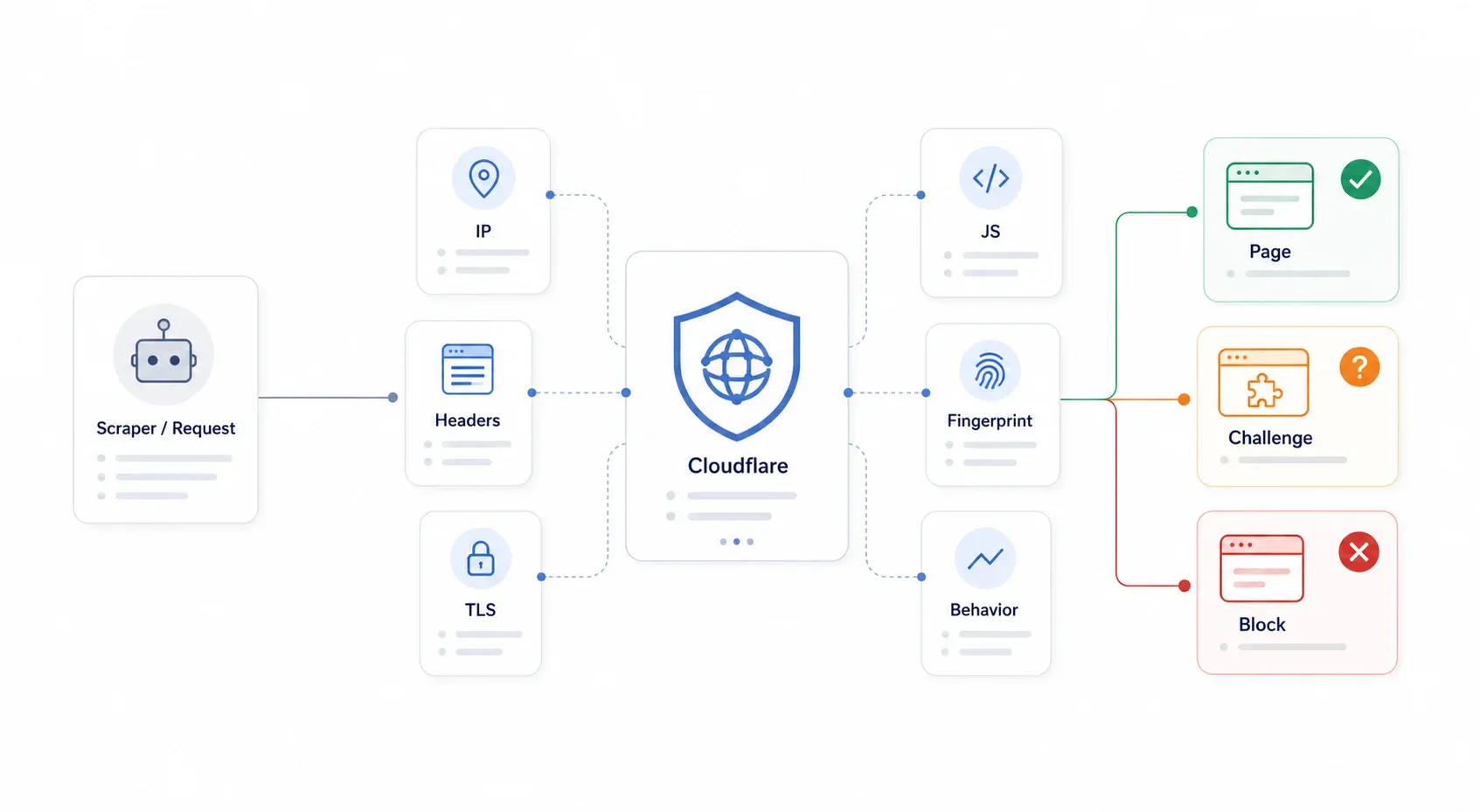
Cloudflare is a reverse proxy that sits between visitors and the website's origin server. Every request hits Cloudflare's edge first, and Cloudflare decides whether to serve the page, challenge the visitor, or block them outright. The key thing to understand: Cloudflare doesn't need to know your scraper is malicious. It just needs to classify your request as sufficiently automated or suspicious.
Cloudflare's Bot Management system uses a layered approach — not a single lock, but a whole security checkpoint. It checks IP reputation, HTTP headers, TLS fingerprints, JavaScript execution, browser fingerprinting, and behavioral patterns. When your Python requests library sends a GET to a Cloudflare-protected page, it fails multiple layers simultaneously: wrong TLS handshake, no JavaScript execution, no cookies, no browser fingerprint. That's why simple header spoofing stopped working years ago.
The most common symptoms you'll see: 403 Forbidden, 503 with "Checking your browser…", 1020 Access Denied, infinite challenge loops, Turnstile widgets that never resolve, and HTML challenge pages where you expected JSON.
Passive Detection: What Cloudflare Checks Before the Page Even Loads
Before you even see a page, Cloudflare's passive layer has already scored your request:
- IP reputation: Datacenter IPs, cloud-hosted ranges, and known proxy exits get flagged. Residential and mobile carrier IPs are far more trusted. Community reports in 2026 consistently describe local residential browsing passing while Docker or VPS environments get blocked.
- HTTP header analysis: Cloudflare compares your User-Agent, Accept-Language, header order, and HTTP version. A mismatch — say, claiming to be Chrome 136 while your TLS handshake screams "Python" — is a dead giveaway.
- TLS fingerprinting (JA3/JA4): During the TLS handshake, your client reveals a pattern of supported cipher suites, extensions, and protocol preferences. JA3/JA4 compress that into an identifier. Real Chrome and a Python
requestsscript leave very different "shapes." - HTTP/2 fingerprinting: Browsers and HTTP libraries differ in HTTP/2 SETTINGS frames, pseudo-header ordering, and priority behavior. Cloudflare's JA4 Signals work goes beyond single-request identity and tracks inter-request patterns over time.
- AI Labyrinth: This is Cloudflare's newer trap. Instead of blocking suspicious crawlers, it routes them into AI-generated honeypot pages that look plausible but waste crawler resources. Your scraper might not even realize it's been caught.
Active Detection: Challenges That Run in Your Browser
When passive checks aren't conclusive, Cloudflare escalates to active challenges:
- JavaScript challenges: The classic "Checking your browser…" interstitial. Cloudflare's JavaScript Detections run invisible scripts to identify automated requests.
- Turnstile: Cloudflare's CAPTCHA replacement. Turnstile widget modes include Managed, Non-Interactive, and Invisible. It analyzes mouse movements, browser environment, TLS fingerprint, and more — without necessarily showing a visible puzzle.
- Canvas and WebGL fingerprinting: These checks flag headless browsers that render differently from real ones.
- Behavioral signals: Request timing, scroll patterns, click sequences. A scraper that fetches 50 pages in 3 seconds with zero mouse movement looks nothing like a human.
The practical takeaway: if Cloudflare has escalated to an active challenge, plain HTTP clients like requests, httpx, or even curl_cffi can't pass. You need something that executes a real browser environment.
Cloudflare Protection Tiers: Why the Same Script Works on One Site but Fails on Another
This is what most bypass guides miss entirely. Cloudflare's protection isn't uniform. A site on Cloudflare's free plan with "Security Level: Medium" is a completely different challenge from a site on Enterprise with Bot Management and Turnstile enabled. The same script that breezes through one will slam into a wall on the other.
| Cloudflare Tier | Typical Defenses | Bypass Difficulty | What Usually Works |
|---|---|---|---|
| Free plan (low security) | Bot Fight Mode, basic WAF rules, IP reputation | ⭐ Low | Internal API discovery, curl_cffi with proper headers, real browser session |
| Pro plan (medium) | Super Bot Fight Mode, Managed Challenge, JavaScript detections | ⭐⭐ Medium | Real browser session, stealth browser automation, residential proxies |
| Business | Stronger WAF, Bot Analytics, stricter challenges on key paths | ⭐⭐⭐ Medium–High | Browser-session extraction, session persistence, residential/mobile proxies, paid scraping APIs |
| Enterprise / Bot Management | Bot scores, JA3/JA4 fields, per-endpoint rules, Turnstile, AI Labyrinth | ⭐⭐⭐⭐ High | Internal API (if accessible), real user session tools, provider-grade scraping APIs |
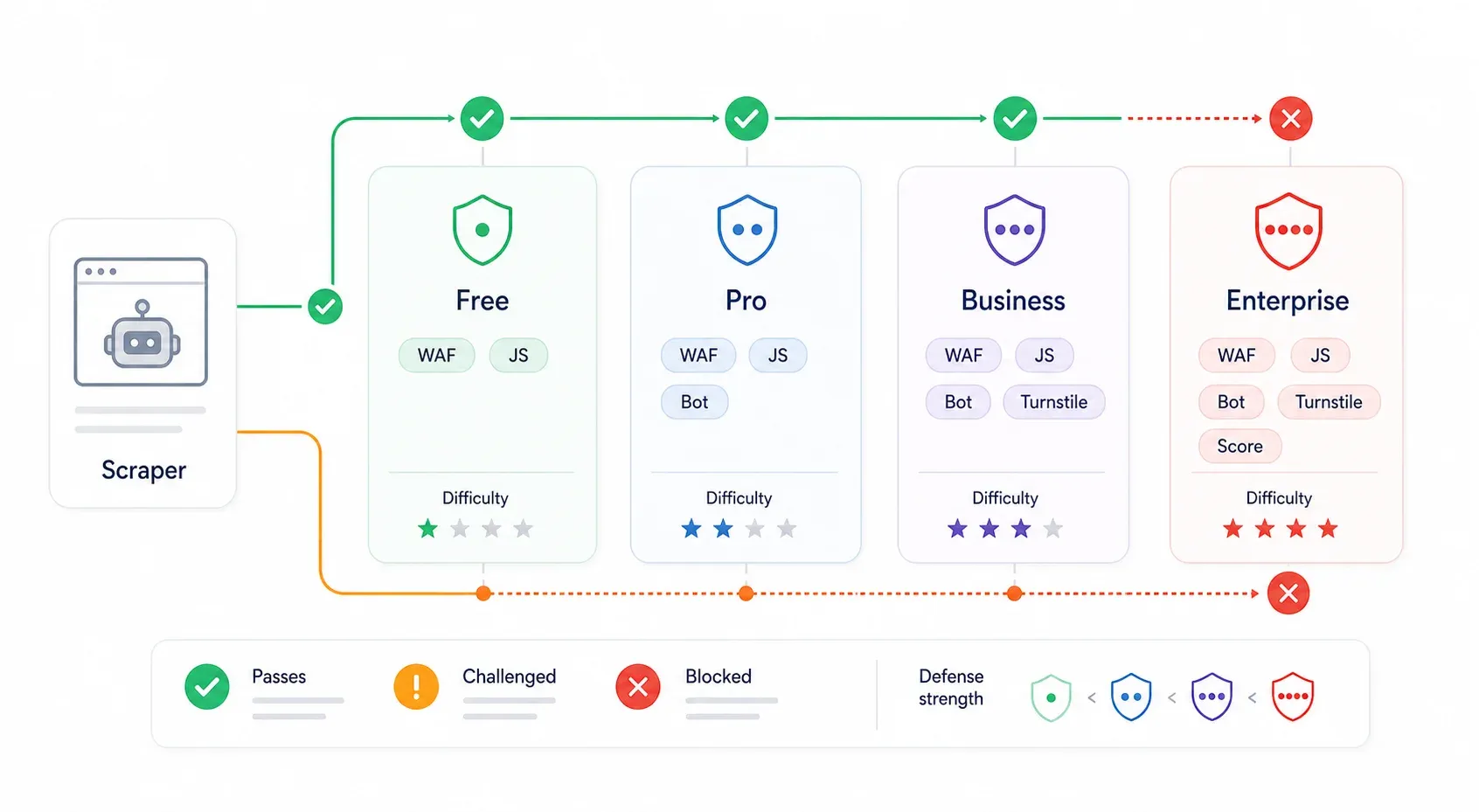
Cloudflare's pricing page lists Free at $0, Pro at $20/month, Business at $200/month, and Enterprise at custom pricing. Bot Fight Mode is the simple Free-plan toggle; Super Bot Fight Mode adds more controls for Pro/Business; Enterprise Bot Management adds granular bot scores and endpoint-specific rules.
How to roughly identify the tier you're facing: A 403 with a Cloudflare-branded block and no challenge script often means WAF or fingerprint rejection. A cf-turnstile div or challenges.cloudflare.com/turnstile/v0/api.js script means Turnstile. A "Checking your browser" interstitial means a Managed Challenge. Path-specific failures after a successful homepage load often indicate endpoint-specific WAF or Bot Management rules.
Identify the protection level before choosing your approach. It saves hours of debugging.
The "Try This First" Decision Tree for Bypassing Cloudflare
Instead of randomly trying methods, follow a ranked approach. Start with the easiest and most reliable, and escalate only when needed:
| Step | Try This First | Why | If It Fails → |
|---|---|---|---|
| 1 | Check for an internal/undocumented API | Skips Cloudflare entirely; fastest, most reliable | Step 2 |
| 2 | Use a no-code tool with built-in browser rendering (e.g., Thunderbit) | No setup, handles JS challenges automatically | Step 3 |
| 3 | TLS fingerprint impersonation (curl_cffi) | Fast, lightweight, no browser needed | Step 4 |
| 4 | Stealth browser automation (SeleniumBase UC / Puppeteer stealth) | Handles JS challenges + fingerprinting | Step 5 |
| 5 | FlareSolverr + Docker | Open-source, server-friendly | Step 6 |
| 6 | Paid scraping API (ScrapingBee, ZenRows, Scrapfly, etc.) | Offloads the arms race entirely | — |
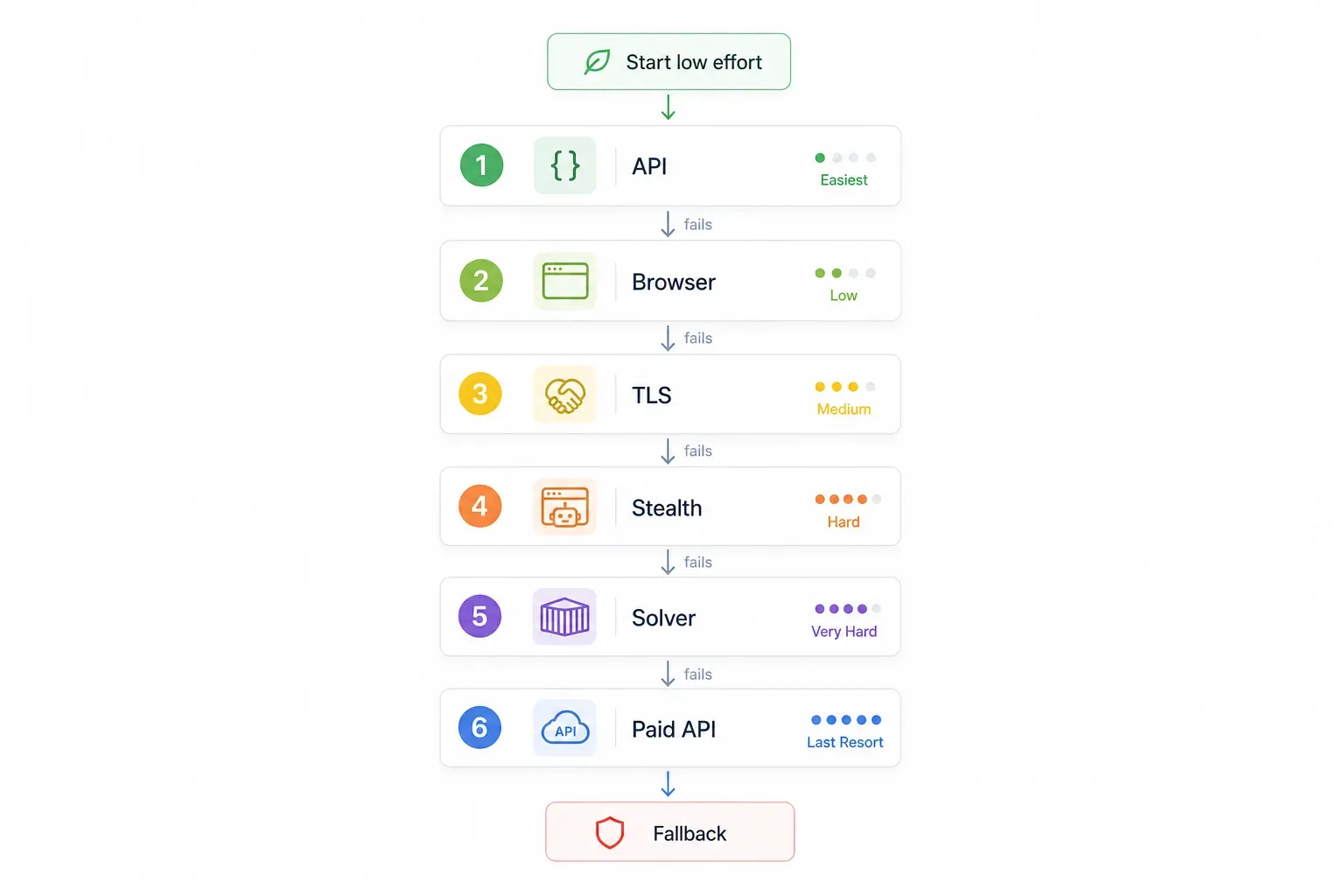
The logic: free and low-effort first, code-heavy and paid last. Jump to whichever step matches your situation.
A March 2026 community benchmark claimed curl_cffi passed 16 of 20 tested domains (80%), FlareSolverr covered roughly 55–70%, and paid proxy aggregators reached about 97% average success — but the same thread warns these numbers drift as Cloudflare updates. Treat all success rates as directional, not guaranteed.
Step 1: Skip the Fight — Find the Internal API Behind Cloudflare
Four separate forum threads I've come across recommend finding the site's internal API instead of fighting Cloudflare head-on. And honestly, this is the smartest first move. If the site has an internal API, you bypass Cloudflare entirely — no tricks, no fingerprint spoofing, no stealth plugins.
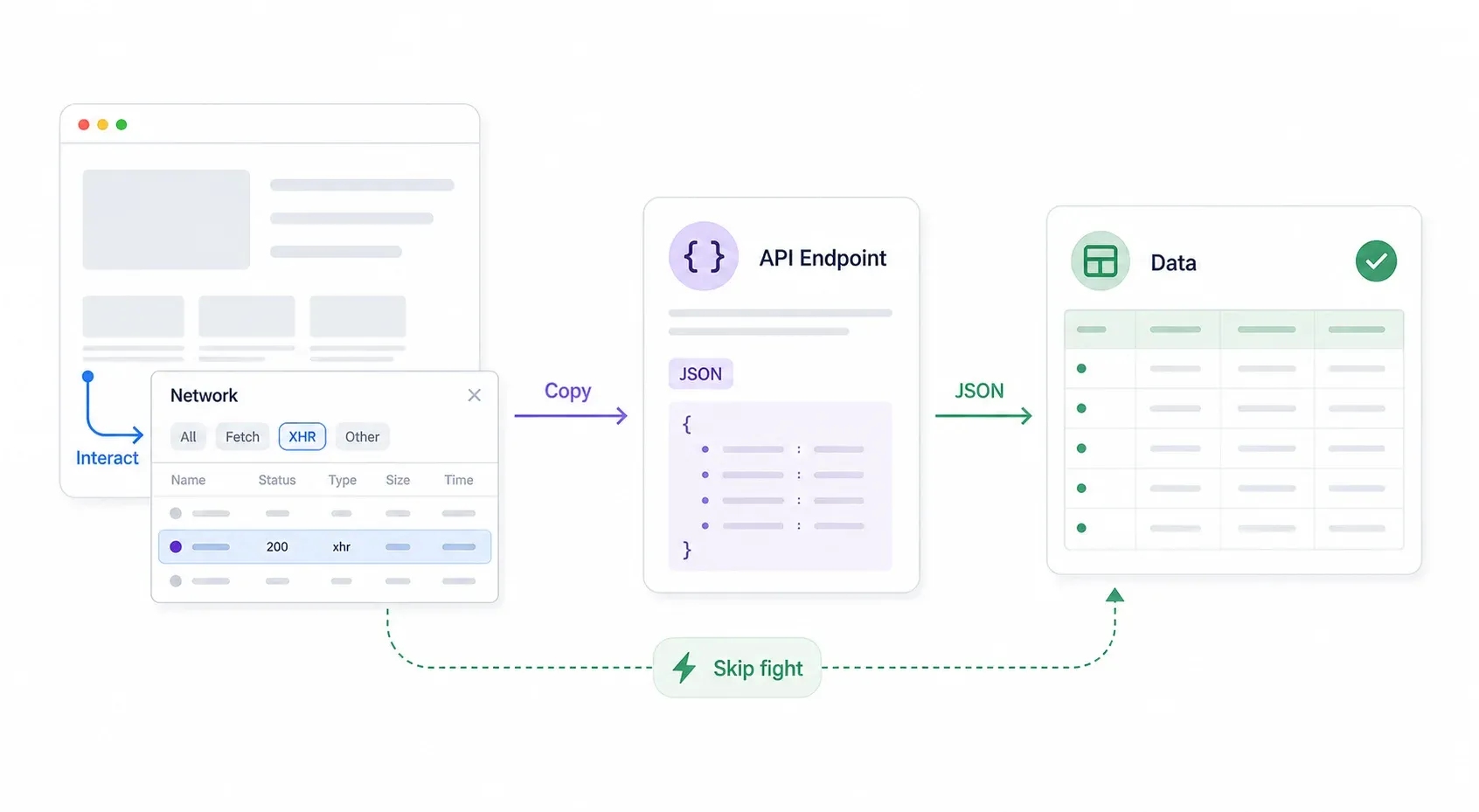
Here's the systematic approach:
- Open Chrome DevTools → go to the Network tab → filter by XHR/Fetch.
- Interact with the page: search, filter, paginate, scroll. Watch for JSON responses appearing in the Network tab.
- Inspect the request URL and headers. Often the API endpoint has no Cloudflare protection or weaker protection than the frontend page.
- Right-click the request → Copy → Copy as cURL. Paste it into your terminal or Postman and test it.
- Replicate the request in Python (using
requestsorcurl_cffi) with the same headers, cookies, and query parameters.
If the API returns structured JSON, you may not need a traditional scraper at all. A Reddit thread from January 2026 described exactly this scenario: a user blocked by Cloudflare despite curl_cffi found that the only workable path was intercepting the API response directly.
Practical tip: After the cURL copy works, start stripping unnecessary headers. Headers like sec-ch-ua, cookies, CSRF tokens, and referer may be required; browser cache controls usually aren't. Keep the TLS fingerprint consistent with the User-Agent if moving from browser cURL to code.
Limitations: Not every site has an accessible API. Some APIs require authentication, CSRF tokens, signed request parameters, or session-bound cookies. But when it works, this is the ~99% success rate method with zero maintenance.
Try Thunderbit for browser-based scraping
Step 2: The No-Code Path — Bypass Cloudflare with a Browser Extension (Thunderbit)
Every competing guide assumes the reader writes Python or JavaScript. But this keyword also attracts sales teams building lead lists, ecommerce ops monitoring competitor prices, and real estate analysts pulling property data. These folks don't want to spin up Docker containers.
Bypass Cloudflare with a browser extension Get Started Free
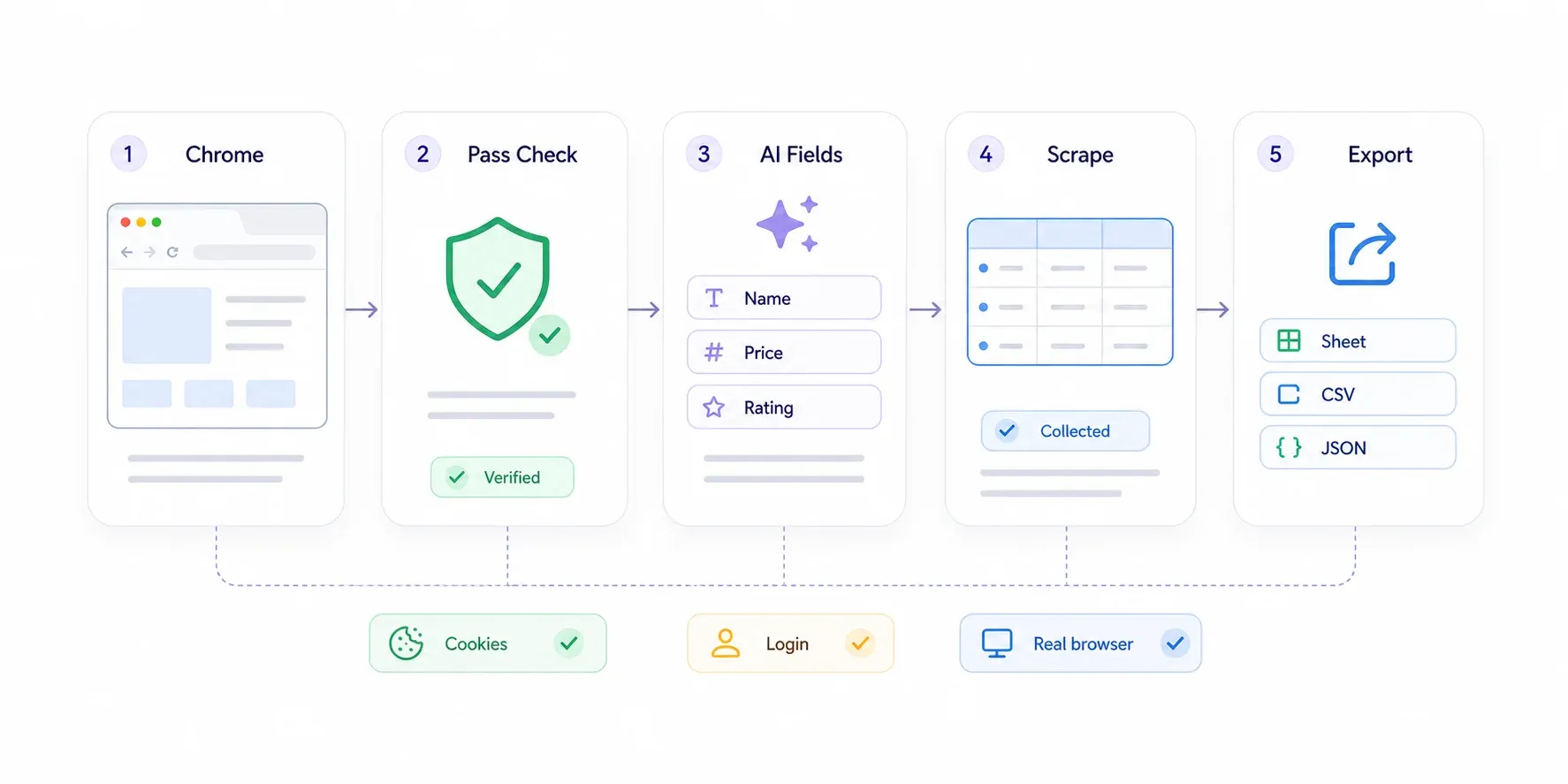
A Chrome extension like Thunderbit naturally handles many Cloudflare checks because it runs inside your real browser session. It inherits Chrome's genuine TLS fingerprint, your cookies, your login state, and your behavioral signals — exactly what Cloudflare trusts. No stealth plugins, no xvfb-run, no terminal commands.
Step-by-Step Walkthrough
- Install the Thunderbit Chrome Extension from the Chrome Web Store.
- Navigate to the Cloudflare-protected page in Chrome. If Cloudflare challenges you, pass it as a normal user — click the Turnstile checkbox, wait for the "Checking your browser" page to clear. You're a real person in a real browser; Cloudflare lets you through.
- Click "AI Suggest Fields" in the Thunderbit sidebar. The AI scans the page and proposes data columns like "Product Name," "Price," "Rating," or whatever's relevant.
- Review the suggested fields. Remove what you don't need, add custom fields by describing what you want in plain English.
- Click "Scrape." Thunderbit extracts the data from the visible page.
- Export to Google Sheets, Excel, Airtable, Notion, CSV, or JSON.
For paginated sites, Thunderbit handles both click-based pagination and infinite scroll. For detail pages (say, you have a list of product links and want to pull specs from each individual page), use subpage scraping — Thunderbit visits each linked detail page and enriches your table.
In my experience, this workflow takes about 5–10 minutes from install to exported spreadsheet for a typical 50–100 row dataset.
When Browser-Based Scraping Works Best (and When It Doesn't)
I want to be honest about limitations. Browser-based scraping is bound to your session speed. It's ideal for moderate-scale tasks — hundreds to low thousands of pages. If you need to crawl millions of pages on a schedule, you'll want code-based or API methods.
Thunderbit's Cloud Scraping option can speed things up by scraping up to 50 pages at a time for publicly accessible sites. And for developer workflows or larger scale, Thunderbit's Web Scraper API handles JavaScript rendering, anti-bot protection, and proxy rotation with batch processing of up to 50–100 URLs per request.
But for the business user scraping leads, pricing data, or property listings at a reasonable scale? This is often the only method you need. No code, no proxies, no maintenance.
Step 3: TLS Fingerprint Spoofing with curl_cffi (Lightweight Code Approach)
If you're comfortable with Python and the no-code path doesn't fit your workflow, curl_cffi is the lightest-weight code option. It's a Python binding around libcurl that can impersonate real browsers' TLS fingerprints. Unlike requests or httpx, your TLS handshake looks like it came from Chrome or Safari.
As of 2026, supported impersonation targets include chrome136, safari184, and many historical profiles. The library had a PyPI release as recently as April 2026, so it's actively maintained.
When to use it: Sites with Free or Pro-level Cloudflare protection that rely mainly on passive fingerprinting — no active JavaScript challenge, no Turnstile.
Basic example:
from curl_cffi import requests

url = "https://example.com/products"
resp = requests.get(
    url,
    impersonate="chrome136",
    headers={
        "accept": "text/html,application/xhtml+xml,application/xml;q=0.9,*/*;q=0.8",
        "accept-language": "en-US,en;q=0.9",
    },
    timeout=30,
)
print(resp.status_code)
print(resp.text[:500])
One thing that trips people up: Keep your User-Agent consistent with the impersonation target. If you're impersonating Chrome 136, don't send a User-Agent string for Chrome 120. The mismatch is a signal.
Limitations: curl_cffi doesn't execute JavaScript. If the site serves a "Checking your browser" challenge or Turnstile widget, this method fails. It's also not useful for sites that require cookie-based session state from a browser challenge. Think of it as a fast, cheap first attempt for passive-only protection.
Alternatives in the same family: tls-client and curl-impersonate offer similar TLS impersonation capabilities.
Step 4: Stealth Browser Automation (Puppeteer Stealth and SeleniumBase UC)
TLS spoofing won't cut it when the site requires JavaScript execution, active challenges, or Turnstile. At that point you need a full browser. Two main options:
- SeleniumBase UC Mode (Python): The docs explicitly describe UC Mode as a way for automation to appear more human and avoid anti-bot services. It includes Cloudflare Turnstile handling examples.
- Puppeteer with
puppeteer-extra-plugin-stealth(Node.js): Still widely used, but increasingly fragile in 2026. Community reports describe failures from CDP (Chrome DevTools Protocol) detection flags and mismatched browser profiles.
Both tools launch a real Chromium browser but patch detectable automation signals: navigator.webdriver, WebGL metadata, plugin lists, and more.
Configuration tips that actually matter:
- Use headed mode (not headless). SeleniumBase's docs warn that UC Mode is detectable in headless mode. On Linux servers, use a virtual display.
- Randomize viewport size and User-Agent, but keep them coherent with each other and with your proxy's geolocation.
- Add realistic delays between actions. A 200ms gap between page loads screams "bot."
- Persist cookies and browser profiles after passing the initial challenge. Don't re-solve the challenge every request.
- Pair with residential proxies for better IP reputation.
The risk with this approach is maintenance. Browser automation stacks break when Chrome updates, Cloudflare adds a new signal, a stealth plugin lags behind, or a target adds path-specific Turnstile. A ScrapeOps benchmark found that many stealth-browser setups fail fingerprint tests due to "franken-fingerprint" combinations — mismatched timezone/language/proxy geography.
This method is powerful but operationally expensive. Budget time for ongoing fixes.
Proxy Rotation: Why IP Matters as Much as Fingerprints
Even with perfect browser stealth, sending too many requests from one IP triggers rate limits. Cloudflare trusts residential and mobile IPs far more than datacenter IPs.
- Residential proxies: ~$1.50–$8+/GB at entry volumes in 2026. More trusted, but more expensive.
- Datacenter proxies: Cheaper, but fail quickly on serious Cloudflare targets.
- Rotation strategy: Rotate per session, not per request. Per-request rotation breaks session-bound cookies and
cf_clearance. Keep IP, cookies, and fingerprint consistent within a session.
There's no magic "minimum proxy pool size." A low-volume lead scrape may work with a handful of sticky residential sessions; a high-volume price monitor may need hundreds of exits plus retry logic.
Step 5: FlareSolverr — The Open-Source Cloudflare Bypass Server
FlareSolverr is an open-source proxy server that uses Chromium with undetected-chromedriver in a Docker container to solve Cloudflare challenges and return cookies/headers for reuse. It had a v3.5.0 release in May 2026, so it's still actively maintained.
When to use it: Server-side scraping pipelines where you need a persistent challenge-solving service — for example, an automated job that runs nightly and needs fresh cf_clearance cookies.
How it works: Your scraper sends a URL to FlareSolverr's API. FlareSolverr opens the page in a browser, attempts to solve the challenge, and returns the HTML plus cookies. You can then reuse those cookies in your regular HTTP client for subsequent requests.
Setup overview: Docker Compose, spin up the container, send POST requests to the local API endpoint. ScrapeOps has a solid walkthrough.
Limitations I want to be upfront about:
- Cannot reliably solve interactive Turnstile challenges or Enterprise Bot Management.
- GitHub issues and Reddit threads show inconsistent behavior: challenge detection misses, Turnstile timeouts, page crashes.
- Requires Docker infrastructure and ongoing maintenance.
- Resource-heavy — each challenge solve launches a browser context.
Estimated reliability: 60–80% on medium-protection targets. Lower for Enterprise, higher for simpler challenge pages. If FlareSolverr doesn't cut it, it's time to consider paid APIs.
Step 6: Paid Scraping APIs That Handle Cloudflare for You
Sometimes the math just works out: maintaining your own stealth infrastructure costs more in engineer-hours than a subscription. Paid scraping APIs offload the entire arms race to a dedicated provider — you send a URL, they handle fingerprinting, proxies, challenge solving, and retries.
How to compare them:
| Provider | Cloudflare Support | JS Rendering | Residential Proxies | Structured Output | Pricing Model |
|---|---|---|---|---|---|
| ScrapingBee | Yes | Yes | Yes | HTML only | Per-request credits |
| ZenRows | Yes (claims >99% success) | Yes | Yes (premium) | HTML, some parsing | CPM with multipliers |
| Scrapfly | Yes (lists CF, Akamai, DataDome) | Yes | Yes | HTML, some parsing | Credit-based |
| Browserless | Yes | Yes (headless Chrome) | Yes (built-in) | HTML, screenshots | Unit-based |
| Thunderbit API | Yes | Yes | Yes | Structured JSON/CSV with AI schema | Free tier + paid plans |
When this makes sense: High-volume scraping, enterprise-grade reliability requirements, or when your team doesn't want to maintain scraping infrastructure. Cost range: roughly $30–$500+/month for small-to-mid use, scaling higher for enterprise volumes.
The Thunderbit API is worth mentioning separately because it outputs structured data (not just raw HTML). Its Extract endpoint can batch up to 50 URLs per request and return JSON/CSV based on an AI-powered schema — useful if you need clean, analysis-ready data rather than HTML to parse yourself.
Honest Reliability Scoreboard: What Actually Works (and What Breaks)
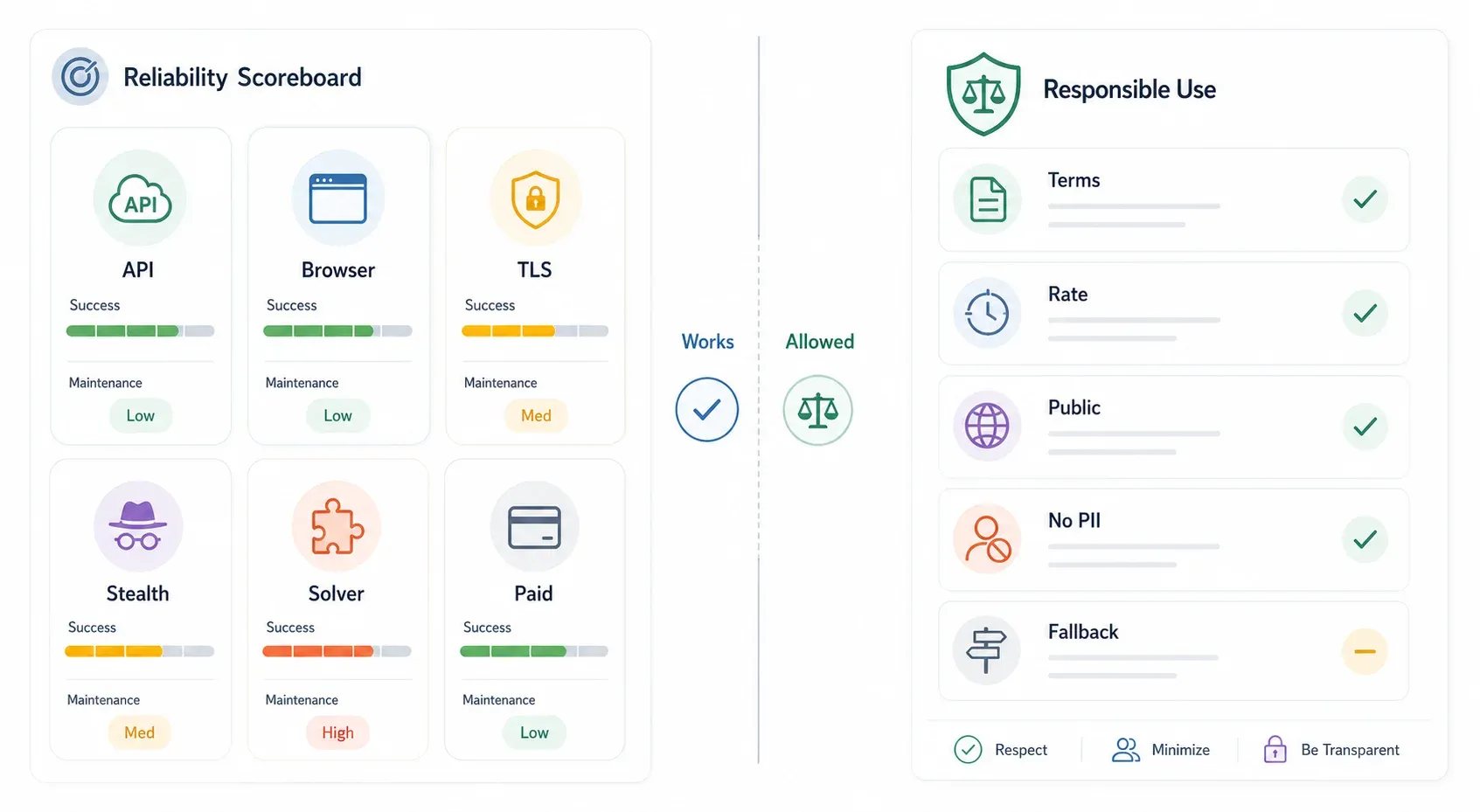
I've been tracking community reports, GitHub issues, and vendor claims throughout 2025–2026. What follows is a candid comparison. These are directional estimates, not lab benchmarks:
| Method | Est. Success Rate | Maintenance Burden | Breaks When… | Cost Range |
|---|---|---|---|---|
| Internal API (if exists) | ~90–99% | Low | API changes, auth added, tokens become signed | Free |
| Browser extension (Thunderbit) | ~85–95% (real session) | Low (AI adapts to layout changes) | Site requires special auth flow, aggressive per-action Turnstile | Free tier available |
curl_cffi / TLS spoofing | ~70–85% | Medium (fingerprint updates) | Cloudflare rotates JA3 checks, active JS challenge required | Free |
| Puppeteer + stealth plugin | ~70–90% | High (plugin updates lag) | CDP detection, new fingerprint signals, headless detection | Free + proxy cost |
| FlareSolverr | ~60–80% | High (Docker, dependency drift) | Enterprise-level protection, Turnstile interaction | Free + infra cost |
| Paid scraping API | ~85–95% | Low (provider maintains) | Provider hasn't updated; budget exceeded | ~$30–500+/mo |
The most important column isn't the success rate — it's "Breaks When." Every method has a failure mode. The best strategy is to pick the lowest-effort method that works for your target and have a fallback plan.
There is no permanent solution. Cloudflare continuously updates. The arms race is real.
Tips to Stay Under Cloudflare's Radar (No Matter Which Method You Use)
Regardless of which method you pick, a few habits keep you off Cloudflare's radar longer:
- Respect rate limits. Add realistic delays between requests — 2–5 seconds minimum for user-like browsing. Hammering a site at machine speed is the fastest way to get blocked.
- Keep your fingerprint consistent. User-Agent, TLS fingerprint, browser version, timezone, locale, and IP geography should all tell the same story. A Chrome 136 User-Agent from a German IP with an
en-USlocale and a Python TLS handshake is a contradiction. - Reuse cookies and sessions after passing a challenge. Don't re-solve the challenge every request.
- Don't switch IPs mid-session. Cloudflare tracks session continuity.
- Use residential or mobile IPs when the use case and budget justify it.
- Monitor for soft blocks: challenge HTML where you expected JSON, empty tables, login redirects, or pages that look suspiciously like AI Labyrinth honeypots.
- Avoid peak traffic hours when site operators may tighten WAF rules.
- Build fallback paths: API first → browser session second → paid provider third.
For Thunderbit users specifically, the AI adapts to page layout changes automatically, so you spend less time maintaining CSS selectors and more time actually using the data.
A Quick Note on Legal and Ethical Considerations
Not the focus of this article, but too important to skip.
Scraping publicly available data has favorable US case law in some contexts — the hiQ v. LinkedIn CFAA reasoning survived Supreme Court remand, though the parties settled in 2022 and the full picture is nuanced. More recently, Reddit sued Anthropic in 2025 over alleged scraping of user comments, and Reddit also sued Perplexity and data scraping firms later that year.
In the EU, GDPR applies whenever personal data is involved, and the EU AI Act adds specific obligations around untargeted scraping for AI training.
Practical rules of thumb:
- Always check the site's Terms of Service.
- Cloudflare protection is a signal that the site owner wants to control automated access — respect that intent.
- Avoid collecting personal data without a legitimate basis.
- For commercial or high-volume workflows, prefer official APIs, licensed data, or written permission when available.
- When in doubt, consult legal counsel for your specific use case and jurisdiction.
Thunderbit is designed for legitimate business use cases — lead generation, price monitoring, market research — using publicly accessible data.
Wrapping Up: What to Try First and What to Try Next
The biggest time-saver in this whole article isn't a tool or a code snippet — it's identifying the protection tier before you start. That alone prevents hours of debugging a method that was never going to work.
Start here:
- Check for an internal API (it's free, fast, and often overlooked).
- If you're a business user who doesn't write code, try Thunderbit's Chrome Extension — your real browser session is your best asset against Cloudflare.
- If you're a developer and the target uses only passive fingerprinting, try
curl_cffi. - Escalate to stealth browsers, FlareSolverr, or paid APIs only when the simpler methods fail.
No single method is permanent. Combine the right tool for your scale with a fallback plan, and you'll spend a lot less time staring at 403 pages.
If you want to go deeper, we've written about web scraping without coding, AI web scraping, and the best AI web scrapers on the Thunderbit blog. And if you want to see the extension in action, check out the Thunderbit YouTube channel for walkthrough videos.
Try Thunderbit for Cloudflare-protected sites
Try Thunderbit AI Web Scraper Get Started Free
FAQs
1. Can you bypass Cloudflare protection completely?
No single method guarantees 100% success, especially against Enterprise-level Bot Management with Turnstile, JA4 fingerprinting, and AI Labyrinth. The most reliable approaches combine real browser fingerprints with good IP reputation. Finding an internal API is the closest to a "complete" bypass since it avoids Cloudflare entirely — but not every site has one.
2. Is it legal to bypass Cloudflare when scraping?
It depends on your jurisdiction, the site's Terms of Service, and what data you're collecting. Scraping publicly available data has favorable US case law in some contexts (hiQ v. LinkedIn), but bypassing technical access controls, violating ToS, or collecting personal data without a legitimate basis can create legal risk. For commercial workflows, prefer official APIs or licensed data when available, and consult legal counsel if you're unsure.
3. What is the easiest way to bypass Cloudflare without coding?
Browser extensions like Thunderbit that run inside your real Chrome session handle Cloudflare challenges automatically — you interact with the site as a normal user, then let the extension extract and export the data. No Python, no Docker, no proxy configuration.
4. Why does my scraper work on some Cloudflare sites but not others?
Cloudflare's protection level varies dramatically by plan (Free, Pro, Business, Enterprise) and configuration. A method that works against basic JS challenges on a Free-plan site may fail against Turnstile or full Bot Management on an Enterprise site. Always identify the protection tier first — check whether you're seeing a simple JS check, a Managed Challenge, or a Turnstile widget — before choosing your bypass approach.
5. How often do Cloudflare bypass methods break?
Code-based methods like stealth plugins and TLS spoofing can degrade every few weeks to months on hard targets as Cloudflare updates its detection. Paid APIs and real-browser-session tools tend to be more resilient because they adapt at the infrastructure or user-session layer. Internal APIs rarely break unless the site redesigns its backend or changes its authentication model. The safest long-term strategy is to have multiple fallback methods rather than depending on a single approach.
Learn More




