
In 2026, automation isn’t just a buzzword—it’s the backbone of how modern businesses get more done with less. Whether you’re wrangling messy web data, orchestrating multi-app workflows, or just trying to keep your inbox from turning into a digital landfill, the right automation tool can be the difference between “I’m drowning” and “I’m done before lunch.” Two names keep popping up in my conversations with sales, ops, and tech teams: OpenClaw and n8n. Both are powerful, but they couldn’t be more different in how they approach automation.
Here’s the kicker: automation spending is climbing across the board this year, and the lines between “AI agent” and “workflow automation” are blurrier than ever—an “agent” doing 14 chained tool calls and a “workflow” with an LLM node in the middle increasingly look like the same animal. So, which tool actually fits your needs in 2026? Let’s break down the features, strengths, and real-world scenarios for OpenClaw vs n8n—plus how a tool like Thunderbit can supercharge your automation stack.
Try Thunderbit for Web Data Extraction
What Are OpenClaw and n8n? Understanding Their Place in Automation
Let’s start with the basics: OpenClaw and n8n both help you automate tasks, but they come from different worlds.
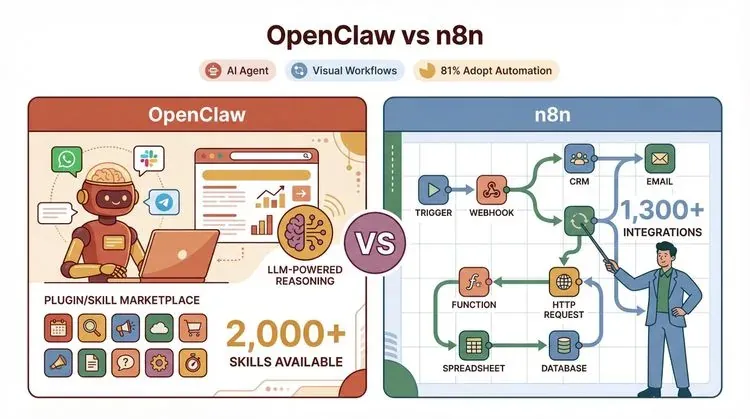
- OpenClaw is a personal AI agent you run on your own device or server. Think of it as a digital assistant that can chat with you on WhatsApp, Slack, Telegram, or even iMessage—and then go off and “do” things for you. It’s goal-driven: you tell it what you want (“Find all the latest competitor prices and summarize them”), and it figures out the steps, often using AI to make decisions along the way (github.com).
- n8n (pronounced “n-eight-n”) is a visual workflow automation platform. Imagine a drag-and-drop canvas where you connect boxes—each box is an app, an API, or a logic step. You build explicit, step-by-step workflows: “When a new lead arrives in Salesforce, enrich it with Clearbit, then send a Slack alert.” It’s structured, predictable, and great for repeatable processes (github.com).
Analogy time: OpenClaw is like hiring a smart assistant who can improvise and handle fuzzy, open-ended tasks. n8n is like setting up a conveyor belt—each station does its job, and you know exactly what happens at every step.
Typical use cases:
- OpenClaw: “Summarize the latest news from ten websites and email me the highlights.” (It figures out how to browse, extract, and summarize.)
- n8n: “Every time a new order comes in, update my CRM, notify the warehouse, and log the order in Google Sheets.” (You define each step.)
OpenClaw Features in 2026: Powering Flexible Data Collection and Automation
OpenClaw has made a name for itself as the “Swiss Army knife” of AI agents—especially when it comes to web scraping, data collection, and handling tasks that require judgment or adaptation.
Key Features of OpenClaw in 2026
- AI-Driven Task Execution: OpenClaw uses large language models (LLMs) to interpret your goals, break them down into steps, and execute them autonomously. It’s not just following a script—it can adapt if a website layout changes or if it hits an unexpected error (blink.new).
- Flexible Web Scraping: OpenClaw shines at extracting data from complex, dynamic websites. It can handle pagination, logins, and even CAPTCHAs (with the right plugins). You can ask it to “get all product prices from these 20 URLs,” and it’ll figure out the best approach.
- Extensible Skills/Plugins: The ClawHub marketplace lets you install “skills” (plugins) for everything from advanced scraping to file conversion, email automation, and more (clawhub.ai).
- Chat-Based Control: You can talk to OpenClaw via chat apps—send a message, get a result. It feels like texting a very capable (and slightly nerdy) friend.
- Local-First Design: OpenClaw is designed to run on your own hardware, keeping your data private. You can also deploy it to a VPS or use managed hosting if you prefer (openclaw.ai).
- Multi-Platform Integrations: OpenClaw connects to WhatsApp, Telegram, Slack, Discord, Signal, iMessage, and more. You can trigger automations from wherever you work.
Real-World Example
A market research team uses OpenClaw to monitor 50 competitor websites. When prices change or new products launch, OpenClaw scrapes the data, summarizes the changes, and sends a digest to the team’s Slack channel—no manual checking required.
Recent Updates
- Skill Ecosystem Growth: As of May 2026, ClawHub lists over 3,200 skills across 11 categories (AI/ML, Utility, Development, Productivity, Web, Science, Media, Social, Finance, Location, Business), with advanced scraping, PDF parsing, and AI-powered data cleaning all well represented (clawhub.ai).
- Security Enhancements: After some high-profile incidents (more on that later), OpenClaw now supports skill signing and sandboxing to reduce the risk of malicious plugins (theverge.com).
n8n Features in 2026: Visual Workflow Automation for Teams
n8n is the go-to platform for teams that want to automate business processes without writing code. Its visual interface and huge integration library make it a favorite for sales, marketing, and ops teams.
Key Features of n8n in 2026
- Visual Workflow Builder: Drag, drop, and connect nodes to build workflows. Each node represents an app, API, or logic step. You can see the entire process at a glance (github.com).
- Massive Integration Library: n8n boasts over 400+ official integrations (nodes) and claims 1,300+ total integrations when you include community and partner nodes (blink.new).
- AI Agent Node: n8n now includes an AI Agent node, letting you embed LLM-powered reasoning steps inside your workflows. For example, you can summarize an email thread before sending it to your CRM (docs.n8n.io).
- Cloud and Self-Hosted Options: Run n8n on your own server (open source), or use their managed cloud service for easy scaling and team collaboration (n8n.io).
- Auditability and Compliance: n8n tracks every workflow execution, making it easy to review what happened, when, and why—crucial for regulated industries.
- Team Collaboration: Assign roles, manage permissions, and share workflows across your organization.
Real-World Example
A sales ops team uses n8n to automate lead routing: when a new lead comes in via web form, n8n enriches the lead with LinkedIn data, scores it using an AI node, assigns it to the right rep, and updates Salesforce—all without human intervention.
Recent Updates
- Workflow Templates: As of May 2026, n8n's official template library at n8n.io/workflows has grown past 9,000 community-contributed workflows—everything from CRM syncing to automated reporting, with the majority now including at least one LLM-powered step.
- Improved AI Integration: The AI Agent node now supports multiple LLM providers and can chain reasoning steps within a workflow.
OpenClaw vs n8n Features: Side-by-Side Comparison Table
Let’s get to the heart of the “openclaw vs n8n features” debate. Here’s how they stack up on the most important dimensions:
| Feature/Dimension | OpenClaw | n8n |
|---|---|---|
| Automation Type | Goal-driven, agentic (AI figures out steps) | Step-driven, workflow-based (explicit sequence) |
| Interface | Chat-based (WhatsApp, Slack, Telegram, etc.); CLI; API | Visual drag-and-drop workflow builder; web UI |
| AI Capabilities | Deep LLM integration; autonomous reasoning; skill/plugin ecosystem | AI Agent node for reasoning within workflows; LLM-powered steps as part of workflow |
| Integrations | 3,200+ skills (via ClawHub); strong at web scraping and custom data sources | 400+ official nodes; 5,800+ community nodes indexed; excels at SaaS/app/API connectivity |
| Extensibility | Skills/plugins (install from ClawHub or build your own) | Custom nodes; code steps; community-contributed nodes |
| Ease of Use | Easy for chat users; technical setup required for self-hosting | Very easy for non-coders; visual builder lowers barrier |
| Deployment | Local-first (run on your own device/server); managed hosting available | Self-hosted (open source) or managed cloud (n8n.io) |
| Best-Fit Use Cases | Ad hoc data collection, web scraping, research, tasks needing judgment | High-volume, repeatable workflows, multi-app integrations, compliance-driven processes |
| Security | Risks from skill/plugin ecosystem; local data control; sandboxing improving | Risks from exposed endpoints; strong audit/logging; patching and config are critical |
| Pricing | Free core; pay for LLM/API usage; managed hosting from ~$22/mo (annualized) | Free self-hosted; cloud from €20/mo (annualized); business tier for advanced features |
Summary: OpenClaw is your go-to for flexible, AI-powered tasks where you want the agent to “figure it out.” n8n is unbeatable for building reliable, repeatable workflows that connect dozens of apps and services—especially if you want a visual, no-code experience.
When to Choose OpenClaw: Best-Fit Scenarios for 2026
OpenClaw is at its best when you need an AI agent that can adapt, improvise, and handle tasks that aren’t always predictable.
Ideal Scenarios for OpenClaw
- Complex Web Scraping: Need to extract data from 100+ websites, each with a slightly different layout? OpenClaw can use its AI to adapt on the fly, even if the sites change (decodo.com).
- Research and Summarization: Want a daily digest of competitor news, or a summary of the latest product reviews? OpenClaw can browse, extract, and summarize—all from a chat command.
- Inbox Triage: Connect OpenClaw to your email or Slack, and have it flag urgent messages, summarize threads, or even auto-respond to routine requests.
- Multi-Platform Coordination: Use OpenClaw to sync files, send reminders, or trigger actions across WhatsApp, Telegram, and more—all from a single chat.
Who Benefits Most?
- Analysts and Researchers: Anyone who spends hours gathering and cleaning data from the web.
- Small Teams and Power Users: Those who want a personal AI assistant that can handle a wide range of tasks without rigid workflows.
- Tech-Savvy Business Users: Folks comfortable with a bit of setup who want maximum flexibility.
When to Choose n8n: Workflow Automation for Predictable Processes
n8n is the tool of choice when your processes are well-defined, repeatable, and need to connect lots of different apps or APIs.
Ideal Scenarios for n8n
- Sales and Marketing Automation: Automatically route leads, update CRMs, send follow-up emails, and sync data between platforms.
- Scheduled Reporting: Generate and email reports every Monday at 8 a.m., pulling data from multiple sources and formatting it just right.
- Data Pipeline Automation: Move data from one system to another, transform it, and keep everything in sync—without writing code.
- Compliance and Auditability: Need to prove what happened, when, and why? n8n’s execution logs and audit trails make it easy.
Who Benefits Most?
- Non-Technical Teams: Anyone who wants to build automations visually, without coding.
- Ops and IT Teams: Those responsible for keeping data flowing smoothly between systems.
- Organizations with Compliance Needs: Teams that need audit trails, access controls, and predictable, repeatable processes.
Pricing and Cost Considerations: OpenClaw vs n8n in 2026
Let’s talk dollars and sense. Both OpenClaw and n8n offer free options, but costs can add up depending on how you use them.
OpenClaw Pricing (2026)
- Free/Open Source Core: Run OpenClaw on your own hardware for free (github.com).
- LLM/API Costs: If you use AI features (like GPT-4/5), you’ll pay for API usage—typically billed by the number of tokens or requests.
- Managed Hosting: Services like Blink Claw offer managed OpenClaw hosting from $22/month (annualized), with higher tiers for more usage or advanced features (blink.new).
- Skill/Plugin Costs: Most skills are free, but some premium plugins may have their own fees.
n8n Pricing (2026)
- Free Self-Hosted: You can run n8n on your own server for free (open source, fair-code license).
- Cloud (n8n.io):
- Starter: €20/month (annualized), hosted by n8n, includes basic features and limited executions (n8n.io).
- Pro: €50/month (annualized), adds more executions, premium support, and advanced features.
- Business: €667/month (annualized), self-hosted, with SSO/SAML, scaling, and version control.
- Execution/Usage Limits: Cloud plans have limits on the number of workflow executions per month; self-hosted is only limited by your hardware.
Cost Comparison Tips
- OpenClaw is cheaper for ad hoc, low-volume, or highly custom tasks—especially if you self-host and use open LLMs.
- n8n is more predictable for high-volume, repeatable workflows—especially if you want managed hosting and team features.
- Both tools can scale up in cost if you go heavy on AI (OpenClaw) or need lots of executions/users (n8n).
Setup and User Experience: Getting Started with OpenClaw and n8n
How hard is it to get up and running? Here’s what you can expect:
OpenClaw Setup
- Install: One-liner shell installer for most platforms; Node.js runtime required (docs.openclaw.ai).
- Connect Chat Apps: Link your WhatsApp, Telegram, Slack, or other chat accounts.
- Add Skills: Install plugins from ClawHub for scraping, automation, or custom tasks.
- Learning Curve: Easy to use from chat once set up, but initial install may require some technical know-how.
- Docs & Community: Good documentation, active GitHub issues, and a growing Discord/Telegram community.
n8n Setup
- Cloud: Sign up and start building workflows in minutes—no install needed (n8n.io).
- Self-Hosted: Docker image, npm install, or desktop app. Easy for most IT teams.
- Build Workflows: Use the visual builder to drag, drop, and connect nodes.
- Learning Curve: Very friendly for non-coders; tons of templates and guides.
- Docs & Community: Extensive docs, active forums, and a huge template library.
Bottom line: n8n is easier for non-technical users to start with, especially in the cloud. OpenClaw is a bit more technical to set up, but once running, it’s as easy as chatting with a friend.
Security, Data Ownership, and Compliance: What Business Teams Need to Know
Security is a big deal—especially when your automation tool can read your files, send emails, or access sensitive data.
OpenClaw Security
- Local Data Control: By default, your data stays on your device/server.
- Skill Ecosystem Risks: ClawHub plugins can be powerful—but also risky. In early 2026, Koi Security audited all 2,857 skills then on ClawHub and flagged 341 as malicious—335 of them traced back to a single coordinated operation now tracked as "ClawHavoc." The malicious skills masqueraded as popular tools (crypto wallets and trackers, Polymarket bots, YouTube utilities, Google Workspace integrations) and, in at least one case, opened a hidden reverse shell that handed the attacker full remote control of the victim's machine (eSecurity Planet, Snyk, Trend Micro).
- Mitigations: ClawHub now requires publisher accounts to be at least one week old before posting new skills, and any skill that crosses three user reports is automatically hidden pending review. OpenClaw itself supports skill signing, sandboxing, and a VirusTotal integration that surfaces a malware-scan report on each skill's page. You still need to read what you install—none of this catches a brand-new attacker on day eight.
- Prompt Injection: Like all LLM-powered tools, OpenClaw can be vulnerable to prompt injection attacks if not properly sandboxed (decodo.com).
n8n Security
- Audit Trails: Every workflow execution is logged—great for compliance and troubleshooting.
- Exposed Endpoints: If you run n8n on the public internet, you must secure webhooks and keep up with patches. In January 2026, researchers disclosed CVE-2026-21858—nicknamed "Ni8mare"—an unauthenticated remote-code-execution flaw with a CVSS score of 10.0. Initial Shadowserver scans found 105,753 unpatched instances exposed online, dropping to roughly 59,558 a week later, with the heaviest concentrations in the US and Europe. The fix shipped in n8n 1.121.0; older self-hosted versions on the public internet should be considered compromised until proven otherwise (The Hacker News, SecurityWeek, Horizon3.ai).
- Access Controls: Business tier adds SSO/SAML/LDAP and advanced permissioning.
- Data Ownership: Self-hosted n8n keeps your data on your own infrastructure.
Recommendations
- For sensitive data: Self-host and restrict access for both tools.
- For compliance: n8n’s audit logs and access controls are a plus.
- For plugin safety: Only install trusted skills in OpenClaw; review permissions carefully.
Can OpenClaw and n8n Work Together? Combining Strengths for Advanced Automation
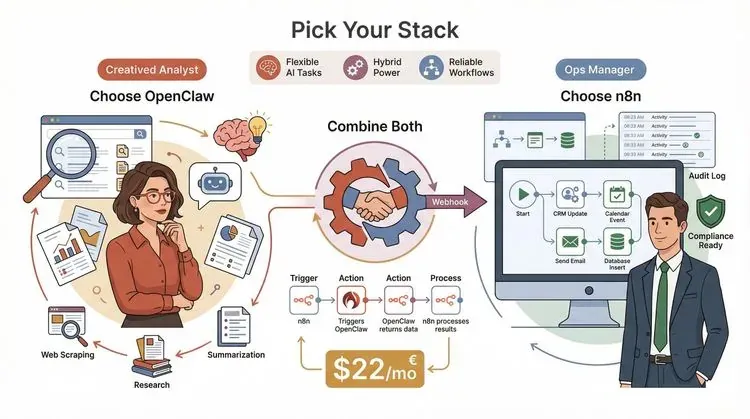
Here’s a secret: you don’t have to pick just one. The best teams in 2026 are combining OpenClaw and n8n for the ultimate automation stack (blink.new).
How to Integrate OpenClaw and n8n
- n8n as Orchestrator: Use n8n to trigger OpenClaw for reasoning-heavy or scraping tasks. For example, n8n detects a new lead, calls OpenClaw via webhook to research the lead’s company, then processes the results.
- OpenClaw as Orchestrator: Let OpenClaw handle open-ended tasks, then delegate deterministic steps (like updating a CRM) to n8n via HTTP requests.
- Webhooks and APIs: Both tools support webhooks and HTTP nodes, making integration straightforward (docs.openclaw.ai).
Real-World Example
A sales team uses n8n to monitor incoming leads. When a lead matches certain criteria, n8n calls OpenClaw to scrape the lead’s website and summarize recent news. The results are fed back into n8n, which updates the CRM and notifies the sales rep.
Benefits
- Best of Both Worlds: Use n8n for reliability and auditability; use OpenClaw for flexibility and AI-powered tasks.
- Modular Automation: Build complex automations without locking yourself into one paradigm.
Thunderbit: Expanding Web Data Collection Beyond OpenClaw and n8n
Let’s be honest: even with OpenClaw and n8n, web scraping can be a pain—especially if you want structured data, fast, and without writing code. That’s where Thunderbit comes in.
Try Thunderbit for Structured Web Data
What Is Thunderbit?
Thunderbit is an AI web scraper Chrome extension built for business users. It’s designed to make web data extraction as simple as clicking a button—no code, no templates, no headaches.
Thunderbit’s Unique Features
- AI Field Suggestions: Just click “AI Suggest Fields,” and Thunderbit reads the website, suggests column names, and sets up the scraper for you.
- Subpage Scraping: Need data from product detail pages or author profiles? Thunderbit can visit each subpage and enrich your table automatically.
- Instant Templates: For popular sites (Amazon, Zillow, Shopify, etc.), Thunderbit offers one-click templates—no setup required.
- Free Data Export: Export to Excel, Google Sheets, Airtable, Notion, CSV, or JSON—completely free.
- AI Autofill: Use AI to fill out online forms and automate workflows.
- Scheduled Scraper: Set up recurring scrapes to keep your data fresh.
- Cloud or Browser Scraping: Choose the mode that fits your needs—Thunderbit can scrape 50 pages at a time in the cloud for speed, or run in your browser for sites that require login.
- Supports 34 Languages: Thunderbit is built for global teams.
How Thunderbit Complements OpenClaw and n8n
- For OpenClaw Users: Use Thunderbit to quickly extract structured data from complex websites, then feed the results into OpenClaw for further processing or analysis.
- For n8n Users: Export Thunderbit data directly to Google Sheets or Airtable, then use n8n to automate downstream workflows (like syncing to your CRM or sending alerts).
- For Everyone: Thunderbit is the fastest way to get web data into your automation stack—no coding, no setup, just results.
Real-World Example
A real estate team uses Thunderbit to scrape property listings from multiple sites, exports the data to Google Sheets, and then uses n8n to sync the listings to their CRM and trigger follow-up emails. Meanwhile, OpenClaw is used to summarize market trends and flag interesting properties for review.
Want to see Thunderbit in action? Download the Chrome extension and try it for free.
Conclusion: How to Choose the Right Automation Tool for Your Business in 2026
Here’s my take, after years in the trenches of SaaS, automation, and AI:
- OpenClaw is your best bet for flexible, AI-driven tasks—especially when you need to scrape, summarize, or adapt to changing data sources.
- n8n is unbeatable for structured, repeatable workflows that connect lots of apps and require reliability, auditability, and team collaboration.
- Thunderbit supercharges your stack by making web data extraction fast, easy, and accessible to everyone—no code required.
Decision checklist:
- Need an AI agent that can improvise and handle fuzzy tasks? Go with OpenClaw.
- Want to automate predictable, multi-app workflows visually? Choose n8n.
- Need to extract structured data from the web, fast? Add Thunderbit to your toolkit.
- Want the best of all worlds? Combine them! Use Thunderbit for data extraction, OpenClaw for reasoning, and n8n for orchestration.
The future of automation is hybrid. The smartest teams in 2026 aren’t picking just one tool—they’re building flexible stacks that play to each tool’s strengths. My advice? Start experimenting. Try out OpenClaw, n8n, and Thunderbit on a real business problem. You’ll be amazed at how much time (and sanity) you can save.
For more tips, deep dives, and automation guides, check out the Thunderbit Blog.
Try Thunderbit for Faster Web Data Extraction Get Started Free
FAQs
1. What’s the main difference between OpenClaw and n8n features?
OpenClaw is a goal-driven AI agent that can handle flexible, open-ended tasks—especially web scraping and research—using LLMs and plugins. n8n is a visual workflow automation platform that excels at building structured, repeatable processes connecting hundreds of apps. OpenClaw improvises; n8n follows explicit steps.
2. Is OpenClaw or n8n better for non-technical users?
n8n is generally easier for non-technical users, thanks to its drag-and-drop workflow builder and huge template library. OpenClaw is easy to use once set up, but initial installation may require some technical skills.
3. How do OpenClaw and n8n handle security and compliance?
OpenClaw gives you local data control but has risks from its skill/plugin ecosystem. n8n offers strong audit trails and access controls, but you must secure public endpoints and keep up with patches. Both tools can be self-hosted for maximum data privacy.
4. Can I use OpenClaw and n8n together?
Absolutely! Many teams use n8n to orchestrate workflows and call OpenClaw for AI-powered or scraping tasks, or vice versa. Both tools support webhooks and APIs, making integration straightforward.
5. How does Thunderbit fit into the OpenClaw vs n8n features debate?
Thunderbit is an AI web scraper Chrome extension that complements both OpenClaw and n8n. It makes web data extraction fast and easy—no code required—and integrates with your automation stack by exporting data to Sheets, Airtable, Notion, and more. It’s the perfect companion for teams that need reliable, structured web data.
Ready to level up your automation game? Try Thunderbit for free and see what a modern automation stack can do for your business in 2026.
Learn More




