
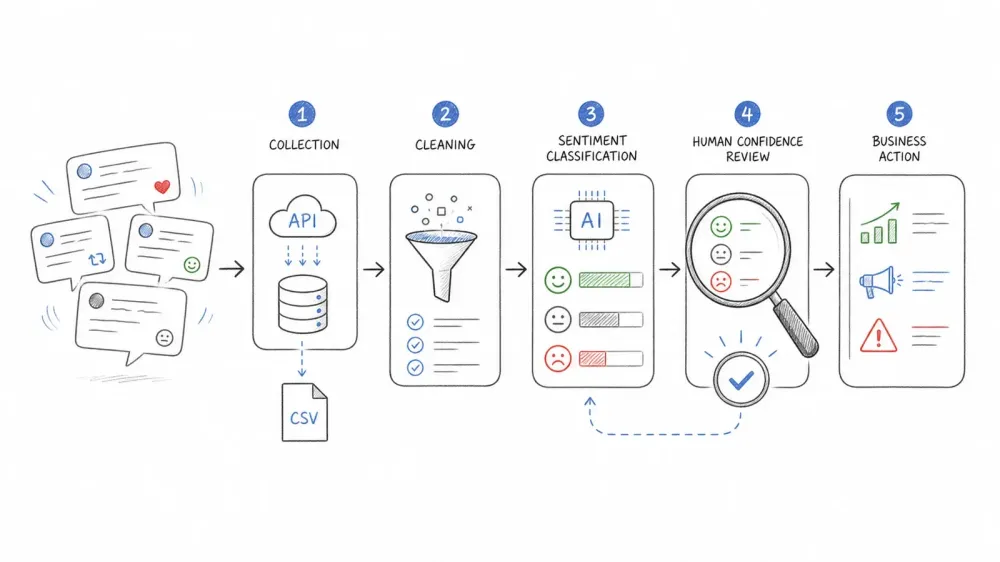
Open a spreadsheet with 300 raw posts and the problem becomes obvious fast: copy, paste, read, squint, guess, repeat—and you still may not know whether people loved or hated the launch you are tracking.
That failure mode is why sentiment analysis exists. But here's the problem: most tutorials on this topic are stuck in 2022. They assume free API access that no longer exists, recommend models that choke on sarcasm and emoji, and skip the preprocessing steps that actually determine whether your results mean anything. I've spent a lot of time in the SaaS and automation world (including building Thunderbit), and I've watched the sentiment analysis landscape shift dramatically. The honest, updated path covers both Python and no-code workflows, with data collection methods and models that reflect reality in 2026.
What Is Twitter Sentiment Analysis?
Twitter sentiment analysis is the process of automatically classifying posts on X as positive, negative, or neutral based on their text, emojis, and context. Think of it as teaching a machine to read a tweet and answer: "Is this person happy, unhappy, or somewhere in between?"
Sentiment analysis is different from general social listening, though. Social listening is about tracking what people are talking about—topics, trends, volume. Sentiment analysis is the scoring and classification layer on top of that: it tells you how people feel about what they're saying. The concept has roots in computational linguistics and opinion mining research going back decades, but it's become a mainstream business tool only in the last several years.
There are a few common classification levels:
- Binary: Positive or negative (simplest, but loses nuance)
- Ternary: Positive, neutral, or negative (the most common default)
- Fine-grained: Very positive → very negative (useful for research and detailed brand tracking)
And there are related but distinct tasks—like emotion detection (angry, sad, joyful), stance detection (for or against a proposition), aspect-level sentiment (how someone feels about price vs. quality), and sarcasm/irony detection. The TweetEval benchmark treats these as separate tasks, and for good reason: a single sentiment score can't answer every business question. If you're tracking a product launch, you probably want aspect-level sentiment ("love the camera, hate the battery"). If you're monitoring a crisis, you want emotion and volume, not just polarity.
Why Twitter Sentiment Analysis Matters for Your Business
X is built around real-time conversation, so reactions to launches, live events, and breaking news can accumulate quickly. For businesses, that speed is the point. Sentiment analysis turns a firehose of unstructured text into structured data that a team can review and act on.
The most common use cases break down like this:
| Use Case | Team | Business Outcome |
|---|---|---|
| Brand reputation monitoring | PR, Marketing | Catch negative spikes before they go viral |
| Product launch feedback | Product, Marketing | Identify what's working and what's not, in real time |
| Competitive benchmarking | Strategy, Marketing | Compare brand perception vs. competitors over equal windows |
| Crisis detection | PR, Ops | Trigger human review when negative volume spikes |
| Campaign performance | Marketing | Measure sentiment shift by creative, channel, or time |
| Market/stock sentiment | Finance, Research | Track public mood around earnings, events, or policy |
| Political and policy research | Research, Government | Gauge public opinion on issues at scale |
To make this concrete: X's 2026 Super Bowl recap reported 16 million Posts from 4 million authors, 5 billion impressions, and 605 million video views around a single event—with half the conversation happening in real time. That's the kind of scale where manual reading is impossible and automated sentiment scoring becomes essential.
And it's not just about volume. X's own BrandRanx methodology combines volume, engagement, and sentiment—reinforcing that sentiment is most powerful when paired with other signals, not used in isolation.
The bottom line: if your team makes decisions based on public perception—product, brand, campaign, or crisis—sentiment analysis on X data is one of the fastest feedback loops available.
The 2026 X API Reality: How to Actually Get Tweet Data
This is where most tutorials fall apart. If you've ever followed a Tweepy-based guide, pasted in your code, and hit a paywall or a cryptic error, you're not alone. The old Free / Basic / Pro subscription tiers are gone. X's API is now pay-per-usage with prepaid credits, per-endpoint costs, and real-time usage tracking.
An honest comparison of every current data collection method:
| Method | Cost (2026) | Volume | Skill Level | Notes |
|---|---|---|---|---|
| X API v2 (pay-per-use) | $0.005/Post read | Up to 2M Post reads/month (self-serve) | Intermediate (Python) | Official, reproducible, compliant |
| Full-Archive Search | $0.005 per returned Post; $0.010 per full-archive count request | Back to March 2006 | Intermediate–Advanced | Available to pay-per-use and Enterprise |
| Filtered Stream | Post reads billed on delivery | Real-time, continuous | Intermediate–Advanced | Best for live collection |
| Pre-built datasets (Kaggle, Sentiment140) | $0 | Static, historical only | Beginner | Great for learning, not for live analysis |
| snscrape, Twint, Twikit, etc. | $0 | Unreliable / frequently broken | Advanced | snscrape hasn't worked for X search since 2023; Twint is archived; Twikit uses unofficial methods |
| Your own X archive | $0 | Your posts only | Beginner | Useful for personal analysis |
A few things to know:
- The old Free/Basic/Pro tiers are gone. Don't follow any tutorial that references them as current.
- snscrape is dead for X. Its maintainer confirmed in 2024 that Twitter search scraping no longer works. Twint is archived. Twikit uses unofficial scraping and cookies—activity does not equal permission.
- X's terms prohibit browser scraping without prior written consent. That means Selenium, Playwright, and browser extensions are not compliant workarounds for API access on X.
X API v2: What You Actually Get
A standard Post read costs $0.005 per returned Post. User reads cost $0.010 each. So 10,000 unique Post reads run about $50 before other resource costs. The self-serve cap is 2 million Post reads per month. Rates can change—always check the Developer Console.
For sentiment work, you'll want more than just id and text. A useful minimum schema includes created_at, lang, author_id, conversation_id, referenced_tweets, entities, context_annotations, and public_metrics. Save the raw response and an immutable record of your query, endpoint, UTC window, and pagination tokens. Without those, your corpus is not reproducible.
One more wrinkle: X's May 4, 2026 search-index migration changed the observed corpus. Keyword REST search no longer returns reposts, while Filtered Stream is unchanged. If you're comparing results from before and after that date, you may be counting different populations.
Pre-Built Datasets: Good for Learning, Not for Live Analysis
Sentiment140 (1.6 million tweets, distant-supervised labels) and various Kaggle datasets are free and great for education and benchmarking. But Sentiment140 was collected in 2009. TweetEval's sentiment subset uses SemEval data from 2013–2016. They can't prove your model works on 2026 language, slang, or events.
A Note on Thunderbit and X Data
I want to be upfront here, since we built Thunderbit: Thunderbit is an AI web scraping and automation tool that works on many compatible websites. But X's current terms prohibit browser scraping without consent. So I'm not going to position Thunderbit as a way around X API costs or access controls—that would be misleading. For X data, use the official API, an authorized provider, or your own account archive. Where Thunderbit does fit into a sentiment workflow is downstream: structuring, labeling, and exporting data you've already collected through a permitted route. More on that later.
Choosing the Right Sentiment Model: VADER vs. TextBlob vs. RoBERTa
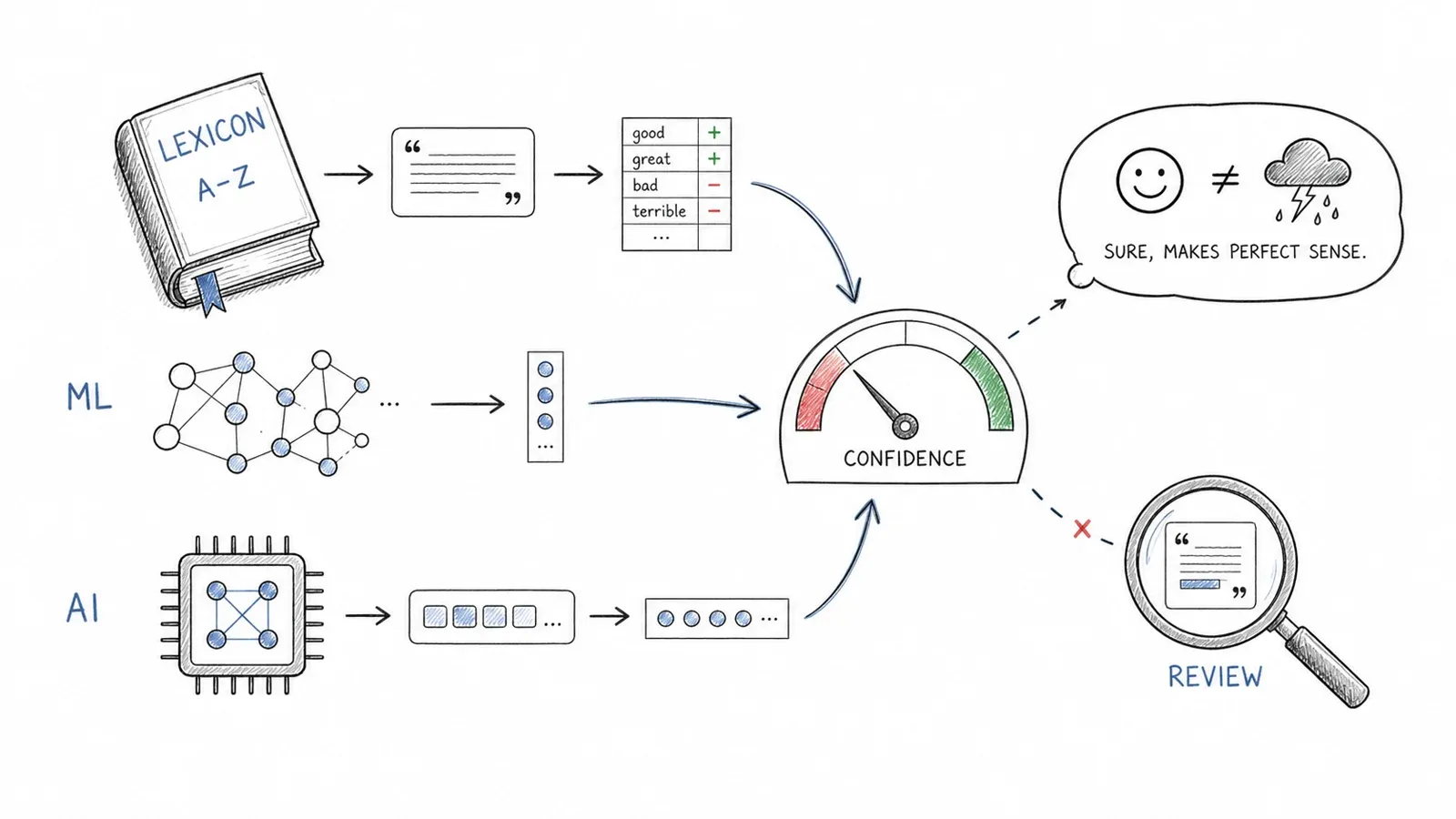
The model you pick matters more than most tutorials let on. And the biggest gap in competing guides is that almost none of them cover transformer-based models fine-tuned on tweets—which is where some of the strongest practical baselines now live.
A head-to-head comparison follows. I'm deliberately not putting universal F1 numbers in this table, because scores differ by dataset, split, label definition, time period, and metric. Instead, I'll describe relative performance and point you to the benchmarks where you can verify.
| Model / Library | Approach | Handles Sarcasm? | Handles Slang/Emoji? | Relative Tweet Accuracy | Setup Complexity |
|---|---|---|---|---|---|
| VADER (NLTK) | Rule-based lexicon | Weak | Some emoji support | Lowest | Very low |
| TextBlob | Pattern-based | Weak | No | Lower | Very low |
| Naive Bayes / Logistic Regression (TF-IDF) | Classic ML | No | No | Moderate | Medium |
| CardiffNLP RoBERTa | Transformer (fine-tuned on tweets) | Better (not perfect) | Yes | Highest among these | Medium (HuggingFace pipeline) |
VADER: Quick and Simple, But Limited
VADER is a rule-based lexicon approach built for social text. It's fast, interpretable, needs no training data, and handles some emoji and emoticons. It accounts for negation, degree modifiers, punctuation, and capitalization. For a quick-and-dirty baseline or when compute and transparency matter, VADER is useful. Where it falls short: sarcasm, slang, context-dependent meaning, and anything that requires understanding beyond individual words. Its default compound-score thresholds (≥0.05 = positive, ≤-0.05 = negative) are defaults, not universal business thresholds—tune them on your own validation set.
TextBlob: Even Simpler, Even More Limited
TextBlob is a tiny educational baseline. Its default PatternAnalyzer is not trained on tweet-style text. It's useful for a first-ever NLP experiment, but not for production tweet analysis.
Classic ML: Naive Bayes, Logistic Regression, SVM
A word-and-character TF-IDF pipeline with logistic regression or LinearSVC remains a valuable supervised baseline. It's cheap, interpretable, and often exposes whether a transformer adds enough value to justify its complexity. The key rule: fit your vectorizer only after the train/validation split to avoid vocabulary and IDF leakage.
These models outperform rule-based approaches on large labeled datasets, but they still miss context, sarcasm, and slang.
CardiffNLP RoBERTa: The 2026 Standard for Tweet Sentiment
cardiffnlp/twitter-roberta-base-sentiment-latest is a maintained, tweet-oriented three-class model and a sensible strong baseline for 2026. It was pretrained on a large corpus of tweets and fine-tuned for sentiment, so it handles emoji, slang, and informal language far better than rule-based or classic ML approaches.
Here's a minimal HuggingFace code snippet to run it:
from transformers import pipeline

classifier = pipeline(
    "text-classification",
    model="cardiffnlp/twitter-roberta-base-sentiment-latest",
    top_k=None,
)
scores = classifier("@user Love waiting three hours for support 😒 http")
print(scores)
Some caveats:
- The output is a model score, not a calibrated business probability. Calibrate or add an abstention threshold on a current labeled sample.
- Contextual models usually outperform rule systems on many tweet tasks, but sarcasm, mixed targets, missing thread context, dialect, and coded language remain structural error sources. Don't promise that any model "understands sarcasm"—it's more accurate to say it handles it better, not perfectly.
- Alternatives include BERTweet, TimeLMs, and multilingual Twitter-XLM-R models, depending on language and task.
So, can Twitter sentiment analysis actually be accurate? Yes—when the model, preprocessing, label definition, and evaluation sample all fit the task. A generic VADER script pasted from a 2019 tutorial is a baseline, not proof of production quality.
A Real Tweet Preprocessing Pipeline (Not Just text.lower())
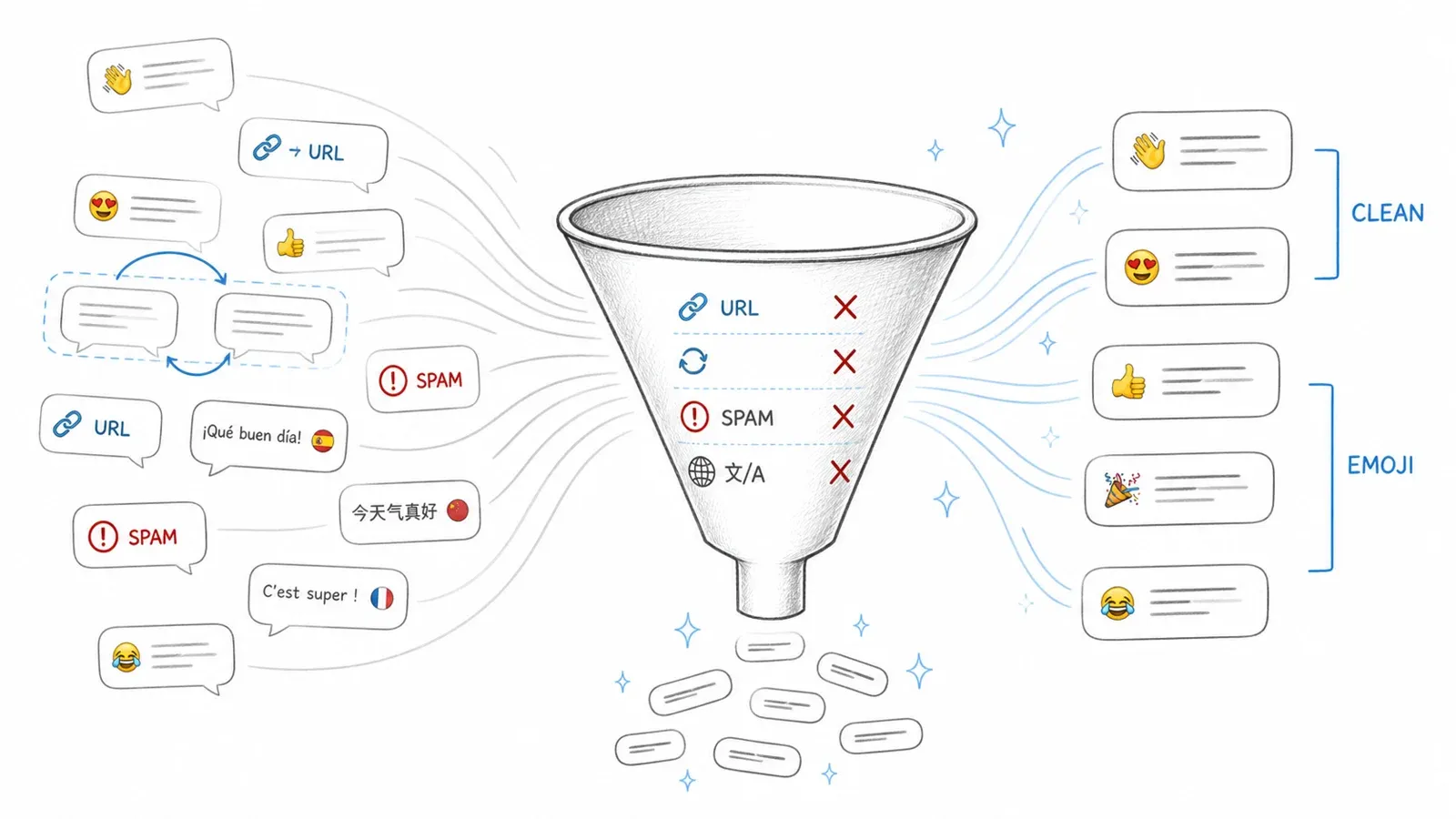
Feed a sentiment model raw URLs, @mentions, and HTML entities and even a decent model can return garbage. Most tutorials (including the top-ranking ones) only lowercase text before feeding it to a model. That silently sabotages accuracy—especially for classic ML, where preprocessing quality can matter as much as model choice.
What to Clean (and Why It Matters)
| Element | What to Do | Why |
|---|---|---|
| URLs | Replace with a placeholder like http | URLs are noise for sentiment; removing surrounding text can break context |
| @mentions | Replace handles with @user | Keeps structure, removes author identity leakage |
| Emoji/emoticons | Preserve for modern tokenizers; test demojized text for sparse models | Emoji carry strong sentiment signal—deleting them is throwing away data |
| Hashtags | Keep the token; optionally add a segmented copy (e.g., #ClimateChangeIsReal → Climate Change Is Real) | Hashtags often contain the opinion |
| Negation | Preserve not, no, never, contractions, contrast words | Generic stop-word lists often remove these, flipping sentiment |
| Casing/punctuation | Preserve for VADER and compatible models | VADER uses capitalization and punctuation as features |
| RT prefix | Remove RT marker | It's metadata, not sentiment |
| Reposts/duplicates | Detect exact and near duplicates before splitting | Duplicates across train and test cause leakage |
Before and After: What Preprocessing Actually Does to a Tweet
Here's a concrete example:
| Stage | Text |
|---|---|
| Raw tweet | RT @BrandX: Wow, #CustomerServiceFail 😡😡 https://t.co/abc123 I've been waiting 3 hrs ngl this is awful |
| After URL removal | RT @BrandX: Wow, #CustomerServiceFail 😡😡 http I've been waiting 3 hrs ngl this is awful |
| After mention normalization | RT @user: Wow, #CustomerServiceFail 😡😡 http I've been waiting 3 hrs ngl this is awful |
| After RT removal | @user: Wow, #CustomerServiceFail 😡😡 http I've been waiting 3 hrs ngl this is awful |
| After hashtag segmentation | @user: Wow, #CustomerServiceFail Customer Service Fail 😡😡 http I've been waiting 3 hrs ngl this is awful |
| After emoji-to-text (for sparse models) | @user: Wow, #CustomerServiceFail Customer Service Fail angry_face angry_face http I've been waiting 3 hrs ngl this is awful |
| Final (for CardiffNLP RoBERTa) | @user Wow, #CustomerServiceFail Customer Service Fail 😡😡 http I've been waiting 3 hrs ngl this is awful |
Notice that for a transformer like CardiffNLP RoBERTa, you preserve emoji, punctuation, and casing—the model was trained on text that looks like this. For a TF-IDF model, you might demojize, lowercase, and lemmatize.
Copy-Paste Python Preprocessing Code
A clean, modular function for transformer-compatible preprocessing:
import html
import re
import unicodedata

URL_RE = re.compile(r"https?://\S+|www\.\S+", re.I)
MENTION_RE = re.compile(r"(?<!\w)@[A-Za-z0-9_]+")

def normalize_social_text(text: str) -> str:
    """Normalize a tweet for transformer-based sentiment models."""
    text = html.unescape(text)
    text = unicodedata.normalize("NFC", text)
    text = URL_RE.sub("http", text)
    text = MENTION_RE.sub("@user", text)
    text = re.sub(r"\bRT\b", "", text)
    return " ".join(text.split())
For classic ML pipelines, you'd extend this with lowercasing, emoji-to-text conversion (using the emoji or demoji library), hashtag segmentation (using wordninja or ekphrasis), slang normalization, stopword removal, and lemmatization (via spaCy or NLTK). The key principle: match your preprocessing to your model. BERTweet, for example, uses its own documented normalization convention—don't force every model through one pipeline.
Step-by-Step: Twitter Sentiment Analysis with Python
This is the complete workflow, tying together everything above. You can follow this from start to finish.
Before you start:
- Difficulty: Intermediate (some Python familiarity assumed)
- Time Required: ~30–60 minutes for the full pipeline; ~10 minutes for the quick transformer path
- What You'll Need: Python 3.8+, a free Google Colab or local environment,
pandas,transformers,scikit-learn,matplotlib,seaborn, and optionallywordcloud
Step 1: Collect Your Tweet Data
I'll use the Sentiment140 dataset for this tutorial (free, 1.6 million tweets, available on Kaggle). It's great for learning and benchmarking, even though it's historical.
If you want live data, use the X API v2 pay-per-use tier. A standard Post read costs $0.005. For 10,000 Posts, that's about $50.
Load the dataset:
import pandas as pd

columns = ["target", "id", "date", "flag", "user", "text"]
df = pd.read_csv(
    "training.1600000.processed.noemoticon.csv",
    encoding="latin-1",
    names=columns,
)
#Labels: Sentiment140 uses 0 = negative, 4 = positive
df["label"] = df["target"].map({0: "negative", 4: "positive"})
print(df[["text", "label"]].head())
You should see a DataFrame with raw tweet text and a label column.
Step 2: Clean and Preprocess Your Tweets
Apply the preprocessing function from the earlier section:
df["clean_text"] = df["text"].apply(normalize_social_text)
print(df[["text", "clean_text"]].head())
Check a few rows to confirm URLs are replaced, mentions are normalized, and RT prefixes are removed.
Step 3: Pick Your Model and Classify Sentiment
Path A: Classic ML with TF-IDF + Logistic Regression
This is the "understand the fundamentals" path. Split your data, fit the vectorizer on the training set only, and train a logistic regression classifier:
from sklearn.model_selection import train_test_split
from sklearn.feature_extraction.text import TfidfVectorizer
from sklearn.linear_model import LogisticRegression
from sklearn.metrics import classification_report

X_train, X_test, y_train, y_test = train_test_split(
    df["clean_text"], df["label"], test_size=0.2, random_state=42
)
vectorizer = TfidfVectorizer(max_features=50000, ngram_range=(1, 2))
X_train_tfidf = vectorizer.fit_transform(X_train)
X_test_tfidf = vectorizer.transform(X_test)

clf = LogisticRegression(max_iter=1000)
clf.fit(X_train_tfidf, y_train)
y_pred = clf.predict(X_test_tfidf)
print(classification_report(y_test, y_pred))
You should see a classification report with precision, recall, and F1 for each class. On Sentiment140, logistic regression with TF-IDF typically performs respectably—but remember, this dataset is from 2009 and uses distant supervision (emoticons as labels), so don't treat these numbers as your production benchmark.
Path B: CardiffNLP RoBERTa via HuggingFace
For the best accuracy on tweet text, use the pretrained transformer:
from transformers import pipeline

classifier = pipeline(
    "text-classification",
    model="cardiffnlp/twitter-roberta-base-sentiment-latest",
    top_k=None,
)

sample_tweets = [
    "@user Love waiting three hours for support 😒 http",
    "@user This new update is absolutely fantastic, best one yet!",
    "@user The event was okay, nothing special.",
]
for tweet in sample_tweets:
    result = classifier(tweet)
    print(f"Tweet: {tweet}\nScores: {result}\n")
You'll see a list of label scores (negative, neutral, positive) for each tweet. The sarcastic tweet ("Love waiting three hours...") should score higher on negative than a rule-based model would predict—though no model is perfect here.
Step 4: Evaluate Your Results
Now generate a confusion matrix heatmap for the classic ML path:
import matplotlib.pyplot as plt
import seaborn as sns
from sklearn.metrics import confusion_matrix

cm = confusion_matrix(y_test, y_pred, labels=["negative", "positive"])
sns.heatmap(cm, annot=True, fmt="d", xticklabels=["negative", "positive"],
            yticklabels=["negative", "positive"], cmap="Blues")
plt.xlabel("Predicted")
plt.ylabel("Actual")
plt.title("Confusion Matrix: Logistic Regression on Sentiment140")
plt.show()
With the transformer path, label a small current sample by hand (50–100 tweets), run the model, and compare. Report macro F1, per-class precision and recall, and the confusion matrix. If you're doing this for a real project, also check calibration and set an abstention threshold for ambiguous cases.
Step 5: Test on Edge Cases
Try a few tweets that test sarcasm, emoji, and slang:
edge_cases = [
    "Oh great, another update that breaks everything 🙄",
    "ngl this product slaps 🔥🔥🔥",
    "The camera is amazing but the battery life is trash",
    "Just got my order. It's... fine. I guess.",
]
for tweet in edge_cases:
    clean = normalize_social_text(tweet)
    result = classifier(clean)
    print(f"Tweet: {tweet}\nScores: {result}\n")
Look at where the model gets it right and where it struggles. Mixed-target tweets ("camera is amazing but battery is trash") are a known challenge—aspect-level sentiment is a separate task.
Twitter Sentiment Analysis Without Writing Code
Not everyone wants to write Python, and that's fine. If you're a marketer, brand manager, or operations lead who needs sentiment insights without touching code, here's your path.
One honest caveat: no-code tools trade customization for speed. They're ideal for quick brand monitoring, not for research-grade analysis or custom model training.
No-Code Options at a Glance
| Tool | Best For | Sentiment Built-In? | Price Range |
|---|---|---|---|
| AWS Comprehend | Enterprise-scale text analysis | Yes | Pay-per-use |
| Brandwatch / Sprinklr | Full social listening suite | Yes | Enterprise pricing |
| Google Sheets + NLP add-ons | Quick lightweight analysis | Via add-on | Free–low |
| Thunderbit + spreadsheet | Structure and label data from compatible pages | AI Field Prompt for exploratory labels | Free tier available |
No-Code Workflow: Collect Data, Classify in a Spreadsheet
A practical workflow for someone who has tweet data (collected via the official X API, an authorized provider, or their own archive):
- Export your tweet data to a spreadsheet. If you used the X API, export the JSON to CSV or use a tool like Thunderbit to structure and export data from compatible pages where you have permission to automate.
- Open in Google Sheets. Paste or import your tweet text into a column.
- Apply a sentiment classifier. Use a Google Sheets NLP add-on (check the add-on marketplace for current options) or a service like AWS Comprehend. Some add-ons let you classify sentiment directly in a cell formula.
- Review and visualize. Use Google Sheets' built-in charting to create a sentiment distribution bar chart or a sentiment-over-time line chart.
Thunderbit's AI Field Prompt can also add a prompt-based sentiment label during extraction on compatible pages—useful for exploratory monitoring. But for audited or high-stakes decisions, validate a sample and use a documented model.
When to Use No-Code vs. Python
| Scenario | Recommended Path |
|---|---|
| Quick brand check, small volume | No-code (spreadsheet + add-on) |
| Team dashboard, weekly reporting | No-code or low-code |
| Large-scale analysis, custom models | Python |
| Academic research, reproducibility | Python |
| Real-time monitoring at scale | Python + API + scheduled pipeline |
Visualizing Your Twitter Sentiment Results
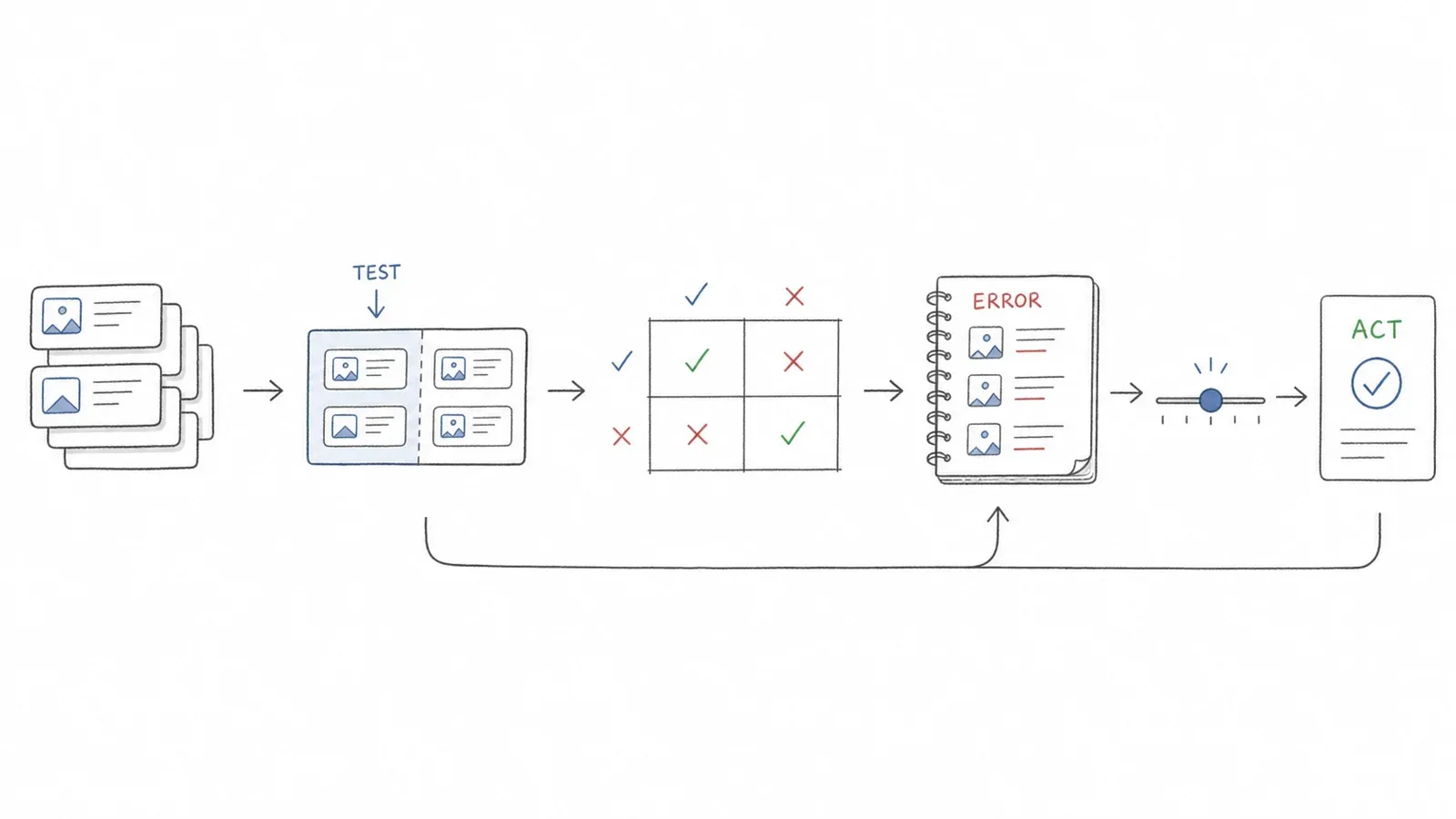
Most tutorials stop at a classification report. But if you want to communicate findings to a team or make a decision, you need visuals.
Sentiment Distribution Bar Chart
The most basic but universally useful output:
import matplotlib.pyplot as plt
import seaborn as sns

sentiment_counts = df["label"].value_counts()
sns.barplot(x=sentiment_counts.index, y=sentiment_counts.values, palette="coolwarm")
plt.xlabel("Sentiment")
plt.ylabel("Tweet Count")
plt.title("Sentiment Distribution")
plt.show()
Word Cloud by Sentiment Class
Separate word clouds for positive and negative tweets reveal what people are actually saying:
from wordcloud import WordCloud

for sentiment in ["positive", "negative"]:
    text = " ".join(df[df["label"] == sentiment]["clean_text"])
    wc = WordCloud(width=800, height=400, background_color="white").generate(text)
    plt.figure(figsize=(10, 5))
    plt.imshow(wc, interpolation="bilinear")
    plt.axis("off")
    plt.title(f"Word Cloud: {sentiment.capitalize()} Tweets")
    plt.show()
Sentiment Over Time: The Chart No One Else Shows You
This is the visualization that turns raw data into a story. If you have timestamps, you can track how sentiment shifts during an event, launch, or crisis:
df["date"] = pd.to_datetime(df["date"])
df["day"] = df["date"].dt.date
sentiment_map = {"positive": 1, "neutral": 0, "negative": -1}
df["score"] = df["label"].map(sentiment_map)
daily = df.groupby("day")["score"].mean()

plt.figure(figsize=(12, 5))
daily.plot()
plt.xlabel("Date")
plt.ylabel("Average Sentiment Score")
plt.title("Sentiment Over Time")
plt.axhline(0, color="gray", linestyle="--")
plt.show()
A sudden dip on launch day? That's your signal to dig into the negative tweets and find out what went wrong.
Confusion Matrix Heatmap
Already shown in the evaluation step above. The key: look at where your model confuses positive for negative (or vice versa). Those are the tweets worth reading manually.
For Non-Coders: Charting in Google Sheets or Notion
If you've exported your sentiment-labeled data to a spreadsheet, you can chart sentiment distribution and trends directly in Google Sheets, Notion, or any BI tool. No Python required.
Common Pitfalls in Twitter Sentiment Analysis (and How to Dodge Them)
Across real-world sentiment workflows, the same mistakes keep showing up.
Sarcasm and Irony
The biggest accuracy killer. "Love waiting three hours for support 😒" looks positive to a rule-based model. Transformer models do better, but sarcasm remains structurally difficult—especially when the post alone lacks context (the thread, the author's history, the event). For high-stakes use cases, combine model output with human spot-checks.
Emoji and Slang Blind Spots
If your preprocessing strips emojis instead of converting them to text (for sparse models) or preserving them (for transformers), you're throwing away some of the strongest sentiment signals in the data. Same for slang—"ngl this slaps" is positive, but a model trained on formal English won't know that.
Outdated API Tutorials and Broken Scrapers
If a tutorial uses Tweepy with API v1.1, it's outdated. If it recommends snscrape, that hasn't worked for X search since 2023. Always check the date and API version of any tutorial you follow.
Overfitting to a Single Dataset
Sentiment140 is great for training, but it's from 2009. A 2024 EMNLP audit of 20 social-media datasets found that removing duplicates reduced F1 in 14 of 19 tested datasets and changed model rankings in 17 of 19. Use time-based, event-disjoint, and preferably author-disjoint splits. Test your model on recent tweets to see if it generalizes.
Treating Sentiment Scores as Ground Truth
A model score is not a calibrated probability. Don't trigger automated responses or public-facing decisions based solely on a sentiment label. Always require human review for decisions affecting individuals or crisis responses.
Privacy, Platform Policy, and Responsible Use
This section isn't optional.
X's Developer Policy emphasizes privacy, user control, content deletion, and restrictions on off-X matching. Practical rules:
- Collect only necessary fields.
- Aggregate results rather than publishing raw handles.
- Keep Post IDs and retrieval timestamps for compliance.
- Remove or update stored content after deletion, protection changes, or qualifying requests.
- Do not infer sensitive traits about individuals.
- Do not join sentiment scores to CRM identities without a permitted basis and consent.
- Do not train or fine-tune a foundation model on X Content where prohibited by restricted-use rules.
- Document sample size, query terms, time window, language filters, and exclusions.
- Never automate a public response solely from a sentiment score.
Sentiment analysis is a powerful tool, but it comes with real responsibilities. Treat it accordingly.
Conclusion and Key Takeaways
Twitter sentiment analysis works in 2026—but only if you update your approach to match the current reality. The old recipe (free API, lowercase-only preprocessing, VADER or Naive Bayes, no evaluation) is broken. What actually works:
- Get your data through a permitted route. Use the X API v2 (pay-per-use), an authorized provider, or a transparent dataset. Don't rely on broken scrapers or browser workarounds.
- Preprocess for your model, not just for show. Preserve emoji, negation, and casing for transformers. Normalize URLs and mentions. Match your pipeline to your model's training data.
- Compare a cheap baseline with a tweet-specific transformer. TF-IDF + logistic regression is still a great sanity check. CardiffNLP RoBERTa is the current strong default for tweet sentiment.
- Evaluate honestly. Report macro F1, per-class metrics, and a confusion matrix. Use a current, hand-labeled sample. Set an abstention threshold for ambiguous cases.
- Visualize for decisions, not just for decoration. Sentiment-over-time charts and word clouds tell a story that a classification report can't.
- Keep humans in the loop. No model is perfect at sarcasm, mixed targets, or context-dependent meaning. For high-stakes use cases, combine model output with human review.
If you're just getting started, grab a free dataset, open Google Colab, and run the HuggingFace pipeline. You'll have working sentiment scores in under ten minutes. If you want to collect and structure web data without code for other parts of your workflow, Thunderbit can help on compatible pages where you have permission to automate.
And if you're building this for a portfolio or a job interview: adding a transformer comparison, a real preprocessing pipeline, and a sentiment-over-time chart will instantly set your project apart from the bootcamp default.
Learn More
- How to Master Automated Data Scraping Using Thunderbit
- 6 Best Twitter (x.com) Scrapers in 2026
- How to Scrape Tweets from Twitter Using Python in 2025
- How to Use Twitter AI Scraping for Enhanced Data Insights
- Twitter (X) Statistics 2026: Users, Demographics & Ads
FAQs
Is Twitter sentiment analysis accurate?
It depends on the model and how you evaluate. Rule-based tools like VADER perform at the low end on tweet data. Transformer models like CardiffNLP RoBERTa perform significantly better—but exact scores vary by dataset, split, label definition, and metric. Preprocessing quality also matters. Always evaluate on a current, hand-labeled sample rather than trusting a single benchmark number.
Can I do Twitter sentiment analysis for free?
Yes. Use a free dataset (Sentiment140 on Kaggle), a free Python environment (Google Colab), and a pretrained HuggingFace model. For live data, the X API charges $0.005 per Post read, so small-scale collection is affordable. Thunderbit offers a free tier for structuring data on compatible pages.
What is the best Python library for Twitter sentiment analysis?
For quick prototyping: VADER via NLTK. For best accuracy on tweets: the HuggingFace transformers library with CardiffNLP's RoBERTa model. For classic ML baselines: scikit-learn with TF-IDF. The right choice depends on your volume, accuracy needs, and compute budget.
How do I handle sarcasm in Twitter sentiment analysis?
Transformer models handle sarcasm better than rule-based or classic ML models because they process context, not just individual words. But no model is perfect at sarcasm—research shows that even human annotators disagree on sarcastic intent. For critical use cases, combine model output with human review and consider using sarcasm-specific datasets for evaluation.
Can I analyze Twitter sentiment without coding?
Yes. Collect your data through a permitted route (X API, authorized provider, or your own archive), export to Google Sheets, and apply a no-code sentiment classifier via a Sheets NLP add-on or a service like AWS Comprehend. Thunderbit can also add prompt-based sentiment labels during data structuring on compatible pages. For more on no-code data workflows, check out our guide to AI tools for Google Sheets.




