
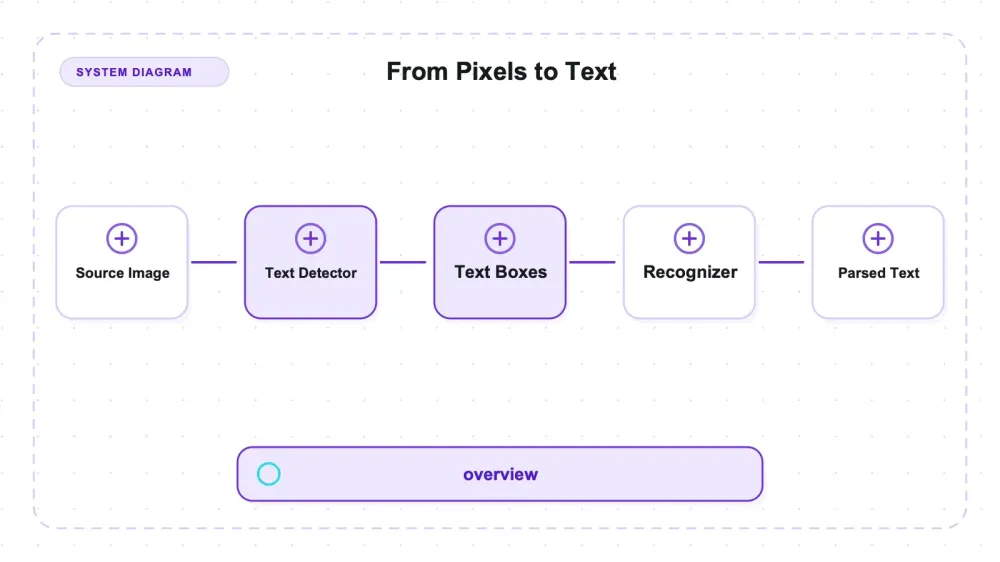
EasyOCR is JaidedAI's ready-to-use OCR library for Python: pip install easyocr, two lines of code, and the text baked into an image comes back as strings. It is Apache-2.0 licensed, advertises 80+ languages, and runs as a pipeline of two PyTorch models — a CRAFT detector that draws boxes around anything it believes is text, then a recognizer that reads the characters inside each box. The pretrained weights download themselves the first time you call it. In shape it is a self-hosted alternative to Tesseract and PaddleOCR, not a per-page cloud OCR API.
The basic API is short: Reader(['en']), then readtext(). Deployment is larger—about 2 GB of PyTorch in this environment and roughly a gigabyte of peak resident memory in the measured fresh process. I rendered 36 English PNG fixtures, ran easyocr 1.7.2 on CPU, and scored reads character by character against generated ground truth. Size and orientation caused the largest CER collapses; the dashboard also exposed short-token detection and dollar-sign recognition errors.
The sharpest of those failures involves the one parameter everybody recommends. rotation_info has a reputation on the issue tracker as the fix for rotated images, so it got three orthogonally rotated copies of the same sentence. At 270° it did exactly what it promises, pulling character error rate from 0.83 down to 0.10. At 180° it half-worked: 0.85 to 0.67, with a phrase dropped. At 90° it went backwards, 0.81 to 0.92, and the recognizer started returning mirror text. Same parameter, same list of angles, three different outcomes — so switching it on does not buy you "rotation is handled." The same 36 fixtures also produced a hard font-size cliff, a systematic dollar-sign misread, and one prediction of mine that turned out flatly wrong.
Two models in a trench coat
EasyOCR isn't one model. It's a pipeline of two, and knowing which stage failed changes how you debug it.
Stage one is CRAFT, the detector. Its entire job is localization — deciding where in the image there is text at all, and handing back boxes. It never reads a character. Stage two is a CRNN recognizer — ResNet feature extraction, then a BiLSTM, then CTC greedy decoding — which reads the characters inside each box. Both run on PyTorch. On CPU, the recognizer runs dynamically quantized to int8 by default, which is why it's faster and lighter than the raw parameter count suggests.
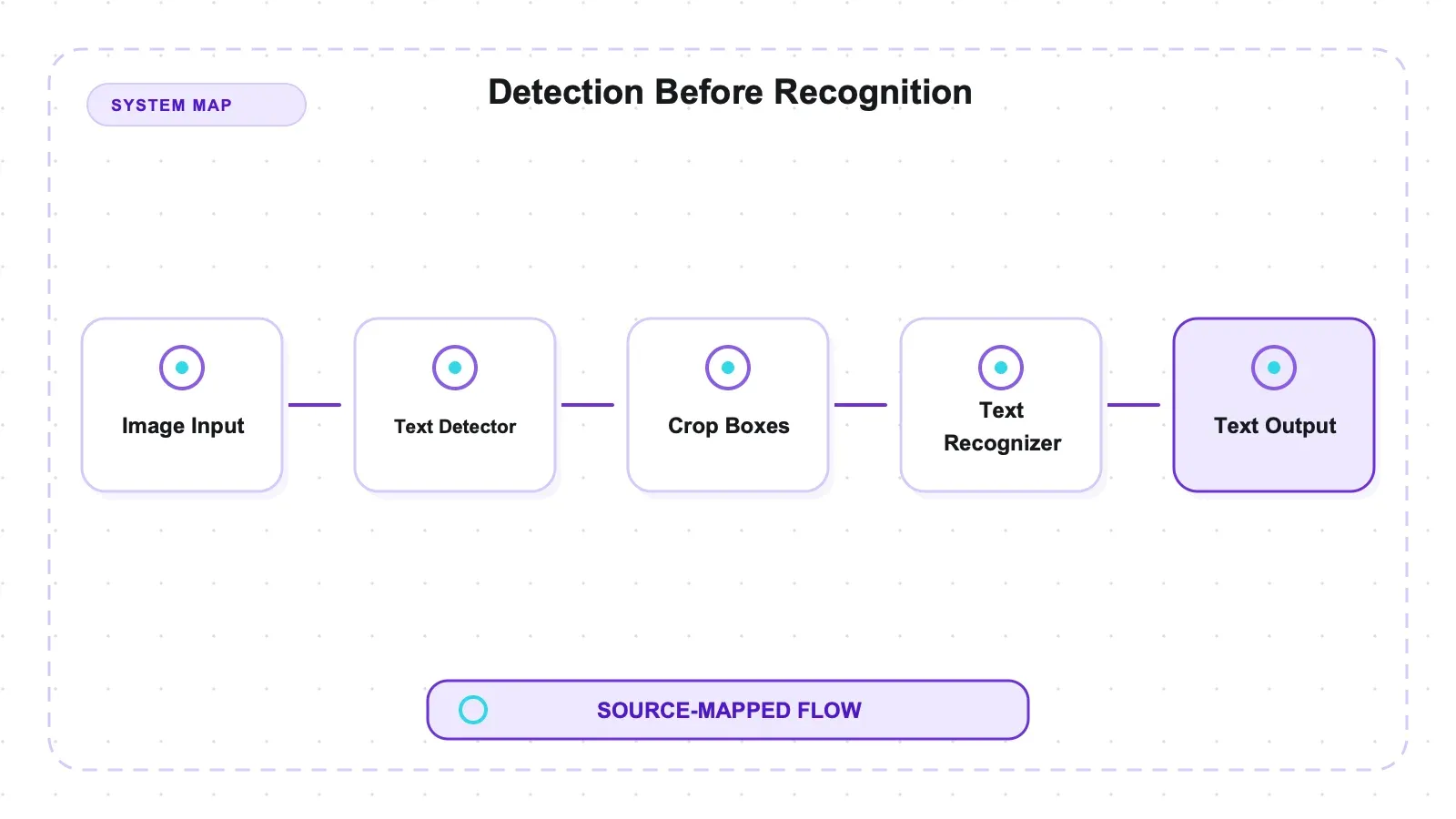
The practical consequence: EasyOCR has two completely different failure modes, and they need different fixes. If the detector never draws a box, no amount of recognizer tuning helps — the characters were never in the pipeline. If the box exists but the string is wrong, that's a recognition problem and preprocessing might save you. Nearly every "EasyOCR missed my text" thread I've read conflates the two.
Current state of the project, checked on July 27, 2026: 29,825 stars, 528 open issues, Apache-2.0, and v1.7.2 from September 2024, with the last push to master in December 2025. Those dates do not prove architectural stability or maintenance health. Before adoption, verify compatibility with your Python/PyTorch stack, recent maintainer response, and issues relevant to your inputs.
OCR gets associated with CAPTCHA solving, and that is not the use case here. Nothing was tested against, and nothing here endorses, defeating bot-detection challenges. The job in scope is reading text out of images and screenshots you're entitled to read.
What I measured, and what these numbers don't cover
The test set is 36 PNGs I rendered myself: 35 single-line images sweeping seven fonts, eight sizes, seven contrast levels, seven skew angles, three orthogonal rotations, and three backgrounds — plus one synthetic dashboard screenshot with 19 individually labeled elements. Every image was generated from a fixed string (Sphinx of black quartz, judge my vow. 1234567890 — 48 characters, mixed case, digits, punctuation) in the same pass that wrote the ground-truth label, so the image and its label physically cannot drift apart.
Accuracy is character error rate (CER): Levenshtein distance in characters divided by ground-truth length. CER 0 means a perfect read. CER 0.10 means roughly one character in ten is wrong. I report case-sensitive CER as the headline and case-insensitive alongside, because case turns out to be where most of the "error" lives.
The boundaries matter more than the numbers:
- English only. The
english_g2recognizer. EasyOCR advertises 80+ languages; I tested one. Nothing here speaks to non-Latin scripts, which is exactly where the published academic OCR comparisons live. - Synthetic only. Rendered text, not photographs. No camera noise, no JPEG artifacts, no lighting, no perspective.
- No handwriting. The project itself lists handwriting as not-yet-supported.
- CPU only. macOS arm64,
gpu=False. MPS was available on the machine but EasyOCR uses CPU on anything that isn't CUDA. GPU performance was never measured, so no GPU number appears anywhere here. - One machine, one version. easyocr 1.7.2, torch 2.13.0, Python 3.12.
So: these are controlled single-variable curves showing exactly where fidelity breaks, on clean rendered Latin text. They're not a real-world corpus score, and they don't replace one.
The evidence is inspectable rather than trapped in a notebook. The fixture generator and exact strings are in tests/build_fixtures.py and tests/fixtures/ground_truth.json; recognition, timing, and resource capture live in tests/run_easyocr.py; and tests/metrics.py computes the reported error rates from the raw output. The resulting recognition records and aggregate metrics are preserved under artifacts/raw/. Re-running that chain is useful for checking this machine and version. It still does not answer how EasyOCR will behave on your phone photos, languages, layouts, or preprocessing pipeline, so production acceptance should add representative inputs rather than treating these fixtures as a certification suite.
One harness trap is worth flagging, because it nearly produced a wrong headline number. My first metrics pass reported CER 0.375 on clean black Arial, which is terrible for the easiest possible input. It wasn't EasyOCR. The detector had split one visual line into a words-box and a digits-box, and my naive sort-by-y-then-x join was putting the digits first. Fixed with line-aware grouping (group boxes by vertical overlap, then read left to right), after which clean fonts landed around 0.04–0.10. If you're building your own OCR evaluation, that trap is waiting for you too.
Setup: the install is small, the dependency is not
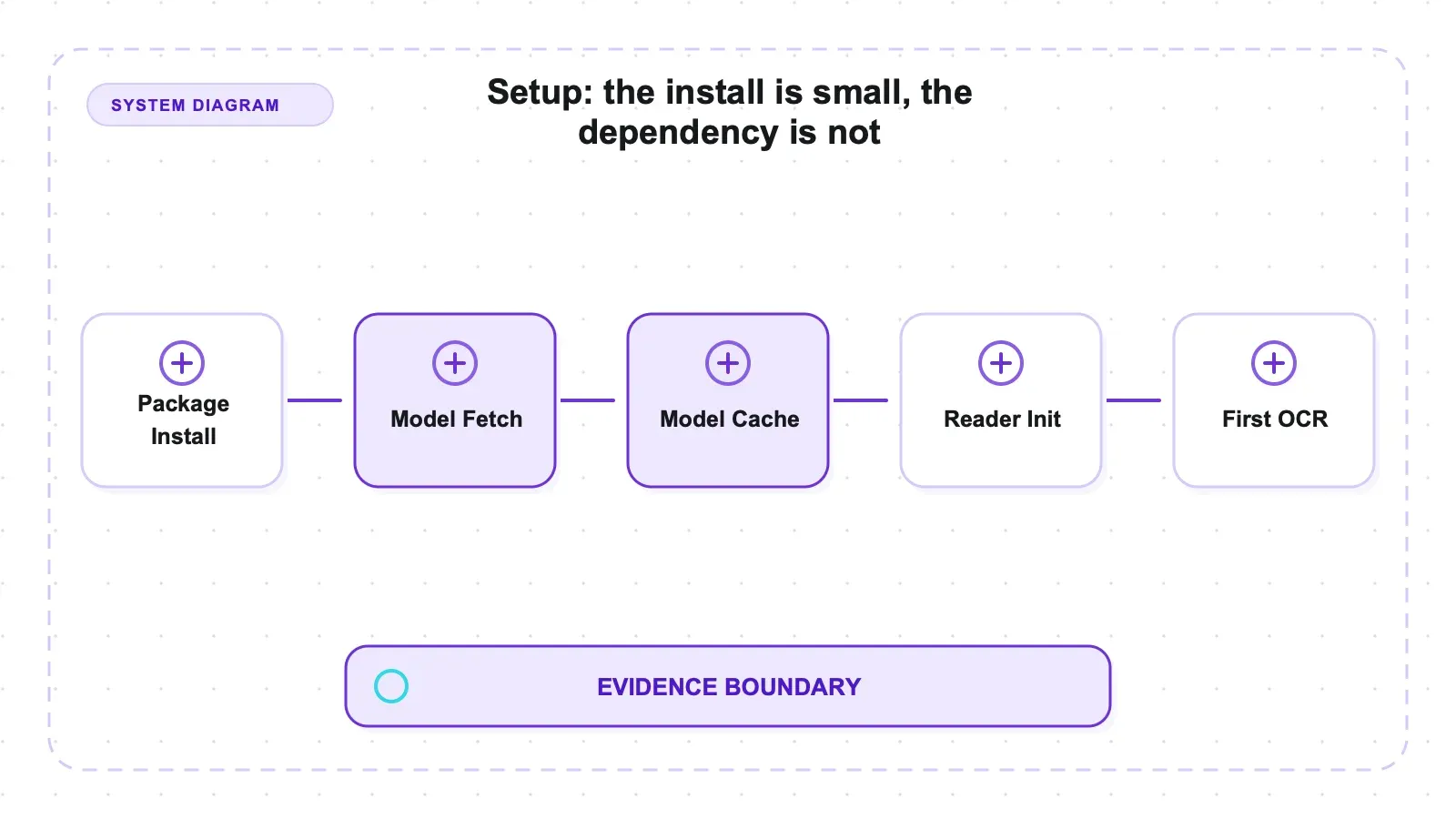
pip install easyocr
That's the whole thing, and it's honest about very little. The package itself is trivial; what it drags in is PyTorch, roughly 2 GB. Then the first time you call readtext(), EasyOCR silently downloads its weights to ~/.EasyOCR/model/ — 93.7 MiB total, split as 79.30 MiB for the CRAFT detector (craft_mlt_25k.pth) and 14.44 MiB for the English recognizer (english_g2.pth).
Nobody flags this in tutorials, so: your first run needs network access and will pause for the download, and every containerized deployment either bakes those weights into the image or eats the download on cold start. Once cached, everything is offline.
Cold Reader() initialization — models off disk into RAM, plus the int8 quantization pass — took 1.3–1.7 seconds across runs. After that:
import easyocr
reader = easyocr.Reader(['en'], gpu=False)
result = reader.readtext('screenshot.png')
And it works. Two lines, nothing to configure, no checkpoint to go shopping for. The "easy" in the name is earned at this stage — the friction is entirely in the dependency weight, not the API.
The clean-text floor: near-perfect characters, imperfect capitalization
Seven system fonts, black on white, 32 px, same string every time:
| Font | CER (case-sensitive) | CER (case-insensitive) |
|---|---|---|
| Georgia | 0.0625 | 0.0000 |
| Times | 0.0417 | 0.0417 |
| Comic Sans | 0.0417 | 0.0208 |
| Arial | 0.0833 | 0.0208 |
| Verdana | 0.0833 | 0.0208 |
| Impact | 0.0833 | 0.0208 |
| Courier | 0.1042 | 0.0417 |
| Mean | 0.0714 | 0.0238 |
Mean CER of 0.071, dropping to 0.024 once case is normalized. That gap is the finding. EasyOCR is not losing characters on clean Latin text — it's getting the shape right and the case wrong.
Specifically, it renders the lowercase word vow as VOW in six of seven fonts (Comic Sans compromises on Vow). Impact throws in of → Of for good measure. The other recurring error is punctuation: the sentence-final period comes back as : or _ in several fonts. Georgia is a perfect read once you stop caring about capitalization.
That's a genuinely useful shape to know. If your downstream step is fuzzy matching, keyword search, or feeding text to a language model, a case-flip costs you almost nothing. If your downstream step is an exact string comparison against a database key, it costs you everything. Normalize case before you compare, and half of EasyOCR's apparent error rate evaporates.
Courier being worst (0.1042) also tracks: monospace fonts space characters unnaturally wide, which is harder for a CTC decoder that learned typical letter spacing.
The size cliff sits exactly where the docs say it does
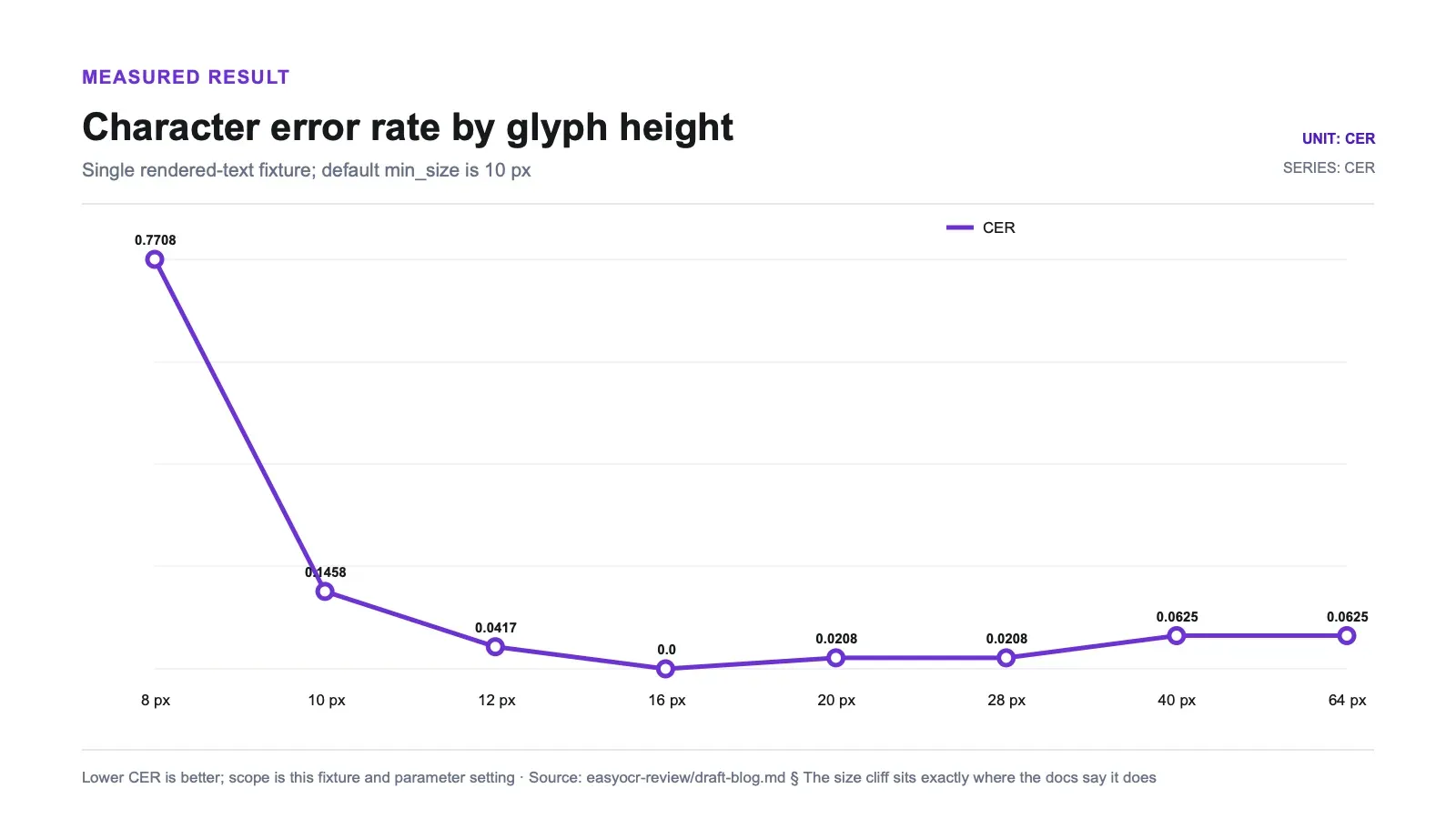
readtext() has a documented parameter, min_size=10, which discards detected boxes shorter than 10 pixels. Most people scroll past it. It is the single most consequential number in the API for anyone doing screenshot or PDF extraction, and here's what it does when you sweep rendered glyph height:
| Rendered px | CER | What happened |
|---|---|---|
| 8 | 0.7708 | Collapsed — boxes fall under the min_size filter and get dropped; only fragments survive |
| 10 | 0.1458 | Degraded — right at the floor, the detector fragments the line into 3 boxes |
| 12 | 0.0417 | Recovered |
| 16 | 0.0000 | Perfect read |
| 20 | 0.0208 | Clean |
| 28 | 0.0208 | Clean |
| 40 | 0.0625 | Clean (the case-flip reappears) |
| 64 | 0.0625 | Clean (case-flip) |
The jump from 0.04 to 0.77 between 12 px and 8 px is not gradual degradation. It's a filter doing exactly what it's documented to do, and the result is that text below roughly 10 px is functionally invisible to default EasyOCR.
The sweet spot is 12–28 px, with a full CER of 0 at 16 px. Above 40 px, CER creeps back up — not because characters get lost, but because the vow → VOW flip returns. Large text isn't harder to read; it's just no longer benefiting from whatever spacing made 16 px land perfectly.
For anyone extracting text from screenshots: check your rendered glyph height before you blame the model. A dashboard captured at 1× on a HiDPI display, or a PDF page rasterized at 72 DPI, routinely puts body text under 10 px. Capture at 2× or upscale before OCR, and you'll skip the entire class of "EasyOCR ignored half my page" bug reports. If neither is possible, lower min_size — but expect noise, since the filter exists to suppress junk detections.
Rotation: 10° of tolerance, and a fix that isn't symmetric
Skew first. Small angles, Arial 32 px, default settings versus rotation_info=[90,180,270]:
| Skew angle | CER (default) | CER (with rotation_info) |
|---|---|---|
| 0° | 0.0833 | 0.0833 |
| 5° | 0.0417 | 0.0417 |
| 10° | 0.0208 | 0.0833 |
| 15° | 0.2917 | 0.3750 |
| 20° | 0.7500 | 0.7708 |
| 30° | 0.8958 | 0.8750 |
| 45° | 0.8958 | 0.8750 |
Default EasyOCR handles skew up to about 10° without breaking a sweat (CER ≤ 0.083), wobbles at 15°, and is gone by 20°. rotation_info does nothing for skew, which makes sense once you know what it does — it only retries at the angles you list, and a 15° skew isn't 90, 180, or 270. At 10° it actually made things slightly worse (0.021 → 0.083), because a wrong-angle retry can win the confidence vote.
The orthogonal rotations are where it gets strange:
| Rotation | CER (default) | CER (with rotation_info) | Recovered? |
|---|---|---|---|
| 90° | 0.8125 | 0.9167 | No — worse |
| 180° | 0.8542 | 0.6667 | Partially |
| 270° | 0.8333 | 0.1042 | Yes |
Same parameter. Same list of angles. Three different outcomes.
At 270°, rotation_info does exactly what the issue thread promises: CER falls from 0.83 to 0.10, a genuinely usable read. At 180°, it half-works — CER improves to 0.67, but the phrase my vow. is dropped entirely. At 90°, it goes backwards, from 0.81 to 0.92, and the raw output explains why: the recognizer returns mirrored strings. VOW comes back as MOA. quartz comes back as zuuenb. Read those in a mirror and they're correct, which is a fun party trick and a useless data pipeline.
I checked this against the raw predictions rather than the aggregated metrics, because "the join order scrambled it" was my first suspicion. It isn't a join artifact — that's what EasyOCR actually returned.
The mechanism is a hypothesis, not a measurement; no rotation-convention experiment was run. Pillow renders positive angles counter-clockwise, so only the 270°-rendered image happens to line up with a retry orientation the recognizer handles well, and the 90° case has its best-scoring retry landing on a flipped orientation. Whatever the mechanism, the operational lesson doesn't depend on it:
This fixture shows that rotation_info cannot be assumed to behave symmetrically across orientations. Validate the rotations expected in your inputs; upstream orientation normalization is a candidate mitigation, not a requirement established by three rendered examples.
The prediction I got wrong
I went in expecting low contrast to be EasyOCR's soft underbelly. Faint gray text on white is the classic OCR failure story, and there's a whole documented rescue path for it: contrast_ths=0.1 with adjust_contrast=0.5, which re-runs low-contrast boxes with a boosted copy and keeps the more confident result.
It never fired, because it never needed to.
| Foreground gray | Weber contrast | CER (default) | CER (adjust_contrast=1.0) |
|---|---|---|---|
| 0 (black) | 1.000 | 0.0833 | 0.0833 |
| 64 | 0.749 | 0.0833 | 0.0833 |
| 110 | 0.569 | 0.0833 | 0.0833 |
| 150 | 0.412 | 0.1042 | 0.1042 |
| 180 | 0.294 | 0.0625 | 0.0625 |
| 200 | 0.216 | 0.0417 | 0.0417 |
| 220 | 0.137 | 0.0417 | 0.0417 |
CER never leaves the clean band, all the way down to Weber 0.14 — gray-220 on white, which is faint enough that I had to squint at the fixture to confirm the text was there. And the contrast-boost column is identical to the default column at every step, because the default already succeeded.
Backgrounds told the same story. Black text throughout:
| Background | CER |
|---|---|
| Solid light-blue panel | 0.083 |
| Vertical gradient | 0.021 |
| Gaussian noise (μ200, σ22) | 0.000 |
A perfect read on the noisiest fixture in the set.
The scope is narrow: this is solid-color, noise-free low contrast, not a photographed receipt with sensor noise and JPEG compression. In this fixture set, geometry and short tokens caused the largest failures; the tested color and synthetic-noise variants did not.
A real scenario: pulling numbers out of a dashboard screenshot
This is the case most Python OCR work actually turns out to be. Someone sends a screenshot of an internal dashboard, or you're running a Python scraping pipeline against a chart-heavy analytics page where the numbers only exist as rendered pixels, and you want the values as data.
I rendered a "Sales Dashboard" window — dark header with a title and a circular avatar badge, three KPI panels, three buttons, a 2×3 table — and labeled all 19 text elements with their exact strings and pixel boxes, then matched EasyOCR's output to them by box overlap.
Detection recall: 16 of 19. The three misses:
- the single-letter badge, "A"
- the table cell "Q1"
- the table cell "Q2"
And "Q3" was detected. Same font, same size, same column—the detector kept one two-character token and dropped two others. Detection was inconsistent across visually similar cells. Because outputs were deterministic in these runs, this is not evidence of random “coin-flip” behavior. A related screenshot-quality issue is tracked in #460.
On the 16 elements it did find, the text was near-perfect: mean CER 0.027, with 13 of 16 exact. Titles, labels, buttons ("Save", "Cancel", "Export CSV"), column headers, and comma-grouped numbers all came back at CER 0. 1,284 was read correctly, comma included.
The three imperfect reads are all the same error. Dollar amounts:
| Ground truth | EasyOCR read |
|---|---|
$57,912 | S57,912 |
$18,330 | S18,330 |
$25,178 | S25,178 |
$12,004 | $12,004 (correct) |
Three of four dollar signs became a capital S. Which, visually, is fair — but it means every currency field in your extraction is one character away from garbage, and a naive float() will throw on all of them.
If your screenshot pipeline contains short labels or currency, validate candidate mitigations such as upscaling, padded crops, constrained field expectations, or symbol-aware post-processing. None was benchmarked here, and a regex that rewrites leading S can corrupt legitimate values. Apply corrections only where the schema and validation rules make them safe.
What it costs to run
Numbers on the same machine (macOS arm64, CPU, one host, measured under possible concurrent load — treat these as shape, not as a universal benchmark):
| Metric | Value |
|---|---|
| Model weights on disk | 93.7 MiB (79.30 detector + 14.44 recognizer) |
| Peak resident memory, fresh CPU process | 984.5 MiB |
Cold Reader() init | 1.3–1.7 s |
| Warm latency, one clean 48-char line (p50) | ~0.062 s (p25–p75: 0.059–0.067 s, n=20) |
detail=0 vs detail=1 | ~equal (0.062 vs 0.063 s median) |
The headline cost isn't the 94 MB of weights — it's roughly a gigabyte of resident memory per worker process, on top of a ~2 GB torch install. That's the number that decides whether this fits in your container, and it's the number nobody quotes.
Speed is fine for the easy case. Sub-0.1 s warm for a clean single line on CPU is perfectly usable. But that is the easy case: one short high-contrast line. The recurring "EasyOCR takes tens of seconds on CPU" complaints are about large multi-region documents at full canvas size, and I did not reproduce those — different workload, and I'm citing it rather than claiming it.
One small myth to kill: detail=0 does not make EasyOCR faster. It strips bounding boxes and confidence scores from the return value. The compute already happened. Medians differ by a millisecond, which is noise.
Pros and cons
Pros
- Character recall on clean rendered Latin text is essentially perfect — mean CER 0.071 case-sensitive, 0.024 case-insensitive, with a full CER of 0 achievable at 16 px.
- Genuinely two-line API.
Reader(['en'])thenreadtext(), no config, no model selection. - Far more contrast-robust than folklore suggests: no collapse down to Weber 0.14 on clean text, and noisy/gradient/colored backgrounds didn't degrade it (the gaussian-noise fixture was a perfect read).
- Near-perfect on screenshot elements it detects: mean CER 0.027, 13 of 16 exact, including comma-grouped numbers.
- Deterministic. Every accuracy number here was byte-identical across two fully independent process runs; only timing moved.
- Apache-2.0 and self-hosted, with no vendor usage fee; compute, memory, storage, and queueing remain operating costs.
Cons
- Hard collapse below the documented
min_size=10floor — CER 0.77 at 8 px. Small UI text is invisible by default. - Skew tolerance stops at ~10° and collapses by 20°.
rotation_infois not a symmetric fix: 270° recovers, 180° partially, 90° gets worse and returns mirror text.- The detector drops isolated short tokens — a single-letter badge and two 2-character cells, while keeping a third identical-format cell.
- Systematic
$→Smisread on currency values (3 of 4). - ~1 GB resident memory per process, plus a ~2 GB torch dependency.
- Latest release is from September 2024; the project is stable rather than actively evolving.
Who should use it, and who should walk away
Evaluate EasyOCR when your inputs are clean, upright, rendered text at a reasonable size—screenshots, UI captures, rasterized PDFs, or generated reports—and you want a self-hosted Python pipeline with no vendor usage fee. The synthetic English CPU results apply to that lane; photographs, handwriting, and other scripts need separate testing.
Walk away if any of these describe your inputs. Photographs — my numbers are synthetic rendered text and say nothing about camera noise, perspective, or lighting. Handwriting — the project itself doesn't claim it. Non-Latin scripts — EasyOCR supports 80+ languages, but I tested one, and the published academic comparisons are the reference there, not a synthetic English sweep. Arbitrarily rotated inputs — unless you're doing your own orientation correction first. Memory-constrained deployments — a gigabyte per worker adds up fast.
Before choosing OCR, inspect the DOM and network responses. If the desired values already exist as structured text, extracting that source avoids OCR's detection and recognition errors. OCR belongs where pixels are the only available representation.
Alternatives, and where our stack fits
EasyOCR is Apache-2.0 and self-hosted, with no vendor usage fee but real compute and operational cost. PaddleOCR, Tesseract, and vision-language models were not run through this bench, so no head-to-head conclusion is made.
The more interesting comparison isn't OCR-versus-OCR. It's whether you should be doing OCR at all.
Most of the screenshot-extraction work I see is a workaround for a web page that was hard to scrape — a JavaScript-rendered table, a dashboard behind a login, a site that fought back. Screenshotting and OCR-ing feels like the path of least resistance, but you're throwing away perfectly good structured text and then paying a dollar-sign tax to get a worse version of it back.
Author note: Thunderbit is our managed option for extracting from web pages. It was not run through these image fixtures. The relevant boundary is source representation: use DOM/network extraction when structured web data exists, and evaluate OCR when pixels are the only source.
Related reading from the same test bench: the full open-source scraper comparison, the Crawl4AI review, and a broader look at AI-driven extraction for pages that resist selectors.
Try Thunderbit for Web Data Extraction
Verdict
Should you use EasyOCR? Yes, if your images are upright, your glyphs are at least 12 pixels tall, and you're reading Latin script. Inside those lines it's very good — mean CER 0.071 on clean text, 0.024 once you normalize case, a perfect read at 16 px, and better contrast robustness than its reputation suggests. The API is genuinely two lines and the output is deterministic, which matters more than people admit when you're debugging a pipeline.
Outside those lines, it fails in specific, learnable ways. Text under 10 px vanishes into the min_size filter. Skew past 20° destroys the read. rotation_info fixes one orthogonal orientation, half-fixes another, and makes the third worse with mirror text. Single letters and two-character tokens fall out of the detector while their neighbors survive. Dollar signs become the letter S.
The fixture failures came from both stages: missed or misoriented boxes on the geometry side, and dollar-sign confusion on the recognition side. Treat upscaling, orientation normalization, padded crops, and schema-aware symbol repair as candidates to validate, not universally safe fixes.
Just don't test it the way I almost did, with a broken evaluation harness and a number you don't understand. Render your own fixtures, know your ground truth exactly, and find your own cliff.
Try Thunderbit for Web Data Extraction Get Started Free
FAQs
Is EasyOCR accurate enough for production screenshot text extraction?
On the synthetic dashboard, matched elements had mean CER 0.027 with 13 of 16 exact. Three of 19 elements were not detected, and three of four dollar signs became S. Whether that is acceptable—and whether upscaling or schema-aware repair helps—must be tested on the target layouts.
What is the minimum font size EasyOCR can read?
Practically, about 12 pixels of rendered glyph height. The readtext() parameter min_size=10 discards detected boxes shorter than 10 px, and the effect is a cliff rather than a slope: CER was 0.77 at 8 px, 0.15 at 10 px, 0.04 at 12 px, and 0 at 16 px. The clean band in my sweep was 12–28 px. If your source is a HiDPI screenshot captured at 1× or a PDF rasterized at 72 DPI, upscale before OCR rather than lowering min_size, since that filter exists to suppress junk detections.
Does rotation_info fix rotated images in EasyOCR?
Not reliably, and not symmetrically. With rotation_info=[90,180,270] on three orthogonally rotated copies of the same sentence, the 270° image recovered cleanly (CER 0.83 → 0.10), the 180° image only partially (0.85 → 0.67, with a phrase dropped), and the 90° image got worse (0.81 → 0.92) while returning mirrored text like VOW → MOA. It also does nothing for small skew angles, since it only retries at the angles you list. Correct orientation before you call EasyOCR rather than relying on this parameter.
How much memory and disk does EasyOCR need?
The weights are 93.7 MiB, downloaded to ~/.EasyOCR/model/ on first use—79.30 MiB for the detector plus 14.44 MiB for the English recognizer. Peak resident memory in the measured fresh CPU process was 984.5 MiB, on top of a roughly 2 GB torch install. Cold reader initialization took 1.3–1.7 seconds; a clean single line then ran at a p50 near 0.062 seconds on this machine. detail=0 changed the return shape, not the measured runtime.
Is EasyOCR free for commercial use, and is it still maintained? It's Apache-2.0 licensed, which is permissive and commercially friendly. As of July 27, 2026 the repository sits at 29,825 stars with 528 open issues, the latest release is v1.7.2 from September 2024, and the last push to master was December 2025. Read that as stable rather than abandoned — the architecture hasn't changed in a while and the activity has moved to the issue tracker. Confirm the current license and release state yourself before you build on it.




