
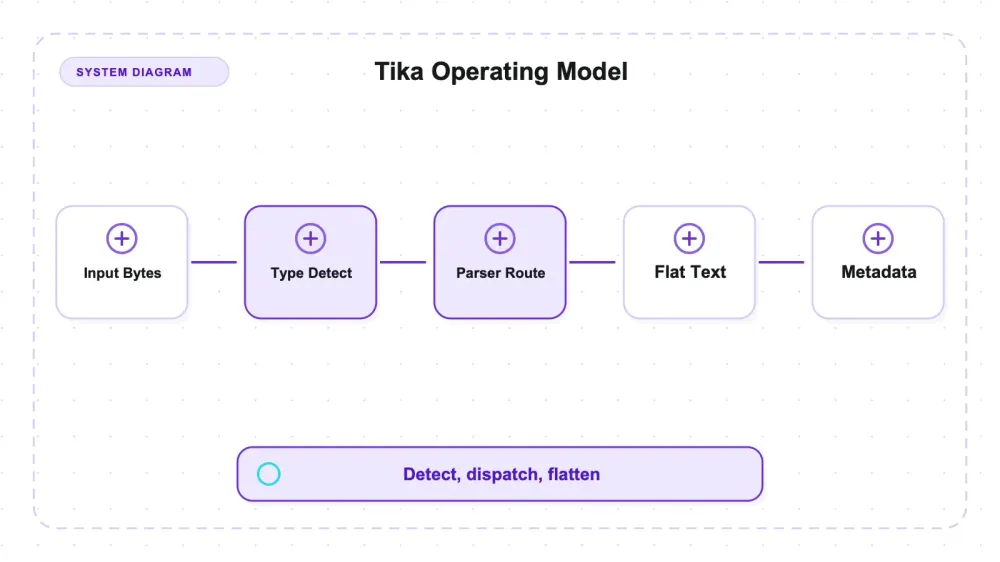
Apache Tika is the Apache Software Foundation's document-parsing toolkit: hand it a file of almost any type and it hands back plain text plus a normalized metadata dictionary. The project README advertises over a thousand supported file types, and Tika gets there by bundling the specialist libraries itself — PDFBox for PDFs, Apache POI for Office documents, jsoup for HTML, an ODF reader for ODT — so the whole thing ships as a single fat jar with nothing to fetch at parse time. In a data pipeline it's the unglamorous first stage: the component in front of a search index, an e-discovery review set, or an LLM corpus that turns a heterogeneous pile of files into something uniform. Two jobs, really — work out what a byte stream is, then get the text and metadata out of it.
It is the least demanding tool I have set up in a long while. One jar, java -jar tika-app-3.3.2.jar --text file.pdf, no config file, no model weights, no post-install step, and it ran clean on a bleeding-edge JDK that stopped other Java tooling dead on the same host the same afternoon. The catalog claim is not what I wanted to test, though; the testable question is narrower. When the input lies to you, what does Tika actually do? So I built a controlled fixture set where every block of content carries a unique marker token, rendered the same logical document into nine carrier formats, then attacked the whole thing with wrong extensions, missing extensions, no filenames at all, zero-byte files, and half-written binaries.
Detection is where the interesting behavior lives. I renamed a PDF to .txt and asked Tika what it was; it said application/pdf. Then I deleted the filename entirely, piped the raw bytes in on stdin, and got the same answer. Across the five content-detectable formats in my set, that held in all 20 unique logical conditions: three filename conditions plus one filename-less stream condition per format. The harness executed the stream case three times under different labels, producing 30 successful raw runs, but those repeats are not independent evidence. PDF and RTF expose recognizable bytes; DOCX exposes its container; HTML and XML can be identified from markup or root content. Different mechanisms, same useful result in this fixture set: the extension did not override the content. Then there's the text-family regime, where Markdown collapses to text/plain the moment the filename is wrong or gone. Its identity, here, rode entirely on .md.
Two bounds on every number that follows. I tested Apache Tika 3.3.2 — checked on July 27, 2026, that was still the newest stable release; the 4.0.0 line exists only as alpha and beta builds on Maven Central. The project sat at roughly 3.9k GitHub stars when I checked on July 27, 2026, and is Apache-2.0 licensed, which is about as commercially unbothered as licensing gets. And I did not test OCR at all. Not one scanned page, not one image-only PDF. Tesseract and poppler aren't installed on the machine I ran this on, so every OCR path was blocked before it started. There are no OCR numbers here because there are no OCR numbers, full stop.
What Tika is, once you stop reading the marketing on the box
The common assumption is that Apache Tika is a document converter — feed it a DOCX, get back clean Markdown with headings and tables intact. It isn't that, and the sooner that's clear the better the tool looks.
The path tested here has three relevant stages: a content-type detector, a dispatcher that hands the bytes to the right parser, and the CLI's --text output handler, which emits flat text alongside separately available metadata. In that output contract there are no Title objects, no ListItem, and no reconstructed table grid. Tika also exposes other handlers and APIs, including XHTML/SAX-oriented output; I did not test those. Every structure conclusion below is therefore about tika-app --text, not a claim that the toolkit has no structured event stream anywhere.
That sounds like a limitation, and in one dimension it is. But it also means Tika has nothing to misclassify, which is exactly the trade its noisier cousins make in the other direction.
Detection itself runs in a documented order: signature bytes first, then XML root inspection, then the filename glob, then any type you supplied yourself (Tika's own detection docs lay this out). Only once the type is resolved does the dispatcher hand the bytes to the matching bundled parser — PDFBox, POI, jsoup, TextAndCSVParser for the text family.
That detection-then-parse split is not internal trivia. It's why a file too broken to parse can still be typed correctly, which turns into the most practical trick Tika offers once things start breaking.
Setup: one jar, one command, and a JVM that isn't picky
Install is a download. tika-app-3.3.2.jar from Maven Central is about 67 MB — a fat jar bundling every parser — and after that it's java -jar tika-app-3.3.2.jar --text file.pdf. No config file, no model weights, no post-install step, no brew install chain to walk.
The JDK story surprised me. I ran the whole thing on OpenJDK 26.0.1, a bleeding-edge non-LTS build, and --version, --text, --metadata, and --detect all returned exit 0 with no compatibility complaints. That's worth naming, because I put Apache Nutch through its paces on the same host in the same sitting and its crawl cycle would not run on JDK 26 at all — it needs an LTS at 21 or below, thanks to the SecurityManager removal in newer JDKs. Tika didn't care. If you've been avoiding JVM tooling because of that specific class of pain, Tika isn't where it bites you.
Two honest deductions on the setup side. The CLI spins a fresh JVM per invocation, so cold start is real — running 131 invocations for my harness took about a minute of mostly JVM warmup. If you're processing files at volume, you want the library or the server mode, not a shell loop over the jar. And the dependency-free story has a hard edge: PDF text-layer extraction needs nothing external, but OCR needs tesseract and poppler. Text-layer PDFs, DOCX, ODT, RTF, HTML, XML, TXT, Markdown, CSV all parsed on a host with neither installed. Scanned documents would not have, and I didn't try to pretend otherwise.
That contrast is sharper against the sibling library I tested the same day, unstructured, whose electronic-PDF path was blocked entirely because importing its PDF module pulls the inference stack (torch and friends) at load time — before strategy dispatch, so even the "fast" strategy won't import without it. Tika parsed the same PDF's text layer with a plain java -jar.
The lying-extension test: mime type detection that ignores what you named the file
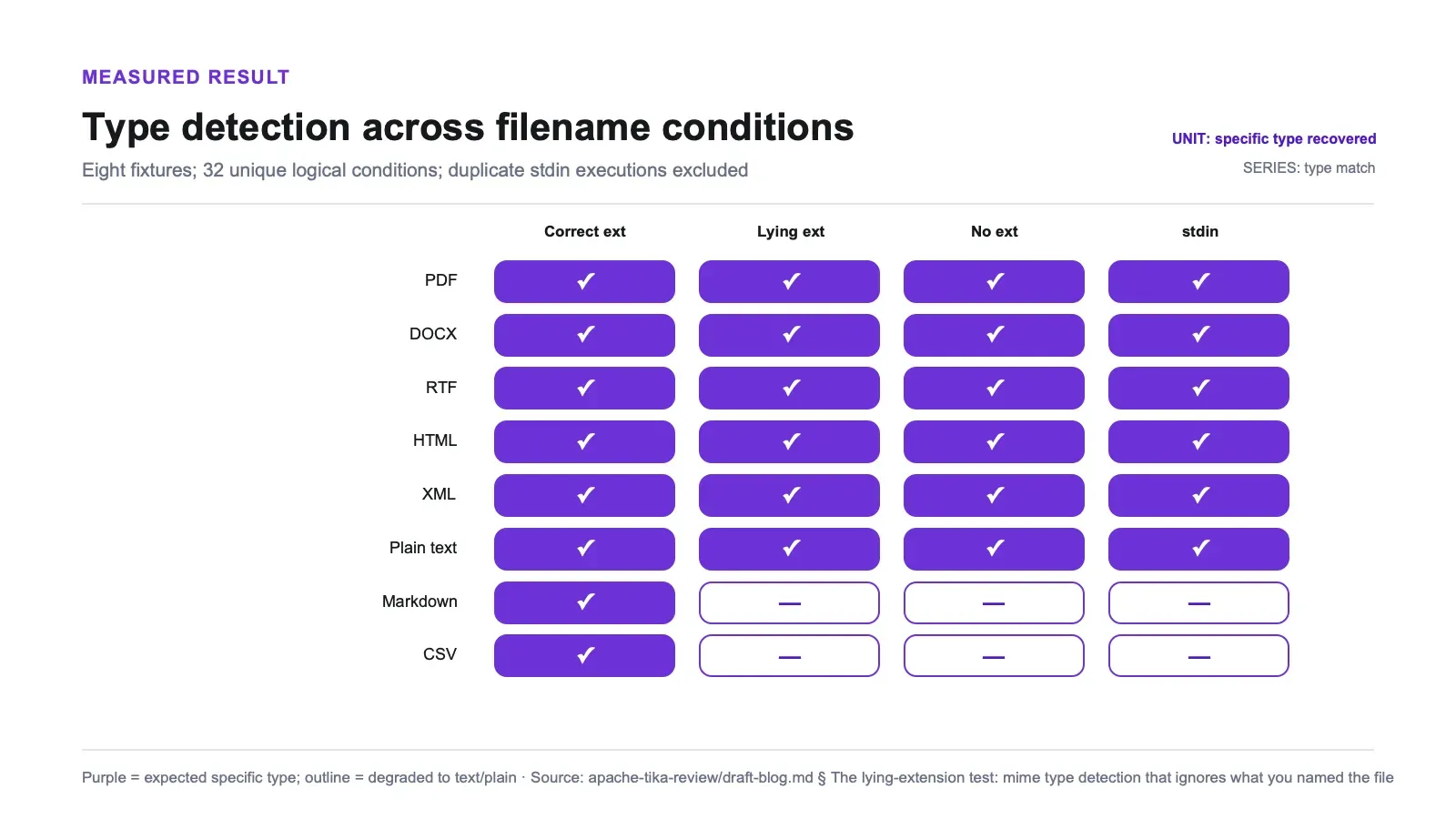
Eight formats, each presented with a correct extension, a deliberately wrong extension, or no extension, plus a filename-less byte stream on stdin. That is 32 unique logical conditions. The original harness also ran the identical stream bytes once under each filename label, yielding 48 raw executions; those three stream rows collapse to one condition because stdin carries no filename.
| Fixture | True type | Renamed to | Correct ext | Lying ext | No ext | Raw stream, no filename |
|---|---|---|---|---|---|---|
application/pdf | .txt | ✅ | ✅ | ✅ | ✅ | |
| DOCX | OOXML wordprocessingml | .jpg | ✅ | ✅ | ✅ | ✅ |
| RTF | application/rtf | .html | ✅ | ✅ | ✅ | ✅ |
| HTML | text/html | .csv | ✅ | ✅ | ✅ | ✅ |
| XML | application/xml | .txt | ✅ | ✅ | ✅ | ✅ |
| Plain text | text/plain | .pdf | ✅ | ✅ | ✅ | ✅ |
| Markdown | text/markdown | .pdf | ✅ | ❌ text/plain | ❌ text/plain | ❌ text/plain |
| CSV | text/csv | .txt | ✅ | ❌ text/plain | ❌ text/plain | ❌ text/plain |
(The stream column collapses all three extension conditions, because with no filename there's nothing for the glob to read.)
The five content-detectable formats — PDF, DOCX, RTF, HTML, and XML — hit the true type in 20 of 20 unique conditions (and 30 of 30 raw harness executions, including duplicated stream runs). A PDF called report.txt remained a PDF. A DOCX called photo.jpg remained a DOCX. Neither needed a filename. This does not mean all five use fixed byte signatures: PDF and RTF have recognizable headers, DOCX is a ZIP-based container, and HTML/XML are detected from markup or root content. In these fixtures, the lying extension did not win.
Then the text-family regime. Markdown resolved to text/markdown only when the .md extension was present and readable. Rename it, drop the extension, or send it as a stream, and it degraded to text/plain in this test. CSV behaved the same way on this deliberately small grid: text/csv came only from the .csv glob. Counting unique conditions, Markdown and CSV each resolved as their specific type in one of four conditions; plain text was already text/plain, so there was nothing for it to “collapse” from. The raw 48-run harness remains useful as a repeatability record, but not as a larger denominator.
One detail cuts in Tika's favor here: the lying extension doesn't win either. My Markdown fixture renamed to .pdf came back text/plain, not application/pdf. Tika didn't believe the lie; it just couldn't confirm the truth. Degrading to the parent type is a much better failure than confidently asserting a wrong one, and text/markdown being a documented subtype of text/plain makes that fallback principled rather than arbitrary.
There's a caveat on CSV specifically. Tika has a statistical CSV detector, and at parse time — confirmed by TextAndCSVParser showing up in the X-TIKA:Parsed-By chain — my small 2-column by 3-row grid resolved to text/plain rather than text/csv. That's a single observation on a deliberately minimal fixture. A larger or quoted CSV may well trip the detector. I'm not claiming CSV content-detection is broken; I'm claiming that on this grid, the extension is what produced text/csv.
Why this matters in a real upload pipeline
The concrete scenario is an upload router. Say you accept user uploads and route them by type: PDFs to the invoice parser, spreadsheets to the ledger importer, everything else to a text index. If you trust the extension, someone uploading a PDF named notes.txt lands in the wrong branch — and that's the benign case; the hostile version is a polyglot file with a friendly extension.
For the binary and markup fixtures tested here, Tika routed by content even after the filename disappeared, which is useful when a blob store or HTTP body handler has discarded it. That result does not cover Tika's long tail, ambiguous files, or polyglots. The tested text-family fixtures behaved differently: when the pipeline stripped filenames, Markdown and CSV arrived as text/plain, so rules keyed on their specific media types stopped firing. Preserve the original filename as sidecar metadata rather than expecting content detection to reconstruct it.
The planted content survived. --text flattened the structure.
Fidelity is the second axis, and it splits cleanly in two. I rendered one canonical document (headings, two body paragraphs, a bulleted list, a numbered list, a closing paragraph) into HTML, Markdown, plain text, DOCX, PDF, RTF, ODT, and XML, plus a table document into HTML, Markdown, text, DOCX, CSV, and XML. Fourteen carrier renderings. Every block carries a unique token — zztitle1, zzitem3, zztblcell_beta and so on — so "survived" versus "dropped" is an exact substring check, not a judgment call.
Marker-token recall came back 1.000 on all fourteen renderings. Not one planted token went missing: every tagged table cell, list item, and heading was present. Three local repetitions per carrier after warmup returned byte-identical --text output. This oracle says nothing about untagged characters, ordering, whitespace, Unicode normalization, repeated content, links, headers, footnotes, or embedded objects. It is a block-presence check, not a proof of complete document fidelity.
The flat-text output gives up most of the source structure.
This is the HTML table document coming out of --text:
	Tool	Throughput

	zztblcell_alpha	120

	zztblcell_beta	95
Tab-joined lines. The header row is not marked as a header. There is no grid, no cell boundaries beyond a tab, no way to know it was ever a <table>. The DOCX table flattens the same way.
Lists are subtler, and they split by what the source actually contained:
| What the bullet was in the source | Carriers | What --text returns |
|---|---|---|
A literal character — these renderings all wrote - as actual text | plain text, Markdown, RTF, ODT, PDF | the - survives, because Tika is passing characters through |
Real structure — an HTML <li>, a DOCX List Bullet style | HTML, DOCX | the marker vanishes entirely and you get the item text alone: tab-indented in HTML, a plain unadorned line in DOCX |
Tika never re-renders a marker it didn't receive as text. Same content either way; different-looking output.
The Markdown case makes the point cleanly. Feed Tika a .md file with a pipe table and the pipes come back verbatim, which looks like structure preservation. It isn't. Tika parsed it as text and handed the bytes back. Nothing understood that table.
So the measured contract is narrower: all planted markers survived, while --text did not preserve typed elements or a reconstructable table grid. Calling that a parser defect would miss the point. Flat extraction deliberately avoids the element-classification problem; it also cannot satisfy a downstream consumer that needs those element types. If you need typed blocks or reconstructed tables, --text is one component of the stack, not the stack. Other Tika handlers may expose more structure, but they were outside this run.
Standard caveat on every fidelity number here: they come from controlled synthetic fixtures on one machine, one version, one JDK. They show that the tagged blocks were present in the output. They do not establish character-for-character preservation or accuracy on a messy real-world corpus.
Metadata: normalized, and refreshingly unwilling to invent
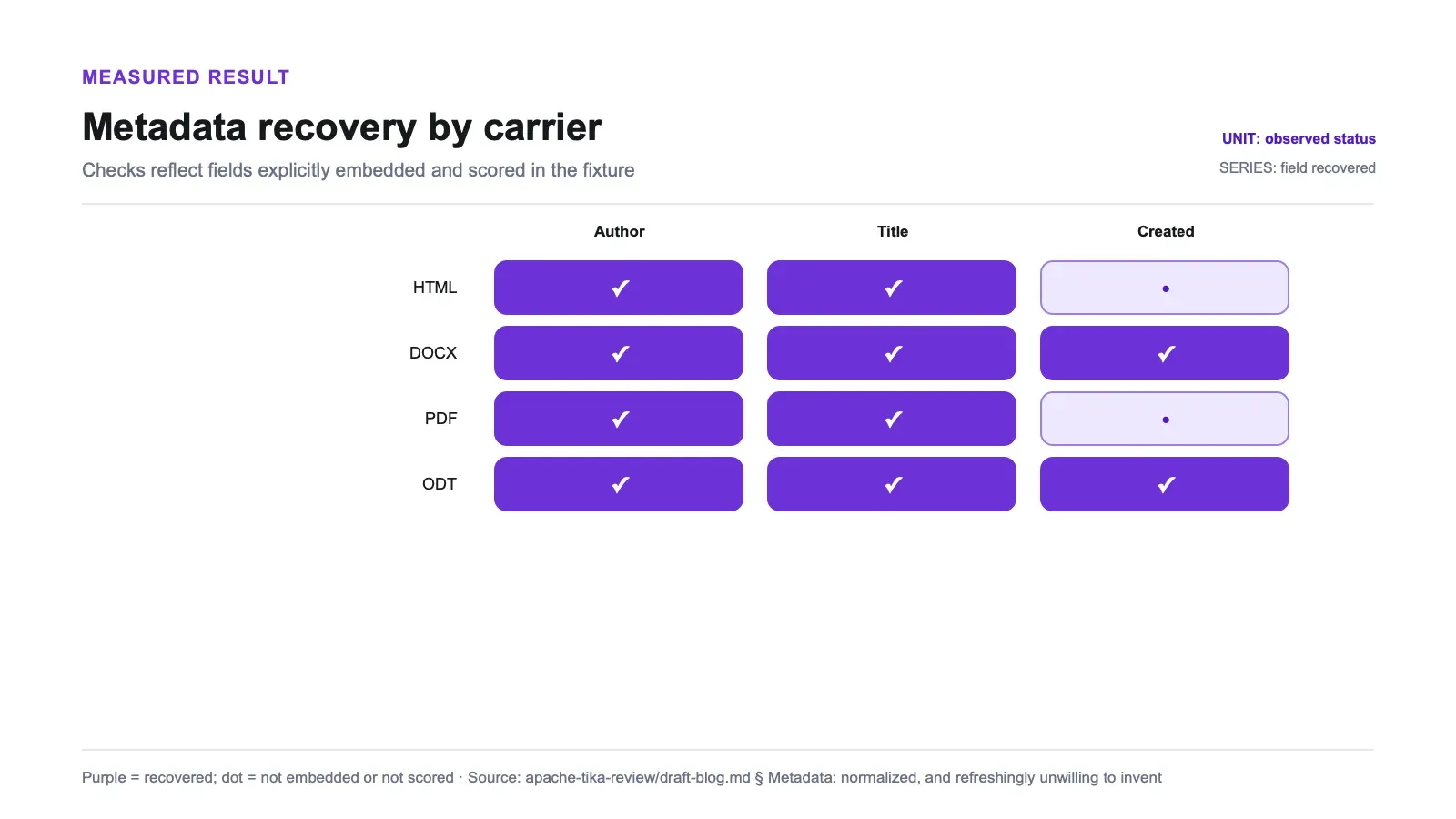
I embedded known author, title, and creation-date values into every carrier that has a metadata layer, then checked what came back.
| Carrier | author → dc:creator | title → dc:title | created → dcterms:created |
|---|---|---|---|
HTML (<meta name=author>, <title>) | ✅ | ✅ | not embedded |
| DOCX (core properties) | ✅ | ✅ | ✅ exact 2021-03-15T09:30:00Z |
| PDF (info dict) | ✅ | ✅ | present, but it was the generator's own timestamp — not scored |
ODT (meta.xml) | ✅ | ✅ | ✅ exact 2021-03-15T09:30:00Z |
| TXT / MD / CSV / RTF / XML | no metadata layer | — | — |
Author and title were recovered on 4 of 4 metadata-bearing carriers, and — this is the part worth having — they're normalized. An HTML <meta name="author">, a DOCX core property, a PDF /Author entry, and an ODT dc:creator element all arrive under the same dc:creator key. You write one consumer, not four.
created is the honest wobble. DOCX and ODT returned my exact embedded 2021 timestamp. The PDF returned a creation date, but it was the date my generator library stamped at build time, not the value I meant to embed — so I score it as present, not recovered. And the formats with no metadata layer surfaced nothing at all, which is the correct answer. Tika does not guess an author out of the text body.
Breaking it on purpose, and the triage trick that falls out
Four hostile inputs. A zero-byte file. A valid PDF header with the body cut off. A truncated DOCX ZIP. And a UTF-8 file carrying multibyte characters with no BOM and no encoding declaration. These are local fixture shapes, not Tika thresholds.
The underlying harness, generated fixtures, raw JSON, jar checksum, and environment manifest are not publicly linked here, so an outside reader cannot independently reproduce the exact denominators. Treat the tables as reported observations rather than third-party-verifiable evidence.
| Input | --text / --json | What it threw | --detect |
|---|---|---|---|
| 0-byte file | exit 1, empty stdout | ZeroByteFileException: InputStream must have > 0 bytes | exit 0 → text/plain with filename, application/octet-stream from stream |
| Truncated PDF | exit 1, empty stdout | TikaException: TIKA-198: Illegal IOException from PDFParser | exit 0 → application/pdf |
| Truncated DOCX | exit 1, empty stdout | POI FATAL: "XML document structures must start and end within the same entity" | exit 0 → OOXML type |
| UTF-8, no BOM, undeclared | exit 0 | nothing | exit 0 → text/plain, charset UTF-8 |
Extraction fails loudly, and these failures share the same outer shape. The zero-byte file, truncated PDF, and truncated DOCX each produced an exception, exit 1, and empty stdout. The CLI does not swallow the failure into a tidy empty result. Process-safe in these cases — no hang, no segfault — but the caller must check exit status and stderr rather than only looking for an empty string.
Detection is decoupled from parsing. On both truncated binaries, --detect returned exit 0 with the expected type from the intact leading content; the parser then failed on the broken body. A pipeline can therefore use detection as a separate triage signal before or after a failed parse. Whether detect-first is a good default depends on deployment mode: this test did not benchmark detect-first against parse-only, and two fresh CLI JVMs may be the wrong trade at volume.
Charset detection works. The no-BOM, undeclared UTF-8 file was decoded as UTF-8 and 日本語テスト came through intact. Small caveat for anyone reading the metadata dicts: my pure-ASCII fixtures report charset=ISO-8859-1, which is indistinguishable from UTF-8 on ASCII bytes. That's not a miss, it's a tie.
Tika next to unstructured: same file types, different jobs
Both were exercised in the same research session, but this is a taxonomy of output contracts, not a symmetric benchmark. The tools were scored on different outcomes.
Related review: Unstructured review.
| Apache Tika | unstructured | |
|---|---|---|
| What I measured it on | content fidelity: did anything get dropped? | element-classification fidelity: did each block get the right type? |
| Result | all planted markers present across fourteen renderings | in the separate classification test, a plain-text table produced Table recall of 0.000, and one heading containing a verb was classified as narrative text |
| Typed elements returned | none — no structure came back either | Title, NarrativeText, ListItem, Table — exactly what Tika refuses to do |
| OCR | blocked on my host, missing tesseract | blocked on my host, missing tesseract |
Flat marker-preserving output versus typed elements with observed classification errors. Pick according to what the downstream consumer needs. If it is a search index or an LLM context window, flat text may be enough. If it keys on element type, Tika's --text path cannot supply that contract.
Neither of us has scanned-document numbers.
Pros and cons
Pros
- Content-type detection ignored lying filenames in 20/20 unique conditions across the five content-detectable fixtures; duplicated stream executions also agreed.
- Every planted marker survived in all 14 carrier renderings, including the tagged table cells and list items.
- Repeatable in three local reruns: each carrier returned byte-identical text within this environment.
- Metadata normalized across formats —
dc:creator/dc:title/dcterms:createdregardless of source format, recovered on 4/4 metadata-bearing carriers. - Genuinely dependency-free for the formats I tested: PDF text layer, DOCX, ODT, RTF, HTML all parse from one jar with no external binaries.
- Runs clean on OpenJDK 26 — no LTS-only constraint.
- Detection stays correct (exit 0) on truncated binaries, giving you a reliable triage signal when parsing fails.
- Apache-2.0, mature, actively maintained.
Cons
- Markdown and CSV identity depends entirely on the file extension; 10 of 18 signature-less cells collapsed to
text/plainonce the filename was gone or wrong. --textdoes not return element types; table grids flattened to tab-joined lines and structural list markers dropped.- Extraction throws uncaught on empty and corrupt inputs; the two cases look identical from the extraction call alone.
- 67 MB jar plus a per-invocation JVM cold start in CLI mode.
- OCR and scanned-image PDFs are entirely untested here — tesseract and poppler were absent, so no claim of any kind is made about that path.
- Every number here is synthetic ground truth on one machine, one version. Real-corpus accuracy, encrypted files, embedded/recursive documents, and throughput at scale were not measured.
Who should run it, and who shouldn't
Tika fits when your input is files you already have and your output needs to be text plus metadata that a machine can index. Search indexing, e-discovery, archive processing, feeding a corpus to an LLM, building the content-type validation layer of an upload pipeline. It is useful as a first-stage triage and normalization step in front of something smarter: detect the tested types, extract flat text, and hand it on with explicit checks for the content your pipeline cannot afford to lose.
Skip it — or rather, don't stop at --text — if you need typed elements, reconstructed tables, or document layout. Skip it if your documents are scans, at least until you've installed tesseract and run your own numbers, because I have none. For volume work, benchmark the library or server mode against the CLI on representative documents. Process startup was visible in this small-file harness, but throughput and resource cost were not measured.
The one that catches people: if your storage layer strips filenames and you handle Markdown or CSV, don't rely on Tika to tell those apart from plain text. Keep the original name.
Alternatives, and where Thunderbit sits
Fair framing first, because the honest comparison here is about inputs, not quality. Tika is a free, Apache-2.0, self-hosted toolkit for parsing files. Files you have on disk or in a bucket. It doesn't fetch pages, doesn't run JavaScript, doesn't deal with anti-bot, and doesn't pretend to.
That is the boundary where a managed web extraction service, including our own Thunderbit, may enter the architecture: it fetches live pages, while Tika parses files already in your possession. This article did not benchmark those services against Tika, and they are not substitutes for the same input.
The clean split: Tika for documents already in your possession, a managed extraction API for web pages you need to go get. Plenty of pipelines run both — crawl and extract on the web side, Tika on the PDF and DOCX attachments that come back.
If you're comparing across the wider open-source field, I've written up the full open-source scraper comparison, a survey of the most useful scraping projects on GitHub, a hands-on Crawl4AI review covering the browser-backed Markdown approach, and a broader roundup of scraping tools. For the no-code path, there's also a walkthrough of how to scrape a site using AI.
Try Thunderbit for Web Data Extraction
Verdict
Should you use Apache Tika? Yes, if your job is turning heterogeneous files into flat text and normalized metadata, and you validate the fields or markers your own pipeline cannot afford to lose.
The detector was the strongest part of this run. It returned the expected type in 20 of 20 unique conditions for the five content-detectable fixtures, including filename-less streams. Every planted marker survived across fourteen renderings, and the output repeated byte-for-byte in three local reruns. Useful evidence. Still synthetic evidence. Doing it from one jar on this JDK, with no external binaries for the non-OCR paths tested, kept deployment pleasantly dull.
Size it correctly, though. Every table you feed it comes back as tab-joined lines. Every structural list marker disappears. Markdown and CSV lose their identity the moment the filename does. Empty files and corrupt files throw the same shape of failure, and you'll need the separate detect call to tell them apart. And on OCR, the question a lot of Tika users care about most, I have nothing to offer: I couldn't run it, and I'm not going to estimate.
Inside those lines, Tika does an unglamorous job with unusual reliability. It reads the bytes, not the label on the box. Just don't ask it what shape the bytes were in.
Try Thunderbit for Web Data Extraction Get Started Free
FAQs
Does Apache Tika detect file types correctly if the extension is wrong?
For the five content-detectable fixtures tested here, yes. PDF, DOCX, RTF, HTML, and XML resolved to their expected media type in all 20 unique logical conditions (30 raw runs with duplicated stream executions), including misleading extensions, no extension, and filename-less streams. A PDF named .txt still detected as application/pdf. Markdown and the small CSV fixture depended on filename information and degraded to text/plain when it was missing or wrong.
Does Tika preserve tables and document structure?
Not in the --text mode tested here. Table grids came back as tab-joined lines with no cell or header semantics, and structural list markers (an HTML <li>, a DOCX List Bullet style) disappeared. Every planted marker survived across all 14 carrier renderings, but that does not prove complete content fidelity, and --text provides no element typing. For typed elements or reconstructed tables, test another Tika output handler or use another tool alongside it.
Can Apache Tika do OCR on scanned PDFs? Tika supports OCR through Tesseract, but I did not test it, and none of these results are a claim about it. Tesseract and poppler were absent on my test host, so every OCR and scanned-image path was blocked before it ran. There are no OCR numbers anywhere in this testing. If OCR is your use case, install tesseract and benchmark it yourself — treat that part of Tika as unverified here.
What does Tika do with empty or corrupted files?
It fails loudly rather than silently. A 0-byte file throws ZeroByteFileException; a truncated PDF throws a TikaException from PDFParser; a truncated DOCX throws a POI XML error. All three exit 1 with empty stdout, so empty and corrupt are indistinguishable from the extraction call alone. Detection, however, stays robust — --detect returned exit 0 with the correct type on both truncated binaries, which makes it a reliable triage step before you spend a parse.
What did the Tika testing not cover? Four things, explicitly. OCR and scanned images (blocked, untested). Real-corpus accuracy — all results are controlled synthetic fixtures with planted marker tokens, which measures fidelity against known labels rather than accuracy on messy real documents. Resource cost, throughput, and peak memory, which I didn't measure. And the long tail of the "thousand file types" claim: I tested nine representative, dependency-free formats, not the full catalog. Everything here is Tika 3.3.2 on OpenJDK 26.0.1, macOS arm64, single machine.




