निच फाइंडर

द्वारा
किसी भी keyword से trending और profitable niches खोजें। Demand signals, competition, और जुड़े हुए sub-niches देखकर opportunities जल्दी पहचानें।

Scrape hundreds of webpages in one click with the Thunderbit Chrome Extension. Prefer to hand this job to AI? Use the Thunderbit API or Thunderbit MCP. Want us to run it for you? Use our Web Scraping Service.

Thunderbit के साथ लीड्स तेज़ी से खोजेंThunderbit की मदद से कुछ ही क्लिक में वेबसाइटों, सबपेज, PDFs, docs, और images से structured data scrape और extract करें। डेटा collection को automate करें और results को Sheets, Airtable, या Notion में export करें।

Thunderbit के साथ लीड्स तेज़ी से खोजें

Thunderbit के AI Web Scraper Chrome extension से niche research sources, directories, और competitor sites scrape करें। AI Suggest Fields की मदद से सही columns चुनें, फिर subpages, PDFs, docs, और images से structured data निकालकर तेज़ी से analysis करें। Collected data को summarize, categorize, और format करके clean tables बनाएं, फिर उसे Google Sheets, Airtable, या Notion में export करें। Scheduled scraping सेट करें ताकि trends और changes पर बिना manual checking के नज़र रखी जा सके।

Thunderbit का इस्तेमाल करके niches कैसे खोजें

step_01.png
STEP 1Download और Install करेंThunderbit Chrome Extension को Thunderbit Chrome Extension Download Page से डाउनलोड और install करें। Install होने के बाद, शुरू करने के लिए log in करें या free account बनाएं।
step_02.png
STEP 2Extension खोलेंChrome खोलें और Thunderbit extension icon पर क्लिक करके Thunderbit लॉन्च करें। Tool list में "Niche Finder" चुनें और "Find Niches by Keyword/Topic" tab खोलें। अपना keyword या topic "keyword_or_topic" में डालें (उदाहरण: "organic skincare"), फिर चाहें तो जिस market पर research करनी है उसके अनुसार "region," "language," "industry," "time_horizon," और "result_count" सेट करें।
step03.png
STEP 3Find niches बटन पर क्लिक करें"Find niches" बटन पर क्लिक करके trend direction, competition level, estimated demand, growth potential, और related sub-niches वाली ranked table बनाएं। Results review करें और दिए गए first steps तथा monetization paths की मदद से तय करें कि किन niches को अगला validate करना है। Table को Excel, Google Sheets, Airtable, या Notion में export करें, या फिर sharing और आगे के analysis के लिए CSV या JSON के रूप में download करें।

सीखें कि keyword या topic से profitable, trending niches कैसे खोजें

Keyword या topic से niche ideas बनाएं
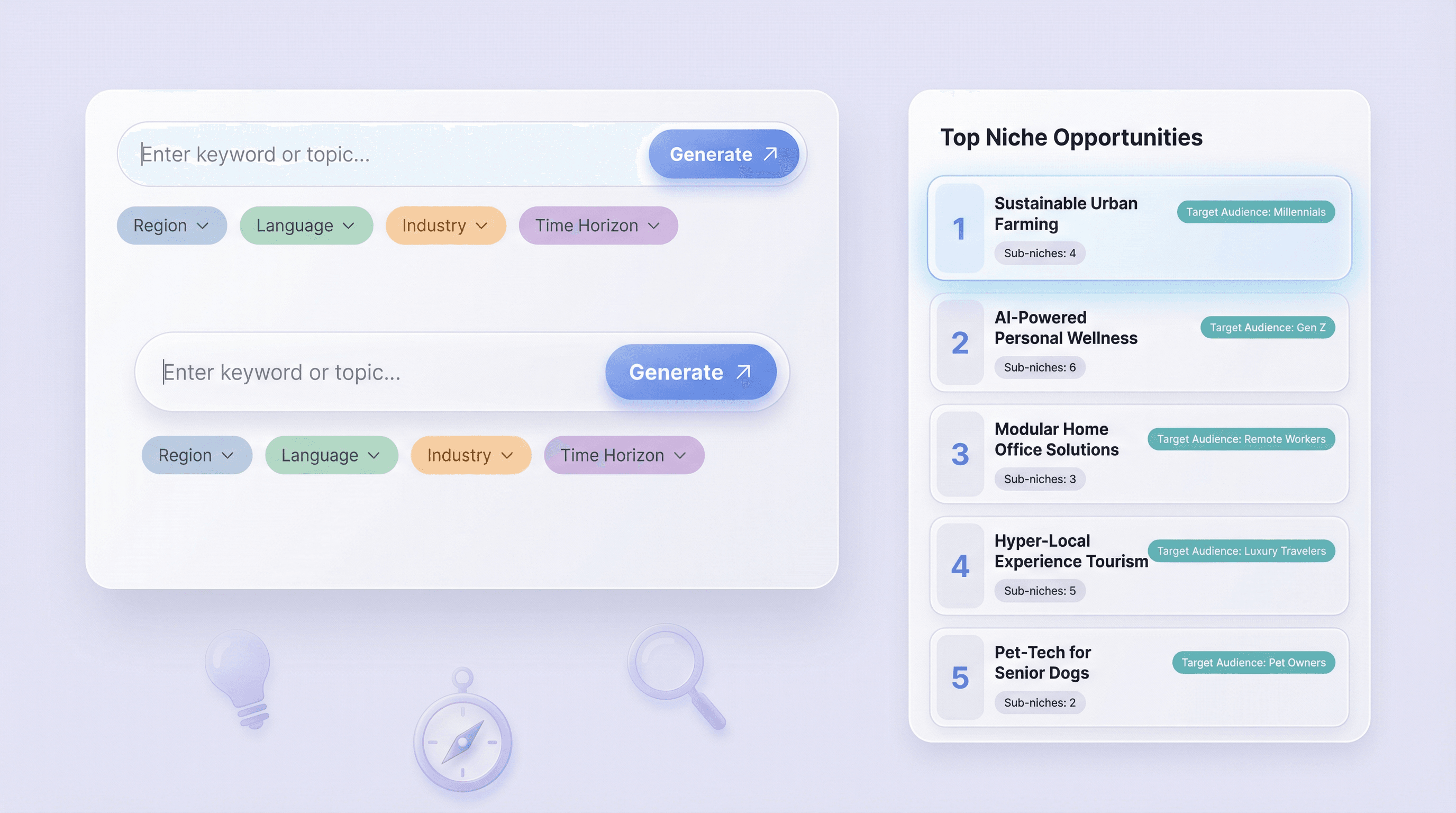
Niche Finder एक single keyword या topic को specific niche opportunities की ranked list में बदल देता है। चाहें तो region, language, industry, और time horizon जैसे optional filters जोड़कर ideas को अपने market के हिसाब से shape करें। हर niche के लिए यह एक साफ़ target audience और related sub-niches सुझाता है, ताकि entrepreneurs, bloggers, और marketers एक vague idea से निकलकर एक focused direction तक पहुँच सकें जिसे वे validate और build कर सकें।
मुफ़्त शुरू करें
niche_finder_section1.png

Trends, demand, और competition का विश्लेषण करें
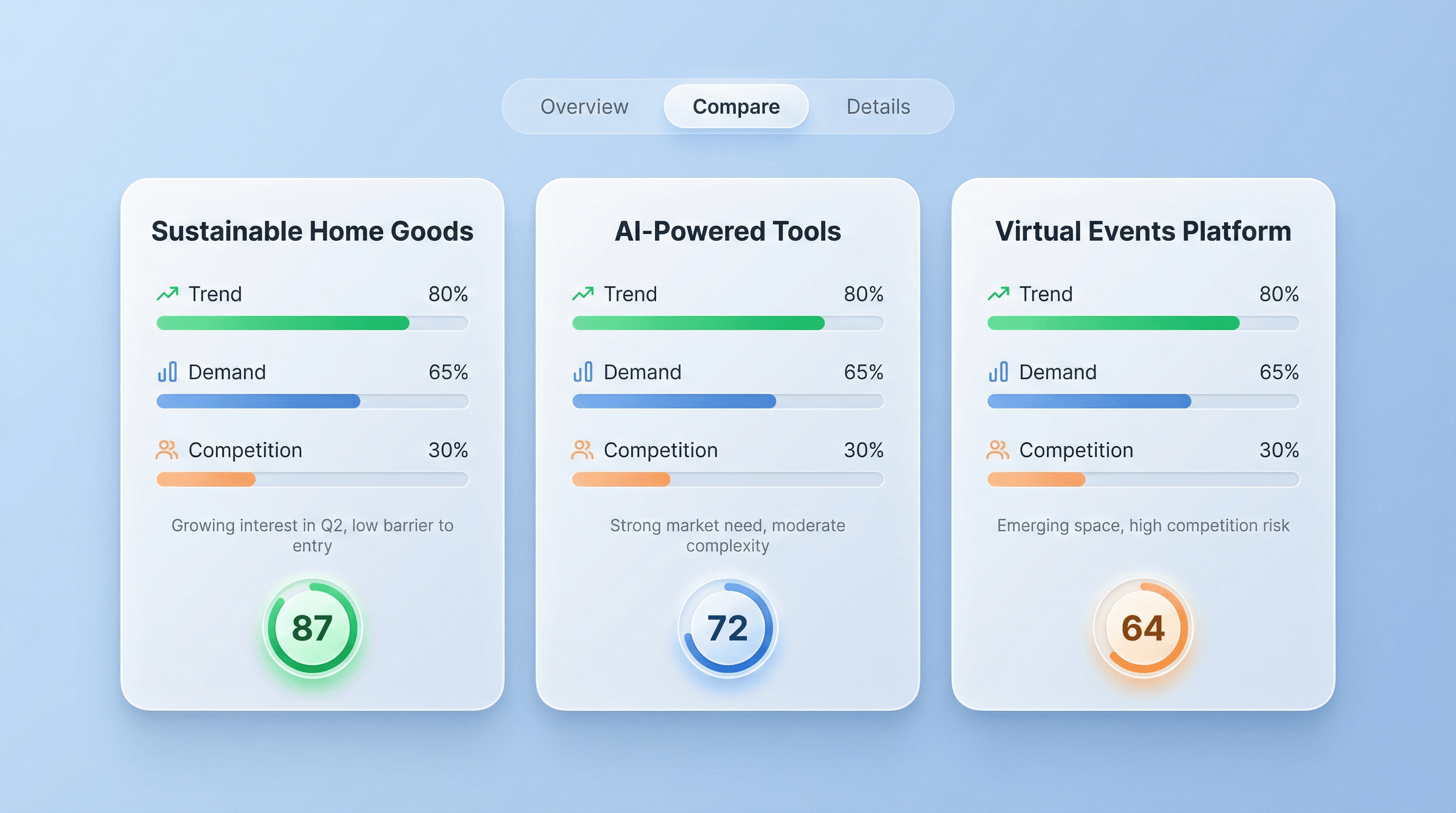
Niche Finder हर niche के लिए trend direction, estimated demand, और competition level का सार देता है, साथ में छोटे notes भी देता है जो rating के पीछे की assumptions समझाते हैं। इससे आप opportunities को side by side compare कर सकते हैं और उन niches से बच सकते हैं जो popular तो लगते हैं लेकिन बहुत crowded हैं या monetize करना मुश्किल है। यह उन teams के लिए बनाया गया है जिन्हें content, product, या store ideas को prioritize करने के लिए तेज़ और structured market research चाहिए।
मुफ़्त शुरू करें
niche_finder_section2.png

Creators और marketers के लिए content और offers की योजना बनाएं
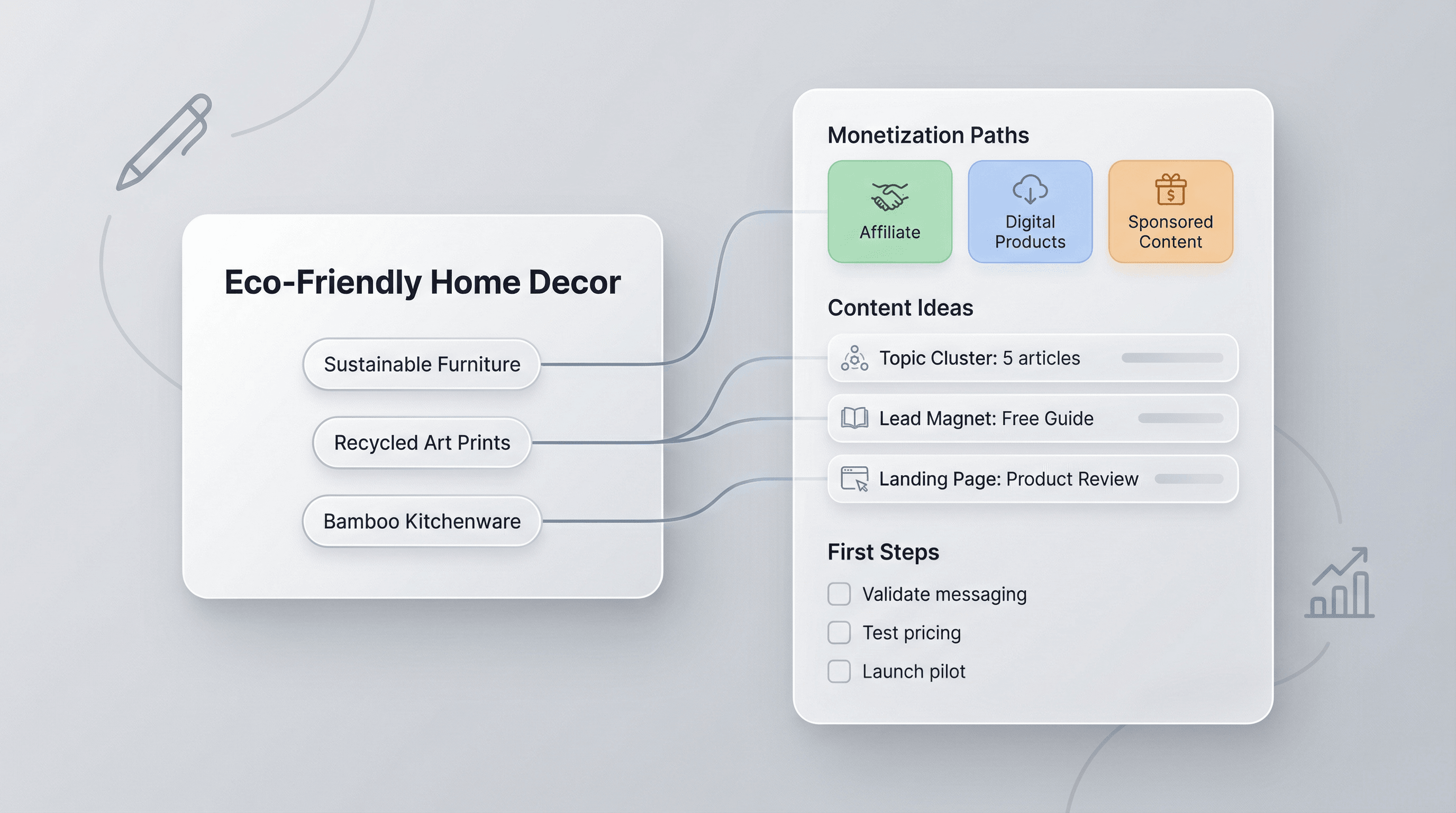
Output का इस्तेमाल हर niche को monetization paths और example content या products से जोड़ने के लिए करें, ताकि research को execution plan में बदला जा सके। Bloggers सुझाए गए sub-niches के आसपास topic clusters, SEO pages, और lead magnets बना सकते हैं। Marketers ads और landing pages के angles पहचान सकते हैं, फिर first-steps checklist की मदद से production में निवेश करने से पहले messaging, pricing, और positioning validate कर सकते हैं।
मुफ़्त शुरू करें
niche_finder_section3.png

Entrepreneurs और e-commerce teams के लिए product opportunities validate करें
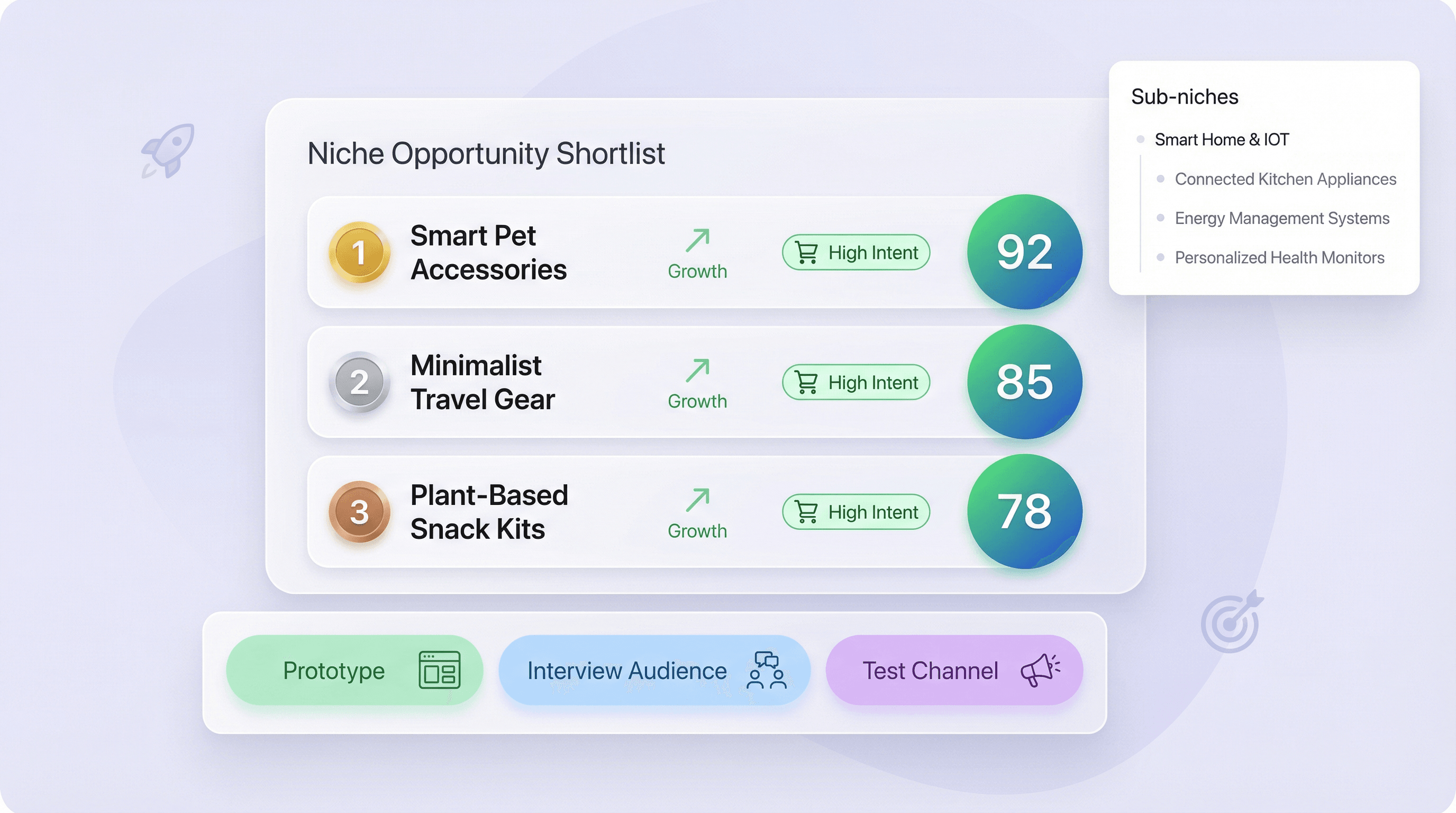
Niche Finder founders और operators को ऐसे niches shortlist करने में मदद करता है जिनमें strong growth potential और clear buyer intent हो, फिर उन्हें test करने योग्य sub-niches में तोड़ता है। Ranked list का इस्तेमाल करके तय करें कि किन ideas का prototype बनाना है, किन audiences से interview करनी है, और किन channels को पहले test करना है। Opportunity score कई ideas के बीच prioritization को आसान बनाता है, ताकि अगला क्या build, source, या launch करना है, यह तय करना सरल हो।
मुफ़्त शुरू करें
niche_finder_section4.png

और मुफ़्त टूल्स खोजें

जॉब डिस्क्रिप्शन जनरेटर

रोल की जानकारी से प्रोफेशनल जॉब डिस्क्रिप्शन तैयार करें, ताकि पोस्टिंग्स एक जैसी रहें और हायरिंग तेज़ हो।

डोमेन नाम जेनरेटर

अपने कीवर्ड्स से क्रिएटिव डोमेन आइडियाज़ बनाइए और ऐसे विकल्प पाएँ जो आपके ब्रांड और प्रोजेक्ट से मेल खाते हों।

AI Email Headline Generator

एआई ईमेल विषय पंक्ति जनरेटर

एक छोटी-सी जानकारी के आधार पर आकर्षक ईमेल विषय पंक्तियाँ बनाएं। AI-संचालित सुझावों से ओपन रेट बढ़ाएँ। तेज़, आसान और बिना साइन-अप के।

ईमेल सिग्नेचर जनरेटर

अपने कॉन्टैक्ट और कंपनी डिटेल्स से एक प्रोफेशनल ईमेल सिग्नेचर तैयार करें। लेआउट, फ़ॉन्ट, रंग और लोगो को कस्टमाइज़ करके ब्रांडिंग को एक जैसा रखें। किसी भी ईमेल क्लाइंट के लिए HTML और प्लेन टेक्स्ट में कॉपी करें या डाउनलोड करें।

एलेवेटर पिच जनरेटर

आपके मुख्य विवरणों से संक्षिप्त, प्रभावशाली एलेवेटर पिच बनाता है, ताकि आप कम समय में मूल्य को स्पष्ट रूप से समझा सकें।

टेक्स्ट पैराफ्रेज़र

अपने content को clarity और engagement के लिए rephrase और enhance करें। error-free, original rewrites generate करने के लिए अपनी पसंद की language और tone चुनें। marketers, copywriters और students के लिए perfect।

बिज़नेस नाम जनरेटर

अपने कीवर्ड्स और पसंदीदा स्टाइल के आधार पर ब्रांड के लिए उपयुक्त बिज़नेस नामों के आइडिया तैयार करें, ताकि ब्रेनस्टॉर्मिंग तेज़ हो और आपके वेंचर के लिए सही नाम मिल सके।

कंपनी नाम जनरेटर

अपने कीवर्ड्स या उद्योग के आधार पर रचनात्मक कंपनी नाम तैयार करें, ताकि आप जल्दी से ब्रांड-योग्य विकल्पों पर विचार कर सकें।


अभी और टूल्स खोजें

Thunderbit के बारे में उपयोगकर्ता क्या कहते हैं

Taryn W.Growth Strategist@Thunderbit ने मेरे competitor research का तरीका बदल दिया। मैं 'AI Suggest Fields' पर क्लिक करती हूँ, और यह paginated results में एक साफ table बना देता है—ना coding, ना CSS. लंबे-tail marketplaces से product data analyze करते समय यह बहुत समय बचाता है।
Miles T.Sales Development Consultantमैं directories से emails और phone numbers निकालने के लिए Thunderbit का उपयोग करता हूँ। यह एक क्लिक में साफ contact info निकाल देता है, और Sheets या Notion में export करने में कुछ ही सेकंड लगते हैं। कोई extra setup नहीं, कोई coding नहीं—बस इस्तेमाल करने लायक data तैयार।
Rhea C.E-commerce AnalystThunderbit मुझे कई pages पर SKU data मॉनिटर करने में मदद करता है। मैं listings स्क्रैप करती हूँ, फिर Subpage Scraping से पूरे product specs, pricing, reviews, और stock निकालती हूँ। AI सब कुछ मेरे तय किए हुए columns में व्यवस्थित कर देता है।
Cassian B.Real Estate AdvisorThunderbit का Scheduled Scraper real estate tracking को आसान बनाता है। मैं interval को साधारण English में बताता हूँ, और यह बिना setup दोबारा छुए अपने आप updated listings, prices, और links निकालता रहता है। सरल और बहुत practical।
Dorian B.Content & SEO Specialistमैं scraped blog content को साफ और tag करने के लिए Thunderbit के Field AI Prompts का उपयोग करता हूँ। यह titles, authors निकालता है, और categories तक सुझाता है। dynamic sites और subpages पर शानदार काम करता है—structured SEO datasets बनाने के लिए perfect।
Lina K.Marketplace Operations Leadहम Thunderbit से niche stores के SKUs ट्रैक करते हैं। Cloud Scraping एक बार में 50 pages संभाल लेता है, और login-required sites के लिए हम browser mode पर चले जाते हैं। यह तेज़, flexible है, और ongoing maintenance या manual edits की ज़रूरत नहीं पड़ती।
Jorge F.Inbound Sales ManagerThunderbit का AI Autofill बहुत काम का है। contact info स्क्रैप करने के बाद मैं इसे सीधे browser में lead forms भरने के लिए इस्तेमाल करता हूँ। मैं बस tab चुनता हूँ, और यह scraped row से सब कुछ भर देता है। manual input की ज़रूरत नहीं।
Alina D.Freelance Researcherमैं PDFs, image-based sites, और infinite scroll pages से data निकालने के लिए Thunderbit पर भरोसा करती हूँ। यह messy formats को AI से संभालता है और ready-to-export tables देता है जिन्हें मैं कुछ ही सेकंड में Google Sheets या Airtable में भेज सकती हूँ।
Taryn W.Growth Strategist@Thunderbit ने मेरे competitor research का तरीका बदल दिया। मैं 'AI Suggest Fields' पर क्लिक करती हूँ, और यह paginated results में एक साफ table बना देता है—ना coding, ना CSS. लंबे-tail marketplaces से product data analyze करते समय यह बहुत समय बचाता है।
Miles T.Sales Development Consultantमैं directories से emails और phone numbers निकालने के लिए Thunderbit का उपयोग करता हूँ। यह एक क्लिक में साफ contact info निकाल देता है, और Sheets या Notion में export करने में कुछ ही सेकंड लगते हैं। कोई extra setup नहीं, कोई coding नहीं—बस इस्तेमाल करने लायक data तैयार।
Rhea C.E-commerce AnalystThunderbit मुझे कई pages पर SKU data मॉनिटर करने में मदद करता है। मैं listings स्क्रैप करती हूँ, फिर Subpage Scraping से पूरे product specs, pricing, reviews, और stock निकालती हूँ। AI सब कुछ मेरे तय किए हुए columns में व्यवस्थित कर देता है।
Cassian B.Real Estate AdvisorThunderbit का Scheduled Scraper real estate tracking को आसान बनाता है। मैं interval को साधारण English में बताता हूँ, और यह बिना setup दोबारा छुए अपने आप updated listings, prices, और links निकालता रहता है। सरल और बहुत practical।
Dorian B.Content & SEO Specialistमैं scraped blog content को साफ और tag करने के लिए Thunderbit के Field AI Prompts का उपयोग करता हूँ। यह titles, authors निकालता है, और categories तक सुझाता है। dynamic sites और subpages पर शानदार काम करता है—structured SEO datasets बनाने के लिए perfect।
Lina K.Marketplace Operations Leadहम Thunderbit से niche stores के SKUs ट्रैक करते हैं। Cloud Scraping एक बार में 50 pages संभाल लेता है, और login-required sites के लिए हम browser mode पर चले जाते हैं। यह तेज़, flexible है, और ongoing maintenance या manual edits की ज़रूरत नहीं पड़ती।
Jorge F.Inbound Sales ManagerThunderbit का AI Autofill बहुत काम का है। contact info स्क्रैप करने के बाद मैं इसे सीधे browser में lead forms भरने के लिए इस्तेमाल करता हूँ। मैं बस tab चुनता हूँ, और यह scraped row से सब कुछ भर देता है। manual input की ज़रूरत नहीं।
Alina D.Freelance Researcherमैं PDFs, image-based sites, और infinite scroll pages से data निकालने के लिए Thunderbit पर भरोसा करती हूँ। यह messy formats को AI से संभालता है और ready-to-export tables देता है जिन्हें मैं कुछ ही सेकंड में Google Sheets या Airtable में भेज सकती हूँ।

अक्सर पूछे जाने वाले प्रश्न

AI का उपयोग करके डेटा निकालें
डेटा को Google Sheets, Airtable, या Notion में आसानी से ट्रांसफर करें
Chrome Store Rating
PRODUCT HUNT#1 Product of the Week