कुछ महीने पहले, हमारे एक उपयोगकर्ता ने हमें n8n वर्कफ़्लो का एक स्क्रीनशॉट भेजा — 14 nodes, आधा दर्जन sticky notes, और विषय पंक्ति बस इतनी थी: "Help." उन्होंने एक popular n8n web scraping tutorial फॉलो किया था, test site पर 10 rows वाला बढ़िया demo चला लिया था, और फिर 200 product pages पर असली competitor prices scrape करने की कोशिश की। नतीजा? एक टूटा हुआ pagination loop, 403 error की दीवार, और एक silent scheduler जो पहली Tuesday के बाद फिर चला ही नहीं।
Demo और real pipeline के बीच का यही gap वह जगह है जहाँ ज़्यादातर n8n scraping projects दम तोड़ देते हैं। मैंने सालों Thunderbit बनाने और automation पर काम करने में बिताए हैं, और मैं साफ़ कह सकता हूँ: scraping वाला हिस्सा शायद ही कभी सबसे मुश्किल होता है। असली चुनौती उसके बाद शुरू होती है — पहली successful scraping के बाद। Pagination, scheduling, anti-bot handling, data cleaning, export, और सबसे बड़ी बात — maintenance, जब site इस quarter में तीसरी बार अपना layout बदल देती है। यह guide पूरे pipeline को cover करती है — आपके पहले HTTP Request node से लेकर एक recurring, production-ready n8n web scraping workflow तक। और जहाँ n8n का DIY तरीका अटकता है, वहाँ मैं दिखाऊँगा कि Thunderbit जैसे AI-powered tools आपको घंटों नहीं तो दिनों की झुंझलाहट से कैसे बचा सकते हैं।
n8n वेब स्क्रैपिंग क्या है (और ज़्यादातर ट्यूटोरियल सतही क्यों रह जाते हैं)
n8n एक open-source, low-code workflow automation platform है। इसे एक visual canvas की तरह सोचिए जहाँ आप "nodes" जोड़ते हैं — हर node एक खास काम करता है (web page fetch करना, HTML parse करना, Slack message भेजना, Google Sheets में लिखना) — और फिर उन्हें जोड़कर automated workflows बनाते हैं। भारी coding की ज़रूरत नहीं होती, हालांकि ज़रूरत पड़े तो आप JavaScript भी इस्तेमाल कर सकते हैं।
"n8n web scraping" का मतलब है n8n के built-in HTTP Request और HTML nodes (साथ ही community nodes) का इस्तेमाल करके website data को इन automated workflows के अंदर fetch, parse, और process करना। इसका core दो steps में है: Fetch (HTTP Request node URL से raw HTML लाता है) और Parse (HTML node CSS selectors की मदद से आपको चाहिए data — जैसे product names, prices, emails, वगैरह — निकालता है)।
यह platform बहुत बड़ा है: अप्रैल 2026 तक, n8n के पास ~184k GitHub stars, 230,000 से ज़्यादा active users, 9,166+ community workflow templates, और लगभग हर हफ्ते एक नया minor release आता है। मार्च 2025 में इसे €55M Series B funding भी मिली। यहाँ सचमुच काफी momentum है।
लेकिन एक gap है जिस पर कोई बात नहीं करता। dev.to पर सबसे popular n8n scraping tutorial (Lakshay Nasa द्वारा, "Extract by Zyte" org के तहत published) ने "Part 2" में pagination का वादा किया था। Part 2 आया भी — और लेखक का अपना निष्कर्ष था: "N8N gives us a default Pagination Mode inside the HTTP Request node under Options, and while it sounds convenient, it didn't behave reliably in my experience for typical web scraping use cases." आख़िर में pagination को एक paid third-party API के रास्ते भेजना पड़ा। दूसरी तरफ, n8n forum users बार-बार "pagination, throttling, login" को वह point बताते हैं जहाँ n8n scraping "जल्दी complex हो जाती है।" यह guide उसी gap को भरने के लिए है।
Sales, Ops, और Ecommerce teams के लिए n8n वेब स्क्रैपिंग क्यों मायने रखती है
n8n web scraping सिर्फ़ developers का शौक नहीं है। यह एक business tool है। global web scraping market 2025 में लगभग $1–1.3 billion के आसपास है और 2030 तक $2–2.3 billion तक पहुँचने का अनुमान है। केवल dynamic pricing ही लगभग 30% e-commerce businesses इस्तेमाल करते हैं, और 65% hedge funds अब alternative data पर depend करते हैं — जिसका बड़ा हिस्सा web से scrape किया जाता है। McKinsey के अनुसार, dynamic pricing अपनाने वालों को 2–5% sales growth और 5–10% margin improvement मिलता है।
n8n की असली ताकत यहीं दिखती है: बात सिर्फ़ data पाने की नहीं है। बात है उसके बाद क्या होता है। n8n आपको scraping को downstream actions के साथ जोड़ने देता है — CRM updates, Slack alerts, spreadsheet exports, AI analysis — सब एक ही workflow में।
| Use Case | Who Benefits | What You Scrape | Business Outcome |
|---|---|---|---|
| Lead generation | Sales teams | Business directories, contact pages | CRM को qualified leads से भरना |
| Competitor price monitoring | Ecommerce ops | Product listing pages | Real time में pricing adjust करना |
| Real estate listing tracking | Real estate agents | Zillow, Realtor, local MLS sites | Competitors से पहले नई listings पकड़ना |
| Market research | Marketing teams | Review sites, forums, news | Trends और customer sentiment पहचानना |
| Vendor/SKU stock monitoring | Supply chain ops | Supplier product pages | Stockout से बचना, खरीद को optimize करना |
Data साफ़ बताता है कि ROI real है: 92% sales orgs 2025 में AI investment बढ़ाने की योजना बना रहे हैं, और automated lead nurturing ने नौ महीनों में pipeline को 61% तक बढ़ाया है। अगर आपकी team अभी भी websites से spreadsheets में copy-paste कर रही है, तो आप पैसा छोड़ रहे हैं।
आपका n8n वेब स्क्रैपिंग toolbox: Core Nodes और उपलब्ध solutions
कुछ भी बनाने से पहले, आपको अपने toolbox में क्या है, यह जानना होगा। web scraping के लिए n8n के ज़रूरी nodes ये हैं:
- HTTP Request node: किसी भी URL से raw HTML लाता है। यह browser की तरह page request करता है, लेकिन page render करने के बजाय code वापस देता है। GET/POST, headers, batching, और (थ्योरी में) built-in pagination support करता है।
- HTML node (पहले "HTML Extract"): CSS selectors का इस्तेमाल करके HTML parse करता है और खास data निकालता है — titles, prices, links, images, जो भी चाहिए।
- Code node: data cleaning, URL normalization, deduplication, और custom logic के लिए JavaScript snippets लिखने देता है।
- Edit Fields (Set) node: downstream nodes के लिए data fields को दोबारा व्यवस्थित या rename करता है।
- Split Out node: arrays को अलग-अलग items में तोड़ता है ताकि process किया जा सके।
- Convert to File node: structured data को CSV, JSON आदि में export करता है।
- Loop Over Items node: lists पर iterate करता है (pagination के लिए अहम — नीचे और देखें)।
- Schedule Trigger: आपके workflow को cron schedule पर चलाता है।
- Error Trigger: workflow fail होने पर आपको alert करता है (production के लिए ज़रूरी)।
ज़्यादा advanced scraping — यानी JavaScript-rendered sites या भारी anti-bot protection वाली sites — के लिए community nodes चाहिए होंगे:
| Approach | Best For | Skill Level | Handles JS-Rendered Sites | Anti-Bot Handling |
|---|---|---|---|---|
| n8n HTTP Request + HTML nodes | Static sites, APIs | Beginner–Intermediate | No | Manual (headers, proxies) |
| n8n + ScrapeNinja/Firecrawl community node | Dynamic/protected sites | Intermediate | Yes | Built-in (proxy rotation, CAPTCHA) |
| n8n + Headless Browser (Puppeteer) | Complex JS interactions | Advanced | Yes | Partial (depends on setup) |
| Thunderbit (AI Web Scraper) | Any site, non-technical users | Beginner | Yes (Browser or Cloud mode) | Built-in (inherits browser session or cloud handling) |
अप्रैल 2026 तक n8n में native headless-browser node नहीं है। हर JS-rendering scrape के लिए या तो community node चाहिए या external API।
Thunderbit के बारे में एक छोटी सी बात: यह हमारी team का बनाया हुआ AI-powered Chrome extension है। आप "AI Suggest Fields" पर क्लिक करते हैं, फिर "Scrape" — और आपको structured data मिल जाता है। CSS selectors नहीं, node configuration नहीं, maintenance नहीं। इस guide में मैं दिखाऊँगा कि यह कहाँ fit बैठता है (और कहाँ n8n बेहतर है)।
चरण-दर-चरण: अपना पहला n8n वेब स्क्रैपिंग workflow कैसे बनाएँ
अब toolbox समझ लिया है, तो चलिए शुरू से एक working n8n web scraper बनाते हैं। example के लिए हम एक product listing page लेंगे — वही चीज़ जिसे आप price monitoring या competitor research के लिए सच में scrape करेंगे।
शुरू करने से पहले:
- Difficulty: Beginner–Intermediate
- Time Required: ~20–30 minutes
- What You'll Need: n8n (self-hosted या Cloud), एक target URL, Chrome browser (CSS selectors खोजने के लिए)
Step 1: नया Workflow बनाएँ और Manual Trigger जोड़ें
n8n खोलें, "New Workflow" पर क्लिक करें, और कोई साफ़ नाम दें — जैसे "Competitor Price Scraper." एक Manual Trigger node drag करें। (बाद में हम इसे scheduled trigger में बदलेंगे।)
आपको canvas पर एक single node दिखना चाहिए, जो "Test Workflow" पर क्लिक करते ही चलने के लिए ready हो।
Step 2: HTTP Request node से पेज fetch करें
एक HTTP Request node जोड़ें और इसे Manual Trigger से connect करें। method को GET पर set करें और अपना target URL दर्ज करें (जैसे, https://example.com/products)।
अब वह सबसे अहम step जिसे ज़्यादातर tutorials छोड़ देते हैं: एक realistic User-Agent header जोड़ें। Default रूप से n8n axios/xx को अपना user agent भेजता है — जो तुरंत bot जैसा दिखता है। "Headers" के नीचे यह जोड़ें:
| Header Name | Value |
|---|---|
| User-Agent | Mozilla/5.0 (Windows NT 10.0; Win64; x64) AppleWebKit/537.36 (KHTML, like Gecko) Chrome/124.0.0.0 Safari/537.36 |
| Accept | text/html,application/xhtml+xml,application/xml;q=0.9,/;q=0.8 |
अगर आप कई URLs scrape कर रहे हैं, तो Batching (Options के तहत) चालू करें और requests के बीच 1–3 seconds की wait time set करें। इससे rate limits trigger होने का खतरा कम होता है।
Node चलाइए। आपको output panel में raw HTML दिखना चाहिए।
Step 3: HTML node से data parse करें
HTTP Request output से एक HTML node जोड़ें। operation को Extract HTML Content पर set करें।
सही CSS selectors खोजने के लिए target page को Chrome में खोलें, जिस data की आपको ज़रूरत है उस पर right-click करें (जैसे product title), और "Inspect" चुनें। Elements panel में highlighted HTML element पर right-click करें और "Copy → Copy selector" चुनें।
अपनी extraction values कुछ इस तरह configure करें:
| Key | CSS Selector | Return Value |
|---|---|---|
| product_name | .product-title | Text |
| price | .price-current | Text |
| url | .product-link | Attribute: href |
Node execute करें। output में आपको structured data की table दिखनी चाहिए — product names, prices, और URLs।
Step 4: Code node से साफ़ और normalize करें
Raw scraped data अक्सर messy होता है। Prices के साथ extra whitespace होता है, URLs relative हो सकते हैं, और text fields में trailing newlines आ जाती हैं। एक Code node जोड़ें और इसे HTML node से connect करें।
यहाँ चीज़ों को साफ़ करने के लिए एक simple JavaScript snippet है:
return items.map(item => {
  const d = item.json;
  return {
    json: {
      product_name: (d.product_name || '').trim(),
      price: parseFloat((d.price || '').replace(/[^0-9.]/g, '')),
      url: d.url && d.url.startsWith('http') ? d.url : `https://example.com${d.url}`
    }
  };
});
Production-quality data के लिए यह step बहुत ज़रूरी है। इसे छोड़ दिया तो आपकी spreadsheet में "$ 29.99\n" जैसी entries भर जाएँगी।
Step 5: Google Sheets, Airtable, या CSV में export करें
एक Google Sheets node जोड़ें (या Airtable, या CSV के लिए Convert to File)। अपने Google account से authenticate करें, spreadsheet और sheet चुनें, और Code node output के fields को अपने column headers से map करें।
पूरा workflow चलाइए। आपको साफ़, structured data आपकी spreadsheet में आ जाना चाहिए।
एक side note: Thunderbit Google Sheets, Airtable, Notion, और Excel में free data export देता है, और उसके लिए zero node setup चाहिए। अगर आपको पूरे workflow chain की ज़रूरत नहीं है और बस data चाहिए, तो यह एक useful shortcut है।
वह हिस्सा जिसे हर n8n Web Scraping Tutorial छोड़ देता है: Complete Pagination Workflows
Pagination n8n scraping content में #1 gap है — और n8n community forums में frustration का #1 कारण भी।
Pagination के दो main patterns हैं:
- Click-based / URL-increment pagination —
?page=1,?page=2, जैसी pages। - Infinite scroll — content नीचे scroll करते ही load होता है (जैसे Twitter, Instagram, या कई modern product catalogs)।
n8n में Click-Based Pagination (Loop Nodes के साथ URL Incrementing)
HTTP Request node के Options menu में built-in Pagination option सुनने में सुविधाजनक लगता है। लेकिन व्यवहार में यह भरोसेमंद नहीं है। सबसे popular n8n scraping tutorial के लेखक (Lakshay Nasa) ने इसे आज़माया और लिखा: "it didn't behave reliably in my experience." Forum users के अनुसार यह एक जैसी pages वापस करता है, infinitely loop करता है, और आख़िरी page को पहचानने में fail रहता है।
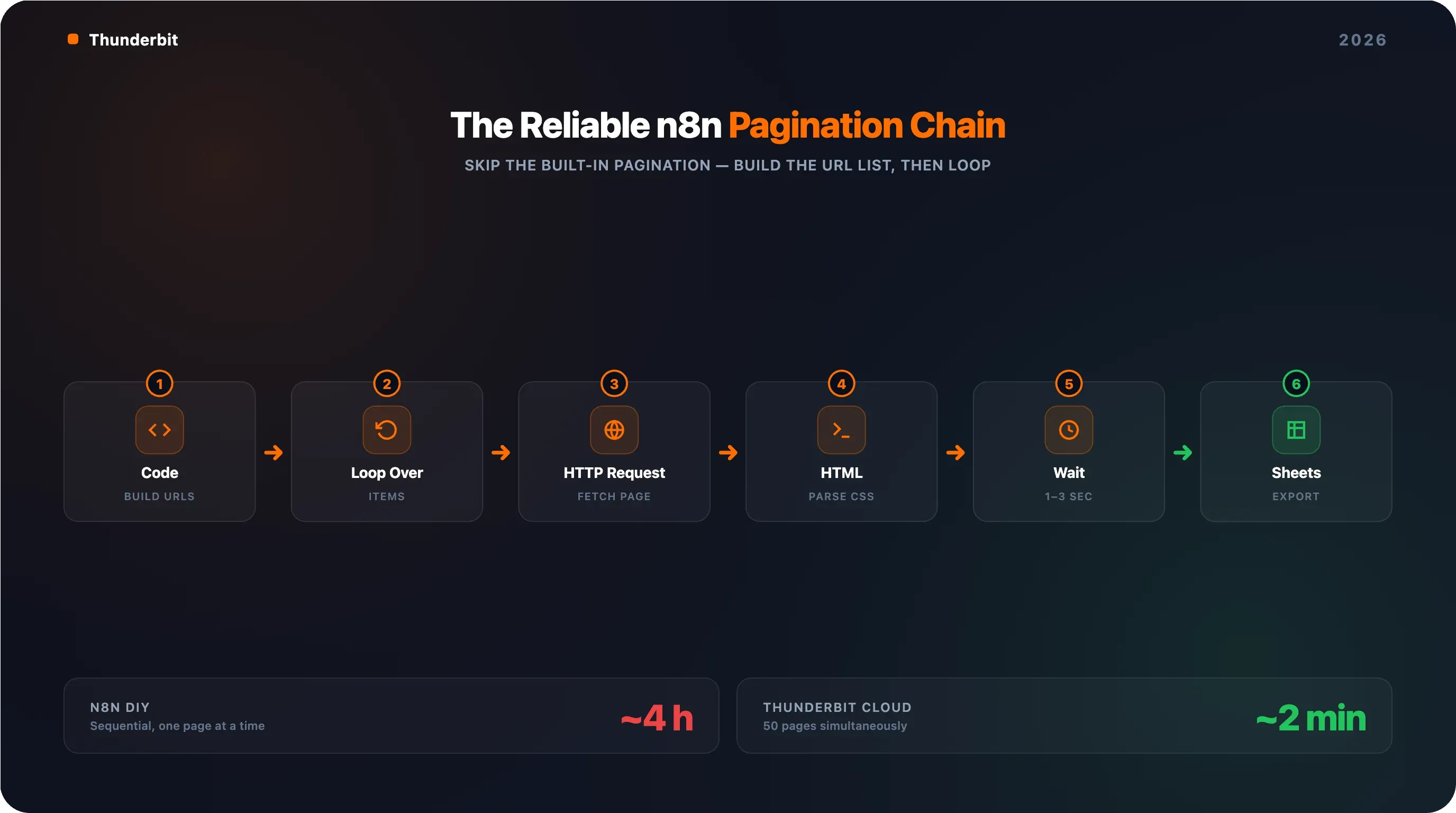
ज़्यादा भरोसेमंद तरीका: Code node में URL list साफ़-साफ़ बनाइए, फिर Loop Over Items से iterate कीजिए।
ऐसे करें:
- एक Code node जोड़ें जो आपके page URLs बनाए:
const base = 'https://example.com/products';
const totalPages = 10; // या dynamic तरीके से detect करें
return Array.from({length: totalPages}, (_, i) => ({
  json: { url: `${base}?page=${i + 1}` }
}));
- एक Loop Over Items node जोड़ें ताकि list पर iterate किया जा सके।
- Loop के अंदर अपना HTTP Request node जोड़ें (URL को
{{ $json.url }}पर set करें), फिर parsing के लिए HTML node। - Loop के अंदर एक Wait node जोड़ें (1–3 seconds, randomized) ताकि 429 rate limits से बचा जा सके।
- Loop के बाद results को aggregate करें और Google Sheets या CSV में export करें।
पूरा chain: Code (URLs बनाएँ) → Loop Over Items → HTTP Request → HTML → Wait → (loop back) → Aggregate → Export.
एक बात ध्यान रखें: Loop Over Items node में एक known bug है जहाँ nested loops silently items skip कर देते हैं। अगर आप pagination के साथ-साथ subpages enrich भी कर रहे हैं, तो सावधानी से test करें — "done" count आपके input count से match न भी करे।
Infinite Scroll Pagination: n8n के built-in nodes क्यों struggle करते हैं
Infinite scroll pages JavaScript के जरिए content load करती हैं जैसे ही आप scroll करते हैं। HTTP Request node सिर्फ़ शुरुआती HTML लाता है — यह JavaScript execute नहीं कर सकता और न ही scroll events trigger कर सकता है। आपके पास दो options हैं:
- एक headless browser community node इस्तेमाल करें (जैसे n8n-nodes-puppeteer या n8n-playwright) ताकि page render हो और scrolling simulate की जा सके।
- एक scraping API (ScrapeNinja, Firecrawl, ZenRows) इस्तेमाल करें जिसमें JS rendering enabled हो।
दोनों ही मामलों में complexity काफी बढ़ जाती है। हर site पर setup में 30–60+ minutes लग सकते हैं, और उसके बाद लगातार maintenance भी।
Thunderbit बिना configuration के pagination कैसे संभालता है
मैं biased हूँ, लेकिन फर्क साफ़ है:
| Capability | n8n (DIY Workflow) | Thunderbit |
|---|---|---|
| Click-based pagination | Manual loop node setup, URL incrementing | Automatic — pagination detect करके follow करता है |
| Infinite scroll pages | Headless browser + community node चाहिए | Built-in support, कोई config नहीं |
| Setup effort | प्रति site 30–60 min | 2 clicks |
| Pages per batch | Sequential (one at a time) | 50 pages simultaneously (Cloud Scraping) |
अगर आप 10 paginated listings पर 200 product pages scrape कर रहे हैं, तो n8n में आपका पूरा दोपहर लग जाएगा। Thunderbit में लगभग दो मिनट लगेंगे। इसका मतलब यह नहीं कि n8n खराब है — बस यह अलग काम के लिए अलग tool है।
Set It and Forget It: Cron-Triggered n8n Web Scraping Pipelines
एक बार की scraping useful है, लेकिन n8n web scraping की असली ताकत recurring, automated data collection है। हैरानी की बात है कि लगभग कोई n8n scraping tutorial scraping के लिए Schedule Trigger को cover नहीं करता — जबकि community में यह सबसे ज़्यादा माँगे जाने वाले features में से एक है।
Daily Price Monitoring Pipeline बनाना
अपने Manual Trigger को Schedule Trigger node से बदलें। आप n8n UI ("Every day at 8:00 AM") या cron expression (0 8 * * *) इस्तेमाल कर सकते हैं।
पूरा workflow chain:
- Schedule Trigger (daily at 8 AM)
- Code node (paginated URLs बनाएँ)
- Loop Over Items → HTTP Request → HTML → Wait (सभी pages scrape करें)
- Code node (data clean करें, prices normalize करें)
- Google Sheets (नई rows append करें)
- IF node (क्या कोई price threshold से नीचे गया?)
- Slack (हाँ होने पर alert भेजें)
इसके साथ एक Error Trigger workflow भी जोड़ें जो किसी भी failed execution पर चले और Slack ping करे। वरना जब selectors टूटेंगे — और टूटेंगे — तब आपको यह तीन हफ्ते बाद पता चलेगा जब report खाली होगी।
दो गैर-ज़रूरी लगने वाले लेकिन अहम requirements:
- n8n को 24/7 चलना चाहिए। Laptop पर hosted self-host बंद ढक्कन के साथ trigger नहीं होगा। Server, Docker, या n8n Cloud इस्तेमाल करें।
- हर workflow edit के बाद workflow को off करके वापस on करें। n8n Cloud में एक known issue है जहाँ edits के बाद schedulers चुपचाप de-register हो जाते हैं, और कोई error feedback नहीं मिलता।
Weekly Lead Extraction Pipeline बनाना
यही pattern, बस target अलग: Schedule Trigger (every Monday at 9 AM) → HTTP Request (business directory) → HTML (name, phone, email निकालें) → Code (deduplicate, formatting साफ़ करें) → Airtable या HubSpot push.
यहाँ maintenance burden असली hidden cost है। अगर directory site अपना layout बदल देती है, तो आपके CSS selectors टूट जाते हैं और workflow चुपचाप fail हो जाता है। HasData के अनुसार किसी भी selector-based pipeline में initial build time का 30–60% सालाना ongoing maintenance के लिए budget करना चाहिए। जब आप ~20 sites maintain कर रहे हों, तब overhead सच में भारी हो जाता है।
Thunderbit का Scheduled Scraper: No-Code विकल्प
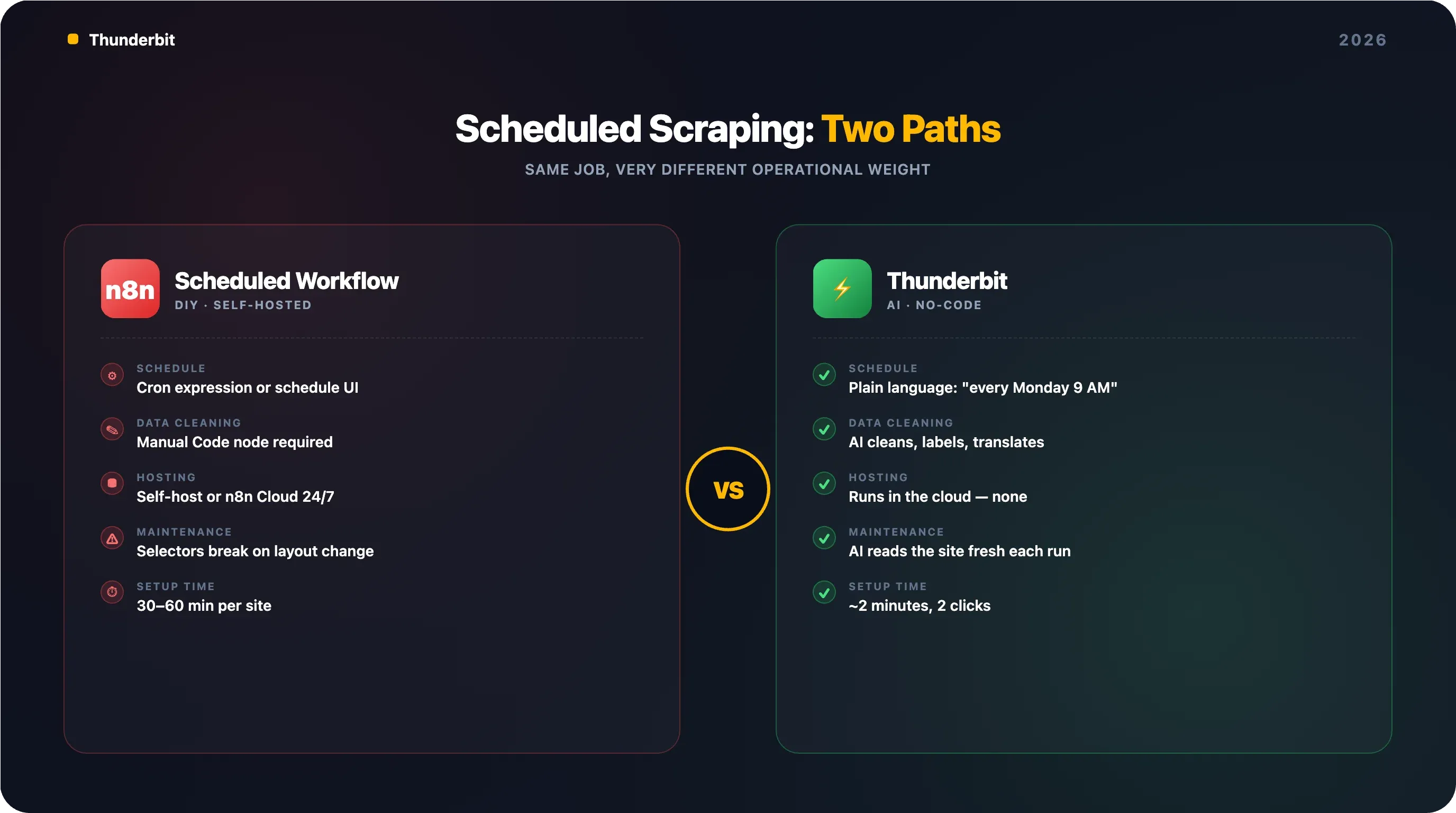
Thunderbit का Scheduled Scraper आपको interval साधारण भाषा में बताने देता है (जैसे "every Monday at 9 AM"), अपने URLs डालिए, और "Schedule" पर क्लिक कीजिए। यह cloud में चलता है — hosting नहीं, cron expressions नहीं, silent de-registrations नहीं।
| Dimension | n8n Scheduled Workflow | Thunderbit Scheduled Scraper |
|---|---|---|
| Schedule setup | Cron expression या n8n schedule UI | साधारण भाषा में बताइए |
| Data cleaning | Manual Code node चाहिए | AI अपने-आप clean/label/translate करता है |
| Export destinations | Integration nodes चाहिए | Google Sheets, Airtable, Notion, Excel (free) |
| Hosting requirement | Self-hosted या n8n Cloud | कोई नहीं — cloud में चलता है |
| Maintenance on site changes | Selectors टूटते हैं, manual fix चाहिए | AI हर बार site को fresh पढ़ता है |
आख़िरी पंक्ति सबसे अहम है। Forum users सीधे कहते हैं: "most of them are fine until a site changes its layout." Thunderbit का AI-based approach इस pain को खत्म करता है क्योंकि यह fixed CSS selectors पर depend नहीं करता।
जब आपका n8n वेब स्क्रैपर block हो जाए: Anti-Bot Troubleshooting guide
Pagination के बाद सबसे common परेशानी block होना है। सामान्य सलाह — "User-Agent header जोड़ दो" — उतनी ही मददगार है जितनी तूफ़ान के सामने screen door पर ताला लगाना।
Imperva 2025 Bad Bot Report के अनुसार, bots अब पूरे internet traffic का 51% हैं, और 37% malicious हैं। Anti-bot vendors (Cloudflare, Akamai, DataDome, HUMAN, PerimeterX) ने TLS fingerprinting, JavaScript challenges, और behavioral analysis अपना लिया है। n8n HTTP Request node, जो अंदर से Axios library का उपयोग करता है, एक अलग, आसानी से पहचाने जाने वाला, non-browser TLS fingerprint बनाता है। User-Agent header बदलना कुछ नहीं बदलता — JA3/JA4 hash HTTP header पढ़े जाने से पहले ही आपको expose कर देता है।
Anti-Bot Decision Tree
यह एक व्यवस्थित troubleshooting framework है — सिर्फ़ "User-Agent जोड़ो" नहीं:
Request blocked?
- 403 Forbidden → User-Agent + Accept headers जोड़ें (Step 2 देखें) → फिर भी blocked?
- हाँ → Residential proxy rotation जोड़ें → फिर भी blocked?
- हाँ → Scraping API (ScrapeNinja, Firecrawl, ZenRows) या headless browser community node पर जाएँ
- नहीं → आगे बढ़ें
- नहीं → आगे बढ़ें
- हाँ → Residential proxy rotation जोड़ें → फिर भी blocked?
- CAPTCHA दिख रहा है → Built-in CAPTCHA solving वाली scraping API इस्तेमाल करें (जैसे n8n का अपना Cloudflare Turnstile bypass workflow)
- Empty response (JS-rendered content) → Headless browser community node या JS rendering वाली scraping API इस्तेमाल करें
- Rate limited (429 error) → HTTP Request node पर batching चालू करें, batches के बीच 2–5 seconds wait time रखें, concurrency कम करें
एक और समस्या: n8n में एक known HTTPS proxy bug है जहाँ HTTP Request node HTTP proxy के जरिए HTTPS को ठीक से tunnel नहीं कर पाता। Axios library TLS handshake पर fail हो जाती है, जबकि उसी container में curl ठीक चलता है। अगर आप proxy इस्तेमाल कर रहे हैं और mysterious connection errors मिल रहे हैं, तो शायद यही वजह है।
Thunderbit ज़्यादातर Anti-Bot problems से कैसे बचता है
Thunderbit दो scraping modes देता है:
- Browser Scraping: यह आपके असली Chrome browser के अंदर चलता है, आपके session cookies, login state, और browser fingerprint को inherit करता है। इससे server-side requests को block करने वाले anti-bot measures का बड़ा हिस्सा bypass हो जाता है — क्योंकि request सचमुच एक real browser से आ रही होती है।
- Cloud Scraping: publicly available sites के लिए, Thunderbit का cloud anti-bot को scale पर संभालता है — 50 pages एक साथ।
अगर आप data analyze करने से ज़्यादा Cloudflare से लड़ने में समय लगा रहे हैं, तो यह practical alternative है।
ईमानदार राय: n8n वेब स्क्रैपिंग कहाँ काम करती है — और कब कुछ और इस्तेमाल करना चाहिए
n8n एक शानदार platform है। लेकिन हर scraping job के लिए यह सही tool नहीं है, और कोई competitor article इस बारे में ईमानदार नहीं होता। Forums पर लोग literally पूछ रहे हैं: "how difficult is it to create a web scraper with n8n?" और "which scraping tool works best with n8n?"
जहाँ n8n वेब स्क्रैपिंग सबसे अच्छा काम करती है
- Multi-step workflows जहाँ scraping के साथ downstream processing भी जुड़ी हो — CRM updates, Slack alerts, AI analysis, database writes। यही n8n की core strength है।
- ऐसे मामले जहाँ scraping एक बड़े automation chain का सिर्फ़ एक node हो — scrape → enrich → filter → CRM में push।
- Technical users जो CSS selectors और node-based logic में सहज हैं।
- ऐसे scenario जिनमें scraping और storage के बीच custom data transformation चाहिए।
जहाँ n8n वेब स्क्रैपिंग मुश्किल हो जाती है
- Non-technical users जिन्हें बस जल्दी data चाहिए। Node setup, CSS selector खोज, और debugging loop business users के लिए भारी पड़ती है।
- Heavy anti-bot protection वाली sites। Proxy और API add-ons लागत और complexity दोनों बढ़ाते हैं।
- Site layout बदलने पर maintenance। CSS selectors टूटते हैं, workflows चुपचाप fail होते हैं।
- बहुत सारी अलग-अलग site types पर bulk scraping। हर site के लिए अपनी selector configuration चाहिए।
- Subpage enrichment। इसके लिए n8n में अलग sub-workflows बनाने पड़ते हैं।
Side-by-Side: n8n vs. Thunderbit vs. Python Scripts
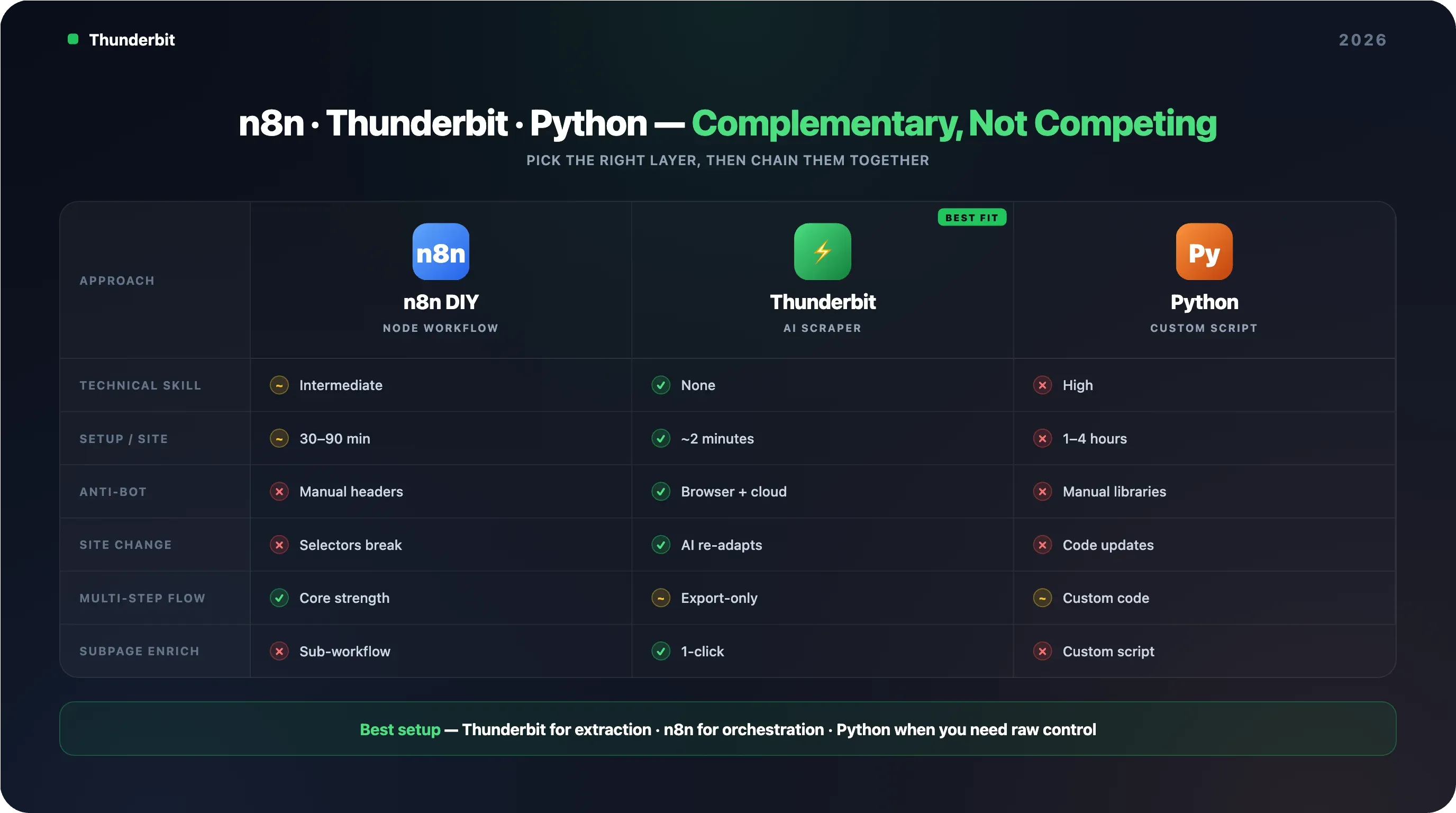
| Factor | n8n DIY Scraping | Thunderbit | Python Script |
|---|---|---|---|
| Technical skill needed | Intermediate (nodes + CSS selectors) | None (AI fields सुझाता है) | High (coding) |
| Setup time per new site | 30–90 min | ~2 minutes | 1–4 hours |
| Anti-bot handling | Manual (headers, proxies, APIs) | Built-in (browser/cloud modes) | Manual (libraries) |
| Maintenance when site changes | Manual selector updates | Zero — AI automatically adapt करता है | Manual code updates |
| Multi-step workflow support | Excellent (core strength) | Sheets/Airtable/Notion में export | Custom code चाहिए |
| Cost at scale | n8n hosting + proxy/API costs | Credit-based (~1 credit per row) | Server + proxy costs |
| Subpage enrichment | Manual — अलग sub-workflow बनाना पड़ता है | 1-click subpage scraping | Custom scripting |
निष्कर्ष: n8n का इस्तेमाल तब करें जब scraping किसी complex, multi-step automation chain का हिस्सा हो। Thunderbit तब इस्तेमाल करें जब workflows बनाए बिना जल्दी data चाहिए। Python तब इस्तेमाल करें जब आपको maximum control चाहिए और developer resources उपलब्ध हों। ये competitors नहीं, बल्कि complementary tools हैं।
असली दुनिया के n8n वेब स्क्रैपिंग workflows जिन्हें आप सीधे copy कर सकते हैं
Forum users बार-बार पूछते हैं: "Has anyone chained these into multi-step workflows?" — तीन खास workflows, यानी असली node sequences, जिन्हें आप आज ही बना सकते हैं।
Workflow 1: Ecommerce Competitor Price Monitor
Goal: competitors की कीमतें रोज़ track करना और कम होने पर alert पाना।
Node chain: Schedule Trigger (daily, 8 AM) → Code (paginated URLs बनाएँ) → Loop Over Items → HTTP Request → HTML (product name, price, availability निकालें) → Wait (2s) → (loop back) → Code (data clean करें, prices normalize करें) → Google Sheets (rows append करें) → IF (price below threshold?) → Slack (alert भेजें)
Complexity: 8–10 nodes, प्रति competitor site 30–60 min setup।
Thunderbit shortcut: Thunderbit का Scheduled Scraper + popular ecommerce sites के लिए instant templates मिनटों में इसी तरह के परिणाम दे सकते हैं, और Google Sheets में free export भी मिलता है।
Workflow 2: Sales Lead Generation Pipeline
Goal: एक business directory को weekly scrape करना, leads को clean और categorize करना, और CRM में push करना।
Node chain: Schedule Trigger (weekly, Monday 9 AM) → HTTP Request (directory listing page) → HTML (name, phone, email, address निकालें) → Code (deduplicate, formatting साफ़ करें) → OpenAI/Gemini node (industry के हिसाब से categorize करें) → HubSpot node (contacts बनाएं)
Note: n8n में native HubSpot node है — CRM push के लिए useful। लेकिन scraping और cleaning के चरणों के लिए अभी भी manual CSS selector work चाहिए।
Thunderbit shortcut: Thunderbit का free Email Extractor और Phone Number Extractor एक क्लिक में contact info निकाल सकते हैं, बिना workflow बनाए। AI labeling extraction के दौरान ही leads को categorize कर सकता है। जिन्हें पूरा automation chain नहीं चाहिए, वे n8n setup पूरी तरह छोड़ सकते हैं।
Workflow 3: Real Estate New Listing Tracker
Goal: Zillow या Realtor.com पर नई listings weekly देखना और एक digest email भेजना।
Node chain: Schedule Trigger (weekly) → HTTP Request (listing pages) → HTML (address, price, bedrooms, link निकालें) → Code (data clean करें) → Google Sheets (append) → Code (पिछले हफ्ते के data से तुलना करें, नई listings flag करें) → IF (नई listings मिलीं?) → Gmail/SendGrid (digest भेजें)
Note: Thunderbit में Zillow जैसी sites के लिए instant scraper templates हैं — CSS selectors की ज़रूरत नहीं। जिन्हें पूरा automation chain चाहिए (scrape → compare → alert), उन्हें n8n से फायदा होता है; जिन्हें सिर्फ़ listing data चाहिए, उनके लिए Thunderbit बेहतर है।
और workflow inspiration के लिए n8n की community library में price monitoring with AI + alerts, real estate scraping with Google Sheets, और ScrapeNinja + AI के साथ किसी भी web page को structured JSON में बदलने वाले templates मौजूद हैं।
अपने n8n web scraping pipelines को smoothly चलाने के लिए tips
Production scraping में 20% build और 80% maintain करना होता है।
Rate Limits से बचने के लिए Batching और Delays इस्तेमाल करें
HTTP Request node पर batching चालू करें और batches के बीच 1–3 seconds की wait time रखें। Concurrent requests IP ban पाने का सबसे तेज़ तरीका हैं। यहाँ थोड़ा धैर्य बाद में बहुत pain बचाता है।
Silent Failures के लिए Workflow Executions मॉनिटर करें
n8n के Executions tab में failed runs देखें। अगर किसी site का layout बदल जाए तो scraped data चुपचाप खाली लौट सकता है — workflow "succeed" हो जाएगा, लेकिन आपकी spreadsheet blanks से भर जाएगी।
एक Error Trigger workflow set करें जो किसी भी failed execution पर चले और Slack या email alert भेजे। Production pipelines के लिए यह अनिवार्य है।
आसान Updates के लिए CSS Selectors को बाहर Store करें
CSS selectors को Google Sheet या n8n environment variables में रखें ताकि workflow को edit किए बिना उन्हें update किया जा सके। जब site layout बदले, आपको सिर्फ़ selector एक जगह update करना होगा।
कब AI-Powered Scraper पर Switch करना चाहिए, यह पहचानें
अगर आप लगातार CSS selectors update कर रहे हैं, anti-bot measures से जूझ रहे हैं, या scrapers maintain करने में data use करने से ज़्यादा time लगा रहे हैं, तो Thunderbit जैसे AI-powered tool पर विचार करें, जो हर बार site को fresh पढ़ता है और अपने-आप adapt हो जाता है। complementary-stack approach अच्छा काम करती है: Thunderbit fragile extraction layer संभालता है (वही हिस्सा जो site के <div> बदलते ही टूट जाता है), Google Sheets या Airtable में export करता है, और n8n native Sheets/Airtable trigger से नई rows उठाकर orchestration संभालता है — CRM updates, alerts, conditional logic, multi-system fan-out।
समापन: अपनी team के हिसाब से सही pipeline बनाएँ
n8n web scraping तब बहुत powerful है जब आपको scraping को किसी बड़े automation workflow के एक step के रूप में चाहिए। लेकिन इसके लिए technical setup, लगातार maintenance, और pagination, anti-bot, और scheduling configuration के साथ धैर्य चाहिए। इस guide में हमने पूरा pipeline cover किया: आपका पहला workflow, pagination (वह हिस्सा जिसे हर tutorial छोड़ देता है), scheduling, anti-bot troubleshooting, n8n कहाँ fit बैठता है इसका ईमानदार आकलन, और ऐसे real-world workflows जिन्हें आप copy कर सकते हैं।
मैं इसे ऐसे देखता हूँ:
- n8n इस्तेमाल करें जब scraping किसी complex, multi-step automation chain का हिस्सा हो — CRM updates, Slack alerts, AI enrichment, conditional routing।
- Thunderbit इस्तेमाल करें जब workflows बनाए बिना जल्दी data चाहिए — AI field suggestion, pagination, anti-bot, और export 2 clicks में संभालता है।
- Python इस्तेमाल करें जब maximum control चाहिए और आपके पास developer resources हों।
और सच कहूँ तो, कई teams के लिए सबसे अच्छा setup दोनों का मेल है: extraction के लिए Thunderbit, orchestration के लिए n8n। अगर आप देखना चाहते हैं कि AI-powered scraping आपके n8n workflow से कैसे compare करता है, तो Thunderbit का free tier आपको छोटे पैमाने पर experiment करने देता है — और Chrome extension कुछ ही seconds में install हो जाती है। Video walkthroughs और workflow ideas के लिए Thunderbit YouTube channel देखें।
AI वेब स्क्रैपिंग के लिए Thunderbit आज़माएँ Get Started Free
FAQs
क्या n8n JavaScript-heavy websites को scrape कर सकता है?
Built-in HTTP Request node के साथ अकेले नहीं। HTTP Request node raw HTML लाता है और JavaScript execute नहीं कर सकता। JS-rendered sites के लिए आपको n8n-nodes-puppeteer जैसा community node या ScrapeNinja, Firecrawl जैसी scraping API integration चाहिए जो server-side JavaScript render करे। Thunderbit Browser और Cloud दोनों scraping modes में JS-heavy sites को native रूप से संभालता है।
क्या n8n web scraping free है?
n8n का self-hosted version free और open source है। n8n Cloud पहले free tier देता था, लेकिन अप्रैल 2026 तक सिर्फ़ 14-day trial available है — उसके बाद plans $24/month से शुरू होते हैं, 2,500 executions के लिए। Protected sites scraping के लिए paid proxy services ($5–15/GB for residential proxies) या scraping APIs ($49–200+/month, volume पर depend) भी लग सकती हैं।
n8n web scraping की तुलना Thunderbit से कैसे होती है?
n8n multi-step automations के लिए बेहतर है, जहाँ scraping बड़े workflow का एक हिस्सा हो (जैसे scrape → enrich → filter → CRM में push → Slack पर alert)। Thunderbit तेज़, no-code data extraction के लिए बेहतर है, जिसमें AI-powered field detection, automatic pagination, और sites बदलने पर zero maintenance मिलती है। कई teams दोनों को साथ इस्तेमाल करती हैं — extraction के लिए Thunderbit, orchestration के लिए n8n।
क्या मैं n8n से login-required sites से data scrape कर सकता हूँ?
हाँ, लेकिन इसके लिए HTTP Request node में cookies या session tokens configure करने पड़ते हैं, जो maintain करना tricky हो सकता है। Thunderbit का Browser Scraping mode user के logged-in Chrome session को automatically inherit करता है — अगर आप logged in हैं, तो Thunderbit वही scrape कर सकता है जो आप देख रहे हैं।
अगर मेरा n8n scraper अचानक data लौटाना बंद कर दे तो क्या करूँ?
सबसे पहले n8n Executions tab में errors देखें। सबसे common कारण site layout change होता है, जिससे आपके CSS selectors टूटते हैं — workflow "success" दिखाता है लेकिन खाली fields देता है। Chrome के Inspect tool में selectors verify करें, workflow में (या external selector sheet में) उन्हें update करें, और फिर से test करें। अगर anti-bot block आ रहा है, तो इस guide के troubleshooting decision tree को follow करें। लंबे समय की reliability के लिए, Thunderbit जैसे AI-powered scraper पर विचार करें जो layout changes के साथ automatically adapt करता है।
Learn More