
Amazon Web Scraper क्या होता है
एक Amazon Web Scraper ऐसा काम का टूल या सॉफ़्टवेयर है, जिसे Amazon.com से अपने-आप data निकालने के लिए बनाया गया है। इस data में product details, prices, reviews, stock status और बहुत कुछ शामिल हो सकता है। Amazon Web Scraper इस्तेमाल करने का मुख्य मकसद market research, price comparison या competitive analysis के लिए बड़ी मात्रा में data इकट्ठा करना होता है। आप keyword research के लिए user reviews भी जमा कर सकते हैं, ताकि products के pros और cons को और अच्छे से समझ सकें।
Amazon Web Scraper की मुख्य खूबियाँ
- Automated Data Extraction: अब बार-बार copy-paste करने की झंझट खत्म। Web scraper आपके लिए web pages से ज़रूरी data अपने-आप निकाल सकता है।
- Customizable Scraping: अपनी ज़रूरत के हिसाब से scraper को इस तरह set किया जा सकता है कि वह सिर्फ़ खास data tags ही निकाले, जिससे targeted analysis आसान हो जाता है।
- Data Export: Scraped data को Excel, CSV या JSON जैसे popular formats में आसानी से export करें, ताकि आगे analysis किया जा सके।
- Regular Updates: Scraping के लिए interval तय करके Amazon product database को हमेशा up-to-date रखें।
- Review Scraping: अक्सर competitive analysis के लिए review section से pros और cons निकालना ज़रूरी होता है।

Amazon Web Scraper का उपयोग क्यों करें
Amazon global e-commerce market का एक बड़ा नाम है, जो अपने विशाल product selection, competitive pricing और आसान shopping experience के लिए जाना जाता है। यह businesses को दुनिया भर के potential customers तक पहुँचने का platform देता है, जिससे market reach बढ़ती है। Customers Amazon को online shopping के लिए एक भरोसेमंद जगह मानते हैं, जिससे merchants के लिए sales environment भी reliable बनता है। साथ ही, Amazon का logistics network तेज़ और efficient delivery services का फायदा देता है, जिससे customer satisfaction बढ़ती है। Amazon product visibility और sales बढ़ाने के लिए sponsored product ads और brand promotions जैसे marketing tools भी देता है।
E-commerce businesses के लिए Amazon पर sales data का analysis करना बेहद ज़रूरी है। Amazon Web Scraper की मदद से businesses ऐसा data इकट्ठा कर सकती हैं जिससे market trends और consumer behavior को समझा जा सके, product strategies और inventory management को बेहतर बनाया जा सके। इससे businesses Amazon platform पर बेहतर तरीके से scale कर सकती हैं, sales और brand recognition बढ़ा सकती हैं, और long-term growth हासिल कर सकती हैं। चलिए देखते हैं कि analysis के लिए Amazon Web Scraper का उपयोग कैसे किया जा सकता है:
Market Research
-
SKU Selection
सही SKU (Stock-Keeping Unit) चुनना e-commerce success के लिए बहुत अहम है। इसका असर product assortment, supply chain efficiency और inventory management पर पड़ता है। Amazon Web Scraper की मदद से आप लाखों products में से precise data निकालकर sales trends और customer preferences का analysis कर सकते हैं। उदाहरण के लिए, Amazon के Product Detail Pages scrape करके आप product prices, review counts और seller ratings जैसी key जानकारी आसानी से पा सकते हैं, जिससे गहरी market analysis की जा सकती है। यह data बताता है कि कोई SKU market potential रखता है या नहीं, और कौन-से products सबसे अच्छा perform कर रहे हैं। एक ही category के products की तुलना करके businesses अपनी product selection को optimize कर सकती हैं, popular SKUs का stock बढ़ा सकती हैं और slow-moving items का stock घटा सकती हैं, जिससे inventory turnover बेहतर होता है।
-
Customer Trends पहचानना
बड़ी संख्या में product reviews, ratings और customer feedback scrape करके web scraper आपको consumer demand में आए बदलाव जल्दी पहचानने में मदद करता है। उदाहरण के लिए, review data analyze करके आप यह जान सकते हैं कि consumer किसी product में सबसे ज़्यादा किस चीज़ को महत्व देते हैं, जैसे “affordable pricing” या “durability.” यह जानकारी product development, pricing strategy और marketing strategy के लिए बहुत उपयोगी होती है। इसके अलावा, purchase frequency और समय के साथ sales trends का data scrape करके आप seasonal demand को पहले से भाँप सकते हैं और inventory तथा marketing activities की बेहतर planning कर सकते हैं।

Competitive Analysis
-
Price Monitoring
competitive माहौल में price monitoring e-commerce businesses के लिए बेहद ज़रूरी है। Amazon Web Scraper real-time product data scrape करके competitors की price changes पर नज़र रखने में मदद करता है, जिससे आपकी pricing competitive बनी रहती है। यह feature खास तौर पर dynamic pricing strategies लागू करने में उपयोगी है। Similar products की price information जुटाकर businesses ऐसे flexible pricing models बना सकती हैं जो market demand, inventory levels और competitor pricing के आधार पर automatically prices adjust करें, ताकि profits अधिकतम हों।
-
Review Scraping
Customer reviews सिर्फ़ product sales को ही प्रभावित नहीं करते, बल्कि market demand में बदलाव का संकेत भी देते हैं। Amazon Web Scraper businesses को भारी मात्रा में customer feedback इकट्ठा करने में मदद करता है। AI-based web scrapers summaries बनाने और sentiment analysis करने में भी सहायता कर सकते हैं, जिससे आपके products और competitors पर लोगों की राय का बेहतर insight मिलता है और आप समय रहते product design या marketing strategy में बदलाव कर सकते हैं।
Cost Comparison
Amazon Web Scraper की मदद से businesses समान products की prices, shipping costs और promotions का data इकट्ठा करके पूरी cost comparison कर सकती हैं। इस data का analysis cost structure को optimize करने, अनावश्यक खर्च कम करने और profit margins बढ़ाने में मदद करता है। जो businesses Amazon पर vendors खोज रही हैं, उनके लिए यह अलग-अलग vendors की shipping fees और sales prices की जानकारी भी देता है, जिससे लागत घटती है और market में competitive pricing बनाए रखना आसान होता है। परिणामस्वरूप gross profit margins बेहतर होते हैं।
AI से Web Scraping आज़माएँ
इसे आज़माइए! आप देखते-देखते क्लिक कर सकते हैं, explore कर सकते हैं, और workflow चला सकते हैं।
Amazon Product Data Scrape करने के लिए AI का उपयोग क्यों करें
AI की तेज़ प्रगति के साथ, AI-driven Amazon Web Scraper tools data scraping की दुनिया में नया दौर ला रहे हैं। ये traditional web scraping की तुलना में कई सुविधाएँ देते हैं। AI न सिर्फ़ data collection को तेज़ और अधिक accurate बनाता है, बल्कि technical barrier को भी काफी कम करता है, जिससे e-commerce businesses के लिए नए और अधिक innovative मौके बनते हैं।
Non-Tech Users के लिए आसान
जिन users का technical background नहीं है, उनके लिए AI-supported Amazon Web Scraper tools बहुत सुविधाजनक हैं। Traditional scrapers में जहाँ manual coding और API calls की ज़रूरत पड़ती है, वहीं यहाँ user सिर्फ़ अपनी scraping requirements बताता है और desired column names चुनता है। AI अपने-आप suitable scraping plans और suggestions तैयार कर देता है, जिससे programming और complex settings की परेशानी खत्म हो जाती है। यह user-friendly feature e-commerce teams को बिना professional technical staff के भी efficiently data हासिल करने में मदद करता है, productivity बढ़ाता है और non-technical staff को advanced data collection tools आसानी से इस्तेमाल करने देता है।
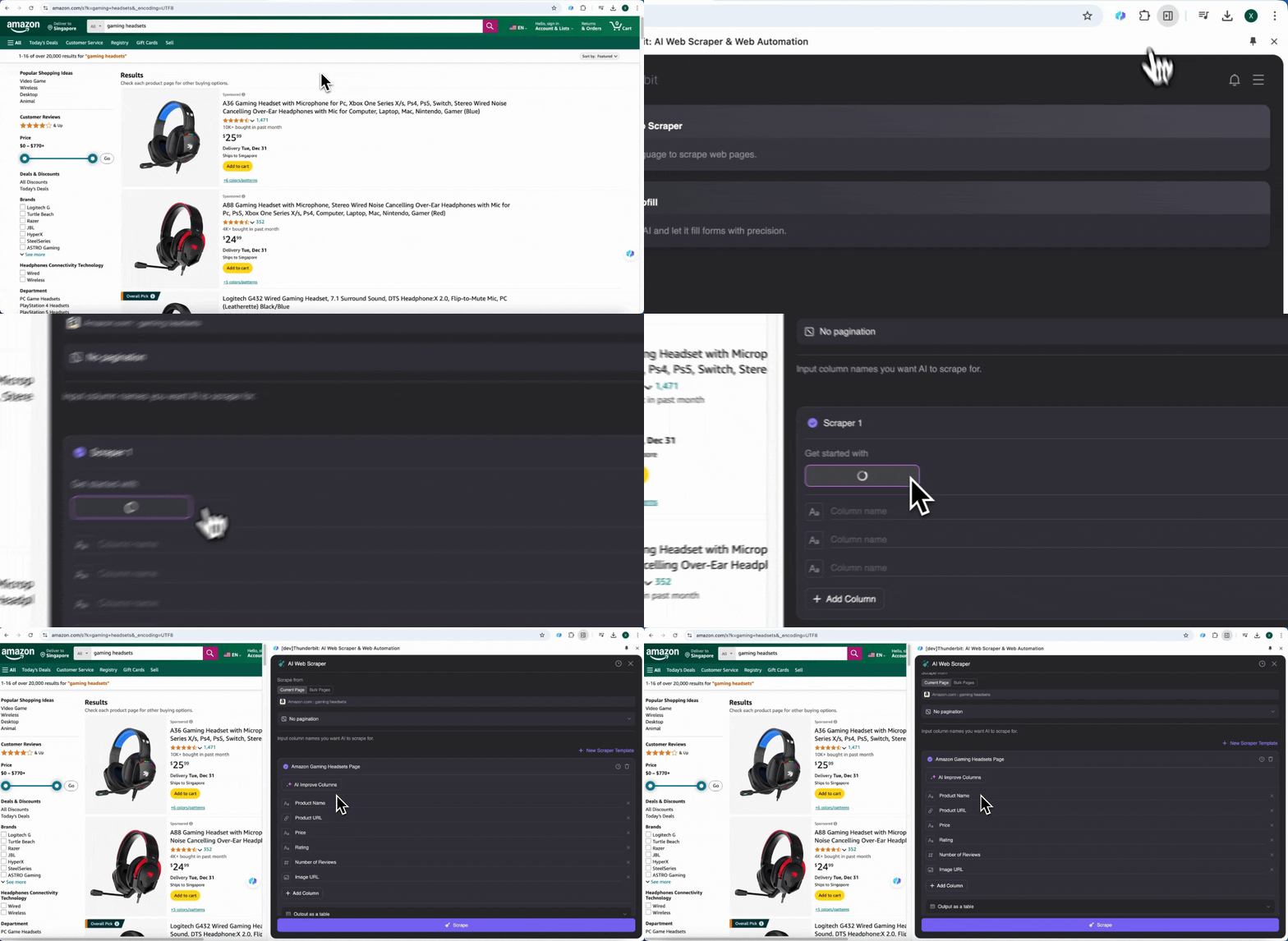
तेज़ और असरदार
AI का उपयोग करके किसी भी वेबसाइट से data scrape करें Get Started Free
AI Web Scraper data extraction process को automate कर देता है, जिससे scraping की speed और efficiency काफी बढ़ जाती है। ये tools complex website structures और dynamic content को जल्दी संभाल सकते हैं, target data को सटीकता से capture करते हैं, manual intervention कम करते हैं, और overall scraping accuracy बढ़ाते हैं। साथ ही, AI Web Scraper operational costs घटाने और workflows को optimize करने में भी मदद करता है, जिससे businesses कम लागत में high-quality data प्राप्त कर सकती हैं और decision-making के लिए बेहतर support मिलता है।
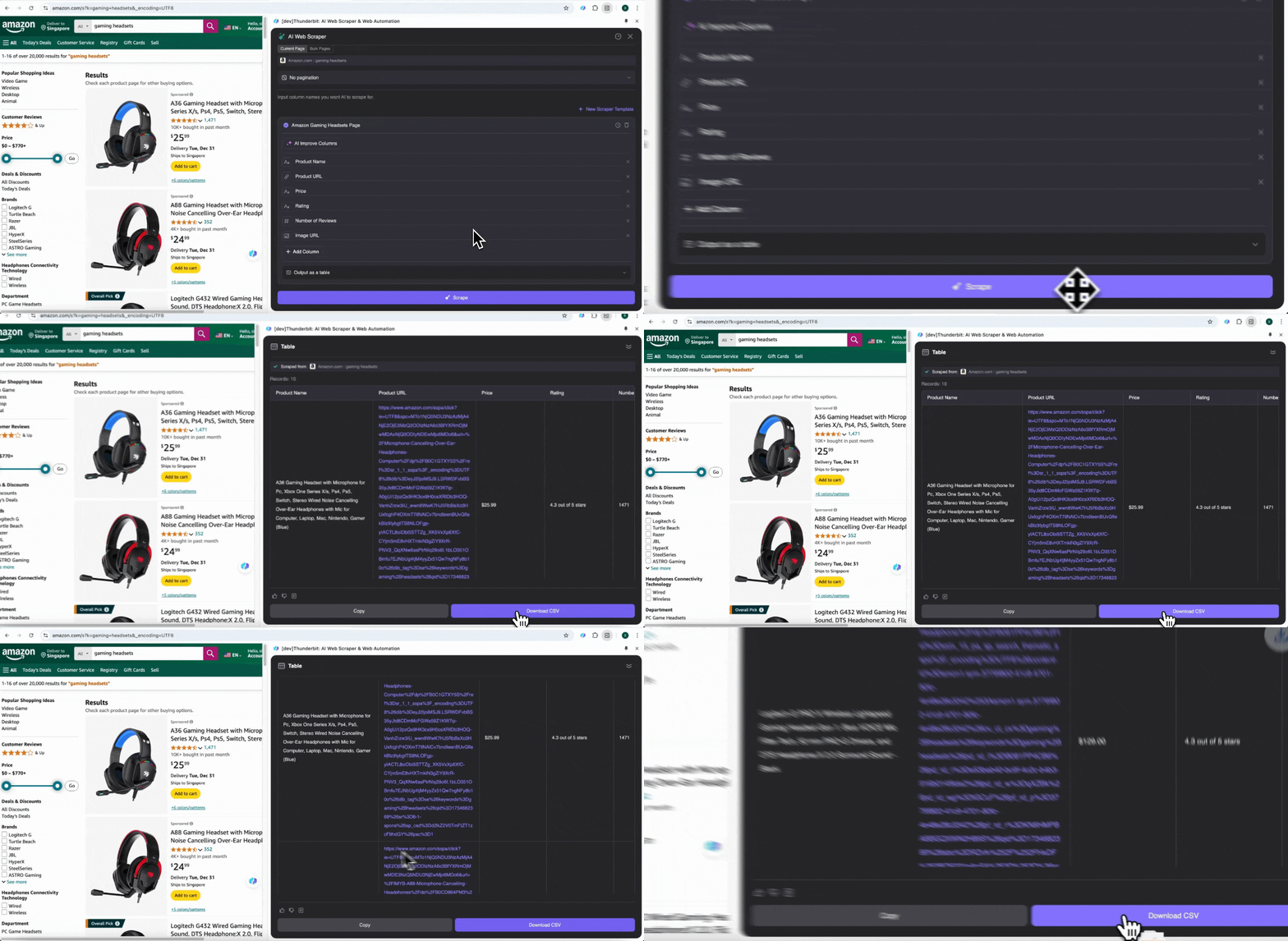
Intelligent Analysis और Suggestion
Traditional web scrapers की तुलना में AI web scraper intelligent workflow automation का बड़ा फायदा देता है। AI tools data को automatically categorize कर सकते हैं, summarize कर सकते हैं, और useful insights दे सकते हैं। उदाहरण के लिए, businesses AI की मदद से अलग-अलग products को predefined categories में auto-sort कर सकती हैं, या बड़ी मात्रा में review data analyze करके keywords और sentiment trends निकाल सकती हैं, जिससे customer feedback को बेहतर तरीके से समझा जा सके और products को optimize किया जा सके। AI scraped data के आधार पर customized reports भी बना सकता है, और automatically market analysis तैयार करके businesses को popular product features और संभावित market opportunities जल्दी पहचानने में मदद करता है।
Smart Output और Export Options
AI-based Amazon web scraper का इस्तेमाल data output को और स्मार्ट बनाता है। Traditional coding methods आम तौर पर सिर्फ़ CSV files तक सीमित रहती हैं, जबकि AI tools CSV के साथ-साथ scraped data को Google Sheets और Notion जैसे collaboration platforms पर भी automatically export कर सकते हैं, जिससे data analysis और sharing आसान हो जाती है। उदाहरण के लिए, आप data को सीधे Google Sheets में डालकर real-time analysis कर सकते हैं, या इसे team collaboration tools के साथ जोड़ सकते हैं, ताकि departments के बीच information flow बिना रुकावट चले। यह intelligent export method teams को तेज़ी से decisions लेने में मदद करती है और overall business flexibility तथा responsiveness बढ़ाती है।
Thunderbit के साथ Scraping: AI Web Scraper
Thunderbit एक नया, शक्तिशाली और comprehensive AI-driven web scraper tool है, जिसे आपकी data needs को ध्यान में रखकर बनाया गया है। Thunderbit की मदद से user Amazon से product details, price changes या customer reviews जैसी जानकारी आसानी से इकट्ठा कर सकते हैं और उसे तुरंत valuable business insights में बदल सकते हैं। आइए देखें कि Thunderbit e-commerce businesses की competitiveness कैसे बढ़ा सकता है।
सबसे पहले Thunderbit website पर जाएँ और Thunderbit web scraper extension को अपने Chrome browser में जोड़ें। फिर Google account या किसी दूसरे email से login करें।
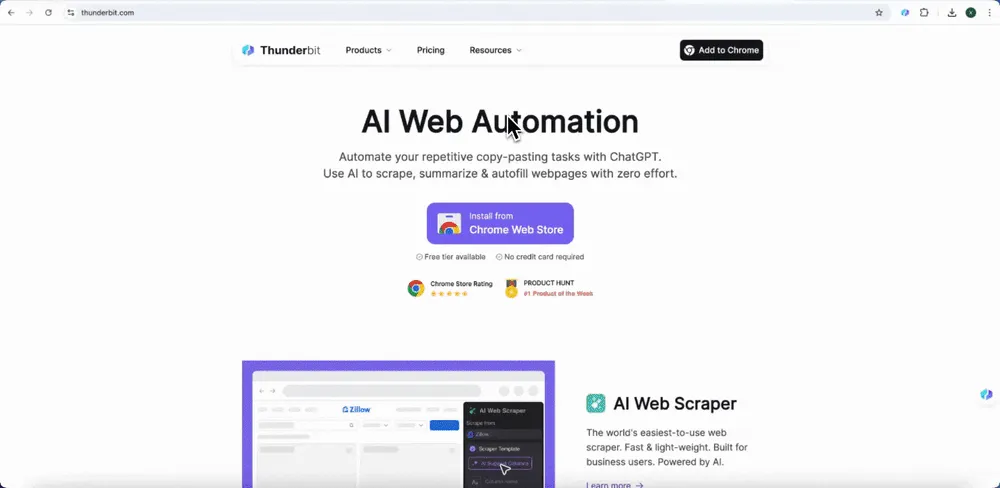 इसके बाद आप Thunderbit के built-in pre-built web scraper या AI web scraper का उपयोग करके Amazon product data और reviews scrape कर सकते हैं। तरीका यह है:
Option 1: Thunderbit का Pre-Built Web Scraper इस्तेमाल करें
Thunderbit ने user needs के आधार पर कई pre-built web scraper tools बनाए और optimize किए हैं, जिनमें Amazon के लिए खास scraper module भी शामिल है। इन tools में Amazon की complex data structure के लिए पहले से templates तैयार हैं, इसलिए आपको खुद scraping logic बनाने की ज़रूरत नहीं पड़ती और process तेज़ व आसान हो जाता है।
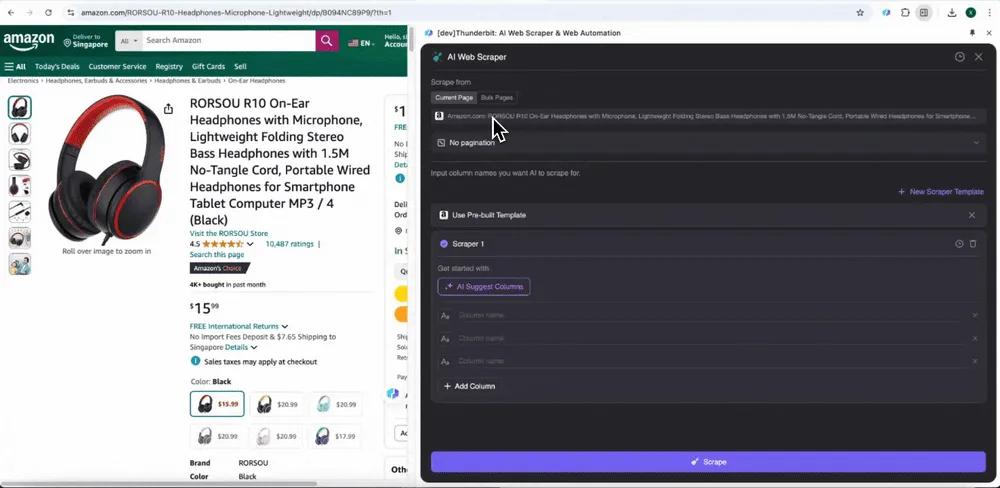
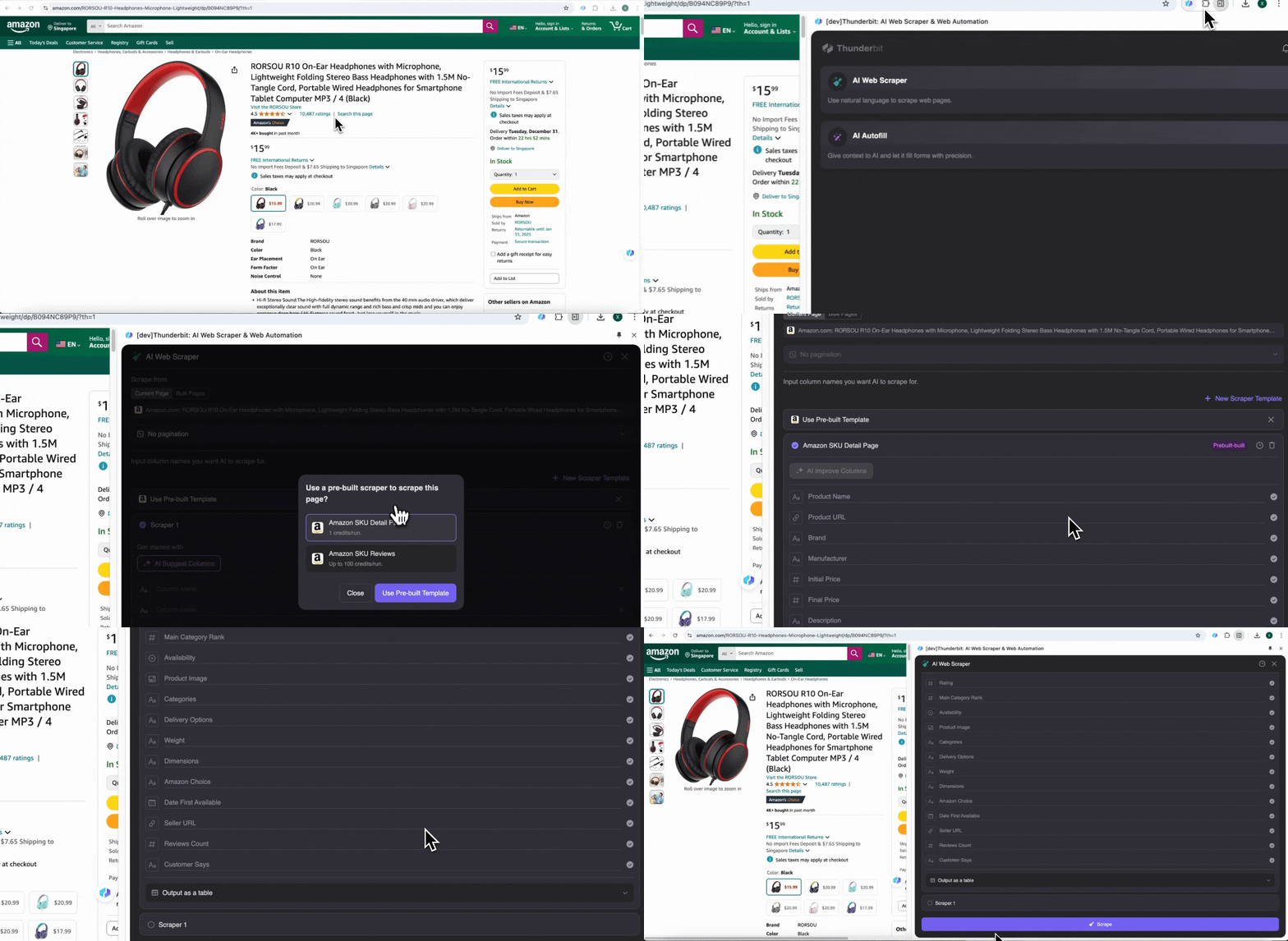
Amazon पर कोई भी page खोलें, फिर Thunderbit extension का web scraper खोलें। आपको rich column names वाले दो pre-built scrapers दिखेंगे। जिन column names को आप extract करना चाहते हैं, बस उन्हें check करें, और बाकी काम Thunderbit कर देगा।
-
Amazon Collect SKU Reviews
यह tool product name, product URL, overall product rating, detailed rating breakdown, product rating count, review title, author name, review content, review country और keywords जैसे pre-built column names देता है। जिन columns की ज़रूरत हो, उनके सामने box tick करें, scrape पर click करें, और ज़रूरी SKU review data तुरंत हासिल करें ताकि product review analysis किया जा सके।
-
Amazon Collect SKU Details
यह tool product name, product URL, brand, manufacturer, initial price, final price, description, rating, categories, delivery options और seller URL जैसे pre-built column names देता है। जिन fields की ज़रूरत हो, उन्हें चुनें, scrape पर click करें, और SKU detail data तुरंत प्राप्त करें। चाहे आप vendors, manufacturers और delivery options की तुलना कर रहे हों, market research कर रहे हों, अपने SKU की price competitiveness आँक रहे हों, या latest sales trends समझना चाहते हों—यह data analysis में बहुत काम आता है।
Option 2: Thunderbit का AI Web Scraper इस्तेमाल करें
Step 1: Amazon.com खोलें और sidebar में “AI Web Scraper” पर क्लिक करें
अपने Chrome browser में Amazon website खोलें, जिस page से data लेना है उसे search या browse करके ढूँढें, फिर Chrome के top right corner में Thunderbit icon पर click करके extension खोलें और "AI Web Scraper" चुनें।
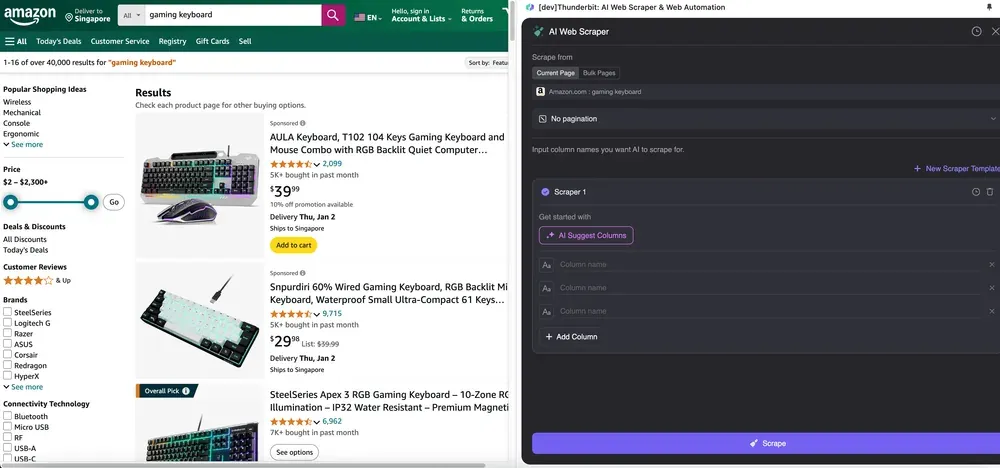
Step 2: जिन Data Fields को निकालना है उन्हें Customize करें
अगर आपको data tags समझ नहीं आ रहे, तो AI Suggest Columns पर click करें और Thunderbit की AI को अपने-आप भरोसेमंद column names बनाने दें। आप natural language में data labels का वर्णन भी कर सकते हैं और उन्हें column name field में भर सकते हैं। Data type बदलने के लिए icons चुनें—चाहे image, URL, text, number या कोई और format हो—और उसी के हिसाब से data scrape करें।
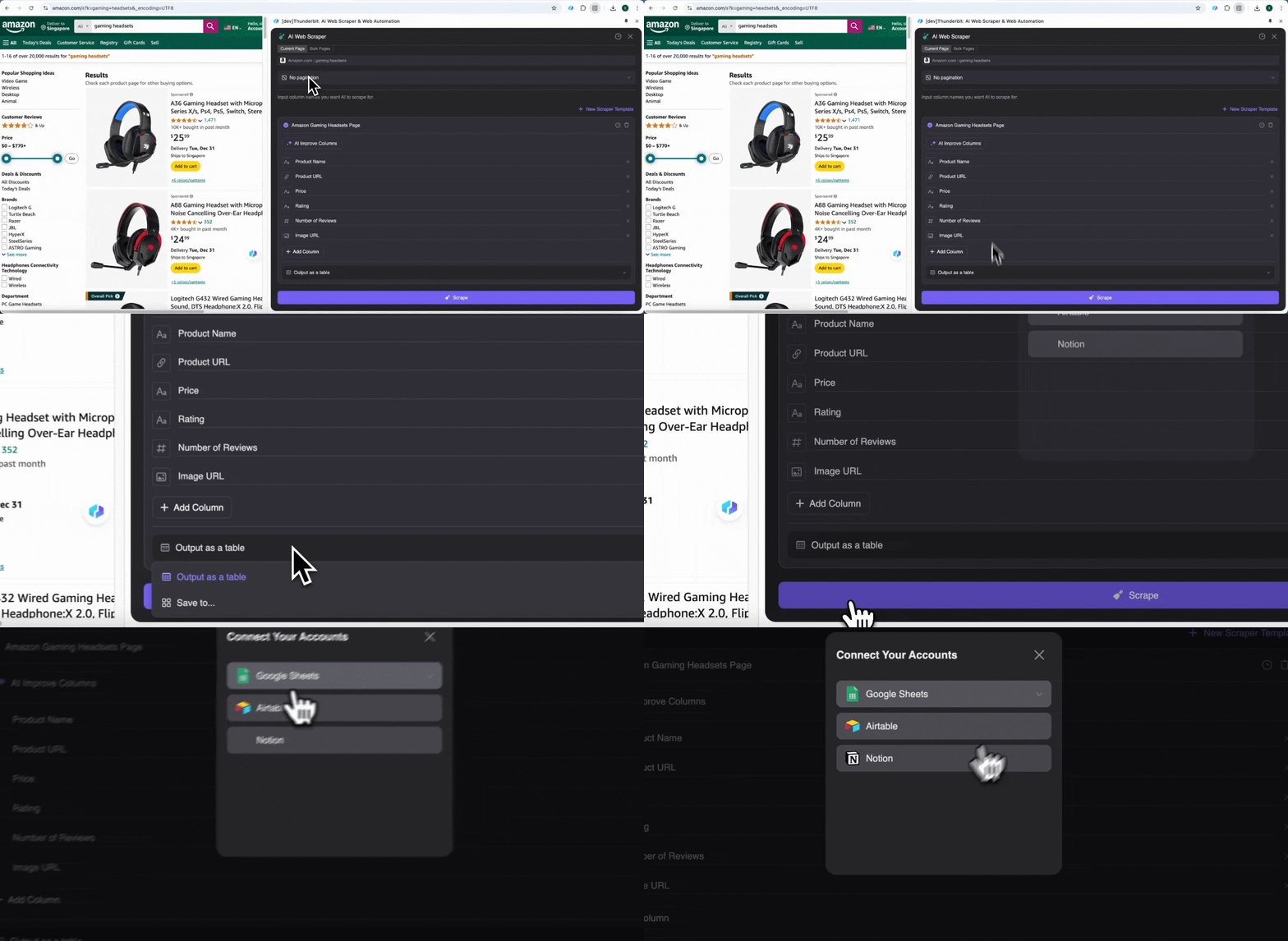
Initial column names भरने के बाद, आप AI Improve Columns चुनकर AI से entries को और बेहतर बनवा सकते हैं। आप अपनी ज़रूरत के अनुसार column detailed instructions भी जोड़ सकते हैं। उदाहरण के लिए, आप product type column से products को men’s, women’s, children’s और अन्य categories में classify करने के लिए कह सकते हैं। Thunderbit उस column की हर entry को आपके तय किए गए चार categories में बाँट देगा। आप यह भी कह सकते हैं कि price column में सभी prices को current exchange rate के हिसाब से आपकी पसंद की currency में बदला जाए, ताकि analysis के लिए सही values मिलें और currency inconsistency की चिंता न रहे।
आखिर में, आप data की मात्रा भी customize कर सकते हैं। Amazon product pages के लिए आप pagination चुन सकते हैं और जितने pages scrape करने हैं, उनकी संख्या तय कर सकते हैं। Thunderbit अपने-आप अगले pages खोलकर हर page से data निकाल लेगा।
Step 3: Scraped Data डाउनलोड करें या Table के रूप में Export करें
Thunderbit web scraper extension की मदद से आप scraped data को कई तरीकों से export कर सकते हैं। Output को table के रूप में चुनें, फिर CSV file को अपने सिस्टम में डाउनलोड करें, या Google Sheets में save करें, Notion या Airtable चुनें। अपने account में login करके इन online file management और collaboration platforms पर सीधे export करें।
AI की मदद से 2 क्लिक में Amazon SKU Data scrape करें
Traditional Web Scraper के साथ Scraping
Latest AI tools के अलावा, आप lightweight code और APIs वाले traditional web scraper tools का उपयोग करके भी Amazon product data scrape कर सकते हैं।
ScraperAPI: API की मदद से Amazon product data को JSON format में पाएं
ScraperAPI एक efficient Amazon data collection API देता है, जो Amazon से product details, reviews, search results और pricing information scrape करके structured JSON format में लौटाता है। API का उपयोग करके scraping करने का तरीका यह है:
Step 1: Python Environment सेट करें
सबसे पहले सुनिश्चित करें कि आपके सिस्टम में Python 3.8 या उससे नया version installed है। इसके बाद Pandas जैसी analysis libraries और requests तथा BeautifulSoup जैसी web scraping libraries install करें। ये libraries web pages से data निकालने में मदद करती हैं।
Step 2: ScraperAPI Account बनाएं
ScraperAPI website पर जाकर free account बनाएं और अपनी API key लें। इस key का उपयोग code में ScraperAPI को access करने के लिए किया जा सकता है।
Step 3: Code तैयार करें
Local system पर एक dedicated directory बनाएं और data scraping के लिए Python script लिखें। एक basic workflow इस तरह है:
- Amazon Search URL लें: Amazon पर अपना desired product खोजें और search results page का URL कॉपी करें।
- Requests बनाएं: ScraperAPI अपने-आप search results के पहले पाँच pages पर loop चला देगा। हर page का URL base URL में &page= और corresponding page number जोड़कर बनाया जाता है।
- Requests भेजें और Data Parse करें: ScraperAPI को request भेजने के लिए get() method का उपयोग करें। अगर request सफल हो (status code 200), तो page content parse करके desired ASIN (Amazon Standard Identification Number) निकालें।
- Detailed Product Data लें: Structured data endpoint को call करके आप हर ASIN के लिए detailed product information पा सकते हैं, जिसका उपयोग आगे data analysis में किया जा सकता है।
Step 4: और Tutorials देखें
और विस्तृत उपयोग guides के लिए ScraperAPI official blog tutorial देखें।
ScrapFly: Block होने से बचें और बड़े पैमाने पर Scrape करें
Amazon data scrape करते समय IP blocking, CAPTCHAs और dynamic content loading जैसी anti-scraping techniques अक्सर scraper developers के लिए चुनौती बनती हैं। ScrapFly एक शक्तिशाली API देता है जो इन anti-scraping mechanisms को bypass करने में मदद करता है और data scraping को सुचारु बनाता है।
ScrapFly की core features में शामिल हैं:
- Rotating Residential Proxies: IP blocking से बचने के लिए automatically IP addresses बदलता है।
- JavaScript Rendering: dynamic content loading को संभालता है और JavaScript-rendered web pages scrape करता है।
- Full Browser Automation: browser control करके scroll, input और click जैसी actions कराता है।
- Format Conversion: HTML, JSON, Text या Markdown में scrape करने देता है।
कुछ ही lines of code से आप ScrapFly की मदद से Amazon data scrape कर सकते हैं। एक simple example:
import scrapfly_sdk

# Create a client
client = scrapfly_sdk.ScraperClient(api_key="your_api_key")

# Send a request
response = client.scrape(url="<https://www.amazon.com/s?k=product_name>")

# Get the returned data
print(response.json())
ScrapFly का उपयोग करके आपका scraper Amazon की अलग-अलग anti-scraping mechanisms को संभाल सकता है, जिससे data scraping success rate बढ़ती है। चाहे simple product information scrape करनी हो या complex review analysis, ScrapFly एक बहुत उपयोगी tool है। अधिक जानकारी के लिए ScrapFly की official tutorial देखें।
Python के साथ Scraping: Traditional Coding Methods
जो लोग coding में सहज हैं, वे Python code लिखकर भी Amazon product data scrape करने की कोशिश कर सकते हैं। नीचे एक simple example दिया गया है।
Step 1: ज़रूरी चीज़ें तैयार करें
सबसे पहले अपने project के लिए एक अलग folder बनाएं।
mkdir amazonscraper
फिर इस folder में ज़रूरी libraries install करें।
pip install beautifulsoup4
pip install requests
अब कोई भी नाम देकर एक Python file बनाइए। यही हमारी main file होगी, जिसमें code रहेगा। मैं इसे amazon.py नाम दे रहा हूँ।
Step 2: Target Page पर GET Request भेजें
अब requests library का उपयोग करके target page पर GET request भेजते हैं।
import requests
from bs4 import BeautifulSoup

target_url = "<https://www.amazon.com/s?k=gaming+headsets&_encoding=UTF8>"

headers = {
    "accept-language": "en-US,en;q=0.9",
    "accept-encoding": "gzip, deflate, br",
    "User-Agent": "Mozilla/5.0 (Windows NT 10.0; Win64; x64) AppleWebKit/537.36 (KHTML, like Gecko) Chrome/111.0.0.0 Safari/537.36",
    "accept": "text/html,application/xhtml+xml,application/xml;q=0.9,image/avif,image/webp,image/apng,*/*;q=0.8,application/signed-exchange;v=b3;q=0.7"
}

response = requests.get(target_url, headers=headers)
Step 3: Amazon Products Data Scrape करें
अब हमें तय करना है कि target page से क्या निकालना है।
# Check if the request was successful
if response.status_code == 200:
    # Parse the page content
    soup = BeautifulSoup(response.content, 'html.parser')

    # Find all product listings
    products = soup.find_all('div', {'data-component-type': 's-search-result'})

    # Iterate over each product and extract details
    for product in products:
        # Extract product title
        title = product.h2.text.strip()

        # Extract product price
        price = product.find('span', 'a-price')
        if price:
            price = price.find('span', 'a-offscreen').text.strip()
        else:
            price = "Price not available"

        # Extract product rating
        rating = product.find('span', 'a-icon-alt')
        if rating:
            rating = rating.text.strip()
        else:
            rating = "Rating not available"

        # Print product details
        print(f"Title: {title}")
        print(f"Price: {price}")
        print(f"Rating: {rating}")
        print("-" * 40)
else:
    print(f"Failed to retrieve the page. Status code: {response.status_code}")
FAQs
1. क्या amazon.com scrape करना legal है?
हाँ, Amazon का public data scrape करना legal है! कई दूसरे websites की तरह, Amazon अपने product listings और अन्य public information को सबके लिए browse करने लायक उपलब्ध कराता है। आप इस freely available data को scrape और collect कर सकते हैं, और इससे Amazon की terms of service का उल्लंघन नहीं होता।
2. क्या मैं Thunderbit को free में try कर सकता हूँ?
हाँ, Thunderbit free page extraction और data extraction features देता है। कुछ advanced functionalities के लिए payment की ज़रूरत हो सकती है, लेकिन basic data extraction capabilities आम तौर पर free होती हैं।
3. Amazon से क्या-क्या data scrape किया जा सकता है?
आप Amazon से product titles, prices, descriptions, reviews, ratings और seller information जैसी कई तरह की जानकारी scrape कर सकते हैं। यह data market research, price monitoring और competitive analysis के लिए काफ़ी उपयोगी हो सकता है।
4. Amazon data कितनी बार scrape करनी चाहिए?
इसकी frequency इस बात पर निर्भर करती है कि आप किस तरह का data देख रहे हैं। अगर आप prices या competitor activity पर नज़र रख रहे हैं, तो daily या weekly scraping बेहतर हो सकती है। Product details जैसी अधिक स्थिर जानकारी के लिए monthly scraping पर्याप्त हो सकती है।
और जानें
- AI की मदद से Website Data को Excel में कैसे Scrape करें
- 2025 में 6 Best Twitter (x.com) Scrapers
- AI का उपयोग करके PDF से Data कैसे Scrape करें
AI Web Scraper आज़माएँ Get Started Free