अगर आप सेल्स, मार्केटिंग या रिक्रूटिंग में हैं, तो आपने LinkedIn automation tools के बारे में ज़रूर सुना होगा। Dripify इस कैटेगरी के सबसे चर्चित प्लेटफ़ॉर्म में से एक है, जो LinkedIn outreach का दोहराव वाला काम कम करके lead generation को स्केल करने का वादा करता है। लेकिन क्या यह वाकई इस काम के लिए सबसे अच्छा टूल है? या फिर इससे बेहतर, ज़्यादा user-friendly और किफ़ायती विकल्प मौजूद हैं—खासकर उनके लिए जो complicated setup या coding से बचना चाहते हैं?
मैंने Dripify की features को गहराई से समझने में काफी समय लगाया है, G2 Pricing, Capterra Pricing और Trustpilot जैसी साइटों पर सैकड़ों यूज़र रिव्यू पढ़े हैं, और इसे Thunderbit जैसे नए समाधानों से compare किया है। अगर आप अपनी टीम के लिए Dripify पर विचार कर रहे हैं—या इसके learning curve, pricing, या support से परेशान हैं—तो यह detailed review आपके लिए है। मैं बताऊँगा कि Dripify कहाँ अच्छा है, कहाँ कमजोर पड़ता है, और क्यों Thunderbit तेज़ी से उन लोगों की पहली पसंद बनता जा रहा है जो बिना झंझट web data extraction और outreach automate करना चाहते हैं।
चलिए शुरू करते हैं।
Dripify क्या है?
Dripify एक cloud-based LinkedIn automation platform है, जिसकी शुरुआत 2019 में Austin, Texas से हुई थी — यानी यह कोई अधपका beta product नहीं, बल्कि छह साल की लगातार improvement के साथ एक mature tool है। इसकी सबसे बड़ी खासियत है sales और marketing teams के लिए LinkedIn prospecting को automate करना—जैसे connection requests भेजना, follow-up messages भेजना, और business emails ढूँढना, सब कुछ autopilot पर। इसका मकसद है कि आप “drip” campaigns सेट करें (इसी वजह से नाम Dripify है), उन्हें background में चलने दें, और दिन में सौ बार “Connect” क्लिक करने की बजाय deals close करने पर ध्यान दें।
मुख्य प्रोडक्ट और फीचर्स:
- Automated LinkedIn Campaigns: connect, message, profile visit जैसी actions के साथ multi-step sequences बनाइए। delays जोड़ सकते हैं, conditional logic सेट कर सकते हैं, और आपका outreach तब भी चलता रहेगा जब आपका computer off हो।
- Email Integration: Dripify आपके prospects के business emails ढूँढ सकता है और campaign के हिस्से के रूप में personalized email sequences भेज सकता है, इसलिए आप सिर्फ LinkedIn तक सीमित नहीं रहते।
- Analytics Dashboard: acceptance rates, reply rates और team performance के real-time stats मिलते हैं। यह sales managers के लिए उपयोगी है जो देखना चाहते हैं कि क्या काम कर रहा है और क्या नहीं।
- Team Collaboration: अपनी पूरी टीम onboard कीजिए, outreach को साथ मिलकर manage कीजिए, और एक ही dashboard से सभी का performance ट्रैक कीजिए।
- Smart Inbox & CRM Export: अपनी सारी LinkedIn conversations एक जगह देखिए और जवाब दीजिए, साथ ही lead data को CSV में export कीजिए या CRM updates के लिए दूसरे tools से integrate कीजिए।
- Safety and Autopilot: Dripify cloud में चलता है, human-like activity simulate करता है, और LinkedIn policies के अनुरूप रहने के लिए हर user को dedicated IP देता है।
Dripify का दावा है कि वह दुनिया भर में 40,000 से ज़्यादा companies की sales बढ़ा रहा है, और इसे LinkedIn पर sales automation के लिए premium solution की तरह position किया गया है।
Dripify किसके लिए है?
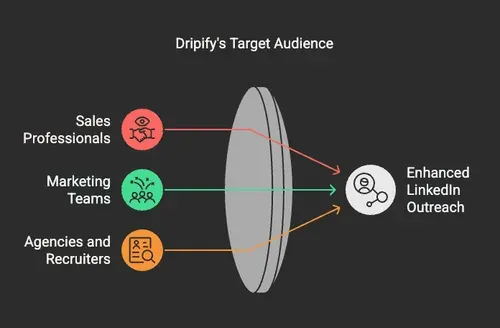
Dripify उन professionals और teams के लिए बनाया गया है जो LinkedIn के साथ ही काम करते हैं। अगर आप B2B sales, marketing, recruiting में हैं, या ऐसी agency चलाते हैं जो LinkedIn lead generation को service के रूप में देती है, तो Dripify सीधे आपके लिए है।
आम यूज़र्स:
- Sales Professionals: business development reps, account executives, और SDRs जिन्हें cold outreach और follow-ups automate करने हैं।
- Marketing and Lead Gen Teams: growth marketers और demand gen specialists जो content promotion या lead capture के लिए LinkedIn campaigns चलाना चाहते हैं।
- Agencies and Recruiters: client accounts के लिए LinkedIn manage करने वाली agencies, या scale पर candidates खोजने वाले recruiters।
अगर आपको हर हफ्ते दर्जनों या सैकड़ों prospects से संपर्क करना पड़ता है, तो Dripify आपका काफी manual काम बचा सकता है। लेकिन यह खास तौर पर उन teams के लिए बेहतर है जिन्हें analytics, collaboration और LinkedIn outreach के लिए एक structured approach चाहिए।
Dripify Pricing Plan
Dripify subscription model पर काम करता है और हर LinkedIn account (user) के हिसाब से charge करता है। Annual billing पर discount मिलता है और तीन मुख्य plans हैं:
- Basic: $39/month से शुरू (annual billing). 1 LinkedIn drip campaign और सीमित daily action quotas देता है।
- Pro: $59/month. Unlimited campaigns, full daily quotas, A/B testing, webhook integrations और data export शामिल हैं।
- Advanced: $79/month. Pro के सभी फीचर्स के साथ team management और enhanced safety features भी मिलते हैं।
अगर आप month-to-month pay करते हैं, तो कीमतें लगभग $59, $79 और $99 per user हो जाती हैं। 7-day free trial है (credit card की ज़रूरत नहीं), और बड़े संगठनों के लिए custom pricing वाला Enterprise plan भी उपलब्ध है।
ध्यान देने वाली बातें:
- हर user के लिए अलग license चाहिए—multi-user discount नहीं मिलता।
- Advanced features (जैसे team analytics) केवल सबसे ऊँचे plan में मिलते हैं।
- अगर टीम बड़ी है, तो खर्च तेज़ी से बढ़ सकता है।
Solo users या छोटे businesses के लिए Dripify, कुछ alternatives की तुलना में, काफ़ी महँगा पड़ सकता है।
Dripify पर यूज़र फीडबैक
मैंने G2 Pricing, Capterra Pricing और Trustpilot पर घंटों रिव्यू पढ़कर यह समझने की कोशिश की कि लोगों को Dripify में क्या पसंद है—और क्या नहीं। जो मिला, वह यहाँ है।
ओवरऑल रेटिंग्स
- G2: 5 में से 4.5 (330+ reviews)
- Capterra: 5 में से 4.7 (476 reviews)
- Trustpilot: 5 में से 4.6 (430+ reviews)
ये scores काफ़ी मज़बूत हैं, लेकिन असली कहानी details में छिपी है।
यूज़र्स को क्या पसंद है
Dripify की सबसे आम तारीफ़ इसकी आसान interface और समय बचाने की क्षमता को लेकर है। यूज़र्स को पसंद है कि campaigns जल्दी set up हो जाते हैं और repetitive काम टूल संभाल लेता है। कुछ highlights:
- “Super simple to use. Very intuitive and easy to implement... Love that it is working away in the background, continually contacting leads and expanding my network!” (G2 Pricing)
- “Definitely helps save time and reach more connections.” (Capterra Pricing)
- यूज़र्स को sequences customize करने, messages personalize करने, और results को real time में ट्रैक करने की सुविधा भी पसंद आती है।
कई sales reps और marketers के लिए Dripify, LinkedIn productivity बढ़ाने के अपने वादे पर खरा उतरता है।
Dripify कहाँ कमज़ोर पड़ता है
लेकिन सब कुछ इतना अच्छा नहीं है। नकारात्मक feedback भी उतना ही ज़रूरी है—खासकर अगर आप इसे अपनी टीम में roll out करने की सोच रहे हैं।
1. Learning Curve और Onboarding में दिक्कत
“Easy to use” होने के दावों के बावजूद, कई यूज़र्स (खासकर beginners) को Dripify का onboarding थोड़ा उलझाऊ लगता है। Built-in tutorial कभी-कभी freeze हो जाता है, और non-technical लोगों के लिए interface भारी लग सकता है।
- “The walk-through guide kept freezing on me!” (G2 Pricing)
- “Could be a bit more streamlined for beginners.” (Viralspy)
अगर आप पहले से LinkedIn automation से परिचित नहीं हैं, तो इसे सीखने और शायद अपनी team को train करने में समय लग सकता है।
2. Pricing और Feature Lock-In
कई यूज़र्स को लगता है कि जो फीचर्स मिलते हैं, उनके हिसाब से Dripify महँगा है—खासकर क्योंकि टीम के लिए कोई discount नहीं है, और advanced features सबसे ऊँचे plan में ही मिलते हैं।
- “No discounts for adding team members.” (G2 Pricing)
- “Had to subscribe to their top plan to get the features I wanted.” (G2 Pricing)
- “Built to take your money.” (G2 Pricing)
अगर आप solo user हैं या छोटी टीम चलाते हैं, तो खर्च जल्दी बढ़ सकता है—और हो सकता है कि आपको ज़रूरी सारे फीचर्स सिर्फ सबसे महँगे plan में ही मिलें।
3. Marketers के लिए कुछ फीचर्स की कमी
कुछ marketers चाहते हैं कि Dripify में LinkedIn Company Page को follow करने के लिए contacts invite करने जैसे और विकल्प हों। Tool outreach के ज़्यादातर basic काम संभाल लेता है, लेकिन कुछ niche use cases छूट जाते हैं।
Dripify समीक्षा पर निष्कर्ष
Dripify एक ताकतवर LinkedIn automation tool है, जो sales और marketing teams के लिए बहुत कुछ ऑफ़र करता है। इसके automation features, analytics और team collaboration tools वाकई उपयोगी हैं, और ज़्यादातर यूज़र्स को productivity में साफ़ बढ़ोतरी दिखती है। G2 और Capterra पर इसकी ऊँची ratings भी इसी बात को साबित करती हैं।
लेकिन यह perfect नहीं है। Beginners के लिए learning curve काफ़ी तेज़ हो सकता है, technical और billing issues भी चिंता का विषय हैं, और pricing model teams या budget-conscious users के लिए friendly नहीं है। अगर आप Dripify चुन रहे हैं, तो समय और पैसे की बचत के मुकाबले संभावित परेशानियों का भी हिसाब लगाइए—खासकर अगर आप tech-savvy नहीं हैं या आपको कई users manage करने हैं।
अगर आप कुछ ऐसा चाहते हैं जो आसान, सस्ता और बेहतर support वाला हो, तो alternatives देखना समझदारी होगी। यहीं पर Thunderbit काम आता है।
Thunderbit का परिचय: Business Users के लिए सबसे आसान AI Web Scraper और Automation Tool
AI की मदद से किसी भी अनुमत वेबसाइट से डेटा निकालें Get Started Free
Thunderbit एक AI Web Scraper Chrome Extension है, जिसे business users के लिए बनाया गया है ताकि वे किसी भी अनुमत वेबसाइट से data scrape कर सकें, repetitive tasks automate कर सकें, और हर हफ्ते घंटों बचा सकें। यह sales, marketing, real estate और ecommerce teams के लिए बना है—लेकिन इतना आसान है कि कोई भी कुछ ही मिनटों में शुरू कर सकता है।
Thunderbit अलग क्यों है?
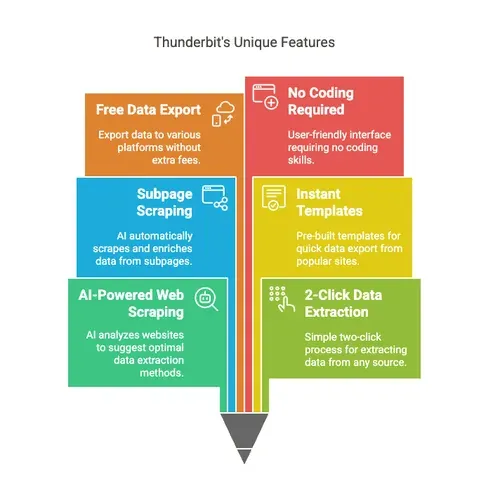
Thunderbit को Dripify और दूसरे automation tools से अलग बनाने वाली बातें:
- AI-Powered Web Scraping: बस “AI Suggest Columns” पर क्लिक कीजिए, और Thunderbit का AI वेबसाइट का विश्लेषण करके structured data निकालने का सबसे अच्छा तरीका सुझा देगा। कोई coding नहीं, कोई complicated setup नहीं—बस point, click और scrape।
- 2-Click Data Extraction: किसी भी अनुमत वेबसाइट, PDF या image से सिर्फ दो clicks में data scrape करें। यह उन non-technical users के लिए बढ़िया है जो scripts या APIs के साथ उलझना नहीं चाहते।
- Subpage Scraping: Thunderbit का AI हर subpage (जैसे product pages, directory listings या team bios) पर अपने आप जा सकता है और आपकी data table को enrich कर सकता है—बिना manual काम के।
- Instant Data Scraper Templates: Amazon, Zillow, Instagram और Shopify जैसी लोकप्रिय sites के लिए pre-built templates से आप एक click में data export कर सकते हैं।
- Free Data Export: अपने scraped data को Excel, Google Sheets, Airtable या Notion में बिना extra fees के export करें।
- AI Autofill: online forms भरने और workflows complete करने के लिए AI का इस्तेमाल करें। बस context चुनिए और enter दबाइए—AI बाक़ी काम कर देगा।
- Scheduled Scraper: तय समय पर automatic scraping सेट करें। बस समय बताइए, URLs डालिए और “Schedule” पर क्लिक कीजिए।
- Email, Phone, and Image Extractors: किसी भी अनुमत वेबसाइट से emails, phone numbers और images एक click में निकालिए—पूरी तरह free।
- Image/Document Parser: PDFs, Word, Excel और images जैसे unstructured documents से tables निकालिए। डॉक्यूमेंट upload कीजिए, AI को data structure करने दीजिए, और “Scrape” पर क्लिक कीजिए।
- No Coding Required: Thunderbit business users के लिए बना है, developers के लिए नहीं। अगर आप browser चला सकते हैं, तो Thunderbit भी चला सकते हैं।
Thunderbit AI Web Scraper मुफ्त में आज़माएँ
Thunderbit Pricing Plans
| Tier | Pricing (Monthly) | Pricing (Yearly) | Yearly Total Price | Credits (Monthly) | Credits (Yearly) |
|---|---|---|---|---|---|
| Free | Free | Free | Free | 6 pages | N/A |
| Starter | $15 | $9 | $108 | 500 | 5,000 |
| Pro 1 | $38 | $16.5 | $199 | 3,000 | 30,000 |
| Pro 2 | $75 | $33.8 | $406 | 6,000 | 60,000 |
| Pro 3 | $125 | $68.4 | $821 | 10,000 | 120,000 |
| Pro 4 | $249 | $137.5 | $1,650 | 20,000 | 240,000 |
आप मुफ्त में शुरू कर सकते हैं और सिर्फ तभी upgrade करें जब आपको और credits की ज़रूरत हो। कोई risk नहीं, free trial के लिए credit card की ज़रूरत नहीं, और आप कभी भी cancel कर सकते हैं।
Thunderbit बनाम Dripify: सीधी तुलना
आइए Thunderbit और Dripify को आमने-सामने रखते हैं, ताकि आप साफ़ देख सकें कि कौन सा टूल कहाँ चमकता है—और कहाँ Thunderbit आगे निकल जाता है।
| Feature | Dripify 💼 | Thunderbit⚡ |
|---|---|---|
| Primary Use Case | LinkedIn automation (outreach, messaging) 🔗 | AI web scraping, data extraction, automation 🤖 |
| Ease of Use | Moderate (learning curve for beginners) 🧗♂️ | Extremely easy (2-click AI-powered scraping) 🖱️✨ |
| Onboarding | Can be clunky, some users report issues 😕 | Seamless, no training required 🚀 |
| Pricing | $39–$79/month per user (no team discounts) 💸 | Starts at $15/month, pay-as-you-go credits, generous free tier 💰 |
| Data Export | CSV export, some integrations 📄 | Free export to Excel, Google Sheets, Airtable, Notion 📊 |
| Email/Phone/Image Extraction | Limited, may require add-ons 📉 | Included for free 📦 |
| Scheduled Automation | Yes (for LinkedIn campaigns) ⏰ | Yes (for permitted recurring web data workflows) 🔄 |
| Subpage Scraping | No 🚫 | Yes (AI visits subpages automatically) 🧭 |
| Templates for Popular Sites | No 📭 | Yes (Amazon, Zillow, Instagram, Shopify, etc.) 🛍️ |
| AI Autofill | No ❌ | Yes (completely free) 🧠✅ |
| Support | Mixed reviews, slow response reported 🐢 | Fast, helpful, with clear documentation and video tutorials 🎥📘 |
| Team Collaboration | Yes (higher-tier plans) 👥 | Not team-focused, but easy for anyone to use 🧍♂️👍 |
| Billing Transparency | Some users report issues ⚠️ | Transparent, no hidden fees, cancel anytime ✅💡 |
| Free Trial | 7 days, no credit card 🗓️ | Free tier, no credit card, upgrade only if needed 🆓🔓 |
| Best For | Sales/marketing teams focused on LinkedIn 📈 | Anyone who needs to scrape data or automate web tasks 🌐📤 |
मैं Thunderbit की सलाह क्यों देता हूँ (खासकर non-technical users के लिए)
दोनों tools को टेस्ट करने और सैकड़ों यूज़र रिव्यू पढ़ने के बाद, मेरा साफ़ निष्कर्ष यह है:
- अगर आप ऐसी sales team हैं जो LinkedIn पर काम करती है और advanced outreach automation चाहती है, तो Dripify एक अच्छा विकल्प है—लेकिन learning curve, ज़्यादा लागत और support-related परेशानियों के लिए तैयार रहिए।
- अगर आप अनुमत websites, PDFs, images, ecommerce pages, directories, या internal research workflows से data extraction automate करना चाहते हैं, तो Thunderbit बेहतर चुनाव है।
Thunderbit का AI-based approach इसका मतलब है कि अच्छे results पाने के लिए आपको tech expert होने की ज़रूरत नहीं। Pricing fair है, support responsive है, और आप free में शुरुआत कर सकते हैं। साथ ही, आपको subpage scraping, instant templates और free data export जैसे फीचर्स मिलते हैं, जो Dripify देता ही नहीं।
अगर आप complicated tools से परेशान हो चुके हैं, या hidden fees और slow support से निराश हैं, तो Thunderbit ज़रूर आज़माइए। आप Thunderbit Chrome Extension डाउनलोड करके कुछ ही मिनटों में data scraping शुरू कर सकते हैं—credit card की ज़रूरत नहीं।
Thunderbit को मुफ़्त में आज़माएँ और फर्क देखें
संक्षेप में: Dripify एक शक्तिशाली LinkedIn automation tool है, लेकिन यह सभी के लिए नहीं है। Learning curve, pricing और support issues इसे beginners, छोटी टीमों, या hassle-free experience चाहने वालों के लिए कम आकर्षक बनाते हैं।
दूसरी तरफ, Thunderbit business users के लिए बनाया गया है जो बिना झंझट web data extraction और repetitive tasks automate करना चाहते हैं। यह आसान है, किफ़ायती है, और ऐसे फीचर्स से भरा है जो आपका काम सरल बनाते हैं।
Thunderbit के साथ मुफ़्त में scraping शुरू करें
और पढ़ें
अगर आप web scraping, automation, और Thunderbit की दूसरे tools से तुलना के बारे में और जानना चाहते हैं, तो ये resources देखें:
- Sales Automation क्या है? Beginners के लिए गाइड
- B2B Lead Generation के लिए LinkedIn का उपयोग कैसे करें
- Sales Success के लिए Multichannel Outreach क्यों ज़रूरी है
- 10 LinkedIn Outreach Templates जो सच में काम करते हैं
- Automation के साथ अपनी Sales Workflow कैसे आसान बनाएं
AI Web Scraper आज़माएँ Get Started Free