
अंतिम समीक्षा और अपडेट: अगस्त 2026.
ब्राउज़र वर्कफ़्लो, विज़ुअल प्रोजेक्ट्स और डेवलपर पाइपलाइनों के लिए 6 स्क्रीन स्क्रैपिंग टूल
स्क्रीन स्क्रैपिंग से कई तरह के काम समझे जा सकते हैं: ब्राउज़र में पहले से दिख रही जानकारी को कैप्चर करना, बार-बार किए जा सकने वाले विज़ुअल वर्कफ़्लो को रिकॉर्ड करना, कस्टम क्रॉलर बनाना, या किसी एप्लिकेशन से डेटा-एक्सट्रैक्शन API को कॉल करना। इन कामों के मालिक, रखरखाव मॉडल और आउटपुट अलग-अलग होते हैं। असली सवाल यह नहीं है कि किस टूल में फीचर्स सबसे ज़्यादा हैं, बल्कि यह है कि कौन-सा टूल आपके ज़रूरी वर्कफ़्लो के लिए सही बैठता है।
यह गाइड इस वर्कफ़्लो के आधार पर छह मौजूदा टूल्स की तुलना करता है: एक browser-first AI scraper, दो visual project builders, एक Python framework, एक API-first extraction platform, और एक recipe-driven browser extension। इनका उपयोग केवल उसी डेटा के लिए करें जिसे एक्सेस करने की आपको अनुमति है, और अपने प्रोजेक्ट से जुड़े permissions, privacy और site rules को पहले से ध्यान में रखें।
स्क्रीन स्क्रैपिंग टूल कैसे चुनें
किसी सामान्य “easy बनाम powerful” स्केल से शुरू करने के बजाय operating model से शुरुआत करें:
- ब्राउज़र में दिखने वाला डेटा, जिसकी अभी किसी business user को ज़रूरत है: ऐसा browser-first टूल चुनें जो current page को structured table में बदल सके।
- टेस्टिंग और scheduled cloud runs के साथ repeatable visual workflow: Octoparse या ParseHub जैसा visual task builder चुनें।
- मेंटेन्ड, code-owned crawler: जब आपकी टीम code लिखने, टेस्ट करने, deploy करने और उसे own करने के लिए तैयार हो, तो Scrapy जैसा framework चुनें।
- API के ज़रिए application को structured data वापस चाहिए: Diffbot जैसे API-first product पर विचार करें।
- Recipe-driven browser task: जब recipe model page से मेल खाता हो और काम स्वाभाविक रूप से browser में ही पूरा होता हो, तब DataMiner जैसे browser extension पर विचार करें।
यह भी तय करें कि results कहाँ जाएँगे, page बदलने पर extraction को कौन maintain करेगा, और क्या source data के लिए collection process अनुमत है।
1. Thunderbit: Browser-First AI Screen Scraping
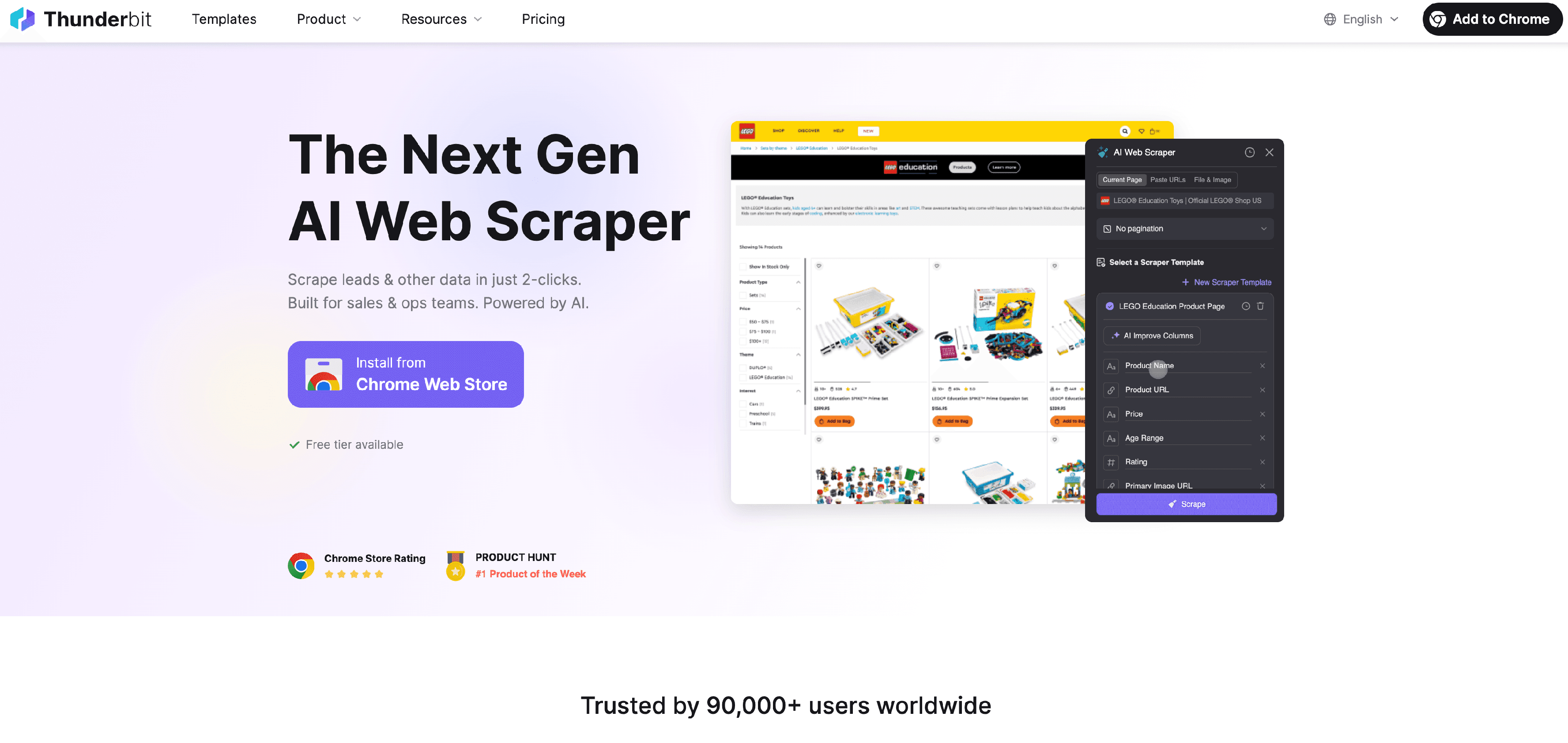
Thunderbit एक agentic web scraper है—वेब स्क्रैपिंग के लिए एक AI agent—जो ऐसे डेटा को इकट्ठा करने के लिए बनाया गया है जिसे user browser में देखने के लिए अधिकृत है। यह browser में दिखने वाली lists, directories, product pages, portals और documents को structured rows में बदलने के लिए बनाया गया है, बिना पहले scraper project बनाने या selectors तय करने की ज़रूरत के।
इसका interaction जानबूझकर छोटा रखा गया है: AI Suggest Fields current page या document के लिए columns सुझाता है; reader उन्हें review या adjust कर लेता है, और फिर Scrape पर एक क्लिक extraction शुरू कर देता है। तैयार table को Excel, Google Sheets, Airtable और Notion जैसे tools में export किया जा सकता है।
किसके लिए सबसे अच्छा: Sales, operations, market research, real-estate और ecommerce teams के लिए, जिन्हें structured authorized web data चाहिए, लेकिन visual flowchart या code repository से शुरुआत नहीं करनी है।
तकनीकी data workflows के लिए, Thunderbit API, MCP server, और CLI भी सपोर्ट करता है। जब browser-oriented extraction को किसी internal system, scheduled process या agent workflow से जोड़ना हो, तब ये interfaces उपयोगी होते हैं।
ब्राउज़र-आधारित स्क्रीन स्क्रैपिंग के लिए Thunderbit आज़माएँ
2. Octoparse: Visual, Repeatable Extraction Workflows
Octoparse एक scraping task को repeatable workflow की तरह organize करता है: URL, template, या custom configuration से task बनाइए; sample test कीजिए; इसे local या cloud में run कीजिए; फिर structured results export कीजिए। इसकी current documentation में clicks, scrolling, pagination और detail pages खोलने जैसी visual actions का वर्णन है।
यह Octoparse को तब अच्छा fit बनाता है जब टीम को ऐसा स्पष्ट visual workflow चाहिए जिसे बड़े run से पहले test किया जा सके, और बाद में scheduled या unattended collection के लिए cloud में चलाया जा सके। Current documentation files, spreadsheets, databases, cloud storage और अन्य connected systems में exports भी बताती है।
किसके लिए सबसे अच्छा: Analysts और operations teams के लिए, जिन्हें reusable visual workflow, test stage, और local-or-cloud operating model चाहिए।
इस पर विचार करें जब: Extraction एक छोटे browser task से ज़्यादा हो और टीम में कोई व्यक्ति site के बदलने पर workflow configuration को संभालेगा।
3. ParseHub: Desktop Visual Projects with Cloud Runs
ParseHub एक visual extraction product है, जिसका केंद्र desktop project builder है। इसके current product material में project को locally build करना, locally test करना, और cloud में projects run करना शामिल है; साथ ही यह अपने API के माध्यम से programmatic access और paid plans पर scheduling भी बताता है।
ParseHub उस टीम के लिए practical विकल्प है जो cloud को runs सौंपने से पहले desktop interface में project assemble और inspect करना पसंद करती है। असली तुलना यह नहीं है कि “हर dynamic page पर सबसे बेहतर” कौन है, बल्कि यह है कि क्या यह project-based desktop workflow उन लोगों के लिए fit बैठता है जो job को configure और maintain करेंगे।
किसके लिए सबसे अच्छा: Researchers, analysts, और छोटे technical teams के लिए, जिन्हें cloud execution और API access के साथ desktop visual project workflow चाहिए।
इस पर विचार करें जब: आप extraction project को locally build और test करना चाहते हों, और फिर ParseHub की cloud features के ज़रिए उसके results retrieve या schedule करना चाहते हों।
4. Scrapy: Code-Owned Crawlers के लिए Python Framework
Scrapy एक open-source Python framework है, जो crawlers और data-extraction projects बनाने के लिए उपयोग होता है। इसकी documentation में spiders, CSS और XPath selectors, items, item pipelines, feed exports, middleware, और projects manage करने के लिए command-line workflow शामिल हैं।
जब extraction logic software codebase का हिस्सा हो, तब यह tool-category सही बैठती है: developers crawler define कर सकते हैं, pipelines में items transform और store कर सकते हैं, और project को अपने deployment तथा data systems से जोड़ सकते हैं। इस control के साथ implementation, testing, infrastructure और updates की ज़िम्मेदारी भी आती है।
किसके लिए सबसे अच्छा: Engineering और data teams के लिए, जिन्हें code-owned data pipeline का हिस्सा बनने वाला customizable crawler चाहिए।
इस पर विचार करें जब: आपके पास Python development capacity हो और आप scraper के behavior, exports, और integrations को अपने ही project में implement और maintain करना चाहते हों।
5. Diffbot: API-First Structured Web Extraction
Diffbot APIs प्रदान करता है जो web content को categorize करके structured JSON में extract करते हैं। इसकी current Extract API documentation automatic analysis के साथ-साथ articles, products, images, videos, discussions, events, lists, और jobs के लिए page-type APIs को कवर करती है; साथ ही यह rule-defined output के लिए Custom API भी देता है।
Diffbot का Crawl product seed URLs से शुरुआत कर सकता है, links follow कर सकता है, और qualifying pages को Extract API तक भेज सकता है, जिससे structured results एक साथ इकट्ठा हो जाते हैं। यह browser extension पर क्लिक करते हुए काम करने या Python crawler बनाने से अलग operating model है: consuming application API के साथ integrate करती है और लौटाए गए data के साथ काम करती है।
किसके लिए सबसे अच्छा: Product, data, और engineering teams के लिए, जो structured page data extract करने या site-level crawl jobs चलाने के लिए API-centered approach चाहते हैं।
इस पर विचार करें जब: आपका मुख्य integration point कोई application या data service हो, और आप content classification तथा extraction को API के ज़रिए प्राप्त करना चाहते हों।
6. DataMiner: Recipe-Driven Browser Extraction
DataMiner Chrome और Edge के लिए एक browser extension है, जो browser-visible page data को CSV या Excel में extract करता है। इसकी current product documentation में extraction के लिए recipes का उपयोग और customized rules बनाना बताया गया है; help center में recipe preview करने, scrape method चुनने और तैयार data डाउनलोड करने का workflow दिखाया गया है।
DataMiner browser-based collection के लिए अच्छा है, जहाँ compatible recipe एक समझदार शुरुआती बिंदु देती है और काम करने वाला व्यक्ति browser के भीतर ही extraction inspect करना चाहता है। इसकी help documentation paginated list के across collection के लिए next-page automation को एक option के रूप में भी बताती है।
किसके लिए सबसे अच्छा: Researchers, growth और operations users, तथा browser-based workflows के लिए, जहाँ recipe selection और output preview महत्वपूर्ण हों।
इस पर विचार करें जब: आप browser extension से काम करना चाहते हों, recipe select या refine करना चाहते हों, preview inspect करना चाहते हों, और spreadsheet-oriented result डाउनलोड करना चाहते हों।
त्वरित तुलना
| Tool | Operating model | Strongest use case |
|---|---|---|
| Thunderbit | Browser-first AI extraction | Authorized, browser-visible content को structured tables में बदलना |
| Octoparse | Visual task builder | Repeatable workflows को local या cloud में build, test, run और export करना |
| ParseHub | Desktop visual projects | Projects को locally configure करना और cloud runs या API access का उपयोग करना |
| Scrapy | Python framework | Codebase में custom crawler बनाना और उसे own करना |
| Diffbot | Extraction and crawl APIs | Structured web data को application या data service में integrate करना |
| DataMiner | Recipe-driven browser extension | Browser-visible data को CSV या Excel में preview और extract करना |
कौन-सा टूल आपके वर्कफ़्लो के लिए सही है?
जब टीम को authorized browser session में पहले से दिख रहे data को structure करना हो, और fields सुझाने में AI की मदद चाहिए, तब Thunderbit इस्तेमाल करें। जब आपको ऐसा visual task चाहिए जिसे build, test और फिर local या cloud में run किया जा सके, तब Octoparse चुनें। जब desktop visual project builder और cloud execution operating team के लिए बेहतर हों, तब ParseHub लें। जब developers को अपने stack में maintained Python crawler चाहिए, तब Scrapy का उपयोग करें। जब receiving system को extraction या crawl API कॉल करनी हो, तब Diffbot उपयुक्त है। जब recipe-driven browser extension और in-browser preview काम के हों, तब DataMiner चुनें।
सबसे अच्छा विकल्प वही है जिसे आपकी टीम लंबे समय तक ज़िम्मेदारी से चला सके। किसी workflow को लागू करने से पहले exact pages, permissions, output quality, maintenance responsibilities, और current plan details की पुष्टि ज़रूर करें।
FAQs
स्क्रीन स्क्रैपिंग क्या है?
स्क्रीन स्क्रैपिंग का मतलब है वेबसाइट या browser interface में दिखाई देने वाली जानकारी को structured data में बदलना। यह शब्द browser extensions और visual builders से लेकर code frameworks और extraction APIs तक, बहुत अलग-अलग तरीकों को कवर करता है।
गैर-तकनीकी business user के लिए कौन-सा टूल सबसे अच्छा है?
Browser में दिखाई देने वाले authorized data के लिए, Thunderbit इस तरह बनाया गया है कि वह selectors या code से शुरू किए बिना fields सुझा सके और table बना सके। जब उसका recipe workflow page से fit बैठता हो, तब DataMiner एक और browser-based विकल्प है।
Developer-owned pipeline के लिए कौन-सा टूल सबसे अच्छा है?
Scrapy एक Python framework है, जो code-owned project में crawler बनाने के लिए उपयोग होता है। Diffbot एक वैकल्पिक मॉडल है, जब integration को crawler implementation own करने के बजाय API के माध्यम से structured extraction consume करनी हो।
क्या मैं recurring workflow schedule कर सकता हूँ?
Octoparse cloud task scheduling document करता है, और ParseHub paid plans पर cloud scheduling बताता है। सही विकल्प इस पर निर्भर करता है कि आपकी टीम visual task, desktop project, API integration, या code-owned deployment में से क्या पसंद करती है।
क्या ये टूल हर वेबसाइट के साथ काम करते हैं?
नहीं। कोई भी product विकल्प exact workflow को test करने की ज़रूरत को खत्म नहीं करता। Page structure, access controls, permissions, allowed use, और required fields—all यह तय करते हैं कि कोई विशेष workflow उपयुक्त और भरोसेमंद है या नहीं।
ब्राउज़र-आधारित स्क्रीन स्क्रैपिंग के लिए Thunderbit आज़माएँ Get Started Free




