
Automated bot traffic now accounts for more than 53% of all web traffic—more than humans generate. If you're scraping data, managing accounts, or verifying ads across regions, you're operating in an environment where anti-bot systems are specifically designed to catch you.
And yet, most guides on "static vs rotating proxies" reduce the whole topic to a two-column table and call it a day. They skip the third concept (sticky sessions), ignore the actual detection mechanics, and never do the cost math at scale. I've spent a lot of time researching proxy providers and AI scraping APIs for our work at Thunderbit, and the reality is messier—and more interesting—than the typical listicle suggests. This guide covers the real three-way distinction most articles get wrong, how anti-bot systems actually detect proxy traffic, what it costs to run 50K pages/day through different proxy types, and 10 tools I'd genuinely consider using. Some are raw proxy providers, some are scraping APIs, and one (ours) skips proxy management entirely.
Try Thunderbit for AI Scraping
Static vs Rotating vs Sticky Proxies: The Three-Way Distinction Most Guides Miss
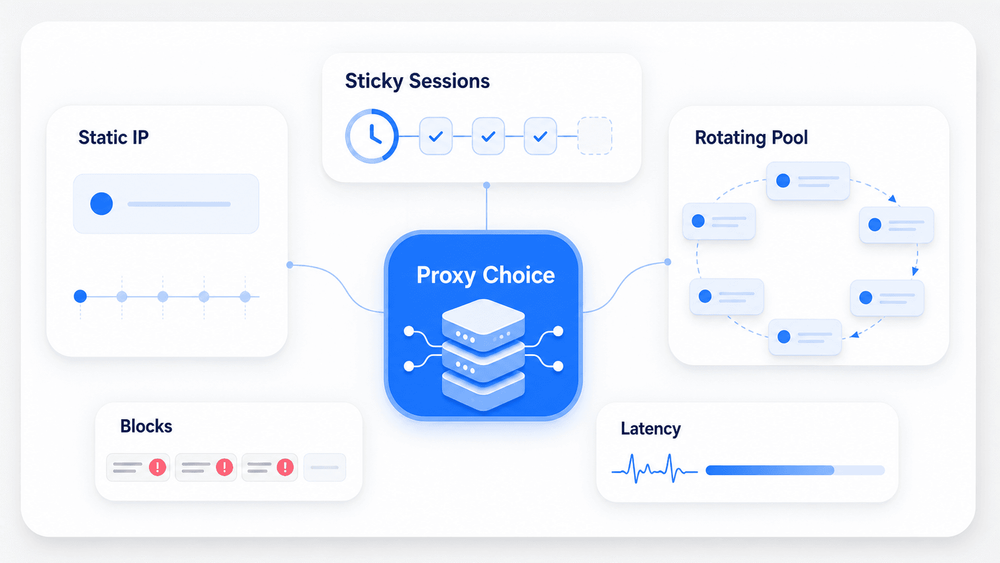
Most proxy comparison articles treat this as a binary: static or rotating. That framing is incomplete, and it leads to bad purchasing decisions. There are three distinct proxy behaviors, and they serve different jobs.
Static proxy: The same IP address, indefinitely, until you manually swap it or the lease expires. Think of it as your home internet connection—same address every day. Useful when a platform expects to see the same identity over time (account management, geo-locked content, rank tracking).
Sticky session: The same IP for a configurable window—maybe 10 minutes, maybe 30, maybe up to 24 hours depending on the provider—then it rotates to a new one. Oxylabs itself acknowledges that "some use sticky proxy and static proxy interchangeably," but they are not the same thing. A sticky session is temporary continuity; a static proxy is permanent continuity. Decodo (formerly Smartproxy) describes sticky sessions as holding one IP for 1, 10, 30, 60 minutes, or custom intervals up to 24 hours.
Rotating proxy: New IP every request, or every few seconds. Maximum anonymity for high-volume work, but zero session continuity unless you layer sticky sessions on top.
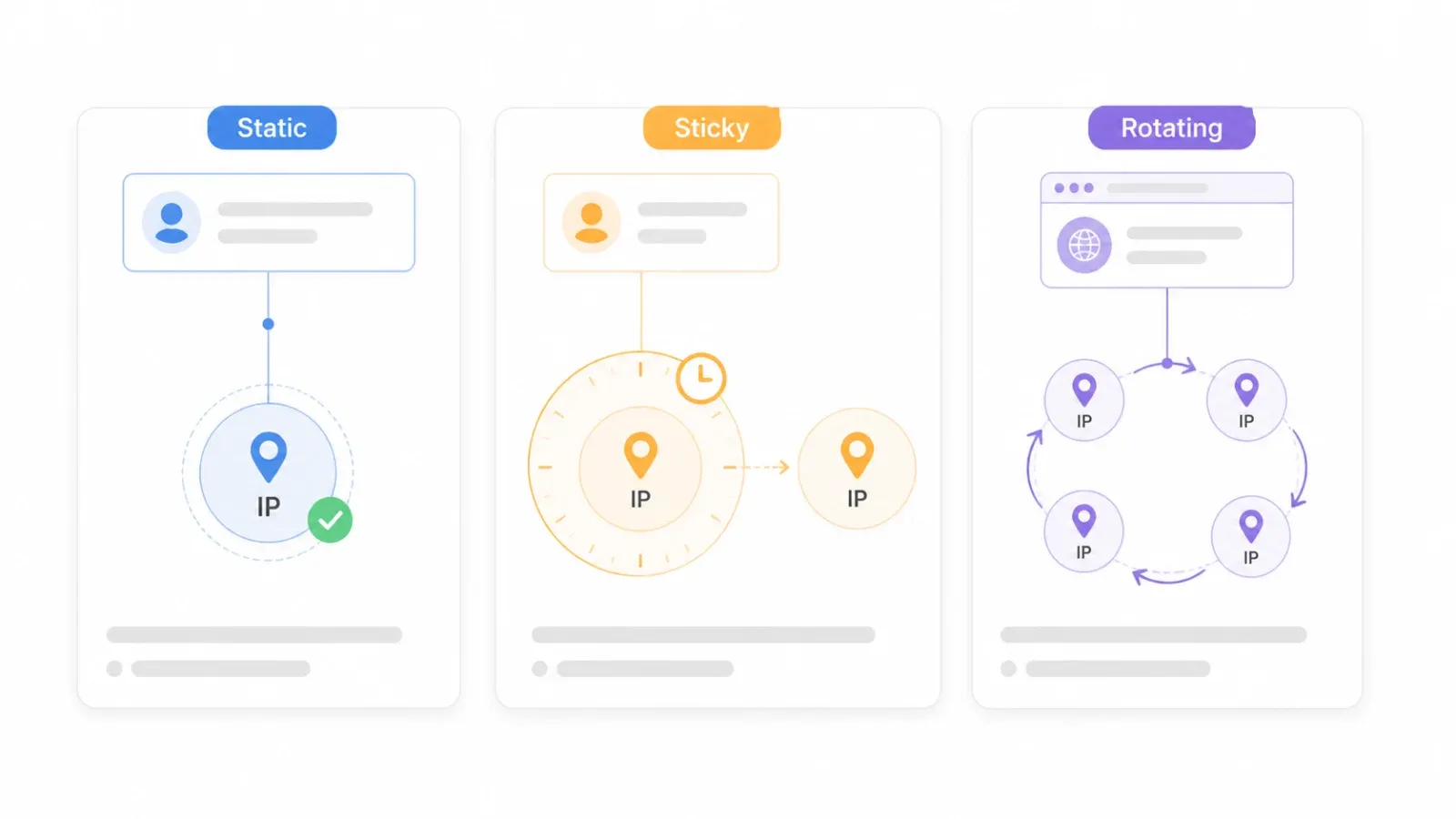
The distinction in table form:
| Attribute | Static Proxy | Sticky Session | Rotating Proxy |
|---|---|---|---|
| IP changes? | Never (same IP indefinitely) | After a set duration (e.g., 10–30 min) | Every request or every few seconds |
| Session persistence | Permanent | Temporary (configurable TTL) | None |
| Typical use case | Account management, geo-locked content | Multi-step scraping (login → navigate → extract) | High-volume scraping, ad verification |
| Detection risk | Higher over time (same fingerprint accumulates history) | Moderate | Lowest for IP-based detection (if residential) |
| Cost model | Usually per IP/month | Part of residential/mobile plans billed per GB | Per GB, per request, or flat-rate |
Why does this matter for tool selection? If you're logging into a platform, adding items to a cart, or filling out a multi-step form, you need sticky sessions—not pure rotation (which would break your session) and not necessarily a permanent static IP (which is overkill and expensive). Forum users on r/proxies regularly confuse these categories, asking whether sticky sessions behave like "regular rotating residential proxies" or like static IPs. The answer: neither. They're a third thing.
How Anti-Bot Systems Actually Detect Static vs Rotating Proxies
Every proxy comparison article mentions "detection risk" in a table cell. Almost none explain how detection actually works. That matters because the detection method determines whether rotating IPs even helps.
Modern anti-bot systems use at least four layers, and rotating your IP only addresses one of them.
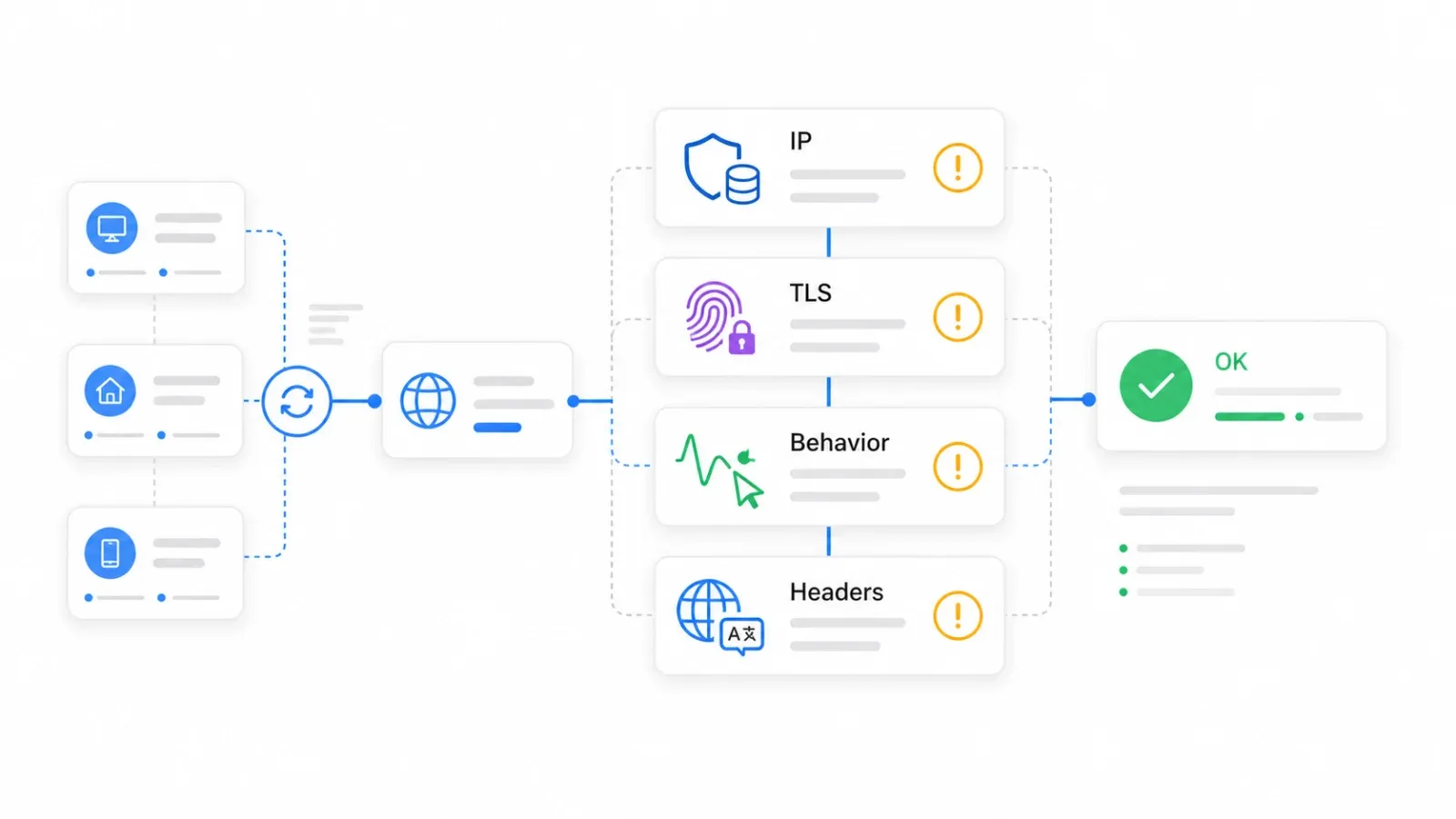
Layer 1: IP Reputation Databases
Datacenter IP ranges come from cloud and hosting ASNs—Amazon, Google, DigitalOcean, etc. Anti-bot vendors maintain databases that pre-flag these ranges. Residential and mobile IPs start with higher trust because they look like normal consumer traffic. Cloudflare's bot documentation frames this through bot scores from 1 to 99, where low scores indicate likely automation. If your IP is from a known datacenter range, you start with a low trust score before you've made a single request.
Layer 2: TLS/JA3/JA4 Fingerprinting
This is the one most proxy buyers don't know about. When your client initiates an HTTPS connection, the TLS handshake reveals characteristics of the software making the request. Cloudflare's JA3/JA4 documentation explains that these fingerprints identify TLS clients based on connection characteristics and act as stable identifiers across different destination IPs. In plain language: if your request claims to be Chrome on macOS but the TLS handshake looks like a Python requests library, rotating the IP doesn't fix that mismatch. The fingerprint follows you.
Layer 3: Behavioral Signals
Request cadence, navigation order, mouse movement (or lack thereof), login patterns, and whether sessions evolve like human browsing. DataDome's detection documentation describes behavioral models that flag abnormal patterns like too many login attempts or inhuman navigation speeds. A 2026 arXiv study on AI browsing agents found behavioral fingerprints were more discriminative than browser fingerprints for distinguishing AI agents from humans.
Layer 4: Header and Environment Consistency
A 2026 academic measurement study of 10,000 websites found that 75% of Chromium-headless-only blocks were caused by header-level signals alone. If your Accept-Language header says en-US but your IP geolocates to São Paulo, that inconsistency is a signal. If your user agent string doesn't match your TLS fingerprint, that's another signal.
The takeaway: rotating IPs reduce IP-based rate limits and reputation accumulation. They do not solve TLS fingerprint mismatches, behavioral anomalies, or header inconsistencies. This is exactly why API-first scraping tools—which handle rendering, fingerprint consistency, and CAPTCHA solving at the infrastructure level—have become a practical alternative to managing all four layers yourself.
Skip proxy management with AI scraping Get Started Free
The Real Cost of Static vs Rotating Proxies at Scale
Pricing is the part most proxy guides skip or gloss over with vague "affordable" language. But billing model + page weight + block rate changes total cost dramatically.
The HTTP Archive's 2025 Web Almanac reports that the median homepage weighs 2.86 MB on desktop. If you're rendering full pages through a metered residential proxy at 50,000 pages/day, that's roughly 143 GB/day, or about 4.29 TB/month. At $5–$15/GB for rotating residential bandwidth, you're looking at $21,450–$64,350/month before retries and blocked requests.
That number shocks most people the first time they see it.
It's also why experienced scrapers block images, fonts, videos, and unnecessary scripts in headless browsers—a practical optimization that can reduce bandwidth by 60–80%. Even with that reduction, you're still looking at 858 GB–1.72 TB/month, which at residential rates is $4,290–$25,740/month.
Direct HTTP or API-level scrapes are much lighter. A practitioner estimate puts direct HTTP requests at 50–200 KB per page versus 1.5–8 MB for full headless rendering. At 200 KB/page, 50K pages/day is only about 300 GB/month.
| Proxy Type | Billing Model | Typical Cost Range | Est. Cost for 50K Pages/Day (full render) | Notes |
|---|---|---|---|---|
| Datacenter (static) | Per IP/month | ~$0.50–$2/IP | Low (flat-rate, no per-GB meter) | High block risk on protected targets |
| ISP / Static Residential | Per IP or per GB | ~$3–$8/GB | Moderate-high | Best for continuity + tougher targets |
| Rotating Residential | Per GB | ~$5–$15/GB | Very high unless bandwidth-optimized | Gold standard for anonymity; costs explode at volume |
| Rotating Datacenter | Per request or per GB | ~$0.50–$3/GB | Low-moderate | Useful for lenient targets |
| AI Scraping API (e.g., Thunderbit) | Per request / credits | Varies by plan | Predictable (no bandwidth meter) | Returns structured data, not raw HTML |
This is exactly why forum users ask about manually rotating static ISP proxies as a cheaper alternative to metered residential bandwidth. The anonymity/cost tradeoff is real, and the right answer depends on your target's anti-bot sophistication and your volume.
Pick Your Proxy Type in Under 60 Seconds
Zero out of six top-ranking competitor articles include a decision flowchart. Here's the logic as a step-by-step decision tree:
-
Do you need the same IP across long sessions? → Yes → Static proxy (ISP/static residential for tough targets, datacenter for easy ones)
-
No → Are you scraping 10K+ pages? → Yes → Rotating proxy (residential for tough targets, datacenter for lenient ones)
-
Do you need session persistence for multi-step tasks (login, cart, forms)? → Yes → Sticky session (residential, with configurable TTL)
-
Do you want to skip proxy management entirely? → Yes → AI scraping API (e.g., Thunderbit API/MCP)
The same logic as a scenario table:
| Your Situation | Best Approach |
|---|---|
| Need raw IP access (account mgmt, geo-testing) | Self-managed static or rotating proxies |
| Scraping structured data from JS-heavy sites | AI scraping API (e.g., Thunderbit /extract) |
| High-volume page crawling for RAG/indexing | AI distill API (e.g., Thunderbit /distill) + batch |
| Multi-step scraping with login | Browser proxies with sticky sessions |
| Budget-constrained, less-protected targets | Datacenter proxies (cheapest) |
Most readers fall into one of these five buckets. Figure out which one you're in before scrolling to the tool list.
What We Looked For in These 10 Tools
Every tool in this list was evaluated on seven criteria:
- Proxy types offered: Does it cover static, rotating, ISP, residential, mobile—or does it abstract the proxy layer away entirely?
- IP pool size: Bigger pools mean better rotation quality and lower reuse risk. But pool-size claims are marketing numbers, not independently audited.
- Pricing model: Per-IP, per-GB, per-request, flat-rate, or credit-based. The billing model matters as much as the unit price.
- Anti-bot / detection handling: Built-in CAPTCHA solving, fingerprint management, or nothing beyond IP diversity.
- Sticky session support: Configurable TTL, maximum duration, reliability.
- Best use case fit: Scraping, account management, SEO, ad verification—each tool has a sweet spot.
- Ease of integration: API quality, SDK availability, dashboard usability, no-code options, MCP/CLI support.
The list starts with Thunderbit (our AI scraping API approach) and then covers nine proxy providers in roughly descending order of scale and feature depth.
1. Thunderbit: Skip Proxy Management with an AI Scraping API
Thunderbit is not a proxy provider. It's the option for when you realize proxies are a means to an end—and what you actually want is structured data.
We built Thunderbit as an AI scraping API that handles proxies, anti-bot measures, CAPTCHAs, and JavaScript rendering at the infrastructure level. You describe what data you want; you get clean, structured output back. No proxy pool configuration, no rotation logic, no fingerprint spoofing.
For developers (the primary use case):
- Open API:
POST /distillconverts a page to clean Markdown.POST /extracttakes a JSON schema and returns structured fields. Both supportrenderModeoptions and batch jobs (up to 100 URLs asynchronously with webhooks). - MCP Server: Claude, Cursor, and other AI agents can call
thunderbit_extractandthunderbit_distillmid-task. The proxy layer is invisible—the agent just gets data. - CLI:
npx @thunderbit/thunderbit-cli extract <url> --schema <json>for terminal, CI, and cron workflows. Batch supports up to 100 distill / 50 extract URLs. - Credit pricing: Distill = 1 credit/URL. Extract = 20 credits/URL. No per-GB bandwidth meter. Starter plan starts at $15/month with 500 credits.
For non-technical users, the Chrome Extension offers 2-click scraping with AI Suggest Fields, exporting to Excel, Google Sheets, Airtable, or Notion. No proxy configuration needed—Thunderbit's cloud scraping handles IP rotation and rendering.
Best for: Structured data extraction from JS-heavy sites, RAG/indexing pipelines, AI agent workflows, and anyone who'd rather spend time on analysis than proxy infrastructure.
Limitations: Not a raw proxy provider. If you need raw IP access for account management, geo-testing, or sneaker bots, a traditional proxy is the better tool.
Pricing: Free tier available; Starter from ~$15/month. Check Thunderbit Pricing for current plans.
For more on how AI web scraping works under the hood, see our guide on AI web scraping.
2. Bright Data: The Largest IP Pool for Static and Rotating Proxies
Bright Data is one of the oldest and most complete proxy suites on the market. Their headline number is 400M+ rotating residential IPs across 195 countries, with city/state/ZIP/ASN targeting, plus 1.3M+ static ISP proxies.
- Proxy types: Residential (rotating), ISP/static residential, datacenter (static and rotating), mobile
- IP pool: 400M+ residential, 1.3M+ ISP—the largest publicly claimed pool
- Anti-bot handling: Web Unlocker product with CAPTCHA solving and fingerprint management; Browser API for headless rendering
- Sticky sessions: Yes, configurable (typically 10–30 min for residential)
Pricing: Residential regular PAYG at $8/GB, with promo rates around $4/GB for larger commitments. Datacenter from ~$0.90/IP. ISP from ~$3.30/IP. The pricing structure is flexible but can get expensive quickly at scale.
Best for: Enterprises needing massive IP diversity, precise geo-targeting, and a full product suite. Teams with the budget and technical staff to navigate a complex dashboard.
Drawbacks: The dashboard has a learning curve. Pricing can be steep for smaller teams—if you're scraping 50K pages/day through residential proxies, the bandwidth bill adds up fast. Users on review sites frequently cite pricing complexity.
3. Oxylabs: Premium Rotating and Static Proxies for Large-Scale Scraping
Oxylabs is another enterprise-grade provider with a strong focus on web scraping infrastructure. They offer residential, static residential/ISP, datacenter, mobile, Web Unblocker, and Scraper API products.
- Proxy types: Residential (rotating), ISP/static residential, datacenter (static and rotating), mobile
- IP pool: Large enterprise pool (exact current number varies by product)
- Anti-bot handling: Web Unblocker and Scraper APIs with rendering and CAPTCHA support
- Sticky sessions: Standard residential session time is 10 minutes, with other configurations available; some setups support up to 24 hours
Pricing: Residential from $6/GB at entry, dropping to $3.50/GB at 1TB volume. ISP proxies priced per IP/month. Positioned as premium.
Best for: Large enterprises with significant data collection needs, teams that want managed scraping solutions alongside raw proxy access.
Drawbacks: Higher price point than mid-market alternatives. May be overkill for small-to-mid scale projects.
4. Smartproxy (Decodo): Budget-Friendly Rotating Proxies with Easy Setup
Smartproxy, now rebranded as Decodo, is a popular mid-market provider known for competitive pricing and a user-friendly dashboard. Many users still search "Smartproxy," so both names appear in the wild.
- Proxy types: Residential (rotating), ISP/static residential, datacenter, mobile
- IP pool: 115M+ residential IPs
- Anti-bot handling: Site Unblocker and scraping API products available
- Sticky sessions: 1, 10, 30, 60 minutes, or custom intervals up to 24 hours across residential, datacenter, ISP, and mobile
Pricing: Residential from ~$3.75/GB at the 3GB tier, dropping with volume. Static residential/ISP from ~$3.33/IP at the low tier. Competitive for the feature set.
Best for: Small-to-mid-size teams wanting a good balance of price and features, first-time proxy buyers who want easy onboarding.
Drawbacks: Smaller IP pool than Bright Data or Oxylabs. Some users report inconsistent speeds depending on target and pool.
5. IPRoyal: Affordable Static and Rotating Proxies with Flexible Pricing
IPRoyal has carved out a niche as the budget-friendly option with a unique selling point: non-expiring residential traffic. Buy bandwidth, use it whenever you want.
- Proxy types: Residential (rotating), ISP/static residential, datacenter, mobile, sneaker proxies
- IP pool: Growing; exact current size varies by source
- Anti-bot handling: Basic—relies on IP quality rather than built-in CAPTCHA solving or fingerprint management
- Sticky sessions: Up to 7 days for residential
Pricing: Residential from $7/GB, discounted to $1.75/GB in bulk. The non-expiring traffic model means you don't lose unused bandwidth at the end of the month.
Best for: Budget-conscious users, variable/seasonal usage patterns, sneaker and ecommerce use cases.
Drawbacks: Smaller IP pool than premium providers. Limited built-in anti-detection features. Less suited for heavily protected targets.
6. NetNut: ISP-Level Static Proxies with Direct Carrier Partnerships
NetNut differentiates itself through direct ISP connectivity—partnering with internet service providers for static residential IPs rather than relying on traditional peer-to-peer proxy networks.
- Proxy types: ISP/static residential (primary focus), rotating residential, datacenter, mobile
- IP pool: 1M+ static residential IPs, residential coverage in 200+ countries
- Anti-bot handling: Unblocker API with CAPTCHA and JS rendering for some products
- Sticky sessions: Yes, with emphasis on long-duration static IP availability
Pricing: Less transparent on the public website—pricing tends to be sales/quote-driven. Residential from approximately $6/GB based on available plan information.
Best for: Teams prioritizing IP quality and session stability, ad verification, brand protection use cases where ISP-grade IPs matter.
Drawbacks: Less brand awareness than Bright Data or Oxylabs. Pricing transparency could be better for self-serve buyers.
7. SOAX: Geo-Targeted Rotating Proxies with Granular Filtering
SOAX is strongest when you need hyper-local targeting. Their filtering goes down to country, region, city, ISP, and ASN level—useful for ad verification and market research where location precision matters.
- Proxy types: Residential (rotating), ISP/static, datacenter, mobile
- IP pool: 155M+ IPs across 195+ locations
- Anti-bot handling: Clean IP pools with low ban rates; Web Data API available
- Sticky sessions: Yes, with customizable refresh rates; HTTP(S), SOCKS5, UDP, and QUIC protocol support
Pricing: Business plan at $4.00/GB with 800GB included ($3,200/month). Enterprise rates start at $0.32/GB for high-volume custom deals.
Best for: Market research teams needing hyper-local data, ad verification across specific geographies and ISPs.
Drawbacks: Can feel complex for simple use cases. Sticky session max duration varies by product—verify before committing.
8. ScraperAPI: Rotating Proxies Bundled into a Scraping-First API
ScraperAPI is not a traditional proxy provider. Like Thunderbit, it abstracts the proxy layer—but it returns raw HTML rather than structured data. Send a URL, get back rendered HTML. ScraperAPI handles proxy selection, rotation, retries, and anti-bot behind the scenes.
- How it works: Single API endpoint; append your target URL and ScraperAPI manages everything
- Anti-bot handling: Built-in CAPTCHA solving, JS rendering, and geo-targeting
- Sticky sessions: Not applicable in the traditional sense—the API manages sessions internally
Pricing: 1,000 free API credits/month. Standard page = 1 credit. Amazon = 5 credits. Google/Bing = 25 credits. LinkedIn = 30 credits. Sites behind Cloudflare/DataDome/PerimeterX add 10 credits per request. Paid plans from ~$49/month for 100K credits.
Best for: Developers who want to skip proxy infrastructure and just get HTML back. Small-to-mid scale scraping.
Drawbacks: Returns raw HTML—you still need to parse and structure it yourself. Can get expensive at very high volume due to credit multipliers on protected sites. Compare with Thunderbit: ScraperAPI gives you HTML; Thunderbit's /extract gives you schema-matched structured JSON.
9. Webshare: No-Frills Datacenter and Rotating Proxies at Low Cost
Webshare is the no-frills option. Extremely affordable datacenter proxies, a free tier with 10 proxies, and straightforward developer-focused tooling. (Webshare was acquired by Oxylabs in 2024, which may affect future product direction.)
- Proxy types: Datacenter (static and rotating), residential (rotating), ISP
- IP pool: 80M+ residential claimed, large datacenter fleet
- Anti-bot handling: Minimal—no built-in CAPTCHA solving; relies on IP diversity
- Sticky sessions: Yes, for residential proxies
Pricing: Rotating residential from $1.40/GB. Static residential from $0.23/IP. Free tier with 10 proxies. Among the cheapest options available.
Best for: Developers on a tight budget, internal tools, scraping less-protected sites, prototyping.
Drawbacks: Datacenter IPs are frequently blocked by major sites. Limited anti-detection. Residential pool quality varies.
10. Storm Proxies: Simple Rotating Proxies with Flat-Rate Pricing
Storm Proxies is one of the only providers offering flat-rate, unlimited-bandwidth rotating proxy plans. The pricing model is simple: pay per proxy port per month, use as much bandwidth as you want.
- Proxy types: Rotating residential, rotating datacenter, dedicated static datacenter
- IP pool: Official page claims 20M+ residential reverse backconnect proxies; third-party reviews suggest the effective pool is smaller
- Anti-bot handling: Minimal—no built-in CAPTCHA or fingerprint management
- Sticky sessions: Rotation every request, or every 3 or 15 minutes
Pricing: Flat monthly rate based on proxy port count. Third-party sources describe plans like 5 residential ports for ~$50/month with unlimited bandwidth. Verify on the checkout page before purchasing.
Best for: Users who want predictable monthly costs with no bandwidth meter. Light-to-moderate scraping where cost predictability matters more than pool size.
Drawbacks: Very small effective IP pool (high reuse risk). Limited geo-targeting. Outdated dashboard. Not suited for heavily protected sites.
Static vs Rotating Proxies: Side-by-Side Tool Comparison
| Tool | Proxy / API Types | Approx Pool Size | Pricing Model | Anti-Bot Handling | Sticky Session Support | Best Use Case |
|---|---|---|---|---|---|---|
| Thunderbit | AI scraping API, MCP, CLI, Chrome Extension | Batch up to 100 URLs | Credits (Distill 1/URL, Extract 20/URL) | Full: rendering, anti-bot, CAPTCHA | N/A (managed) | Structured data extraction, RAG, AI agents |
| Bright Data | Residential, ISP, datacenter, mobile | 400M+ residential, 1.3M+ ISP | Per GB + per IP + per request | Web Unlocker, Browser API | Yes (10–30 min) | Enterprise-scale, geo-targeting |
| Oxylabs | Residential, ISP, datacenter, mobile | Large enterprise pool | Residential $6→$3.50/GB | Web Unblocker, Scraper APIs | Yes (10 min standard, configurable) | Enterprise scraping, managed solutions |
| Smartproxy/Decodo | Residential, ISP, datacenter, mobile | 115M+ residential | Residential ~$3.75/GB; ISP ~$3.33/IP | Site Unblocker | Yes (1–60 min, up to 24h) | Mid-market, first-time buyers |
| IPRoyal | Residential, ISP, datacenter, mobile, sneaker | Growing pool | Residential $7→$1.75/GB, non-expiring | Basic (IP quality) | Yes (up to 7 days) | Budget users, seasonal usage |
| NetNut | ISP/static, residential, datacenter, mobile | 1M+ static residential | Quote-based; ~$6/GB residential | Unblocker API | Yes (long-duration static) | Ad verification, brand protection |
| SOAX | Residential, ISP, datacenter, mobile | 155M+, 195+ locations | Business $4/GB; enterprise $0.32/GB | Clean pools, Web Data API | Yes (custom refresh) | Hyper-local targeting, market research |
| ScraperAPI | Scraping API with proxy rotation | Service-level (not raw pool) | Per credit; standard 1, Amazon 5, Google 25 | Built-in CAPTCHA, rendering, geo | Managed internally | Developers wanting HTML back |
| Webshare | Datacenter, residential, ISP | 80M+ residential | Rotating res $1.40/GB; static $0.23/IP | Minimal | Yes (residential) | Budget devs, prototyping |
| Storm Proxies | Rotating residential/datacenter, static DC | 20M+ claimed | Flat monthly per port, unlimited BW | Minimal | Every request / 3 / 15 min | Predictable cost, light scraping |
The tools cluster into three groups. Raw proxy infrastructure (Bright Data, Oxylabs, Smartproxy, IPRoyal, NetNut, SOAX, Webshare, Storm Proxies) gives you IP access and you manage everything else. Scraping APIs (ScraperAPI) abstract the proxy layer but still return raw HTML. AI extraction APIs (Thunderbit) abstract both the proxy layer and the parsing layer, returning structured data directly.
When Proxies Aren't the Answer: AI Scraping APIs vs Self-Managed Proxies
This is the part no competitor article covers: most people reading about "static vs rotating proxies" are not proxy enthusiasts. They're trying to scrape data, and proxies are a means to an end.
For many use cases, managing proxy pools, rotation logic, fingerprint spoofing, and CAPTCHA solving is overhead that an API-first tool eliminates entirely. But not always. Here's when each approach makes sense:
Self-managed proxies make sense when you need raw IP access for account management, geo-testing, or sneaker bots; fine control over ASN, carrier, or exit-IP behavior; or a custom browser/proxy stack your team already maintains.
API-first extraction makes sense when you need structured data (product listings, contact info, pricing) rather than raw HTML, clean Markdown for RAG pipelines, AI agent workflows where mid-task web access should be invisible, or simply less time spent on proxy infrastructure and more time on the data itself.
Thunderbit's API handles rendering, anti-bot, and CAPTCHAs server-side. Developers get clean Markdown (/distill) or schema-matched JSON (/extract) without configuring proxy pools or fingerprint consistency. The MCP server lets Claude or Cursor scrape mid-task via thunderbit_extract—the proxy layer is genuinely invisible.
For a broader look at web scraping without coding, we've covered that topic separately.
Which Static vs Rotating Proxy Tool Is Right for You?
Specific recommendations by scenario, because "it depends" is accurate but unhelpful:
- Best for enterprises needing massive IP pools: Bright Data, Oxylabs
- Best for budget-conscious teams: IPRoyal, Webshare, Storm Proxies
- Best for easy mid-market setup: Smartproxy/Decodo, SOAX
- Best for ISP-quality static proxies: NetNut
- Best for skipping proxy management entirely: Thunderbit (structured data), ScraperAPI (raw HTML)
- Best for AI agent and MCP workflows: Thunderbit
Anti-bot systems keep getting smarter—layering IP reputation, TLS fingerprinting, behavioral analysis, and header consistency—and the cost of self-managing proxies keeps rising with them. For teams whose end goal is clean, structured web data, API-first tools that abstract the entire proxy layer are increasingly the practical choice.
That shift isn't hypothetical. It's already happening.
If you want to see what that looks like in practice, the Thunderbit Chrome Extension is a good starting point for non-technical users, and the API documentation covers the developer workflow. For more context on the broader scraping tool landscape, check out our comparison of the best AI web scrapers. You can also watch walkthroughs on the Thunderbit YouTube Channel.
Try Thunderbit AI Web Scraper Get Started Free
FAQs
1. When should I use static proxies instead of rotating proxies?
Use static proxies when you need a consistent IP across sessions—account management, geo-locked content access, rank tracking, or any platform that flags IP changes as suspicious. If the target expects to see the same identity over time, static is the right call. For tough targets, ISP/static residential IPs are safer than datacenter.
2. What is the difference between a sticky session and a static proxy?
A sticky session holds the same IP for a configurable time window (e.g., 10 minutes, 30 minutes, up to 24 hours depending on the provider), then rotates to a new one. A static proxy keeps the same IP indefinitely until you manually swap it. They are not the same thing, despite some provider docs using the terms interchangeably.
3. Why do rotating proxies still get blocked on some sites?
Because modern anti-bot systems use multi-layered detection beyond just IP addresses. TLS/JA3 fingerprinting, behavioral analysis (request patterns, navigation paths), and header consistency checks can all flag automated traffic regardless of IP rotation. Rotating IPs reduce IP-based rate limits but don't address these other detection layers.
4. How much do rotating residential proxies cost at scale?
Public self-serve pricing ranges from about $1.40/GB (Webshare) to $8/GB regular PAYG (Bright Data), with enterprise discounts available. At full-page rendering volume (50K pages/day at ~2.86 MB/page), bandwidth alone can reach 4+ TB/month—potentially tens of thousands of dollars. Credit-based or per-request APIs (like Thunderbit or ScraperAPI) offer more predictable pricing without bandwidth metering.
5. Can an AI scraping API replace proxies entirely?
For structured data extraction and web scraping, often yes. Tools like Thunderbit handle proxy rotation, anti-bot measures, CAPTCHA solving, and JS rendering at the infrastructure level—you get clean data back without managing proxy infrastructure. For use cases requiring raw IP access (account management, geo-testing, sneaker bots), traditional proxies remain necessary.
Learn More




