
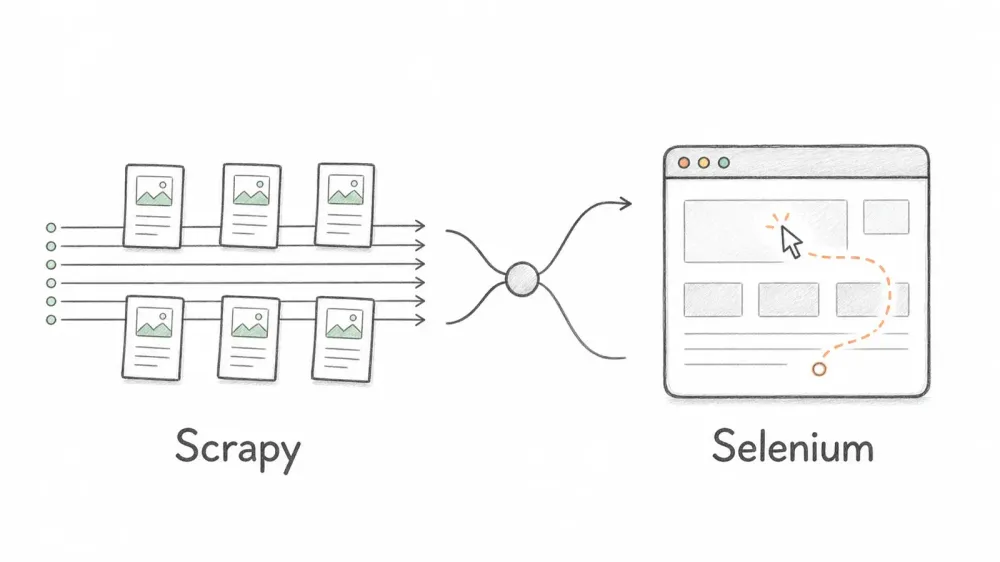
Every "Scrapy vs. Selenium" guide on the internet says the same thing: Scrapy is faster, Selenium handles JavaScript, pick your poison. The direction is usually right, but universal pages-per-minute claims are not. Throughput depends on the target, network, concurrency, browser lifecycle, waits, and anti-bot controls.
This guide compares the architectures and operational tradeoffs that actually survive from one project to the next. It also covers what most comparisons skip: how browser automation changes the resource model, why selective rendering often beats an all-browser crawl, and when a managed extraction API is a better fit than either framework.
Quick Verdict: Scrapy vs. Selenium in 2026
If you want the short version: Scrapy wins on speed, scale, and resource efficiency for anything server-rendered. Selenium wins when you need a real browser doing real browser things — clicking, typing, waiting for a modal to animate in. Neither one is great against modern anti-bot defenses out of the box, and Playwright has quietly eaten most of the use cases people used to reach for Selenium for.
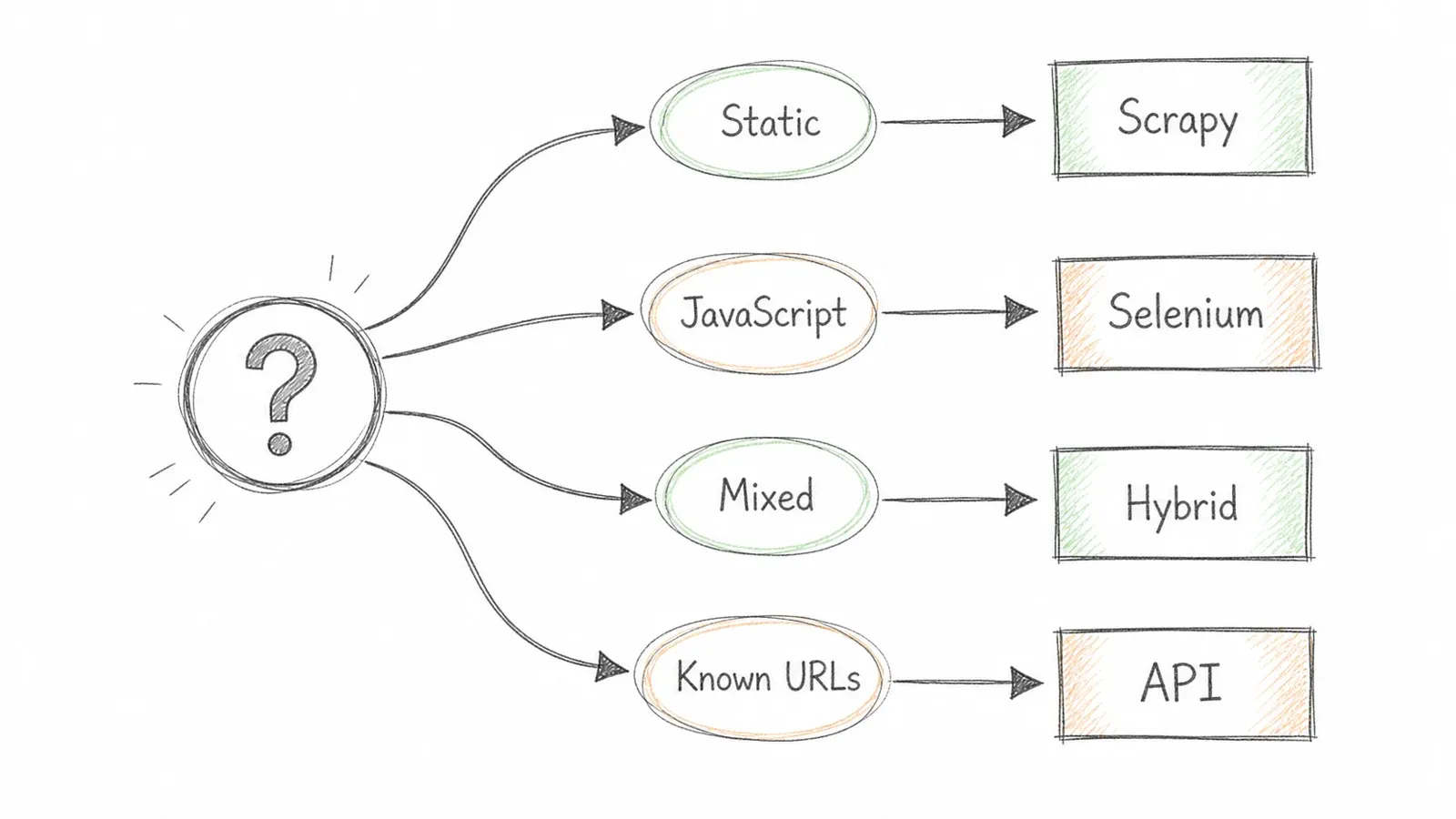
Here's the decision matrix I actually use:
| Your Situation | Go With |
|---|---|
| Static or server-rendered pages, high volume | Scrapy |
| JS-heavy SPA with logins, clicks, multi-step flows | Selenium or Playwright |
| Mixed site — mostly static, some JS-only sections | Scrapy-Playwright hybrid |
| Known URLs, you just need structured data, minimal upkeep | AI extraction API (Thunderbit and similar) |
As of mid-2026, Scrapy 2.17.0 is available, Selenium 4 continues to expand WebDriver BiDi support, and scrapy-playwright provides a maintained way to route selected Scrapy requests through a browser. Keep that decision matrix in your back pocket — the rest of this article explains why it works.
What Are Scrapy and Selenium (and Why Developers Still Debate Them)
Comparing Scrapy to Selenium is a little like comparing a delivery truck to a car. They both move things from A to B, but one was built for hauling volume efficiently and the other was built to be driven by a person who needs to actually interact with the road. The debate persists because both tools can scrape — they're just built for different jobs, and plenty of teams pick the wrong one before realizing it.
Scrapy: The Async Crawling Engine
Scrapy is a Python-only framework built on Twisted's event-driven, non-blocking I/O model. It's not a browser — it never was — it just fires off HTTP requests and parses whatever HTML comes back. That's the whole trick. Because it never has to wait around for a browser to render anything, it can fire dozens of requests at once without blocking.
Out of the box, Scrapy ships with spiders, item pipelines, feed exporters, retry middleware, and rate-limiting. This isn't a "you'll need to build this yourself" framework — a lot of production concerns are already handled. Scrapy's architecture docs lay out the Engine, Scheduler, Downloader, and Item Pipeline as separate, swappable components, which is exactly why the framework has aged well: you can bolt things on without rewriting the core.
The catch: no browser means no JavaScript execution. If your data loads via a client-side fetch call after the page renders, Scrapy sees none of it. It's reading the initial HTML response, full stop.
Selenium: The Browser You Can Program
Selenium controls actual browsers — Chrome, Firefox, Edge — through the W3C WebDriver protocol, which is the standardized spec that makes Selenium language- and browser-agnostic rather than some Chrome-only hack. It renders JavaScript, executes AJAX calls, and can click, scroll, and type exactly the way a human would.
This makes Selenium the right call for anything interaction-dependent: multi-step logins, wizards, infinite scroll, dropdown menus that trigger API calls. But every one of those browser sessions is heavy. Selenium's own Grid sizing guidance suggests budgeting roughly 1 GB of RAM per browser session just for planning purposes — and that's before you factor in CPU load from actually rendering pages.
One quirk that trips people up constantly: page load complete doesn't mean the UI is ready. Selenium's own docs warn against mixing implicit and explicit waits because the resulting timeouts get unpredictable fast. If your Selenium script is flaky, this is usually why.
Scrapy vs. Selenium: Performance Without Fake Universal Numbers
A trustworthy benchmark has to publish the target pages, cache state, network conditions, concurrency, browser reuse strategy, wait conditions, and complete code. Without that context, a pages-per-minute number is marketing, not evidence. The architectural comparison is still useful:
| Workload characteristic | Scrapy | Selenium | Scrapy-Playwright |
|---|---|---|---|
| Server-rendered HTML | Direct HTTP path | Full browser path | Use Scrapy’s direct path |
| JavaScript-rendered content | Requires an additional renderer | Native browser execution | Selective browser rendering |
| Concurrency model | Asynchronous request scheduler | Browser sessions managed by your code or Grid | Scrapy scheduler plus browser contexts |
| Resource profile | No browser rendering overhead | Browser CPU and memory overhead | Browser cost only for tagged requests |
| Best measurement | Items per minute at a safe error rate | Completed flows per minute at a safe error rate | Separate static and rendered request throughput |
Scrapy’s default concurrent-request setting is an upper bound, not a promised throughput figure. Actual speed is governed by latency, per-domain limits, throttling, retries, response size, parsing work, and the target’s acceptable request rate. Selenium can reuse a browser session, so it is not inherently limited to one new browser per page, but every active session still executes and renders a browser environment.
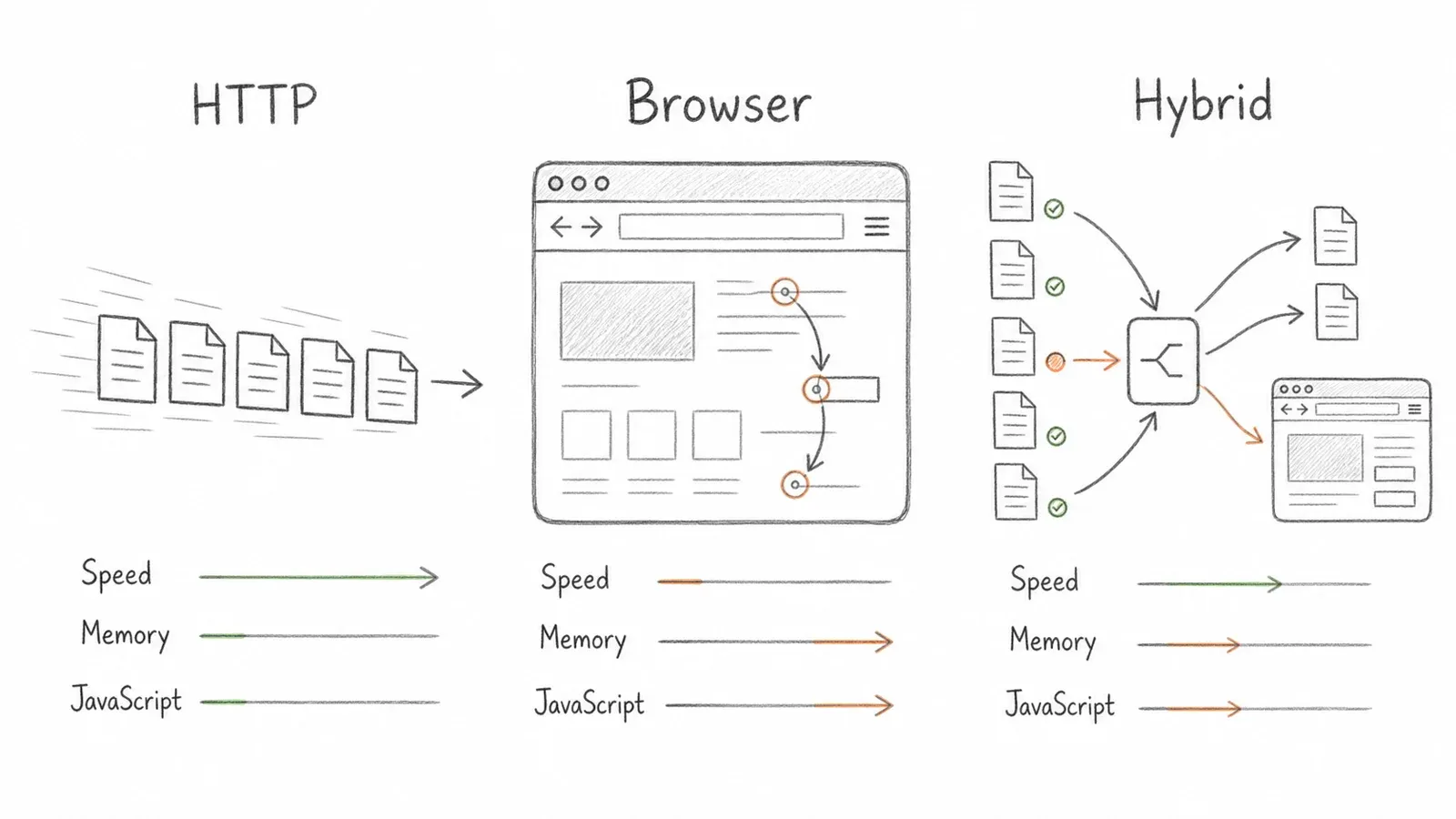
The hybrid model is attractive because it keeps ordinary requests on Scrapy’s HTTP path and sends only pages that need rendering through a browser. That usually reduces browser work, but it is not automatically faster: measure static and rendered paths separately, include failure and retry rates, and tune concurrency against both target-site safety and available memory.
Core Differences That Shape Your Decision
Speed isn't the only variable. A handful of practical factors matter just as much once you're running this stuff in production.
JavaScript Rendering and Dynamic Content
Scrapy alone is blind to anything rendered client-side. Selenium sees everything because it's an actual browser. The middle ground — Scrapy-Splash (older, Lua-scriptable) and scrapy-playwright (modern, recommended) — lets you selectively render JS within Scrapy's crawl loop instead of committing to a full browser for every request. If 80-90% of your target pages are static HTML and only a handful need JS, selective rendering is the obvious architecture. Rendering everything through a browser because some pages need it is a waste of compute.
Scalability and Concurrency
Scaling Scrapy from 1,000 pages to 1,000,000 is mostly a provisioning conversation — add more concurrent requests, maybe distribute across workers with Redis. Scaling Selenium means linearly adding browser instances, which means linearly adding RAM and CPU, which means you're now managing a browser farm with Selenium Grid and dealing with crash recovery. It's not that Selenium can't scale — it's that scaling it is an infrastructure project, not a config change.
Data Pipelines and Export
Scrapy's item pipeline handles validation, deduplication, and export to JSON, CSV, or a database as a built-in feature. Selenium gives you none of that — you're writing your own serialization and storage logic from scratch. If data quality and downstream integration matter to you (and they should), this is a meaningful head start Scrapy gives you for free.
Maintenance and Long-Term Reliability
Here's a pattern I've noticed: Scrapy spiders tend to age reasonably well because the middleware-based architecture enforces some structure. Selenium scripts get brittle — browser updates break drivers, timing issues cause flaky test runs, and every DOM change means updating selectors. I've seen developers on forums flat-out say a Selenium-based scraper "seems like not the best choice for something we're going to sell to a client," and honestly, that instinct is correct if the project needs to survive more than a few months untouched.
Anti-Bot Reality Check: How Each Tool Fares Against 2026 Defenses
This is the part every other comparison glosses over, and it's the part that actually determines whether your scraper works at all. Neither Scrapy nor Selenium was built with modern anti-bot infrastructure in mind, and pretending otherwise just sets you up for a bad surprise in production.
| Defense Layer | Scrapy | Selenium | Scrapy-Playwright | Thunderbit API |
|---|---|---|---|---|
| JS rendering | ❌ Needs middleware | ✅ | ✅ | ✅ Built-in |
| TLS fingerprint | ⚠️ Detectable | ⚠️ Detectable | ⚠️ Better, not solved | ✅ Handled |
| CAPTCHA solving | ❌ Manual | ❌ Manual | ❌ Manual | ✅ Built-in |
| Rate-limit rotation | ⚠️ DIY proxies | ⚠️ DIY proxies | ⚠️ DIY proxies | ✅ Managed |
Scrapy fails browser fingerprint checks outright because there's no browser to fingerprint in the first place — it's just an HTTP client, and plenty of anti-bot vendors flag traffic that doesn't look like it came from a real browser. Selenium passes basic JS checks since it is a real browser, but it's detectable through signals like navigator.webdriver, a standardized flag that's true under automation. Patches like undetected-chromedriver try to mask this, but they're playing whack-a-mole against detection vendors who update their signatures regularly.
The Stealth Arms Race (and Why DIY Is Fragile)
Here's the uncomfortable truth about anti-detection patches: they're a maintenance treadmill, not a fix. undetected-chromedriver and playwright-stealth work until Cloudflare Turnstile or DataDome ships an update that catches whatever technique they were using. Then you're patching again. I've watched teams spend more engineering time keeping their stealth layer alive than they spent building the actual scraper.
Rate limiting deserves its own callout, too. When a server returns 429 Too Many Requests, the Retry-After header is a suggestion, not a mandate — plenty of sites don't send it at all, and some throttle you through other signals entirely. Scrapy's AutoThrottle helps by adjusting delay based on observed latency, but it's reactive, not preventive.
This is where a managed extraction API earns its keep — anti-bot handling becomes someone else's engineering problem instead of yours. More on that later.
The Playwright Factor: Why "Scrapy vs. Selenium" Is No Longer the Full Picture
Framing this as a two-tool debate misses what's actually happened in the scraping community over the past couple of years. Developer forums are full of people saying some version of "I switched to Playwright from Selenium and was quite happy with it" — and yet most comparison articles mention Playwright once in passing, if at all.
Playwright, built by Microsoft, controls Chromium, Firefox, and WebKit through a single API. Its actionability model waits for elements to be visible, stable, and actually interactive before performing an action — which cuts down on the timing-related flakiness that plagues a lot of Selenium scripts. It also handles browser contexts more efficiently, letting you spin up isolated sessions without the overhead of launching a full new browser each time.
When Playwright Replaces Selenium Entirely
For scraping specifically — not browser testing with existing Selenium infrastructure — Playwright is often just the better tool in 2026. Faster context creation, lower resource footprint per page, native async support, and built-in network interception. If you're starting a scraping project from scratch with no existing Selenium test suite to preserve, there's not much reason to reach for Selenium first.
The exception: if your team already has Selenium test infrastructure, or you need very specific browser profile customization that Playwright doesn't support as cleanly, Selenium still earns its place.
How scrapy-playwright Works
scrapy-playwright is a download handler for Scrapy that routes only requests tagged meta={"playwright": True} through a real browser — everything else stays on Scrapy's fast, async HTTP path. Here's a simplified spider that crawls a paginated catalog where product cards render via client-side JS:
import scrapy

class CatalogSpider(scrapy.Spider):
    name = "catalog"

    def start_requests(self):
        yield scrapy.Request(
            "https://example.com/products?page=1",
            meta={"playwright": True, "playwright_include_page": True},
        )

    async def parse(self, response):
        page = response.meta["playwright_page"]
        products = response.css("div.product-card")
        for product in products:
            yield {
                "title": product.css("h3::text").get(),
                "price": product.css(".price::text").get(),
            }

        next_page = response.css("a.next::attr(href)").get()
        if next_page:
            yield scrapy.Request(
                response.urljoin(next_page),
                meta={"playwright": True, "playwright_include_page": True},
            )
        await page.close()
Only pages that actually need rendering go through the browser. This is the whole point of the hybrid approach — you're not paying the browser tax on every single request, just the ones that require it.
Scrapy-Splash vs. Scrapy-Playwright: Which Middleware to Use
Scrapy-Splash requires standing up a separate Splash Docker service and writing Lua scripts for interaction — it works, but it's a heavier, older setup. scrapy-playwright integrates directly into Scrapy's async event loop, supports all three major browser engines, and handles complex interactions without a second scripting language bolted on. If you're starting a new project in 2026, there's really no reason to reach for Splash anymore.
Production-Ready Hybrid Architecture
Most articles say "you can combine Scrapy and Selenium" and leave it there. That's not an architecture. That's a suggestion. Here's what an actual production setup looks like.
The flow: a Scrapy scheduler routes requests through a URL router that checks whether a page is static or dynamic. Static requests go straight through Scrapy's standard downloader. Dynamic requests get tagged and routed to the Playwright middleware, which manages a pool of browser contexts. Both paths converge back into the same item pipeline for validation, deduplication, and export — whether the data came from raw HTML or a rendered DOM, it ends up in the same JSON, CSV, or database output.
A few deployment notes if you're taking this to production: containerize with Docker so the Playwright browser binaries ship consistently across environments, cap concurrent Playwright contexts based on available RAM (I wouldn't go past 8-10 contexts on a standard 4 GB box), and run scheduled jobs through cron or a CI/CD pipeline rather than leaving a process running indefinitely.
This setup gives you maximum control. It also means you're now responsible for browser binary updates, context lifecycle bugs (unclosed pages will stall a crawl), proxy rotation, and whatever anti-bot patches you need to bolt on. That's a real engineering commitment, and it's worth being honest about before signing up for it.
For teams that want the structured output without owning that infrastructure, Thunderbit's CLI takes a different swing at the same problem:
thunderbit batch extract --schema schema.json --file urls.txt
Same structured JSON output. No spider code, no browser pool, no anti-bot plumbing to maintain. You trade some customization for speed-to-production — that's a legitimate trade-off, not a universal upgrade, and it depends entirely on how much control your project actually needs.
The "Skip the Framework" Path: When an AI Scraping API Beats Both
At some point, a developer realizes they don't actually need a crawling framework. They need structured data from 500 known URLs, and building a spider, a browser pool, and an anti-bot layer for that feels like overkill — because it usually is.
This is the gap Thunderbit is built to fill, and I'll say upfront: it's not a replacement for Scrapy on a complex, recursive, custom-logic crawl. It's a different tool for a different, narrower problem.
Open API: POST /extract takes a JSON Schema and returns structured data matching it — not raw HTML, not a pile of Markdown you have to parse yourself. POST /distill does the inverse job, returning clean Markdown that's ready to feed into a RAG pipeline or an LLM. The managed service supports JavaScript rendering and anti-bot handling, so you're not managing that infrastructure yourself. The current Distill vs. Extract guide lists 1 credit per Distill page and 20 per Extract page; check the live docs before budgeting because product terms can change.
MCP Server: for AI agents like Claude or Cursor, Thunderbit’s MCP server exposes distillation, structured extraction, field suggestion, and batch jobs as tools, letting an agent pull fresh web data mid-task without leaving its environment.
CLI: the documented Thunderbit CLI supports commands such as thunderbit extract <url> --schema schema.json and fits neatly into terminal workflows and scheduled jobs. You can pipe distilled Markdown into another tool for quick one-off research tasks.
If you'd rather skip code entirely, the Thunderbit Chrome Extension covers the same ground with a point-and-click interface, which is worth a look if your team includes non-developers who need data without touching a terminal. I've written more on the broader landscape of AI web scraping and web scraping without coding if you want the fuller picture.
Be honest with yourself about which camp you're in: Scrapy is still the right pick for complex multi-site crawls with custom logic and recursive link-following. Selenium or Playwright for interaction-heavy flows. But "I need structured data from these known URLs" is a narrower problem than either tool was designed to solve, and an API can genuinely eliminate the spider code, the anti-bot plumbing, and the ongoing maintenance that comes with owning that infrastructure yourself.
Scrapy vs. Selenium vs. Playwright vs. AI API: Side-by-Side
| Feature | Scrapy | Selenium | Scrapy-Playwright | Thunderbit API |
|---|---|---|---|---|
| Language support | Python only | Python, Java, C#, JS, Ruby | Python | REST (any language) |
| JS rendering | No (needs middleware) | Yes | Yes | Yes, built-in |
| Async/concurrency | Native, high | Limited per instance | Native via Scrapy | Managed server-side |
| Anti-bot handling | DIY | DIY | Partial | Built-in |
| Data pipeline/export | Built-in | DIY | Built-in | Structured JSON out |
| Setup complexity | Moderate | Low to start, high at scale | Moderate to high | Minimal |
| Maintenance burden | Low-moderate | High | Moderate | Near zero |
| Best for | High-volume static crawls | Interaction-heavy flows | Mixed static/dynamic sites | Known URLs, structured output |
If you're weighing other scraper options beyond these four, it's also worth a glance at how Instant Data Scraper alternatives and the best AI web scrapers stack up — the landscape has gotten crowded, and not every tool solves the same problem.
Legal and Ethical Notes for Web Scraping in 2026
Keeping this brief since it's not the focus here, but it matters. Scrapy's ROBOTSTXT_OBEY setting will make your spider respect robots.txt rules — good practice, but worth knowing that the Robots Exclusion Protocol itself explicitly states its rules aren't a legal access authorization. Selenium and Playwright have no built-in robots.txt compliance at all — that's entirely on you to implement. Regardless of tool, check site terms of service and applicable law in your jurisdiction before scraping and reusing data; "it's publicly visible" isn't automatically a legal green light everywhere.
Picking the Right Tool for Your 2026 Scraping Project
The decision really comes down to four questions: what's the content type, what's the scale, how much interaction do you need, and how much ongoing maintenance are you willing to sign up for. Static pages at real scale, go Scrapy. JS-heavy pages with actual interaction, go Selenium or Playwright. A mixed bag of both, build the hybrid. Known URLs where you just need structured data with minimal upkeep, an API like Thunderbit's probably saves you more time than it costs.
"Scrapy vs. Selenium" was never really the full question — it just used to be the only framing available. Playwright changed the middle ground, and AI extraction APIs created an entirely new lane for people who realized they were building infrastructure instead of solving a business problem. Worth trying the free tier before committing to either path — suggest-fields is free and distill runs a single credit, so you can sanity-check whether the API route fits before you write a line of spider code.
FAQs
Is Scrapy faster than Selenium for web scraping? In my testing, yes — often by an order of magnitude on static pages, since Scrapy's async architecture skips the browser overhead entirely. That gap narrows when Scrapy uses Playwright middleware for JS-heavy pages, but Scrapy still wins on overall throughput for mixed workloads because non-JS pages stay on the fast path.
Can Scrapy handle JavaScript-rendered pages?
Not on its own — Scrapy only sees the initial HTML response. Adding scrapy-playwright or the older Scrapy-Splash as middleware lets you selectively render specific requests through a real browser while keeping the rest of your crawl on Scrapy's native, faster path.
When should I use Selenium instead of Scrapy? When you need full browser interaction — multi-step logins, clicking through wizards, filling forms — and the page count is moderate rather than massive. It's also the sensible choice if you already have Selenium-based test infrastructure you want to reuse for scraping.
Is Playwright better than Selenium for scraping in 2026? For scraping specifically, generally yes — Playwright tends to offer better performance, built-in auto-wait, and a lighter resource footprint per browser context. Selenium still holds an edge for teams running established cross-browser testing suites that Playwright wasn't built to replace.
What is an AI scraping API and when does it replace Scrapy or Selenium? An AI scraping API, like Thunderbit's Open API, handles JS rendering, anti-bot defenses, and data extraction on the server side, handing back structured JSON that matches a schema you define. It's the right call when you have known URLs and need structured output without building or maintaining crawl infrastructure — it's not a replacement for Scrapy on complex, recursive, custom-logic crawls.
Learn More




