
A few months ago, a developer on Stack Overflow posted a question that's been open since 2012: "Google Places API Place Details limited to 5 reviews?" Fourteen years, hundreds of upvotes, and the answer is still the same — yes, five reviews max. That single limitation tells you everything about why this debate exists.
If you've ever needed Google Places data at scale — lead lists, competitor reviews, foot-traffic patterns, local SEO audits — you've probably hit the same fork in the road. The official Google Places API is clean, structured, and well-documented. But it doesn't return everything you can see on a Google Maps page, and the bill can get wild once you scale past the free tier. Scraping captures more, costs differently, and comes with its own headaches (CAPTCHAs, broken selectors, legal gray areas). I've spent a lot of time digging into both sides — the API docs, the pricing SKUs, the scraping toolchain, and the real-world tradeoffs — and this article is the result. We'll cover field-by-field data gaps, true costs at 10K/100K/1M records, the anti-bot reality, and a practical hybrid playbook. Plus a decision flowchart, because nobody wants to read 3,000 words and still not know what to pick.
What Is the Google Places API (and What Does It Actually Give You)?
The Google Places API is Google's official, structured way to pull business data — names, addresses, phone numbers, ratings, reviews, photos — from their database. You send an HTTP request, you get back formatted JSON. It's the sanctioned pipeline.
The current version (Places API "New") organizes everything around field masks. When you call Place Details, you specify exactly which fields you want — displayName, formattedAddress, rating, reviews, photos, etc. — and Google bills you based on the highest-tier field you requested. Omit the field mask and you get an error, not a default response. This is by design: Google wants you to pay only for what you use (and to pay more for the juicy stuff).
The available fields are organized into pricing tiers:
| Tier | Example Fields | What You Get |
|---|---|---|
| Essentials | Place ID, formatted address, location, photo metadata | Basic identity and location |
| Pro | Display name, business status, Google Maps URI, primary type | Richer business info |
| Enterprise | Rating, user rating count, website, phone numbers, opening hours, price level | The fields most business users actually want |
| Enterprise + Atmosphere | Reviews, review summary, generative summary, amenities, parking, takeout/delivery | The richest (and priciest) data |
Key endpoints most users care about: Autocomplete (for search-as-you-type), Text Search and Nearby Search (for discovering places), Place Details (for enriching a known place), and Place Photos (for imagery).
Now, the limitations that matter:
- Reviews: The Place resource returns a maximum of 5 reviews per place, sorted by relevance. That's it. Not 50, not "all." Five.
- Photos: Capped at 10 photo references per place in the Place resource.
- Popular times / live busyness: Not available as a standard Places API field. Google confirms this data exists in consumer-facing surfaces (based on aggregated, anonymized Location History), and their Maps blog explains how it works — but the field list doesn't include it.
- Q&A section: Not exposed.
- "People also search for" competitors: Not exposed.
- Menu / price list: Not a standard field.
Who Typically Uses the Google Places API?
- Logistics companies validating and geocoding addresses
- Travel and hospitality apps showing nearby hotels, restaurants, attractions
- Real estate platforms enriching property listings with local business data
- Local SEO agencies auditing NAP (name, address, phone) consistency
- Sales teams building lead lists from place IDs and basic business info
If your use case fits neatly into "I need structured place data in a production app," the API is the right starting point. If your use case involves the words "all reviews," "popular times," or "competitor analysis" — keep reading.
What Does "Scraping" Google Places Data Mean?
Web scraping means using software to automatically extract data from a web page — in this case, Google Maps or Google Search results — rather than through an official API. The scraper reads the page the same way your browser does, then pulls out the structured bits: business names, addresses, review text, star ratings, popular-times histograms, Q&A, competitor suggestions, the full photo gallery, and anything else that's rendered on screen.
The key distinction: the API gives you what Google decides to expose. Scraping gives you (in theory) everything a human can see on the page.
"Scraping" is not one thing, though. There are three very different approaches, and the tradeoffs between them are significant.
DIY Scripts vs. Managed Scraping APIs vs. No-Code Tools
| Approach | How It Works | Best For | Main Tradeoff |
|---|---|---|---|
| DIY scripts (Puppeteer, Playwright, Selenium) | You write and maintain a headless browser script that navigates Google Maps pages and parses the DOM | Developers who need full control and custom logic | Highest maintenance burden — selectors break when Google changes its UI |
| Managed scraping APIs (Thunderbit API, SerpApi, Outscraper) | You send a URL or query to an API; it handles rendering, anti-bot, and parsing, and returns structured data | Developers who want structured output without maintaining scrapers | Vendor pricing and quality vary; you're trusting a third party |
| No-code browser extensions (Thunderbit Chrome Extension) | Point-and-click extraction from your browser — AI suggests fields, you click "Scrape," export to Sheets/Excel | Business users, marketers, sales teams who need data in a spreadsheet fast | Less flexible for complex pipelines; depends on the tool's AI quality |
Short version: DIY = most flexible but highest maintenance. Managed APIs = structured output, no maintenance. No-code tools = fastest for non-developers.
Google Places API vs Scraping: Field-by-Field Data Comparison
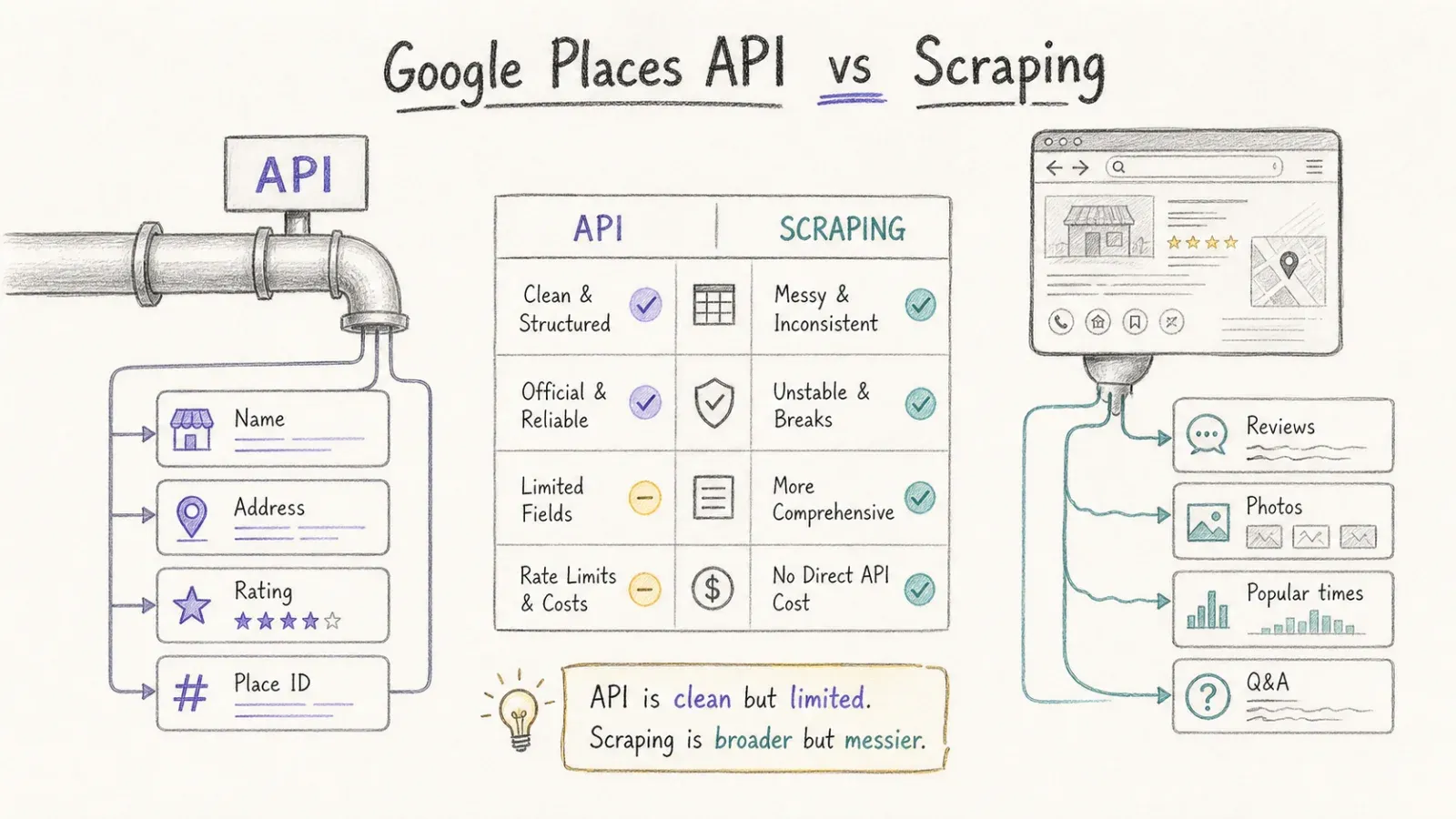
This is the table I wish existed when I started researching this topic. Every field a business user or developer might need, compared side by side:
| Data Field | Google Places API | Web Scraping |
|---|---|---|
| Business name | ✅ Full (Pro tier) | ✅ Full |
| Address / location | ✅ Full (Essentials tier) | ✅ Full |
| Phone number | ✅ Enterprise tier | ✅ When visible |
| Website URL | ✅ Enterprise tier | ✅ When visible |
| Aggregate rating | ✅ Enterprise tier | ✅ Full |
| User rating count | ✅ Enterprise tier | ✅ Full |
| Individual reviews (text + rating) | ⚠️ Max 5 reviews | ✅ All available reviews |
| Popular times / live busyness | ❌ Not a standard API field | ✅ Extractable (when rendered) |
| Q&A section | ❌ Not exposed | ✅ Extractable |
| Photo metadata | ✅ Max 10 references via Photos endpoint | ✅ Full gallery |
| Menu / price list | ❌ Not a standard field | ⚠️ When present on page |
| "People also search for" (competitors) | ❌ Not exposed | ✅ Extractable |
| Opening hours | ✅ Enterprise tier | ✅ When visible |
| Price level | ✅ Enterprise tier | ✅ When visible |
| Place ID | ✅ Strong (Essentials) | ⚠️ Possible, but API is canonical source |
| Google Maps URI | ✅ Pro tier | ✅ It's the page URL |
| Owner responses to reviews | ⚠️ Verify current availability | ✅ Often visible |
| SERP / map-pack position | ❌ Not the API's purpose | ✅ Via SERP scraping |
The headline gap: if you need full review sets for sentiment analysis, reputation monitoring, or competitive benchmarking, the API alone won't cut it. Five reviews per place is a sample, not a dataset.
Popular times and foot-traffic patterns? Same story. If you're a retail consultant or a commercial real estate analyst, scraping is the only path — that data simply isn't in the API.
On the flip side, for canonical Place IDs, structured addresses for geocoding, or powering a store locator, the API is cleaner, more reliable, and officially supported.
The Real Cost: Google Places API vs Scraping at 10K, 100K, and 1M Records
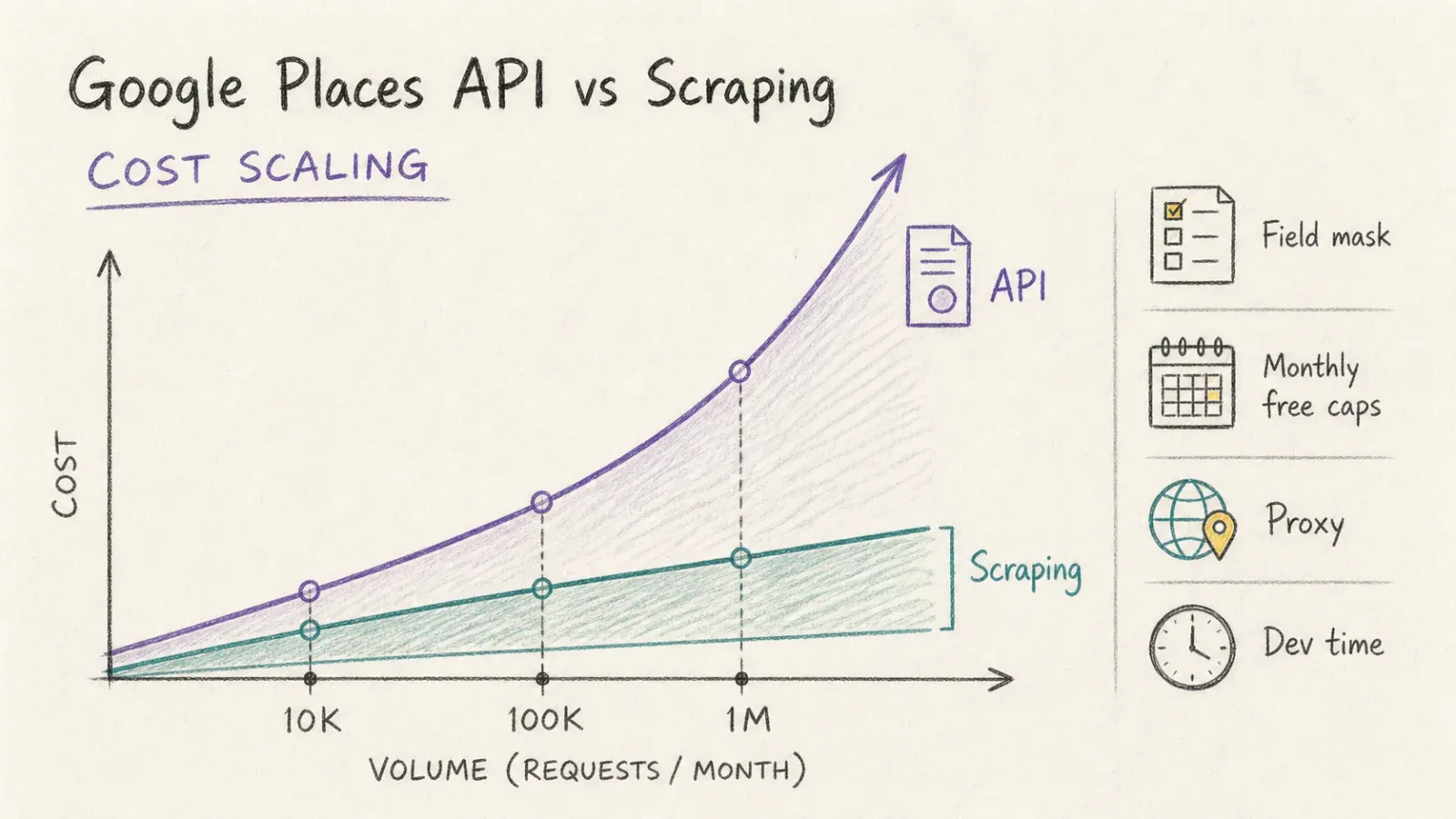
Cost is the most misunderstood part of this decision. Many users sign up for the API's free tier, build a prototype, and then get a bill that makes their eyes water once they scale past it. On the scraping side, people underestimate proxy costs and developer time.
So here's the math.
Google Places API Pricing Breakdown
Google overhauled Maps Platform pricing in March 2025, replacing the old flat $200 monthly credit with SKU-level free usage caps and volume-based tiering. The current pricing works like this:
- Essentials fields (Place Details): 10,000 free requests/month, then $5.00 per 1,000 up to 100K
- Pro fields (Place Details): 5,000 free, then $7.00/1K
- Enterprise fields (Place Details): 1,000 free, then $20.00/1K
- Enterprise + Atmosphere (reviews, amenities): 1,000 free, then $25.00/1K
Critical detail: if your field mask includes even one Enterprise + Atmosphere field (like reviews), your entire request is billed at that tier. And a typical workflow chains multiple SKUs — Text Search Pro to discover places, then Place Details Enterprise + Atmosphere to enrich them — so costs stack.
A single "lookup" is rarely a single billable request.
Scraping Costs: Tools, Proxies, and Developer Time
Scraping costs break down into three buckets:
- Tool subscription or API credits: Managed scraping APIs charge per request, per credit, or per record. SerpApi charges per search. Outscraper uses pay-as-you-go per record. Thunderbit's API uses a credit system (Extract = 20 credits/request). The Thunderbit Chrome Extension charges 1 credit per output row.
- Proxy spend (DIY only): Residential proxies for Google Maps scraping typically run $50–$300/month depending on volume and provider.
- Developer time (DIY only): Building and maintaining Puppeteer/Playwright scripts. This is the hidden cost that kills DIY economics (more on this below).
Side-by-Side Cost Table: API vs. Scraping at Scale
| Scale | Google Places API (Enterprise + Atmosphere) | Managed Scraping API (est.) | DIY Scraping (proxy + dev time) |
|---|---|---|---|
| 10K records/month | ~$225 (1K free, 9K × $25/1K) | ~$50–$150 depending on provider | ~$50 proxy + 2–4 hrs dev/month |
| 100K records/month | ~$2,475 (after free cap, volume tiers apply) | ~$250–$500 | ~$150 proxy + 8–16 hrs dev/month |
| 1M records/month | ~$17,975 (volume tiers reduce per-unit cost, but total is still high) | ~$1,500–$3,000 | ~$300 proxy + 20+ hrs dev/month + breakage risk |
Notes: API estimates use published volume tiers for Place Details Enterprise + Atmosphere, applied after the 1K free cap. Managed scraping API estimates are approximate ranges across providers. DIY dev time assumes $50–$100/hr loaded cost.
The pattern is clear: at hobby scale (under 10K), the API's free caps may make it the cheapest option, especially if you only need Essentials or Pro fields. At business scale (100K+), the API costs spike hard, particularly for rich fields. At enterprise scale (1M+), the API can approach five figures monthly, and scraping or dataset services become economically compelling — assuming you actually need the extra fields the API doesn't expose.
If you only need addresses and Place IDs, don't scrape. The API is cheaper and better for that. The cost argument for scraping only holds when you need data the API can't return.
The Anti-Bot Reality Check: Why DIY Google Scrapers Break
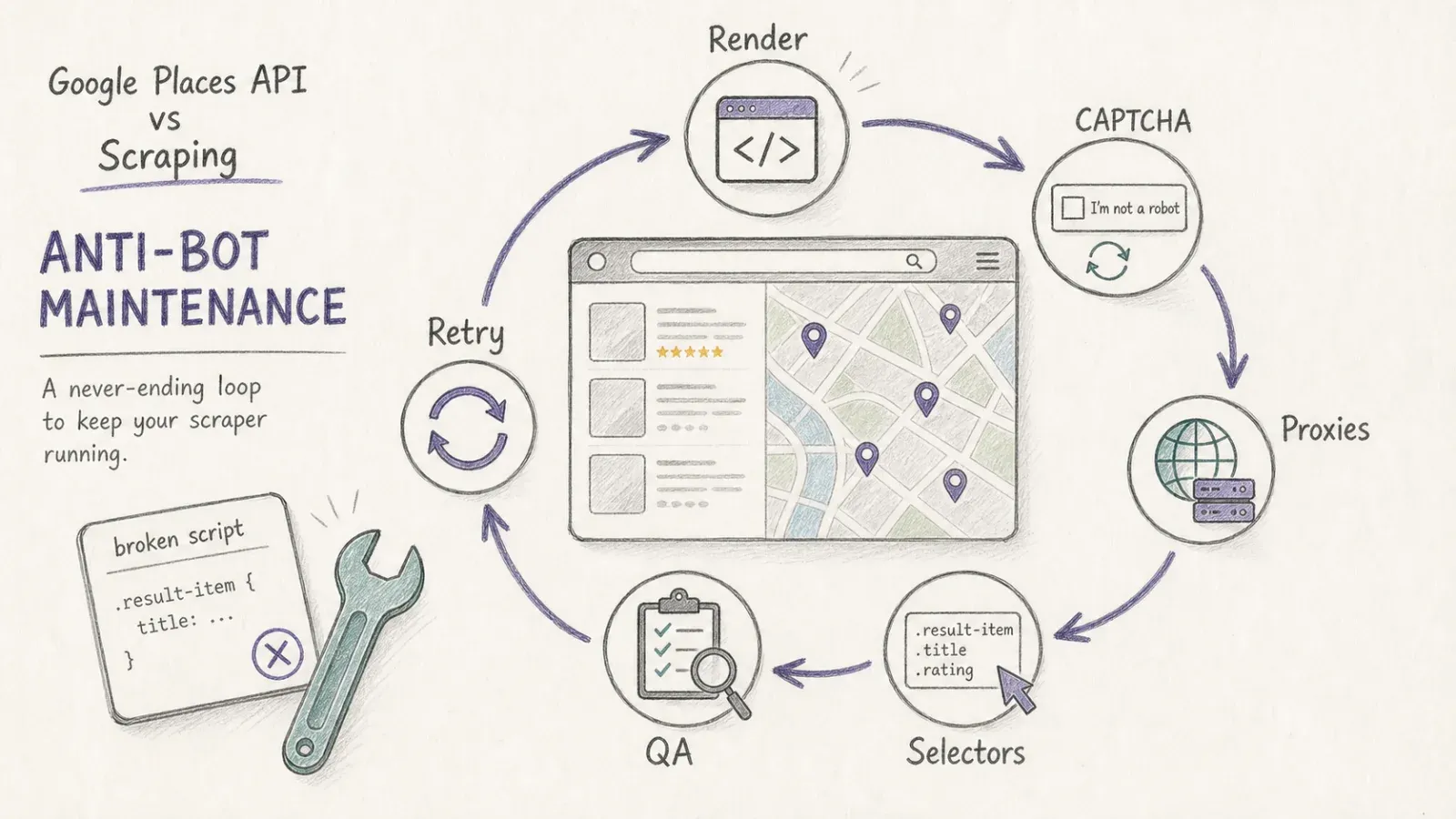
Here's the part scraping evangelists skip. Google does not want you scraping Google Maps. They've built multiple layers of defense and update them regularly.
Google's Layered Defenses
- reCAPTCHA challenges: Automated browsers trigger CAPTCHAs at much higher rates than human users
- Client-side JavaScript rendering: Google Maps is a heavy JavaScript application. A simple HTTP request won't get you rendered content — you need a full headless browser
- Browser fingerprinting: Google detects headless browsers through canvas fingerprints, WebGL, navigator properties, and other signals
- IP rate limiting: Too many requests from the same IP (or the same proxy subnet) and you're blocked
- DOM structure changes: Google changes the way its pages are built regularly — community consensus on Reddit and GitHub issues is that selectors break every few weeks to months
That last one is the silent killer. A Puppeteer script that worked perfectly in June might return blank results in July because Google renamed a CSS class or restructured a div.
The Hidden Cost of Maintaining DIY Scripts
Every time Google changes its DOM, someone on your team has to:
- Notice the scraper is broken (hopefully before bad data propagates)
- Inspect the new page structure
- Update selectors, handle new CAPTCHA types, adjust retry logic
- Test and redeploy
Over a year, this maintenance time can easily exceed the subscription cost of a managed scraping API. I've seen teams burn 40+ developer hours annually just keeping a Google Maps scraper alive — and that's a conservative estimate for a moderately complex setup.
Why Managed Scraping APIs Exist
This maintenance burden is exactly why services like Thunderbit's API, SerpApi, and Outscraper exist. They absorb the anti-bot complexity — JS rendering, CAPTCHA solving, proxy rotation, selector maintenance — and return structured data.
Thunderbit's POST /extract endpoint with renderMode: "full" handles JavaScript-heavy pages like Google Maps and returns schema-matched structured JSON, not raw HTML that still needs parsing. The MCP server extends this to AI agents — Claude, Cursor, or other LLM-based workflows can scrape Google Maps data mid-task without leaving their environment.
For non-technical users, the Thunderbit Chrome Extension is the zero-maintenance option: open a Google Maps page, click "AI Suggest Fields," click "Scrape," export to Sheets. No selectors, no proxies, no debugging.
SerpApi and Outscraper are solid alternatives with different pricing models and output formats. SerpApi returns structured JSON per search; Outscraper charges per record with pay-as-you-go pricing. The right choice depends on your volume, budget, and whether you need structured JSON or are comfortable parsing semi-structured output.
The Hybrid Playbook: Using Google Places API and Scraping Together
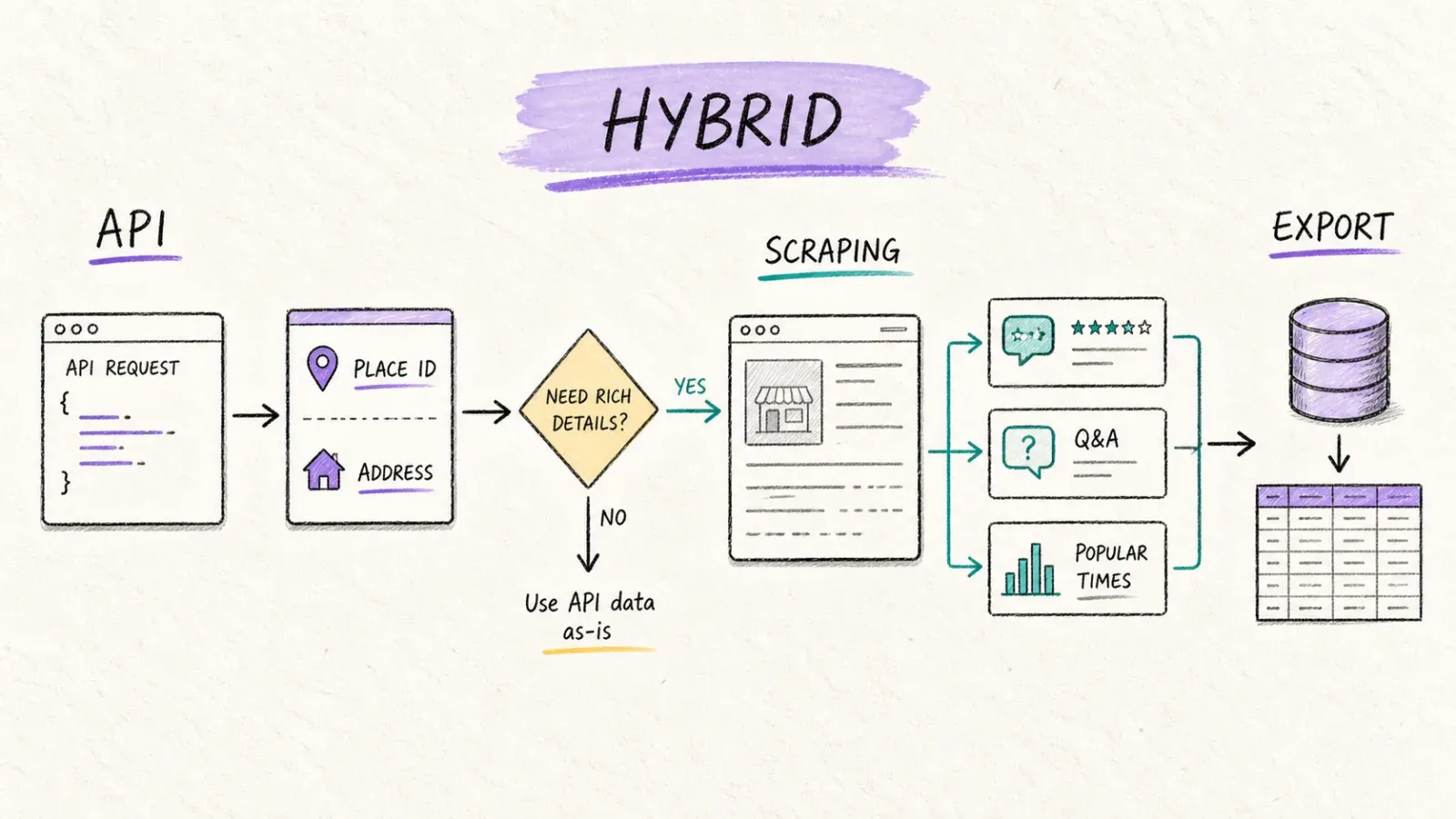
None of the top-ranking articles on this topic suggest what I've seen work best in practice: using both. Many teams end up relying on the official API for some tasks and scraping for others. The trick is matching each tool to the right job.
When the Official API Wins
- Autocomplete in a live production app: Low latency, ToS-compliant, reliable SLA. No contest.
- Location-based app backends: Store locators, address validation, place ID matching. The API is structured, supported, and documented.
- Compliance-sensitive integrations: Enterprise contracts, public-facing products, or any context where Google ToS compliance is non-negotiable.
When Scraping Wins
- Full review extraction (5K+ reviews per place): Sentiment analysis, reputation monitoring, competitive benchmarking. The API's 5-review cap makes it useless here.
- One-time lead list extraction: Cheaper for batch jobs with no ongoing billing. A no-code tool like Thunderbit can scrape a list of businesses and export to a spreadsheet in minutes.
- Popular times / foot-traffic analysis: Not available via API. Period.
- Q&A data, competitor "people also search for": Only visible on the page, not in the API.
When a Hybrid Approach Makes Sense
- Ongoing price/rating monitoring: Use the API for basic structured data (Place ID, address, aggregate rating), then scrape for deep fields the API misses (full reviews, popular times).
- Enrichment workflows: Use the API to get Place IDs and canonical business info, then scrape individual listing pages for full review sets, Q&A, and competitor context.
- Scheduled monitoring: Thunderbit's scheduled scraper (for no-code users) or CLI batch extract with cron (for developers) can handle recurring scraping without custom infrastructure.
Use-Case Decision Matrix
| Use Case | Recommended Method | Why |
|---|---|---|
| Autocomplete in a live app | ✅ Official API | Low latency, ToS-compliant, reliable |
| Pulling 5K+ full review sets | ✅ Scraping / Scraping API | API caps at 5 reviews per place |
| One-time local business lead list | ✅ Scraping (or Thunderbit extension) | Cheaper for batch; no ongoing billing |
| Popular times / foot-traffic analysis | ✅ Scraping only | Not available via API |
| Ongoing price/rating monitoring | ⚠️ Hybrid | API for basic data, scraping for deep fields |
| Location-based app backend | ✅ Official API | Structured, supported, SLA |
| Local SEO SERP position tracking | ✅ Scraping / SERP API | Not the Places API's purpose |
| Competitor "people also search for" | ✅ Scraping only | Not exposed via API |
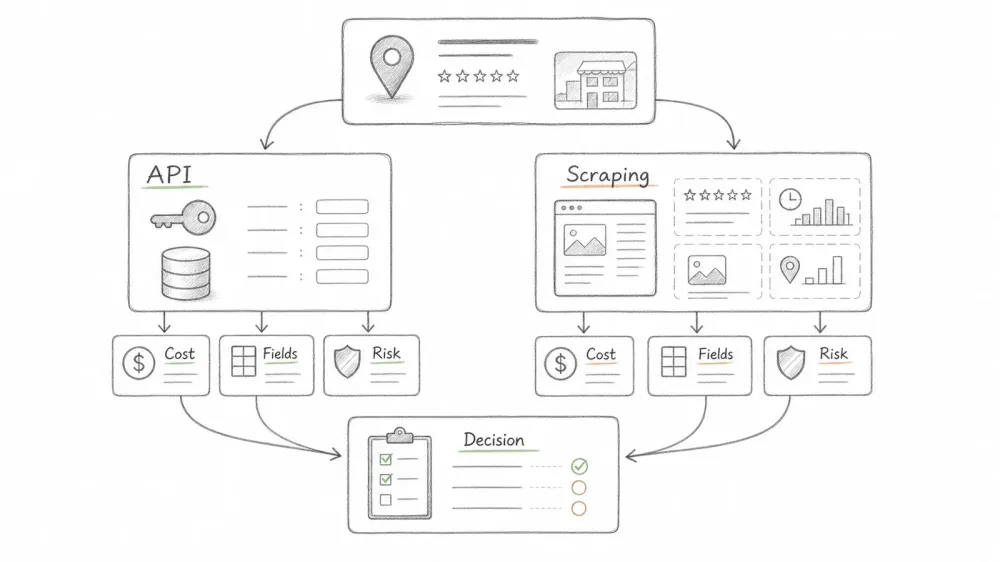
Decision Flowchart: Google Places API vs Scraping — Which Should You Pick?
Rather than a vague "it depends," here's a concrete decision framework. Walk through these four questions:
1. Do you need real-time data in a production app? → Yes: Use the Official API. It's supported, has an SLA, and is ToS-compliant. Stop here. → No: Continue.
2. Do you need data the API doesn't return (full reviews, popular times, Q&A)? → Yes: Scraping is required. The API literally cannot give you this data. → No: Continue.
3. How many records per month? → Under 10K: The API is probably cheapest, especially if you only need Essentials or Pro fields. The free caps cover a lot at this scale. → Over 10K: Scraping or a managed scraping API is likely more economical, especially for rich fields.
4. Do you have developer resources to build and maintain scrapers? → Yes: DIY with Puppeteer/Playwright gives you maximum control (but budget for ongoing maintenance). → No: Use a managed scraping API (Thunderbit API, SerpApi, Outscraper) or a no-code tool (Thunderbit Chrome Extension).
Quick Comparison of Developer-Oriented Alternatives
| Tool | Pricing Model | Output Format | Handles Anti-Bot | Batch Support |
|---|---|---|---|---|
| Thunderbit API / MCP | Credit-based (Extract = 20 credits/request) | Schema-matched structured JSON | ✅ JS rendering, proxy rotation, geo-routing | ✅ Up to 100 URLs per batch |
| SerpApi | Per-search (tiered plans) | Structured JSON | ✅ | ✅ Via API parameters |
| Outscraper | Per-record (pay-as-you-go) | JSON / CSV | ✅ | ✅ Via task queues |
| DIY (Puppeteer/Playwright) | Proxy + dev time | Raw HTML (you parse it) | ❌ You handle it | ✅ Whatever you build |
Thunderbit's API differentiator: it returns schema-matched structured JSON based on a JSON Schema you define — not raw HTML or Markdown that still needs parsing. If you're feeding an LLM pipeline or loading a database, that saves real post-processing time.
How Thunderbit Fits In (For Business Users and Developers)
We built Thunderbit to bridge the gap between "I need Google Maps data" and "I don't want to become a scraping infrastructure engineer." Here's how it works for both audiences.
For Non-Technical Users: The Chrome Extension
- Open a Google Maps page — a search results page or an individual business listing
- Click "AI Suggest Fields" — Thunderbit's AI reads the page and proposes columns (business name, address, rating, reviews, phone, etc.)
- Click "Scrape" — the extension extracts data into a structured table. Use cloud mode for up to 50 pages concurrently
- Scrape subpages — click "Scrape Subpages" to visit each listing and pull full details
- Export — to Excel, Google Sheets, Airtable, or Notion. Free data export, no paywall
For recurring monitoring — weekly competitor rating checks, new business listings — the scheduled scraper runs automatically on whatever cadence you set.
For Developers: API, MCP Server, and CLI
POST /extractwith a JSON Schema: Send a Google Maps URL, define the fields you want, get back structured JSON. SetrenderMode: "full"for JavaScript-heavy pages. Thunderbit handles rendering, anti-bot, proxy rotation, and geo-routing.POST /distill: Get clean Markdown from any page — useful for LLM pipelines that need raw content rather than structured fields. 1 credit/request vs. 20 for Extract.- MCP Server: AI agents (Claude, Cursor) can scrape Google Maps data mid-task. Supports distillation, structured extraction, field suggestions, and batch jobs up to 100 URLs.
- CLI:
thunderbit batch extract --file urls.txt --schema places.jsonfor scheduled or CI/CD-integrated scraping.
Credit pricing: Extract = 20 credits/request, Distill = 1 credit/request. API credits are per-request, not per-row (unlike the extension, where 1 credit = 1 output row). Check Thunderbit Pricing for current plans.
Legal and Terms-of-Service Considerations
I'll keep this short and factual — no scare tactics, no sales pitch.
The Google Places API comes with clear terms: Google's service-specific terms say Places API content may be used without a Google Map, but must not be used with a non-Google map. Latitude/longitude values can be cached for up to 30 consecutive calendar days; Place IDs can be stored indefinitely. Attribution is required for details, photos, and reviews.
Scraping Google Maps may violate Google's Terms of Service. Enforcement varies — risks include IP blocks, CAPTCHA walls, and (in rare cases) legal action. Managed scraping APIs generally assume some of the compliance burden on behalf of users, but this is not a legal shield.
For production apps serving end users, the official API is the safer choice. For internal research, batch analysis, and competitive intelligence, scraping is common industry practice. Consult your own legal counsel for commercial workflows.
What I'd Actually Pick (and Why)
After digging through pricing SKUs, field lists, community threads, and tool docs, here's where I land:
- Use the official API when you need real-time, ToS-compliant data in a production app, or when Essentials/Pro fields are sufficient and your volume is under 10K/month. The free caps are generous at small scale, and the data quality is unimpeachable.
- Use scraping (managed API or no-code tool) when you need full reviews, popular times, Q&A, competitor context, or any field the API doesn't expose. Also when your volume exceeds 10K–100K records/month and you're requesting rich (Enterprise + Atmosphere) fields — the API bill becomes hard to justify.
- Use both when your workflow demands canonical Place IDs and basic structured data (API) plus deep visible-page intelligence (scraping). This is more common than most articles admit.
The cost inflection point: under ~10K records/month with basic fields, the API is simpler and often free. Above that, especially for rich data, scraping becomes more economical. At 1M records with Enterprise + Atmosphere fields, you're looking at ~$18K/month on the API vs. a fraction of that with a managed scraper.
If you want to test this yourself, the Thunderbit Chrome Extension is the fastest way to see what scraping captures vs. the API. For developer workflows, the Thunderbit API docs have everything you need to get started. And for deeper reading on web scraping without coding or AI web scraping in general, we've covered those topics extensively on the blog.
Key Takeaways
- The Google Places API is the right tool for production apps, autocomplete, and structured place lookups — but it caps reviews at 5, photos at 10, and doesn't expose popular times, Q&A, or competitor suggestions.
- Scraping captures everything visible on a Google Maps page, including full review sets and popular-times data, but requires managing anti-bot defenses or paying for a managed service.
- At under 10K records/month, the API's free caps often make it the cheapest option. Above 100K, scraping or managed scraping APIs are typically more economical for rich data.
- DIY scrapers break regularly due to Google's anti-bot defenses and DOM changes — budget 40+ developer hours/year for maintenance, or use a managed tool.
- The best real-world strategy is often hybrid: API for canonical IDs and basic fields, scraping for deep intelligence the API can't return.
- Thunderbit serves both sides: a Chrome Extension for no-code users and a structured-JSON API/MCP server for developers.
FAQs
Can you get more than 5 Google reviews through the Places API?
No. The Google Places API caps review returns at 5 per place, sorted by relevance. This has been the case since the API launched and hasn't changed despite years of developer requests. To access all available reviews for a business, scraping (either DIY or via a managed scraping API) is the only option.
Is scraping Google Maps legal?
No universal yes-or-no answer exists. Scraping publicly visible Google Maps data may violate Google's Terms of Service, and enforcement ranges from IP blocks to (rarely) legal action. Many businesses use scraping for internal research and competitive intelligence without issue. Managed scraping APIs absorb some compliance risk, but they're not a legal shield. If you're building a commercial product or processing personal data, consult legal counsel.
How much does the Google Places API cost for 100K lookups?
It depends on which fields you request. For Place Details at the Essentials tier, ~$450. At the Pro tier, ~$1,615. At Enterprise + Atmosphere (which includes reviews and amenities), ~$2,475. If your workflow also requires Text Search Pro for discovery, add another ~$3,040. These estimates use Google's published volume tiers and assume one billable request per record after the free cap.
What's the difference between a scraping API and a no-code scraping tool?
A scraping API (like Thunderbit's Open API) is for developers who integrate scraping into code, automation pipelines, or AI agent workflows via HTTP requests. A no-code tool (like the Thunderbit Chrome Extension) lets non-technical users point, click, and export data from their browser without writing any code. Both can return structured data; the difference is the interface and integration model.
Does Thunderbit work on Google Maps pages?
Yes. The Chrome Extension can scrape Google Maps search results and individual business listings — AI suggests fields automatically, and you can use cloud mode for up to 50 concurrent pages. The API's POST /extract endpoint with renderMode: "full" handles Google Maps' JavaScript-rendered pages and returns schema-matched structured JSON. The MCP server enables AI agents to scrape Google Maps data mid-workflow.
Learn More




